Unconstrained Delegation: How to Find and Remove It in Active Directory
A server trusted for unconstrained delegation keeps a copy of the Kerberos ticket of everyone who signs in to it. That includes your admins. It can include your domain controllers too. Whoever controls that server controls those accounts. Here's how to find these servers and take the setting away without breaking the app that needed it.
| Priority | High. Local admin on one of these servers is usually a short path to Domain Admin |
|---|---|
| What decides it | Whether any account other than a domain controller has the TRUSTED_FOR_DELEGATION flag set |
| Who's affected | Domains with old application servers, web front ends, SQL linked servers or migration leftovers |
| Fix | Protect admin accounts from delegation today. Then clear the flag and replace it with constrained or resource-based constrained delegation to the exact services the app needs |
Check it now: which accounts are trusted for unconstrained delegation?
$s = [adsisearcher]'(&(userAccountControl:1.2.840.113556.1.4.803:=524288)(!(userAccountControl:1.2.840.113556.1.4.803:=8192)))'
$s.PageSize = 1000
$s.FindAll() | ForEach-Object { $_.Properties.samaccountname[0] }
Runs as any domain user. No RSAT needed. The filter asks for the TRUSTED_FOR_DELEGATION bit (524288) and skips writable domain controllers (the 8192 bit). Every name it prints is an account trusted for unconstrained delegation. Names ending in $ are computers or managed service accounts. An empty result is what you want.
You checked one setting. The free scan checks the rest of your on-prem AD in a few minutes.
Nothing gets installed on your domain controllers. Only HTTPS leaves your network.
How unconstrained delegation works
Some apps need to act as the user on a second server. A web app reads a SQL database as whoever's signed in. People call it the double hop. Kerberos delegation is how Windows allows it.
The oldest way to allow it is unconstrained delegation. It's the Trust this computer for delegation to any service (Kerberos only) option on an account's Delegation tab. AD stores it as the TRUSTED_FOR_DELEGATION flag (0x80000) in userAccountControl. Surprisingly, Microsoft's description is blunt about it: any service running under that account "can impersonate a client requesting the service."
When a user signs in to that host with Kerberos, the KDC marks the host as OK to delegate to. The user's machine then sends a copy of its ticket-granting ticket (TGT) along with the service ticket. The host keeps it in LSASS so the service can act as that user later. The TGT isn't tied to one back end. It works for any service in the domain until it expires.
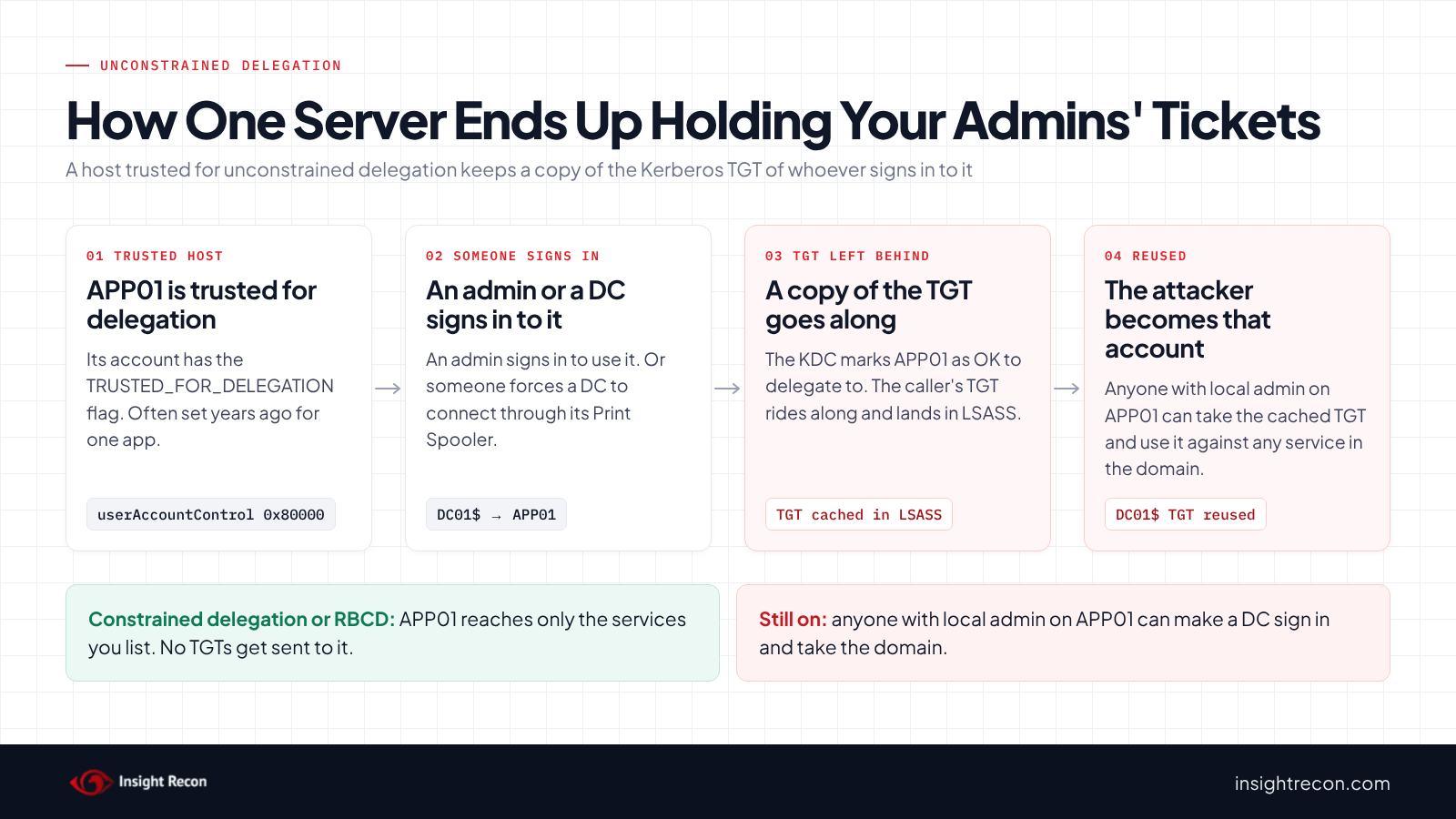
Domain controllers are trusted for unconstrained delegation by design, so leave those alone. It's every other account with the flag that is the problem.
Microsoft added constrained delegation so a service can act for users only on the back ends you list. Resource-based constrained delegation (RBCD) came later and lets the back end decide who may delegate to it. Neither one hands the host a reusable TGT.
| Type | Where it's set | What the host can reach as the user | Our check |
|---|---|---|---|
| Unconstrained | TRUSTED_FOR_DELEGATION on the front end's account | Any service, with the user's own TGT | Unconstrained Delegations Detected |
| Constrained, Kerberos only | msDS-AllowedToDelegateTo on the front end's account | Only the SPNs listed | Constrained Delegation Detected |
| Constrained, any protocol | Same list plus TRUSTED_TO_AUTH_FOR_DELEGATION | The listed SPNs, as any user, even one who never signed in to it | Constrained Delegation through protocol transition enabled |
| Resource-based (RBCD) | msDS-AllowedToActOnBehalfOfOtherIdentity on the back end | Only the back ends that allow it | Resource-Based Constrained Delegation Configured |
Why unconstrained delegation is dangerous
A server with unconstrained delegation ends up holding the keys of whoever used it. Anyone who gets local admin on that server can take those cached tickets. So every local admin on the box is as powerful as the most privileged person whose ticket is still cached there. By default a TGT lasts 10 hours. On a busy server there's almost always a fresh one.
The joint guidance from the Australian Signals Directorate, CISA, NSA and partners on Active Directory compromises covers this. It says attackers target computers with unconstrained delegation to escalate privileges and move laterally.
It doesn't wait for an admin to show up
An attacker doesn't have to wait for a Domain Admin to sign in. Microsoft's Defender for Identity documentation explains that any authenticated user can ask a domain controller's Print Spooler to connect to a host of their choosing. When that host has unconstrained delegation, the DC's own credentials end up exposed there. The ASD guide describes the same path. It also notes there are several ways to force an account to authenticate to a computer. A DC's credentials are enough to take over the domain.
Two more things add to it:
- The flag can sit on a user account. A service account trusted for delegation carries the same risk wherever its service runs. Weak service account passwords add to it. See our Kerberoasting post.
- Forest trusts used to carry it across. Before 2019, a host with unconstrained delegation in a trusting forest could collect TGTs from users in yours. Microsoft's ADV190006 and the May and July 2019 updates turned TGT delegation across forest and external trusts off by default. An admin can still turn it back on for a trust.
MITRE ATT&CK doesn't have a technique just for unconstrained delegation. The pieces map to T1187 Forced Authentication, T1558 Steal or Forge Kerberos Tickets and T1550.003 Pass the Ticket.
Find unconstrained delegation in your domain
List every account trusted for unconstrained delegation
This one adds what you need to decide what happens to each account: its type, whether it's enabled, the OS, the last logon and its SPNs. It runs as any domain user with the AD module.
Import-Module ActiveDirectory
$filter = '(&(userAccountControl:1.2.840.113556.1.4.803:=524288)(!(userAccountControl:1.2.840.113556.1.4.803:=8192)))'
Get-ADObject -LDAPFilter $filter -Properties sAMAccountName, userAccountControl, operatingSystem, lastLogonTimestamp, servicePrincipalName |
    Select-Object sAMAccountName, ObjectClass,
        @{n='Enabled';   e={ -not ($_.userAccountControl -band 2) }},
        operatingSystem,
        @{n='LastLogon'; e={ if ($_.lastLogonTimestamp) { [datetime]::FromFileTime($_.lastLogonTimestamp) } }},
        @{n='SPNs';      e={ ($_.servicePrincipalName | Select-Object -First 3) -join '; ' }} |
    Sort-Object ObjectClass, sAMAccountName | Format-Table -AutoSize
What to look for:
- Disabled accounts or old last logons. These are typically the easy wins.
- User accounts and managed service accounts. The SPNs tell you which service runs as that account and where.
- Read-only domain controllers. The filter doesn't skip RODCs. They shouldn't have this flag at all. If one shows up, find out why.
- Old operating systems. A legacy server holding TGTs is a much bigger risk than a patched one.
Find admins whose tickets can still be delegated
Privileged accounts should be marked Account is sensitive and cannot be delegated (the NOT_DELEGATED flag) or sit in Protected Users. Either one keeps their TGT away from a host with unconstrained delegation. This lists the admins who have neither. It runs as any domain user with the AD module.
Import-Module ActiveDirectory
$groups = 'Administrators','Domain Admins','Enterprise Admins','Schema Admins',
          'Account Operators','Server Operators','Backup Operators','Print Operators'
$protected = Get-ADGroupMember 'Protected Users' -Recursive | Select-Object -ExpandProperty distinguishedName
$groups | ForEach-Object { Get-ADGroupMember $_ -Recursive -ErrorAction SilentlyContinue } |
    Where-Object objectClass -eq 'user' | Sort-Object distinguishedName -Unique |
    Get-ADUser -Properties AccountNotDelegated |
    Where-Object { -not $_.AccountNotDelegated -and $protected -notcontains $_.DistinguishedName } |
    Select-Object SamAccountName, Enabled
What to look for: any human admin account in the output. Enterprise Admins and Schema Admins only exist in the forest root. The script hides those errors in child domains. Built-in service accounts that show up need a closer look before you mark them sensitive. Be extra cautious when remediating service accounts, particularly placing them into Protected Users.
Check your forest trusts
TGT delegation across a trust is stored as the TRUST_ATTRIBUTE_CROSS_ORGANIZATION_ENABLE_TGT_DELEGATION bit (0x800) in the trust's trustAttributes. Run this in each domain that has trusts. It runs as any domain user with the AD module.
Import-Module ActiveDirectory
Get-ADObject -LDAPFilter '(&(objectClass=trustedDomain)(trustAttributes:1.2.840.113556.1.4.803:=2048))' -Properties trustAttributes, trustDirection |
    Select-Object Name, trustDirection, trustAttributes
An empty result means TGT delegation is off on every trust, which has been the default since the July 2019 updates. If a trust shows up, it's worth investigating why. Microsoft's KB4490425 has the netdom command that turns it back off.
Check unconstrained delegation with Insight Recon
The free scan includes Unconstrained Delegations Detected. It flags computers and accounts trusted for unconstrained delegation and lists each one in the finding. The finding also has the Hacker Insight, remediation steps, and compliance mappings for this check.
These related checks cover the rest of this post:
- Privileged Users Allowed to Be Delegated
- Protected Users Group Not Utilized
- Print spooler service is enabled on a Domain Controller
- Dangerous Trust Attributes Detected, which includes trusts with TGT delegation turned on
- Constrained Delegation Detected, Constrained Delegation through protocol transition enabled and Resource-Based Constrained Delegation Configured. Use them to review whatever you replace it with.
On paid plans, the hybrid identity checks include Dangerous Kerberos Delegation on the Entra Seamless SSO Account and Dangerous Delegation on AzureADKerberos Object. Those read the on-premises side of Entra ID. They don't scan the tenant. Our hybrid identity post covers them.
Know what it doesn't cover. The scan reads AD. It can't tell you whether anyone uses the delegation or which back ends the app reaches. It doesn't look for the Print Spooler on servers other than DCs. The PowerShell in this post fills those gaps. Want to see what a finding looks like first? Here's a sample report. The full list is in our check library.
See what else is open in your AD.
The scan runs from a domain-joined Windows machine with a standard domain account. The free plan covers every on-prem AD check.
Before you remove unconstrained delegation
Clear the flag on a server that really depends on it and the double hop breaks. Users get "access denied" or an anonymous login on the back end. Find out what each host delegates to first.
What usually depends on it
- Web front ends with Windows authentication that pass the user to SQL Server, a file share or an API.
- SQL Server linked servers and reporting tools that query another server as the user.
- Project leftovers. Servers set this way during a migration or by an installer years ago. Often nobody remembers why.
Credential Guard may have made the call for you already. Microsoft says Credential Guard blocks Kerberos unconstrained delegation. It's on by default for domain-joined Windows 11 Enterprise and Education machines on 22H2 or later and for Windows Server 2025 member servers that meet the requirements. Users on those machines already don't send their TGTs. If the app still works for them, it probably doesn't need unconstrained delegation.
See what the host reaches
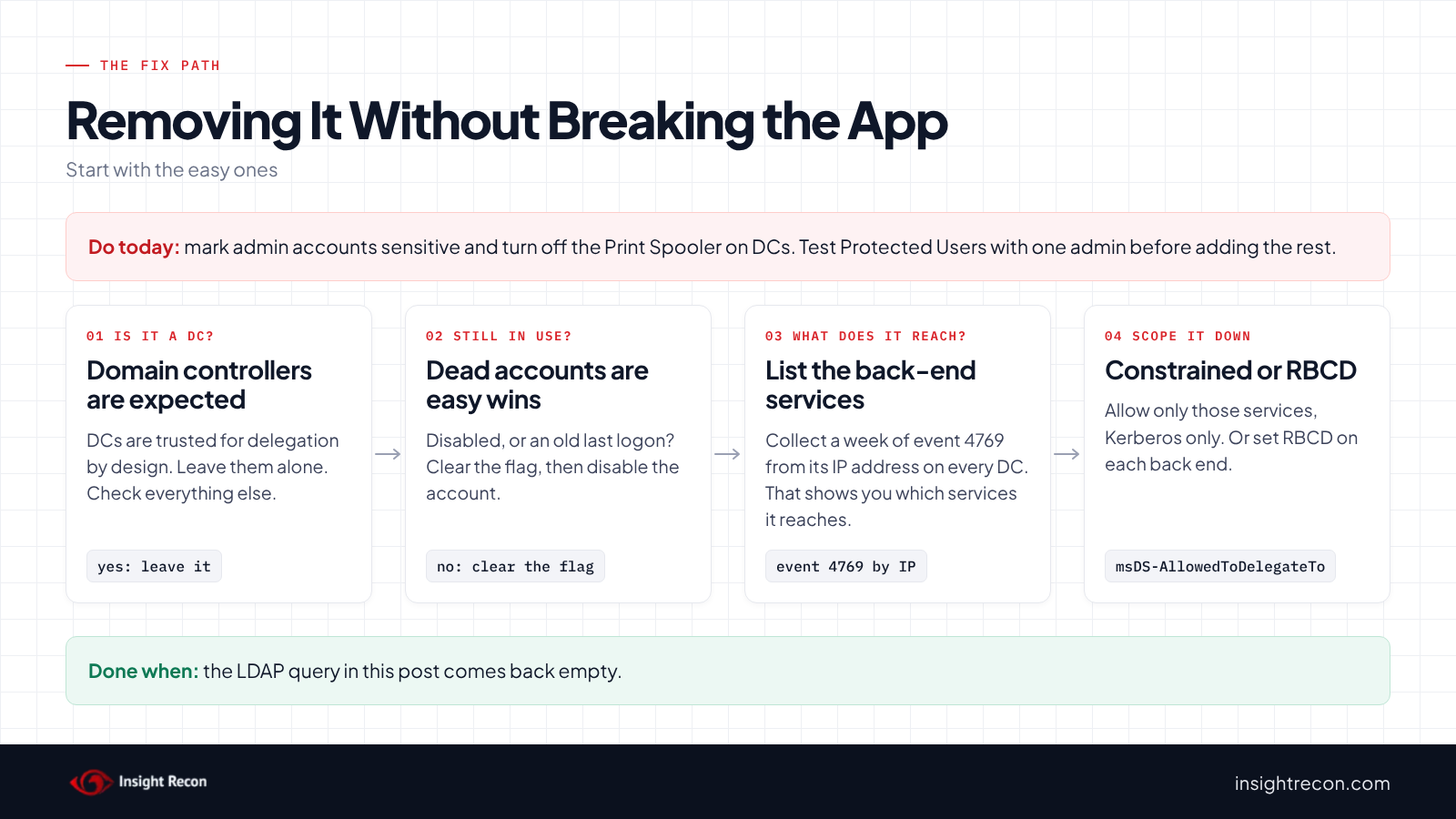
When the host requests a ticket as a user, the DC logs event 4769 with the host's IP address as the client address. A week of those events tells you which services the host reaches. This needs Audit Kerberos Service Ticket Operations turned on. Run it as admin on each DC, because every DC logs its own Kerberos events. Or pull the same fields from your SIEM. It's slow on a busy DC.
$hostIp  = '10.0.4.25'   # IP address of the delegation host (APP01)
$hostSam = 'APP01$'      # its own account, to filter out its own requests
Get-WinEvent -FilterHashtable @{ LogName = 'Security'; Id = 4769; StartTime = (Get-Date).AddDays(-7) } |
    ForEach-Object {
        $d = @{}
        ([xml]$_.ToXml()).Event.EventData.Data | ForEach-Object { $d[$_.Name] = $_.'#text' }
        [pscustomobject]$d
    } |
    Where-Object { ($_.IpAddress -replace '^::ffff:') -eq $hostIp -and $_.TargetUserName -notlike "$hostSam*" } |
    Group-Object ServiceName | Sort-Object Count -Descending | Select-Object Count, Name
ServiceName is the account that runs each back-end service, such as SQL01$ or svc-sql. Event 4769 doesn't log the SPN. Run setspn -L against each account to get its SPNs. Admins who signed in to the host directly show up here too. Expect some noise. A host that shows no back-end requests in a normal week probably isn't delegating at all.
Remove unconstrained delegation
1. Protect admin accounts today
This doesn't remove the flag. It keeps your most important TGTs off these hosts while you work. Mark every human admin account as sensitive. Test Protected Users with one admin before you add the rest. Run as a Domain Admin:
Set-ADAccountControl -Identity adm-jsmith -AccountNotDelegated $true
# After you've tested Protected Users with one admin:
Add-ADGroupMember -Identity 'Protected Users' -Members adm-jsmith
Protected Users is stricter. Members can't use NTLM, RC4 or DES. Their TGTs last four hours and they can't be delegated at all. Microsoft says never to add service or computer accounts to it. Our RC4 post covers getting accounts ready for AES only.
Neither setting protects computer accounts. Your DCs are computer accounts. So turn off the Print Spooler on domain controllers too. Microsoft recommends it and most DCs don't need the service anyway. Our Print Spooler post covers the GPO that turns it off.
2. Record what you have
Save the current state so you can roll back one account without guessing. Runs as any domain user with the AD module.
Import-Module ActiveDirectory
$filter = '(&(userAccountControl:1.2.840.113556.1.4.803:=524288)(!(userAccountControl:1.2.840.113556.1.4.803:=8192)))'
Get-ADObject -LDAPFilter $filter -Properties userAccountControl, 'msDS-AllowedToDelegateTo' |
    Select-Object DistinguishedName, userAccountControl,
        @{n='AllowedToDelegateTo'; e={ $_.'msDS-AllowedToDelegateTo' -join ';' }} |
    Export-Csv .\delegation-before.csv -NoTypeInformation
3. Clear the flag on anything unused
Start with disabled accounts and retired servers. Apps nobody owns come next. Run each change with -WhatIf first, then without it. Run as a Domain Admin:
# A computer account. Drop -WhatIf once the output looks right.
Get-ADComputer OLDAPP01 | Set-ADAccountControl -TrustedForDelegation $false -WhatIf
# A user or service account:
Set-ADAccountControl -Identity svc-legacy -TrustedForDelegation $false -WhatIf
Then disable or delete the account through your normal process.
4. Switch to constrained delegation or RBCD
Set delegation on the account the service runs as. If an IIS app pool or SQL service runs as svc-webapp, set it on svc-webapp. Add the allowed SPNs first and clear the unconstrained flag after. That way there's no gap. Run as a Domain Admin:
# Constrained delegation, Kerberos only, to the services you found with event 4769
$app = Get-ADComputer APP01
Set-ADComputer $app -Add @{ 'msDS-AllowedToDelegateTo' = 'MSSQLSvc/sql01.contoso.com:1433', 'MSSQLSvc/sql01.contoso.com' }
$app | Set-ADAccountControl -TrustedForDelegation $false
In Active Directory Users and Computers, the same change is on the account's Delegation tab. Pick Trust this computer for delegation to specified services only, then Use Kerberos only, then add the services. Skip "Use any authentication protocol" unless the app really needs it. That option turns on protocol transition. We flag it as its own High finding.
The ASD guide says to use RBCD when a computer needs delegation. You set it on the back end. It names the front ends allowed to delegate to it. Run as an account that can write to the back end's computer object:
Set-ADComputer SQL01 -PrincipalsAllowedToDelegateToAccount (Get-ADComputer APP01)That command replaces the existing list on SQL01. It doesn't add to it. Check the current list first with Get-ADComputer SQL01 -Properties PrincipalsAllowedToDelegateToAccount and include any front ends already there. Our RBCD post covers reviewing those lists.
5. Test, then reboot the host
Test with a fresh login. Sign out and back in on a test client, or run klist purge, then use the app. Restart the app pool or service so it picks up new tickets. When the app works, reboot the host. TGTs it already cached stay in memory until they expire or the machine restarts.
If an app can't move off unconstrained delegation yet, treat the host as Tier 0 until it can. Only Tier 0 admins manage it and nobody else gets local admin. Patch it like a DC. Write down the exception and an end date. If you want help mapping dependencies or making the change, our remediation team does this work.
Keep it from coming back
- Alert on the flag. Event 4742 (a computer account was changed) shows 'Trusted For Delegation' - Enabled when the flag goes on. Event 4738 does the same for user accounts. Both need account management auditing on your DCs. Any hit outside a change ticket is worth a call.
- Limit who can set it. Setting the flag takes the Enable computer and user accounts to be trusted for delegation right on DCs. Administrators hold it by default. Don't add anyone.
- Watch logons to these hosts. The ASD guide says to review event 4624 on DCs where the source network address is a host with unconstrained delegation. That pattern can mean the host is being used to go after a DC.
- Use Defender for Identity if you have it. Its "Unsecure Kerberos delegation" assessment lists non-DC accounts with the flag.
- Re-run the check after server builds and app installs. Installers are the usual way the flag comes back.
Unconstrained delegation checklist
- Does the LDAP query in this post come back empty?
- Is every human admin account marked sensitive or a member of Protected Users?
- Is the Print Spooler disabled on every domain controller?
- Does the trust query come back empty?
- Did each app you moved pass a test with a fresh login?
- Do you get an alert when 'Trusted For Delegation' is enabled on any account?
A "no" on any of these means a server can still collect tickets worth more than the server itself.
Compliance mapping
| Framework | Reference | Why it applies |
|---|---|---|
| MITRE ATT&CK | T1558, T1550.003 | Cached TGTs taken from the host and reused to act as their owners. |
| DISA STIG | Active Directory Domain STIG: V-243478 (AD.0018, Medium) and V-243470 (AD.0005, High, formerly V-36435) | Non-DC systems must not be configured for unconstrained delegation. Delegation of privileged accounts must be prohibited. |
| CIS Controls v8 | Control 4, Control 6 | Secure configuration of enterprise assets. Access control management. |
| NIST CSF 2.0 | PR.AA-05 | Access permissions and authorizations are managed with least privilege. |
| ANSSI | vuln_delegation_t4d | ANSSI's Active Directory control point for unconstrained delegation. |
| Microsoft guidance | Credential Guard considerations, Defender for Identity | Microsoft says unconstrained delegation "isn't a recommended practice" and recommends constrained delegation or RBCD instead. |
Unconstrained delegation FAQ
Should I remove unconstrained delegation from domain controllers?
No. Domain controllers are trusted for delegation by design. The STIG and Defender for Identity both leave them out. The risk is every other account with the flag.
What's the difference between unconstrained, constrained and resource-based delegation?
Unconstrained delegation hands the host the user's TGT, which works for any service. Constrained delegation lets the host reach only the SPNs listed on its own account. Resource-based constrained delegation flips it around. The back end lists which front ends may delegate to it.
Does Protected Users fix unconstrained delegation?
Only for the accounts in it. Their TGTs aren't delegated, which protects your admins. It does nothing for computer accounts, including domain controllers. It does nothing for anyone outside the group either. You still need to remove the flag.
Is turning off the Print Spooler on DCs enough?
No. Turning it off closes the best-known way to force a DC to connect to a host with unconstrained delegation. There are other ways and admins still sign in to these servers. It buys you time while you remove the flag.
Does Insight Recon check for unconstrained delegation?
Yes. Unconstrained Delegations Detected is in the free scan and lists the computers and accounts trusted for unconstrained delegation. Related checks cover admins who can be delegated, Protected Users, the Print Spooler on DCs and TGT delegation on trusts.
Find every server in your domain collecting Kerberos tickets it doesn't need.
The scan runs from a domain-joined Windows machine with a standard domain account. The free plan covers every on-prem AD check.
Not ready to scan?
AD Signal is our monthly look at what's changing in AD security and how real domains score. Read the latest report.
References
- Microsoft Learn: Use the UserAccountControl flags to manipulate user account properties
- Microsoft Learn: Kerberos Constrained Delegation overview
- RFC 4120: The Kerberos Network Authentication Service (V5), section 2.8, OK-AS-DELEGATE
- Microsoft Learn: Maximum lifetime for user ticket
- Microsoft Learn: Protected Users security group
- Microsoft Learn: Defender for Identity, Unsecure Kerberos delegation assessment
- Microsoft Learn: Defender for Identity, Print Spooler service on domain controllers
- Microsoft Learn: Credential Guard considerations
- Microsoft Learn: Credential Guard overview (default enablement and editions)
- Microsoft Learn: Windows prevents unconstrained delegation (SQL Server)
- Microsoft Learn: Event 4769, a Kerberos service ticket was requested
- Microsoft Learn: Event 4742, a computer account was changed
- Microsoft Learn: Event 4738, a user account was changed
- Microsoft Learn: Enable computer and user accounts to be trusted for delegation
- Microsoft Learn: [MS-ADTS] trustAttributes
- Microsoft Support: Updates to TGT delegation across incoming trusts in Windows Server (KB4490425)
- Microsoft Security Response Center: ADV190006, Guidance to mitigate unconstrained delegation vulnerabilities
- ASD, CISA, NSA and partners: Detecting and mitigating Active Directory compromises (last reviewed September 2026)
- DISA Active Directory Domain STIG: V-243478
- MITRE ATT&CK: T1187 Forced Authentication
- MITRE ATT&CK: T1558 Steal or Forge Kerberos Tickets
- MITRE ATT&CK: T1550.003 Pass the Ticket