
DnsAdmins: How DNS Admin Access Can Lead to Domain Compromise
DnsAdmins was built so people could manage DNS without handing them Domain Admin. The problem is where that DNS service lives. In most AD environments it's AD-integrated and runs right on your domain controllers. Control over the DNS service is control over a Tier 0 box. The group is empty by default, which means every account in it is a decision someone made. Here's why a populated DnsAdmins group matters, how to find who's in it, and how to clean it up.
Quick Summary
| Priority | High if DnsAdmins has any members, especially accounts also used for everyday work |
|---|---|
| Risk | Members have broad control of the DNS service, which runs on domain controllers in most AD environments |
| Impact | DNS can be redirected or broken, authentication can be disrupted, and in the worst case membership becomes a path to domain compromise |
| Exploitation | Historically, DnsAdmins rights could be turned into code execution in the DNS service context on a domain controller |
| Fix | Remove members who don't need it, delegate DNS at the zone level instead, and treat anyone who stays as Tier 0 |
If you want to see who's in DnsAdmins and your other privileged groups without touching anything, Insight Recon's free read-only scan flags it.
What Is the DnsAdmins Group?
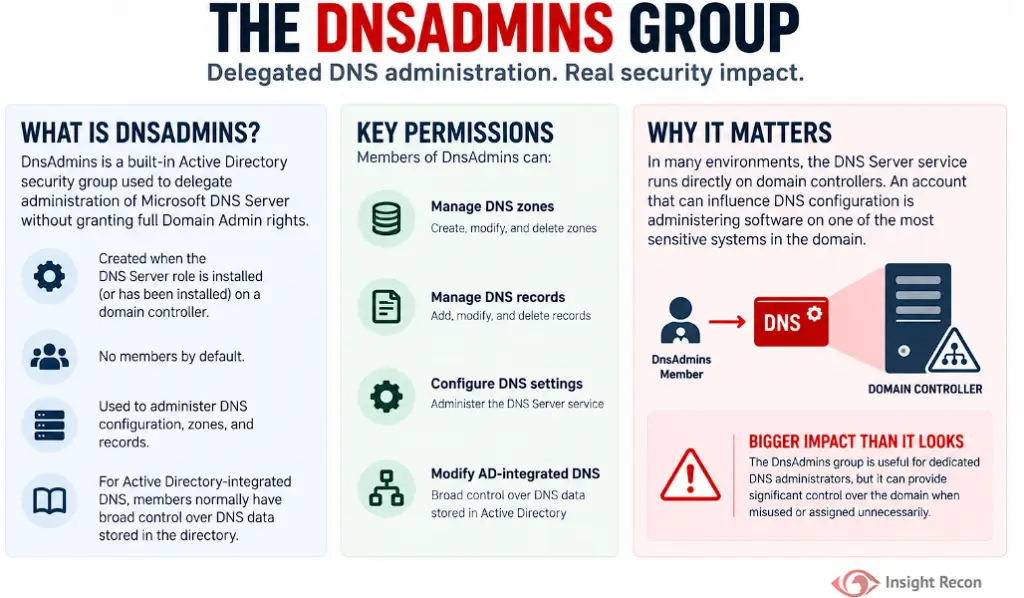
DnsAdmins is a built-in group that shows up when you install the DNS Server role on a domain controller. It starts with no members. The point of it is to let someone manage DNS, its zones and its records without putting them in Domain Admins.
That sounds like good least-privilege, and it can be. But managing the DNS service's configuration means administering a process on a Tier 0 machine, even though the group's name makes it sound like a narrow, low-risk role.
Why a Populated DnsAdmins Group Creates Risk
Having members in DnsAdmins isn't a misconfiguration on its own. The risk shows up when the membership is broader than it needs to be, when it's permanent, or when the accounts in it aren't protected the way your other privileged accounts are. A few things to keep in mind:
- DNS changes are powerful on their own. Someone who can change DNS can redirect clients, break the name resolution that authentication depends on, or cause an outage, without any escalation at all.
- There's a known escalation path. DNS server configuration has historically allowed a member to get code running in the DNS service context, which runs as SYSTEM on the domain controller.
- That path targets Tier 0. Because the DNS service usually runs on a DC, the escalation lands you on your most sensitive assets.
- Membership tends to stick around. People get added for one project and stay in the group for years after they stop needing it.
- The accounts get less scrutiny. DnsAdmins doesn't look scary. Its members often skip the hardening that Domain Admin accounts get.
- Bad DNS changes cascade. A wrong change can take down authentication, connectivity and service discovery across the domain.
Real-World Context
The DnsAdmins escalation path has been public for years and is a standard move in offensive AD testing. It keeps working because the group usually gets populated for one specific job, like managing a handful of zones, then nobody reviews it again. It's also common for the member to use that same account for regular work like email and browsing, which puts a Tier 0 credential in reach of everyday phishing and malware. Since the group is empty out of the box, every entry in it reflects a delegation decision someone made and may have forgotten.
How Attackers Abuse DnsAdmins Membership
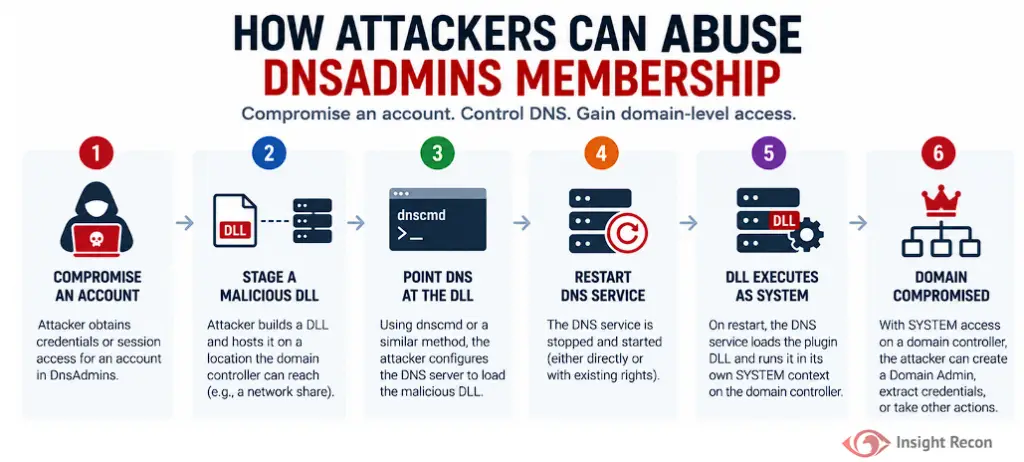
At a high level, the path looks like this. The details have been public for years. The point here is to recognize the shape of it rather than walk anyone through it.
- Compromise any account that holds DnsAdmins rights, either directly or through a nested group.
- Point the DNS server at attacker-controlled code through its configuration.
- Get the DNS service to restart, which the group's rights may allow directly or through another account.
- On restart, the DNS service loads that code and runs it as SYSTEM on the domain controller.
- From SYSTEM on a DC, the rest of the domain is in reach: creating Domain Admins, dumping credentials, and so on.
How to Check Who's in DnsAdmins
PowerShell
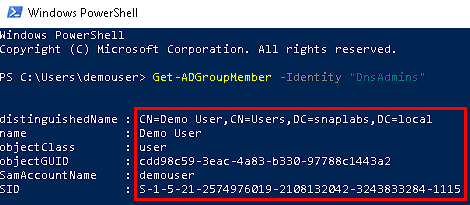
The fastest way to see the group is from the Active Directory module. The -Recursive switch is the important part, since it expands nested groups and shows you who effectively has the rights.
Import-Module ActiveDirectory

# Direct members
Get-ADGroupMember -Identity 'DnsAdmins' |
    Select-Object name, objectClass, distinguishedName

# Effective members, including anyone who inherits it through a nested group
Get-ADGroupMember -Identity 'DnsAdmins' -Recursive |
    Select-Object name, objectClass, distinguishedName
How to read it: every account that comes back should be treated as Tier 0. An empty result is the healthy state. If the recursive list is longer than the direct list, a nested group is pulling extra accounts in. That's worth untangling.
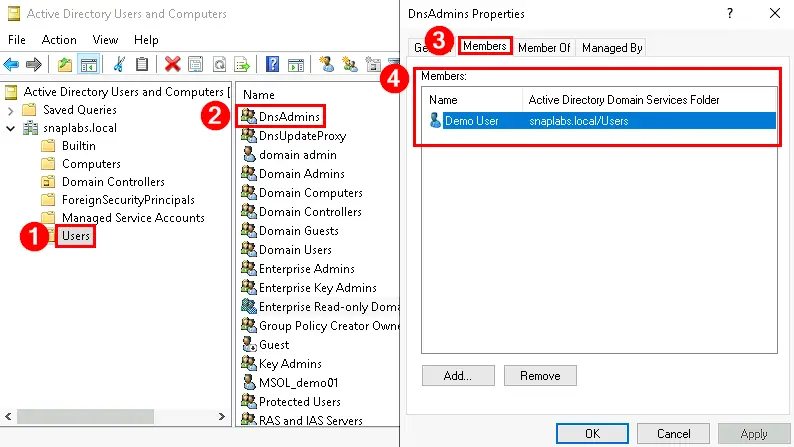
Active Directory Users and Computers
If you'd rather use the GUI:
- Open Active Directory Users and Computers and turn on Advanced Features under the View menu.
- Go to the Users container and open the DnsAdmins group.
- On the Members tab, review every entry, including any nested groups.
Monitoring
Reviewing it once isn't enough, since the whole problem is that membership drifts. Two things worth alerting on:
- Group changes: event 4732 (a member added to a security-enabled local group) and 4733 (a member removed). DnsAdmins is a domain local group, so these events cover it. Flag any change that doesn't tie back to an approved request.
- The plugin DLL setting: on your DNS servers, watch the DNS service's
ServerLevelPluginDllregistry value for unexpected changes. Most environments never set a custom DNS plugin, so any value there at all is worth a look right away.
Finding DnsAdmins Exposure with Insight Recon
The commands above are the manual way. Insight Recon's read-only Active Directory security assessment checks DnsAdmins for you, along with 150+ other checks:
- DNS Admins Group Not Empty (High): flags accounts in DnsAdmins, expands nested groups so you see who effectively has the rights, and explains the attacker context and how to remediate.
- Dangerous Control Over Privileged Objects (Critical) and High Number of Privileged Users (High): catch the broader pattern of standing privilege that DnsAdmins is one example of.
Every finding comes with the attacker context and the remediation steps. Hand it straight to whoever owns the fix.
See who's sitting in DnsAdmins and your other privileged groups. Free, read-only, and it takes a few minutes.
Run a Free AD CheckHow to Fix It
Remove Members Who Don't Need It
Before you remove anyone, confirm which members still actually administer DNS, and get your change-control approval. You'll need Domain Admin rights or delegated rights on the group to make the change.
For a single account:
Remove-ADGroupMember -Identity 'DnsAdmins' -Members 'olduser' -WhatIfRun it with -WhatIf first to confirm what it would do, then run it again without -WhatIf to make the change. For a reviewed list, keep the accounts to remove in a CSV with a SamAccountName column and loop over it:
# Review Dnsadmins-removals.csv before running this
Import-Csv '.\Dnsadmins-removals.csv' | ForEach-Object {
    Remove-ADGroupMember -Identity 'DnsAdmins' -Members $_.SamAccountName -WhatIf
}
Drop the -WhatIf once the output matches the list you reviewed. Doing a dry run first matters here, because a typo in the CSV would otherwise pull the wrong accounts out of the group without asking.

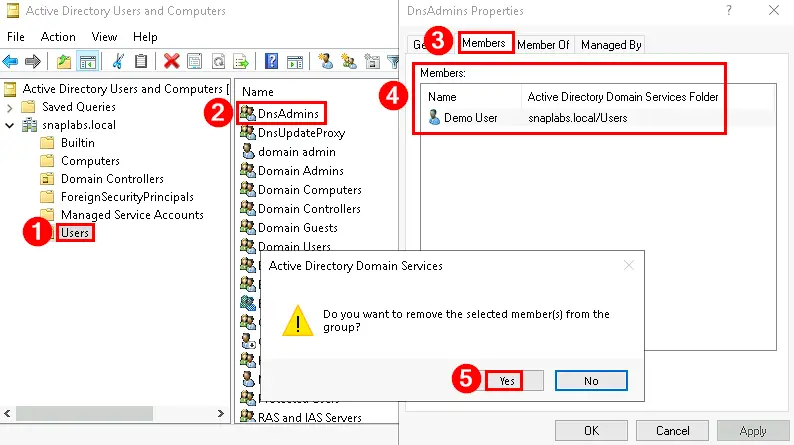
In ADUC, open the DnsAdmins group in the Users container, go to the Members tab, select the account, click Remove and confirm.
Delegate DNS at the Zone Level Instead
A lot of the time, the reason someone is in DnsAdmins is that they manage a couple of specific zones. You can grant that on the zones or records themselves through ACLs, instead of handing over server-level DNS control. They keep doing their job and the escalation path goes away. This is the move that lets you actually empty the group rather than just shrinking it.
Keep It From Filling Back Up
Empty is the goal, but staying empty is the real work. A few habits that help:
- Keep DnsAdmins empty by default and treat adding anyone as a privileged change.
- Scope DNS permissions to what each admin actually needs, at the zone level.
- Treat anyone who does stay in the group as Tier 0: dedicated admin accounts, hardened workstations, no email and browsing on the same identity.
- Review membership on a schedule, not just once.
- Alert on 4732 and 4733 so you catch additions and removals.
- Watch
ServerLevelPluginDllon your DNS servers.
Quick Validation Checklist
- Do you know every direct and nested member of DnsAdmins right now?
- Are additions and removals from the group monitored and alerted on?
- Would you notice an unexpected
ServerLevelPluginDllvalue on a DNS server?
A no on any of these means DnsAdmins is a gap in how you cover Tier 0.
Risk & Compliance Mapping
DnsAdmins is a privileged-access and least-privilege problem. It lines up with the control frameworks the same way your other Tier 0 groups do.
| Framework | Reference | Why it applies |
|---|---|---|
| NIST CSF 2.0 | PR.AA-05 | Access permissions are managed with least privilege. DnsAdmins should hold only who needs it. |
| CIS Controls v8 | 5 (Account Management), 6 (Access Control Management) | Inventory and control of accounts, and least-privilege access to sensitive functions. |
| MITRE ATT&CK | T1078.002, T1098 | Abuse of valid domain accounts and manipulation of account privileges. |
| Microsoft guidance | Securing privileged access | Minimize standing membership in privileged groups and treat DNS admins as Tier 0. |
Frequently Asked Questions
Does DnsAdmins always have to be empty?
No. Some environments have a real need for it. The rule is that anyone in it gets treated like a Domain Admin, because the escalation path means that's effectively what they are.
Can I delegate DNS without using DnsAdmins?
Yes. You can set permissions on specific zones and records through ACLs, which covers most day-to-day DNS work without granting server-level control.
Should DnsAdmins members go in the Protected Users group?
Sometimes. Protected Users adds real protection, but it also disables NTLM and some delegation, which can break workflows. Test it before rolling it out to these accounts.
Will removing people from DnsAdmins break DNS administration?
Not if those admins already hold Domain Admin rights, since that covers DNS too. If they don't, delegate the specific zones they manage first, then remove them. Either way, test after the change.
Treat DNS Administration as Privileged Access
DnsAdmins looks like a narrow, low-risk role. That's exactly why it gets overlooked. On a domain that runs AD-integrated DNS, a member of that group is one step from SYSTEM on a domain controller. Find out who's in it, empty it where you can, delegate at the zone level where you can't, and treat whoever stays like the Tier 0 account they are.
Find the standing privilege hiding in your domain. Insight Recon checks DnsAdmins and your other privileged groups. Free and read-only.
Scan Your Domain Now