Resource-Based Constrained Delegation: Find and Review RBCD
Resource-based constrained delegation (RBCD) lets a server name the accounts allowed to act on behalf of users when they connect to it. Used deliberately, it's the delegation model Microsoft and the Australian Signals Directorate recommend. Left unreviewed, it can let whoever controls a listed account authenticate to that server as almost any delegatable user. Here's how to find every RBCD entry in your domain, decide which ones belong and close the paths used to add new ones.
| Priority | High. A listed account can potentially authenticate to the server as almost any user |
|---|---|
| What decides it | The msDS-AllowedToActOnBehalfOfOtherIdentity attribute on the server (or account) being accessed, set with PrincipalsAllowedToDelegateToAccount |
| Who's affected | Any domain with RBCD entries nobody has reviewed, entries on domain controllers, or entries that name accounts any user could create or control |
| Fix | Keep only the entries an application needs, limit each one to the exact front-end account, protect admin accounts from delegation and lock down who can write the attribute |
Check it now: where is RBCD configured?
Import-Module ActiveDirectory
Get-ADObject -LDAPFilter '(msDS-AllowedToActOnBehalfOfOtherIdentity=*)' -Properties 'msDS-AllowedToActOnBehalfOfOtherIdentity' |
    ForEach-Object {
        $resource = $_.Name
        $_.'msDS-AllowedToActOnBehalfOfOtherIdentity'.Access |
            Select-Object @{n='Resource'; e={ $resource }}, @{n='AllowedToDelegate'; e={ $_.IdentityReference }}, AccessControlType
    }
Runs as any domain user with the ActiveDirectory module. Each row is a resource and an account allowed to delegate to it. No output means no RBCD is configured anywhere in the domain. A domain controller in the Resource column, or a name in AllowedToDelegate you don't recognize, is where to start.
You checked one setting. The free scan checks the rest of your on-prem AD in a few minutes.
Nothing gets installed on your domain controllers. Only HTTPS leaves your network.
How resource-based constrained delegation works
Delegation lets a front-end service reach a back-end service as the signed-in user. A web app that queries a database with the user's own permissions is the classic case. Our unconstrained delegation post covers the oldest and riskiest variant.
Classic constrained delegation is configured on the front end, by a domain admin. RBCD flips that around. It's configured on the back end, the resource being accessed. Microsoft describes it as giving control of delegation to the administrator who owns the resource. Windows stores the list in msDS-AllowedToActOnBehalfOfOtherIdentity, a security descriptor on the resource's account. The PowerShell parameter that sets it is PrincipalsAllowedToDelegateToAccount.
| Type | Configured on | Who can set it |
|---|---|---|
| Unconstrained | The front end | Domain admins |
| Constrained | The front end, with a list of back-end services | Domain admins |
| Resource-based constrained | The back end, with a list of front-end accounts | Anyone with sufficient permissions to modify the resource account, including GenericAll, GenericWrite, or write access to the RBCD attribute |
Where RBCD is used on purpose
There are good reasons to use it. Windows Admin Center, for example, uses RBCD so its gateway can manage servers with single sign-on. Microsoft documents the exact command to allow the gateway on each managed server. The ASD and CISA guide on Active Directory compromises says that if a computer needs delegation, RBCD is the form to use.
As for risk, Microsoft notes that the KDC always allows protocol transition with RBCD. A listed front end doesn't need the user to sign in to it first. It can request access to the resource on behalf of a user who never touched it.
Why resource-based constrained delegation can be risky
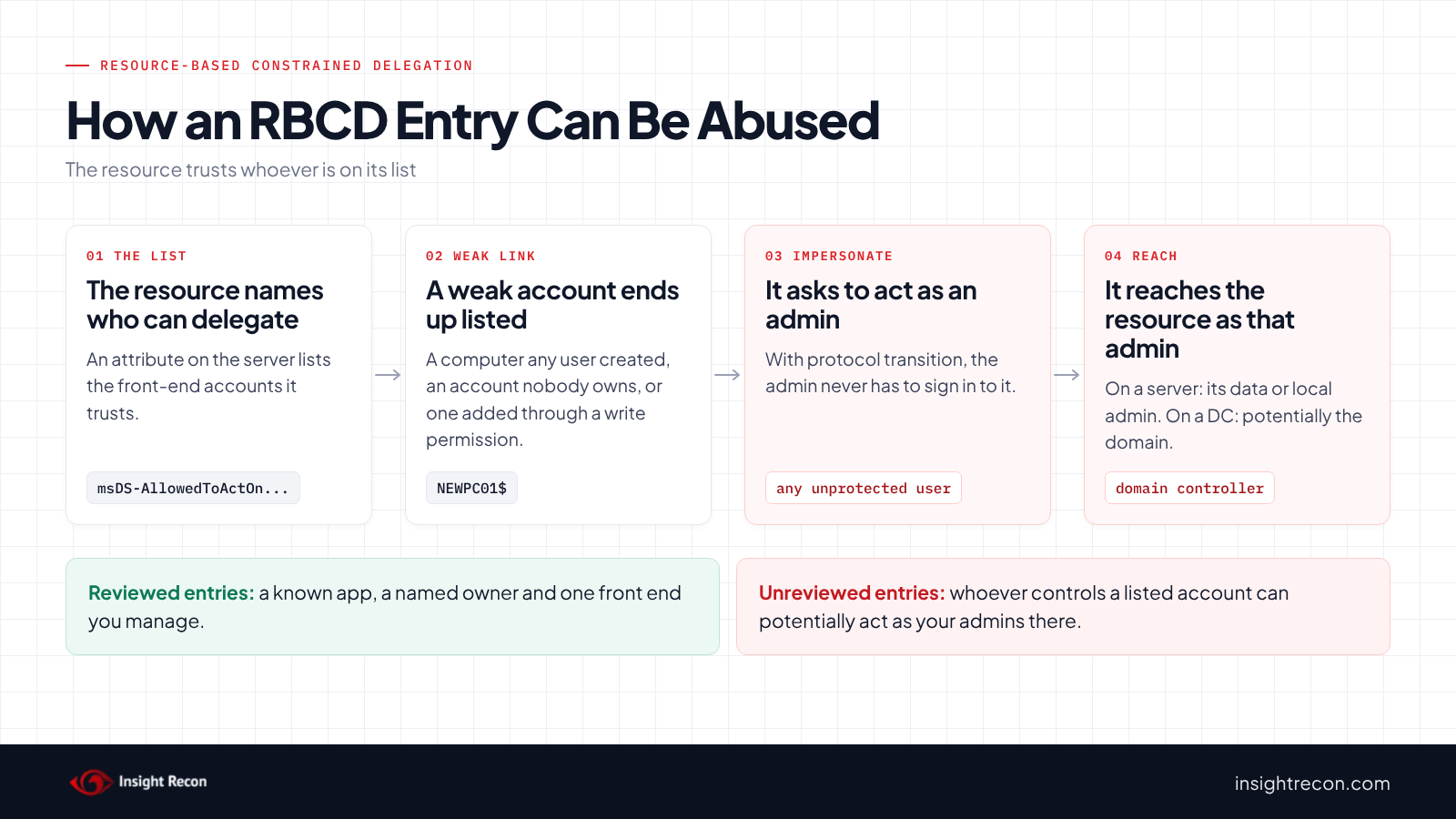
An RBCD entry is a statement of trust. It says the listed account may act as users when it talks to this resource. Whoever controls that account can potentially authenticate to the resource as almost any delegatable user. The exceptions are accounts in Protected Users or marked "Account is sensitive and cannot be delegated". For a file server that means its data. Set on a server's own computer account, it can mean local admin on that server. On a domain controller, successful abuse can lead to domain compromise.
That makes three things worth reviewing:
- Where it's set. RBCD on a domain controller or other Tier 0 system can create a direct path to domain compromise if the listed principal is controlled and a sufficiently privileged user can be delegated. Treat unexplained entries there as critical.
- Who is listed. A front-end account that's a user with a weak password, a computer created by an ordinary user, or an account nobody owns is a weak link guarding a strong resource.
- Who can change the list. Because the attribute sits on the resource, anyone with write access to that account, such as GenericAll, GenericWrite or a write permission on the attribute itself, may be able to add an account they control.
How the pieces combine
The last two combine. If standard users can still create computer accounts, any user may be able to supply an account to add. Our MachineAccountQuota post covers that setting. The ASD guide notes the quota can be used as part of larger relay-based compromises. Enforcing LDAP signing and LDAP channel binding matters here too, because a relayed login can be one way an entry gets written. Microsoft Defender for Identity also has a dedicated alert for suspicious RBCD authentication.
In MITRE ATT&CK terms the abuse maps to T1558 Steal or Forge Kerberos Tickets and T1550.003 Pass the Ticket.
Find resource-based constrained delegation in your domain
Add context to every entry
The quick check shows names. This adds what you need to triage them: whether the resource is a domain controller, what kind of account each listed principal is, and whether a standard user created it through the computer account quota. It runs as any domain user with the AD module.
Import-Module ActiveDirectory
$dcs = @((Get-ADDomainController -Filter *).ComputerObjectDN)
Get-ADObject -LDAPFilter '(msDS-AllowedToActOnBehalfOfOtherIdentity=*)' -Properties 'msDS-AllowedToActOnBehalfOfOtherIdentity' |
    ForEach-Object {
        $resource = $_
        $rules = $resource.'msDS-AllowedToActOnBehalfOfOtherIdentity'.GetAccessRules($true, $true, [System.Security.Principal.SecurityIdentifier])
        foreach ($ace in $rules) {
            $sid = $ace.IdentityReference.Value
            $p = Get-ADObject -LDAPFilter "(objectSid=$sid)" -Properties 'mS-DS-CreatorSID', whenCreated
            [pscustomobject]@{
                Resource         = $resource.Name
                ResourceIsDC     = $dcs -contains $resource.DistinguishedName
                ResourceClass    = $resource.ObjectClass
                Principal        = if ($p) { $p.Name } else { $sid }
                PrincipalClass   = if ($p) { $p.ObjectClass } else { 'not found' }
                CreatedViaQuota  = [bool]$p.'mS-DS-CreatorSID'
                PrincipalCreated = $p.whenCreated
                Access           = $ace.AccessControlType
            }
        }
    } | Sort-Object ResourceIsDC, CreatedViaQuota -Descending
What to look for: any row where ResourceIsDC is True, then any where CreatedViaQuota is True. Both sort to the top. A PrincipalClass of user deserves a look at that account's password and owner. not found usually means a well-known group or a deleted account. Either one on an RBCD list needs an explanation.
Find who can write RBCD on your servers
This lists accounts outside the built-in admin groups that can change the attribute on server computer objects. It checks GenericAll, GenericWrite, WriteDacl, WriteOwner and write access to msDS-AllowedToActOnBehalfOfOtherIdentity itself. It runs as any domain user with the AD module. On a large domain it takes a while.
Import-Module ActiveDirectory
$rbcdAttr = [guid]'3f78c3e5-f79a-46bd-a0b8-9d18116ddc79'   # msDS-AllowedToActOnBehalfOfOtherIdentity
$expected = 'Domain Admins|Enterprise Admins|BUILTIN\\Administrators|NT AUTHORITY\\SYSTEM|NT AUTHORITY\\SELF|Key Admins|Enterprise Key Admins'
foreach ($c in Get-ADComputer -LDAPFilter '(operatingSystem=*Server*)') {
    (Get-Acl "AD:$($c.DistinguishedName)").Access | Where-Object {
        $_.AccessControlType -eq 'Allow' -and
        $_.IdentityReference -notmatch $expected -and (
            $_.ActiveDirectoryRights -match 'GenericAll|GenericWrite|WriteDacl|WriteOwner' -or
            ($_.ActiveDirectoryRights -match 'WriteProperty' -and ($_.ObjectType -eq $rbcdAttr -or $_.ObjectType -eq [guid]::Empty))
        )
    } | Select-Object @{n='Server'; e={ $c.Name }}, IdentityReference, ActiveDirectoryRights, IsInherited
}
What to look for: users, broad groups and help desk groups with write access to servers they don't manage. Account Operators may appear. That group should be empty, as our operator groups post explains. The owner of a computer object can also change its permissions and won't show in this list. Treat it as a starting point and review by hand.
Find admins that can still be impersonated
Members of Protected Users and accounts marked "Account is sensitive and cannot be delegated" can't be delegated. Everyone else can. This lists Domain Admins with neither protection. It runs as any domain user with the AD module.
Import-Module ActiveDirectory
$protected = @(Get-ADGroupMember -Identity 'Protected Users' -Recursive).SamAccountName
Get-ADGroupMember -Identity 'Domain Admins' -Recursive | Where-Object objectClass -eq 'user' |
    Get-ADUser -Properties AccountNotDelegated |
    Select-Object SamAccountName, AccountNotDelegated,
        @{n='InProtectedUsers'; e={ $protected -contains $_.SamAccountName }}
What to look for: human admin accounts where both AccountNotDelegated and InProtectedUsers are False. Those are the accounts an RBCD entry could be used to impersonate.
Check resource-based constrained delegation with Insight Recon
The free scan includes Resource-Based Constrained Delegation Configured. It lists every account that has RBCD configured and marks domain controllers separately. The finding carries the Hacker Insight, remediation steps and compliance mappings for the check.
Know what it doesn't cover. The check reports where RBCD is configured. It can't tell an application's intended entry from one that shouldn't be there. That decision is yours. The scripts above give you the context to make it. It also doesn't evaluate who can write the attribute. Use the permission script for that.
These related checks cover the rest of this area:
- Non-administrative users can add computer accounts, the setting that may let any user create an account to add to an RBCD list.
- Unconstrained Delegations Detected, Constrained Delegation Detected and Constrained Delegation through protocol transition enabled, the other forms of delegation.
- Privileged Users Allowed to Be Delegated and Protected Users Group Not Utilized, the admin protections that limit what any delegation can reach.
- Resource-Based Constrained Delegation on Entra Seamless SSO Account, the same setting on the
AZUREADSSOACCcomputer account. Like all hybrid identity checks, it's on paid plans. It covers the on-premises footprint of Entra ID. It doesn't scan the tenant.
Want to see what a finding looks like first? Here's a sample report. The full list is in our check library.
See what else is open in your AD.
The scan runs from a domain-joined Windows machine with a standard domain account. The free plan covers every on-prem AD check.
Before you change resource-based constrained delegation
Unlike most findings, the goal here usually isn't zero. RBCD that an application needs is the recommended way to do delegation. The work is sorting the entries you can explain from the ones you can't.
Removing an RBCD entry an application depends on breaks it. Users of that app may lose access to the back end, or single sign-on may stop working (Windows Admin Center is a common example). Find the owner of each entry before you clear it, and keep the export so you can put it back.
Sort each entry
- Explained and needed: a known app, a named owner, a front end that's a computer or service account you manage. Keep it and tighten it if the list has more than it needs.
- On a domain controller or Tier 0 system: treat as an incident until someone can show why it's there.
- Unexplained: no owner, a front end created by an ordinary user, or a front end that no longer exists. Plan to remove it.
Record every RBCD list
Save each list, including the raw descriptor, so you can put one back without guessing. It runs as any domain user with the AD module.
Import-Module ActiveDirectory
Get-ADObject -LDAPFilter '(msDS-AllowedToActOnBehalfOfOtherIdentity=*)' -Properties 'msDS-AllowedToActOnBehalfOfOtherIdentity' |
    Select-Object Name, ObjectClass, DistinguishedName,
        @{n='Allowed'; e={ ($_.'msDS-AllowedToActOnBehalfOfOtherIdentity'.Access.IdentityReference) -join '; ' }},
        @{n='Sddl'; e={ $_.'msDS-AllowedToActOnBehalfOfOtherIdentity'.GetSecurityDescriptorSddlForm('All') }} |
    Export-Csv .\rbcd-before.csv -NoTypeInformation
Clean up resource-based constrained delegation
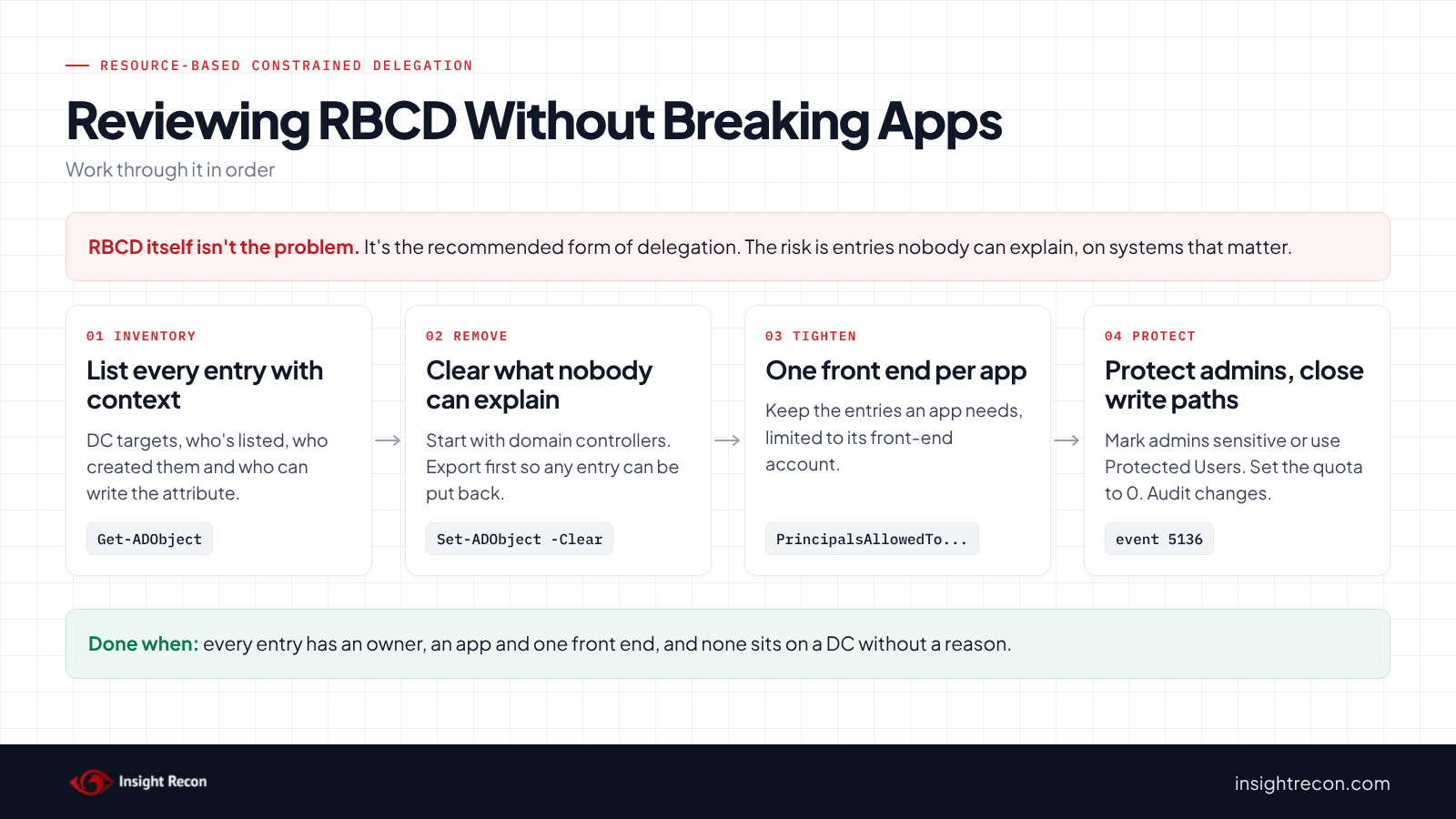
1. Remove entries nobody can explain
Start with domain controllers, then everything else in the "unexplained" pile. It's a dry run with -WhatIf. Drop that to apply. It needs write access to the object, which usually means Domain Admin for servers and DCs.
# Dry run. Drop -WhatIf to apply. Removes every principal allowed to delegate to this object.
# Works for computers, users and service accounts. Needs write access to the object.
Import-Module ActiveDirectory
Set-ADObject -Identity 'CN=APP01,OU=Servers,DC=contoso,DC=com' -Clear 'msDS-AllowedToActOnBehalfOfOtherIdentity' -WhatIf
For an entry on a domain controller you didn't expect, removing it is only the first step. Find out who added it and when, and treat it as an investigation. If you'd like help with it, our remediation team does this work.
2. Tighten the entries you keep
Each list should name only the front-end account the application uses. The parameter replaces the whole list, so include every account that genuinely needs it. Dry run first:
# Dry run. Drop -WhatIf to apply. This REPLACES the whole list with WEB01 only.
Import-Module ActiveDirectory
Set-ADComputer -Identity 'SQL01' -PrincipalsAllowedToDelegateToAccount (Get-ADComputer -Identity 'WEB01') -WhatIf
If a change breaks something, this puts one saved list back:
# Restores the saved list for one object. Dry run first.
Import-Module ActiveDirectory
$saved = Import-Csv .\rbcd-before.csv | Where-Object Name -eq 'SQL01'
$sd = New-Object System.DirectoryServices.ActiveDirectorySecurity
$sd.SetSecurityDescriptorSddlForm($saved.Sddl)
Set-ADObject -Identity $saved.DistinguishedName -Replace @{ 'msDS-AllowedToActOnBehalfOfOtherIdentity' = $sd.GetSecurityDescriptorBinaryForm() } -WhatIf
3. Protect admin accounts from delegation
Mark every human admin account "Account is sensitive and cannot be delegated", or add it to Protected Users after testing. Either one stops any form of delegation from impersonating it. Our unconstrained delegation post has the commands. Be extra cautious with service accounts. Microsoft says never to add service or computer accounts to Protected Users.
4. Close the paths used to add new entries
- Set MachineAccountQuota to 0 to help restrict unprivileged users from creating attacker-controlled computer accounts.
- Enforce LDAP signing and channel binding on domain controllers.
- Remove broad write permissions on server and DC computer objects found by the permission script.
Keep it from coming back
- Audit changes to the attribute. Event 5136 logs a change to a directory attribute when "Audit Directory Service Changes" is on and the object has a matching SACL. Add an auditing entry for writes to
msDS-AllowedToActOnBehalfOfOtherIdentityon domain controllers and Tier 0 servers at minimum. Alert on every change there. - Use Defender for Identity if you have it. It has a dedicated alert for suspicious resource-based constrained delegation authentication.
- Give every entry an owner. Keep a short record of each RBCD entry, the app, the owner and the date it was added. Any new entry without a documented owner or business justification should be investigated.
- Re-run the check. New entries show up when apps are deployed or troubleshot. Review them each time.
Resource-based constrained delegation checklist
- Is there no RBCD entry on any domain controller, or a documented reason for each one?
- Does every remaining entry have a known application and owner?
- Does each list name only the front-end account the application uses?
- Are none of the listed accounts computers created by ordinary users, or accounts nobody owns?
- Are all human admin accounts marked sensitive or in Protected Users?
- Is MachineAccountQuota 0, and is write access to server and DC objects limited to admins?
- Are changes to the attribute on DCs and Tier 0 servers audited?
A "no" on the first question needs attention today. A "no" on any of the others leaves a gap someone could use to add or abuse an entry.
Compliance mapping
| Framework | Reference | Why it applies |
|---|---|---|
| MITRE ATT&CK | T1558, T1550.003 | Service tickets requested as other users through an RBCD entry, then used against the resource. |
| CIS Controls v8 | Control 4, Control 6 | Secure configuration of delegation settings, and access control limited to the accounts that need it. |
| NIST CSF 2.0 | PR.AA-05 | Access permissions and authorizations follow least privilege. |
| ANSSI | vuln_delegation_sourcedeleg | ANSSI's control point for resource-based constrained delegation on privileged services such as domain controllers. |
Resource-based constrained delegation FAQ
Is resource-based constrained delegation bad?
No. It's the form of delegation Microsoft and the ASD recommend when delegation is needed. The risk is entries nobody reviews, entries on domain controllers, and lists that name accounts an attacker could control.
How is RBCD different from constrained delegation?
Constrained delegation is set on the front end by a domain admin and lists the back-end services it may reach. RBCD is set on the back end and lists the front ends allowed to delegate to it. Anyone who can write to the back end's account can change it.
How do I remove resource-based constrained delegation?
Clear msDS-AllowedToActOnBehalfOfOtherIdentity on the resource. Set-ADObject -Clear works for any account type. For computers, Microsoft's Windows Admin Center docs use Set-ADComputer -PrincipalsAllowedToDelegateToAccount $null. Export the list first and confirm no app depends on it.
Does Protected Users stop RBCD?
It stops RBCD from impersonating the accounts in it. Microsoft documents that Protected Users members can't be delegated with constrained or unconstrained delegation. It doesn't remove the entry or protect accounts outside the group.
Does Insight Recon check for RBCD?
Yes. Resource-Based Constrained Delegation Configured is in the free scan. It lists every account with RBCD configured and marks domain controllers separately, so you can review each entry.
See every delegation setting in your domain in one report.
The scan runs from a domain-joined Windows machine with a standard domain account. The free plan covers every on-prem AD check.
Not ready to scan?
AD Signal is our monthly look at what's changing in AD security and how real domains score. Read the latest report.
References
- Microsoft Learn: Kerberos constrained delegation overview
- Microsoft Learn: msDS-AllowedToActOnBehalfOfOtherIdentity attribute
- Microsoft Learn: Set-ADComputer (PrincipalsAllowedToDelegateToAccount)
- Microsoft Learn: Windows Admin Center user access control (RBCD for single sign-on)
- Microsoft Learn: Protected Users security group
- Microsoft Learn: Defender for Identity alerts (suspicious RBCD authentication)
- Microsoft Learn: Event 5136, A directory service object was modified
- ASD, CISA, NSA and partners: Detecting and mitigating Active Directory compromises
- MITRE ATT&CK: T1558 Steal or Forge Kerberos Tickets
- MITRE ATT&CK: T1550.003 Pass the Ticket