Protected Users Group: Add Your Admins Without Locking Them Out
The Protected Users group is a built-in Active Directory group that hardens how its members sign in. Members can't use NTLM, RC4 or delegation, and Windows avoids caching several forms of reusable credential material on the machines where they sign in. Microsoft, the ASD and the DISA STIG all point privileged accounts toward it, but adding admins without preparation can lock them out. Here's how to find the admins who aren't protected, get them ready and add them in a way you can roll back.
| Priority | Moderate. Admin credentials outside the group are easier to reuse after a machine is compromised |
|---|---|
| What decides it | Whether privileged user accounts (Domain Admins, Enterprise Admins, Administrators and similar groups) are members of Protected Users |
| Who's affected | Domains where eligible privileged user accounts are not protected by the group. It's empty by default |
| Fix | Turn on the Protected Users logs, fix accounts that lack AES keys, test with one admin, then add the rest in batches. Keep one break-glass account out and leave service accounts out |
Check it now: which admins aren't in Protected Users?
Import-Module ActiveDirectory
$domainSid = (Get-ADDomain).DomainSID.Value
$protected = @(Get-ADGroupMember -Identity "$domainSid-525" -Recursive | ForEach-Object { $_.SID.Value })
$groups = 'S-1-5-32-544', 'S-1-5-32-548', 'S-1-5-32-551', "$domainSid-512", 'Enterprise Admins', 'Schema Admins'
$groups | ForEach-Object { Get-ADGroupMember -Identity $_ -Recursive -ErrorAction SilentlyContinue } |
    Where-Object { $_.objectClass -eq 'user' -and $protected -notcontains $_.SID.Value } |
    Sort-Object SamAccountName -Unique | Select-Object SamAccountName, Name
Runs as any domain user with the ActiveDirectory module. It lists user accounts in Administrators, Domain Admins, Enterprise Admins, Schema Admins, Account Operators and Backup Operators that aren't in Protected Users. The groups match the DISA STIG's list. Enterprise Admins and Schema Admins only exist in the forest root, so in a child domain those two are skipped without an error. No output means every listed admin is protected.
You checked one setting. The free scan checks the rest of your on-prem AD in a few minutes.
Nothing gets installed on your domain controllers. Only HTTPS leaves your network.
What the Protected Users group does
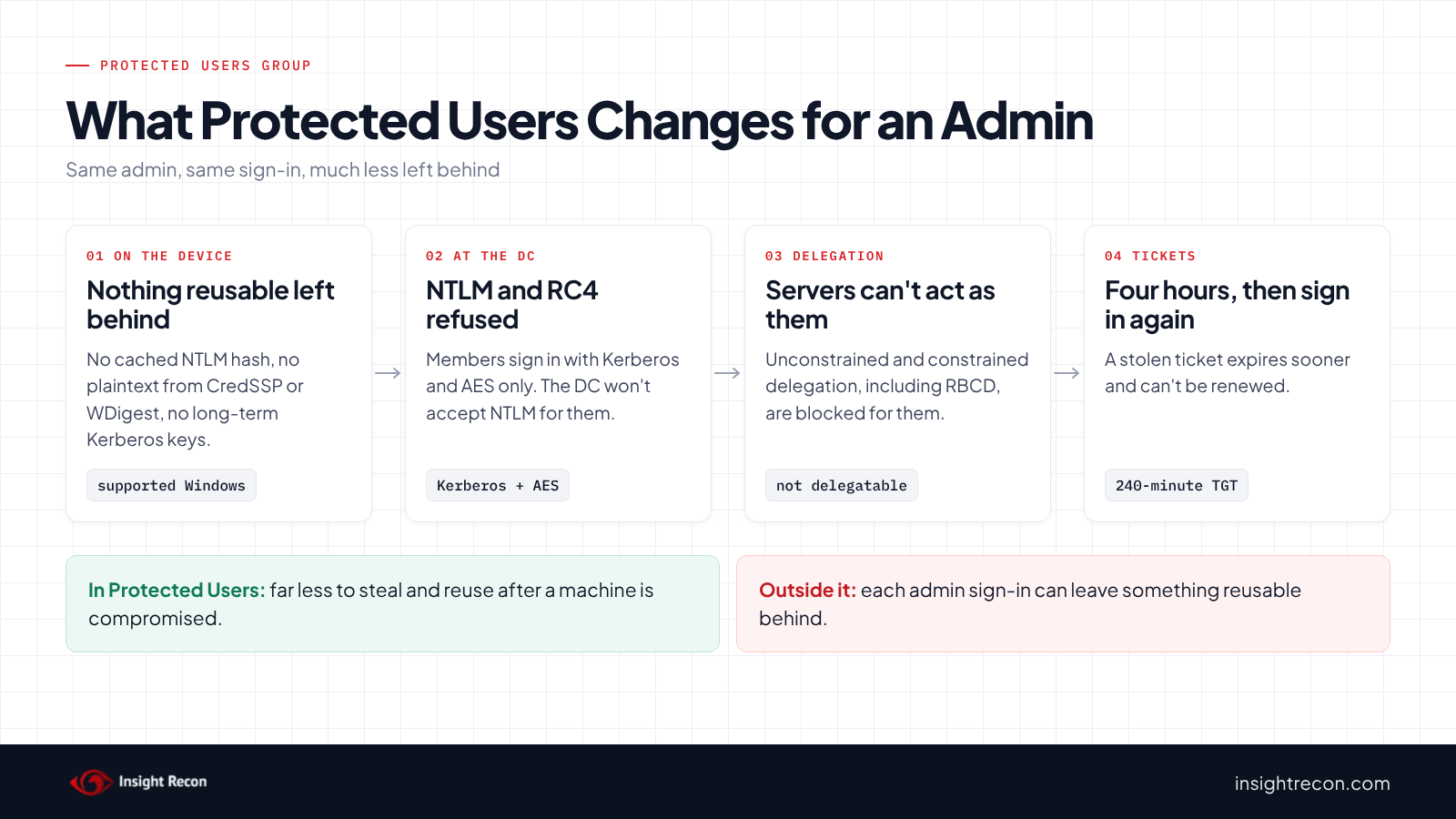
Protected Users is a built-in security group that every domain has (RID 525). Adding an account to it turns on a fixed set of restrictions, and you can't pick and choose among them. Microsoft splits them into two layers.
On the device, for members signing in to Windows 10, Windows 11 or Windows Server 2012 R2 and later:
- CredSSP and WDigest don't cache the user's plaintext password, even if a policy allows it.
- NTLM doesn't cache the user's NT one-way function (the hash).
- Kerberos doesn't create DES or RC4 keys and doesn't keep the user's long-term keys after the first ticket.
- No cached verifier is stored. The account can't sign in offline.
On the domain controller, once the domain functional level is Windows Server 2012 R2 or later, members can't:
- Authenticate with NTLM.
- Use DES or RC4 in Kerberos pre-authentication.
- Be delegated with unconstrained or constrained delegation.
- Renew a Kerberos ticket-granting ticket beyond its initial four hours.
These restrictions disable authentication behaviors that dedicated administrative accounts generally should not need. They're also why adding the wrong account, or adding it before it's ready, causes trouble.
Why admins outside the Protected Users group are a risk
Admins sign in to a lot of machines. Without Protected Users, each sign-in can leave something reusable behind, such as an NTLM hash or, with some older settings, a recoverable password. Someone who later gains admin on one of those machines may be able to pick that up and use it elsewhere as the admin. The NTLM path is the classic example. A captured hash can potentially be used to authenticate without ever knowing the password. Membership stops the hash from being cached on supported devices and stops the domain controller from accepting NTLM for the account at all.
The group closes other paths too. Members can't be delegated, which protects them from the server-side impersonation covered in our unconstrained delegation, constrained delegation and resource-based constrained delegation posts. They can't fall back to RC4, which matters more now that Windows is moving off RC4 by default (see our RC4 post). Their Kerberos TGT is limited to four hours and cannot be renewed beyond that window, reducing how long a stolen TGT remains useful.
The ASD and CISA guide on Active Directory compromises lists making privileged users members of Protected Users as a mitigation. The DISA STIG for Active Directory domains requires it for personnel accounts in the main admin groups. In MITRE ATT&CK terms the group helps against T1550.002 Pass the Hash and T1558 Steal or Forge Kerberos Tickets.
What it doesn't do
It isn't a full fix on its own. An attacker with control of a machine while the admin is signed in may still be able to act during that session. It doesn't protect service accounts, and Microsoft says not to add them. The device-side protections only apply on supported Windows versions. Separate admin accounts, admin workstations and limiting where admins sign in still matter.
Find admins outside the Protected Users group
List privileged users with readiness details
The quick check shows names. This adds what you need to plan: whether each account is enabled, already protected or marked sensitive, when its password last changed, when it last signed in, and whether it has a service principal name. It runs as any domain user with the AD module.
Import-Module ActiveDirectory
$domainSid = (Get-ADDomain).DomainSID.Value
$protected = @(Get-ADGroupMember -Identity "$domainSid-525" -Recursive | ForEach-Object { $_.SID.Value })
$groups = 'S-1-5-32-544', 'S-1-5-32-548', 'S-1-5-32-551', "$domainSid-512", 'Enterprise Admins', 'Schema Admins'
$groups | ForEach-Object { Get-ADGroupMember -Identity $_ -Recursive -ErrorAction SilentlyContinue } |
    Where-Object objectClass -eq 'user' | Sort-Object SamAccountName -Unique |
    Get-ADUser -Properties AccountNotDelegated, PasswordLastSet, ServicePrincipalName, LastLogonDate |
    Select-Object SamAccountName, Enabled,
        @{n='InProtectedUsers'; e={ $protected -contains $_.SID.Value }},
        AccountNotDelegated, PasswordLastSet, LastLogonDate,
        @{n='HasSPN'; e={ @($_.ServicePrincipalName).Count -gt 0 }} |
    Sort-Object InProtectedUsers, PasswordLastSet
What to look for: enabled accounts where InProtectedUsers is False. Those sort to the top. HasSPN set to True usually means a service account. Those don't belong in Protected Users and generally shouldn't be in admin groups either. No SPN doesn't mean it's a person, though. Backup agents and scheduled task accounts often have none, so confirm who uses each account before it goes in a batch. The oldest passwords are the likeliest to have no AES keys.
Check what's already in the group
Some domains already use the group, sometimes with the wrong members. This lists them. It runs as any domain user with the AD module.
Import-Module ActiveDirectory
Get-ADGroupMember -Identity "$((Get-ADDomain).DomainSID)-525" |
    Select-Object Name, SamAccountName, objectClass
What to look for: anything with an objectClass of computer or a managed service account, and any user that runs a service. Microsoft says never to add service or computer accounts, because the protections don't help when the password or certificate is always available on the host.
Confirm the domain is ready
The domain controller protections need a domain functional level of Windows Server 2012 R2 or later. Microsoft also says not to test unless every DC runs Windows Server 2008 or later. This shows both. It runs as any domain user with the AD module.
Import-Module ActiveDirectory
"Domain functional level: $((Get-ADDomain).DomainMode)"
Get-ADDomainController -Filter * | Select-Object Name, OperatingSystem
Check the Protected Users group with Insight Recon
The free scan includes Protected Users Group Not Utilized. It lists privileged user accounts that aren't members of Protected Users. The finding carries the Hacker Insight, remediation steps and compliance mappings for the check.
Know what it doesn't decide for you. The finding can include service accounts that sit in privileged groups. Don't add those to Protected Users. Take them out of the admin group instead, or document why they need it. Accounts that are protected through a nested group may also still show up, so add admins to Protected Users directly. And the STIG allows one account to stay out for Kerberos availability, so expect your break-glass account on the list.
These related checks cover the rest of this area:
- Privileged Users Allowed to Be Delegated, admins with neither Protected Users nor the "sensitive and cannot be delegated" flag.
- Unconstrained Delegations Detected and Resource-Based Constrained Delegation Configured, the settings that delegation protection defends against.
- NTLMv1 or LM is Permitted and DES/RC4 Support Enabled, the weak authentication that members are kept away from.
- High Number of Privileged Users and Operator Groups In Use, because the fewer admins you have, the smaller this job is.
You can see what the findings look like in our sample report. The full list is in our check library.
See what else is open in your AD.
The scan runs from a domain-joined Windows machine with a standard domain account. The free plan covers every on-prem AD check.
Before you add admins to the Protected Users group
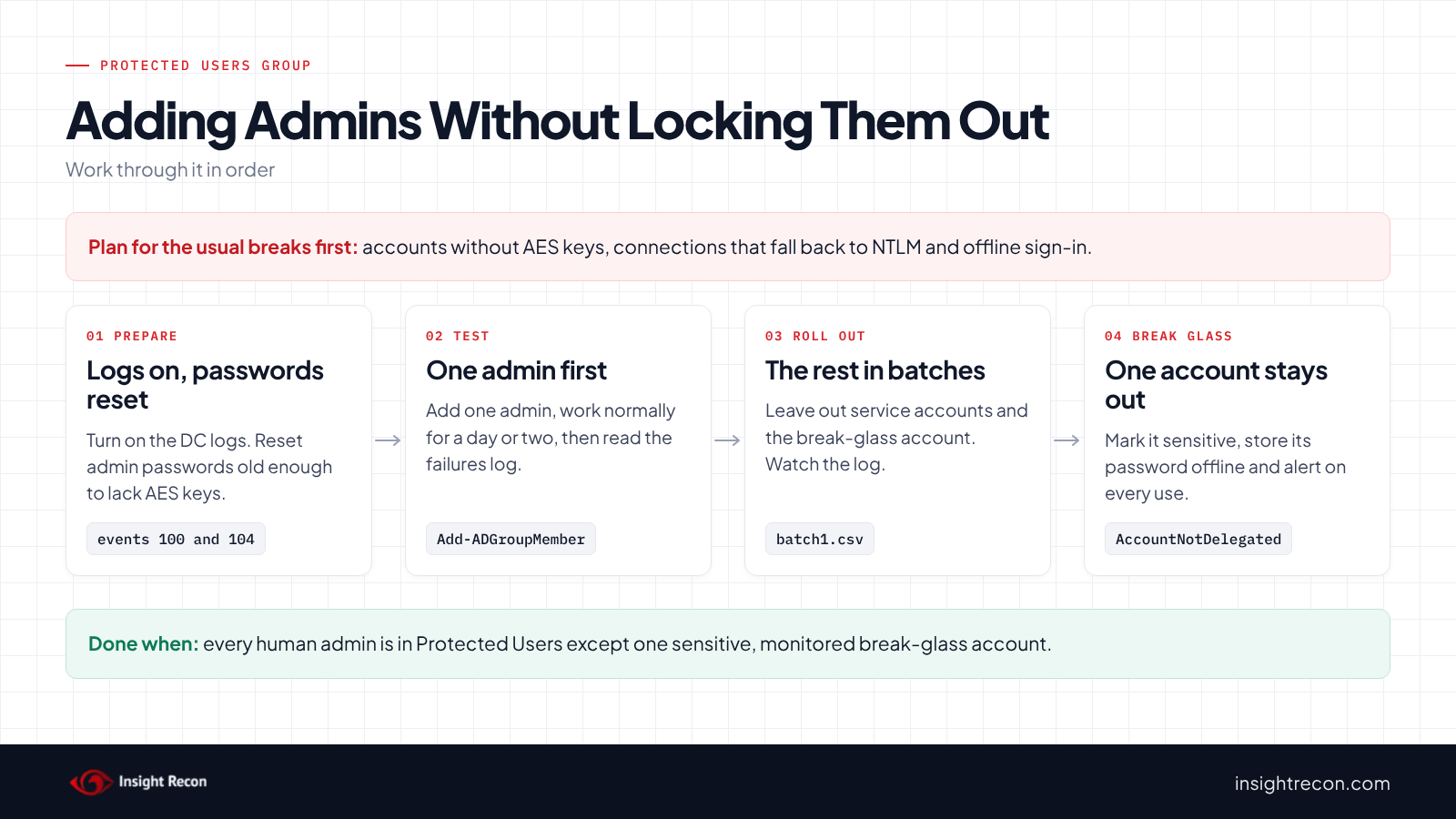
Adding an account that isn't ready can lock it out. Microsoft warns that adding every member of Domain Admins or Enterprise Admins at once could lock out those accounts. Test with one admin, keep one break-glass account out of the group and add the rest in batches.
What can break
- Accounts without AES keys. Members can only use Kerberos with AES. An account only gets AES keys when its password changes on a domain controller running Windows Server 2008 or later. Microsoft calls out the built-in Administrator and migrated accounts specifically. Reset the password first.
- Anything that needs NTLM. Microsoft notes that by default Windows won't try Kerberos when you connect to a host by IP address, and falls back to NTLM. Older appliances and some management tools can do the same, and so can a DNS alias without a matching SPN or a machine that can't reach a DC. VPN and Wi-Fi sign-ins through RADIUS with MS-CHAPv2 depend on NTLM at the DC too. For a member, those sign-ins fail.
- Offline sign-in. Members can't sign in without reaching a DC. A dedicated admin account rarely needs to. An admin who uses their everyday account on a laptop will notice.
- Long sessions. After four hours the admin needs to sign in again to get new tickets.
- Delegation. Any tool that relies on delegating the admin's credentials, such as a management gateway using single sign-on, stops doing that for members.
Find accounts that may lack AES keys
Sort the readiness list by PasswordLastSet. The oldest passwords are the likeliest to have no AES keys. Our RC4 post walks through Microsoft's scripts that confirm which accounts have them. Resetting the password generates them.
Turn on the Protected Users logs
Microsoft documents three logs for troubleshooting, under Applications and Services Logs, Microsoft, Windows, Authentication. They're off by default. This turns on the two domain controller logs on every DC. It needs admin rights on the DCs.
# Needs admin rights on the DCs. Prints each log it turns on.
Import-Module ActiveDirectory
$dcs = (Get-ADDomainController -Filter *).HostName
Invoke-Command -ComputerName $dcs -ScriptBlock {
    wevtutil el | Where-Object { $_ -like '*ProtectedUser*DomainController*' } | ForEach-Object {
        wevtutil sl $_ /e:true
        $_
    }
}
In the failures log, event 100 means an NTLM sign-in failed for a member. Event 104 there means a DES or RC4 Kerberos sign-in failed. In the successes log, event 303 means a member got a ticket. The client-side log (ProtectedUser-Client) is on each member's device if you need it.
Record the current membership
Save who's in the group today so you can compare later. It runs as any domain user with the AD module.
Import-Module ActiveDirectory
Get-ADGroupMember -Identity "$((Get-ADDomain).DomainSID)-525" |
    Select-Object SamAccountName, objectClass |
    Export-Csv .\protected-users-before.csv -NoTypeInformation
Add admins to the Protected Users group
1. Test with one admin
Pick an admin who can tell you quickly if something breaks. Reset their password first if it's old. This is a dry run with -WhatIf. Drop that to apply. It needs rights to change the Protected Users group, which usually means Domain Admin.
# Dry run. Drop -WhatIf to apply. Needs rights to change the Protected Users group.
Import-Module ActiveDirectory
Add-ADGroupMember -Identity "$((Get-ADDomain).DomainSID)-525" -Members 'adm-jsmith' -WhatIf
Have them sign out and back in, then do their normal admin work for a day or two: RDP to servers, open the consoles they use, run their scripts. Then check the failures log on every DC:
Import-Module ActiveDirectory
$dcs = (Get-ADDomainController -Filter *).HostName
Invoke-Command -ComputerName $dcs -ScriptBlock {
    $log = wevtutil el | Where-Object { $_ -like '*ProtectedUserFailures-DomainController*' }
    if ($log) { Get-WinEvent -LogName $log -MaxEvents 50 -ErrorAction SilentlyContinue }
} | Select-Object PSComputerName, TimeCreated, Id, Message
Each NTLM failure points at something to fix, usually a connection made by IP address or a tool that doesn't do Kerberos. If it can't be fixed quickly, take the account back out while you work on it:
# Dry run. Drop -WhatIf to apply. The account needs to sign out and back in afterwards.
Import-Module ActiveDirectory
Remove-ADGroupMember -Identity "$((Get-ADDomain).DomainSID)-525" -Members 'adm-jsmith' -WhatIf
2. Add the rest in batches
Put the reviewed accounts in a CSV and add a batch at a time. Leave out service accounts and your break-glass account. Watch the failures log after each batch.
# The CSV has one column, SamAccountName. Leave your break-glass account and service accounts out.
Import-Module ActiveDirectory
$batch = Import-Csv .\protected-users-batch1.csv
Add-ADGroupMember -Identity "$((Get-ADDomain).DomainSID)-525" -Members $batch.SamAccountName -WhatIf
3. Keep one break-glass account out, and mark it sensitive
The STIG allows one account to stay out of Protected Users so you're never locked out by a Kerberos problem. Keep that account out, give it a long password stored offline and alert on every use. Mark it "Account is sensitive and cannot be delegated" so it still can't be delegated. The ASD guide recommends that flag for privileged accounts too.
# Dry run. Drop -WhatIf to apply. Blocks delegation for this account without the other Protected Users limits.
Import-Module ActiveDirectory
Set-ADUser -Identity 'adm-breakglass' -AccountNotDelegated $true -WhatIf
4. Move service accounts out of admin groups
Service accounts flagged by the scan shouldn't go into Protected Users. The better fix is giving the service only the rights it needs, or moving it to a group managed service account. Our gMSA post covers keeping those locked down. If you'd like help untangling a service account from Domain Admins, our remediation team does this work.
Keep it from coming back
- Make it part of onboarding. Every new admin account goes into Protected Users when it's created, after a password set on a current DC.
- Keep the failures log on. Event 100 or 104 for a member means something is trying NTLM or RC4 with an admin account. Look into it even when nothing breaks.
- Alert when someone leaves the group. With Audit Security Group Management on, event 4729 is logged when a member is removed from a global security group like Protected Users. You want to know when an admin gets taken out.
- Watch the break-glass account. Alert on every sign-in. It should almost never be used.
- Go further with authentication policies. Microsoft's protected accounts guidance pairs Protected Users with authentication policies and silos, which can limit where admin accounts sign in. A new silo only audits until you turn on enforcement.
- Re-run the check. New admins and group changes are how unprotected accounts come back.
Protected Users group checklist
- Is the domain functional level Windows Server 2012 R2 or later?
- Is every human admin account in Protected Users, except one documented break-glass account?
- Is the break-glass account marked sensitive, with every use alerted on?
- Are service and computer accounts out of Protected Users?
- Have admin accounts with old passwords been reset so they have AES keys?
- Are the Protected Users logs on and reviewed on every DC?
A "no" on the second question means at least one admin's credentials are easier to reuse than they need to be.
Compliance mapping
| Framework | Reference | Why it applies |
|---|---|---|
| MITRE ATT&CK | T1550.002, T1558 | Reusing a captured NTLM hash, and stealing or abusing Kerberos tickets. Membership limits both for privileged accounts. |
| CIS Controls v8 | Control 5, Control 6 | Account management and access control for administrator accounts. |
| ANSSI | vuln_protected_users | ANSSI's Active Directory control point for privileged accounts that are not members of the Protected Users group. |
| NIST CSF 2.0 | PR.AA-05, PR.AA-02, PR.AA-03 | Least-privilege access, identities bound to credentials, and stronger authentication for privileged users. |
| DISA STIG | V-243477 (AD.0017) | Personnel accounts with domain-level admin rights must be members of Protected Users, with one account allowed out for availability. |
Protected Users group FAQ
What does the Protected Users group do?
It applies fixed sign-in restrictions to its members. Their credentials aren't cached on supported devices, and domain controllers refuse NTLM, DES, RC4 and delegation for them. Their Kerberos TGT is limited to four hours and cannot be renewed beyond that initial lifetime.
Should I add Domain Admins to Protected Users?
Yes, the human admin accounts, after testing. Microsoft warns against adding all of them at once. Test with one, fix what breaks, add the rest in batches and keep one break-glass account out.
Can I add service accounts to Protected Users?
No. Microsoft says never to add service or computer accounts. The protections don't help them. The restrictions can also break the service. Take service accounts out of admin groups instead.
Why can't my admin sign in after joining Protected Users?
The usual causes are a password old enough that the account has no AES keys, a connection that falls back to NTLM, or trying to sign in offline. The failures log on your DCs shows the first two. An offline sign-in never reaches a DC, so check the machine itself for that one. Reset the password, connect by name, or take the account out while you fix it.
Does Insight Recon check the Protected Users group?
Yes. Protected Users Group Not Utilized is in the free scan. It lists privileged user accounts that aren't members of Protected Users.
Find out which of your admins are exposed.
The scan runs from a domain-joined Windows machine with a standard domain account. The free plan covers every on-prem AD check.
Not ready to scan?
AD Signal is our monthly look at what's changing in AD security and how real domains score. Read the latest report.
References
- Microsoft Learn: Protected Users security group
- Microsoft Learn: Guidance about how to configure protected accounts
- Microsoft Learn: Kerberos clients and IP address hostnames (NTLM fallback)
- ASD, CISA, NSA and partners: Detecting and mitigating Active Directory compromises
- DISA Active Directory Domain STIG: V-243477, privileged accounts in Protected Users
- MITRE ATT&CK: T1550.002 Pass the Hash
- MITRE ATT&CK: T1558 Steal or Forge Kerberos Tickets