ADCS ESC11: Require Encrypted RPC Enrollment on Your CAs
ADCS ESC11 is a certificate authority that accepts certificate requests over RPC without requiring encryption. That lets an attacker pass someone else's NTLM sign-in on to the CA and get a certificate as that account, the same idea as ESC8 but over RPC instead of Web Enrollment. The protection is on by default, so finding it off usually means someone turned it off for an old client. This post shows you how to check every CA, find what still needs the old behavior and turn the protection back on.
| Priority | High. A relayed sign-in can potentially become a certificate for that account, including a domain controller |
|---|---|
| What decides it | IF_ENFORCEENCRYPTICERTREQUEST missing from the CA's InterfaceFlags, unless the CA holds every request for approval |
| Who's affected | CAs where the flag was turned off so Windows XP, Server 2003 or an old appliance could enroll |
| Fix | Retire or move the old clients, set the flag and restart Certificate Services |
Check it now: do all your CAs require encrypted RPC enrollment?
Import-Module ActiveDirectory -ErrorAction Stop
$pks = "CN=Public Key Services,CN=Services,$((Get-ADRootDSE).configurationNamingContext)"
foreach ($ca in Get-ADObject -SearchBase "CN=Enrollment Services,$pks" -LDAPFilter '(objectClass=pKIEnrollmentService)' -Properties dNSHostName) {
    $config = "$($ca.dNSHostName)\$($ca.Name)"
    $out = certutil -config $config -getreg CA\InterfaceFlags 2>&1 | Out-String
    [pscustomobject]@{
        CA                = $config
        RequiresEncryption = if ($LASTEXITCODE -ne 0) { "couldn't read" } else { $out -match 'IF_ENFORCEENCRYPTICERTREQUEST' }
    }
}
Runs with the ActiveDirectory module and certutil, which ships with Windows. It finds every enterprise CA in AD and reads its interface flags. True means the CA requires encryption. False is an ESC11 finding. If it says couldn't read, run it as a CA administrator or on the CA itself.
You checked one setting. The free scan checks the rest of your on-prem AD in a few minutes.
Nothing gets installed on your domain controllers. Only HTTPS leaves your network.
What ADCS ESC11 is
Most Windows machines request certificates from an enterprise CA over RPC rather than through a web page. Autoenrollment uses this path. Microsoft's Defender for Identity guidance on enforcing encryption for RPC certificate enrollment explains that the CA's settings decide how secure that RPC interface is.
The setting is IF_ENFORCEENCRYPTICERTREQUEST in the CA's InterfaceFlags. With it on, the RPC interface "only accepts connections with the RPC_C_AUTHN_LEVEL_PKT_PRIVACY authentication level," which signs and encrypts every packet. Microsoft compares it to SMB signing. The [MS-WCCE] protocol specification says a CA with the flag set "MUST deny a connection" from a client that doesn't use that level.
Microsoft says the flag "is on by default, but is often turned off to allow clients that can't support the required RPC authentication level, such as clients running Windows XP." A Microsoft blog from the Windows Server 2012 era describes it being enabled by default on CAs running Windows Server 2012 and 2012 R2. It also shows the command people used to turn it off. ESC11 is a CA where it's off.
Why ADCS ESC11 is dangerous
A relayed sign-in can request a certificate
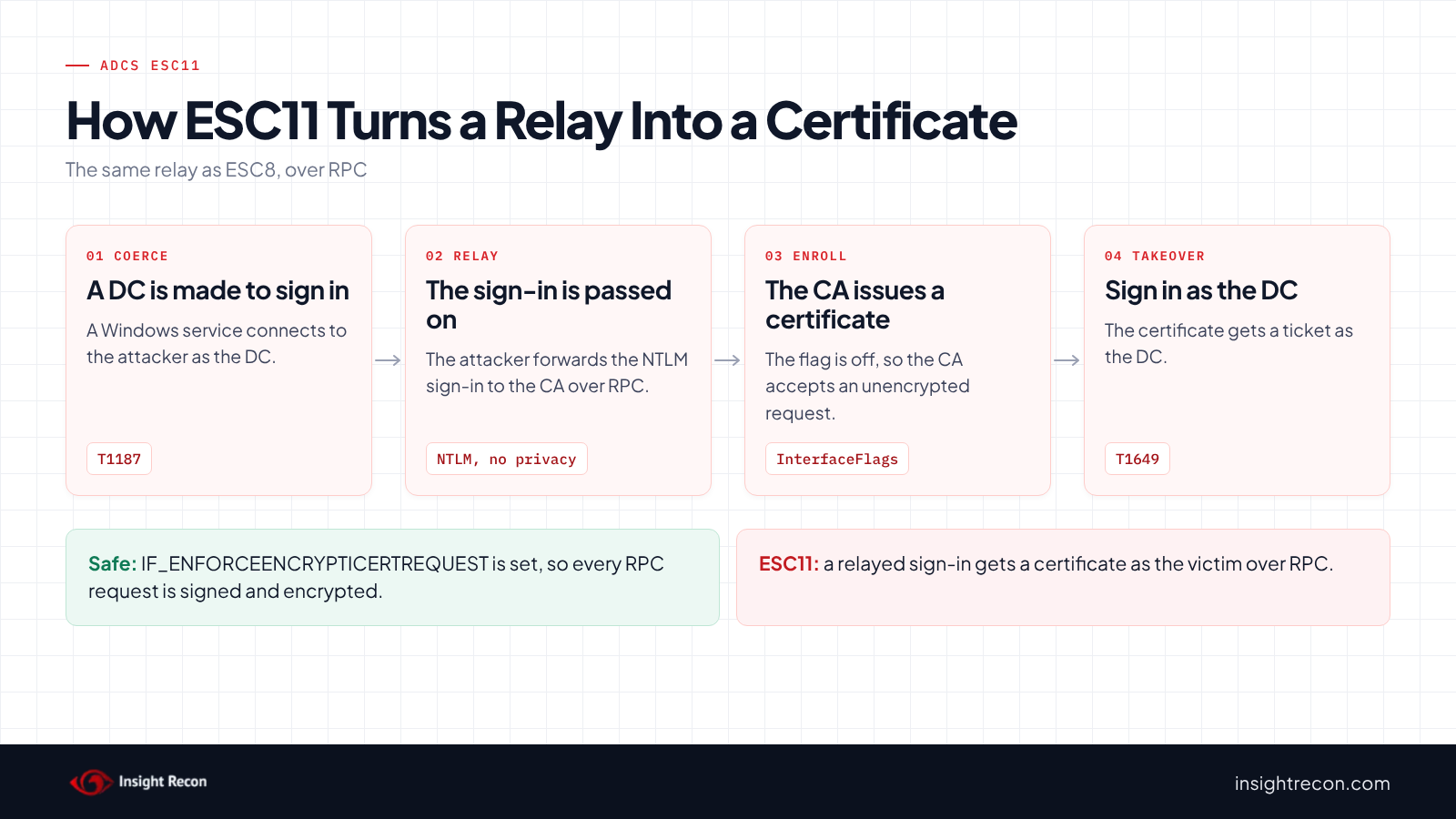
NTLM sign-ins can be relayed. An attacker who receives one passes it on to another server and acts as the victim there. Packet privacy stops that, because the relaying attacker can't produce encrypted traffic for a session they don't hold the keys to. Without it, Microsoft says the RPC enrollment interface "becomes vulnerable to relay attacks." The attacker can then request a certificate as the relayed account. MITRE ATT&CK tracks the relay as T1557, Adversary-in-the-Middle and the certificate as T1649, Steal or Forge Authentication Certificates.
Domain controllers can be made to sign in
Several Windows services can be asked to connect to a server the caller chooses. When they do, they sign in with the computer's account. MITRE tracks this as T1187, Forced Authentication. If that computer is a domain controller, the relayed sign-in may get a certificate for the domain controller itself. With it, the attacker can potentially replicate every password hash in the domain, the attack covered in our DCSync permissions post.
Fixing Web Enrollment doesn't fix this
Our ADCS ESC8 post covers the same relay against the Web Enrollment pages. Removing Web Enrollment or turning on Extended Protection closes that path only. A CA without encrypted RPC enrollment is still open on its RPC interface.
Find ESC11 on your CAs
The quick check shows which CAs have the flag off. Before you turn it on, find out what still depends on the old behavior.
Find clients that can't enroll with ADCS ESC11 closed
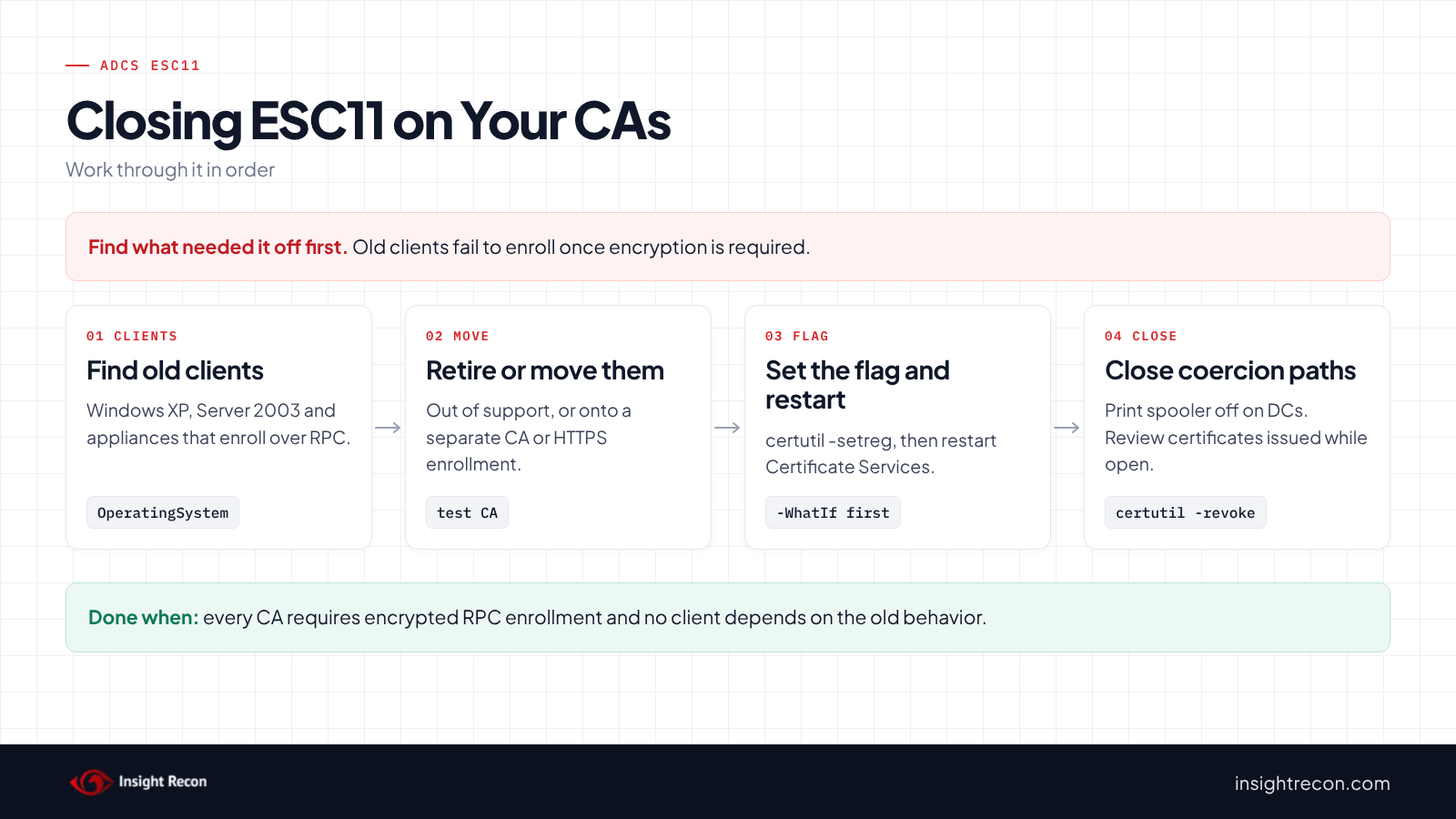
Windows XP and Server 2003 can't use the required encryption, according to Microsoft. This lists enabled computers running either that signed in during the last 90 days. It runs as any domain user with the AD module.
# Lists enabled computers running Windows XP or Server 2003 that signed in during the last 90 days.
# These can't use the encrypted RPC enrollment the fix requires.
Import-Module ActiveDirectory -ErrorAction Stop
$since = (Get-Date).AddDays(-90)
Get-ADComputer -Filter 'Enabled -eq $true' -Properties OperatingSystem, LastLogonDate |
    Where-Object { $_.OperatingSystem -match 'Windows XP|Server 2003' -and $_.LastLogonDate -gt $since } |
    Select-Object Name, OperatingSystem, LastLogonDate
What to look for: any row is a machine that will fail to enroll once the flag is on. Also ask the CA owner about appliances and non-Windows systems that request certificates over RPC. They don't show up in this list. Some were set up years ago with the flag off in mind.
Check what the CA issued while it was open
If a CA had the flag off, review certificates it issued to domain controllers and other computer accounts. For example, look for several in a short time, or ones issued outside your normal autoenrollment templates. Our ADCS ESC8 post has the same review for Web Enrollment.
Check ADCS ESC11 with Insight Recon
The free scan includes Unencrypted Certificate Authority RPC Enrollment in ADCS (ESC11), a High check. For each enterprise CA, it reads InterfaceFlags from the CA's registry the same way our ESC6 check reads EditFlags. It flags the CA if IF_ENFORCEENCRYPTICERTREQUEST isn't set. A CA that puts every request in pending isn't listed, since a relayed request would wait for a certificate manager to approve it. The result notes those. A CA the scan couldn't read is named with the reason. So is one with no InterfaceFlags value, since the scan can't tell a missing value from a blocked read. Without another finding, that leaves the check not assessed instead of passing. The finding comes with the Hacker Insight, remediation steps and compliance mappings.
Know what the ADCS ESC11 check doesn't decide
Some things are still yours to check. The check reports the flag. It doesn't know which clients still rely on unencrypted enrollment, so run the client script before you change anything. A CA that holds every request isn't listed, which is only safe if your certificate managers check each request before approving it. Reading the CA's registry also needs network access to that CA. Run the quick check against any CA the result names. It also doesn't look at certificates already issued.
Related relay checks beyond ESC11
- Web Enrollment Allows NTLM Relay in ADCS (ESC8), the same relay through Web Enrollment. Our ADCS ESC8 post covers it.
- Print spooler service is enabled on a Domain Controller and WebClient Service Running on Domain Controllers, ways to make a domain controller sign in somewhere. Our print spooler post covers the first.
- LDAP Signing Not Enforced on Domain Controllers and Domain Controller with SMB Signing Not Required, the same relay against LDAP and SMB. Our LDAP signing and SMB signing posts cover them.
You can see what the findings look like in our sample report. The full list is in our check library.
Find every relay path to your CAs, from Web Enrollment to RPC.
It runs from any Windows machine that can reach your DCs, with a standard domain account. Every core AD check is free for one domain.
Before you turn encryption back on
Find out why the flag was turned off and what still needs it. Then move those clients before you change the CA.
Find out why it was turned off
Microsoft's own remediation step is to "research why the IF_ENFORCEENCRYPTICERTREQUEST flag is turned off." Usually it was for Windows XP, Server 2003 or an appliance that couldn't enroll. Ask the CA owner. Also check change records from when the CA was built or upgraded.
Move or retire what still depends on it
Machines on Windows XP or Server 2003 are long out of support and a risk of their own. Retire them, or move their certificates to a separate, tightly scoped CA that issues nothing that allows domain sign-in. Appliances can often switch to a supported enrollment method, such as Web Enrollment over HTTPS with Extended Protection set to Required.
Test first
Microsoft's guidance says to "test your settings in a controlled environment before turning them on in production." If you have a test CA, set the flag there and enroll from each kind of client you rely on.
Fix ADCS ESC11 safely
1. Set the flag
This sets IF_ENFORCEENCRYPTICERTREQUEST and restarts Certificate Services, as Microsoft's Defender for Identity guidance describes. It prints the current flags first so you can put them back. It's a dry run with -WhatIf. Drop that to apply. Run it on each affected CA as a CA administrator. The restart pauses issuance for a moment, so pick a quiet time. To undo it, run certutil -setreg CA\InterfaceFlags -IF_ENFORCEENCRYPTICERTREQUEST and restart the service.
# Dry run. Drop -WhatIf to apply.
# Run on the CA as a CA administrator. Restarts Certificate Services, which pauses issuance briefly.
function Enable-RpcEnrollmentEncryption {
    [CmdletBinding(SupportsShouldProcess)]
    param()
    # Note the current flags so you can put them back
    certutil -getreg CA\InterfaceFlags
    if ($PSCmdlet.ShouldProcess($env:COMPUTERNAME, 'Set IF_ENFORCEENCRYPTICERTREQUEST and restart certsvc')) {
        certutil -setreg CA\InterfaceFlags +IF_ENFORCEENCRYPTICERTREQUEST
        if ($LASTEXITCODE -ne 0) { throw 'certutil failed. Nothing was restarted.' }
        Restart-Service -Name certsvc -ErrorAction Stop
    }
}
Enable-RpcEnrollmentEncryption -WhatIf
2. Watch for enrollment failures
After the change, watch for clients that can no longer enroll. On Windows XP, Microsoft's blog shows the failure as a misleading permissions error: "The permissions on this certification authority do not allow the current user to enroll for certificates." Any client that fails this way needs the steps from the section above.
3. Close the coercion paths
Turn off the print spooler on domain controllers and close the other paths the related checks flag. Treat this as a second layer, since new ways to make a server sign in keep turning up.
4. Re-run the quick check
Every CA should show True for RequiresEncryption.
Keep ADCS ESC11 closed
- Log CA configuration changes. With the CA's audit filter on, the CA logs configuration changes, including its flags. Microsoft's Securing PKI guide lists these events among the ones to monitor.
- Check new and rebuilt CAs. The flag is on by default. A new CA is fine unless someone copies old settings onto it.
- Watch NTLM sign-ins on the CA. NTLM sign-ins from domain controller accounts on a CA are worth an alert, whatever the protocol.
- Re-run the scan. It flags the CA again if the flag is turned off.
ADCS ESC11 checklist
- Does every enterprise CA have
IF_ENFORCEENCRYPTICERTREQUESTset? - Have you retired or moved every client that needed it off?
- Did you test enrollment from each kind of client after the change?
- Did you review certificates issued to computer accounts while the flag was off?
- Is Web Enrollment also closed to relay (ESC8)?
- Is the print spooler off on every domain controller?
- Did you check every CA in the forest?
A "no" on the first question means a relayed sign-in can potentially still get a certificate over RPC.
Compliance mapping
| Framework | Reference | Why it applies |
|---|---|---|
| MITRE ATT&CK | T1557, T1649 | Adversary-in-the-Middle for the NTLM relay. Steal or Forge Authentication Certificates for the certificate it produces. |
| CIS Controls v8 | Control 3, Control 6 | Data protection and access control management. Certificate requests should travel encrypted and bound to the requester. |
| NIST CSF 2.0 | PR.AA-01, PR.AA-05, PR.DS-02 | These cover managing credentials, least privilege and protecting data in transit. Unencrypted enrollment weakens all three. |
ADCS ESC11 FAQ
What is ADCS ESC11?
A CA that accepts certificate requests over RPC without requiring encryption. A relayed NTLM sign-in can then request a certificate as the victim.
Isn't the protection on by default?
Yes, according to Microsoft. ESC11 means someone turned it off, usually for Windows XP or an old appliance.
How is ESC11 different from ESC8?
Same relay, different door. ESC8 is Web Enrollment over HTTP. ESC11 is the CA's RPC interface.
What breaks when I turn it on?
Clients that can't use packet privacy, such as Windows XP and Server 2003. Modern Windows clients enroll normally.
Does Insight Recon check for ADCS ESC11?
Yes. The free scan includes Unencrypted Certificate Authority RPC Enrollment in ADCS (ESC11), along with the other ADCS and relay checks.
See whether a relayed sign-in could get a certificate from your CAs.
It runs from any Windows machine that can reach your DCs, with a standard domain account. Every core AD check is free for one domain.
Not ready to scan?
AD Signal is our monthly look at what's changing in AD security and how real domains score. Read the latest report.
References
- Microsoft Learn: Enforce encryption for RPC certificate enrollment interface (ESC11)
- Microsoft Learn: [MS-WCCE] 2.1 Transport
- MITRE ATT&CK: T1557 Adversary-in-the-Middle
- Microsoft Learn (archive): Certification Authority Enhanced RPC security
- MITRE ATT&CK: T1187 Forced Authentication
- Microsoft Learn: Securing PKI, Appendix A: Events to Monitor
- MITRE ATT&CK: T1649 Steal or Forge Authentication Certificates