ADCS ESC6: Find and Turn Off Arbitrary SANs on Your CA
ADCS ESC6 is one setting on a CA: EDITF_
| Priority | Critical. One CA setting lets any requester name any account in the certificate's SAN |
|---|---|
| What decides it | EDITF_ |
| Who's affected | CAs where the flag was turned on to add SANs through Web Enrollment or a request file, often years ago |
| Fix | Clear the flag and restart Certificate Services. Request SANs as extensions or through a template instead |
Check it now: do any of your CAs accept a SAN from any request?
Import-Module ActiveDirectory -ErrorAction Stop
$pks = "CN=Public Key Services,CN=Services,$((Get-ADRootDSE).configurationNamingContext)"
foreach ($ca in Get-ADObject -SearchBase "CN=Enrollment Services,$pks" -LDAPFilter '(objectClass=pKIEnrollmentService)' -Properties dNSHostName) {
    $config = "$($ca.dNSHostName)\$($ca.Name)"
    $out = certutil -config $config -getreg policy\EditFlags 2>&1 | Out-String
    [pscustomobject]@{
        CA             = $config
        ArbitrarySan   = if ($LASTEXITCODE -ne 0) { "couldn't read" } else { $out -match 'EDITF_ATTRIBUTESUBJECTALTNAME2' }
    }
}
Runs with the ActiveDirectory module and certutil, which ships with Windows. It finds every enterprise CA in AD and reads its policy EditFlags. True in ArbitrarySan means the flag is on. Reading CA settings usually works as a regular domain user. If it says couldn't read, run it as a CA administrator or on the CA itself.
You checked one setting. The free scan checks the rest of your on-prem AD in a few minutes.
Nothing gets installed on your domain controllers. Only HTTPS leaves your network.
What ADCS ESC6 is
A certificate's subject alternative name (SAN) lists the other names it's valid for. For sign-in certificates, that's usually the account's user principal name. Windows reads it to decide who the certificate belongs to. Normally the CA builds the SAN from AD, or the template allows the requester to supply it.
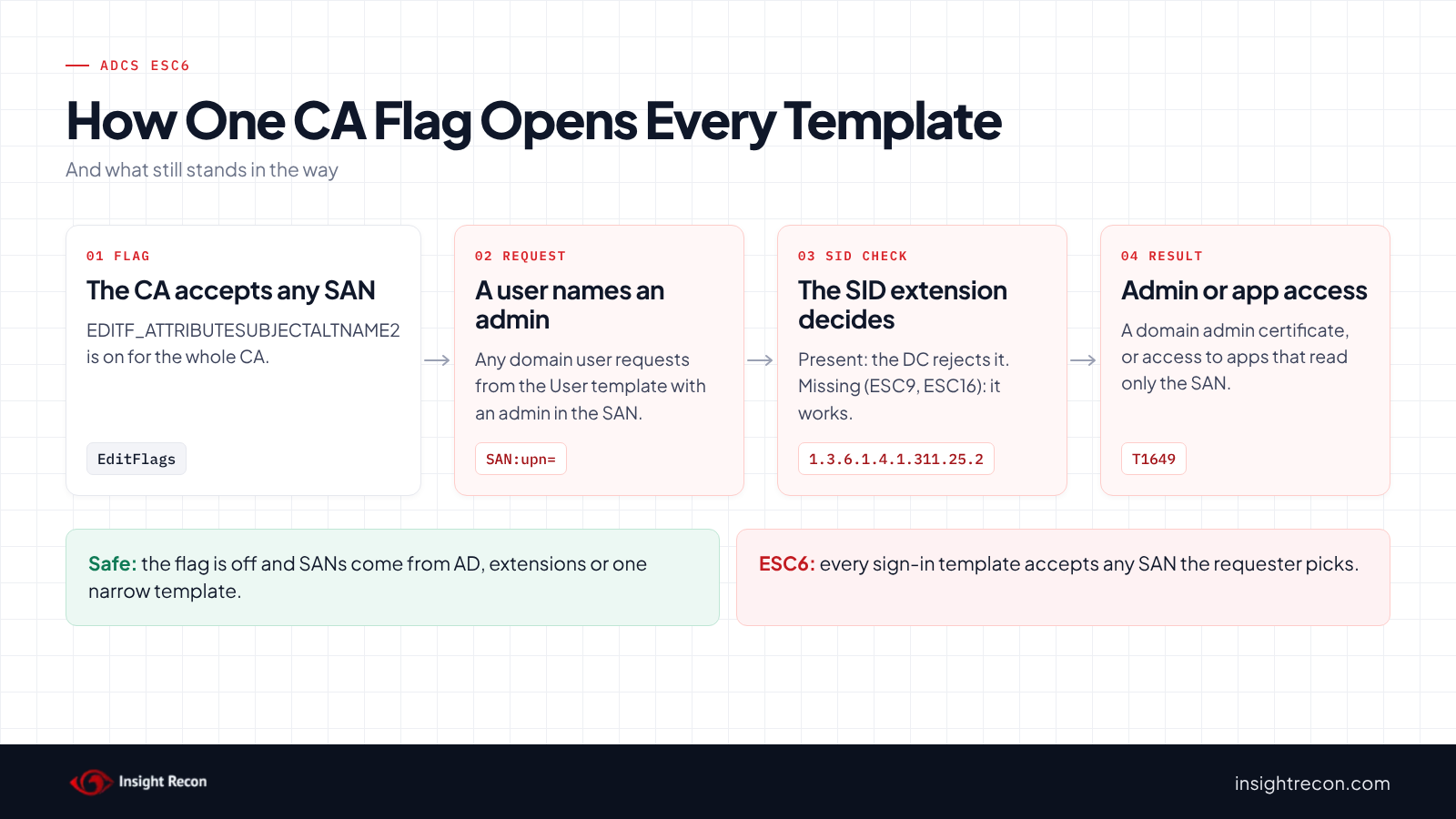
EDITF_ATTRIBUTESUBJECTALTNAME2 is a CA-wide policy flag. With it on, the CA also accepts a SAN passed as a request attribute, on any template. Microsoft's Defender for Identity guidance says it "affects all certificate templates, whether they have the Supply in the request option turned on or not." SpecterOps named this ESC6 in their 2021 Certified Pre-Owned research.
The flag usually gets turned on for a good reason at the time. Microsoft's guide on requesting a certificate with a custom SAN says that adding SANs through Web Enrollment or request attributes requires it. The same guide also says: "Do not enable EDITF_
Why ADCS ESC6 is dangerous
Any template that allows sign-in becomes an ESC1
With the flag on, a regular user can request a certificate from the built-in User template and add a domain admin's name to the SAN. Microsoft's guidance says that with a template valid for authentication, "an attacker can enroll a certificate that can impersonate any arbitrary account." In other words, every sign-in template behaves like the ESC1 templates in our ADCS ESC1 post. MITRE ATT&CK tracks this as T1649, Steal or Forge Authentication Certificates.
Patched domain controllers block most of it, with gaps
Since the May 2022 updates, Microsoft's KB5014754 describes CAs adding a SID extension to certificates from online templates. That extension holds the requester's own SID. When it doesn't match the account the certificate maps to, the domain controller rejects the sign-in. Domain controllers have enforced this by default since February 2025. However, the extension is missing in some cases. A template with the 0x80000 bit set in msPKI-Enrollment-Flag leaves it out (ESC9). A CA can also be set to leave it out of everything (ESC16). Where it's missing, ESC6 still works, because the requester can put the target's SID in the SAN as well. Our weak certificate mappings post explains how domain controllers use that SID.
Other apps may only read the SAN
The SID check happens on domain controllers. Other systems that trust your CA, such as VPN, Wi-Fi or web apps that accept certificates, may decide who you are from the SAN alone. For those, a certificate with someone else's name in the SAN may still work.
Find ESC6 on your CAs
The quick check shows which CAs have the flag. The scripts below show how exposed each one is and whether anyone already used it.
Check what still blocks ADCS ESC6
For each CA, this shows whether the flag is on, whether the CA leaves the SID extension out of everything and which published sign-in templates leave it out. Same as the quick check, it usually runs as a domain user.
Import-Module ActiveDirectory -ErrorAction Stop
$pks = "CN=Public Key Services,CN=Services,$((Get-ADRootDSE).configurationNamingContext)"
$auth = '1.3.6.1.5.5.7.3.2', '1.3.6.1.4.1.311.20.2.2', '1.3.6.1.5.2.3.4', '2.5.29.37.0'
$templates = Get-ADObject -SearchBase "CN=Certificate Templates,$pks" -LDAPFilter '(objectClass=pKICertificateTemplate)' -Properties pKIExtendedKeyUsage, msPKI-Enrollment-Flag
foreach ($ca in Get-ADObject -SearchBase "CN=Enrollment Services,$pks" -LDAPFilter '(objectClass=pKIEnrollmentService)' -Properties dNSHostName, certificateTemplates) {
    $config = "$($ca.dNSHostName)\$($ca.Name)"
    $editFlags = certutil -config $config -getreg policy\EditFlags 2>&1 | Out-String
    $disabled = certutil -config $config -getreg policy\DisableExtensionList 2>&1 | Out-String
    # 0x80000 in msPKI-Enrollment-Flag leaves the SID security extension out of the certificate
    $noSid = $templates | Where-Object {
        $_.Name -in $ca.certificateTemplates -and
        ($_.'msPKI-Enrollment-Flag' -band 0x80000) -and
        (-not $_.pKIExtendedKeyUsage -or @($_.pKIExtendedKeyUsage | Where-Object { $_ -in $auth }).Count -gt 0)
    }
    [pscustomobject]@{
        CA                     = $config
        ArbitrarySan           = $editFlags -match 'EDITF_ATTRIBUTESUBJECTALTNAME2'
        SidExtensionDisabled   = $disabled -match '1\.3\.6\.1\.4\.1\.311\.25\.2'
        SignInTemplatesNoSid   = ($noSid.Name -join ', ')
    }
}
What to look for: ArbitrarySan is True together with either SidExtensionDisabled is True or a name in SignInTemplatesNoSid. That CA can potentially issue a working domain admin certificate to any user today. ArbitrarySan alone is still a finding to fix, because of the other apps that trust your CA.
Check whether anyone supplied a SAN
Run this on each CA where the flag is on. It lists issued certificates whose request carried a SAN as a request attribute, which is exactly what the flag allows.
# Run on the CA as a CA administrator or certificate manager.
# Lists issued certificates whose request carried a SAN request attribute.
$rows = certutil -view -restrict 'Disposition=20' -out 'RequestID,RequesterName,RequestAttributes,CertificateTemplate,NotAfter,SerialNumber' csv |
    ConvertFrom-Csv -Header RequestID, Requester, Attributes, Template, NotAfter, Serial |
    Select-Object -Skip 1
if (-not $rows) { throw 'No rows returned. Check you are on the CA and have permission.' }
$rows | Where-Object { $_.Serial -and $_.Attributes -match '(?im)^\s*san:' }
What to look for: a SAN: value in Attributes that names someone other than the Requester. For example, jsmith requesting a certificate with [email protected]. Legitimate uses, such as a web server certificate with extra DNS names, will also show up. Note the SerialNumber of anything you can't explain.
Check ADCS ESC6 with Insight Recon
The free scan includes Certificate Authority Allows Arbitrary SAN in ADCS (ESC6), a Critical check. For each enterprise CA, it reads the policy module's EditFlags from the CA's registry and flags the CA if EDITF_ATTRIBUTESUBJECTALTNAME2 is set. It reads the registry over WMI, or through the Remote Registry service when WMI doesn't work. The finding drops to High only when the scan rules out every way around the SID check. That means the CA includes the SID extension and publishes no template without it that broad groups can enroll in. Every domain controller also has to enforce strong mapping with Schannel's UPN mapping off, in a forest with no other domain. Even then, the flag still lets any requester get a TLS server certificate for any host name. The finding comes with the Hacker Insight, remediation steps and compliance mappings.
Know what the ADCS ESC6 check doesn't decide
Some things are still yours to check. The check reports the flag. It doesn't decide how exposed each CA is, so use the exposure script above alongside it. Reading a CA's registry also needs network access to the CA. If the scan can't read it, the result names that CA and the reason instead of calling it secure. Also, the check doesn't look at certificates already issued.
Related ADCS checks beyond ESC6
- Certificate Template Missing Security Extension in ADCS (ESC9) and Certificate Authority Disables SID Security Extension in ADCS (ESC16), the two settings that let ESC6 work against patched domain controllers. Our ADCS ESC9 and ADCS ESC16 posts cover them.
- User-controlled certificate template subject in ADCS (ESC1), the same result through one template. Our ADCS ESC1 post covers it.
- Risky Certificate Authority Access Control in ADCS (ESC7). Microsoft notes that the Manage CA right can turn this flag on. Our ADCS ESC7 post covers it.
- Web Enrollment Allows NTLM Relay in ADCS (ESC8), the role that often led someone to turn the flag on. Our ADCS ESC8 post covers it.
You can see what the findings look like in our sample report. The full list is in our check library.
Find every CA with this flag, plus the settings that make it worse.
It runs from any Windows machine that can reach your DCs, with a standard domain account. Every core AD check is free for one domain.
Before you turn the flag off
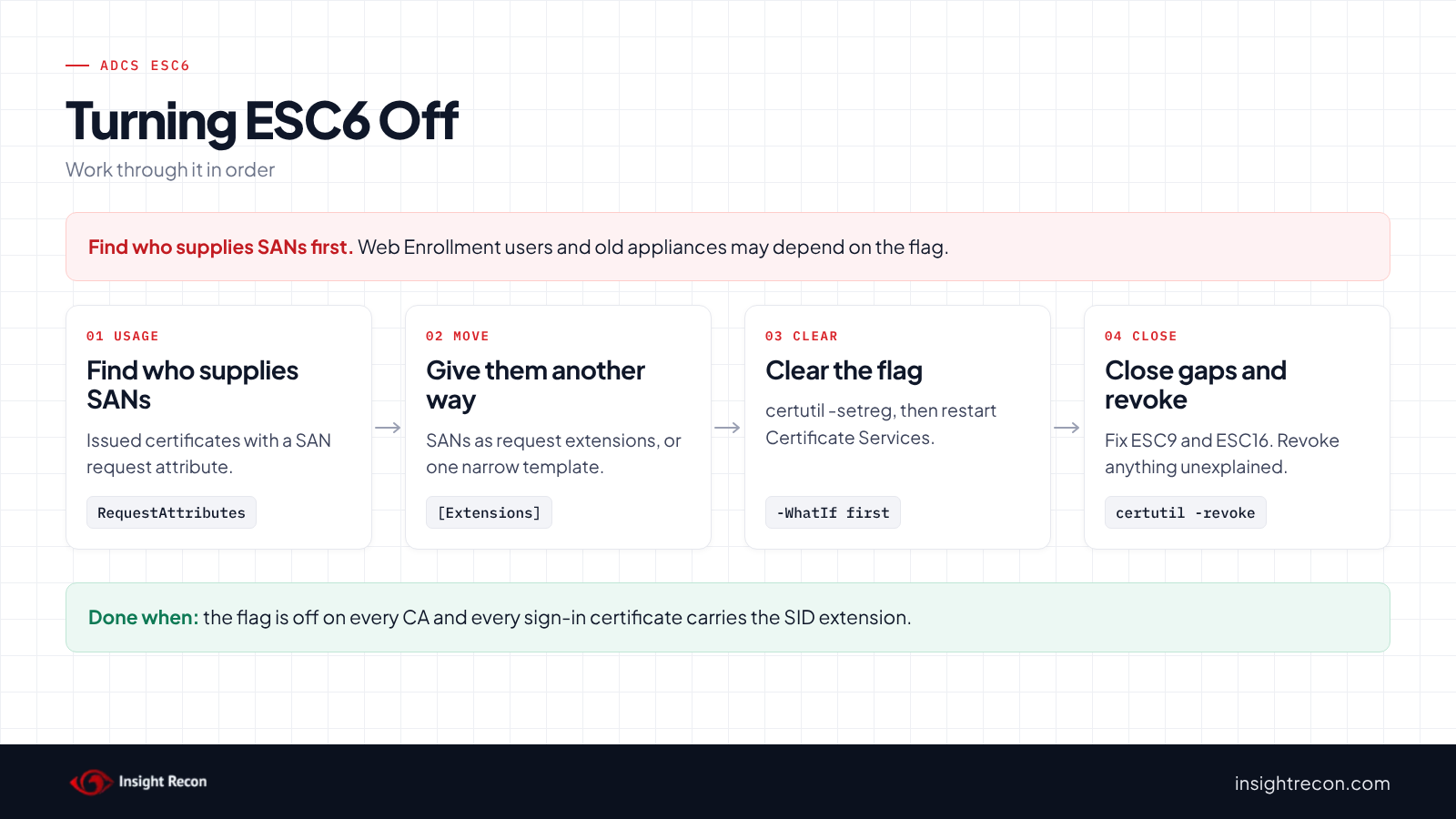
Find out what relies on the flag, give it another way to request SANs, then clear it.
Find what relies on it
The issued-certificate script shows who has been supplying SANs. Typical users are web server certificates requested through Web Enrollment or with a request file. Older appliances that can't put SANs in the request itself are another. Write down each one and its template.
Give them another way
Microsoft's custom SAN guide recommends putting the SAN in the request's extensions instead of request attributes, which doesn't need the flag. For example, the [Extensions] section of a certreq policy file does this. Alternatively, a dedicated server template with "Supply in the request" works, as long as only the right accounts can enroll and it doesn't allow sign-in. It's still an ESC17 to watch. However, it's a far smaller risk than a CA-wide flag.
Plan the restart
The change takes effect when Certificate Services restarts. Issuance pauses for the moment it takes, so pick a quiet time.
Fix ADCS ESC6 safely
1. Clear the flag
This clears EDITF_ATTRIBUTESUBJECTALTNAME2 and restarts Certificate Services, as Microsoft's Defender for Identity guidance describes. It prints the current flags first so you can put them back. It's a dry run with -WhatIf. Drop that to apply. Run it on each affected CA as a CA administrator. To undo it, run certutil -setreg policy\EditFlags +EDITF_ATTRIBUTESUBJECTALTNAME2 and restart the service.
# Dry run. Drop -WhatIf to apply.
# Run on the CA as a CA administrator. Restarts Certificate Services, which pauses issuance briefly.
function Disable-ArbitrarySan {
    [CmdletBinding(SupportsShouldProcess)]
    param()
    # Note the current flags so you can put them back
    certutil -getreg policy\EditFlags
    if ($PSCmdlet.ShouldProcess($env:COMPUTERNAME, 'Clear EDITF_ATTRIBUTESUBJECTALTNAME2 and restart certsvc')) {
        certutil -setreg policy\EditFlags -EDITF_ATTRIBUTESUBJECTALTNAME2
        if ($LASTEXITCODE -ne 0) { throw 'certutil failed. Nothing was restarted.' }
        Restart-Service -Name certsvc -ErrorAction Stop
    }
}
Disable-ArbitrarySan -WhatIf
2. Close the SID extension gaps
If the exposure script showed a CA that leaves the SID extension out, or sign-in templates without it, fix those next. On the CA, take the extension off its disabled list with certutil -setreg policy\DisableExtensionList -1.3.6.1.4.1.311.25.2 and restart Certificate Services. On a template, clear the 0x80000 bit in msPKI-Enrollment-Flag. Ask the owner first, since someone usually set each one on purpose.
3. Revoke certificates you can't explain
For each serial number you noted, revoke the certificate on the CA with certutil -revoke, then publish a new CRL with certutil -crl. Systems may keep using a cached CRL until it expires, so publish the new one right away and run certutil -setreg chain\ChainCacheResyncFiletime @now on each domain controller. Clearing the flag doesn't touch certificates already issued.
4. Re-run the quick check
ArbitrarySan should be False on every CA.
Keep ADCS ESC6 off
- Log CA configuration changes. With the CA's audit filter on, the CA logs changes to its configuration and security settings. Microsoft's Securing PKI guide lists them among the events to monitor.
- Limit Manage CA. Only CA administrators should hold it, since it's the right that can turn the flag back on.
- Log what the CA issues. Event 4887 records each certificate issued. A SAN request attribute on a sign-in template should raise an alert.
- Re-run the scan. It flags the CA again if the flag comes back.
ADCS ESC6 checklist
- Is
EDITF_ATTRIBUTESUBJECTALTNAME2off on every enterprise CA? - Do apps that need SANs request them as extensions or through a narrow template?
- Does every CA include the SID extension?
- Do all published sign-in templates include the SID extension?
- Did you review certificates issued with a SAN request attribute?
- Is Manage CA limited to CA administrators?
- Did you check every CA in the forest?
A "no" on the first and third questions means any domain user can potentially get a working domain admin certificate.
Compliance mapping
| Framework | Reference | Why it applies |
|---|---|---|
| MITRE ATT&CK | T1649 | Steal or Forge Authentication Certificates. The flag lets a requester put another account's name in the certificate. |
| CIS Controls v8 | Control 4, Control 6 | Secure configuration of enterprise assets and access control management. A CA should only issue certificates in the requester's own name. |
| NIST CSF 2.0 | PR.AA-01, PR.AA-02, PR.AA-05 | Credentials are managed and bound to the right identity. Access follows least privilege. ESC6 lets requesters bind a credential to someone else. |
ADCS ESC6 FAQ
What is ADCS ESC6?
A CA with EDITF_ATTRIBUTESUBJECTALTNAME2 turned on. Any requester can add any SAN to any certificate the CA issues.
Is ESC6 still a problem after the 2022 updates?
Less of one for Kerberos. It still works where the SID extension is missing. It also works against apps that only read the SAN.
How is ESC6 different from ESC1?
ESC1 is one template that lets the requester supply the subject. ESC6 is a CA setting that lets the requester supply a SAN on every template.
Does clearing the flag break anything?
Only requests that relied on SAN request attributes. Move those to request extensions or a narrow template first.
Does Insight Recon check for ADCS ESC6?
Yes. The free scan includes Certificate Authority Allows Arbitrary SAN in ADCS (ESC6), along with the other ADCS checks.
See whether any of your CAs lets requesters name any account.
It runs from any Windows machine that can reach your DCs, with a standard domain account. Every core AD check is free for one domain.
Not ready to scan?
AD Signal is our monthly look at what's changing in AD security and how real domains score. Read the latest report.
References
- Microsoft Learn: Edit vulnerable Certificate Authority setting (ESC6)
- Microsoft Learn: How to Request a Certificate With a Custom Subject Alternative Name
- Microsoft Support: KB5014754, certificate-based authentication changes on domain controllers
- Microsoft Learn: Securing PKI, Appendix A: Events to Monitor
- Microsoft Learn: certutil
- SpecterOps: Certified Pre-Owned
- MITRE ATT&CK: T1649 Steal or Forge Authentication Certificates