DCSync Permissions: Find Who Can Pull Every Password Hash
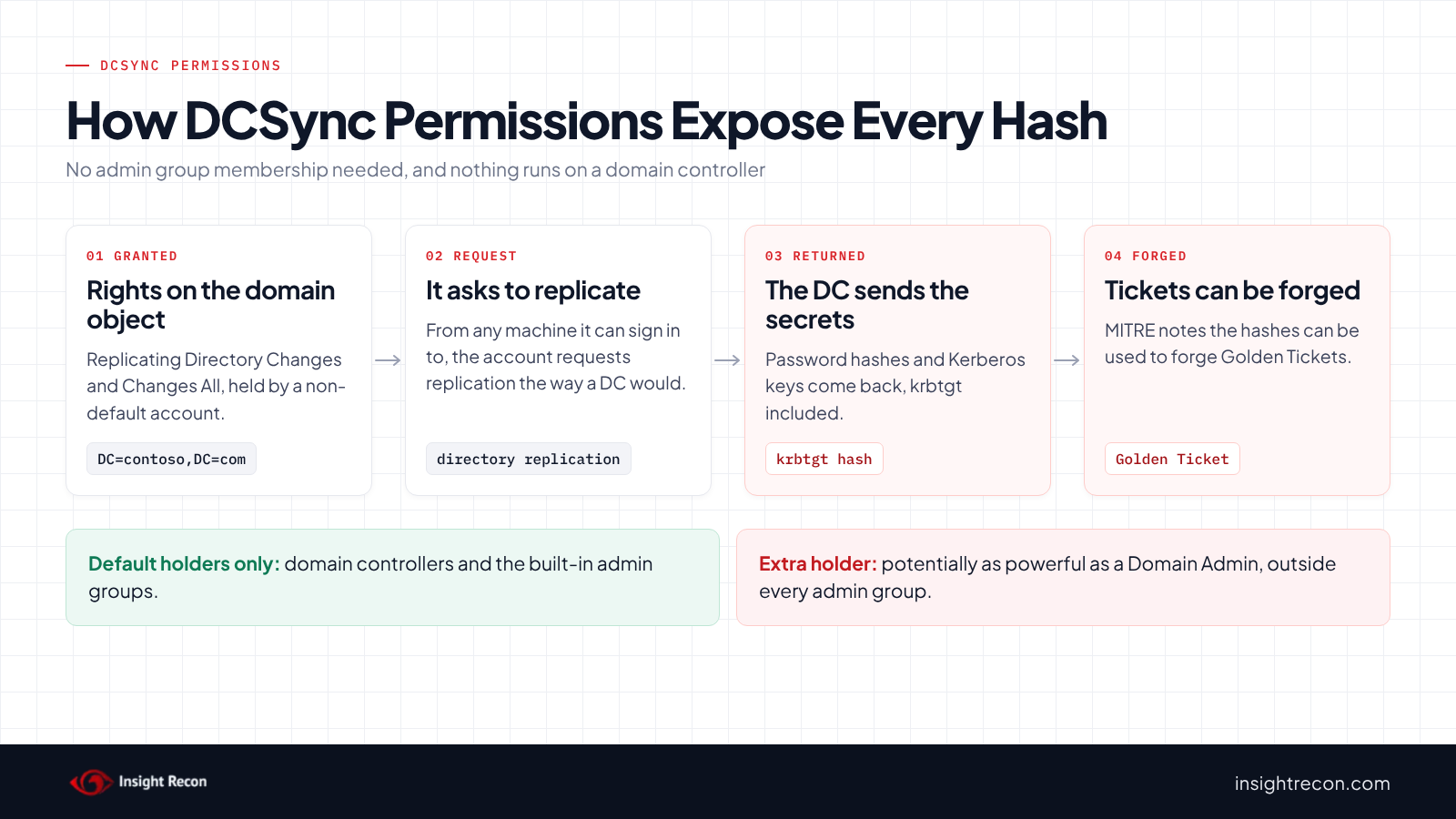
DCSync permissions are the replication rights on your domain object that let an account ask a domain controller for every password hash in the domain, including krbtgt's. Domain controllers and the built-in admin groups hold them by default. Anything else that holds them, from a sync tool to a group someone created years ago, can be as powerful as a Domain Admin without showing up in any admin group. This post shows you how to find every holder, decide which ones still need the rights and remove the rest without breaking the products that depend on them.
| Priority | High. A holder can potentially recover the password hash of every account in the domain. Critical when a broad principal can replicate or owns the domain object |
|---|---|
| What decides it | Replicating Directory Changes and Replicating Directory Changes All on the domain object, or the All right on its own. All Extended Rights, Full Control, change permissions or change owner rights there count too, as does owning the object |
| Who's affected | Domains where a sync product, migration tool, consultant or old project was granted replication rights and never had them taken back |
| Fix | Confirm what each holder is for, investigate the unexplained ones, remove what isn't needed and protect the rest as Tier 0 |
Check it now: who holds Replicating Directory Changes All?
Import-Module ActiveDirectory
$dn = (Get-ADDomain).DistinguishedName
$getChangesAll = [guid]'1131f6ad-9c07-11d1-f79f-00c04fc2dcd2'
(Get-Acl "AD:$dn").Access |
    Where-Object { $_.AccessControlType -eq 'Allow' -and $_.ObjectType -eq $getChangesAll } |
    Select-Object IdentityReference, ActiveDirectoryRights
Runs as any domain user with the ActiveDirectory module. It lists every explicit grant of Replicating Directory Changes All on the domain object of the domain you're signed in to. Expect domain controllers and Administrators. Anything else needs an owner and a reason. It doesn't catch Full Control or All Extended Rights, which the detailed script below does. Run it in each domain of a forest.
You checked one setting. The free scan checks the rest of your on-prem AD in a few minutes.
Nothing gets installed on your domain controllers. Only HTTPS leaves your network.
What DCSync permissions do
Domain controllers keep each other up to date through directory replication. Who may ask for that data is controlled by extended rights on the domain object (the DC=contoso,DC=com object at the top of the domain). Two of them matter here:
- Replicating Directory Changes (
1131f6aa-9c07-11d1-f79f-00c04fc2dcd2). Microsoft describes it as the right "needed to replicate changes from a given NC" (naming context). - Replicating Directory Changes All (
1131f6ad-9c07-11d1-f79f-00c04fc2dcd2). Microsoft describes it as the right that "allows the replication of secret domain data", which includes password hashes.
Together these are what people mean by DCSync permissions. MITRE ATT&CK lists the default holders as members of Administrators, Domain Admins and Enterprise Admins, plus domain controller computer accounts.
Some products legitimately need them. Microsoft Entra Connect's AD DS connector account needs both rights at the domain root for password hash synchronization. Other identity and sync tools often need only Replicating Directory Changes. Microsoft's article on its own metadirectory connector, for example, grants just that one right to discover objects.
Why DCSync permissions are dangerous
An account with both rights can act like a domain controller asking for replication. MITRE ATT&CK tracks this as T1003.006, OS Credential Dumping: DCSync. It describes the result as access to current and historical password hashes for accounts such as krbtgt and Administrators, which someone could then use to forge Golden Tickets. It runs over the network from any machine the account can sign in to. Nothing has to run on a domain controller.
The rights also hide well. They're entries in the domain object's permissions, which no group membership list shows. A service account or a forgotten group can hold them while looking like an ordinary object in every admin group review. Grants tend to pile up: a sync product's setup, a migration tool, a password audit or a consultant's quick fix. Nobody takes them back afterwards.
Control over the domain object counts too. A principal with Full Control, or the right to change the object's permissions or owner, can grant itself both replication rights. So can a principal with All Extended Rights there, which includes both. The object's owner can too, because an owner can always change an object's permissions.
Find DCSync permissions in your domain
Flag every principal that can replicate secrets
This reads the domain object's permissions and lists each principal that holds both replication rights, All Extended Rights or Full Control, change permissions or change owner rights. It marks the default holders so the rest stand out. It runs as any domain user with the AD module and covers only the domain you're signed in to.
Import-Module ActiveDirectory
$domain = Get-ADDomain
$rootSid = (Get-ADDomain (Get-ADForest).RootDomain).DomainSID.Value
$sidType = [System.Security.Principal.SecurityIdentifier]
$expected = 'S-1-5-18', 'S-1-5-9', 'S-1-5-32-544',
    "$($domain.DomainSID)-512", "$($domain.DomainSID)-516", "$rootSid-519"
$getChanges    = [guid]'1131f6aa-9c07-11d1-f79f-00c04fc2dcd2'
$getChangesAll = [guid]'1131f6ad-9c07-11d1-f79f-00c04fc2dcd2'
$inheritOnly   = [System.Security.AccessControl.PropagationFlags]::InheritOnly
(Get-Acl "AD:$($domain.DistinguishedName)").GetAccessRules($true, $true, $sidType) |
    Where-Object { $_.AccessControlType -eq 'Allow' -and -not ($_.PropagationFlags -band $inheritOnly) } |
    Group-Object { $_.IdentityReference.Value } |
    ForEach-Object {
        $sid = $_.Name
        $rules = $_.Group
        $control = [bool]($rules | Where-Object { "$($_.ActiveDirectoryRights)" -match 'GenericAll|WriteDacl|WriteOwner' })
        $ext = @($rules | Where-Object { "$($_.ActiveDirectoryRights)" -match 'ExtendedRight' })
        $allExt = [bool]($ext | Where-Object { $_.ObjectType -eq [guid]::Empty })
        $gc  = $allExt -or [bool]($ext | Where-Object { $_.ObjectType -eq $getChanges })
        $gca = $allExt -or [bool]($ext | Where-Object { $_.ObjectType -eq $getChangesAll })
        if ($control -or ($gc -and $gca)) {
            $name = $sid
            try { $name = ([System.Security.Principal.SecurityIdentifier]$sid).Translate([System.Security.Principal.NTAccount]).Value } catch { }
            [pscustomobject]@{
                Principal      = $name
                CanDCSync      = $gc -and $gca
                CanGrantItself = $control
                Default        = $expected -contains $sid
                Sid            = $sid
            }
        }
    } | Sort-Object Default, Principal
What to look for: rows where Default is False. They sort to the top. CanDCSync means the principal already holds both rights. CanGrantItself means it can add them. Enterprise Read-only Domain Controllers isn't on the default list. It should only hold Replicating Directory Changes, so it shows up here only if someone gave it more. A group in the list gives the rights to every member, including nested members. A SID that doesn't resolve to a name usually means a deleted account or group, or one from a domain that's gone. Its entry still sits on the domain object. The script doesn't list the object's owner or a principal that holds only Replicating Directory Changes All. The scan lists both. To see the owner, read the Owner property from the script's Get-Acl call.
See who is in a flagged group
Replace the group name with one from the list. It runs as any domain user with the AD module.
Import-Module ActiveDirectory
Get-ADGroupMember -Identity 'APP-Replication' -Recursive |
    Select-Object Name, SamAccountName, ObjectClass
What to look for: users and computers that have no obvious reason to replicate the directory. Every one of them can do what the group can.
Look for replication requests from accounts that aren't DCs
Event 4662 ("An operation was performed on an object") can record use of these rights. Microsoft's event 4662 page notes Windows only writes it when Audit Directory Service Access is on and the domain object's SACL covers the access. Many domains don't have that set up, so no events doesn't mean no use. This reads recent 4662 events from every DC and keeps the ones for Replicating Directory Changes All from accounts other than your domain controllers. It needs PowerShell remoting rights on each DC (admin there, or membership in Remote Management Users) and rights to read the Security log.
# Needs PowerShell remoting rights on each DC (admin there, or Remote Management Users)
# plus rights to read the Security log. Needs event 4662 auditing set up (see the text).
Import-Module ActiveDirectory
$dcs = Get-ADDomainController -Filter *
$dcAccounts = $dcs | ForEach-Object { "$($_.Name)`$" }
Invoke-Command -ComputerName $dcs.HostName -ArgumentList (,$dcAccounts) -ScriptBlock {
    param($dcAccounts)
    Get-WinEvent -FilterHashtable @{ LogName = 'Security'; Id = 4662 } -MaxEvents 5000 -ErrorAction SilentlyContinue |
        Where-Object { $_.Properties[11].Value -match '1131f6ad-9c07-11d1-f79f-00c04fc2dcd2' -and
                       $dcAccounts -notcontains $_.Properties[1].Value } |
        Select-Object TimeCreated, @{ n = 'Account'; e = { "$($_.Properties[2].Value)\$($_.Properties[1].Value)" } }
} | Select-Object PSComputerName, TimeCreated, Account
What to look for: any account you can't tie to a product that's supposed to sync. The Entra Connect connector account will show up if you use password hash sync. That one is expected. The script only looks at the most recent 5,000 4662 events on each DC, which can be a short window on a busy domain.
Check DCSync permissions with Insight Recon
The free scan includes Risky DCSync Permissions. It reads the domain object's permissions and lists each principal outside the default set that holds both replication rights, All Extended Rights, Full Control or the right to change the object's permissions or owner. It lists an owner of the object from outside that set too. It also lists a principal that holds Replicating Directory Changes All on its own, because another group can supply the other right. Replicating Directory Changes alone isn't listed. An Entra Connect sync account is still listed, with a note that it's expected but should be protected as Tier 0. A finding rates High, or Critical when a broad principal such as Authenticated Users or Domain Users can replicate or owns the domain object. The finding comes with the Hacker Insight, remediation steps and compliance mappings for the check.
Know what it doesn't decide for you. The check can't tell whether a product still uses the rights, or who added them and when. A group shows up as the group, so check its members with the script above.
These related checks cover the rest of this area:
- Multiple Synchronization Accounts Hold DCSync Rights, for Entra Connect and Cloud Sync accounts. It's one of the hybrid identity checks, which are on paid plans and cover the on-premises footprint of Entra ID, not the tenant.
- Exchange Not Hardened, Exchange's own permissions in AD.
- Dangerous Control Over Privileged Objects and Privileged Objects With Unprivileged Owners, control over admin accounts and groups that can lead to the same place.
- Stale krbtgt Account Password, because a krbtgt hash pulled by DCSync stays useful until the password is reset twice.
- Accounts with reversible passwords and GPO Enables reversible password use, because DCSync also hands over the cleartext copies those leave behind. Our reversible encryption post covers both.
You can see what the findings look like in our sample report. The full list is in our check library.
See who else holds Tier 0 rights in your AD.
It runs from any Windows machine that can reach your DCs, with a standard domain account. Every core AD check is free for one domain.
Before you remove DCSync permissions
Removing replication rights from an account a product still uses stops that product from syncing. Password hash sync to Entra ID is the usual example. Find the owner of every holder first. Save the domain object's permissions so you can put them back.
Sort each holder
- The Entra Connect connector account, on a server you run: keep it if you use password hash sync. Protect the account and the server as Tier 0. Our tenant compromise post covers why the sync account is worth protecting.
- Another product you can name: check its documentation. Many need only Replicating Directory Changes and can do without the All right.
- Nothing you can explain: treat it as a possible compromise. Find out when the entry was added and by whom before you change anything. If you'd like help with that, our remediation team does this work.
Assume anything already pulled is still out there
Removing a right doesn't undo a replication that already happened. If an unexplained principal held these rights, assume the domain's hashes may have been copied. That means a krbtgt reset done twice, as our krbtgt password reset post walks through, plus resets for privileged and service accounts.
Save the current permissions
This writes the domain object's permissions to a file as SDDL text. It runs as any domain user with the AD module.
# Runs as any domain user. Keep this file: it's your way back.
Import-Module ActiveDirectory
$dn = (Get-ADDomain).DistinguishedName
(Get-Acl "AD:$dn").Sddl | Out-File .\domain-root-acl-before.txt
Remove DCSync permissions safely
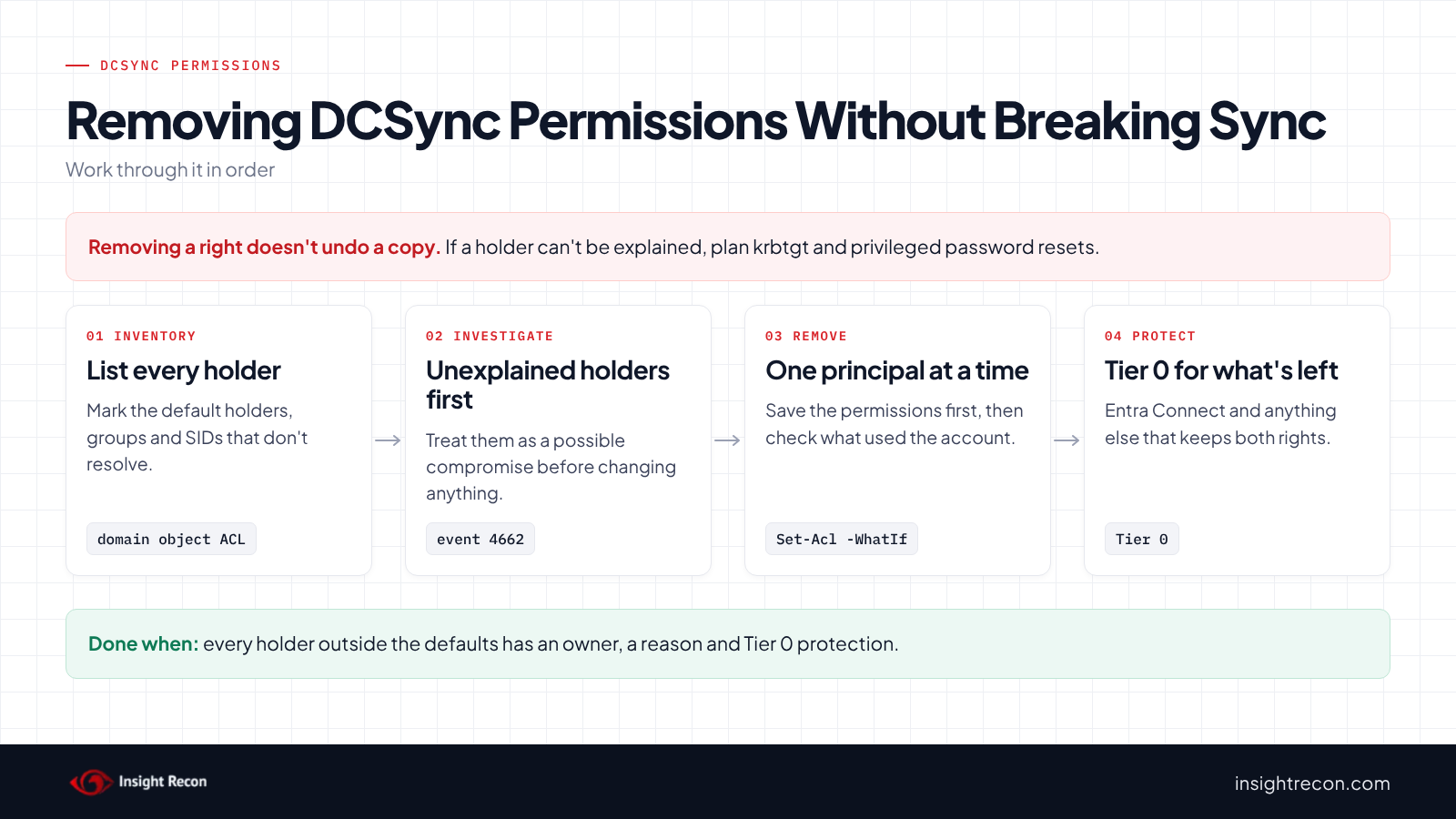
1. Investigate the unexplained holders first
Before you remove an unexplained entry, capture what you need: the principal, its members and any 4662 or Defender for Identity history for it. Then remove it with step 2 and start the resets above.
2. Remove rights from one principal
This removes only the explicit replication, All Extended Rights and control entries for one principal on the domain object. It leaves the principal's other permissions alone. This is a dry run with -WhatIf. Drop that to apply. It needs Domain Admin or the right to change the domain object's permissions. It works on the domain you're signed in to.
# Dry run. Drop -WhatIf to apply. Needs Domain Admin, or the right to change the domain object's permissions.
# Removes only explicit replication, All Extended Rights and control entries for this one principal.
Import-Module ActiveDirectory
$dn  = (Get-ADDomain).DistinguishedName
$sid = (Get-ADGroup 'APP-Replication').SID
$replication = [guid]'1131f6aa-9c07-11d1-f79f-00c04fc2dcd2', [guid]'1131f6ad-9c07-11d1-f79f-00c04fc2dcd2', [guid]::Empty
$acl = Get-Acl "AD:$dn"
$acl.GetAccessRules($true, $false, [System.Security.Principal.SecurityIdentifier]) |
    Where-Object { $_.IdentityReference -eq $sid -and $_.AccessControlType -eq 'Allow' -and (
        "$($_.ActiveDirectoryRights)" -match 'GenericAll|WriteDacl|WriteOwner' -or
        ("$($_.ActiveDirectoryRights)" -match 'ExtendedRight' -and $replication -contains $_.ObjectType)) } |
    ForEach-Object { [void]$acl.RemoveAccessRuleSpecific($_) }
Set-Acl -Path "AD:$dn" -AclObject $acl -WhatIf
Wait for replication, then check that whatever used the principal still works, or has been retired. Repeat for the next principal.
3. Grant the least a product needs
If a product needs replication rights, give them to a dedicated account rather than a shared group. Give it only the rights its documentation lists. For Entra Connect, Microsoft's Set-ADSyncPasswordHashSyncPermissions cmdlet sets exactly the two rights password hash sync needs, at the domain root only.
4. Protect what remains as Tier 0
Any account left with both rights can potentially take the whole domain, so it belongs in Tier 0 with your domain controllers. Limit where it can sign in and keep its password long and rotated. Treat the server that stores its credentials (the Entra Connect server, for example) as a Tier 0 server.
If something breaks
This puts the saved permissions back. It's a dry run with -WhatIf. Drop that to apply. It needs Domain Admin. It replaces the whole permission list, so it also undoes any other change made to the domain object since you saved the file.
# Dry run. Drop -WhatIf to apply. Needs Domain Admin. This replaces the whole domain object
# DACL with the saved copy, so it also undoes any other permission change made since.
Import-Module ActiveDirectory
$dn  = (Get-ADDomain).DistinguishedName
$acl = Get-Acl "AD:$dn"
$acl.SetSecurityDescriptorSddlForm((Get-Content .\domain-root-acl-before.txt -Raw).Trim(), 'Access')
Set-Acl -Path "AD:$dn" -AclObject $acl -WhatIf
Keep DCSync permissions from coming back
- Alert on replication from non-DCs. If you run Microsoft Defender for Identity, its alert "Suspected DCSync attack (replication of directory services)" fires when a computer that isn't a domain controller requests replication. Microsoft recommends a sensor on every DC for full coverage.
- Audit the domain object. With Audit Directory Service Access on and a SACL on the domain object, event 4662 records replication requests and changes to its permissions.
- Review the list monthly. Run the detailed script and compare it with last month's output.
- Re-run the scan. Risky DCSync Permissions shows whether a new holder has appeared.
DCSync permissions checklist
- Does every non-default holder of DCSync permissions have a named owner and a documented reason?
- Did you investigate unexplained holders before removing them?
- If one was unexplained, did you reset krbtgt twice and the privileged passwords afterwards?
- Does each product that needs replication rights have only the rights its documentation lists?
- Are the accounts that keep both rights, and the servers that store their credentials, protected as Tier 0?
- Is replication from non-DCs alerted on?
- Did you check every domain in the forest?
A "no" on the first question means something can potentially copy every password hash in the domain and nobody can say why.
Compliance mapping
| Framework | Reference | Why it applies |
|---|---|---|
| MITRE ATT&CK | T1003.006 | OS Credential Dumping: DCSync. Replication rights let an account request password hashes from a domain controller. |
| CIS Controls v8 | Control 5, Control 6 | Account management and access control. Rights this powerful should belong to known, managed accounts. |
| NIST CSF 2.0 | PR.AA-05, PR.DS-01 | Access permissions follow least privilege. Data at rest is protected. Extra replication rights give accounts that don't need it access to the password hashes stored in AD. |
| ANSSI | vuln_permissions_naming_context | ANSSI's Active Directory control point for dangerous permissions on a naming context root, such as the domain object. |
DCSync permissions FAQ
What are DCSync permissions?
Replicating Directory Changes and Replicating Directory Changes All on the domain object. Together they let an account request directory data from a domain controller, including password hashes.
Who has DCSync rights by default?
Domain controllers and members of Administrators, Domain Admins and Enterprise Admins, according to MITRE ATT&CK. Any other holder should have a documented reason.
Does Entra Connect need DCSync permissions?
For password hash sync, yes. Microsoft lists both replication rights at the domain root for the AD DS connector account. Keep them on that account and protect it and its server as Tier 0.
Is removing a DCSync right enough?
It stops future use. It doesn't undo a replication that already happened. If the holder can't be explained, reset krbtgt twice and reset privileged and service account passwords.
Does Insight Recon check DCSync permissions?
Yes. The free scan includes Risky DCSync Permissions, which lists non-default principals that hold the replication rights or can grant them to themselves.
Find out who can copy your domain's password hashes.
It runs from any Windows machine that can reach your DCs, with a standard domain account. Every core AD check is free for one domain.
Not ready to scan?
AD Signal is our monthly look at what's changing in AD security and how real domains score. Read the latest report.
References
- MITRE ATT&CK: T1003.006 OS Credential Dumping: DCSync
- Microsoft Learn: DS-Replication-Get-Changes extended right
- Microsoft Learn: DS-Replication-Get-Changes-All extended right
- Microsoft Learn: Microsoft Entra Connect, configure AD DS Connector account permissions
- Microsoft Learn: How to grant the Replicating Directory Changes permission
- Microsoft Learn: Event 4662, an operation was performed on an object
- Microsoft Learn: Microsoft Defender for Identity classic alerts