
Quick Summary
| Priority | High for hybrid environments. A tenant compromise shouldn't be able to become a domain compromise |
|---|---|
| The question | If someone takes over your tenant, what can they do to on-prem AD through the links you've set up? |
| Where it's decided | The permissions on your sync account (Entra Connect or Cloud Sync) and the password replication policy on the AzureADKerberos object. Both live in AD |
| Who's affected | Anyone syncing AD to Entra ID with Entra Connect or Cloud Sync, especially with password writeback or cloud Kerberos trust turned on |
| Fix | Keep the sync account's rights away from your admin accounts and keep Tier 0 accounts out of sync. Make sure the AzureADKerberos policy denies every admin group |
Insight Recon's free read-only scan covers every on-prem AD finding. The hybrid identity checks that read your sync account and AzureADKerberos object come with Standard and above.
What Happened with ConnectWise Cloud Backup
ConnectWise Cloud Backup, formerly SkyKick, is a multi-tenant app that customers consent into their Microsoft 365 tenants. On October 15, the app's own credential signed in to customer tenants from an address that wasn't ConnectWise's. Because the sign-in was the app's, the attacker got whatever permissions customers had already granted it. Microsoft says the attacker likely abused those permissions, including Directory.ReadWrite.All. There's no user involved, so MFA never came into it.
In at least one partner tenant, Huntress found the ConnectWise Cloud Management app for Microsoft Teams added itself to Global Administrator. New client secrets then showed up on two other trusted apps, one of them an MSP management app. That's a way back in after the original credential gets reset. Huntress also saw ConnectWise Cloud Management apps give themselves directory roles in about 50 tenants, mostly Exchange Administrator.
ConnectWise has shut off Cloud Backup application access while it investigates. It hasn't said how the credential was obtained. The cleanup steps are at the end of this post.
Why Your Tenant and Your Domain Aren't Separate
Most hybrid setups have at least one of these links:
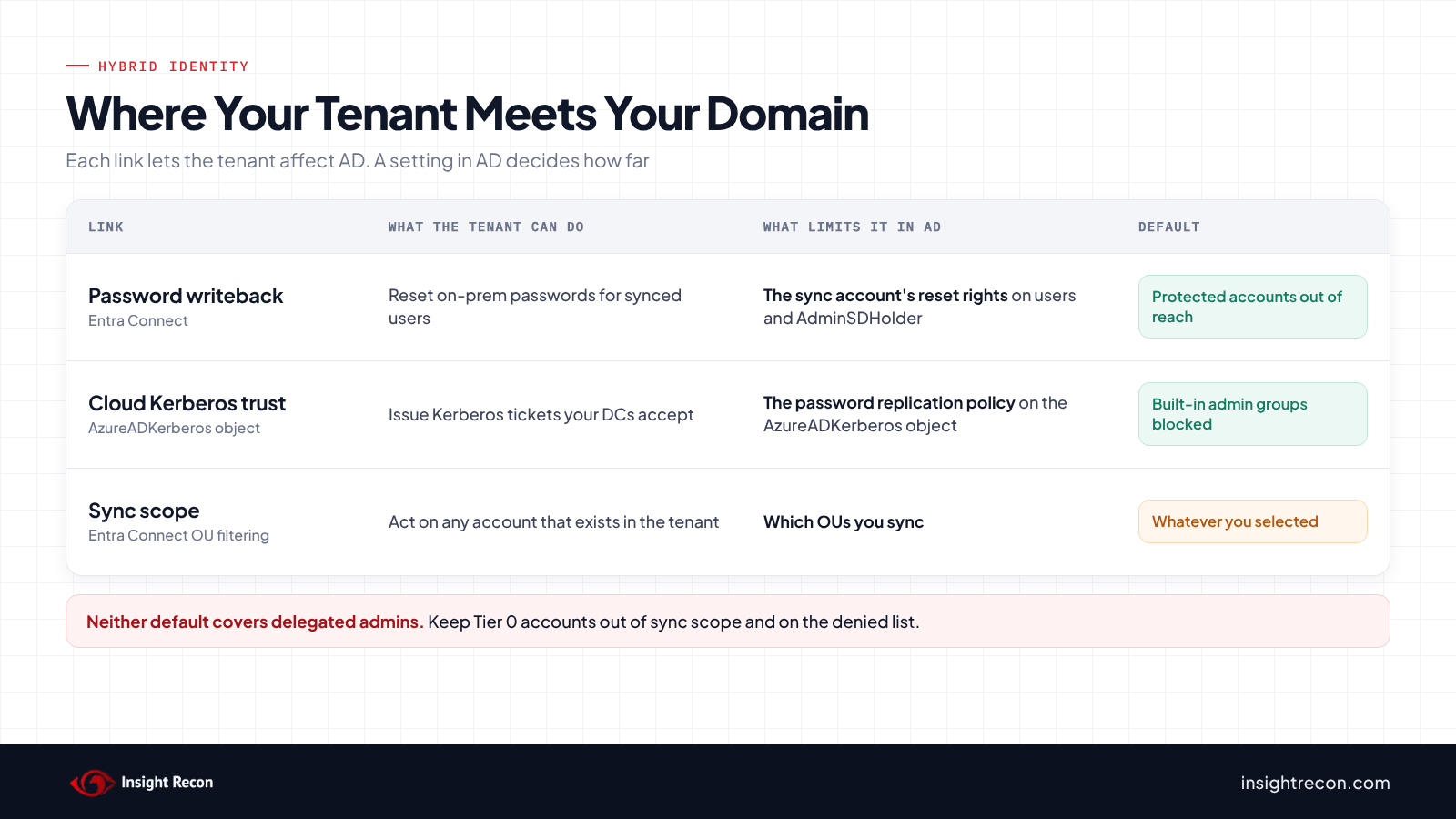
- Entra Connect. Its sync account lives in AD. With password hash sync it holds directory replication rights, which already puts it in Tier 0. With password writeback it can reset passwords on the accounts it's been given rights over. Microsoft documents that when an admin resets a synced user's password in the Entra admin center or through Microsoft Graph, the new password is written back to on-prem AD.
- Entra Cloud Sync. The lighter-weight sync agent runs as a gMSA in AD. Its scope and writeback settings are managed in the tenant. That makes the gMSA's AD permissions the main limit on what it can do on-prem.
- Cloud Kerberos trust. Used by Windows Hello for Business and FIDO2 keys, it creates an
AzureADKerberosobject in your Domain Controllers OU. Entra ID uses it to issue Kerberos tickets your domain controllers accept. A password replication policy on that object decides which accounts that works for.
Both are normal, supported features. The point is that both put tenant-side decisions into your domain. What stops a tenant takeover from turning into a domain takeover is how tightly those AD permissions and policies are set.
Real-World Context
Microsoft Already Treats This as a Risk
Microsoft says the Entra Connect server "must be treated as a Tier 0 component." On cloud Kerberos trust, its own deployment guide warns that "due to possible attack vectors from Microsoft Entra ID to Active Directory, it's not recommended to unblock" privileged accounts by relaxing the AzureADKerberos password replication policy.
The defaults are reasonably safe. Microsoft notes that the writeback account can't change passwords for users in protected groups. Protected accounts don't inherit permissions from the rest of the domain, which is what keeps them out of reach. The default AzureADKerberos policy blocks members of the privileged built-in groups. The trouble starts when someone changes those defaults to make something work. Microsoft's own tool for setting the sync account's permissions has a switch to include AdminSDHolder. Its documentation says plainly: "This isn't recommended."
Where the Defaults Don't Reach
Both defaults key off the built-in admin groups. An account that's powerful because of a delegation, like a helpdesk account that can reset passwords across the domain or a service account with replication rights, isn't in those groups. If it's synced, the defaults don't protect it. That's why keeping Tier 0 accounts out of sync scope matters as much as the permissions themselves.
How Attackers Use It
An attacker who controls a tenant looks for the shortest way to something worth more. In a hybrid setup, one place to look is whatever the tenant is trusted to change on-prem. If the sync account can reset an admin's password, or the AzureADKerberos policy has been loosened for admin accounts, the tenant has more reach into AD than it should.
Cloud management tooling is a related path that AD settings can't show. If a tenant-managed tool can run commands on a domain controller or your Entra Connect server, whoever controls the tenant can too. Intune, Azure Arc and Defender for Endpoint live response are the usual ones to take stock of. Know which of them reach your Tier 0 servers and who in the tenant can use them.
How to Check Your Domain
Find Your Sync Account
Entra Connect's default sync account starts with MSOL_ and has a description that names Entra Connect (or Azure AD Connect on older installs). Custom installs may use a different name or a gMSA. Cloud Sync runs as provAgentgMSA$. This finds the usual ones:
Get-ADObject -LDAPFilter '(|(sAMAccountName=MSOL_*)(sAMAccountName=provAgentgMSA*)(description=*Active Directory Connect*)(description=*Entra Connect*))' `
    -Properties sAMAccountName, description, whenCreated |
    Select-Object sAMAccountName, whenCreated, description
What it does: Lists accounts and gMSAs that look like Entra Connect or Cloud Sync accounts.
How to interpret results: you should see one MSOL_ account per Entra Connect server, staging servers included, plus the Cloud Sync gMSA if you use it. Extras are worth chasing down. A leftover sync account from a decommissioned server often still has its rights.
Check What It Can Do to Protected Accounts
Whatever is on the AdminSDHolder object gets copied onto every protected account and group roughly every hour. So the first place to look is AdminSDHolder itself. Replace the account name with yours:
Import-Module ActiveDirectory
$sync = 'MSOL_0123456789ab'
$dn   = "CN=AdminSDHolder,CN=System,$((Get-ADDomain).DistinguishedName)"
(Get-Acl "AD:$dn").Access |
    Where-Object { $_.IdentityReference -like "*\$sync" } |
    Select-Object IdentityReference, AccessControlType, ActiveDirectoryRights, ObjectType
What it does: Lists any permissions the sync account holds directly on AdminSDHolder.
How to interpret results: nothing returned is what you want. A row with ExtendedRight and the object type 00299570-246d-11d0-a768-00aa006e0529 is the reset password right. GenericAll, WriteDacl or WriteOwner are worse, since they let the account give itself anything. This only catches rights granted to the account by name. Rights it gets through a group need a fuller look. Also check accounts with adminCount set to 1 that have left their protected groups. They keep the old permissions, and AD stops correcting them.
Check the AzureADKerberos Password Replication Policy
If you've set up cloud Kerberos trust or FIDO2 sign-in for on-prem resources, this shows who Entra can issue tickets for:
Get-ADComputer -Filter "Name -eq 'AzureADKerberos'" `
    -Properties msDS-RevealOnDemandGroup, msDS-NeverRevealGroup |
    Select-Object @{n='Allowed';e={$_.'msDS-RevealOnDemandGroup'}}, @{n='Denied';e={$_.'msDS-NeverRevealGroup'}} |
    Format-List
What it does: Shows the allowed and denied lists on the AzureADKerberos object.
How to interpret results: nothing returned means there's no Entra Kerberos object in this domain. The object is per domain, so run it against each one with -Server. If it's there, the denied list should name the high-privilege built-in groups. In many domains it doesn't include the Denied RODC Password Replication Group, even though that group holds Domain Admins, Enterprise Admins and Schema Admins by default. Denied wins over allowed. Any admin group on the allowed list, or missing from the denied list, is the finding. Your delegated admins from earlier aren't in any of those groups. They need adding by hand.
Check What's in Sync Scope
This one isn't in AD. In the Entra Connect wizard, look at Domain and OU filtering. Any OU that holds Tier 0 accounts, including your admin accounts and Tier 0 service accounts, shouldn't be synced. An account that isn't in the tenant can't be reset from there.
Checking Your Hybrid Links with Insight Recon
Insight Recon's paid plans add 24 hybrid identity checks to its read-only Active Directory security assessment. Every plan, including the free one, gets the on-prem checks. The hybrid checks read AD permissions and account attributes only. None of them reads the tenant. They can't tell whether password writeback is turned on. They tell you what the sync account could do if it is. Our hybrid identity launch post covers the same checks from the other direction, on-prem into the cloud.
It finds the sync account the same way you would. An account or gMSA counts if its description has Entra Connect's standard text, or if its name matches a sync pattern like MSOL_* and it holds replication rights on the domain root. Name-only matches are tracked separately as lower confidence. The checks that matter most here:
- Synchronization Account Can Reset Privileged Passwords (Critical): reads the permissions on every AdminSDHolder-protected account and every DC. Flags reset password, full control, change permissions or change owner rights.
- Synchronization Principal Can Control Tier 0 Objects (Critical): follows nested groups to see whether the sync account, or anyone who can control it, has a path to a Tier 0 object.
- Synchronization Permissions Reach AdminSDHolder-Protected Objects (High): flags dangerous rights on AdminSDHolder itself, since AD copies them onto every protected account.
- AzureADKerberos Password Replication Policy Exposes Privileged Accounts (High): checks every admin-protected account that's still privileged through its nested groups. Flags any the allowed list covers and the denied list doesn't.
- Synchronization Account Has Excessive AD Permissions (High): lists everything the sync account can do beyond its own object, including delegations on the domain root and OUs.
- Synchronization Account Has Unexpected DCSync Rights (High): reads the domain root for the two replication rights. Password hash sync needs them. They still make the account Tier 0, which is why it's worth knowing they're there.
When group data is cut short or permissions can't be fully read, these checks report "not assessed" instead of passing. Every finding comes with the attacker context and the fix.
Find out what's open in your on-prem AD. Free and read-only. Takes a few minutes. Hybrid identity checks come with Standard and above.
Run a Free AD CheckHow to Fix It
Before You Start
- Know which features you use. Password hash sync needs the replication rights. Writeback needs reset password and a few related write rights on the OUs that hold synced users. Pull rights a feature needs and that feature breaks.
- Test after you change it. Writeback permission problems don't show up in the sync cycle. They show up in the Entra Connect server's Application log the next time someone resets a password. Do a test reset after any change.
Take the Sync Account Off AdminSDHolder
Remove any entries the sync account has on AdminSDHolder. Within about an hour, AD's normal protection process removes them from every protected account too. With dsacls, that's one line:
dsacls "CN=AdminSDHolder,CN=System,DC=contoso,DC=com" /R "CONTOSO\MSOL_0123456789ab"Writeback for protected accounts stops working after this. That's intended. Your admins should reset their on-prem passwords on-prem.
Scope Writeback to User OUs
If writeback rights were granted at the domain root, move them down to the OUs that hold the users who need self-service password reset. Fewer accounts in reach means less to worry about. Microsoft's ADSyncConfig module can grant them on a single OU with -ADobjectDN. Leave off -IncludeAdminSdHolders. The module only adds rights, so remove the old domain-root entries by hand.
Keep Tier 0 Out of Sync
Use OU filtering to keep your admin accounts and Tier 0 service accounts out of Entra Connect's scope. Microsoft's guidance for the cloud side already says to use cloud-only accounts for Entra admin roles. Doing the same in the other direction means on-prem admin accounts never exist in the tenant at all.
Tighten the AzureADKerberos Policy
Never loosen it. If someone did so admins could use Windows Hello or FIDO2 sign-in, put it back. Microsoft's guidance is not to relax it for privileged accounts. Add the Denied RODC Password Replication Group to the denied list if it's missing. Then put your delegated admin groups in that group. Rotate the AzureADKerberos key on the same schedule as your krbtgt account with Set-AzureADKerberosServer -RotateServerKey. Microsoft says to use only its own tools for this so both sides stay in step.
Lock Down the Sync Account Itself
Anyone who can control the sync account inherits what it can do. Run Microsoft's Set-ADSyncRestrictedPermissions against it, which turns off inheritance and leaves only admins and SYSTEM in control. Then treat the Entra Connect server like a domain controller. That includes who can sign in to it and what can run code on it.
If You Had ConnectWise Cloud Backup Installed
Handle the tenant side first. Follow ConnectWise's incident page and SpecterOps' checklist. In short:
- Disable the app. Don't delete it. Disable application
506e08f9-6e9a-4da4-942b-a099a03644aein the Entra admin center and keep it off until ConnectWise confirms credentials are reset. Consider the ConnectWise and SkyKick Cloud Management apps too. Tokens already issued can stay valid for up to 90 minutes after that. - Check service principal sign-ins. They're on their own tab in the sign-in logs. The default user sign-ins view won't show them.
- Check for new credentials and roles. Look for client secrets or certificates added to any app since October 13, any app added to a directory role and any Conditional Access exclusions for these apps. ConnectWise disabling its side doesn't undo changes already made in your tenant.
- Assume your directory was read. Huntress notes Graph directory reads leave no audit trail. That includes synced on-prem details like account names, OUs and group memberships.
If anything in your tenant got Global Administrator, go through the AD checks above as well. A password reset written back from the tenant shows up on the DC as event 4724 with the sync account as the subject, if User Account Management auditing is on. The Entra Connect server also logs admin-initiated writeback resets in its Application log. Self-service resets create the same events, so compare against normal volume.
The paid version's hybrid identity checks show how far a compromised tenant can reach into your on-prem AD. They flag whether your Entra Connect sync account can reset admin passwords, replicate the directory or control Tier 0 objects, and whether Cloud Kerberos exposes your privileged accounts.
Quick Validation Checklist
- Do you know every sync account in your domain, including old ones?
- Is the sync account kept off AdminSDHolder and your protected accounts?
- Are your Tier 0 accounts excluded from sync?
- Does the AzureADKerberos denied list cover every admin group, including your delegated admins?
- Is your Entra Connect server managed like a domain controller?
A no on any of these means your tenant can reach further into AD than it should.
Risk & Compliance Mapping
These links are a trust and least-privilege problem. They line up with the frameworks like this:
| Framework | Reference | Why it applies |
|---|---|---|
| NIST CSF 2.0 | PR.AA-05, GV.SC-07 | Least privilege for the sync account. Supplier and third-party risk for apps consented into your tenant. |
| CIS Controls v8 | 5 (Account Management), 6 (Access Control Management), 15 (Service Provider Management) | Manage service accounts and their rights. Track what third parties can reach. |
| MITRE ATT&CK | T1199, T1098.001, T1098.003, T1078.004 | Abuse of a trusted app's own identity, then new cloud credentials and roles. All of it showed up in the ConnectWise incident. |
| Microsoft guidance | Entra Connect prerequisites, cloud Kerberos trust deployment | Treat the Entra Connect server as Tier 0. Don't relax the AzureADKerberos policy for privileged accounts. |
Frequently Asked Questions
Did the ConnectWise attacker get into on-prem Active Directory?
As of October 18, 2026, nobody has reported that. Everything confirmed so far happened in Microsoft 365 and Entra ID. This post is about how far a tenant compromise could reach if the AD side isn't locked down.
We don't use password writeback. Does this still matter?
Less for that link. The sync account's rights still matter, though. Settings change and rights stick around. Insight Recon's AD checks can't see whether writeback is on. They report what the sync account could do instead. Clean up the rights either way.
Should we turn off cloud Kerberos trust?
No. It's a good way to get passwordless sign-in to on-prem resources. Make sure its denied list covers every admin group, including your delegated admins.
Does Insight Recon check the tenant too?
No. Insight Recon assesses on-prem Active Directory. The hybrid identity checks on paid plans read the on-prem side of the links between the two, which is where the limits in this post are set. None of them reads the tenant. For the tenant itself, Entra's own sign-in and audit logs are where you look.
Know What Your Tenant Can Reach
The ConnectWise breach is a reminder that your tenant trusts apps you don't control. In a hybrid setup, your domain trusts your tenant. Make sure that trust stops short of your admin accounts.
See how far your tenant can reach into AD. The free scan covers every on-prem AD finding. Standard and above add the 24 hybrid identity checks.
Scan Your Domain NowAdditional References
- Microsoft Learn: How does self-service password reset writeback work?
- Microsoft Learn: Configure AD DS Connector account permissions
- Microsoft Learn: Windows Hello for Business cloud Kerberos trust deployment
- Microsoft Learn: Prerequisites for Microsoft Entra Connect
- SpecterOps: ConnectWise SkyKick Breach: How to Check Your Microsoft 365 Tenant
- The Hacker News: Hackers Use Compromised ConnectWise Credential to Sign In to 173 Microsoft 365 Tenants