Reversible Encryption in Active Directory: Find It, Turn It Off and Clear the Stored Passwords
Reversible encryption makes domain controllers keep a copy of a user's password that they can turn back into the password itself. You can switch it on for one account, for the whole domain through Group Policy or for a group through a fine-grained password policy. Turning it off doesn't remove the copies already stored. This post shows you how to find every place it's on, check what still depends on it and clear the stored passwords without breaking the logins that need them.
| Priority | Critical. Anyone who can read the stored copy gets the actual password |
|---|---|
| What decides it | The "Store password using reversible encryption" flag on an account, the same setting in a GPO's password policy, or in a fine-grained password policy (PSO) |
| Who's affected | Domains that once needed CHAP for remote access or Digest Authentication in IIS, plus accounts someone ticked the box on and forgot |
| Fix | Replace what needs it, turn it off in every place it's set, then have each affected account get a new password |
Check it now: is reversible encryption on anywhere?
Import-Module ActiveDirectory -ErrorAction Stop
"Domain policy: $((Get-ADDefaultDomainPasswordPolicy).ReversibleEncryptionEnabled)"
Get-ADUser -LDAPFilter '(userAccountControl:1.2.840.113556.1.4.803:=128)' |
    Select-Object SamAccountName, Enabled
Runs as any domain user with the ActiveDirectory module. The first line shows whether the domain password policy has reversible encryption on. The rest lists accounts with the per-account flag. Both cover the domain you're signed in to. Add -Server child.contoso.com to each command to check another domain. Fine-grained policies need a separate check with admin rights.
You checked one setting. The free scan checks the rest of your on-prem AD in a few minutes.
Nothing gets installed on your domain controllers. Only HTTPS leaves your network.
What reversible encryption is
Normally a domain controller stores password hashes. You can't turn a hash back into the password. However, some old authentication methods need the actual password instead. Microsoft's policy documentation names two. One is CHAP through remote access or Internet Authentication Services (IAS). The other is Digest Authentication in IIS. For those, AD can keep a reversibly encrypted copy as well.
Microsoft's [MS-SAMR] protocol specification describes that copy as the Primary:CLEARTEXT property of an account's supplementalCredentials. Its value is "the UTF-16 encoded cleartext password." The DC writes it during a password set or change when either of these is true:
- The account has the
ENCRYPTED_TEXT_PWD_ALLOWEDflag (0x80) inuserAccountControl. The "Store password using reversible encryption" checkbox on the account sets it. - The effective password policy for the account has reversible encryption on. That comes from the domain password policy set by a GPO linked to the domain, or from a fine-grained password policy (PSO) that applies to the account.
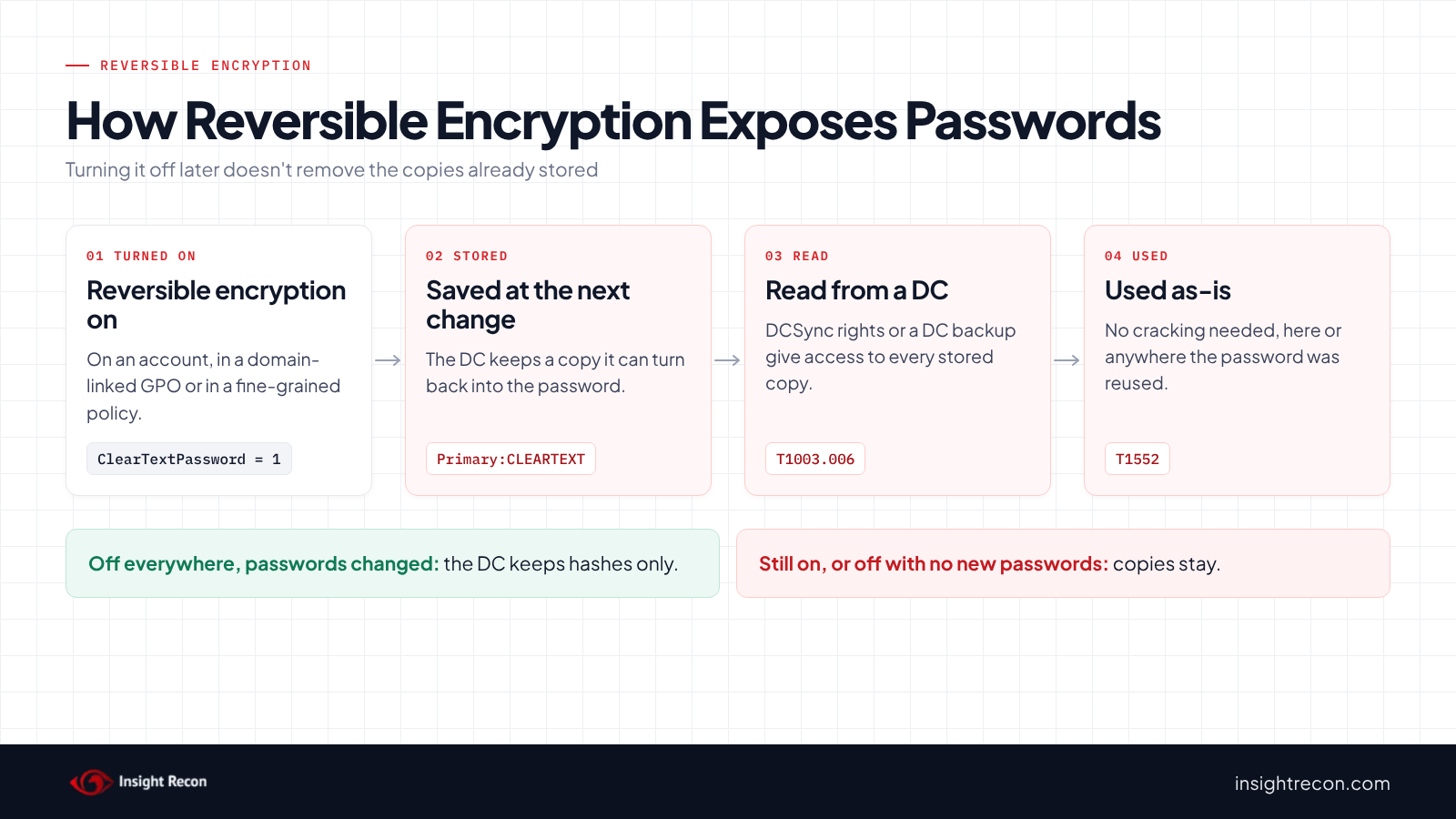
The DC only checks the setting when a password is set. Microsoft's policy page says that after you turn it off, "Existing passwords will be stored using reversible encryption until they are changed."
Why reversible encryption is dangerous
The DISA STIG for Windows Server 2022 (V-254293) rates it high severity and says storing passwords this way "is essentially the same as storing clear-text versions of the passwords." Microsoft's own guidance is to leave it disabled unless business requirements outweigh the need to protect password information.
By contrast, a hash still has to be cracked or relayed. A stored cleartext copy hands over the password itself, ready to use on anything else that account can reach. That includes systems outside Active Directory where the same person may have reused it.
In addition, the copy sits with the rest of the account's secrets on every DC. Anyone who can read those secrets gets it: someone with DCSync rights, as our DCSync permissions post explains, or someone holding a copy of a DC's database or a DC backup. MITRE ATT&CK tracks the DCSync route as T1003.006 and stored credentials in general as T1552, Unsecured Credentials.
Also, turning it on at the domain level affects every account's next password change. So over time, the whole domain can end up with recoverable passwords. MITRE tracks attackers turning it on as T1556.005, Modify Authentication Process: Reversible Encryption.
Find reversible encryption in your domain
Accounts with the flag
This lists every account with the per-account flag, with what you need to sort them. It runs as any domain user with the AD module and covers the domain you're signed in to.
Import-Module ActiveDirectory -ErrorAction Stop
Get-ADUser -LDAPFilter '(userAccountControl:1.2.840.113556.1.4.803:=128)' `
        -Properties PasswordLastSet, LastLogonDate, adminCount, ServicePrincipalName, Description |
    Select-Object SamAccountName, Enabled, PasswordLastSet, LastLogonDate,
        @{ n = 'Privileged'; e = { $_.adminCount -eq 1 } },
        @{ n = 'HasSPN'; e = { $_.ServicePrincipalName.Count -gt 0 } },
        Description |
    Sort-Object Privileged, PasswordLastSet -Descending
What to look for: Privileged rows first. They sort to the top. adminCount set to 1 means the account is or was in a protected admin group. Any PasswordLastSet date after the flag went on means the DC likely holds a cleartext copy. If you don't know when the flag went on, assume it is. Disabled accounts still count because the stored copy stays until the password changes.
GPOs that turn it on
This searches each GPO's security template in SYSVOL for ClearTextPassword = 1, the setting behind "Store passwords using reversible encryption." It shows where each GPO is linked. It only looks at links in this domain, so site links don't show up. Disabled links still do. It runs as any domain user with the GroupPolicy and AD modules, stops with an error if it can't reach SYSVOL and covers one domain at a time.
Import-Module GroupPolicy, ActiveDirectory -ErrorAction Stop
$domain = $env:USERDNSDOMAIN   # or another domain's DNS name
$root = "\\$domain\SYSVOL\$domain\Policies"
if (-not (Test-Path $root)) { throw "Can't reach $root" }
Get-ChildItem $root -Recurse -Filter GptTmpl.inf |
    Select-String -Pattern '^\s*ClearTextPassword\s*=\s*1' -List |
    ForEach-Object {
        $guid = ''
        if ($_.Path -match '\{([0-9A-Fa-f-]{36})\}') { $guid = $Matches[1] }
        $name = 'no GPO with this GUID'
        try { $name = (Get-GPO -Guid $guid -Domain $domain -ErrorAction Stop).DisplayName } catch { }
        $links = (Get-ADObject -LDAPFilter "(gPLink=*$guid*)" -Server $domain).DistinguishedName
        [pscustomobject]@{
            Gpo      = $name
            LinkedTo = if ($links) { $links -join '; ' } else { 'not linked in this domain' }
            Path     = $_.Path
        }
    }
What to look for: a GPO linked to the domain itself (DC=contoso,DC=com). Microsoft's password policy page says this policy "is applied on the domain level," so that's the one that sets reversible encryption for every domain account. If more than one GPO linked to the domain sets it, the one with the highest precedence wins. An enforced link beats one that isn't. After that, link order 1 wins. On the other hand, a GPO linked only to an OU doesn't change domain accounts. It can still apply to local accounts on computers in that OU, so turn it off there too. A GPO that isn't linked does nothing until someone links it.
Fine-grained password policies
A PSO also overrides the domain policy for the users and groups it applies to, so it can turn reversible encryption on for a group even when the domain policy has it off. This lists PSOs with it on and who they apply to. Listing PSOs needs read access to the Password Settings Container, which by default only Domain Admins have. Run it as an admin.
# Needs read access to the Password Settings Container (Domain Admins by default).
Import-Module ActiveDirectory -ErrorAction Stop
Get-ADFineGrainedPasswordPolicy -Filter * | Where-Object ReversibleEncryptionEnabled | ForEach-Object {
    [pscustomobject]@{
        Pso       = $_.Name
        Precedence = $_.Precedence
        AppliesTo = (Get-ADFineGrainedPasswordPolicySubject -Identity $_ | ForEach-Object Name) -join ', '
    }
}
What to look for: any row at all. In that case, every user in AppliesTo, directly or through a group, gets a cleartext copy at their next password change.
Which accounts actually have a stored copy
The settings above show where reversible encryption is on now. They don't show which passwords the DC stored while it was on. The only direct way to know is to read each account's supplementalCredentials, which needs the same replication rights as DCSync and would show you the passwords. For most domains, it's therefore simpler to treat every account covered by any of the three settings, now or in the past, as having a stored copy. After that, have those accounts get a new password.
Check reversible encryption with Insight Recon
The free scan includes two checks for this:
- Accounts with reversible passwords (Critical) lists user accounts with the "Store password using reversible encryption" flag. Disabled accounts count too. Computer accounts aren't checked. The finding drops to High when every account it lists is disabled and none is privileged.
- GPO Enables reversible password use (High) reads the domain's own reversible encryption setting and lists the linked GPOs that turn it on. When the domain policy has it on, the finding is Critical and names the domain GPO that wins, or the domain itself. GPOs linked only to OUs or sites rate Moderate, since they only reach local accounts on those computers. It lists PSOs with it on when the scan can read them. By default that takes a Domain Admin account. A standard-account scan says it couldn't read them.
Each finding comes with the Hacker Insight, remediation steps and compliance mappings for the check.
Know what it doesn't decide for you. Neither check can see which passwords the DC stored while a setting was on, so an account can still have a cleartext copy after every setting is off. The GPO check skips unlinked GPOs and GPOs with their computer settings turned off, since neither applies. The GPO search script above still finds them. Neither check knows what still relies on CHAP or Digest Authentication.
These related checks cover the rest of this area:
- Risky DCSync Permissions, the accounts that could read a stored copy straight from a DC.
- Password in GPO, passwords stored in SYSVOL with a published key. Our GPP passwords post covers it.
- Possible Password in AD Attributes and Possible Passwords in Account Descriptions, passwords typed into fields every domain user can read. Our passwords in AD descriptions post covers both.
You can see what the findings look like in our sample report. The full list is in our check library.
See where else your AD keeps passwords it shouldn't.
The scan runs from any Windows machine that can reach your DCs, with a standard domain account. The free plan covers every on-prem AD check.
Before you turn off reversible encryption
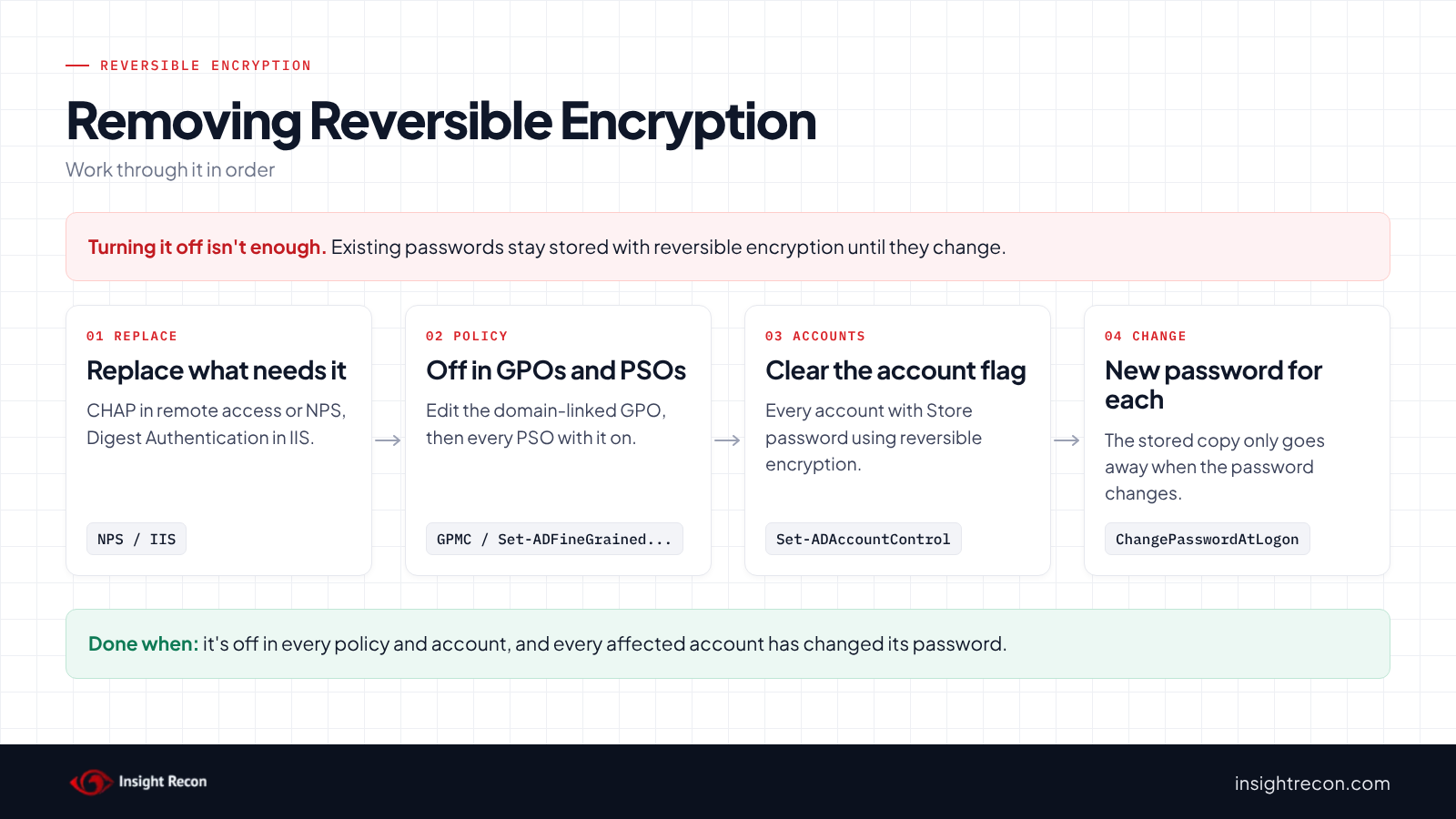
Anything that relies on the stored password stops working for an account once its password changes without a reversible copy. Find those first, replace them and plan the password changes so nobody gets locked out.
Find what depends on it
- Remote access or Network Policy Server using CHAP. Check your NPS or RRAS network policies for CHAP. MS-CHAP v2, PEAP and certificate-based methods don't need the stored password.
- IIS sites using Digest Authentication. Check the authentication settings on each site. Windows Authentication with Kerberos doesn't need it.
- Third-party products. Some older appliances and apps asked for the setting during setup. Search their documentation and ask the owners.
If nothing on that list is in use, the setting is a leftover. In that case, you can turn it off straight away.
Plan the password changes
Turning the setting off protects new passwords. However, the stored copies go away only when each password changes. People can do it themselves at next sign-in. Service accounts need a planned reset and an update everywhere they're used. Check how people sign in before forcing a change, as our stale passwords post explains.
Assume someone may know the stored passwords
If anyone outside your admins has had DCSync rights or a copy of a DC backup while copies were stored, treat those passwords as exposed. The password change you're about to make deals with that, as long as people don't change back to the same password.
Turn off reversible encryption safely
1. Turn it off in the domain password policy
First, edit the GPO linked to the domain that the GPO search found. In the Group Policy Management Console, go to Computer Configuration, Policies, Windows Settings, Security Settings, Account Policies, Password Policy. Set "Store passwords using reversible encryption" to Disabled. You need edit rights on the GPO. Also, make the change in the GPO itself. A change made directly on the domain object can be overwritten by the GPO at the next policy refresh. Do the same in any OU-linked GPO with the setting. If something breaks, set it back to Enabled.
2. Turn it off in fine-grained policies
This turns reversible encryption off in one PSO. It's a dry run with -WhatIf. Drop that to apply. It needs rights to change PSOs, which by default means Domain Admins. To undo it, run it again with $true.
# Dry run. Drop -WhatIf to apply. Needs rights to change PSOs (Domain Admins by default).
Import-Module ActiveDirectory -ErrorAction Stop
Set-ADFineGrainedPasswordPolicy -Identity 'PSO-Legacy-VPN' -ReversibleEncryptionEnabled $false -WhatIf
3. Clear the flag on each account
This clears the per-account flag on one account. It's a dry run with -WhatIf. Drop that to apply. It needs rights to change the account's userAccountControl, which for members of protected admin groups means Domain Admins. To undo it, run it again with $true. The stored copy only comes back at the next password change.
# Dry run. Drop -WhatIf to apply. Needs rights to change the account's userAccountControl
# (Domain Admins for members of protected admin groups).
Import-Module ActiveDirectory -ErrorAction Stop
Set-ADAccountControl -Identity 'jsmith' -AllowReversiblePasswordEncryption $false -WhatIf
4. Get a new password for every affected account
This makes one user choose a new password at their next sign-in. It's a dry run with -WhatIf. Drop that to apply. It needs the rights your helpdesk uses to force a password change. For service accounts, instead reset the password and update everything that uses it. Don't clear "must change" again before they sign in. That updates the password date without a new password, so the stored copy stays.
# Dry run. Drop -WhatIf to apply. Needs the rights your helpdesk uses to force a password change.
Import-Module ActiveDirectory -ErrorAction Stop
Set-ADUser -Identity 'jsmith' -ChangePasswordAtLogon $true -WhatIf
Do this for every account covered by any setting that was on, starting with privileged accounts. Once each one has changed its password, the cleartext copies are gone.
Keep reversible encryption off
- Alert on the domain policy changing. With Audit Authentication Policy Change on, event 4739 records domain policy changes. Any
PasswordPropertiesvalue that includes 16 (0x10) means reversible encryption is on. 17, for example, is 16 plus password complexity. - Alert on the account flag. With Audit User Account Management on, event 4738 records "'Encrypted Text Password Allowed' - Enabled". Microsoft says it "Should not typically be enabled for user accounts."
- Check new PSOs and GPOs. Run the GPO and PSO scripts after any password policy change.
- Re-run the scan. Both checks show whether it's back on anywhere.
Reversible encryption checklist
- Is reversible encryption off in the domain password policy, every PSO and every GPO?
- Does no account have the "Store password using reversible encryption" flag?
- Has every account covered by a setting that was on changed its password since?
- Did you replace CHAP and Digest Authentication before turning it off?
- Are DCSync rights limited to the accounts that need them?
- Are events 4739 and 4738 alerted on for this setting?
- Did you check every domain in the forest?
A "no" on the third question means the DC may still hold some passwords in a form anyone with DC-level access can read.
Compliance mapping
| Framework | Reference | Why it applies |
|---|---|---|
| MITRE ATT&CK | T1003.006, T1552, T1556.005 | All three apply to both checks. T1556.005, Modify Authentication Process: Reversible Encryption, covers attackers turning the setting on. DCSync and Unsecured Credentials cover what comes next. Anyone who can pull a DC's secrets gets the stored copy as the password itself. |
| CIS Controls v8 | Control 3, Control 4, Control 5 | Data protection, secure configuration and account management. Control 4 applies to the GPO check and Control 5 to the account check. |
| NIST CSF 2.0 | PR.AA-01, PR.AA-03, PR.DS-01, PR.PS-01 | Credential management and data at rest for both checks. PR.AA-03 (authentication) applies to the account check and PR.PS-01 (secure configuration) to the GPO check. |
| ANSSI | vuln_ | The first two are ANSSI's control points for reversible passwords set on accounts, which the account check covers. The third is for the setting at the naming context root. The GPO check covers it by reading the domain's own setting. |
| DISA STIG | V-254293 | GPO check only. Windows Server 2022 reversible password encryption must be disabled. |
Reversible encryption FAQ
Is reversible encryption the same as storing passwords in plain text?
For practical purposes, yes. The DISA STIG calls it "essentially the same as storing clear-text versions of the passwords." Anyone who can read the stored copy gets the password.
Does turning it off remove the stored passwords?
No. Microsoft says existing passwords stay stored with reversible encryption until they're changed. Turn it off, then have every affected account get a new password.
What needs reversible encryption?
Microsoft names CHAP through remote access or IAS and Digest Authentication in IIS. Replace those with methods that don't need the password before you turn it off.
Where can you turn it on?
On an account, in a GPO's password policy and in a fine-grained password policy. Check all three.
Does Insight Recon check for reversible encryption?
Yes. The free scan includes Accounts with reversible passwords and GPO Enables reversible password use.
Find out where your AD stores passwords it can give back.
The scan runs from any Windows machine that can reach your DCs, with a standard domain account. The free plan covers every on-prem AD check.
Not ready to scan?
AD Signal is our monthly look at what's changing in AD security and how real domains score. Read the latest report.
References
- Microsoft Learn: Store passwords using reversible encryption
- Microsoft Learn: [MS-SAMR] 3.1.1.8.11.5 Primary:CLEARTEXT Property
- Microsoft Learn: Password Policy
- Microsoft Learn: Pwd-Properties attribute
- Microsoft Learn: Set-GPLink, link order and precedence
- Microsoft Learn: UserAccountControl flags
- DISA STIG V-254293: Windows Server 2022 reversible password encryption must be disabled
- MITRE ATT&CK: T1003.006 DCSync
- MITRE ATT&CK: T1552 Unsecured Credentials
- MITRE ATT&CK: T1556.005 Modify Authentication Process: Reversible Encryption
- Microsoft Learn: Event 4739, Domain Policy was changed
- Microsoft Learn: Event 4738, a user account was changed