ADCS ESC8: Stop NTLM Relay to Certificate Web Enrollment
ADCS ESC8 is a certificate enrollment web page that accepts NTLM without HTTPS and Extended Protection. An attacker who can make a domain controller sign in to them can pass that sign-in on to your CA and potentially walk away with a certificate for the domain controller itself. This post shows you how to find exposed enrollment endpoints, check how IIS is set up and lock them down without breaking whoever still uses them.
| Priority | High. A relayed domain controller sign-in can potentially become a certificate for that domain controller |
|---|---|
| What decides it | Web Enrollment or the enrollment web service accepting NTLM over HTTP, or over HTTPS without Extended Protection set to Required |
| Who's affected | Any CA with the Certificate Authority Web Enrollment or Certificate Enrollment Web Service role installed |
| Fix | Remove Web Enrollment if nothing uses it. Otherwise require HTTPS and Extended Protection. Then limit NTLM on the CA |
Check it now: which CA enrollment pages answer and offer NTLM?
Import-Module ActiveDirectory -ErrorAction Stop
$pks = "CN=Public Key Services,CN=Services,$((Get-ADRootDSE).configurationNamingContext)"
$urls = foreach ($ca in Get-ADObject -SearchBase "CN=Enrollment Services,$pks" -LDAPFilter '(objectClass=pKIEnrollmentService)' -Properties dNSHostName, msPKI-Enrollment-Servers) {
    "http://$($ca.dNSHostName)/certsrv/"
    "https://$($ca.dNSHostName)/certsrv/"
    # Enrollment web service (CES) URLs published in AD
    $ca.'msPKI-Enrollment-Servers' | ForEach-Object { $_ -split '\r?\n' } | Where-Object { $_ -match '^https?://' }
}
foreach ($url in $urls | Sort-Object -Unique) {
    $req = [System.Net.HttpWebRequest]::Create($url)
    $req.Timeout = 6000
    $req.AllowAutoRedirect = $false
    try {
        $resp = $req.GetResponse()
    } catch [System.Net.WebException] {
        $resp = $_.Exception.Response
        if (-not $resp) { [pscustomobject]@{ Url = $url; Status = $_.Exception.Status; Auth = '' }; continue }
    }
    [pscustomobject]@{ Url = $url; Status = [int]$resp.StatusCode; Auth = ($resp.Headers.GetValues('WWW-Authenticate') -join ', ') }
    $resp.Close()
}
Runs as any domain user with the ActiveDirectory module. It finds every enterprise CA in AD and asks each Web Enrollment page and published enrollment web service URL for a page without signing in. 401 with NTLM or Negotiate in Auth means the endpoint takes Windows sign-ins. A 401 on http:// that lists NTLM or Negotiate means it's exposed. A 403 there usually means Require SSL is on. For HTTPS, the IIS script further down shows whether Extended Protection is on.
You checked one setting. The free scan checks the rest of your on-prem AD in a few minutes.
Nothing gets installed on your domain controllers. Only HTTPS leaves your network.
What ADCS ESC8 is
Active Directory Certificate Services (ADCS) has two optional web role services for requesting certificates over HTTP. Certificate Authority Web Enrollment is the /certsrv page. The Certificate Enrollment Web Service (CES) is a web service that clients outside the usual RPC path use. Both run on IIS and both accept Windows sign-ins, which by default includes NTLM.
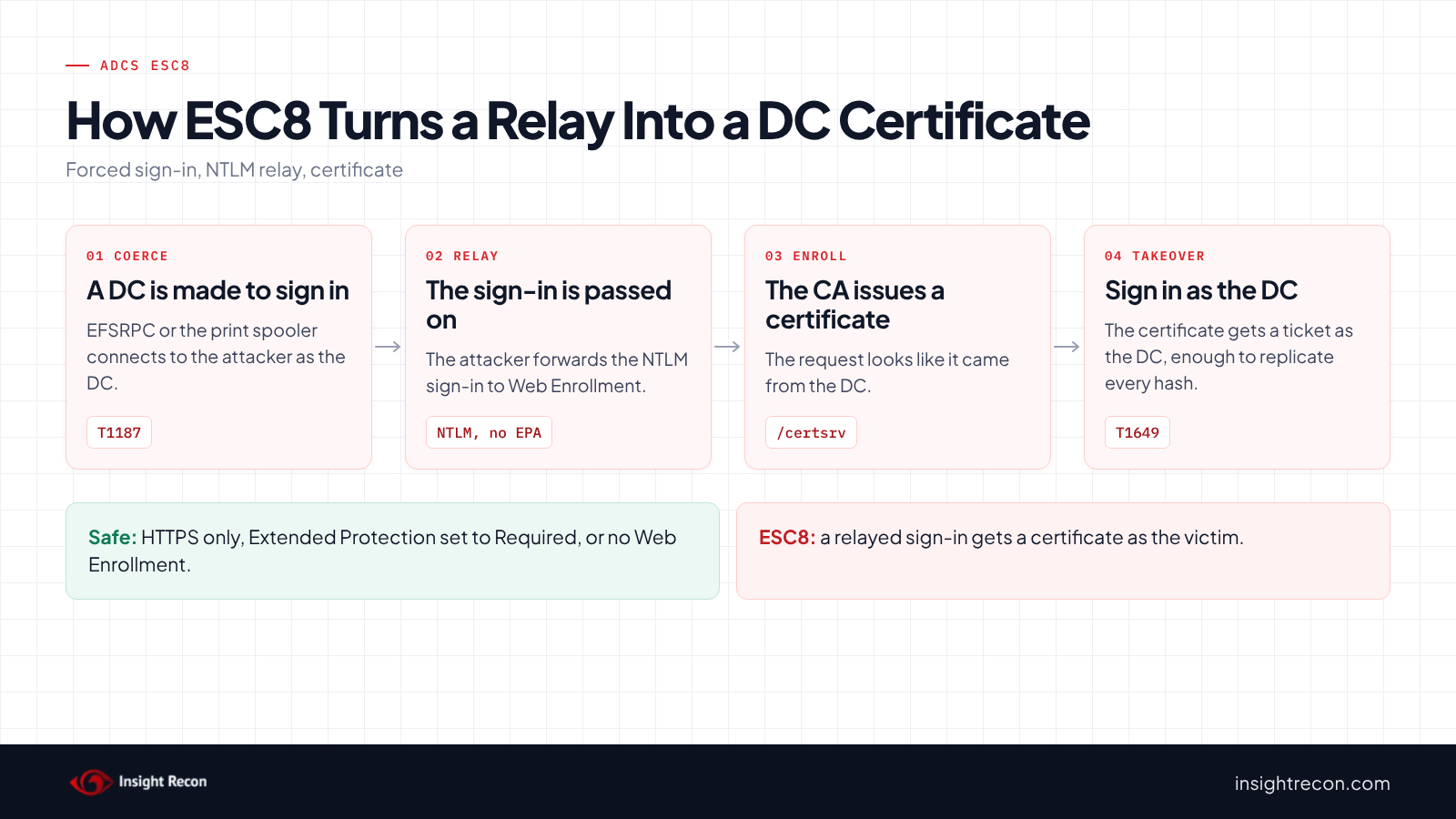
NTLM can be relayed. An attacker who receives a sign-in from a victim can pass it on to another server and act as the victim there. HTTPS with Extended Protection for Authentication (EPA) stops that, because it ties the sign-in to the TLS connection it arrived on. Without it, the enrollment page can't tell a relayed sign-in from a real one. SpecterOps named this ESC8 in their 2021 Certified Pre-Owned research.
Microsoft's KB5005413 says you are "potentially vulnerable to this attack" if you use either role service. An endpoint is ESC8 when it accepts NTLM over plain HTTP, or over HTTPS with Extended Protection off or set to Accept.
Why ADCS ESC8 is dangerous
Attackers can make your domain controllers sign in to them
Several Windows services can be asked to connect to a server the caller chooses. When they do, they sign in with the computer's account. The best-known examples are the print spooler and the Encrypting File System (EFSRPC) path known as PetitPotam. MITRE ATT&CK tracks this as T1187, Forced Authentication. Our print spooler post covers one of these paths.
The relayed sign-in becomes a certificate
The attacker relays the domain controller's sign-in to Web Enrollment and requests a certificate as that domain controller. The CA issues it, because the request looks like it came from the domain controller. With that certificate, the attacker can potentially sign in as the domain controller and replicate every password hash in the domain, the attack covered in our DCSync permissions post. Microsoft's Defender for Identity guidance says relay attacks like this "can lead to complete domain takeover." MITRE tracks the relay as T1557, Adversary-in-the-Middle and the certificate as T1649.
The default on Server 2025 still isn't enough
Microsoft's December 2024 MSRC post says Windows Server 2025 ships with EPA turned on for AD CS. However, the default is "Enabled - When Supported", which still lets clients leave the channel binding out. A relaying attacker can do exactly that. The same post says servers on 2022 and 2019 need EPA turned on by hand. Also, the certificate keeps working until it expires or is revoked, even after the domain controller's own password changes.
Find ESC8 exposure on your CAs
The quick check above shows which endpoints answer and offer NTLM. It can't see whether Extended Protection is on, since that only shows up when a sign-in completes. For that, read the IIS settings on each server that hosts Web Enrollment or the enrollment web service.
Read the IIS settings for each ADCS ESC8 endpoint
Run this on each CA and on any separate server that hosts Web Enrollment or CES. It needs local administrator rights and the IIS management tools. It lists every CertSrv and CES application with its sign-in and HTTPS settings.
# Run on each CA or web enrollment server as a local administrator.
Import-Module WebAdministration -ErrorAction Stop
$apphost = 'MACHINE/WEBROOT/APPHOST'
Get-WebApplication | Where-Object { $_.path -match 'CertSrv|_CES_' } | ForEach-Object {
    $site = ($_.ItemXPath -split "'")[1]
    $loc = "$site$($_.path)"
    $win = 'system.webServer/security/authentication/windowsAuthentication'
    $ces = Join-Path $_.PhysicalPath 'web.config'
    [pscustomobject]@{
        App           = $loc
        WindowsAuth   = (Get-WebConfigurationProperty -PSPath $apphost -Location $loc -Filter $win -Name enabled).Value
        Providers     = (Get-WebConfigurationProperty -PSPath $apphost -Location $loc -Filter "$win/providers" -Name Collection | ForEach-Object value) -join ', '
        EPA           = Get-WebConfigurationProperty -PSPath $apphost -Location $loc -Filter "$win/extendedProtection" -Name tokenChecking
        SslFlags      = Get-WebConfigurationProperty -PSPath $apphost -Location $loc -Filter 'system.webServer/security/access' -Name sslFlags
        CesEpa        = if ($loc -match '_CES_' -and (Test-Path $ces)) { $m = Select-String -Path $ces -Pattern 'policyEnforcement="(\w+)"'; if ($m) { $m.Matches[0].Groups[1].Value } else { 'not set' } } else { '' }
    }
}
What to look for:
EPAshould beRequire.Nonemeans no channel binding check.Allowis the "When Supported" setting, which still accepts sign-ins without binding.SslFlagsshould includeSsl. Empty means the app also answers on plain HTTP.ProviderscontainingNTLMorNegotiatemeans NTLM is accepted.Negotiatefalls back to NTLM when Kerberos isn't used.- For CES apps,
CesEpashould beAlways. KB5005413 sets it in the app'sweb.config.not setmeans web.config has no Extended Protection setting.
Web Enrollment installed on a separate server isn't listed in AD. Check your IIS servers for a /certsrv application if you're not sure where it lives.
Check ADCS ESC8 with Insight Recon
The free scan includes Web Enrollment Allows NTLM Relay in ADCS (ESC8), a High check. For each CA in AD, it tries the Web Enrollment page over HTTP and HTTPS on the CA's host name, plus every enrollment web service URL published in AD. It signs in over NTLM as the scanning account without channel binding and flags any endpoint that accepts it. When an HTTPS endpoint refuses that sign-in, the scan tries again with channel binding. If that works, Extended Protection is doing its job, so the endpoint counts as protected. Endpoints it couldn't test are named in the result, along with what to change before the next scan. It reads the page only and never requests a certificate. Each finding names the endpoint and whether it's open over plain HTTP or over HTTPS without Extended Protection. It also comes with the Hacker Insight, remediation steps and compliance mappings.
Know what the ADCS ESC8 check doesn't decide
Some things are still yours to check. The scan only tries the CA's own host name and the URLs published in AD. Web Enrollment on a separate server, or behind another name, isn't tried. The probe also needs an account that can use NTLM. An account in Protected Users can't, so run the scan with one that isn't. Also, the check doesn't decide whether an attacker can make your domain controllers sign in to them. The related checks below cover those paths.
Related relay checks beyond ESC8
- Unencrypted Certificate Authority RPC Enrollment in ADCS (ESC11), the same relay against the CA's RPC interface. Our ADCS ESC11 post covers it.
- Print spooler service is enabled on a Domain Controller and WebClient Service Running on Domain Controllers, ways to make a domain controller sign in somewhere.
- LDAP Signing Not Enforced on Domain Controllers and LDAPS Channel Binding Not Enforced, the same relay against LDAP. Our LDAP signing post covers both.
- Domain Controller with SMB Signing Not Required, covered in our SMB signing post.
You can see what the findings look like in our sample report. The full list is in our check library.
Find every relay path in your domain, from Web Enrollment to LDAP and SMB.
It runs from any Windows machine that can reach your DCs, with a standard domain account. Every core AD check is free for one domain.
Before you change ADCS web enrollment
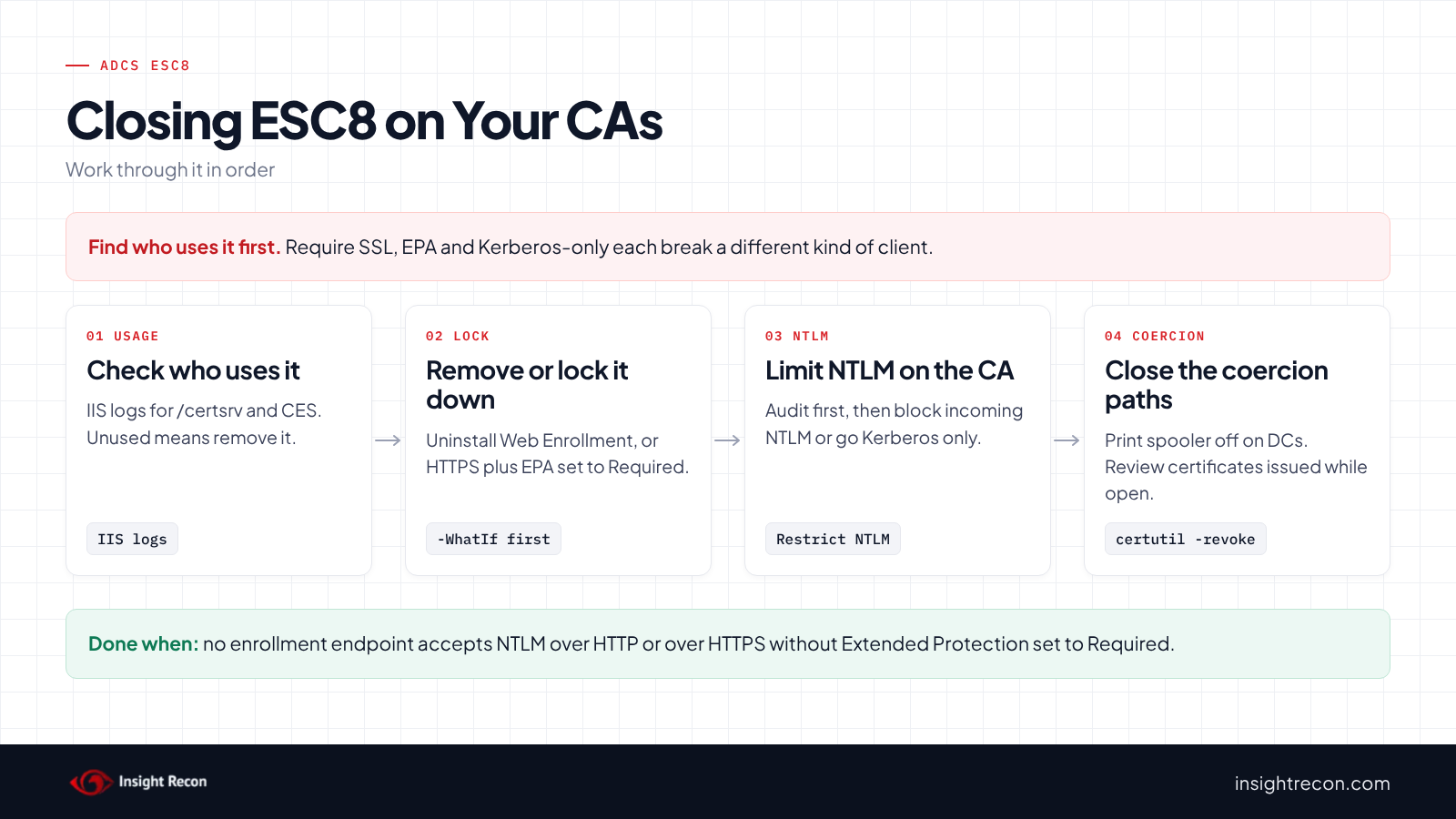
Find out who still uses these pages before you lock them down. Each fix can break a different kind of client.
Check who uses Web Enrollment
Look at the IIS logs on each server for requests to /certsrv and the CES path. Many organizations only use Web Enrollment for the occasional manual request. Autoenrollment doesn't need it. If nobody has used it in months, removing the role is the cleanest fix.
Know what each fix can break
- Require SSL breaks anything that still uses
http://. The site needs an HTTPS binding with a valid certificate first. - Extended Protection set to Required breaks clients that don't send channel binding. It also breaks sign-ins through a load balancer or proxy that terminates TLS in front of IIS. KB5005413 calls Required "the more secure and recommended option."
- Kerberos-only sign-in breaks access by IP address or by a name with no matching SPN.
- Blocking incoming NTLM on the CA breaks every NTLM client of that server, including ones that never touch enrollment. Audit NTLM use first.
Make the change on one server first. KB5005413 says IIS needs a restart to load the changes. That briefly interrupts everything on that IIS server.
Fix ADCS ESC8 safely
1. Remove Web Enrollment if nothing uses it
This removes the Web Enrollment role service from the server it runs on. http://<CA host>/CertEnroll/ has to keep answering afterwards, because issued certificates point clients there for the CA certificate and CRL. Check it before and after. It's a dry run with -WhatIf. Drop that to apply. It needs local administrator rights on that server. To undo it, reinstall the role with Install-AdcsWebEnrollment.
# Dry run. Drop -WhatIf to apply.
# Run on the server that hosts Web Enrollment as a local administrator.
Import-Module ADCSDeployment -ErrorAction Stop
Uninstall-AdcsWebEnrollment -WhatIf
2. Otherwise require HTTPS and Extended Protection
This sets Require SSL and Extended Protection to Required on the CertSrv application. It prints the current values first so you can put them back. It's a dry run with -WhatIf. Drop that to apply. Then restart IIS with iisreset /restart as KB5005413 describes. To undo it, set sslFlags and tokenChecking back to the printed values.
# Dry run. Drop -WhatIf to apply.
# Run on the CA or web enrollment server as a local administrator. Needs an HTTPS binding first.
Import-Module WebAdministration -ErrorAction Stop
function Set-CertSrvEpa {
    [CmdletBinding(SupportsShouldProcess)]
    param([string]$Location = 'Default Web Site/CertSrv')
    $apphost = 'MACHINE/WEBROOT/APPHOST'
    $win = 'system.webServer/security/authentication/windowsAuthentication'
    # Note the current values so you can put them back
    Write-Output "Before: EPA=$(Get-WebConfigurationProperty -PSPath $apphost -Location $Location -Filter "$win/extendedProtection" -Name tokenChecking) SslFlags=$(Get-WebConfigurationProperty -PSPath $apphost -Location $Location -Filter 'system.webServer/security/access' -Name sslFlags)"
    if ($PSCmdlet.ShouldProcess($Location, 'Require SSL and Extended Protection (Require)')) {
        Set-WebConfigurationProperty -PSPath $apphost -Location $Location -Filter 'system.webServer/security/access' -Name sslFlags -Value 'Ssl' -ErrorAction Stop
        Set-WebConfigurationProperty -PSPath $apphost -Location $Location -Filter "$win/extendedProtection" -Name tokenChecking -Value 'Require' -ErrorAction Stop
    }
}
Set-CertSrvEpa -WhatIf
For the enrollment web service, KB5005413 has you set Extended Protection to Required in IIS for the CES application and add an extendedProtectionPolicy with policyEnforcement="Always" to its web.config. Re-run the IIS script afterwards to confirm both.
3. Limit NTLM on the CA servers
KB5005413 lists extra steps, from most to least secure. You can block NTLM in the domain, block incoming NTLM on the AD CS servers with "Network security: Restrict NTLM: Incoming NTLM traffic", or set the IIS sign-in providers to Kerberos only. Audit incoming NTLM on those servers before you block it.
4. Close the coercion paths
Turn off the print spooler on domain controllers and close the other paths the related checks flag. However, treat this as a second layer. New ways to make a server sign in keep turning up. The enrollment endpoints still need fixing.
5. Review certificates if it was exposed
If an endpoint was open, review certificates the CA issued to domain controllers and other computer accounts. For example, look for several in a short time, or ones issued outside your normal autoenrollment templates. Revoke any you can't explain with certutil -revoke, then publish a new CRL with certutil -crl.
Keep ADCS ESC8 closed
- Watch NTLM sign-ins on the CA. Event 4624 records the authentication package for each sign-in. NTLM sign-ins from domain controller accounts on a CA are worth an alert.
- Log what the CA issues. With the CA's audit filter and the Audit Certification Services policy on, event 4887 records each certificate issued. Certificates for domain controllers that didn't come from autoenrollment are worth a look.
- Check new CA servers. Make HTTPS, Extended Protection set to Required and no plain HTTP part of every Web Enrollment or CES install, including on Windows Server 2025.
- Re-run the scan. It flags the endpoint again if a setting is undone.
ADCS ESC8 checklist
- Is Web Enrollment removed from every server that doesn't need it?
- Does every remaining CertSrv and CES app refuse plain HTTP?
- Is Extended Protection set to Required everywhere, rather than Accept or When Supported?
- Is the CES
web.configset topolicyEnforcement="Always"? - Is NTLM limited on the CA servers?
- Is the print spooler off on every domain controller?
- Did you review certificates issued to computer accounts while the endpoint was open?
A "no" on the first three questions means a relayed sign-in can potentially still get a certificate.
Compliance mapping
| Framework | Reference | Why it applies |
|---|---|---|
| MITRE ATT&CK | T1557, T1649 | Adversary-in-the-Middle for the NTLM relay. Steal or Forge Authentication Certificates for the certificate it produces. |
| CIS Controls v8 | Control 3, Control 6 | Data protection and access control management. Enrollment endpoints should only accept sign-ins bound to a protected connection. |
| NIST CSF 2.0 | PR.AA-01, PR.AA-05, PR.DS-02 | Identities and credentials are managed, access follows least privilege and data in transit is protected. Plain HTTP and unbound NTLM fail all three. |
ADCS ESC8 FAQ
What is ADCS ESC8?
Certificate enrollment web pages that accept NTLM without HTTPS and Extended Protection. An attacker can relay a sign-in to them and get a certificate as the victim.
Is HTTPS alone enough?
No. HTTPS without Extended Protection set to Required can still accept a relayed NTLM sign-in.
Does Windows Server 2025 fix ESC8 by default?
Not fully. It turns on Extended Protection in "When Supported" mode, which still accepts sign-ins without channel binding. Set it to Required.
Do I need Web Enrollment for autoenrollment?
No. Autoenrollment doesn't use the Web Enrollment page. If nobody requests certificates through it, you can remove it.
Does Insight Recon check for ADCS ESC8?
Yes. The free scan includes Web Enrollment Allows NTLM Relay in ADCS (ESC8), along with the other ADCS and relay checks.
See whether a relayed sign-in could get a certificate from your CA.
It runs from any Windows machine that can reach your DCs, with a standard domain account. Every core AD check is free for one domain.
Not ready to scan?
AD Signal is our monthly look at what's changing in AD security and how real domains score. Read the latest report.
References
- Microsoft Support: KB5005413, mitigating NTLM relay attacks on AD CS
- Microsoft MSRC: Mitigating NTLM relay attacks by default (December 2024)
- Microsoft Learn: Certificates security posture assessment (ESC8)
- Microsoft Learn: IIS Extended Protection (tokenChecking)
- Microsoft Learn: Uninstall-AdcsWebEnrollment
- Microsoft Learn: Event 4624, an account was successfully logged on
- Microsoft Learn: Audit Certification Services
- SpecterOps: Certified Pre-Owned
- MITRE ATT&CK: T1187 Forced Authentication
- MITRE ATT&CK: T1557 Adversary-in-the-Middle
- MITRE ATT&CK: T1649 Steal or Forge Authentication Certificates