Account Is Sensitive and Cannot Be Delegated: Protect Your Admins From Delegation
"Account is sensitive and cannot be delegated" is the checkbox that stops Kerberos delegation from acting as an account. Without it, or Protected Users membership, any server trusted for delegation can potentially reuse an admin's identity when that admin connects to it. Whoever controls that server can then act as the admin elsewhere. This post shows you how to find the privileged accounts that are still exposed, check what relies on delegating them and turn the protection on without breaking the tools your admins use.
| Priority | High. A server trusted for delegation can potentially act as the admin toward other services |
|---|---|
| What decides it | The NOT_DELEGATED flag in userAccountControl ("Account is sensitive and cannot be delegated") or membership in Protected Users |
| Who's affected | Enabled members of privileged groups that have neither protection, which is most admin accounts by default |
| Fix | Check what delegates admins first. Then add human admins to Protected Users and mark the rest sensitive |
Check it now: which Domain Admins can still be delegated?
Import-Module ActiveDirectory -ErrorAction Stop
$protected = (Get-ADGroupMember -Identity 'Protected Users' -Recursive).SamAccountName
Get-ADGroupMember -Identity 'Domain Admins' -Recursive |
    Where-Object objectClass -eq 'user' |
    Get-ADUser -Properties AccountNotDelegated |
    Where-Object { $_.Enabled -and -not $_.AccountNotDelegated -and $protected -notcontains $_.SamAccountName } |
    Select-Object SamAccountName
Runs as any domain user with the ActiveDirectory module. It lists enabled Domain Admins, including nested members, that are neither marked sensitive nor in Protected Users. No output means the protection covers every Domain Admin in the domain you're signed in to, as long as its domain functional level is Windows Server 2012 R2 or higher. The detailed script below checks the other privileged groups. Run it in each domain of a forest.
You checked one setting. The free scan checks the rest of your on-prem AD in a few minutes.
Nothing gets installed on your domain controllers. Only HTTPS leaves your network.
What "sensitive and cannot be delegated" does
Kerberos delegation lets a service act as a user toward another service. A web app uses it to reach a database as the signed-in user, for example. AD has three kinds: unconstrained, constrained and resource-based constrained delegation (RBCD).
The "Account is sensitive and cannot be delegated" checkbox, on the Account tab in Active Directory Users and Computers, sets the NOT_DELEGATED flag (0x100000) in the account's userAccountControl. Microsoft's documentation describes it this way: when the flag is set, "the security context of the user isn't delegated to a service even if the service account is set as trusted for Kerberos delegation."
The protocol spec shows how. For a ticket a service requests on a user's behalf, Microsoft's [MS-SFU] specification says the KDC should not set the forwardable flag when the user is marked as not allowed to be delegated. Without that flag, the service can't pass the ticket on.
Protected Users membership also gives the same delegation protection, along with others. Microsoft's Protected Users documentation says members can't be delegated with unconstrained or constrained delegation. Domain controllers enforce that part, so it needs a domain functional level of Windows Server 2012 R2 or higher. Our Protected Users post covers the group in detail. This post is about the flag and the admins who have neither.
Why admins need sensitive and cannot be delegated
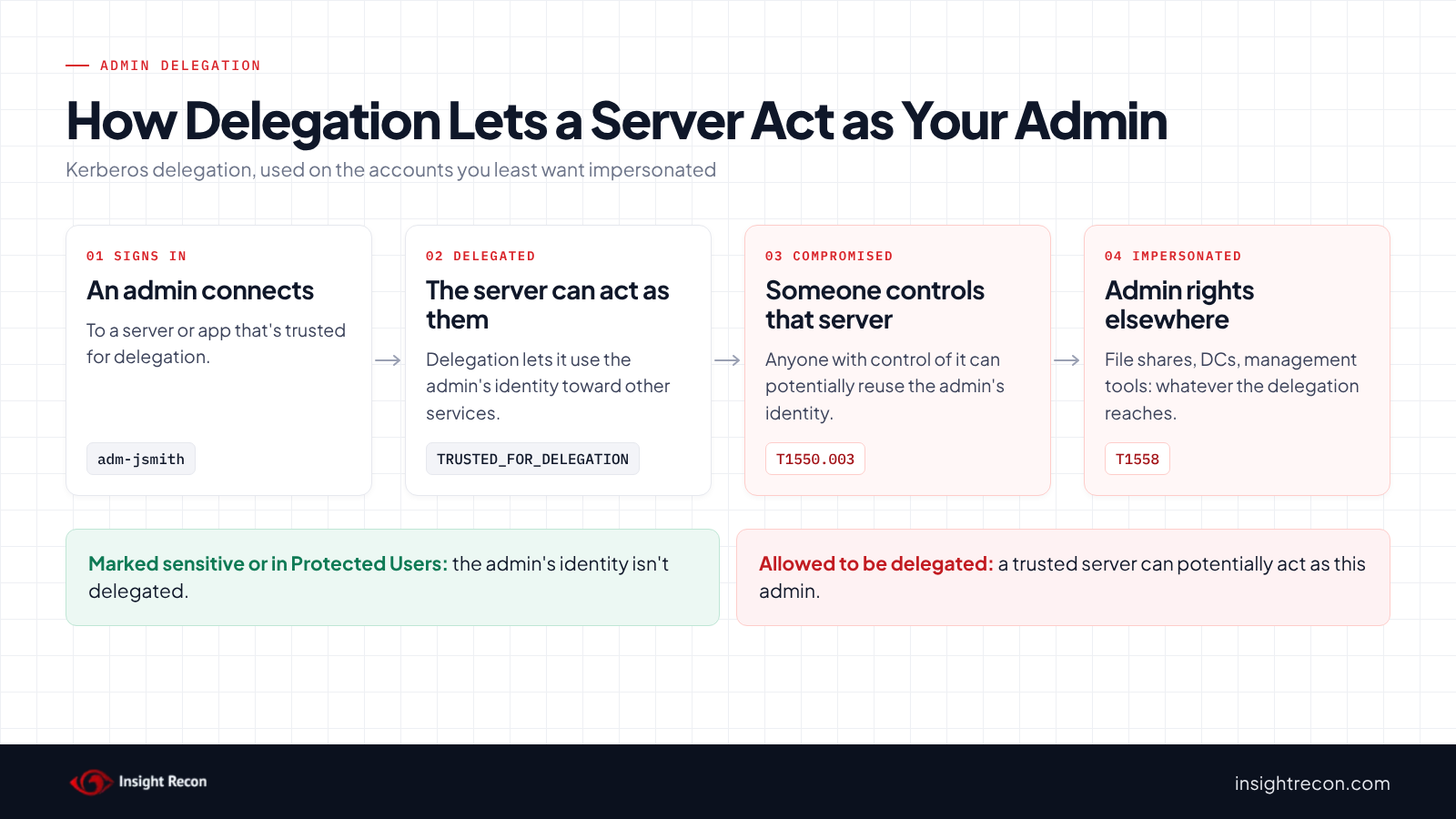
In short, delegation trusts a server to act as whoever connects to it. For an ordinary user reaching a web app, that works as intended. When an admin connects to a server trusted for delegation, the server can potentially act as that admin toward other services, depending on how the delegation is set up.
The risk comes when someone compromises that server. With unconstrained delegation, the server can receive a copy of the admin's ticket that works anywhere, as our unconstrained delegation post explains. With constrained delegation or RBCD, it can act as the admin toward the services it's allowed to reach. Our constrained delegation and RBCD posts cover how far that goes. MITRE ATT&CK tracks the ticket reuse as T1550.003, Pass the Ticket. It tracks ticket theft and forgery more broadly as T1558.
Also, the admin doesn't have to do anything unusual. Signing in to a file server, a management console or a web app that happens to be trusted for delegation is enough. AD doesn't set the flag on anyone by default, so most admin accounts start out exposed.
The DISA STIG for Active Directory treats this as a high-severity finding: V-243470 says "Delegation of privileged accounts must be prohibited."
Find admins not marked sensitive and cannot be delegated
Check which privileged accounts are sensitive and can't be delegated
This lists enabled user accounts in the main privileged groups, including nested members. It shows whether each one is marked sensitive, is in Protected Users or has neither. It runs as any domain user with the AD module and covers the domain you're signed in to. Enterprise Admins and Schema Admins only exist in the forest root, so the script warns and skips them elsewhere. Keep the window open afterwards: the next scripts reuse its $rows result.
Import-Module ActiveDirectory -ErrorAction Stop
$groups = 'Domain Admins', 'Enterprise Admins', 'Schema Admins', 'Administrators', 'Account Operators',
          'Backup Operators', 'Server Operators', 'Print Operators', 'Group Policy Creator Owners',
          'Key Admins', 'Enterprise Key Admins', 'DnsAdmins', 'Cert Publishers'
$protected = @{}
foreach ($m in Get-ADGroupMember -Identity 'Protected Users' -Recursive) { $protected[$m.SamAccountName] = $true }
$members = @{}
foreach ($g in $groups) {
    try { $found = Get-ADGroupMember -Identity $g -Recursive -ErrorAction Stop }
    catch { Write-Warning "Skipped ${g}: $($_.Exception.Message)"; continue }
    foreach ($m in $found | Where-Object objectClass -eq 'user') {
        if (-not $members.ContainsKey($m.SamAccountName)) { $members[$m.SamAccountName] = @() }
        $members[$m.SamAccountName] += $g
    }
}
$rows = foreach ($sam in $members.Keys) {
    try { $u = Get-ADUser -Identity $sam -Properties AccountNotDelegated, ServicePrincipalName, LastLogonDate -ErrorAction Stop }
    catch { Write-Warning "Couldn't read $sam (another domain?)"; continue }
    if (-not $u.Enabled) { continue }
    [pscustomobject]@{
        Account        = $sam
        Exposed        = -not $u.AccountNotDelegated -and -not $protected.ContainsKey($sam)
        Sensitive      = $u.AccountNotDelegated
        ProtectedUsers = $protected.ContainsKey($sam)
        HasSPN         = $u.ServicePrincipalName.Count -gt 0
        LastLogonDate  = $u.LastLogonDate
        Groups         = ($members[$sam] | Sort-Object -Unique) -join ', '
    }
}
$rows | Sort-Object @{ Expression = 'Exposed'; Descending = $true }, Account
What to look for: rows where Exposed is True. They sort to the top. Groups shows which privileged group puts each account in scope. HasSPN marks service accounts in admin groups. Those can't go in Protected Users, so the flag is the protection for them. Removing them from the admin group is better still. Below a Windows Server 2012 R2 domain functional level, Protected Users doesn't block delegation, so treat rows protected only by ProtectedUsers as exposed. Accounts from another domain show up as a warning. Check them in their own domain.
See where services delegate admin accounts today
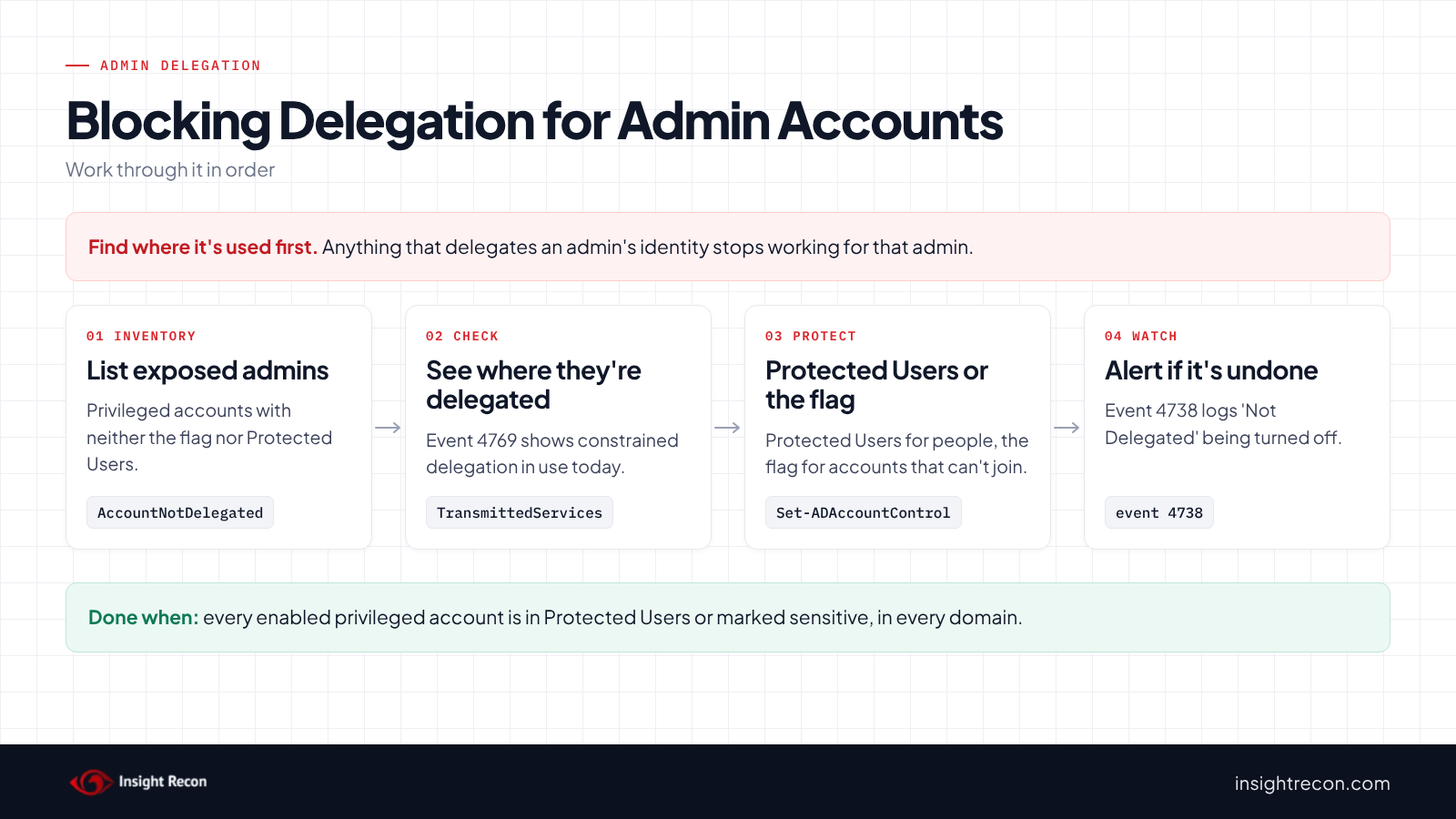
Before you turn the protection on, first find out what relies on delegating these accounts. Event 4769 on domain controllers has a Transmitted Services field. Microsoft's event 4769 page says it lists the SPNs involved "if constrained Kerberos delegation was used." This reads recent 4769 events from every DC and keeps the ones where an exposed admin account was delegated. It needs PowerShell remoting rights on each DC (admin there, or membership in Remote Management Users), rights to read the Security log and Audit Kerberos Service Ticket Operations turned on.
# Needs PowerShell remoting rights on each DC (admin there, or Remote Management Users), rights to read
# the Security log and Audit Kerberos Service Ticket Operations turned on. Shows constrained delegation and RBCD only.
Import-Module ActiveDirectory -ErrorAction Stop
$admins = @($rows | Where-Object Exposed | ForEach-Object Account)   # from the script above, same session
$dcs = (Get-ADDomainController -Filter *).HostName
Invoke-Command -ComputerName $dcs -ArgumentList (,$admins) -ScriptBlock {
    param($admins)
    try { $events = Get-WinEvent -FilterHashtable @{ LogName = 'Security'; Id = 4769 } -MaxEvents 20000 -ErrorAction Stop }
    catch { Write-Warning "${env:COMPUTERNAME}: $($_.Exception.Message)"; return }
    foreach ($e in $events) {
        $d = @{}
        foreach ($n in ([xml]$e.ToXml()).Event.EventData.Data) { $d[$n.Name] = $n.'#text' }
        $user = ($d['TargetUserName'] -split '@')[0]
        if ($d['TransmittedServices'] -and $d['TransmittedServices'] -ne '-' -and $admins -contains $user) {
            [pscustomobject]@{ Time = $e.TimeCreated; Account = $user; Service = $d['ServiceName']; Via = $d['TransmittedServices'] }
        }
    }
} | Select-Object PSComputerName, Time, Account, Service, Via
What to look for: each row is a service that acted as an admin. Via is the delegating service. Service is what it reached. Those are the tools that will stop working for that admin once you protect the account. The script only reads the most recent 20,000 4769 events on each DC, which can be a short window on a busy domain. It doesn't show unconstrained delegation. For that, check the admins' sign-ins to the servers our unconstrained delegation post helps you find.
Check sensitive and cannot be delegated with Insight Recon
The free scan includes Privileged Users Allowed to Be Delegated, rated High. It lists enabled privileged accounts that don't have the "Account is sensitive and cannot be delegated" flag and aren't in Protected Users. Protected Users only counts at a domain functional level of Windows Server 2012 R2 or higher. Below that, its members can still be delegated. An account counts as privileged through a privileged primary group or membership in the domain's admin and operator groups, including nested membership the scan resolves. If the scan can't read one of the nested admin groups, the check shows as "not assessed" rather than guessing. The finding comes with the Hacker Insight, remediation steps and compliance mappings for the check.
Know what it doesn't decide for you. The check can't tell you what delegates an admin today, or which tools will stop working for them once you protect the account. The events script above helps with that. It also doesn't tell you whether Protected Users or the flag is the right choice for a given account.
These related checks cover the rest of this area:
- Protected Users Group Not Utilized, the group that gives the same delegation protection and more.
- Unconstrained Delegations Detected and Constrained Delegation Detected, the servers and services that could act as your admins.
- Protocol Transition Delegation to Domain Controllers and Resource-Based Constrained Delegation Configured, two more ways a service can act as them.
- Accounts Vulnerable to Kerberoasting, often the same service accounts that sit in admin groups.
You can see what the findings look like in our sample report. The full list is in our check library.
See which of your admins any delegating server could act as.
It runs from any Windows machine that can reach your DCs, with a standard domain account. Every core AD check is free for one domain.
Before you turn off delegation for admins
Anything that delegates an admin's identity stops working for that admin once you mark the account sensitive and cannot be delegated. Single sign-on through a management gateway or a web app that reaches a back end as the user are the usual examples. Find those first and test with one account.
Choose sensitive and cannot be delegated or Protected Users
- Human admin accounts: Protected Users is the stronger choice. It blocks delegation and also removes NTLM, DES and RC4 for the account and limits ticket lifetime. It can break more, as our Protected Users post explains.
- Service accounts in admin groups: Microsoft says never to add service accounts to Protected Users. Use the flag. Then work on taking them out of the admin group.
- A break-glass account you keep out of Protected Users: use the flag.
- Admins who can't join Protected Users yet: use the flag now and move them later.
Make sure your domain controllers have the Kerberos delegation fixes
Microsoft fixed two Kerberos delegation bypasses in 2020. CVE-2020-17049 affected how DCs validate service tickets used with constrained delegation. CVE-2020-16996 affected RBCD along with protections such as Protected Users. DCs with updates from July 2021 or later enforce both fixes. An unpatched DC can weaken everything in this post.
One registry value can still turn the CVE-2020-16996 fix off on a patched DC: NonForwardableDelegation set to 1 under HKLM\System\CurrentControlSet\Services\Kdc. Microsoft's KB4577252 covers it. This reads that value on every DC. It needs PowerShell remoting rights on each one.
# Needs PowerShell remoting rights on each DC (admin there, or Remote Management Users).
Import-Module ActiveDirectory -ErrorAction Stop
$dcs = (Get-ADDomainController -Filter *).HostName
Invoke-Command -ComputerName $dcs -ScriptBlock {
    $v = (Get-ItemProperty -Path 'HKLM:\SYSTEM\CurrentControlSet\Services\Kdc' -ErrorAction SilentlyContinue).NonForwardableDelegation
    [pscustomobject]@{ NonForwardableDelegation = if ($null -eq $v) { 'not set' } else { $v } }
} | Select-Object PSComputerName, NonForwardableDelegation
What to look for: any DC showing 1. not set or 0 means the fix is on. Microsoft says the value has to match on every DC, so change them all together.
Record the current state
The bulk step below saves the list of accounts it changes to a CSV first. Keep it. It's your list for undoing the change.
Set sensitive and cannot be delegated on admins safely
1. Mark one admin sensitive and cannot be delegated
This marks one admin account as sensitive. It's a dry run with -WhatIf. Drop that to apply. It needs rights to change the account's userAccountControl. For members of protected admin groups, that usually means Domain Admins. Then have that admin sign out, sign back in and run through their usual tools.
# Dry run. Drop -WhatIf to apply. Needs rights to change the account's userAccountControl.
# For members of protected admin groups, that usually means Domain Admins.
Import-Module ActiveDirectory -ErrorAction Stop
Set-ADAccountControl -Identity 'adm-jsmith' -AccountNotDelegated $true -WhatIf
Tickets issued before the change can keep working until they expire. Sign the admin out everywhere, or wait out the ticket lifetime, before you count on the protection.
2. Add human admins to Protected Users
For people, follow the batch rollout in our Protected Users post. It covers testing, what breaks and the logs to watch.
3. Mark the rest sensitive so they can't be delegated
This saves the exposed accounts to a CSV, then marks each one sensitive. It uses $rows from the detail script, so run it in the same window. It's a dry run with -WhatIf. Drop that to apply. It needs the same rights as step 1 and works on the domain you're signed in to.
# Dry run. Drop -WhatIf to apply. Same rights as above. Uses $rows from the detail script.
$rows | Where-Object Exposed | Export-Csv .\delegation-before.csv -NoTypeInformation
$rows | Where-Object Exposed | ForEach-Object {
    Set-ADAccountControl -Identity $_.Account -AccountNotDelegated $true -WhatIf
}
If something breaks
This turns delegation back on for one account. It's a dry run with -WhatIf. Drop that to apply. Same rights as above. Use the CSV to find the accounts you changed. After that, fix the tool. Undoing the protection should be temporary.
# Dry run. Drop -WhatIf to apply. Same rights as above.
Import-Module ActiveDirectory -ErrorAction Stop
Set-ADAccountControl -Identity 'adm-jsmith' -AccountNotDelegated $false -WhatIf
Keep admin delegation blocked
- Alert when someone turns the flag off. With Audit User Account Management on, event 4738 records "'Not Delegated' - Disabled" when someone clears the checkbox. Microsoft recommends monitoring it for every account where the setting should stay on.
- Protect new admins on day one. Add the step to your admin account creation process.
- Keep the servers trusted for delegation few. Fewer delegating servers means fewer places an unprotected admin is at risk.
- Re-run the scan. Privileged Users Allowed to Be Delegated shows any admin who's still exposed.
Sensitive and cannot be delegated checklist
- Is every enabled privileged account either in Protected Users or set to sensitive and cannot be delegated?
- Did you check what delegates admin accounts today before turning protection on?
- Did you test with one admin before the rest?
- Are service accounts in admin groups marked sensitive, with a plan to remove them from those groups?
- Do all DCs have the 2020 delegation fixes, with
NonForwardableDelegationnot set to 1? - Is event 4738 for "'Not Delegated' - Disabled" alerted on?
- Did you check every domain in the forest?
A "no" on the first question means a compromised delegating server could potentially act as one of your admins.
Compliance mapping
| Framework | Reference | Why it applies |
|---|---|---|
| MITRE ATT&CK | T1550.003, T1558 | Pass the Ticket and Steal or Forge Kerberos Tickets. A delegating server can hold or use tickets that act as the admin. |
| CIS Controls v8 | Control 5, Control 6 | Account management and access control. Privileged accounts need protections ordinary accounts don't. |
| NIST CSF 2.0 | PR.AA-05 | Access permissions follow least privilege. A server shouldn't be able to borrow an admin's rights. |
| ANSSI | vuln_protected_users | ANSSI's control point for privileged accounts outside the Protected Users group. |
| DISA STIG | V-243470 | Delegation of privileged accounts must be prohibited. |
Sensitive and cannot be delegated FAQ
What does "Account is sensitive and cannot be delegated" do?
It sets the NOT_DELEGATED flag, so the account's security context isn't delegated to a service, even one trusted for Kerberos delegation.
Is it the same as Protected Users?
Both block delegation. Protected Users also blocks NTLM, DES and RC4 for the account and shortens ticket lifetime. The flag only blocks delegation, which makes it the option for service accounts and break-glass accounts.
What breaks when an admin is sensitive and can't be delegated?
Anything that delegates the admin's identity, such as single sign-on through a management gateway or a web app that reaches a back end as the user. The admin can still sign in to those systems directly.
Should I set it on every account?
No. After all, ordinary users often rely on delegation for apps to work. Set it on privileged accounts, where the STIG requires it.
Does Insight Recon check this?
Yes. The free scan includes Privileged Users Allowed to Be Delegated, which lists privileged accounts with neither the flag nor Protected Users membership.
Find the admins a delegating server could still act as.
It runs from any Windows machine that can reach your DCs, with a standard domain account. Every core AD check is free for one domain.
Not ready to scan?
AD Signal is our monthly look at what's changing in AD security and how real domains score. Read the latest report.
References
- Microsoft Learn: Use the UserAccountControl flags to manipulate user account properties
- Microsoft Learn: [MS-SFU] 3.2.5.1.2 KDC Replies with Service Ticket
- Microsoft Learn: Protected Users security group
- Microsoft Learn: Event 4769, a Kerberos service ticket was requested
- Microsoft Learn: Event 4738, a user account was changed
- Microsoft Support: KB4598347, managing deployment of Kerberos S4U changes for CVE-2020-17049
- Microsoft Support: KB4577252, managing deployment of RBCD/Protected User changes for CVE-2020-16996
- DISA STIG V-243470: Delegation of privileged accounts must be prohibited
- MITRE ATT&CK: T1550.003 Pass the Ticket
- MITRE ATT&CK: T1558 Steal or Forge Kerberos Tickets