Inactive Admin Accounts: Find Disabled and Unused Admins in Active Directory
Inactive admin accounts are privileged accounts nobody uses anymore: disabled accounts still sitting in admin groups and enabled ones nobody has signed in with for months. Neither does anything for you. Both keep full admin rights one change away. They also get less attention than the accounts people use every day. This post shows you how to find both kinds, check whether anything still depends on them and clean them out without losing your way back.
| Priority | Moderate, High once an enabled admin goes 104 days with no recorded sign-in. Unused admin accounts carry full rights with nobody watching them |
|---|---|
| What decides it | Disabled accounts still in privileged groups, plus enabled privileged accounts with no recorded sign-in for 49 days. That's the STIG's 35 days plus 14 for the lag in lastLogonTimestamp |
| Who's affected | Domains where admins left or changed roles, old project and vendor accounts were never removed, or accounts were disabled instead of being taken out of their groups |
| Fix | Confirm each account isn't needed, take it out of every admin group, disable it, then delete it after a waiting period |
Check it now: which members of Administrators are disabled or unused?
Import-Module ActiveDirectory -ErrorAction Stop
$cutoff = (Get-Date).AddDays(-35)
$admins = (Get-ADGroup -Identity 'S-1-5-32-544').DistinguishedName
Get-ADUser -LDAPFilter "(memberOf:1.2.840.113556.1.4.1941:=$admins)" -Properties LastLogonDate |
    Where-Object { $_.SID -notlike '*-500' -and (-not $_.Enabled -or -not $_.LastLogonDate -or $_.LastLogonDate -lt $cutoff) } |
    Select-Object SamAccountName, Enabled, LastLogonDate
Runs as any domain user with the ActiveDirectory module. It lists members of the built-in Administrators group, including members of groups nested in it like Domain Admins, that are disabled or haven't signed in for 35 days. The scan allows 14 more days for the lag in LastLogonDate, so it starts flagging at 49. It finds the group by its well-known SID, so it works in any language. It skips the built-in Administrator, as the scan does. A blank LastLogonDate means no sign-in is recorded. It covers the domain you're signed in to. The detailed script below checks the operator groups too. Run it in each domain of a forest.
You checked one setting. The free scan checks the rest of your on-prem AD in a few minutes.
Nothing gets installed on your domain controllers. Only HTTPS leaves your network.
What inactive admin accounts are
This post covers two kinds of unused privileged account:
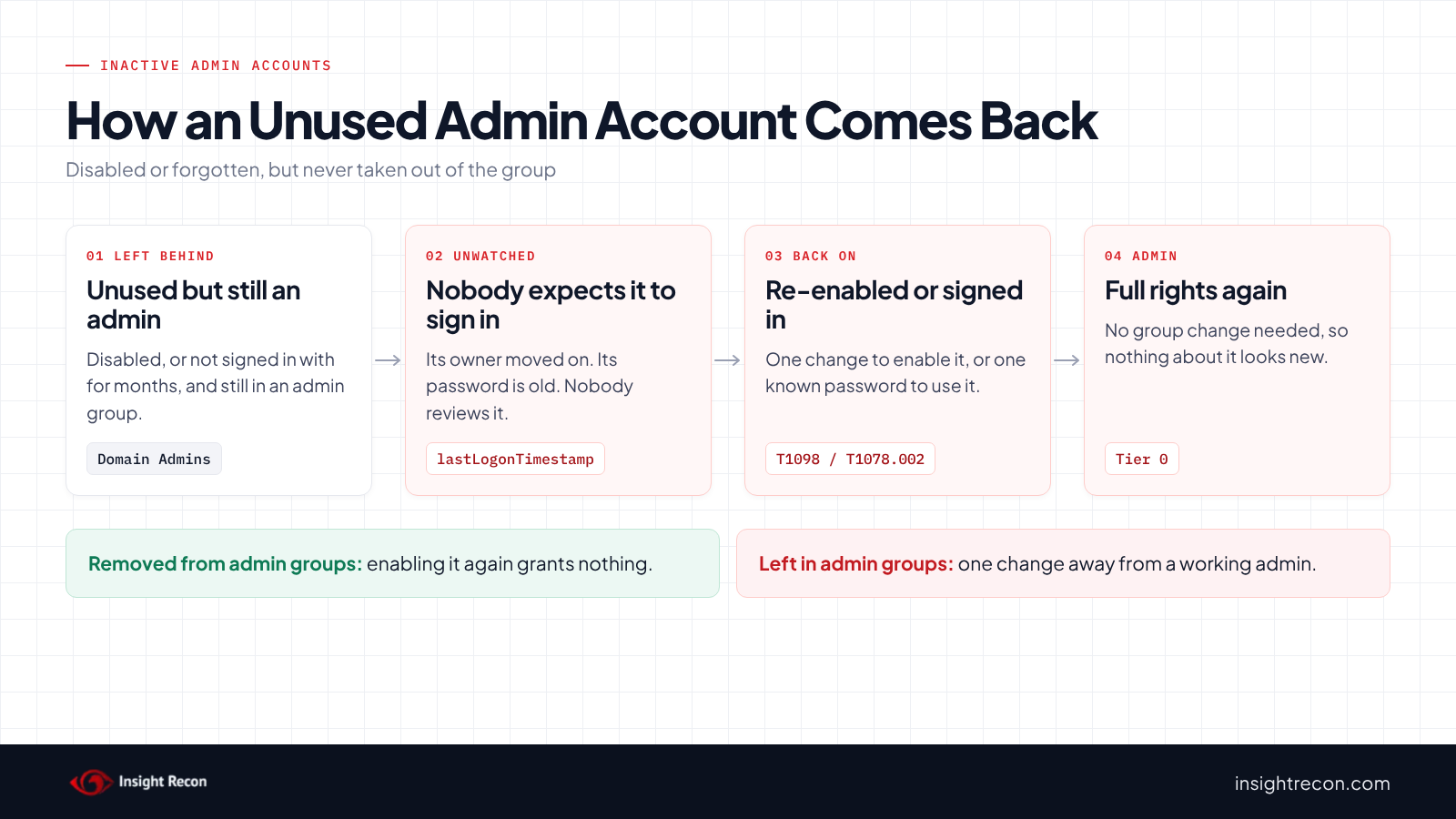
- Disabled admin accounts are disabled but still members of a privileged group such as Domain Admins, Administrators or one of the operator groups. Someone switched the account off without taking its rights away.
- Inactive admin accounts are enabled, privileged and haven't signed in for months. They usually belong to someone who left, changed roles or finished a project. Some belong to a vendor or a tool nobody uses anymore.
AD tracks recent use in the lastLogonTimestamp attribute, which LastLogonDate in PowerShell reads. Microsoft's schema documentation says it only updates when the stored value is older than the sync interval, so it can lag by up to about two weeks. So the scan waits until 49 days rather than 35. Still, confirm an account's last use before you act on it.
The standards agree these accounts shouldn't linger. CIS Controls safeguard 5.3 says to "delete or disable any dormant accounts after a period of 45 days of inactivity." The DISA STIG for Windows Server 2022 (V-254256) uses 35 days.
Why inactive admin accounts are dangerous
A disabled admin is one change from active
Disabling an account blocks sign-in. However, it doesn't touch group membership. A disabled member of Domain Admins becomes a working Domain Admin again the moment someone enables it, with no group change to notice. MITRE ATT&CK tracks changes like that, made to keep or regain access, as T1098, Account Manipulation. Anyone who already has a foothold with rights over the account can use it as a quiet way back in.
An unused admin is one password from active
Meanwhile, an enabled admin account nobody uses still accepts its password. That password is usually old. The person who knew it may have left. If it leaked, nobody would notice it being used, because nobody expects that account to sign in at all. MITRE tracks this as T1078.002, Valid Accounts: Domain Accounts. Our stale passwords post covers why old passwords on these accounts carry extra risk.
Both add to your admin count
In other words, every unused account in an admin group is another way into Tier 0 that nobody is using for real work. Removing them is one of the simplest ways to shrink that list.
Find inactive admin accounts
List every privileged account with its status
This checks the same privileged groups the scan does, including nested members. It finds them by well-known SID, so it works in any language. DnsAdmins has none, so it's found by name. It gives each account a status. Inactive means no sign-in in 35 days. The others are Disabled, Expired, Never signed in and Active. The output also shows which groups put it there. It skips the built-in Administrator, like the scan does. It runs as any domain user with the AD module and covers the domain you're signed in to. Groups that only exist in the forest root, like Enterprise Admins, get a warning and are skipped elsewhere. It reads membership with an LDAP query instead of Get-ADGroupMember, which can fail on a group that holds an orphaned foreign principal. Keep the window open afterwards: the save script further down reuses its $rows result.
Import-Module ActiveDirectory -ErrorAction Stop
$cutoff = (Get-Date).AddDays(-35)
$sid = (Get-ADDomain).DomainSID.Value
# Domain Admins, Enterprise Admins, Schema Admins, Administrators, the four operator groups, Replicator,
# Key Admins, Enterprise Key Admins and Cert Publishers by well-known SID, then DnsAdmins by name
$groups = "$sid-512", "$sid-519", "$sid-518", 'S-1-5-32-544', 'S-1-5-32-548', 'S-1-5-32-549', 'S-1-5-32-550',
          'S-1-5-32-551', 'S-1-5-32-552', "$sid-526", "$sid-527", "$sid-517", 'DnsAdmins'
$members = @{}
foreach ($g in $groups) {
    try { $grp = Get-ADGroup -Identity $g -ErrorAction Stop }
    catch { Write-Warning "Skipped ${g}: $($_.Exception.Message)"; continue }
    foreach ($m in Get-ADUser -LDAPFilter "(memberOf:1.2.840.113556.1.4.1941:=$($grp.DistinguishedName))") {
        if (-not $members.ContainsKey($m.SamAccountName)) { $members[$m.SamAccountName] = @() }
        $members[$m.SamAccountName] += $grp.Name
    }
}
$rows = foreach ($sam in $members.Keys) {
    $u = Get-ADUser -Identity $sam -Properties LastLogonDate, PasswordLastSet, AccountExpirationDate, Description, whenCreated
    if ($u.SID.Value -like '*-500') { continue }
    $status = if (-not $u.Enabled) { 'Disabled' }
              elseif ($u.AccountExpirationDate -and $u.AccountExpirationDate -lt (Get-Date)) { 'Expired' }
              elseif (-not $u.LastLogonDate) { 'Never signed in' }
              elseif ($u.LastLogonDate -lt $cutoff) { 'Inactive' }
              else { 'Active' }
    [pscustomobject]@{
        Account       = $sam
        Status        = $status
        LastLogonDate = $u.LastLogonDate
        PasswordSet   = $u.PasswordLastSet
        Groups        = ($members[$sam] | Sort-Object -Unique) -join ', '
        Description   = $u.Description
        Created       = $u.whenCreated
    }
}
$rows | Sort-Object @{ Expression = { $_.Status -eq 'Active' } }, Account
What to look for: every row that isn't Active. They sort to the top. Groups shows which privileged groups grant each account access. Description and Created often say who asked for the account and why. Expired means the account's expiry date has passed. It behaves like a disabled account and needs the same cleanup. The scan doesn't read expiry dates. It lists an expired account that's still enabled under Inactive Privileged Users once it goes 49 days without a recorded sign-in. The script only lists accounts that live in this domain, so a member from another domain in the forest won't show up here.
Find the group to remove it from
The detail script lists the top-level privileged group. The account may actually sit in a nested group. This shows the groups an account is directly in, which are the ones you'll remove it from. It runs as any domain user with the AD module.
Import-Module ActiveDirectory -ErrorAction Stop
Get-ADPrincipalGroupMembership -Identity 'adm-old' | Select-Object Name, GroupScope, DistinguishedName
Check inactive admin accounts with Insight Recon
The free scan includes two checks for this:
- Disabled Privileged Accounts (Moderate) lists disabled accounts that are still members of a privileged group, including nested membership the scan resolves.
- Inactive Privileged Users (Moderate) lists enabled privileged accounts with no recorded sign-in for 49 days, which is 35 days plus the 14-day lag in
lastLogonTimestamp. It rates High once any account passes 104 days. An account that never signed in counts from the day it was created. The last sign-in is the later oflastLogonTimestampand thelastLogonvalue on the DC the scan reads. Accounts trusted for unconstrained delegation, or for protocol transition to a DC, count as privileged too.
Both checks skip the domain's built-in Administrator, which Microsoft says to keep for build and recovery work. Each finding comes with the Hacker Insight, remediation steps and compliance mappings for the check.
Know what it doesn't decide for you. Neither check knows whether an account is a break-glass account kept unused on purpose, or what still depends on it.
These related checks cover the rest of this area:
- High Number of Privileged Users, the total these accounts add to.
- Privileged Users with Stale Passwords, admin accounts whose passwords haven't changed in more than 180 days.
- Built-in Administrator account used recently, the one admin account you want to stay unused.
- Computer Account Detected in Privileged Group, another kind of admin group member that's easy to miss. Our admin group membership post covers it.
You can see what the findings look like in our sample report. The full list is in our check library.
See every admin account your domain has stopped using.
It runs from any Windows machine that can reach your DCs, with a standard domain account. Every core AD check is free for one domain.
Before you remove inactive admin accounts
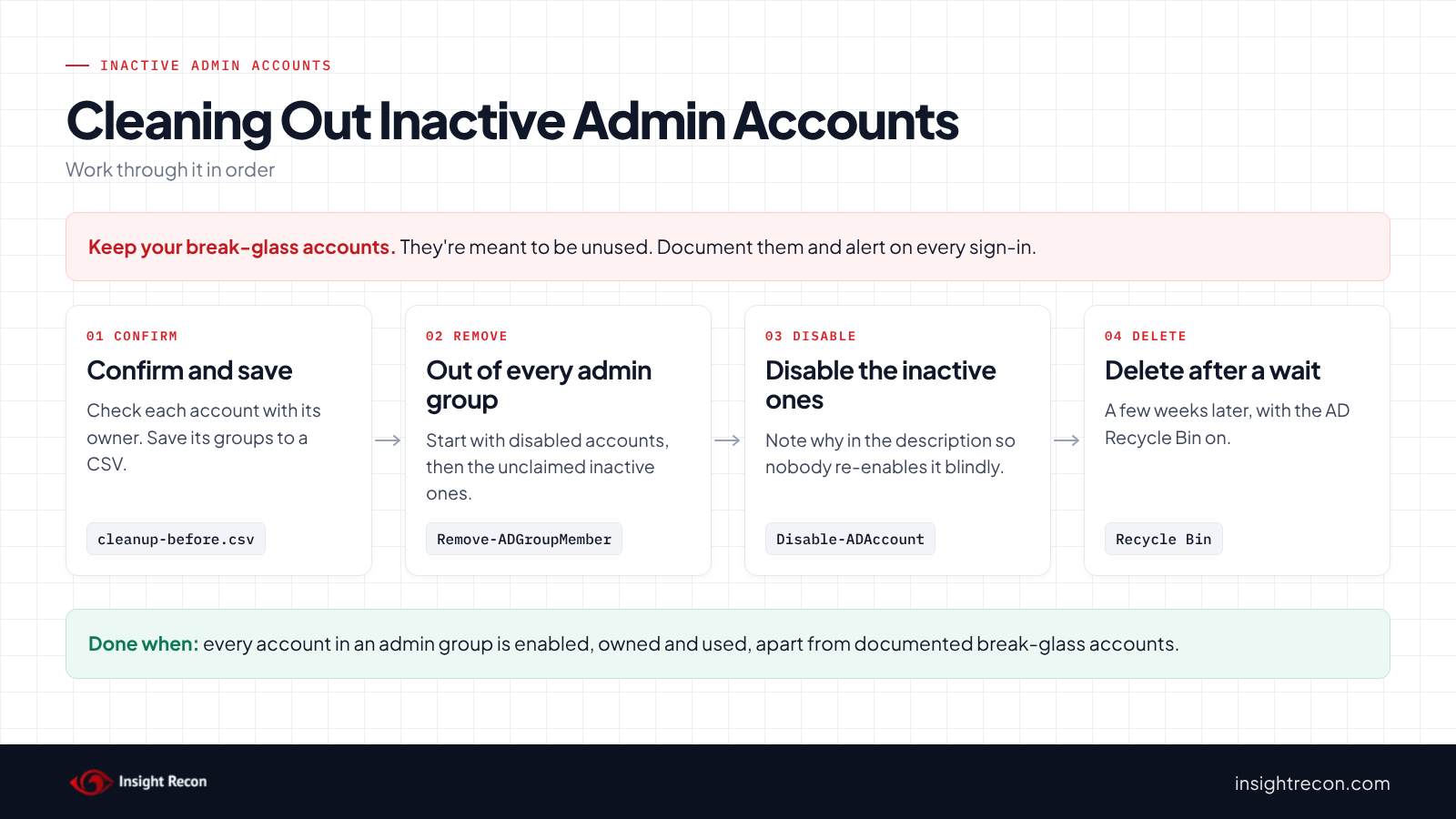
An account that looks unused may still run a task once a quarter, or be your emergency way in. Confirm each one with its owner, save its groups before you change anything and disable before you delete.
Keep your break-glass accounts
A break-glass account is meant to sit unused until an emergency. So don't remove it. Document it, keep its password in a safe place and alert on every sign-in. Our Protected Users post covers how to treat it.
Leave the built-in Administrator in place
The domain's built-in Administrator is in the same boat. Microsoft's guide says to save it for building the domain and for disaster recovery. It also says not to change its group memberships, so leave it in its groups. Both checks skip it, as do the scripts in this post. Harden it instead. The same guide recommends marking it sensitive so it can't be delegated, which our sensitive and cannot be delegated post covers.
Check for rare use
For example, some accounts run a scheduled task or a script a few times a year. Others belong to admins who only work in the cloud, whose sign-ins may not show up on-prem. Ask the owner, or the team that asked for the account, before you change it.
Save the current state
This writes the non-active accounts and every group each one is directly in to two CSV files. It uses $rows from the detail script, so run it in the same window. It runs as any domain user. Those two files are your way back.
# Runs as any domain user. Keep both files: they're your way back.
$rows | Where-Object Status -ne 'Active' | Export-Csv .\cleanup-before.csv -NoTypeInformation
$rows | Where-Object Status -ne 'Active' | ForEach-Object {
    foreach ($g in Get-ADPrincipalGroupMembership -Identity $_.Account) {
        [pscustomobject]@{ Account = $_.Account; Group = $g.DistinguishedName }
    }
} | Export-Csv .\cleanup-groups.csv -NoTypeInformation
Know what removal leaves behind
Accounts that were in protected admin groups keep adminCount set to 1 and keep permission inheritance turned off after you remove them. Microsoft's AskDS team explains that the DC assumes such an account is about to be disabled or deleted. If you keep the account, reset both by hand. Our AdminSDHolder post covers why that matters.
Remove inactive admin accounts safely
1. Take each account out of its admin groups
Start with the disabled accounts, since they can't sign in now. Still check that nothing depends on them first. This removes one account from one group. It's a dry run with -WhatIf. Drop that to apply. It needs rights to change the group's membership, which for Domain Admins and Administrators means Domain Admins. Repeat it for each group the account is directly in.
# Dry run. Drop -WhatIf to apply. Needs rights to change the group's membership
# (Domain Admins for protected groups such as Domain Admins and Administrators).
Import-Module ActiveDirectory -ErrorAction Stop
Remove-ADGroupMember -Identity 'Domain Admins' -Members 'adm-old' -Confirm:$false -WhatIf
2. Disable the inactive ones
For enabled accounts nobody has claimed, disable them as well as removing them from the groups. This disables one account and notes why in its description. It's a dry run with -WhatIf. Drop that to apply. Same rights as step 1.
# Dry run. Drop -WhatIf to apply. Same rights as above for protected admin accounts.
Import-Module ActiveDirectory -ErrorAction Stop
Disable-ADAccount -Identity 'adm-old' -WhatIf
Set-ADUser -Identity 'adm-old' -Description "Disabled $(Get-Date -Format yyyy-MM-dd): inactive admin, see ticket" -WhatIf
3. Wait, then delete
Leave the accounts disabled for a few weeks so anything that still needed them shows up. After that, delete them. If the AD Recycle Bin is on, a deleted account can be restored with its attributes. Our Recycle Bin post covers turning it on.
If something breaks
This re-enables one account and puts it back in one group. It's a dry run with -WhatIf. Drop that to apply. Same rights as above. Use the groups CSV you saved to find every group it was in. Then give the account an owner, or replace it with something better suited, such as a dedicated admin account for that person or a gMSA for a service.
# Dry run. Drop -WhatIf to apply. Same rights as above.
Import-Module ActiveDirectory -ErrorAction Stop
Enable-ADAccount -Identity 'adm-old' -WhatIf
Add-ADGroupMember -Identity 'Domain Admins' -Members 'adm-old' -WhatIf
Keep inactive admin accounts from coming back
- Alert when an admin account is enabled. With Audit User Account Management on, event 4722 records each account being enabled. Microsoft recommends watching every 4722 for high-value accounts.
- Remove admin rights when people leave or move. Add "take out of admin groups" to your leaver and role-change process, before "disable".
- Review admin group membership quarterly. Run the detail script and have each account's owner confirm it.
- Re-run the scan. Both checks show whether unused admin accounts are piling up again.
Inactive admin accounts checklist
- Is every disabled or expired account out of every privileged group?
- Does every enabled admin account have an owner who has used it in the last 35 days?
- Are break-glass accounts documented and alerted on?
- Did you save each account's groups before removing it?
- Did you reset
adminCountand inheritance on de-admined accounts you kept? - Is event 4722 alerted on for admin accounts?
- Did you check every domain in the forest?
A "no" on the first question means a single change could turn a forgotten account back into a working admin.
Compliance mapping
| Framework | Reference | Why it applies |
|---|---|---|
| MITRE ATT&CK | T1078.002, T1098 | Valid Accounts: Domain Accounts and Account Manipulation. An unused admin account can be signed in with or re-enabled. |
| CIS Controls v8 | Control 5, Control 6 | Account management and access control. Safeguard 5.3 calls for disabling dormant accounts. |
| NIST CSF 2.0 | PR.AA-01, PR.AA-05 | You manage identities and credentials and limit access to least privilege. Unused admin accounts fail both. |
| ANSSI | warning_ | Disabled Privileged Accounts only. ANSSI's control point for disabled or expired accounts in privileged groups. The check covers disabled accounts. It doesn't read expiry dates. |
| DISA STIG | V-254256 | Inactive Privileged Users only. Outdated or unused accounts must be removed or disabled. |
Inactive admin accounts FAQ
Isn't a disabled admin account safe?
It can't sign in while it's disabled. It's still a member of the admin group, so enabling it gives full admin rights back in one step. Take it out of the group too.
How long before an admin account counts as inactive?
Insight Recon flags it after 49 days with no recorded sign-in and rates it High after 104. The 49 is the Windows Server 2022 STIG's 35 days plus 14 for the lag in lastLogonTimestamp. CIS Controls says 45 days. Pick a number and apply it consistently.
Should I delete inactive admin accounts right away?
No. Remove them from admin groups and disable them first. Delete them after a few weeks if nothing breaks, ideally with the AD Recycle Bin on.
What about break-glass accounts?
Keep them. They're meant to be unused. Document them, store the password safely and alert on every sign-in.
Does Insight Recon check for inactive admin accounts?
Yes. The free scan includes Disabled Privileged Accounts and Inactive Privileged Users.
Find the admin accounts nobody is using anymore.
It runs from any Windows machine that can reach your DCs, with a standard domain account. Every core AD check is free for one domain.
Not ready to scan?
AD Signal is our monthly look at what's changing in AD security and how real domains score. Read the latest report.
References
- Microsoft Learn: Last-Logon-Timestamp attribute
- CIS Controls v8: Control 5, Account Management
- Windows Server 2022 STIG WN22-00-000190 (V-254256): outdated or unused accounts
- MITRE ATT&CK: T1098 Account Manipulation
- MITRE ATT&CK: T1078.002 Valid Accounts: Domain Accounts
- Microsoft AskDS: Five common questions about AdminSDHolder and SDProp
- Microsoft Learn: Appendix D, Securing built-in Administrator accounts in Active Directory
- Microsoft Learn: Event 4722, a user account was enabled