

Active Directory Recycle Bin: Why One Deletion Can Break Your Domain
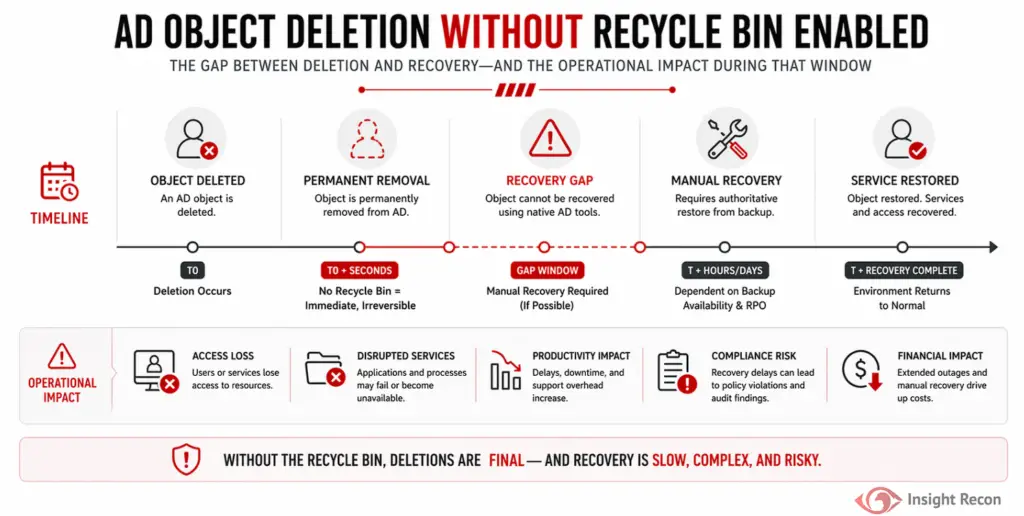
The Active Directory Recycle Bin gives administrators a straightforward way to recover accidentally or maliciously deleted users, groups, computers, and organizational units while preserving important attributes and relationships. Without it, a routine deletion can turn into a much larger recovery event involving backups, authoritative restores, manual reconstruction, and unnecessary downtime.
Quick Summary
Without the Active Directory Recycle Bin, recovering deleted directory objects becomes slower, more complex, and more prone to incomplete restoration. In a real environment, that can mean broken authentication, lost group relationships, application outages, and hours spent rebuilding something that could otherwise be restored in minutes.
| Priority | Low (Moderate in large or compliance-driven environments) |
| Risk | Deleted Active Directory objects cannot be quickly restored with their original attributes and relationships intact |
| Impact | Longer outages, authentication failures, lost access relationships, and increased recovery effort |
| Exploitation | An attacker with sufficient privileges can delete critical directory objects to increase disruption and complicate recovery |
| Fix | Enable Active Directory Recycle Bin at the forest level and regularly validate recovery procedures |
What Is the Active Directory Recycle Bin?
The Active Directory Recycle Bin is a recovery feature introduced with Windows Server 2008 R2. When enabled, it preserves deleted Active Directory objects along with their link-valued and non-link-valued attributes, allowing administrators to restore them much closer to the state they were in immediately before deletion.
This applies to objects such as users, groups, computer accounts, and organizational units. For example, restoring a deleted user through the Recycle Bin can preserve important attributes and group membership relationships that would otherwise need to be reconstructed during recovery. Without the Recycle Bin, Active Directory still retains deleted objects as part of its normal deletion and replication lifecycle, but the recovery process is substantially less convenient.
Why a Disabled Recycle Bin Creates Risk
The Recycle Bin doesn’t prevent an administrator or attacker from deleting an Active Directory object. Its security value is in reducing the operational impact when a deletion occurs.
Common risks include:
- Loss of critical identities
Deleting a user, computer, or service account can immediately disrupt authentication and any service that depends on that identity. - Broken access relationships
Group membership frequently determines access throughout an organization. More complex recovery methods can require additional work to ensure those relationships return to their previous state. - OU and administrative disruption
Deleting an organizational unit can affect large collections of users and computers while disrupting the structure administrators rely on to manage the domain. - Slower incident recovery
Without a straightforward object restoration mechanism, administrators may need to rely on Active Directory backups, authoritative restoration, or manual reconstruction. - Greater opportunity for recovery mistakes
Rebuilding objects manually can introduce differences in attributes, memberships, permissions, and configuration.
Real-World Context
Most directory disruptions are caused by administrative mistakes rather than deliberate attacks. However, during an active incident, adversaries will often delete or modify AD objects as part of a disruption or anti-forensics strategy. Without the Recycle Bin enabled, recovery is slower and more complex, increasing both operational impact and incident response timelines at exactly the moment speed matters most.
How Attackers Can Take Advantage of the Recovery Gap
Attackers don’t exploit a disabled Recycle Bin directly. Instead, its absence makes destructive actions more costly to recover from.
Common abuse scenarios include:
- Disruption and denial of service
Attackers with sufficient privileges can delete critical users, groups, or OUs to create widespread outages. - Covering tracks
Deleting objects tied to persistence or lateral movement can complicate investigations. - Forcing recovery paths
Recovery operations often introduce mistakes, misconfigurations, or over-permissive restores.
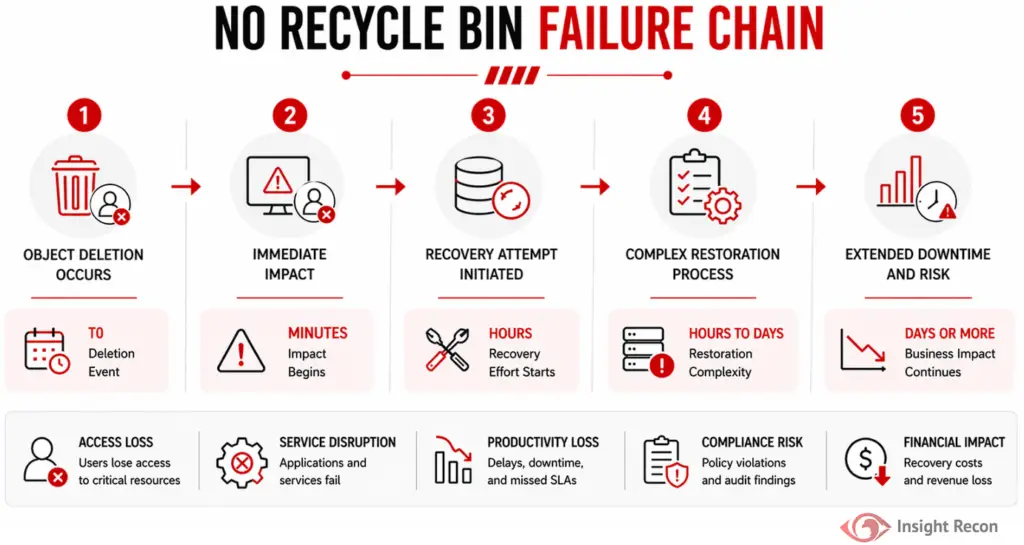
What Happens Without the Active Directory Recycle Bin
Attackers don’t exploit a disabled Recycle Bin directly. Instead, its absence makes destructive actions more costly to recover from.
Common abuse scenarios include:
- Object Deletion Occurs
An administrator accidentally deletes a user, group, or OU, or an attacker removes objects to disrupt operations. - Immediate Impact
Authentication failures, broken group memberships, and service disruptions begin almost immediately. - Recovery Attempt Initiated
Administrators attempt to restore objects using backups or manual recreation. - Complex Restoration Process
Authoritative restore or manual rebuilding introduces risk of incomplete recovery, missing attributes, or configuration drift. - Extended Downtime and Risk
Business operations are impacted, and recovery delays increase exposure to further issues or compliance concerns.
How to Detect Active Directory Recycle Bin Status
This configuration is simple to validate and should be part of regular Active Directory health checks.
PowerShell Method
Run the following command to determine if the Recycle Bin is enabled:
					# Checks whether the Active Directory Recycle Bin is enabled and shows the scope where it is active
Get-ADOptionalFeature -Identity "Recycle Bin Feature" | Select-Object Name, EnabledScopes
What it does: Displays the Active Directory Recycle Bin optional feature and the scopes where it is currently enabled.
How to interpret results: If the “EnabledScopes” property returns a value, the Recycle Bin is enabled. If it returns empty or no output, the feature is not active.

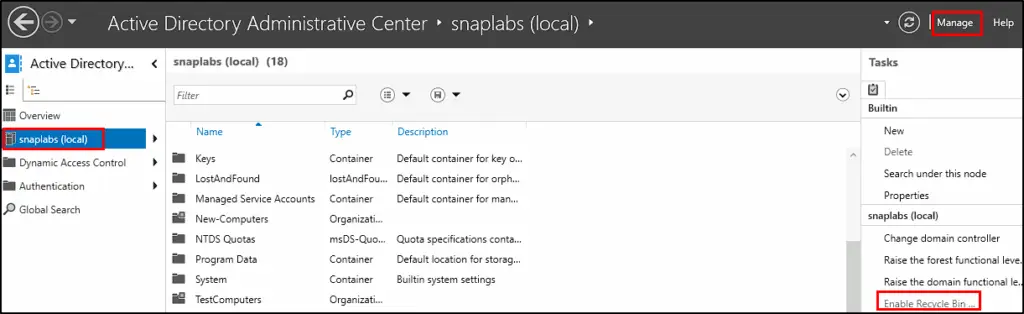
Active Directory Administrative Center (ADAC)
For manual verification:
- Open Active Directory Administrative Center (dsac.exe).
- Select the appropriate target domain.
- Review the Tasks pane.
- Look for Enable Recycle Bin.
- If the option is available, the feature has not been enabled. If it’s not found or greyed out, then it has been enabled.
Finding This Risk with Insight Recon
Insight Recon’s Active Directory security assessment identifies whether the Active Directory Recycle Bin is enabled and surfaces environments where simplified object recovery is not available.
It also provides:
- Automatic detection of Recycle Bin status
- Risk context around directory recovery and operational resilience
- Prioritized guidance showing how the configuration compares with higher-impact Active Directory findings
- Step-by-step remediation guidance
- Validation guidance to confirm the feature is enabled after remediation
This allows teams to discover the recovery gap during a routine Active Directory assessment instead of after an important object has already been deleted.
Enabling the Active Directory Recycle Bin
Prerequisites
Before enabling the feature:
- Confirm the forest and domain functional levels are Windows Server 2008 R2 or later.
- Ensure the Active Directory PowerShell module or Active Directory Administrative Center is available.
- Ensure the account performing the change has sufficient administrative privileges.
- Obtain appropriate change approval.
- Understand that the Recycle Bin cannot be disabled after it has been enabled.
PowerShell Method
From an elevated PowerShell session, first confirm the forest information:
					# Enable the Active Directory Recycle Bin for the current forest
$Forest = Get-ADForest

Enable-ADOptionalFeature `
    -Identity "Recycle Bin Feature" `
    -Scope ForestOrConfigurationSet `
    -Target $Forest.Name `
    -Server $Forest.DomainNamingMaster
Active Directory Administrative Center (ADAC)
- Open Active Directory Administrative Center.
- Select the appropriate target domain.
- Locate Enable Recycle Bin in the Tasks pane.
- Select Enable Recycle Bin.
- Review the warning explaining that the change is irreversible.
- Confirm the change.
- Refresh ADAC.
- Allow Active Directory replication to complete.
Preventing Active Directory Recovery Gaps Going Forward
Enabling the Recycle Bin resolves the configuration finding, but it should be treated as one part of a broader Active Directory recovery strategy.
- Test object restoration regularly
Administrators should know how to restore users, groups, computers, and OUs before a real incident requires it. Use controlled test objects to periodically validate the process. - Monitor directory object deletion
Alert on unexpected deletion of privileged users, groups, service accounts, computer objects, and critical OUs. - Protect important objects from accidental deletion
Use Active Directory’s built-in protection mechanisms and tightly control permissions that allow deletion of high-value directory objects. - Restrict deletion rights
Apply least privilege to administrators and delegated operators who can delete users, groups, computers, and organizational units. - Maintain tested Active Directory backups
The Recycle Bin is not a replacement for system-state or forest recovery backups. Microsoft forest recovery guidance still relies on trusted backups for scenarios involving broader Active Directory failure or compromise. - Review deleted-object retention
Recycle Bin recovery is time-limited, Active Directory uses msDS-deletedObjectLifetime to control the deleted-object state, with its value derived from the forest’s tombstone lifetime when it is not explicitly configured.
Quick Validation Checklist
Can you confidently answer “yes” to all of these?
✓ Is the Active Directory Recycle Bin enabled?
✓ Do administrators know how to restore a deleted user, group, computer, and OU?
✓ Have you tested Active Directory object recovery recently?
If any of these answers are unclear, a routine directory deletion could become a significantly larger recovery event.
Risk & Compliance Mapping
Business Impact: A disabled Active Directory Recycle Bin can increase service disruption, authentication failures, recovery time, and the complexity of restoring access following accidental or malicious directory object deletion.
| Framework | Reference |
|---|---|
| NIST CSF | PR.IP-1 (Baseline Configuration), PR.IP-3 (Configuration Change Control) |
| CIS Controls | Control 11 (Data Recovery) |
| MITRE ATT&CK | T1485 (Data Destruction), T1070 (Indicator Removal) |
| Microsoft Security Baselines | Enable Active Directory Recycle Bin to preserve deleted directory objects and their attributes so supported objects can be restored without requiring an Active Directory backup restoration |
Frequently Asked Questions
No. The feature must be explicitly enabled at the forest level.
No. Enabling the Active Directory Recycle Bin is irreversible. Once enabled for the forest, it cannot be disabled
Enabling the feature does not normally require taking Active Directory offline. The configuration change must replicate across the forest before the feature should be considered available everywhere.
The exact period depends on the forest's deleted-object lifetime configuration. The msDS-DeletedObjectLifetime attribute controls this period; when it is not explicitly configured, Active Directory derives it from the tombstone lifetime. This is why assuming every environment has a fixed 180-day recovery window is not accurate.
Make Recovery Easy Before You Need It
A deleted Active Directory object should be a recoverable mistake, not the beginning of an outage. Enabling the Active Directory Recycle Bin gives administrators a faster path to data recovery. The Recycle Bin provides a simple resilience control that can dramatically reduce the recovery effort following object deletion.
See exactly where your Active Directory is exposed and what to fix first.