ADCS ESC10: Find Domain Controllers That Accept Weak Certificate Mappings
ADCS ESC10 is a domain controller that still accepts weak certificate mappings, where a certificate is matched to an account by name instead of by something that can't be reused. There are two places it hides: the Kerberos enforcement setting from KB5014754 and Schannel's mapping methods. This post shows you how to check both on every domain controller, find the GPO that set them and put each domain controller back on strong mapping without breaking certificate sign-in.
| Priority | High. A weak mapping lets a certificate that carries someone else's name sign in as them |
|---|---|
| What decides it | A domain controller short of full Kerberos enforcement for its update level, or with Schannel's UPN bit (0x4) set |
| Who's affected | Domain controllers behind on updates, or where someone loosened a setting to stop certificate sign-in errors |
| Fix | Patch, fix the GPO that sets the value, remove the weak setting and give anything that needs it a strong mapping |
Check it now: do any domain controllers still accept weak mappings?
# Run as a Domain Admin. Reads two registry values from each DC over remote registry.
Import-Module ActiveDirectory -ErrorAction Stop
foreach ($dc in Get-ADDomainController -Filter *) {
    try {
        $reg = [Microsoft.Win32.RegistryKey]::OpenRemoteBaseKey('LocalMachine', $dc.HostName)
        $kdc = $reg.OpenSubKey('SYSTEM\CurrentControlSet\Services\Kdc')
        $sch = $reg.OpenSubKey('SYSTEM\CurrentControlSet\Control\SecurityProviders\Schannel')
        $binding = if ($kdc) { $kdc.GetValue('StrongCertificateBindingEnforcement') }
        $methods = if ($sch) { $sch.GetValue('CertificateMappingMethods') }
        [pscustomobject]@{
            DC                = $dc.HostName
            KdcBinding        = if ($null -eq $binding) { 'not set' } else { $binding }
            SchannelMethods   = if ($null -eq $methods) { 'not set' } else { '0x{0:X}' -f $methods }
            # 0x1 Subject/Issuer, 0x2 Issuer and 0x4 UPN are the weak Schannel mappings
            SchannelWeakBits  = if ($null -ne $methods) { '0x{0:X}' -f ($methods -band 0x7) } else { '0x0' }
        }
    } catch {
        [pscustomobject]@{ DC = $dc.HostName; KdcBinding = "couldn't read"; SchannelMethods = ''; SchannelWeakBits = '' }
    }
}
Runs as a Domain Admin with the ActiveDirectory module. It reads both settings from every domain controller in the domain. not set and 0x0 are what you want on an up-to-date domain controller. A KdcBinding of 0 or 1, or any SchannelWeakBits other than 0x0, is a finding.
You checked one setting. The free scan checks the rest of your on-prem AD in a few minutes.
Nothing gets installed on your domain controllers. Only HTTPS leaves your network.
What ADCS ESC10 is
When someone signs in with a certificate, the domain controller has to decide which account it belongs to. Microsoft's KB5014754 splits the ways of doing that into strong and weak. Strong mappings use the SID security extension in the certificate, or an explicit mapping such as the issuer and serial number. Weak mappings rely on names, such as the user principal name (UPN), that can be changed or reused.
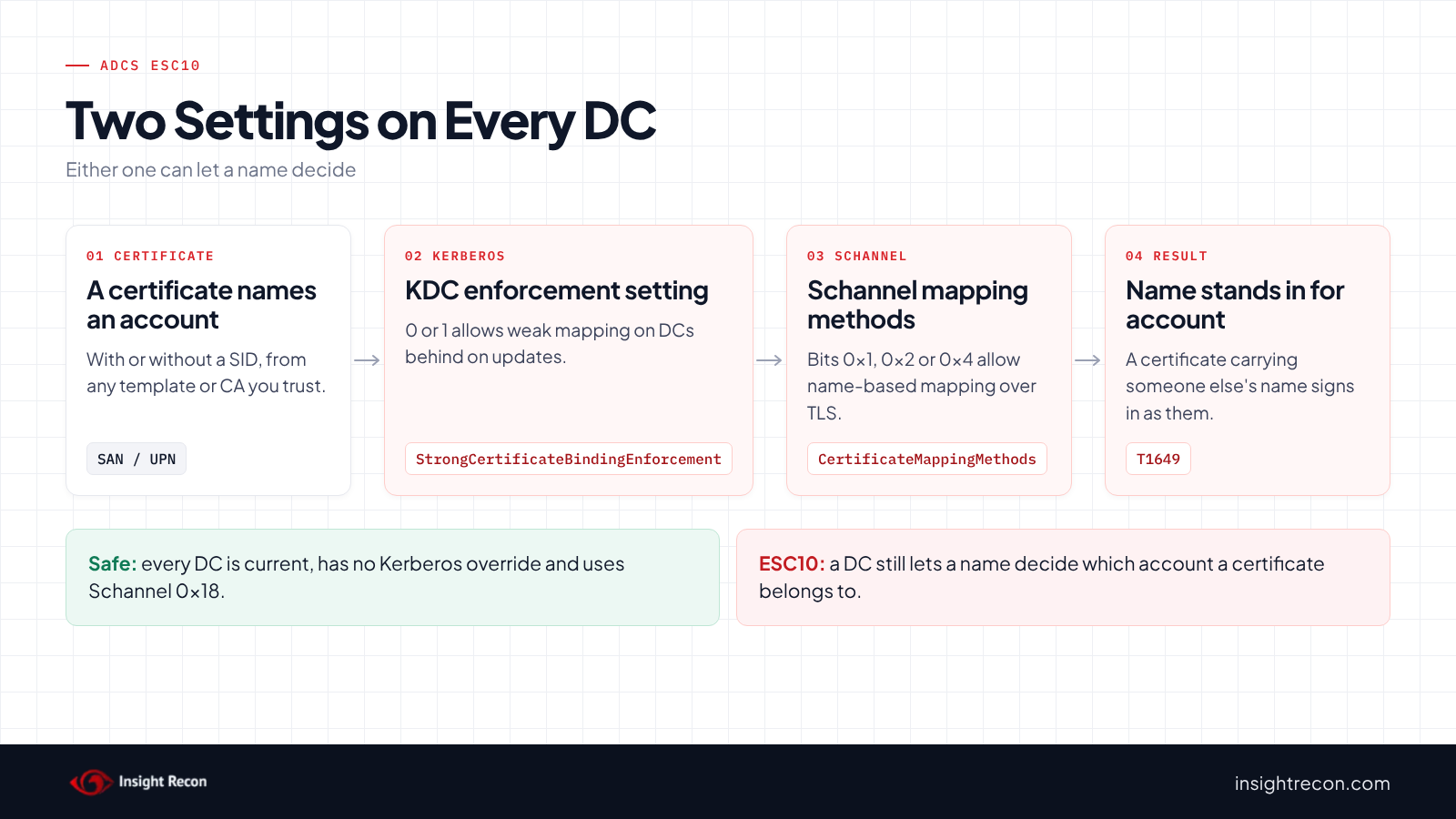
Two settings on each domain controller decide whether weak mappings are still allowed:
- Kerberos:
StrongCertificateBindingEnforcementunderHKLM\SYSTEM\CurrentControlSet\Services\Kdc. KB5014754 defines0as disabling the strong mapping check,1as Compatibility mode and2as Enforcement mode. - Schannel:
CertificateMappingMethodsunderHKLM\System\CurrentControlSet\Control\SecurityProviders\Schannel. Schannel handles certificate sign-in over TLS, for example LDAPS. Bits0x1(Subject/Issuer),0x2(Issuer) and0x4(UPN) are weak. Bits0x8and0x10are strong. KB5014754 says the default changed from0x1Fto0x18.
ESC10 is a domain controller where either setting still allows a weak mapping. Our weak certificate mappings post covers the account side: which accounts and certificates rely on weak mappings and how to replace them. This post covers the domain controller side.
Why ADCS ESC10 is dangerous
A name can stand in for an account
Under a weak mapping, a certificate that carries an account's name is enough to sign in as that account. So anyone who can get a certificate with another account's name in it may be able to sign in as them. For example, someone who can change the UPN of an account they control, or who can use a template from our ADCS ESC9 or ADCS ESC6 posts. MITRE ATT&CK tracks this as T1649, Steal or Forge Authentication Certificates.
The Kerberos setting depends on updates
The April 2023 updates removed Disabled mode, so a 0 only works on a domain controller that's missing them. Domain controllers moved to Full Enforcement with the February 2025 update. KB5014754 says the option to go back to Compatibility mode lasted until the September 9, 2025 update. "After this date, the StrongCertificateBindingEnforcement registry key will no longer be supported." So a 0 or 1 on a domain controller is either a real weakness on one that's behind on updates, or a leftover on one that's current. You need to know which.
The Schannel setting doesn't expire
KB5014754 gives no end date for the Schannel setting. If someone set CertificateMappingMethods back to 0x1F to fix a sign-in problem, it still allows UPN mapping today, whatever updates the domain controller has.
Find ESC10 on your domain controllers
The quick check reads both settings. The scripts below tell you whether a Kerberos finding is real, where the values come from and what's failing today. Each covers the domain you run it in, so run them in every domain.
Check whether each domain controller is up to date
This compares each domain controller's build and revision with the September 9, 2025 update, the same way the scan places it. It runs as a Domain Admin.
# Run as a Domain Admin. Compares each DC's build and revision with the September 9, 2025 update.
Import-Module ActiveDirectory -ErrorAction Stop
$september2025 = @{ 14393 = 8422; 17763 = 7792; 20348 = 4171; 26100 = 6584 }
foreach ($dc in Get-ADDomainController -Filter *) {
    try {
        $reg = [Microsoft.Win32.RegistryKey]::OpenRemoteBaseKey('LocalMachine', $dc.HostName)
        $cv = $reg.OpenSubKey('SOFTWARE\Microsoft\Windows NT\CurrentVersion')
        $build = [int]$cv.GetValue('CurrentBuildNumber')
        $ubr = [int]$cv.GetValue('UBR')
        $level = 'check its update history'
        if ($september2025.ContainsKey($build)) {
            $level = if ($ubr -ge $september2025[$build]) { 'September 2025 or later' } else { 'older than September 2025' }
        }
        [pscustomobject]@{ DC = $dc.HostName; Build = "$build.$ubr"; UpdateLevel = $level }
    } catch {
        [pscustomobject]@{ DC = $dc.HostName; Build = "couldn't read"; UpdateLevel = '' }
    }
}
What to look for: any domain controller marked older than September 2025. On those, a KdcBinding of 0 or 1 from the quick check is a real ESC10 finding. So is not set on one that also missed the February 2025 update. On a current domain controller, the value does nothing, so treat it as a leftover to clean up. A hotpatch build from around September 2025 can show up as older here, so check its update history. The same goes for a build the script doesn't know, like Windows Server 2012 R2.
Find the GPO that sets the ADCS ESC10 values
Either value can come from Group Policy, as an administrative template setting or a registry preference. This searches every GPO in the domain for both. It needs the GroupPolicy module and read access to GPOs, which domain users have by default.
# Needs the GroupPolicy module (RSAT) and read access to GPOs, which domain users have by default.
Import-Module GroupPolicy -ErrorAction Stop
$values = @{
    'HKLM\SYSTEM\CurrentControlSet\Services\Kdc'                         = 'StrongCertificateBindingEnforcement'
    'HKLM\SYSTEM\CurrentControlSet\Control\SecurityProviders\Schannel'   = 'CertificateMappingMethods'
}
foreach ($gpo in Get-GPO -All) {
    foreach ($key in $values.Keys) {
        $policy = Get-GPRegistryValue -Guid $gpo.Id -Key $key -ValueName $values[$key] -ErrorAction SilentlyContinue
        $pref = Get-GPPrefRegistryValue -Guid $gpo.Id -Context Computer -Key $key -ValueName $values[$key] -ErrorAction SilentlyContinue
        if ($policy -or $pref) {
            [pscustomobject]@{
                GPO        = $gpo.DisplayName
                Value      = $values[$key]
                Policy     = $policy.Value
                Preference = $pref.Value
            }
        }
    }
}
What to look for: any row. If a GPO sets the value, removing it on the domain controller alone won't last. The GPO puts it back at the next refresh, so fix the GPO first.
See what's failing strong mapping now
KB5014754 describes three domain controller events for certificates that can't be strongly mapped: 39 (no strong mapping), 40 (certificate older than the account) and 41 (SID didn't match the account). This pulls the last seven days from each domain controller.
# Run as a Domain Admin. Reads the System log on each DC.
# 39: no strong mapping. 40: certificate older than the account. 41: SID didn't match the account.
Import-Module ActiveDirectory -ErrorAction Stop
foreach ($dc in Get-ADDomainController -Filter *) {
    Get-WinEvent -ComputerName $dc.HostName -FilterHashtable @{ LogName = 'System'; Id = 39, 40, 41; StartTime = (Get-Date).AddDays(-7) } -ErrorAction SilentlyContinue |
        Where-Object { $_.ProviderName -match 'Kdc|Key-Distribution' } |
        Select-Object @{ n = 'DC'; e = { $dc.HostName } }, TimeCreated, Id, @{ n = 'Message'; e = { ($_.Message -split "`n")[0..3] -join ' ' } }
}
What to look for: the accounts and certificates in these events. They're what would break, or already is breaking, when every domain controller enforces strong mapping. Our weak certificate mappings post covers how to fix each one.
Check ADCS ESC10 with Insight Recon
The free scan includes Weak Certificate Mapping on Domain Controllers in ADCS (ESC10), a High check. It reads StrongCertificateBindingEnforcement and Schannel's CertificateMappingMethods from every domain controller, plus the build and revision that show its update level. It uses the same registry reads as our ESC6 check, over WMI or through the Remote Registry service. For Kerberos, the update level decides what the value means. A domain controller with the September 2025 update enforces strong mapping whatever the value says, so a leftover 0 or 1 there isn't flagged. On an older one, anything short of full enforcement for its level is flagged. That includes a missing value on one without the February 2025 update. For Schannel, it flags the UPN bit (0x4) on any update level. A missing value only counts as weak on a domain controller from before May 2022, when the default still included it. It also comes with the Hacker Insight, remediation steps and compliance mappings.
Know what the ADCS ESC10 check doesn't decide
Some things are still yours to check. The check only looks at Schannel's UPN bit, so a value like 0x3 passes. The quick check above shows the other two weak bits as well. It can't place every update level either. On Windows Server 2012 R2 or a hotpatch build, it takes an explicit Kerberos value at face value and says so. A missing value whose meaning depends on the level leaves that domain controller not assessed. Reading the registry also needs an account that can read it on each domain controller, which a standard domain account can't do by default. The result names any domain controller it couldn't read. Unless another one is weak, that leaves the check not assessed instead of passing, so run the quick check against those.
Related checks beyond ESC10
- Accounts with Weak Certificate Mappings, accounts that rely on weak explicit mappings. Our weak certificate mappings post covers it.
- Certificate Template Missing Security Extension in ADCS (ESC9) and Certificate Authority Disables SID Security Extension in ADCS (ESC16), the settings that issue certificates without a SID. Our ADCS ESC9 and ADCS ESC16 posts cover them.
- Certificate Authority Allows Arbitrary SAN in ADCS (ESC6), which lets a requester put another account's name in a certificate. Our ADCS ESC6 post covers it.
- Weak Certificate Mapping Write Access in ADCS (ESC14), who can add a certificate mapping to an admin account. Our ADCS ESC14 post covers it.
You can see what the findings look like in our sample report. The full list is in our check library.
Check every domain controller's certificate mapping, plus the templates and CAs that feed it.
It runs from any Windows machine that can reach your DCs, with a standard domain account. Every core AD check is free for one domain.
Before you change domain controller mapping
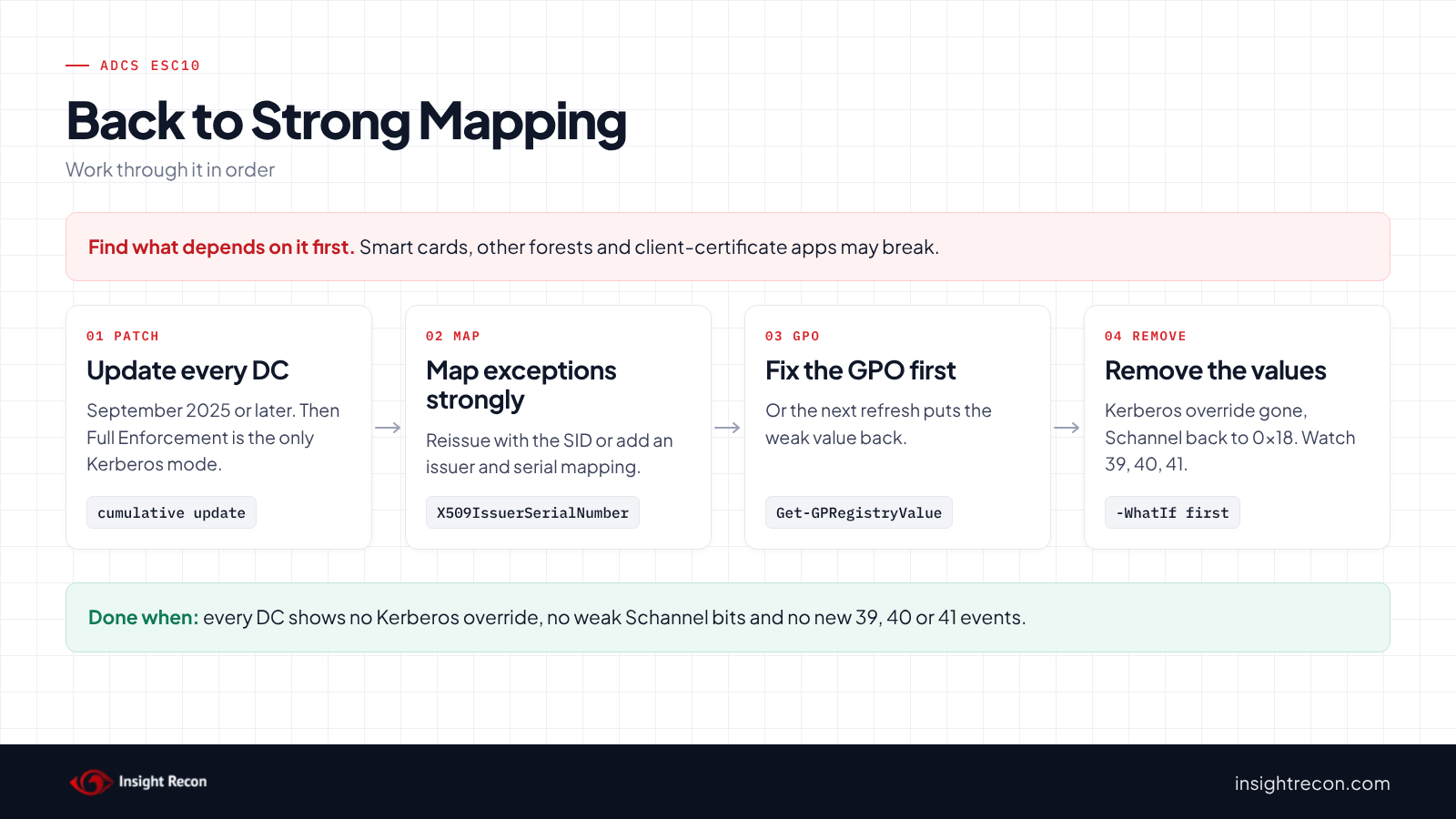
Find out why each value was set and what still depends on it. Then fix those dependencies before you remove the setting.
Find out why it was set
These values usually get loosened on purpose, to stop certificate sign-in failures after the 2022 changes. Typical causes are smart cards from a third-party CA, certificates for accounts in another forest, or an app that signs users in with client certificates over TLS. The events script shows which accounts are affected.
Fix what depends on it first
Give each affected account or certificate a strong mapping: reissue the certificate so it carries the SID, or add an explicit strong mapping. KB5014754 recommends X509IssuerSerialNumber. It also lists X509SKI and X509SHA1PublicKey as strong. Our weak certificate mappings post walks through it.
Fix the GPO before the domain controller
If the GPO script found a GPO setting either value, change the GPO first. Otherwise the next Group Policy refresh puts the value straight back.
Fix ADCS ESC10 safely
1. Update every domain controller
Install the current cumulative update on any domain controller older than September 2025. On those, Full Enforcement is the only Kerberos behavior.
2. Remove the weak values
Once the GPO no longer sets them, this removes both values from one domain controller. It prints the current values first so you can put them back. Without the Kerberos value, a current domain controller enforces strong mapping. Without the Schannel value, Schannel uses its default of 0x18, strong mappings only. Each removal is a dry run with -WhatIf. Drop that to apply. It needs Domain Admins and PowerShell remoting to the domain controller. Change DC01.contoso.com to each of your domain controllers. To undo it, set the values back with Set-ItemProperty.
# Dry run. Drop -WhatIf on each line to apply.
# Needs local administrator rights on the DC (Domain Admins). Fix any GPO that sets these first, or they come back.
$dc = 'DC01.contoso.com'
Invoke-Command -ComputerName $dc -ScriptBlock {
    $kdc = 'HKLM:\SYSTEM\CurrentControlSet\Services\Kdc'
    $sch = 'HKLM:\SYSTEM\CurrentControlSet\Control\SecurityProviders\Schannel'
    # Note the current values so you can put them back
    Get-ItemProperty -Path $kdc, $sch -ErrorAction SilentlyContinue |
        Select-Object PSPath, StrongCertificateBindingEnforcement, CertificateMappingMethods
    # Unsupported after the September 2025 update; a 0 or 1 left behind only misleads
    if ((Get-ItemProperty -Path $kdc).PSObject.Properties.Name -contains 'StrongCertificateBindingEnforcement') {
        Remove-ItemProperty -Path $kdc -Name 'StrongCertificateBindingEnforcement' -ErrorAction Stop -WhatIf
    }
    # Removing the value returns Schannel to its default of 0x18 (strong mappings only)
    if ((Get-ItemProperty -Path $sch).PSObject.Properties.Name -contains 'CertificateMappingMethods') {
        Remove-ItemProperty -Path $sch -Name 'CertificateMappingMethods' -ErrorAction Stop -WhatIf
    }
}
To make sure Schannel picks up the change, restart each domain controller in your normal maintenance window. If an app truly needs a weak Schannel method, move that app to a strong mapping instead of leaving the bit on.
3. Watch the events
Run the events script for a week after the change. Any new event 39, 40 or 41 points to an account or certificate that still needs a strong mapping.
4. Re-run the quick check
Every domain controller should show not set for KdcBinding and 0x0 for SchannelWeakBits.
Keep ADCS ESC10 closed
- Keep domain controllers current. The Kerberos protection depends on the update level.
- Watch the GPOs. A GPO that sets either value again is the most likely way ESC10 comes back. Re-run the GPO script after Group Policy changes.
- Watch events 39, 40 and 41. Send them to your SIEM. A spike usually means a new certificate type that needs a strong mapping.
- Re-run the scan. It flags any domain controller that slips back to a weak setting.
ADCS ESC10 checklist
- Is every domain controller on the September 2025 updates or later?
- Is
StrongCertificateBindingEnforcementabsent, or 2, on every domain controller? - Does
CertificateMappingMethodshave no weak bits (0x1, 0x2 or 0x4) on any domain controller? - Have you removed every GPO setting that loosens either value?
- Do accounts that can't use the SID extension have strong explicit mappings?
- Are events 39, 40 and 41 collected and reviewed?
- Did you check every domain in the forest?
A "no" on the first three questions means a certificate carrying someone else's name may still sign in as them.
Compliance mapping
| Framework | Reference | Why it applies |
|---|---|---|
| MITRE ATT&CK | T1649 | Steal or Forge Authentication Certificates. A weak mapping lets a certificate sign in as the account its name points to. |
| CIS Controls v8 | Control 4, Control 6 | Secure configuration of enterprise assets and access control management. Domain controllers should only accept strong certificate mappings. |
| NIST CSF 2.0 | PR.AA-01, PR.AA-03 | These cover managing credentials and authenticating users and devices. Name-only mapping weakens both. |
| DISA STIG | V-271427 | The STIG requirement our check library maps to this check. |
ADCS ESC10 FAQ
What is ADCS ESC10?
A domain controller that still accepts weak certificate mappings, through the Kerberos enforcement setting or Schannel's mapping methods.
Is StrongCertificateBindingEnforcement still used?
Not after the September 2025 update, according to KB5014754. A value left on a current domain controller is a leftover. On an older one, it still applies.
What should CertificateMappingMethods be?
Not set, or 0x18. That allows only the strong mapping methods.
How is ESC10 different from weak certificate mappings on accounts?
ESC10 is whether domain controllers accept weak mappings. The account check is which accounts still rely on them. Fix both.
Does Insight Recon check for ADCS ESC10?
Yes. The free scan includes Weak Certificate Mapping on Domain Controllers in ADCS (ESC10), along with the other ADCS checks.
See whether any of your domain controllers still map certificates by name.
It runs from any Windows machine that can reach your DCs, with a standard domain account. Every core AD check is free for one domain.
Not ready to scan?
AD Signal is our monthly look at what's changing in AD security and how real domains score. Read the latest report.