ADCS ESC14: Control Who Can Map Certificates to Your Admins
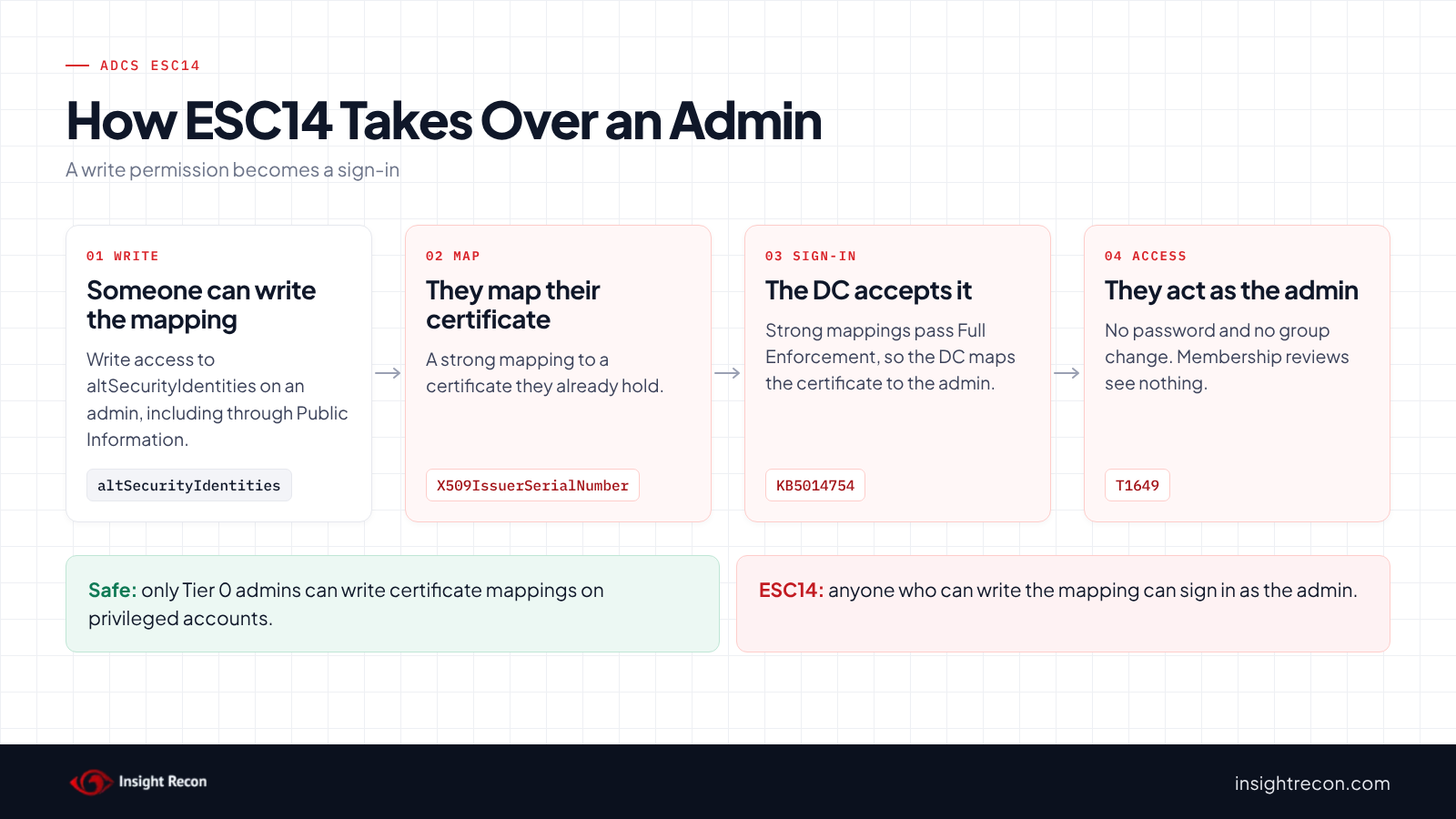
ADCS ESC14 is write access to the altSecurityIdentities attribute on a privileged account. That attribute tells domain controllers which certificates may sign in as the account. Anyone who can write it can potentially map a certificate they hold and sign in as the admin, with no password and no group change. This post shows you how to find who has that access, remove it safely and catch mappings nobody meant to add.
| Priority | High. Write access to one attribute can potentially become a sign-in as a Domain Admin |
|---|---|
| What decides it | Write access to altSecurityIdentities on a privileged account or domain controller, held by anyone outside your admin groups |
| Who's affected | Domains with delegated permissions on AdminSDHolder or admin accounts, or old provisioning accounts with broad write rights |
| Fix | Remove the write access on AdminSDHolder first, then on each account. Remove any mapping nobody can explain |
Check it now: who can write certificate mappings on your admins?
# Runs as any domain user. Checks AdminSDHolder, accounts with adminCount=1 and domain controllers in this domain.
Import-Module ActiveDirectory -ErrorAction Stop
$domain = Get-ADDomain
$rootSid = (Get-ADDomain -Identity (Get-ADForest).RootDomain).DomainSID.Value
# SYSTEM, SELF, Enterprise Domain Controllers, Administrators, Domain Admins, Domain Controllers, Enterprise Admins
$default = 'S-1-5-18', 'S-1-5-10', 'S-1-5-9', 'S-1-5-32-544', "$($domain.DomainSID)-512", "$($domain.DomainSID)-516", "$rootSid-519"
$scope = @{
    [guid]::Empty                                  = 'all properties'
    [guid]'00fbf30c-91fe-11d1-aebc-0000f80367c1'   = 'altSecurityIdentities'
    [guid]'e48d0154-bcf8-11d1-8702-00c04fb96050'   = 'Public Information'
}
$full = [System.DirectoryServices.ActiveDirectoryRights]::GenericAll
$control = [System.DirectoryServices.ActiveDirectoryRights]'WriteDacl, WriteOwner'
$sidType = [System.Security.Principal.SecurityIdentifier]
function Get-Name($sid) { try { ([System.Security.Principal.SecurityIdentifier]$sid).Translate([System.Security.Principal.NTAccount]).Value } catch { $sid } }

$objects = @(Get-ADObject -Identity "CN=AdminSDHolder,CN=System,$($domain.DistinguishedName)" -Properties nTSecurityDescriptor -ErrorAction Stop)
$objects += Get-ADObject -LDAPFilter '(&(objectClass=user)(|(adminCount=1)(userAccountControl:1.2.840.113556.1.4.803:=8192)))' -Properties nTSecurityDescriptor
foreach ($o in $objects) {
    $sd = $o.nTSecurityDescriptor
    $owner = $sd.GetOwner($sidType).Value
    if ($owner -notin $default) {
        [pscustomobject]@{ Object = $o.Name; Principal = Get-Name $owner; Rights = 'Owner (can rewrite permissions)'; Applies = '' }
    }
    foreach ($ace in $sd.GetAccessRules($true, $true, $sidType)) {
        if ($ace.AccessControlType -ne 'Allow' -or ($ace.PropagationFlags -band 'InheritOnly')) { continue }
        $sid = $ace.IdentityReference.Value
        if ($sid -in $default) { continue }
        $r = $ace.ActiveDirectoryRights
        $object = (($r -band $full) -eq $full) -or ($r -band $control)
        $write = ($r -band 'WriteProperty') -and $scope.ContainsKey([guid]$ace.ObjectType)
        if ($object -or $write) {
            [pscustomobject]@{
                Object    = $o.Name
                Principal = Get-Name $sid
                Rights    = "$r"
                Applies   = if ($object) { 'whole object' } else { $scope[[guid]$ace.ObjectType] }
            }
        }
    }
}
Runs as any domain user with the ActiveDirectory module. It checks AdminSDHolder, every account with adminCount set to 1 and every domain controller in the current domain. Run it once per domain, since it only reads the current one. No output means only built-in Tier 0 groups can write the attribute. Any row deserves a look, starting with the ones on AdminSDHolder.
You checked one setting. The free scan checks the rest of your on-prem AD in a few minutes.
Nothing gets installed on your domain controllers. Only HTTPS leaves your network.
What ADCS ESC14 is
Every user and computer in AD has an altSecurityIdentities attribute. Microsoft's schema reference says it "contains mappings for X.509 certificates or external Kerberos user accounts to this user for the purpose of authentication." A value there tells the domain controller to accept a specific certificate as that account.
Microsoft's KB5014754 splits these mappings into two kinds. Mappings by issuer and serial number, subject key identifier or public key hash are strong. Mappings by subject, issuer and subject, or email are weak. Since the February 2025 update, domain controllers in Full Enforcement deny weak mappings. Strong mappings still work.
SpecterOps documented the misuse of this attribute as ESC14 in their 2024 ESC14 research. The Insight Recon check covers the most direct case: someone outside Tier 0 can write the attribute on a privileged account. Weak mappings that already exist are a separate check, covered in our weak certificate mappings post.
Why ADCS ESC14 is dangerous
Enforcement doesn't stop it
Strong mapping enforcement was built to stop certificates being matched to the wrong account by name. However, it trusts any strong mapping written on the account. SpecterOps notes the write-access case works even when strong mapping is enforced. So someone who can write the attribute can map a certificate they already hold, such as one issued to their own account. The domain controller then potentially accepts that certificate as the admin.
It's hidden in a broad permission
The attribute belongs to the Public Information property set, according to Microsoft's property set reference. So a permission that looks harmless, such as "Write Public Information," also grants write access to certificate mappings. Full control, Write all properties, Write permissions and ownership grant it too.
Reviews of group membership won't show it
Nobody gets added to a group and no password changes. Instead, the admin's account gains one more value. MITRE ATT&CK tracks the certificate side as T1649, Steal or Forge Authentication Certificates. The change to the account is T1098, Account Manipulation.
Find ESC14 in your domain
Admin accounts get their permissions from AdminSDHolder. Microsoft's guide to protected accounts explains that a process called SDProp runs every 60 minutes by default and resets their permissions to match AdminSDHolder. So a row on AdminSDHolder is usually the source and rows on accounts are often copies of it.
Read the quick check results
The quick check above returns one row per finding. Object is where the permission sits and Principal is who holds it. Applies shows whether it covers the whole object, all properties, the Public Information set or the attribute itself.
What to look for: any row on AdminSDHolder, since every protected account inherits it within the hour. Next, look for Owner rows, because an owner can always rewrite permissions. Then look for help desk, provisioning or service accounts with whole object or Public Information.
List the mappings already on privileged accounts
Someone may have used the access already. This lists every mapping on admin accounts and domain controllers, with its type.
Normally, admin accounts have no mappings at all. A smart card program that maps certificates explicitly is the usual exception.
# Runs as any domain user. Lists every altSecurityIdentities value on accounts with adminCount=1 and on domain controllers.
Import-Module ActiveDirectory -ErrorAction Stop
# Checked in this order because <I><SR> contains <I> and <I><S> contains <S>
$types = [ordered]@{
    '<SHA1-PUKEY>' = 'SHA1 public key (strong)'
    '<SKI>'        = 'Subject key identifier (strong)'
    '<SR>'         = 'Issuer and serial number (strong)'
    '<RFC822>'     = 'Email (weak)'
    '<I>'          = 'Issuer and subject (weak)'
    '<S>'          = 'Subject only (weak)'
}
Get-ADObject -LDAPFilter '(&(objectClass=user)(altSecurityIdentities=*)(|(adminCount=1)(userAccountControl:1.2.840.113556.1.4.803:=8192)))' -Properties altSecurityIdentities, whenChanged |
    ForEach-Object {
        $o = $_
        foreach ($m in $o.altSecurityIdentities) {
            $type = 'Other'
            foreach ($k in $types.Keys) { if ($m.Contains($k)) { $type = $types[$k]; break } }
            [pscustomobject]@{ Account = $o.Name; Type = $type; Mapping = $m; ObjectChanged = $o.whenChanged }
        }
    }
What to look for: any mapping on an account that doesn't sign in with a smart card. A strong mapping nobody can explain is the clearest sign of ESC14 use. Weak mappings fail under Full Enforcement. Even so, they belong in the weak mappings cleanup.
Check recent changes to the attribute
This reads event 5136 from each domain controller for changes to altSecurityIdentities in the last seven days.
# Run as a Domain Admin. Reads the Security log on each DC.
# Event 5136 needs Audit Directory Service Changes and a SACL entry that audits writes to the attribute.
Import-Module ActiveDirectory -ErrorAction Stop
$xpath = "*[System[EventID=5136 and TimeCreated[timediff(@SystemTime) <= 604800000]]] and *[EventData[Data[@Name='AttributeLDAPDisplayName']='altSecurityIdentities']]"
foreach ($dc in Get-ADDomainController -Filter *) {
    Get-WinEvent -ComputerName $dc.HostName -LogName Security -FilterXPath $xpath -ErrorAction SilentlyContinue |
        ForEach-Object {
            $d = @{}
            ([xml]$_.ToXml()).Event.EventData.Data | ForEach-Object { $d[$_.Name] = $_.'#text' }
            [pscustomobject]@{
                DC        = $dc.HostName
                Time      = $_.TimeCreated
                ChangedBy = "$($d.SubjectDomainName)\$($d.SubjectUserName)"
                Object    = $d.ObjectDN
                Operation = if ($d.OperationType -eq '%%14674') { 'Value added' } else { 'Value deleted' }
                Value     = $d.AttributeValue
            }
        }
}
What to look for: a Value added row on an admin account made by anyone other than your smart card or identity tooling. However, no rows may just mean nothing is audited. Microsoft's event 5136 reference says the object needs a SACL entry that audits writes to the attribute. Make a test change on a lab account first to confirm the event shows up.
Check ADCS ESC14 with Insight Recon
The free scan includes Weak Certificate Mapping Write Access in ADCS (ESC14), a High check. It reads the permissions on every domain controller, read-only ones included, plus krbtgt and every member of a privileged group, including DnsAdmins and Cert Publishers. Nested members count. An account that only kept an old adminCount of 1 is left out. It flags anyone holding Full control, Write DACL, Write owner, Generic write, Write all properties or Write Public Information, the property set that includes altSecurityIdentities. Write access to the attribute itself counts too. Your admins, the built-in operator groups, Key Admins and anyone already in Tier 0 don't count. Neither does the account itself. Each account it lists names the principals that can write, with the rights each one holds. If it couldn't read some accounts, the result says how many. Without another finding, that leaves the check not assessed instead of passing. It also comes with the Hacker Insight, remediation steps and compliance mappings.
Know what the ADCS ESC14 check doesn't decide
Some things are still yours to check. The check doesn't read AdminSDHolder, which our Risky AdminSDHolder Permissions check covers. A right granted there shows up on the accounts once SDProp copies it, so use the quick check to see where the access comes from. Deny entries don't cancel a right here, unlike in our template checks. A principal you held back with a deny entry still gets listed, so remove its allow entry instead. It also doesn't read the mappings already on each account. Run the mappings script for that. Owners are left to a separate check, Privileged Objects With Unprivileged Owners.
Related checks beyond ESC14
- Risky AdminSDHolder Permissions, the usual source of write access on every admin account. Our AdminSDHolder permissions post covers it.
- Privileged Objects With Unprivileged Owners, owners who can grant themselves any right. Our post on who owns your domain controllers covers it.
- Shadow Credential Write Access on Privileged Objects, a similar path through
msDS-KeyCredentialLinkinstead of certificate mappings. - Weak Certificate Mapping on Domain Controllers in ADCS (ESC10), the domain controller side of certificate mapping. Our ADCS ESC10 post covers it.
You can see what the findings look like in our sample report. The full list is in our check library.
Find every principal that can map a certificate to your admins, plus the other ADCS attack paths.
It runs from any Windows machine that can reach your DCs, with a standard domain account. Every core AD check is free for one domain.
Before you remove write access
Find out what each principal uses the access for. Then move that job to Tier 0 or to a narrower permission.
Find out why the access exists
Some write access on admin accounts is deliberate. For example, a smart card provisioning service or identity management system may write mappings for admins. An old help desk delegation may also have been added to AdminSDHolder so staff could edit admin titles and departments. Ask the owner of each principal what it writes and to which attributes.
Pick the fix that fits
- Remove the access when nothing needs it. This is the right call for most help desk and leftover delegations.
- Move the job to Tier 0 when a tool must map certificates for admins. Run it from a Tier 0 account, or have a Tier 0 admin make those changes.
- Narrow it when a principal needs other public attributes. Grant just those attributes instead of the whole Public Information set.
Save the current permissions
The removal script saves each object's permissions to an SDDL file before it changes anything. Keep that file until you're sure nothing broke.
Fix ADCS ESC14 safely
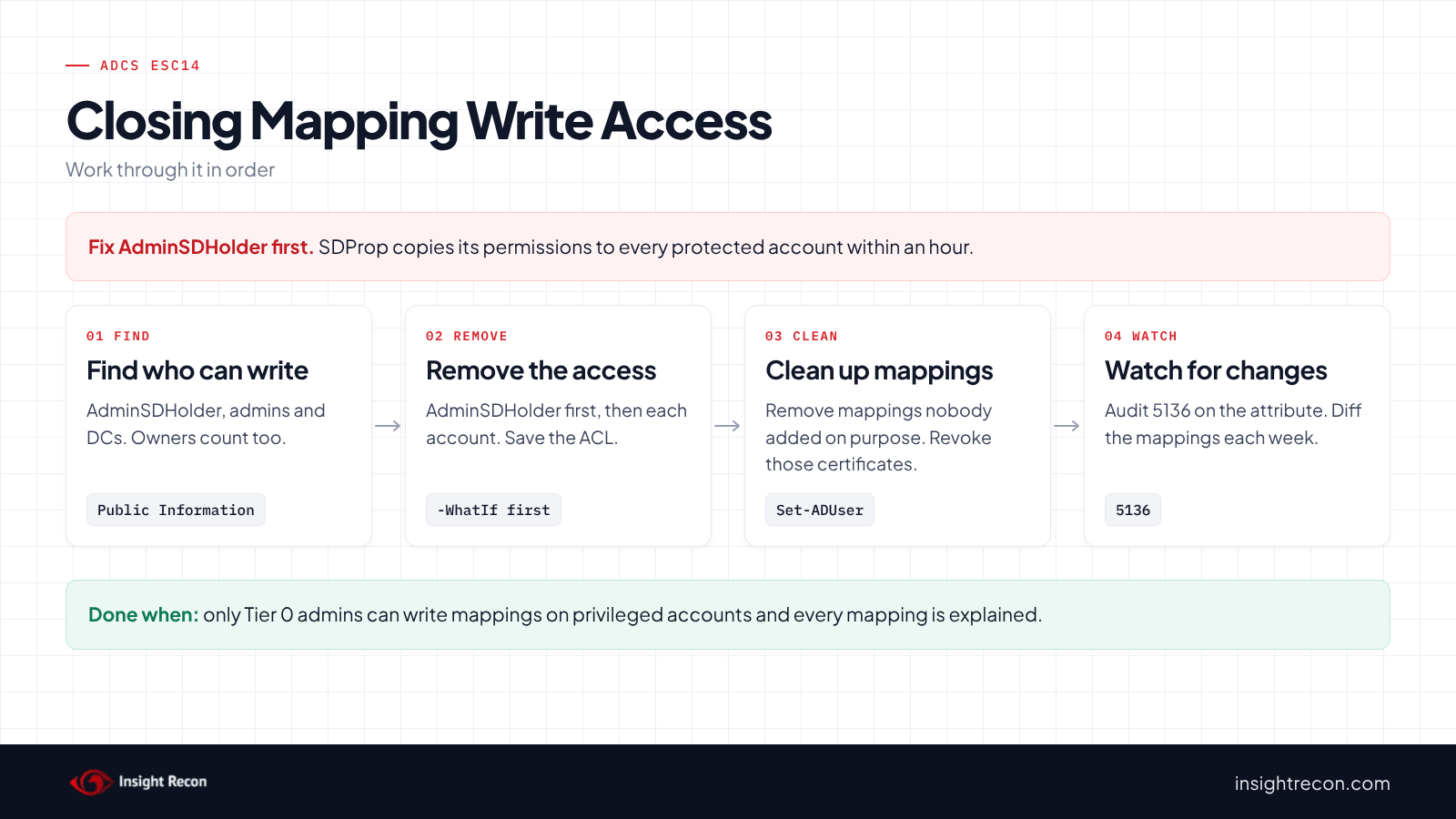
Each script below is a dry run with -WhatIf. Drop that to apply. They need Domain Admins. Change CONTOSO\Helpdesk-Tier1, adm-jsmith and the mapping value to your own.
1. Remove write access on AdminSDHolder first
This removes only the entries that let one principal write the attribute: full control, Write permissions, Write owner, Write all properties, Public Information or the attribute itself. Other entries for that principal stay. It saves the current permissions first and stops if there's nothing to remove.
# Dry run. Drop -WhatIf to apply.
# Needs Domain Admins. Fix AdminSDHolder first if the entry is there, or SDProp copies it back within an hour.
Import-Module ActiveDirectory -ErrorAction Stop
$target    = "CN=AdminSDHolder,CN=System,$((Get-ADDomain).DistinguishedName)"   # or a privileged account's DN
$principal = 'CONTOSO\Helpdesk-Tier1'
$sid = (New-Object System.Security.Principal.NTAccount($principal)).Translate([System.Security.Principal.SecurityIdentifier])
$scope = [guid]::Empty, [guid]'00fbf30c-91fe-11d1-aebc-0000f80367c1', [guid]'e48d0154-bcf8-11d1-8702-00c04fb96050'
$full = [System.DirectoryServices.ActiveDirectoryRights]::GenericAll
$path = "AD:\$target"
$acl = Get-Acl -Path $path -ErrorAction Stop
# Save the current permissions so you can put them back
$acl.Sddl | Set-Content -Path ".\$((Get-ADObject -Identity $target).Name)-acl.sddl"
$rules = $acl.GetAccessRules($true, $false, [System.Security.Principal.SecurityIdentifier]) | Where-Object {
    $_.IdentityReference -eq $sid -and $_.AccessControlType -eq 'Allow' -and (
        (($_.ActiveDirectoryRights -band $full) -eq $full) -or
        ($_.ActiveDirectoryRights -band 'WriteDacl, WriteOwner') -or
        (($_.ActiveDirectoryRights -band 'WriteProperty') -and $_.ObjectType -in $scope))
}
if (-not $rules) { throw "No explicit entry gives $principal write access to altSecurityIdentities on $target." }
$rules | Select-Object ActiveDirectoryRights, ObjectType, InheritanceType
foreach ($r in $rules) { $acl.RemoveAccessRuleSpecific($r) }
Set-Acl -Path $path -AclObject $acl -ErrorAction Stop -WhatIf
What to look for: the dry run lists the entries it would remove. If one of them grants more than the job needs, add back a narrower entry for the attributes the principal really uses. After you apply it on AdminSDHolder, SDProp updates every protected account within the hour.
2. Fix the accounts and domain controllers
Run the same script with $target set to the account or domain controller's DN for any row that isn't on AdminSDHolder. If a row showed a non-default owner, set the owner to Domain Admins on the object's Security tab (Advanced) first.
3. Remove mappings nobody added on purpose
This removes one mapping from one account. It prints the current mappings first and stops if the value isn't there. Treat an unexplained strong mapping on an admin as a possible compromise. Revoke the matching certificate on the CA with certutil -revoke, then review the account's recent sign-ins.
# Dry run. Drop -WhatIf to apply.
# Needs Domain Admins for a protected account. Use Set-ADComputer for a domain controller.
Import-Module ActiveDirectory -ErrorAction Stop
$account = 'adm-jsmith'
$value   = 'X509:<I>DC=com,DC=contoso,CN=Contoso-Issuing-CA<SR>1200000000AABBCCDDEEFF'
$user = Get-ADUser -Identity $account -Properties altSecurityIdentities -ErrorAction Stop
# Note the current mappings so you can put one back
$user.altSecurityIdentities
if ($user.altSecurityIdentities -notcontains $value) { throw "That mapping isn't on $account." }
Set-ADUser -Identity $account -Remove @{ altSecurityIdentities = $value } -ErrorAction Stop -WhatIf
Keep ADCS ESC14 closed
Write access can come back with the next delegation and mappings leave no trace in group reviews. So keep a baseline. This script saves every mapping in the domain and shows what was added or removed since the last run.
# Runs as any domain user. Saves every altSecurityIdentities value in the domain and shows what changed since the last run.
Import-Module ActiveDirectory -ErrorAction Stop
$file = '.\altsecid-baseline.csv'
$now = @(Get-ADObject -LDAPFilter '(altSecurityIdentities=*)' -Properties altSecurityIdentities |
    ForEach-Object { $o = $_; $o.altSecurityIdentities | ForEach-Object { [pscustomobject]@{ Account = $o.Name; Mapping = $_ } } })
if (Test-Path $file) {
    $before = @(Import-Csv -Path $file)
    $seen = @{}; foreach ($b in $before) { $seen["$($b.Account)|$($b.Mapping)"] = $true }
    $kept = @{}; foreach ($m in $now) { $kept["$($m.Account)|$($m.Mapping)"] = $true }
    $now | Where-Object { -not $seen["$($_.Account)|$($_.Mapping)"] } | Select-Object Account, Mapping, @{ n = 'Change'; e = { 'Added' } }
    $before | Where-Object { -not $kept["$($_.Account)|$($_.Mapping)"] } | Select-Object Account, Mapping, @{ n = 'Change'; e = { 'Removed' } }
}
if ($now.Count) { $now | Export-Csv -Path $file -NoTypeInformation } else { 'Account,Mapping' | Set-Content -Path $file }
What to look for: any Added row you can't tie to a smart card or identity system change. Run it weekly, or after any change to AdminSDHolder.
- Audit the attribute. Turn on Audit Directory Service Changes and add a SACL entry for writes to
altSecurityIdentities. Then alert on event 5136 for admin accounts. - Watch AdminSDHolder. Because SDProp copies it, any new permission there reaches every admin within the hour.
- Baseline certificate sign-ins. SpecterOps found no event that shows an explicit mapping was used. Watching enrollment and certificate sign-ins for unusual patterns is the backup.
- Re-run the scan. It also catches new write access on admins and domain controllers.
ADCS ESC14 checklist
- Can only Tier 0 groups write
altSecurityIdentitieson AdminSDHolder? - Are admin accounts and domain controllers free of extra write access?
- Is every admin account owned by Domain Admins or another Tier 0 group?
- Can you explain every mapping on a privileged account?
- Did you revoke certificates behind mappings you removed?
- Is event 5136 logged for changes to the attribute?
- Do you compare mappings against a baseline on a schedule?
A "no" on the first question means someone outside Tier 0 can potentially map a certificate to every admin in the domain.
Compliance mapping
| Framework | Reference | Why it applies |
|---|---|---|
| MITRE ATT&CK | T1649, T1098 | Steal or Forge Authentication Certificates (T1649) and Account Manipulation (T1098). A new mapping lets a held certificate sign in as the admin. |
| CIS Controls v8 | Control 4, Control 6 | Secure configuration of enterprise assets and access control management. Only Tier 0 should control how admins sign in. |
| NIST CSF 2.0 | PR.AA-02, PR.AA-05 | Identities are bound to credentials and access follows least privilege. A rogue mapping binds the wrong credential to an admin. |
| ANSSI | vuln_privileged_members_perm | ANSSI's control point for dangerous permissions on privileged accounts. |
ADCS ESC14 FAQ
What is ADCS ESC14?
Write access to a privileged account's certificate mappings. Anyone with it can potentially map their own certificate and sign in as that account.
Doesn't Full Enforcement fix this?
No. Full Enforcement only blocks weak mappings. A strong mapping written on the account still works.
Why does Write Public Information matter?
The altSecurityIdentities attribute is part of the Public Information property set. So granting that set also grants write access to mappings.
Why did my change on an admin account come back?
SDProp resets admin accounts to match AdminSDHolder every 60 minutes by default. Fix AdminSDHolder first.
Does Insight Recon check for ADCS ESC14?
Yes. The free scan includes Weak Certificate Mapping Write Access in ADCS (ESC14), along with the other ADCS checks.
See who can map a certificate to your admins.
It runs from any Windows machine that can reach your DCs, with a standard domain account. Every core AD check is free for one domain.
Not ready to scan?
AD Signal is our monthly look at what's changing in AD security and how real domains score. Read the latest report.
References
- KB5014754: Certificate-based authentication changes on Windows domain controllers
- Microsoft Learn: Alt-Security-Identities attribute
- Public-Information property set (Microsoft Learn)
- Appendix C: Protected Accounts and Groups in Active Directory
- Event 5136, a directory service object was modified
- SpecterOps: ADCS ESC14 Abuse Technique
- MITRE ATT&CK: T1649 Steal or Forge Authentication Certificates
- MITRE ATT&CK: T1098 Account Manipulation