

Who Owns Your Domain Controllers? The Ownership Gap Attackers Love.
In Active Directory, the owner of an object can rewrite its permissions at will. When Domain Controller ownership drifts to a service account or an individual user, it opens a privilege escalation path that standard permission audits miss entirely. Here is how attackers abuse non-standard Domain Controller ownership, how to find it, and how to close the gap for good.
Quick Summary
In Active Directory, the owner of an object can modify its permissions at any time, including granting full control to other accounts. Domain Controller objects should only be owned by the most trusted security principals in the domain. Non-standard Domain Controller ownership creates a privilege escalation path that standard permission audits often miss entirely.
| Priority | Moderate |
| Risk | A non-standard owner on a Domain Controller object can give an attacker full control over DC permissions |
| Impact | Privilege escalation, unauthorized access to sensitive data, long term persistence, and tampering |
| Exploitation | An attacker who owns a DC object can modify its DACL to grant elevated rights, including DCSync |
| Fix | Ensure DC objects are owned by Domain or Enterprise Admins, and audit/alert for unexpected changes |
What is a Domain Controller Owner?
Every object in Active Directory has an owner. Ownership is not just an administrative label, it’s a security-relevant attribute that determines who has the implicit right to modify the object’s access control list (ACL), regardless of the permissions explicitly granted.
Because these objects represent the most sensitive infrastructure in any Windows environment, their ownership should be held exclusively by Domain Admins or Enterprise Admins. Any deviation from this is considered non-standard and warrants immediate investigation.
Non-standard ownership can appear in an environment for several reasons: improper account provisioning during DC deployment, unintended delegation during administrative work, scripted automation that ran under a service account context, or deliberate attacker activity following an initial compromise.
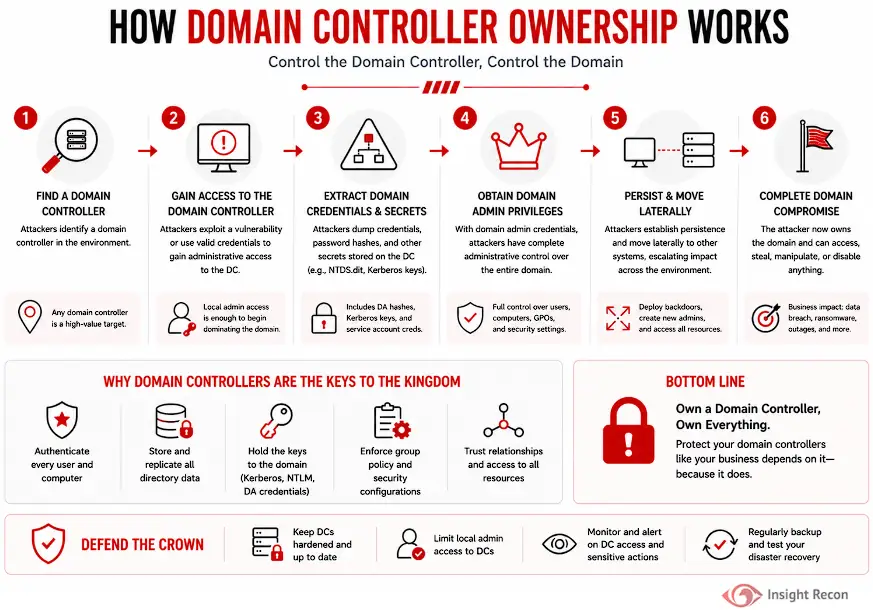
Why Domain Controller Ownership Matters
The owner of a Domain Controller object can modify its DACL at any time. This creates a direct path from a low-privilege foothold to full domain compromise. The misconfiguration is particularly dangerous because it is invisible to tools and reviews that only examine granted permissions.
Common risks include:
- Privilege escalation to Domain Admin
An attacker can grant themselves full control of the domain controller object, enabling credential resets, secret replication, or DCSync attacks. - Unauthorized access to sensitive data
They can modify permissions to read restricted data like password hashes, Kerberos keys, and replication info. - Long-term persistence
Ownership changes are rarely audited, allowing attackers to maintain hidden access even after cleanup. - Replication and Group Policy tampering
Control over the DC object allows manipulation of replication or Group Policy, impacting the entire domain. - Evasion of security reviews
Most Active Directory hardening checklists focus on explicit ACL entries. Object ownership is frequently overlooked, letting this misconfiguration survive audits and remediation.
Real-World Context
Non-standard DC object ownership typically arises when service accounts, automation tools, or third-party identity platforms create or modify Domain Controllers without resetting ownership. In compromised environments, attackers often check for this and exploit it to shortcut the entire privilege escalation chain.
How Attackers Exploit Domain Controller Ownership
Once an attacker controls an account that owns a DC object, the escalation path is direct and requires no special tooling beyond standard AD management interfaces.
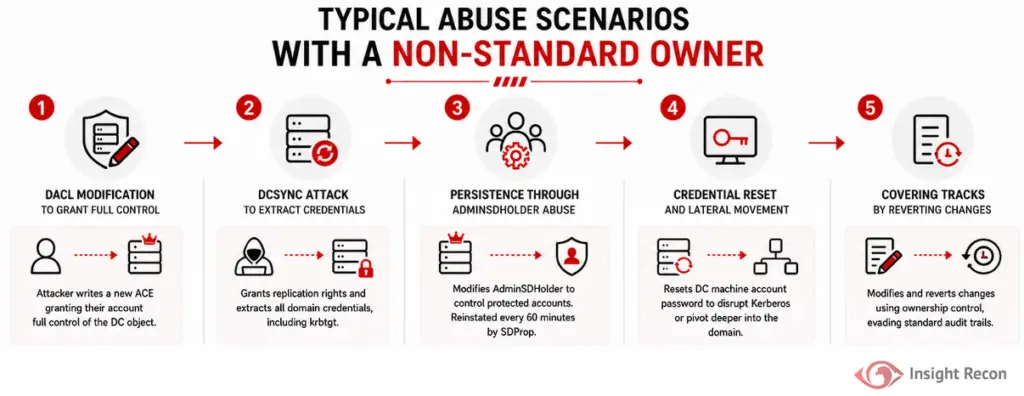
Typical abuse scenarios include:
- DACL modification to grant full control
Using built-in Windows tools or frameworks such as PowerView, the attacker identifies non-standard ownership and then writes a new ACE to the DC object granting their account (or a backdoor account) full control over the object. - DCSync attack to extract all domain credentials
With full control of the DC object, the attacker can grant themselves additional permissions and request a full replication stream from a domain controller, retrieving all password hashes in the domain. - Persistence through AdminSDHolder abuse
Attackers modify the AdminSDHolder template permissions to maintain persistent access. - Credential reset and lateral movement
Full control over a DC object includes the ability to reset the machine account password. This can be used to disrupt Kerberos authentication for that DC or to pivot further into domain controller infrastructure. - Covering tracks by reverting changes
Because the attacker controls ownership, they can modify and revert permission changes without leaving standard audit trails, making detection during and after the attack significantly harder.
How to Detect Non-Standard Domain Controller Ownership
Detection requires querying object ownership, which is separate from permission audits and should be part of standard Active Directory hygiene reviews.
PowerShell Method
Run the following command from an elevated PowerShell prompt:
Get-ADDomainController -Filter * | ForEach-Object { [PSCustomObject]@{DomainController=$_.HostName; Owner=(Get-Acl "AD:$($_.ComputerObjectDN)").Owner } } | Format-Table -AutoSize
What it does: This lists every domain controller alongside the account that owns its AD object.
How to interpret results: Expected values are Domain Admins or Enterprise Admins. Any other value, including individual administrator accounts, service accounts, or third-party tool accounts, should be treated as non-standard and investigated.

Active Directory Users and Computers (ADUC)
For manual inspection of individual accounts:
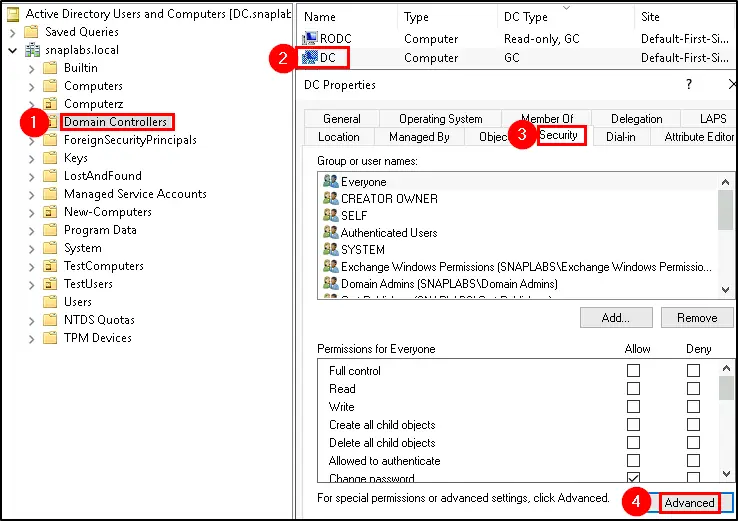
- Open Active Directory Users and Computers
- Expand the Domain Controllers organizational unit
- Right-click a Domain Controller and select Properties
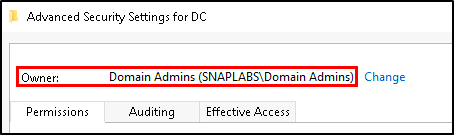
- Navigate to the Security tab, then select Advanced
- The Owner field at the top of the Advanced Security Settings window shows the current object owner
How Insight Recon Identifies This Risk
Insight Recon’s Active Directory security assessment surfaces Domain Controller objects with non-standard owners across the entire domain within minutes.
It also provides:
- Every Domain Controller object with an owner outside of Domain Admins or Enterprise Admins
- Deviations from default permissions and established security baselines
- Context on the owning account, including privilege level and group membership
- Risk-based prioritization so the most dangerous misconfigurations are addressed first
- Actionable remediation guidance needed to correct ownership
You gain immediate visibility into object control across your Active Directory, with results delivered in minutes, not hours.
Remediating Non-Standard Ownership
Prerequisites
Before making any ownership changes:
- Document the current owner of each affected DC object for your audit records.
- Confirm that no critical services or automation tools depend on the non-standard owning account.
- Ensure Domain Admin or equivalent privileges are available to make the change.
- Schedule the change during a maintenance window if the environment has active automation touching DC objects.
PowerShell Method
From an elevated PowerShell prompt, run the following command. Replace the username components to match your environment:
					# Reset DC object ownership to Domain Admins
# Replace DC-NAME with the hostname of the domain controller
$dc = "DC-NAME"
$dn = (Get-ADComputer $dc -Properties distinguishedName).distinguishedName
$acl = Get-Acl "AD:$dn"
$acl.SetOwner([System.Security.Principal.NTAccount]"$((Get-ADDomain).NetBIOSName)\Domain Admins")
Set-Acl -AclObject $acl "AD:$dn"
Active Directory Users and Computers (ADUC)
- Open Active Directory Users and Computers
- Expand the Domain Controllers OU and open Properties on the affected DC
- Navigate to Security, then Advanced
- Select Change next to the Owner field
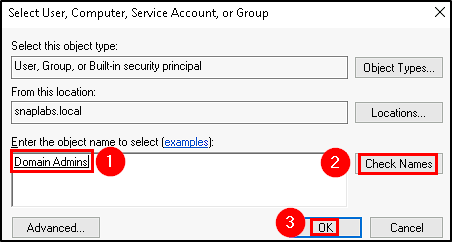
- In the object name field, enter Domain Admins and select Check Names to resolve the account
- Select OK, then Apply to save the change
- Repeat for each affected Domain Controller
Preventing Ownership Drift Going Forward
Fixing existing exposure is the first step. Preventing the misconfiguration from reappearing requires policy controls and ongoing visibility.
- Ongoing Ownership Audits: Audit DC object ownership regularly as part of AD security reviews.
- Alerting on Ownership Changes: Configure auditing and alerting for changes to the Owner attribute of any DC object. Event ID 5136 (Directory Service Object Modified) will capture these changes when object-level auditing is enabled.
- Provisioning Process Controls: Ensure provisioning uses proper admin accounts and verify ownership afterward.
- Administrator Training: Train admins that ownership of critical objects must be correct.
- Periodic Baseline Comparison: Maintain a baseline of expected ownership and check for drift periodically.
Quick Validation Checklist
Can you confidently answer “yes” to all of these?
- Are your Domain Controller objects owned by Domain Admins or Enterprise Admins?
- Do you have a documented baseline of DC object owners that is reviewed periodically?
- Do ownership changes on Domain Controller objects generate an alert?
- Do Administrators understand that changing DC ownership requires explicit approval?
If any of these are unclear, your environment may be exposed to ownership-based privilege escalation.
Risk & Compliance Mapping
Business Impact: Unauthorized privilege escalation, lateral movement, long-term attacker persistence, and failed compliance audits.
| Framework | Reference |
|---|---|
| NIST CSF | PR.AC-1 (Identity Management and Authentication), PR.AC-4 (Access Permissions and Authorizations) |
| CIS Controls | Control 4 (Controlled Use of Administrative Privileges), Control 16 (Account Monitoring and Control) |
| MITRE ATT&CK | T1098 (Account Manipulation), T1078 (Valid Accounts) |
| ANSSI | Dangerous Permissions on Domain Controller Objects [vuln_permissions_dc] |
| STIG | V-243481, V-205742 |
| Microsoft Security Baselines | Domain Controller objects must maintain default ownership by Domain Admins or Enterprise Admins. Non-standard ownership is explicitly flagged as a security risk in Microsoft hardening guidance. |
Frequently Asked Questions
No. This typically indicates misconfiguration or unauthorized modification. However, in hybrid environments, some automation may be required for functionality.
No. Object ownership is not modified by Group Policy processing or in-place upgrades. Ownership only changes when an action explicitly modifies it.
No, as long as the existing permission entries on the DC object remain intact. Correcting ownership to Domain Admins does not remove any granted rights or modify the DACL.
Yes. Permission delegation and ownership are separate. You can grant specific accounts or groups read or write access to a DC object through explicit ACL entries without altering the owner. However this should be done intentionally and with heavy scrutiny.
Close the Gap Before It's Exploited
Non-standard Domain Controller ownership is easy to overlook and straightforward for attackers to leverage. Insight Recon identifies every DC object with unexpected ownership and gives you the context to understand the risk before an attacker gets there first.
See exactly where your Active Directory is exposed and what to fix first.