ADCS ESC7: Find Who Can Manage Your Certificate Authority
ADCS ESC7 is a certificate authority that grants Manage CA or Manage Certificates to people who shouldn't have them. Manage CA can change how the CA behaves, including turning on the setting behind ESC6. Manage Certificates can approve requests that were supposed to wait for a human. This post shows you how to find who holds those rights on each CA, check whether anything was already changed and narrow the rights to your PKI admins.
| Priority | High. Manage CA can potentially reconfigure the CA to issue certificates for any account |
|---|---|
| What decides it | Manage CA or Manage Certificates held by anyone other than Administrators, Domain Admins or Enterprise Admins |
| Who's affected | CAs where rights were handed to a help desk group, a service account or a single admin's daily account |
| Fix | Limit both rights to a small PKI admin group, keep the CA's local Administrators small and check the CA's settings |
Check it now: who can manage each of your CAs?
Import-Module ActiveDirectory -ErrorAction Stop
$pks = "CN=Public Key Services,CN=Services,$((Get-ADRootDSE).configurationNamingContext)"
foreach ($ca in Get-ADObject -SearchBase "CN=Enrollment Services,$pks" -LDAPFilter '(objectClass=pKIEnrollmentService)' -Properties dNSHostName) {
    try {
        $reg = [Microsoft.Win32.RegistryKey]::OpenRemoteBaseKey('LocalMachine', $ca.dNSHostName)
        $bytes = $reg.OpenSubKey("SYSTEM\CurrentControlSet\Services\CertSvc\Configuration\$($ca.Name)").GetValue('Security')
        $sd = [System.Security.AccessControl.RawSecurityDescriptor]::new([byte[]]$bytes, 0)
    } catch {
        [pscustomobject]@{ CA = $ca.Name; Principal = "couldn't read: $($_.Exception.Message)"; Rights = ''; Expected = '' }
        continue
    }
    foreach ($ace in $sd.DiscretionaryAcl) {
        # 0x1 is Manage CA, 0x2 is Manage Certificates
        $rights = @()
        if ($ace.AccessMask -band 0x1) { $rights += 'Manage CA' }
        if ($ace.AccessMask -band 0x2) { $rights += 'Manage Certificates' }
        if (-not $rights -or $ace.AceQualifier -ne 'AccessAllowed') { continue }
        $sid = $ace.SecurityIdentifier
        try { $name = $sid.Translate([System.Security.Principal.NTAccount]).Value } catch { $name = $sid.Value }
        [pscustomobject]@{
            CA        = $ca.Name
            Principal = $name
            Rights    = $rights -join ', '
            # Administrators, SYSTEM, Domain Admins, Enterprise Admins
            Expected  = $sid.Value -in 'S-1-5-32-544', 'S-1-5-18' -or $sid.Value -match '-51[29]$'
        }
    }
}
Runs with the ActiveDirectory module. It finds every enterprise CA in AD, reads the CA's own permissions from its registry and lists everyone who holds Manage CA or Manage Certificates. It matches groups by SID. That way it works in any language. Expected is True for Administrators, SYSTEM, Domain Admins and Enterprise Admins. If it says couldn't read, run it on the CA as an administrator.
You checked one setting. The free scan checks the rest of your on-prem AD in a few minutes.
Nothing gets installed on your domain controllers. Only HTTPS leaves your network.
What ADCS ESC7 is
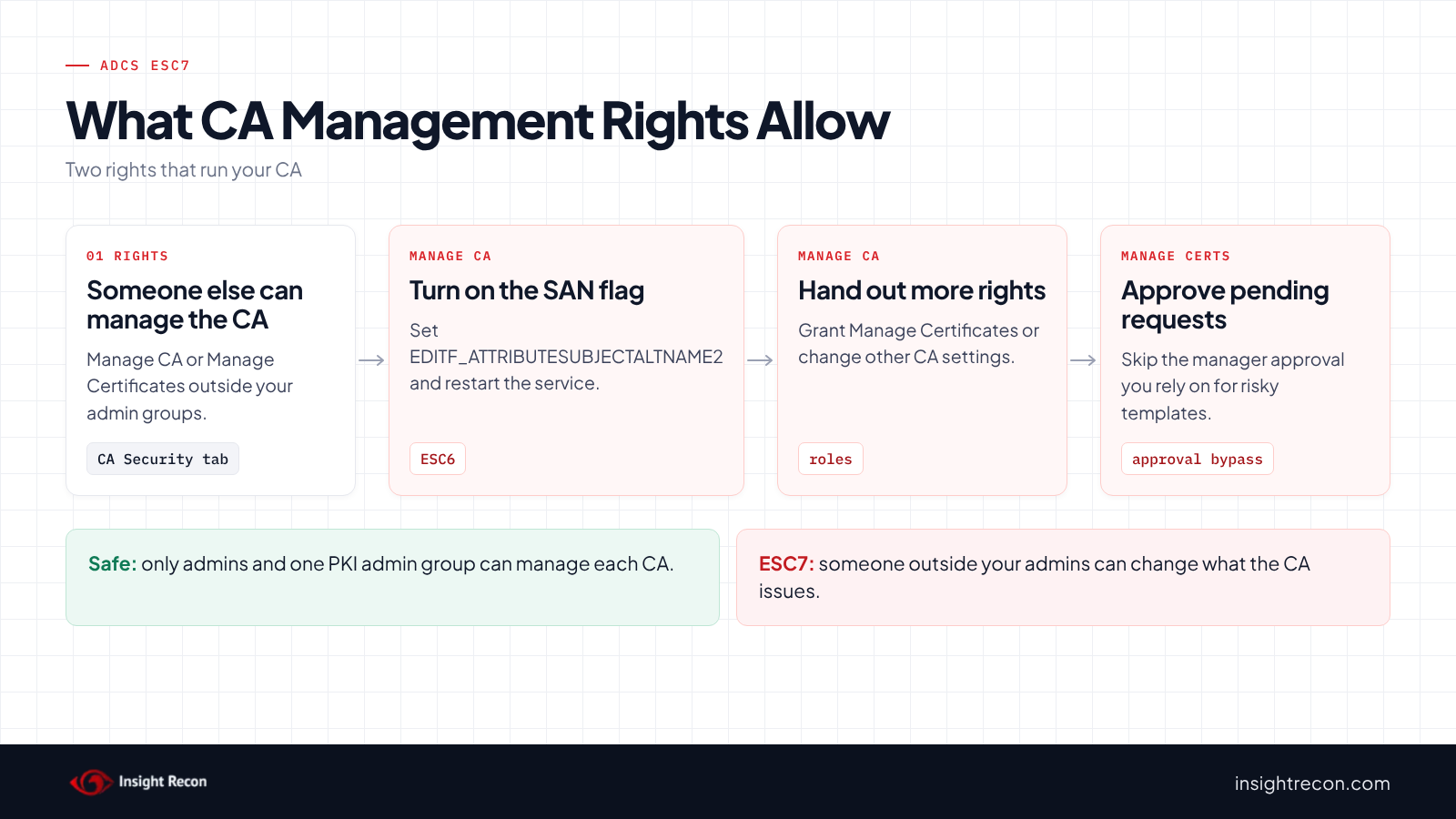
A certificate authority has its own permissions, separate from AD. You see them on the Security tab of the CA's properties in the Certification Authority console. Two of them run the CA. Microsoft's guide to role-based administration describes them:
- Manage CA (CA administrator). Configures and maintains the CA, "includes the ability to assign all other CA roles," and can stop and start the service.
- Issue and Manage Certificates (certificate manager, also called CA officer). Approves, denies and revokes certificate requests.
On an enterprise CA, Microsoft says "local administrators, enterprise administrators, and domain administrators are CA administrators by default." ESC7 is when anyone beyond that holds either right. SpecterOps named it in their 2021 Certified Pre-Owned research.
Why ADCS ESC7 is dangerous
Manage CA can turn on ESC6
First, Manage CA can change the CA's configuration. Microsoft's Defender for Identity guidance says a holder "can modify CA settings, such as adding the User specifies SAN flag." That's EDITF_ATTRIBUTESUBJECTALTNAME2, the setting behind our ADCS ESC6 post. Because Manage CA can also restart the service, the holder can make the change take effect. From there, any requester can potentially put another account's name in a certificate wherever the SID extension doesn't stop it. In addition, Manage CA can grant Manage Certificates to anyone.
Manage Certificates skips manager approval
Manager approval is one of the standard fixes for risky templates. In other words, it sends each request to a pending queue for a person to review. Microsoft's guidance says that a non-admin with Manage Certificates "can approve pending certificate requests, bypassing the Manager approval requirement." SpecterOps notes this right alone can't compromise the domain. However, it removes a safeguard you may be relying on.
Both are admin rights on your PKI
For that reason, our check library says these rights "should be treated as Tier 0 administrative privileges." MITRE ATT&CK tracks the certificate abuse as T1649, Steal or Forge Authentication Certificates and the permission changes as T1098, Account Manipulation.
Find ESC7 rights on your CAs
The quick check lists who holds each right. The scripts below check whether a holder may already have used them.
Check ADCS ESC7 settings a holder may have changed
For each CA, this shows whether the ESC6 flag is on, whether the CA publishes the SubCA template and when its AD object last changed. Publishing or removing a template changes that date. It runs as a domain user with the AD module and certutil.
Import-Module ActiveDirectory -ErrorAction Stop
$pks = "CN=Public Key Services,CN=Services,$((Get-ADRootDSE).configurationNamingContext)"
foreach ($ca in Get-ADObject -SearchBase "CN=Enrollment Services,$pks" -LDAPFilter '(objectClass=pKIEnrollmentService)' -Properties dNSHostName, certificateTemplates, whenChanged) {
    $config = "$($ca.dNSHostName)\$($ca.Name)"
    $editFlags = certutil -config $config -getreg policy\EditFlags 2>&1 | Out-String
    [pscustomobject]@{
        CA                 = $config
        ArbitrarySan       = $editFlags -match 'EDITF_ATTRIBUTESUBJECTALTNAME2'
        PublishesSubCA     = $ca.certificateTemplates -contains 'SubCA'
        TemplatesChanged   = $ca.whenChanged
        PublishedTemplates = ($ca.certificateTemplates | Sort-Object) -join ', '
    }
}
What to look for: ArbitrarySan set to True, or PublishesSubCA set to True on an issuing CA. Neither is normal. Also, check whether TemplatesChanged is a date nobody can explain.
Check who received subordinate CA certificates
Run this on each CA. It lists certificates issued from the SubCA template.
# Run on the CA as a CA administrator or certificate manager.
# Subordinate CA certificates should only ever go to your CA administrators.
certutil -view -restrict 'CertificateTemplate=SubCA,Disposition=20' -out 'RequestID,RequesterName,CommonName,NotBefore,SerialNumber' csv
What to look for: any requester who isn't one of your CA administrators. A subordinate CA certificate should be rare, planned and documented. Note the SerialNumber of anything you can't explain.
Review the CA's own logs
If the CA's audit filter was already on, its Security log records changes to CA permissions (event 4882), certificate manager settings (4890) and configuration entries (4891). Microsoft's Securing PKI events list rates 4882 and 4890 as High. Look for entries made by anyone outside your PKI admins.
Check ADCS ESC7 with Insight Recon
The free scan includes Risky Certificate Authority Access Control in ADCS (ESC7), a High check. For each enterprise CA, it reads the CA's own permissions from its registry, the same way our ESC6 check reads its settings. It flags anyone who holds Manage CA or Manage Certificates apart from Administrators, SYSTEM, Domain Admins and Enterprise Admins. Domain Admins only count from the scanned domain, the forest root and the CA server's own domain. It also honors deny entries that name the account itself, Everyone or Authenticated Users. The finding is Critical when a broad group such as Authenticated Users or Domain Users holds Manage CA. It drops to Moderate when everyone listed has only Manage Certificates, none of them is a broad group and the CA publishes no template a certificate manager could turn into a sign-in. That means no enrollment agent template and none that lets the requester supply the subject, like Subordinate Certification Authority. The finding comes with the Hacker Insight, remediation steps and compliance mappings.
Know what the ADCS ESC7 check doesn't decide
Some things are still yours to check. A delegated PKI admin group will show up as a finding. Keep it if it's intentional, small and treated as Tier 0. Reading the CA's permissions also needs network access to the CA. The result names any CA the scan couldn't read, so run the quick check against those. Also, the check doesn't look at who is in the CA server's local Administrators group. Those members are CA administrators too.
Related ADCS checks beyond ESC7
- Certificate Authority Allows Arbitrary SAN in ADCS (ESC6), the setting Manage CA can turn on. Our ADCS ESC6 post covers it.
- Vulnerable PKI Object Access Control in ADCS (ESC5), the same problem on the CA's AD objects and server. Our ADCS ESC5 post covers it.
- Unrestricted certificate template modification rights in ADCS (ESC4), the same problem on templates. Our ADCS ESC4 post covers it.
You can see what the findings look like in our sample report. The full list is in our check library.
Find out who can run your CAs, plus the other ADCS attack paths.
It runs from any Windows machine that can reach your DCs, with a standard domain account. Every core AD check is free for one domain.
Before you change CA permissions
Check the CA's settings for changes first. Then decide who should hold each right and move everyone else off.
Look for signs it was already used
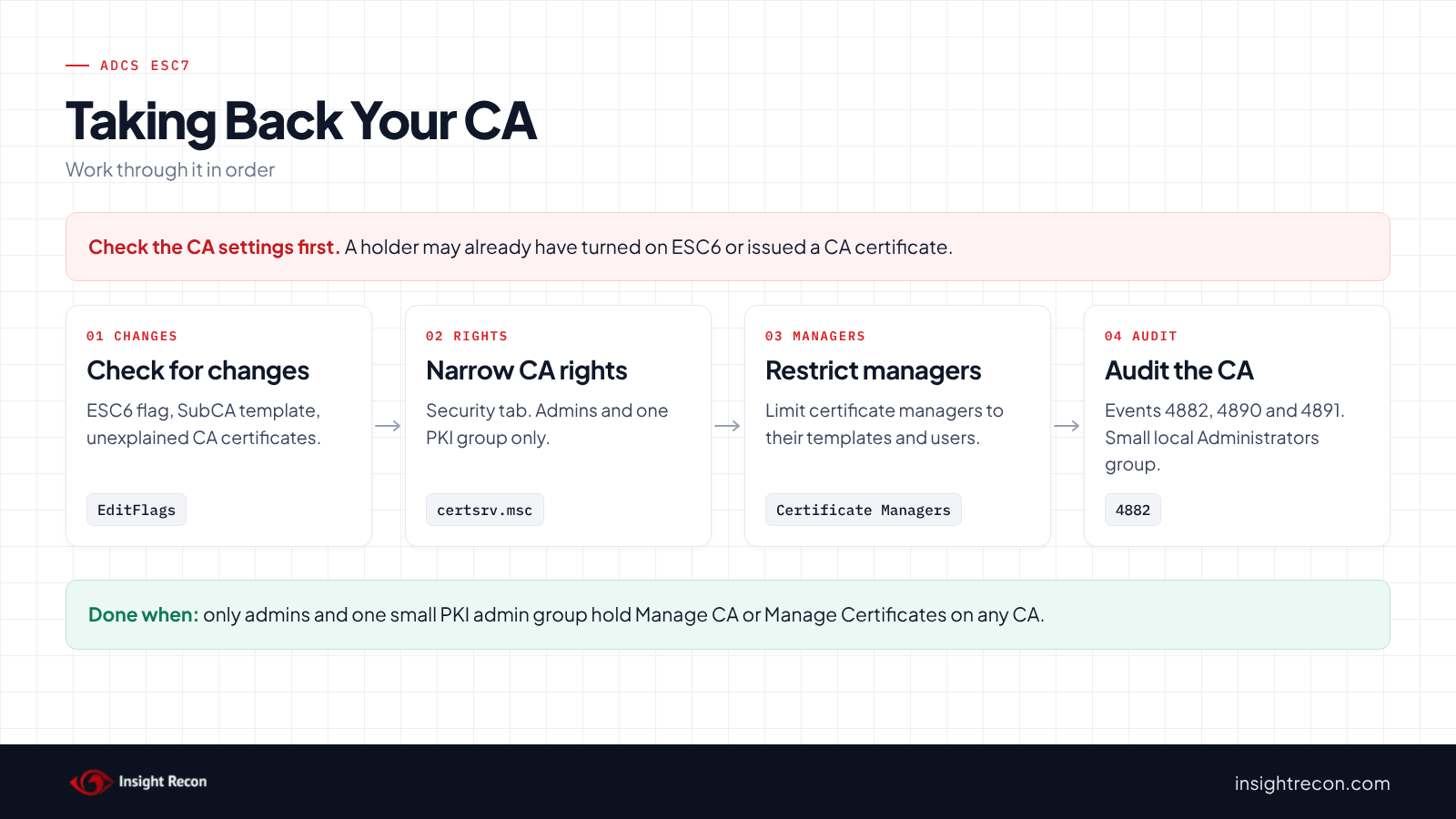
An ESC6 flag nobody remembers turning on, a SubCA template on an issuing CA or an unexplained subordinate CA certificate may mean someone already used these rights. In that case, treat it as a possible domain compromise first.
Decide who holds each right
Microsoft's guidance is to assign CA roles to groups rather than individual users. It also says the CA "is more secure when each user is assigned to only one role." For example, a typical setup is one small PKI admin group with Manage CA and, if you use manager approval, a separate group with Manage Certificates. Both groups are Tier 0. Their members should use separate admin accounts.
Remember the local Administrators group
Microsoft notes that members of the CA server's local Administrators group "can assume administrative authority over all other CA roles." As a result, narrowing Manage CA doesn't help if half the IT team is a local admin on the CA server. Check that group too.
Fix ADCS ESC7 safely
1. Undo anything a holder changed
If the ESC6 flag is on, clear it with the fix in our ADCS ESC6 post. If the SubCA template is published on an issuing CA and nobody needs it, remove it from the CA's Certificate Templates list. Revoke any certificate you can't explain with certutil -revoke, then publish a new CRL with certutil -crl.
2. Narrow Manage CA and Manage Certificates
CA permissions live in the CA's own configuration, so change them in the Certification Authority console (certsrv.msc). You need Manage CA, or local administrator rights on the CA:
- Right-click the CA, open Properties and go to the Security tab.
- Take a screenshot of the current entries first. That way you can put them back.
- For each principal that shouldn't be there, clear Manage CA and Issue and Manage Certificates. Leave Read and Request Certificates as they are, since clients need those to enroll.
- Add your PKI admin group with the rights it needs, then click Apply.
Re-run the quick check afterwards to confirm only the expected groups remain.
3. Restrict what certificate managers can approve
If you use manager approval, set certificate manager restrictions on the Certificate Managers tab of the CA's properties. Microsoft's role guide lists this as a CA administrator task. It limits each manager to the templates and users they're responsible for.
4. Shrink the CA server's local Administrators group
Finally, keep it to Tier 0 admins only. Treat the CA server the way you treat a domain controller.
Keep ADCS ESC7 closed
- Turn on the CA's audit filter. With "Change CA security settings" included, the CA logs permission changes (4882), audit filter changes (4885) and certificate manager changes (4890). Microsoft rates all three as High.
- Log CA configuration changes. With "Change CA configuration" included, the CA logs configuration entries (4891), including EditFlags.
- Watch the CA server's Administrators group. Changes to it show up as event 4732 on the CA server.
- Re-run the scan. It flags the CA again if anyone else gets either right.
ADCS ESC7 checklist
- Do only Administrators, Domain Admins, Enterprise Admins and one PKI admin group hold Manage CA?
- Is Manage Certificates limited to a small, named group, or nobody if you don't use approval?
- Are CA roles assigned to groups rather than individual users?
- Is the CA server's local Administrators group limited to Tier 0 admins?
- Have you confirmed the ESC6 flag is off and the SubCA template is unpublished on issuing CAs?
- Does the CA's audit filter cover security and configuration changes?
- Did you check every CA in the forest?
A "no" on the first question means someone outside your admins can potentially reconfigure the CA to issue certificates for anyone.
Compliance mapping
| Framework | Reference | Why it applies |
|---|---|---|
| MITRE ATT&CK | T1649, T1098 | Steal or Forge Authentication Certificates for certificates issued through a reconfigured CA. Account Manipulation for changing CA roles and permissions. |
| CIS Controls v8 | Control 4, Control 6 | Secure configuration of enterprise assets and access control management. Only PKI administrators should manage the CA. |
| NIST CSF 2.0 | PR.AA-05 | Access permissions follow least privilege. Manage CA is admin access to every certificate the CA issues. |
ADCS ESC7 FAQ
What is ADCS ESC7?
A CA that grants Manage CA or Manage Certificates to someone other than its administrators. Those rights can change what the CA issues or approve requests that should wait.
Who holds Manage CA by default?
On an enterprise CA, local Administrators, Domain Admins and Enterprise Admins, according to Microsoft.
Is Manage Certificates dangerous on its own?
Not by itself. It approves pending requests, which bypasses manager approval wherever you rely on it.
Where do I change CA permissions?
On the Security tab of the CA's properties in the Certification Authority console. They aren't AD permissions.
Does Insight Recon check for ADCS ESC7?
Yes. The free scan includes Risky Certificate Authority Access Control in ADCS (ESC7), along with the other ADCS checks.
See who can reconfigure your certificate authorities.
It runs from any Windows machine that can reach your DCs, with a standard domain account. Every core AD check is free for one domain.
Not ready to scan?
AD Signal is our monthly look at what's changing in AD security and how real domains score. Read the latest report.
References
- Microsoft Learn: Implement Role-Based Administration
- SpecterOps: Certified Pre-Owned
- Microsoft Learn: Certificates security posture assessment (ESC7)
- MITRE ATT&CK: T1649 Steal or Forge Authentication Certificates
- Microsoft Learn: Securing PKI, Appendix A: Events to Monitor
- Microsoft Learn: certutil
- MITRE ATT&CK: T1098 Account Manipulation