ADCS ESC4: Find and Fix Certificate Templates Anyone Can Change
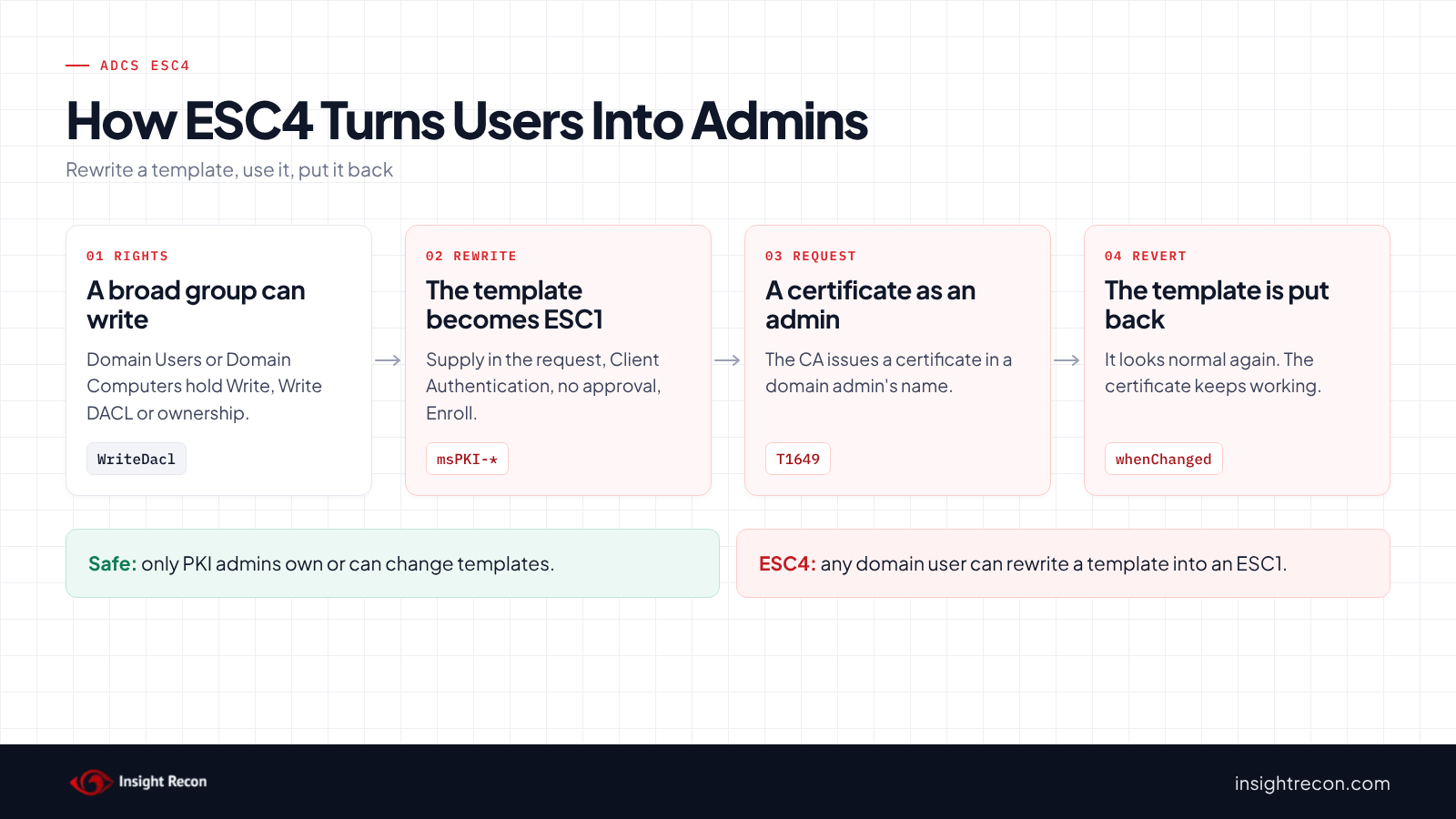
ADCS ESC4 is a certificate template that broad groups have permission to change. Whoever can change a template decides what certificates it issues. Any domain user with that right can potentially turn a harmless template into an ESC1 for a few minutes, get a certificate as a domain admin and change it back. This post shows you how to find who can change your templates, check whether anything was already changed and take those rights back without breaking enrollment.
| Priority | Critical. Anyone who can change a template can potentially make it issue a certificate for any user |
|---|---|
| What decides it | Owner, Full Control, Write, Write Owner or Write DACL on a template held by a broad group |
| Who's affected | Forests where template permissions were widened for an app, a delegation or a quick fix |
| Fix | Take the change rights back, make Enterprise Admins the owner and check nothing was already changed |
Check it now: can broad groups change any certificate template?
Import-Module ActiveDirectory -ErrorAction Stop
$pks = "CN=Public Key Services,CN=Services,$((Get-ADRootDSE).configurationNamingContext)"
# Everyone, NETWORK, INTERACTIVE, Anonymous, Authenticated Users, This Organization, Users
$low = 'S-1-1-0', 'S-1-5-2', 'S-1-5-4', 'S-1-5-7', 'S-1-5-11', 'S-1-5-15', 'S-1-5-32-545'
# Domain Users, Domain Guests and Domain Computers of any domain
$lowRid = '^S-1-5-21-\d+-\d+-\d+-51[345]$'
$control = [System.DirectoryServices.ActiveDirectoryRights]'WriteProperty, WriteDacl, WriteOwner'
Get-ADObject -SearchBase "CN=Certificate Templates,$pks" -LDAPFilter '(objectClass=pKICertificateTemplate)' -Properties nTSecurityDescriptor |
    Where-Object {
        $sd = $_.nTSecurityDescriptor
        $owner = $sd.GetOwner([System.Security.Principal.SecurityIdentifier]).Value
        ($owner -in $low -or $owner -match $lowRid) -or
        @($sd.GetAccessRules($true, $true, [System.Security.Principal.SecurityIdentifier]) |
            Where-Object { $_.AccessControlType -eq 'Allow' -and ($_.IdentityReference.Value -in $low -or $_.IdentityReference.Value -match $lowRid) -and (($_.ActiveDirectoryRights -band $control) -ne 0) }).Count -gt 0
    } | Select-Object Name
Runs as any domain user with the ActiveDirectory module. It lists templates that a broad group owns or can write to, change permissions on or take ownership of. It finds the groups by their well-known SIDs. That way it works in any language. No output means none of your templates match. The script further down also shows custom groups and when each template last changed.
You checked one setting. The free scan checks the rest of your on-prem AD in a few minutes.
Nothing gets installed on your domain controllers. Only HTTPS leaves your network.
What ADCS ESC4 is
Every certificate template is an object in AD, in the forest's Configuration partition. Like any AD object, it has an owner and permissions. Those permissions decide who can change the template's settings: who can enroll, what the certificate is for, where the subject comes from and whether a CA manager has to approve it. SpecterOps named weak template permissions ESC4 in their 2021 Certified Pre-Owned research.
SpecterOps's ESC4 documentation lists five rights that make a template ESC4 when a broad group holds them:
- Owner. The owner has implicit full control and can edit any property.
- Full Control. Can edit any property.
- Write. Can edit the template's properties.
- Write Owner. Can make itself the owner.
- Write DACL. Can change the permissions, including granting itself Write.
Broad groups means Domain Users, Domain Computers, Authenticated Users, Everyone and similar. Microsoft's Defender for Identity guidance covers the same problem in two assessments: one for the template's permissions and one for its owner. In both, a built-in unprivileged group holds rights such as Full Control or Write DACL.
Why ADCS ESC4 is dangerous
Anyone who can change a template can make it an ESC1
An attacker with write access doesn't need a vulnerable template. Instead, they make one. For example, they turn on "Supply in the request", add Client Authentication, turn off manager approval and grant themselves Enroll. As a result, that template is now an ESC1. Then they request a certificate in a domain admin's name and sign in with it. Microsoft's Defender for Identity guidance says that an adversary can "introduce a template misconfiguration, escalate privileges, and compromise the entire domain." MITRE ATT&CK tracks the result as T1649, Steal or Forge Authentication Certificates. Our ADCS ESC1 post covers what that template then allows.
The change can be undone afterwards
Once the certificate is issued, the attacker can put the template back the way it was. As a result, a later review of the template finds nothing wrong. However, the certificate keeps working until it expires or is revoked. A password reset doesn't touch it. Only the CA's issued certificates, the template's change time and any audit logs you already had turned on show what happened.
Domain Computers is a common culprit
SpecterOps's example is Domain Computers with Full Control or Write DACL on a template. In that case, an attacker with control of any domain-joined computer can make the change. Because new computers can often be added by any user, that may mean any user. Our MachineAccountQuota post covers that setting.
Find ESC4 permissions on your templates
Templates live in the forest's Configuration partition, so one run covers the whole forest. The first script runs as any domain user with the AD module. The second runs on the CA.
List who can change each ADCS ESC4 template
This lists every template whose owner isn't an admin or where anyone other than SYSTEM, Administrators, Domain Admins and Enterprise Admins can write to it, change its permissions or take ownership. It also shows which CAs publish it and when it last changed.
Import-Module ActiveDirectory -ErrorAction Stop
$pks = "CN=Public Key Services,CN=Services,$((Get-ADRootDSE).configurationNamingContext)"
$domainSid = (Get-ADDomain).DomainSID.Value
$rootSid = (Get-ADDomain -Identity (Get-ADForest).RootDomain).DomainSID.Value
$low = 'S-1-1-0', 'S-1-5-2', 'S-1-5-4', 'S-1-5-7', 'S-1-5-11', 'S-1-5-15', 'S-1-5-32-545'
$lowRid = '^S-1-5-21-\d+-\d+-\d+-51[345]$'
# SYSTEM, Administrators, Domain Admins, Enterprise Admins, root Domain Admins: expected to hold control rights
$admins = 'S-1-5-18', 'S-1-5-32-544', "$domainSid-512", "$rootSid-519", "$rootSid-512"
$control = [System.DirectoryServices.ActiveDirectoryRights]'WriteProperty, WriteDacl, WriteOwner'
$cas = Get-ADObject -SearchBase "CN=Enrollment Services,$pks" -LDAPFilter '(objectClass=pKIEnrollmentService)' -Properties certificateTemplates
function Get-Name($sid) {
    try { $sid.Translate([System.Security.Principal.NTAccount]).Value } catch { $sid.Value }
}
Get-ADObject -SearchBase "CN=Certificate Templates,$pks" -LDAPFilter '(objectClass=pKICertificateTemplate)' -Properties displayName, whenChanged, nTSecurityDescriptor |
    ForEach-Object {
        $t = $_
        $sd = $t.nTSecurityDescriptor
        $owner = $sd.GetOwner([System.Security.Principal.SecurityIdentifier])
        $writers = $sd.GetAccessRules($true, $true, [System.Security.Principal.SecurityIdentifier]) |
            Where-Object {
                $_.AccessControlType -eq 'Allow' -and
                $_.IdentityReference.Value -notin $admins -and
                (($_.ActiveDirectoryRights -band $control) -ne 0)
            } |
            ForEach-Object {
                $name = Get-Name $_.IdentityReference
                $tag = if ($_.IdentityReference.Value -in $low -or $_.IdentityReference.Value -match $lowRid) { ' (low privilege)' } else { '' }
                "$name$tag [$($_.ActiveDirectoryRights)]"
            }
        if (-not $writers -and $owner.Value -in $admins) { return }
        [pscustomobject]@{
            Template    = $t.Name
            Owner       = (Get-Name $owner) + $(if ($owner.Value -in $low -or $owner.Value -match $lowRid) { ' (low privilege)' } else { '' })
            Writers     = ($writers | Sort-Object -Unique) -join '; '
            PublishedOn = ($cas | Where-Object { $_.certificateTemplates -contains $t.Name }).Name -join ', '
            WhenChanged = $t.whenChanged
        }
    }
What to look for:
- Any entry marked
(low privilege)inOwnerorWriters. Those are exploitable by any domain user. - Custom groups in
Writers. A PKI admin group is expected. A large group, a service account or a single user is worth asking about. - An owner that's a regular user account, such as the admin who created the template with their daily account.
- A recent
WhenChangedon a template nobody remembers changing. Note the date for the next script.
The bracketed rights show what each entry holds. WriteProperty is the Write permission. GenericAll is Full Control.
Check what the template issued since it changed
If a template was writable by a broad group, check what it issued around its last change. This lists certificates issued from one template since a date.
# Run on the CA as a CA administrator or certificate manager, with the AD module installed.
# Use the template name and a date shortly before its WhenChanged value.
Import-Module ActiveDirectory -ErrorAction Stop
$pks = "CN=Public Key Services,CN=Services,$((Get-ADRootDSE).configurationNamingContext)"
$t = Get-ADObject -SearchBase "CN=Certificate Templates,$pks" -LDAPFilter '(cn=WebServerCustom)' -Properties msPKI-Cert-Template-OID
if (-not $t) { throw 'Template not found.' }
$since = '11/1/2026'   # Write the date the way the CA's regional settings expect.
certutil -view -restrict "CertificateTemplate=$($t.'msPKI-Cert-Template-OID'),Disposition=20,NotBefore>=$since" -out 'RequestID,RequesterName,CommonName,NotBefore,SerialNumber' csv
What to look for: requesters who don't normally use that template. Also look at certificates issued shortly before or after the change time. The name a certificate signs in as usually sits in the subject alternative name. For any row you're unsure of, run certutil -view -restrict "RequestID=<id>" and read it. Note the SerialNumber of each certificate you can't explain.
Check ADCS ESC4 with Insight Recon
The free scan includes Unrestricted certificate template modification rights in ADCS (ESC4), a Critical check. It lists templates that a broad group owns or holds Full Control, Write DACL, Write Owner or Write on. Write on just one of the nine settings that decide what a template issues counts too, such as its subject name flag or its EKUs. Broad groups here are Everyone, Anonymous, Authenticated Users, NETWORK, INTERACTIVE, This Organization and Users. Domain Users, Domain Guests and Domain Computers from any domain count too. It also honors deny entries on the template. Unlike our ESC1 check, it lists unpublished templates too. If every template it lists is unpublished, the finding drops to High. For each template, the finding names the groups and the rights they hold. It also comes with the Hacker Insight, remediation steps and compliance mappings.
Know what the ADCS ESC4 check doesn't decide
Some things are still yours to check. The check doesn't count custom groups, so run the script above as well. It also doesn't know whether a writable template was already changed and changed back, so look at WhenChanged and the CA's issued certificates. Also, it reads permissions on templates only. Permissions on the CA itself and on the containers that hold templates are separate. Our ADCS ESC5 and ADCS ESC7 posts cover those.
Related ADCS checks beyond ESC4
- User-controlled certificate template subject in ADCS (ESC1), the template an ESC4 attacker usually builds. Our ADCS ESC1 post covers it.
- Unrestricted certificate template with any purpose in ADCS (ESC2) and Misconfigured enrollment agent templates in ADCS (ESC3), other states a writable template can be turned into. Our ADCS ESC2 and ADCS ESC3 posts cover them.
- Risky Certificate Authority Access Control in ADCS (ESC7), the same problem one level up, on the CA. Our ADCS ESC7 post covers it.
You can see what the findings look like in our sample report. The full list is in our check library.
Find every template your users can rewrite, plus the other ADCS attack paths.
It runs from any Windows machine that can reach your DCs, with a standard domain account. Every core AD check is free for one domain.
Before you change template permissions
Check whether a writable template was already used before you lock it down. Then take back the change rights while keeping Read and Enroll.
Look for signs it was already used
If a broad group could change a template, assume someone may have. Compare the template's current settings to what you expect. Then run the ESC1 and ESC2 scripts from our other posts against it. Check its WhenChanged date and what it issued around then. If you find a change nobody made on purpose, treat it as a possible domain compromise before you fix anything.
Know who should manage templates
In general, template changes belong with your PKI administrators. If someone needs to edit templates without being an Enterprise Admin, give that right to a small, named PKI admin group. However, don't give it to a broad group or to an app's service account.
Keep enrollment working
Broad groups often hold Read and Enroll on a template for good reasons, such as autoenrollment. The fix below only takes away the rights to change the template. It puts back Read. It also puts back Enroll and Autoenroll where the removed entry included them.
Fix ADCS ESC4 safely
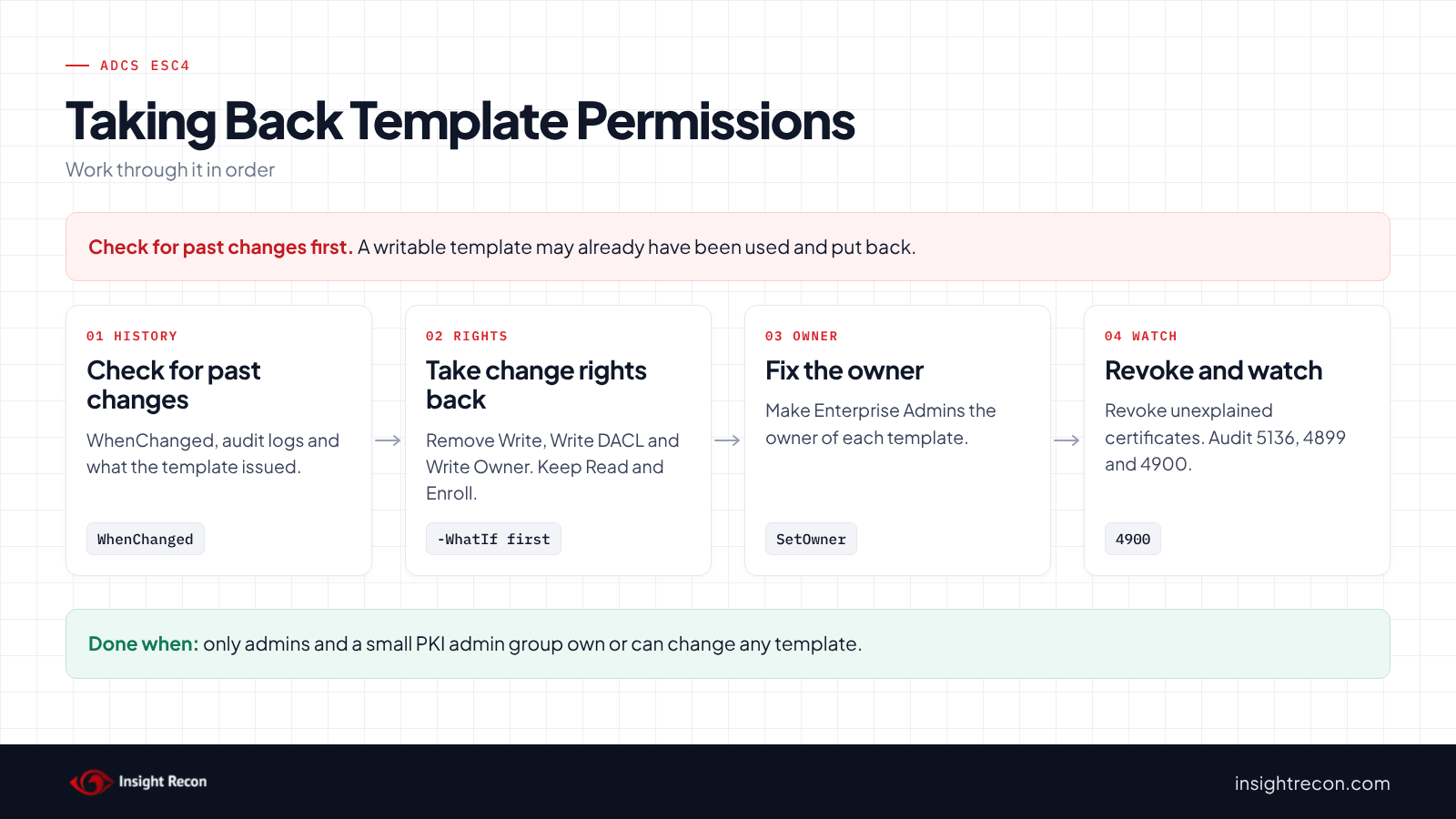
1. Take the change rights back
This removes Write, Write DACL and Write Owner for one principal on one template. It puts back Read. It also puts back Enroll and Autoenroll where the removed entry included them. It saves the current permissions to a file first. It's a dry run with -WhatIf. Drop that to apply. It needs Enterprise Admins, or permission to change the template's security. Change WebServerCustom and the SID to the template and principal from the find script. To undo it, restore the saved permissions on the template's Security tab or with Set-Acl.
# Dry run. Drop -WhatIf to apply.
# Needs Enterprise Admins, or permission to change the template's security.
# Replace WebServerCustom and the group with the template and principal from the script above.
Import-Module ActiveDirectory -ErrorAction Stop
$pks = "CN=Public Key Services,CN=Services,$((Get-ADRootDSE).configurationNamingContext)"
$t = Get-ADObject -SearchBase "CN=Certificate Templates,$pks" -LDAPFilter '(cn=WebServerCustom)'
if (-not $t) { throw 'Template not found.' }
$domainSid = (Get-ADDomain).DomainSID.Value
$target = "$domainSid-513"   # Domain Users. Use the SID of the principal you're fixing.
$control = [System.DirectoryServices.ActiveDirectoryRights]'WriteProperty, WriteDacl, WriteOwner'
$enroll = [guid]'0e10c968-78fb-11d2-90d4-00c04f79dc55'
$autoEnroll = [guid]'a05b8cc2-17bc-4802-a710-e7c15ab866a2'
$path = "AD:$($t.DistinguishedName)"
$acl = Get-Acl -Path $path -ErrorAction Stop
# Saves the current permissions so you can put them back
$acl.Sddl | Set-Content -Path ".\$($t.Name)-acl.sddl"
$sid = [System.Security.Principal.SecurityIdentifier]$target
$keepRead = $false; $keepEnroll = $false; $keepAuto = $false
foreach ($ace in $acl.GetAccessRules($true, $false, [System.Security.Principal.SecurityIdentifier])) {
    if ($ace.AccessControlType -ne 'Allow' -or $ace.IdentityReference.Value -ne $sid.Value -or ($ace.ActiveDirectoryRights -band $control) -eq 0) { continue }
    if (($ace.ActiveDirectoryRights -band [System.DirectoryServices.ActiveDirectoryRights]::ReadProperty) -ne 0) { $keepRead = $true }
    if ((($ace.ActiveDirectoryRights -band [System.DirectoryServices.ActiveDirectoryRights]::ExtendedRight) -ne 0) -and
        ($ace.ObjectType -eq [guid]::Empty -or $ace.ObjectType -eq $enroll)) { $keepEnroll = $true }
    if ((($ace.ActiveDirectoryRights -band [System.DirectoryServices.ActiveDirectoryRights]::ExtendedRight) -ne 0) -and
        ($ace.ObjectType -eq [guid]::Empty -or $ace.ObjectType -eq $autoEnroll)) { $keepAuto = $true }
    [void]$acl.RemoveAccessRuleSpecific($ace)
}
# Put back the read, enroll and autoenroll access the removed entries included
if ($keepRead) { $acl.AddAccessRule([System.DirectoryServices.ActiveDirectoryAccessRule]::new($sid, 'GenericRead', 'Allow')) }
if ($keepEnroll) { $acl.AddAccessRule([System.DirectoryServices.ActiveDirectoryAccessRule]::new($sid, 'ExtendedRight', 'Allow', $enroll)) }
if ($keepAuto) { $acl.AddAccessRule([System.DirectoryServices.ActiveDirectoryAccessRule]::new($sid, 'ExtendedRight', 'Allow', $autoEnroll)) }
Set-Acl -Path $path -AclObject $acl -ErrorAction Stop -WhatIf
Note that it only changes entries set directly on the template. If a right comes from the Certificate Templates container instead, fix it there.
2. Make Enterprise Admins the owner
This sets the template's owner to Enterprise Admins. It prints the current owner first so you can put it back. It's a dry run with -WhatIf. Drop that to apply. It needs Enterprise Admins.
# Dry run. Drop -WhatIf to apply.
# Needs Enterprise Admins.
Import-Module ActiveDirectory -ErrorAction Stop
$pks = "CN=Public Key Services,CN=Services,$((Get-ADRootDSE).configurationNamingContext)"
$t = Get-ADObject -SearchBase "CN=Certificate Templates,$pks" -LDAPFilter '(cn=WebServerCustom)'
if (-not $t) { throw 'Template not found.' }
$rootSid = (Get-ADDomain -Identity (Get-ADForest).RootDomain).DomainSID.Value
$path = "AD:$($t.DistinguishedName)"
$acl = Get-Acl -Path $path -ErrorAction Stop
Write-Output "Current owner: $($acl.Owner)"
$acl.SetOwner([System.Security.Principal.SecurityIdentifier]"$rootSid-519")
Set-Acl -Path $path -AclObject $acl -ErrorAction Stop -WhatIf
3. Revoke certificates you can't explain
For each serial number you noted, revoke the certificate on the CA with certutil -revoke, then publish a new CRL with certutil -crl. Systems may keep using a cached CRL until it expires, so publish the new one right away and run certutil -setreg chain\ChainCacheResyncFiletime @now on each domain controller. If a certificate named a privileged account, treat it as a possible domain compromise.
4. Re-run the find script
Each template should show only admins and your PKI admin group in Owner and Writers.
Keep ADCS ESC4 closed
- Audit template changes in AD. Add auditing to the Certificate Templates container and turn on Audit Directory Service Changes. Event 5136 then records each attribute change, including who made it.
- Log template changes on the CA. With the CA's audit filter on, the CA logs events 4899 (a template was updated) and 4900 (template security was updated). Microsoft's Securing PKI guide lists both as worth monitoring.
- Log what the CA issues. Event 4887 records each certificate issued. Pair it with 5136 to catch a template changed, used and changed back.
- Re-run the scan. It flags the template again if broad groups get the rights back.
ADCS ESC4 checklist
- Do Domain Users, Domain Computers, Authenticated Users and Everyone lack Write, Write DACL and Write Owner on every template?
- Is every template owned by Enterprise Admins or another admin group?
- Is template editing limited to a small PKI admin group?
- Did you check recently changed templates for changes nobody made on purpose?
- Did you review and revoke certificates issued around those changes?
- Are template changes audited in AD and on the CA?
- Can broad groups still read and enroll where they need to?
A "no" on the first two questions means any domain user can potentially rewrite a template into an ESC1.
Compliance mapping
| Framework | Reference | Why it applies |
|---|---|---|
| MITRE ATT&CK | T1649, T1098 | Steal or Forge Authentication Certificates for the certificate the rewritten template issues. Account Manipulation for changing the template's settings and permissions. |
| CIS Controls v8 | Control 4, Control 6 | Secure configuration of enterprise assets and access control management. Only PKI administrators should be able to change templates. |
| NIST CSF 2.0 | PR.AA-05 | Access permissions follow least privilege. Write access to a template is admin access to the PKI. |
| ANSSI | vuln_adcs_template_control | ANSSI's control point for certificate templates that unprivileged users can control. |
ADCS ESC4 FAQ
What is ADCS ESC4?
A certificate template that broad groups can change. Whoever can change it can potentially make it issue certificates for any user.
Which permissions count?
Owner, Full Control, Write, Write Owner and Write DACL. Read and Enroll alone don't.
If the template looks fine now, was it ever used?
You can't tell from the template alone. An attacker can change it back. Check its last change time, your audit logs and what the CA issued.
Will removing these rights break autoenrollment?
No. The fix script removes only the rights to change the template. Autoenrollment keeps working, because the script puts back the read and enroll rights it uses.
Does Insight Recon check for ADCS ESC4?
Yes. The free scan includes Unrestricted certificate template modification rights in ADCS (ESC4), along with the other ADCS checks.
See whether any user in your domain can rewrite your certificate templates.
It runs from any Windows machine that can reach your DCs, with a standard domain account. Every core AD check is free for one domain.
Not ready to scan?
AD Signal is our monthly look at what's changing in AD security and how real domains score. Read the latest report.
References
- Microsoft Learn: Certificates security posture assessment (ESC4 template ACL and owner)
- Microsoft Learn: Securing PKI, Appendix A: Events to Monitor
- Microsoft Learn: Event 5136, a directory service object was modified
- Microsoft Learn: certutil
- SpecterOps: Certified Pre-Owned
- SpecterOps: ESC4 documentation
- MITRE ATT&CK: T1649 Steal or Forge Authentication Certificates
- MITRE ATT&CK: T1098 Account Manipulation