ADCS ESC3: Find and Fix Enrollment Agent Templates Anyone Can Use
ADCS ESC3 is an enrollment agent template that broad groups can enroll in. An enrollment agent certificate lets its holder request certificates on behalf of other users. If any domain user can get one, they can potentially request a certificate as a domain admin and sign in as them. This post shows you how to find these templates and the templates that accept their requests, check what was already issued and lock enrollment agents down.
| Priority | Critical. One enrollment agent certificate can potentially request a certificate for any user, including a domain admin |
|---|---|
| What decides it | A template with the Certificate Request Agent EKU, no approval and broad enroll rights, plus a CA that doesn't restrict enrollment agents |
| Who's affected | Forests where smart card or device enrollment was set up with an agent template opened to too many people |
| Fix | Limit who can enroll in agent templates, require approval and turn on enrollment agent restrictions on the CA |
Check it now: are any enrollment agent templates published with no approval?
Import-Module ActiveDirectory -ErrorAction Stop
$pks = "CN=Public Key Services,CN=Services,$((Get-ADRootDSE).configurationNamingContext)"
$published = Get-ADObject -SearchBase "CN=Enrollment Services,$pks" -LDAPFilter '(objectClass=pKIEnrollmentService)' -Properties certificateTemplates |
    ForEach-Object { $_.certificateTemplates }
# 1.3.6.1.4.1.311.20.2.1 is the Certificate Request Agent EKU
Get-ADObject -SearchBase "CN=Certificate Templates,$pks" -LDAPFilter '(pKIExtendedKeyUsage=1.3.6.1.4.1.311.20.2.1)' -Properties msPKI-Enrollment-Flag, msPKI-RA-Signature |
    Where-Object {
        $_.Name -in $published -and
        -not ($_.'msPKI-Enrollment-Flag' -band 2) -and
        -not $_.'msPKI-RA-Signature'
    } | Select-Object Name
Runs as any domain user with the ActiveDirectory module. It lists templates that are published on at least one CA, carry the Certificate Request Agent EKU and need no approval or authorized signature. No output means none of your published templates match. It doesn't check who can enroll yet. The script further down does.
You checked one setting. The free scan checks the rest of your on-prem AD in a few minutes.
Nothing gets installed on your domain controllers. Only HTTPS leaves your network.
What ADCS ESC3 is
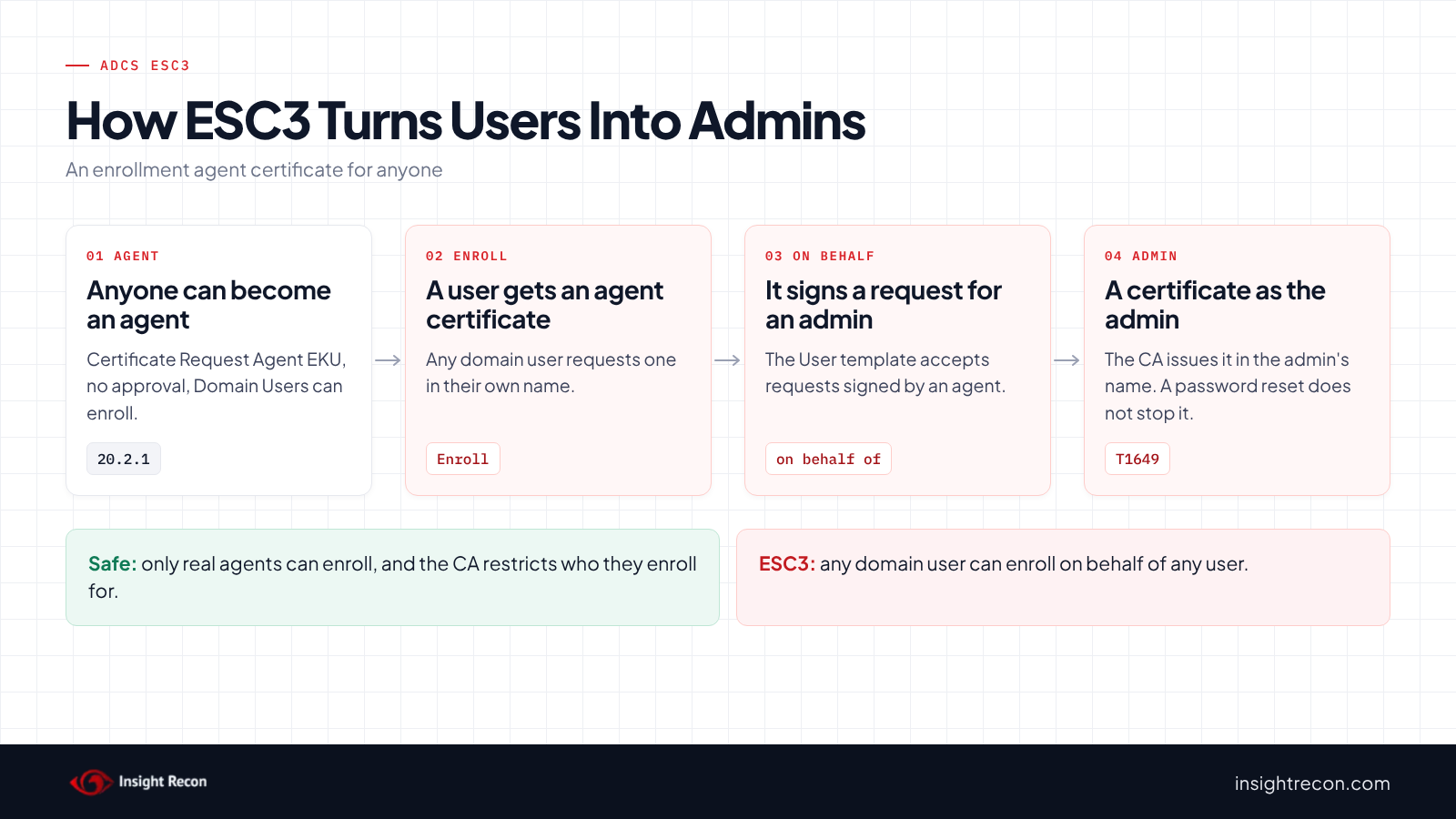
An enrollment agent requests certificates on behalf of other people. For example, a help desk technician may issue smart cards to new staff. To do that, the agent needs its own certificate with the Certificate Request Agent EKU (OID 1.3.6.1.4.1.311.20.2.1). The agent signs each request with it. The CA then issues the certificate in the other person's name. Microsoft's guidance on signing certificate requests says organizations should tightly control who holds one.
ESC3 is the name SpecterOps gave this in their 2021 Certified Pre-Owned research. It takes two templates.
The agent template
A template that issues enrollment agent certificates is the problem when all of these are true:
- It carries the Certificate Request Agent EKU.
- Nothing checks the request. CA certificate manager approval is off and no authorized signatures are required.
- Broad groups can enroll. Domain Users, Domain Computers, Authenticated Users or Everyone holds Enroll or a right that includes it.
- A CA publishes it.
The target template
The agent also needs a second template that accepts its requests and issues a certificate that allows sign-in. According to SpecterOps's ESC3 documentation, any schema version 1 template qualifies, since those have no concept of authorized signatures. A version 2 or later template qualifies when it requires one authorized signature with the Certificate Request Agent application policy. The built-in User template is version 1 and allows Client Authentication. As a result, the agent template is usually the only gate.
Why ADCS ESC3 is dangerous
Any user can become an agent for everyone
With an enrollment agent certificate, a regular user can sign a request for a domain admin against the User template or a smart card template. The CA issues it in the admin's name. That user can then sign in as the admin with it. Microsoft's Defender for Identity guidance says that under these conditions, enrollment agent certificates "can enroll certificates for any eligible user." MITRE ATT&CK tracks this as T1649, Steal or Forge Authentication Certificates.
The CA's own guardrail is usually off
A CA can restrict which agents may enroll for which users and templates. SpecterOps notes that with those restrictions in place, an attacker "most likely cannot act as an enrollment agent." However, they have to be configured on purpose. Many CAs never turn them on.
A password reset doesn't undo it
The certificate issued in the admin's name works until it expires or is revoked. Resetting the admin's password doesn't touch it. The agent certificate keeps working too. The holder can request more. From there, an attacker could potentially replicate every password hash in the domain, the attack covered in our DCSync permissions post.
Find ESC3 templates in your forest
Templates and CAs live in the forest's Configuration partition, so one run covers the whole forest. The first two scripts run as any domain user with the AD module. The last one runs on the CA.
List ADCS ESC3 agent templates and who can enroll
This lists every template with the Certificate Request Agent EKU. For each one, it shows whether approval or signatures are required, which CAs publish it and every account or group that can enroll.
Import-Module ActiveDirectory -ErrorAction Stop
$pks = "CN=Public Key Services,CN=Services,$((Get-ADRootDSE).configurationNamingContext)"
# Everyone, NETWORK, INTERACTIVE, Anonymous, Authenticated Users, This Organization, Users
$low = 'S-1-1-0', 'S-1-5-2', 'S-1-5-4', 'S-1-5-7', 'S-1-5-11', 'S-1-5-15', 'S-1-5-32-545'
# Domain Users, Domain Guests and Domain Computers of any domain
$lowRid = '^S-1-5-21-\d+-\d+-\d+-51[345]$'
$enroll = [guid]'0e10c968-78fb-11d2-90d4-00c04f79dc55'
$cas = Get-ADObject -SearchBase "CN=Enrollment Services,$pks" -LDAPFilter '(objectClass=pKIEnrollmentService)' -Properties certificateTemplates
Get-ADObject -SearchBase "CN=Certificate Templates,$pks" -LDAPFilter '(pKIExtendedKeyUsage=1.3.6.1.4.1.311.20.2.1)' -Properties displayName, msPKI-Enrollment-Flag, msPKI-RA-Signature, nTSecurityDescriptor |
    ForEach-Object {
        $t = $_
        $enrollers = $t.nTSecurityDescriptor.GetAccessRules($true, $true, [System.Security.Principal.SecurityIdentifier]) |
            Where-Object {
                $_.AccessControlType -eq 'Allow' -and (
                    (($_.ActiveDirectoryRights -band [System.DirectoryServices.ActiveDirectoryRights]::GenericAll) -eq [System.DirectoryServices.ActiveDirectoryRights]::GenericAll) -or
                    (($_.ActiveDirectoryRights -band [System.DirectoryServices.ActiveDirectoryRights]::ExtendedRight) -and
                     ($_.ObjectType -eq $enroll -or $_.ObjectType -eq [guid]::Empty)))
            } |
            ForEach-Object {
                $sid = $_.IdentityReference
                try { $name = $sid.Translate([System.Security.Principal.NTAccount]).Value } catch { $name = $sid.Value }
                if ($sid.Value -in $low -or $sid.Value -match $lowRid) { "$name (low privilege)" } else { $name }
            }
        [pscustomobject]@{
            Template    = $t.Name
            DisplayName = $t.displayName
            Approval    = [bool]($t.'msPKI-Enrollment-Flag' -band 2)
            Signatures  = [int]$t.'msPKI-RA-Signature'
            PublishedOn = ($cas | Where-Object { $_.certificateTemplates -contains $t.Name }).Name -join ', '
            Enrollers   = ($enrollers | Sort-Object -Unique) -join '; '
        }
    }
What to look for: rows where Approval is False, Signatures is 0, PublishedOn isn't empty and Enrollers includes an entry marked (low privilege). Those are exploitable today unless the CA restricts agents. Also check the other enrollers. Only the people who actually issue certificates for others should be there. A template that isn't published can't be requested right now. However, anyone who can publish templates could turn it back on.
List the templates that accept agent requests
This lists published templates that allow sign-in, need no approval and accept a request signed by an enrollment agent.
Import-Module ActiveDirectory -ErrorAction Stop
$pks = "CN=Public Key Services,CN=Services,$((Get-ADRootDSE).configurationNamingContext)"
$published = Get-ADObject -SearchBase "CN=Enrollment Services,$pks" -LDAPFilter '(objectClass=pKIEnrollmentService)' -Properties certificateTemplates |
    ForEach-Object { $_.certificateTemplates }
$auth = '1.3.6.1.5.5.7.3.2', '1.3.6.1.4.1.311.20.2.2', '1.3.6.1.5.2.3.4', '2.5.29.37.0'
Get-ADObject -SearchBase "CN=Certificate Templates,$pks" -LDAPFilter '(objectClass=pKICertificateTemplate)' -Properties pKIExtendedKeyUsage, msPKI-Template-Schema-Version, msPKI-Enrollment-Flag, msPKI-RA-Signature, msPKI-RA-Application-Policies |
    Where-Object {
        $ekus = @($_.pKIExtendedKeyUsage)
        $_.Name -in $published -and
        -not ($_.'msPKI-Enrollment-Flag' -band 2) -and
        ($ekus.Count -eq 0 -or @($ekus | Where-Object { $_ -in $auth }).Count -gt 0) -and
        ($_.'msPKI-Template-Schema-Version' -eq 1 -or
         ($_.'msPKI-RA-Signature' -ge 1 -and "$($_.'msPKI-RA-Application-Policies')" -match '1\.3\.6\.1\.4\.1\.311\.20\.2\.1'))
    } |
    Select-Object Name, @{ n = 'Schema'; e = { $_.'msPKI-Template-Schema-Version' } }
What to look for: expect the built-in User template and any smart card templates here. This list shows what an agent certificate could be used for. It's the reason the CA's enrollment agent restrictions matter.
Check for requests made on behalf of someone else
This lists issued certificates where the account that sent the request (Request.CallerName) differs from the name in the request (Request.RequesterName), as Microsoft's [MS-CSRA] specification defines them.
# Run on the CA as a CA administrator or certificate manager.
# Lists issued certificates where the account that sent the request differs from the account it was issued for.
$rows = certutil -view -restrict 'Disposition=20' -out 'RequestID,CallerName,RequesterName,CertificateTemplate,NotAfter,SerialNumber' csv |
    ConvertFrom-Csv -Header RequestID, Caller, Requester, Template, NotAfter, Serial |
    Select-Object -Skip 1
if (-not $rows) { throw 'No rows returned. Check you are on the CA and have permission.' }
$rows | Where-Object { $_.Serial -and $_.Caller -ne $_.Requester }
What to look for: a Caller who isn't one of your real enrollment agents, or any certificate for a privileged account that nobody can explain. Your smart card or device management system will show up too, which is expected.
Check ADCS ESC3 with Insight Recon
The free scan includes Misconfigured enrollment agent templates in ADCS (ESC3), a Critical check. It lists every published template with the Certificate Request Agent EKU that needs no approval or authorized signature and where a broad group holds Enroll, all extended rights or full control. Broad groups here are Everyone, Anonymous, Authenticated Users, NETWORK, INTERACTIVE, This Organization and Users. Domain Users, Domain Guests and Domain Computers from any domain count too. It also honors deny entries on the template. Owners and accounts that can only edit the template show up under ESC4 instead. For each template, the finding names the groups that hold enroll rights. It also comes with the Hacker Insight, remediation steps and compliance mappings.
Know what the ADCS ESC3 check doesn't decide
Some things are still yours to check. The check doesn't read the CA's enrollment agent restrictions, so a template it lists may already be fenced in on the CA. It doesn't look at the templates an agent could target either. The target template script above lists those. The check skips templates no CA publishes. If it can't read a CA's template list, it treats every template as published, so it may list one nobody can request right now. When unpublished templates would match, a note on the result says how many. They show up in the script above with an empty PublishedOn. It also doesn't count custom groups with many members. Run the agent template script above too. It lists every enroller, which is the list you'll need for the fix anyway. Also, it reads templates only. It doesn't look at certificates already issued.
Related ADCS checks beyond ESC3
- Unrestricted certificate template with any purpose in ADCS (ESC2), templates whose certificates can also act as an enrollment agent. Our ADCS ESC2 post covers it.
- User-controlled certificate template subject in ADCS (ESC1), a shorter path to the same result. Our ADCS ESC1 post covers it.
- Unrestricted certificate template modification rights in ADCS (ESC4), templates that broad groups can rewrite into an agent template. Our ADCS ESC4 post covers it.
- Risky Certificate Authority Access Control in ADCS (ESC7), which decides who can change the CA's settings, including its enrollment agent restrictions. Our ADCS ESC7 post covers it.
You can see what the findings look like in our sample report. The full list is in our check library.
Find every template like this in your forest, plus the other ADCS attack paths.
It runs from any Windows machine that can reach your DCs, with a standard domain account. Every core AD check is free for one domain.
Before you change enrollment agent templates
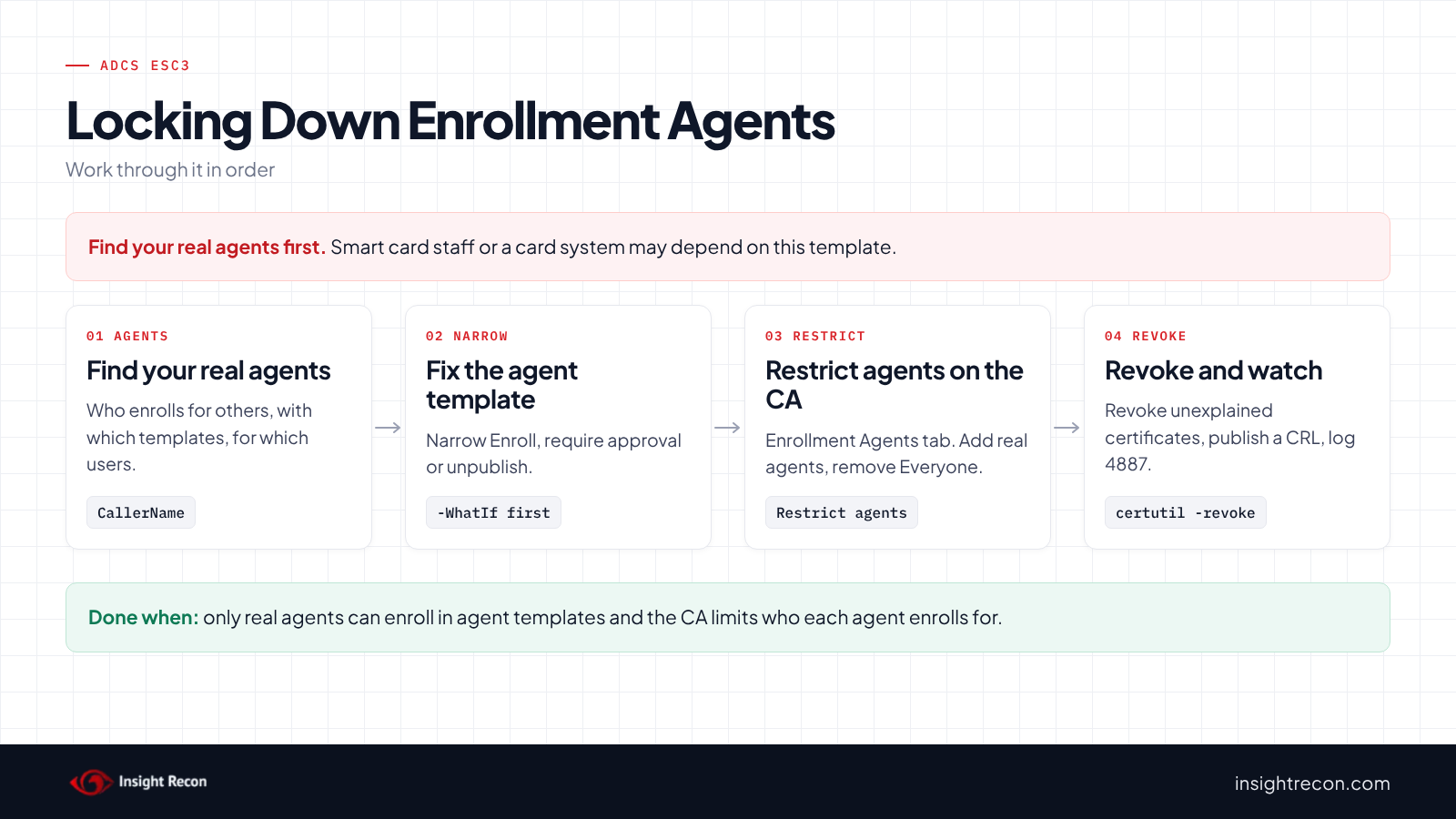
Find out who actually enrolls for others before you change anything. Then limit the agents to those people and those templates.
Find your real enrollment agents
The on-behalf-of list shows who has acted as an agent. Common examples are smart card issuance staff, a card management system, a device management platform or an NDES server. Write down each agent, the templates it uses and the users it enrolls for. You'll need that list for the CA restrictions.
Pick the fixes that fit
Microsoft lists five ways to close it. Any one is enough on its own. Doing more than one is better:
- Unpublish the agent template if nobody enrolls for others.
- Narrow who can enroll to the real agents.
- Require CA certificate manager approval on the agent template. Agent certificates are rare, so approving each one by hand is usually fine.
- Turn on enrollment agent restrictions on the CA, so each agent can only enroll for the users and templates you list.
- Remove the Certificate Request Agent EKU from templates that don't need it.
Save the current settings
Note the template's current settings and permissions so you can put them back. The enroll script below saves the permissions to a file before it changes anything.
Fix ADCS ESC3 safely
1. Narrow the agent template
Each script below changes one template. Each is a dry run with -WhatIf. Drop that to apply. They need Enterprise Admins, or rights delegated on the template or CA object. Change EnrollmentAgent and Contoso-CA to your names.
Narrow who can enroll. This removes Enroll and Autoenroll for the broad groups and keeps their Read access. It warns about entries that combine Enroll with other rights, which you fix on the template's Security tab. Before you apply it, give Enroll to the group that holds your real agents.
# Dry run. Drop -WhatIf to apply.
# Needs Enterprise Admins, or permission to change the template's security.
Import-Module ActiveDirectory -ErrorAction Stop
$pks = "CN=Public Key Services,CN=Services,$((Get-ADRootDSE).configurationNamingContext)"
$t = Get-ADObject -SearchBase "CN=Certificate Templates,$pks" -LDAPFilter '(cn=EnrollmentAgent)'
if (-not $t) { throw 'Template not found.' }
$low = 'S-1-1-0', 'S-1-5-2', 'S-1-5-4', 'S-1-5-7', 'S-1-5-11', 'S-1-5-15', 'S-1-5-32-545'
$lowRid = '^S-1-5-21-\d+-\d+-\d+-51[345]$'
$enrollRights = [guid]'0e10c968-78fb-11d2-90d4-00c04f79dc55', [guid]'a05b8cc2-17bc-4802-a710-e7c15ab866a2', [guid]::Empty
$path = "AD:$($t.DistinguishedName)"
$acl = Get-Acl -Path $path -ErrorAction Stop
# Saves the current permissions so you can put them back
$acl.Sddl | Set-Content -Path ".\$($t.Name)-acl.sddl"
foreach ($ace in $acl.GetAccessRules($true, $false, [System.Security.Principal.SecurityIdentifier])) {
    if ($ace.AccessControlType -ne 'Allow' -or ($ace.IdentityReference.Value -notin $low -and $ace.IdentityReference.Value -notmatch $lowRid)) { continue }
    if ($ace.ActiveDirectoryRights -eq 'ExtendedRight' -and $ace.ObjectType -in $enrollRights) {
        [void]$acl.RemoveAccessRuleSpecific($ace)
    } elseif ($ace.ActiveDirectoryRights -band [System.DirectoryServices.ActiveDirectoryRights]::ExtendedRight) {
        Write-Warning "$($ace.IdentityReference) holds Enroll combined with other rights. Fix it on the template's Security tab."
    }
}
Set-Acl -Path $path -AclObject $acl -ErrorAction Stop -WhatIf
Require approval. This turns on CA certificate manager approval. Every request then waits for a person. To undo it, set the flag back to the value it had before.
# Dry run. Drop -WhatIf to apply.
# Needs Enterprise Admins, or write rights on the template object.
Import-Module ActiveDirectory -ErrorAction Stop
$pks = "CN=Public Key Services,CN=Services,$((Get-ADRootDSE).configurationNamingContext)"
$t = Get-ADObject -SearchBase "CN=Certificate Templates,$pks" -LDAPFilter '(cn=EnrollmentAgent)' -Properties msPKI-Enrollment-Flag
if (-not $t) { throw 'Template not found.' }
# 0x2 is CT_FLAG_PEND_ALL_REQUESTS: every request waits for a certificate manager
Set-ADObject -Identity $t -Replace @{ 'msPKI-Enrollment-Flag' = ($t.'msPKI-Enrollment-Flag' -bor 2) } -ErrorAction Stop -WhatIf
Unpublish it. This stops one CA from issuing the template. To undo it, run the same command with -Add. Repeat it for each CA in PublishedOn.
# Dry run. Drop -WhatIf to apply.
# Needs Enterprise Admins, or write rights on the CA's enrollment services object.
Import-Module ActiveDirectory -ErrorAction Stop
$pks = "CN=Public Key Services,CN=Services,$((Get-ADRootDSE).configurationNamingContext)"
$ca = Get-ADObject -SearchBase "CN=Enrollment Services,$pks" -LDAPFilter '(cn=Contoso-CA)'
if (-not $ca) { throw 'CA not found.' }
Set-ADObject -Identity $ca -Remove @{ certificateTemplates = 'EnrollmentAgent' } -ErrorAction Stop -WhatIf
2. Restrict enrollment agents on the CA
Microsoft's restricted enrollment agents guide covers the steps. In the Certification Authority console, open the CA's properties and go to the Enrollment Agents tab. Select "Restrict enrollment agents". Then add your real agents and remove Everyone. For each agent, add only the templates it uses and remove <All>. Finally, add only the users or groups it enrolls for and remove Everyone. It needs CA administrator or Enterprise Admins rights. Test with one real agent before you rely on it.
3. Revoke certificates you can't explain
Revoke any agent certificate held by someone who isn't a real agent. Also revoke any certificate from the on-behalf-of list you can't explain. Use certutil -revoke on the CA, then publish a new CRL with certutil -crl. Systems may keep using a cached CRL until it expires, so publish the new one right away and run certutil -setreg chain\ChainCacheResyncFiletime @now on each domain controller. If a certificate named a privileged account, treat it as a possible domain compromise.
4. Re-run the find scripts
The agent template should show only your real agents, with approval on or the CA restrictions in place.
Keep ADCS ESC3 closed
- Log what the CA issues. Turn on the CA's audit filter and the Audit Certification Services policy on the CA. Events 4886 and 4887 then record each request and each certificate issued.
- Review on-behalf-of requests. Run the on-behalf-of script on a schedule. A new caller, or a certificate for an admin, is worth a look.
- Watch template and CA changes. Audit changes to the Certificate Templates container with Audit Directory Service Changes (event 5136). An agent template that gains broad Enroll rights is how ESC3 comes back.
- Re-run the scan. It flags the template again if broad groups get Enroll back.
ADCS ESC3 checklist
- Can only your real enrollment agents enroll in agent templates?
- Do agent templates require approval or authorized signatures?
- Are agent templates you don't use unpublished?
- Are enrollment agent restrictions on, with Everyone removed?
- Did you review certificates requested on behalf of someone else?
- Did you revoke the ones you can't explain and publish a new CRL?
- Is CA issuance logged and reviewed?
A "no" on the first and fourth questions means any domain user can potentially request a certificate as a domain admin.
Compliance mapping
| Framework | Reference | Why it applies |
|---|---|---|
| MITRE ATT&CK | T1649 | Steal or Forge Authentication Certificates. An enrollment agent certificate can get certificates in other users' names. |
| CIS Controls v8 | Control 4, Control 6 | Secure configuration of enterprise assets and access control management. Only real agents should be able to enroll for others. |
| NIST CSF 2.0 | PR.AA-01, PR.AA-02, PR.AA-05 | Credentials are managed and bound to the right identity. Access follows least privilege. ESC3 lets anyone obtain credentials bound to someone else. |
ADCS ESC3 FAQ
What is ADCS ESC3?
An enrollment agent template that broad groups can enroll in with no approval. Anyone with the resulting certificate can potentially request certificates on behalf of any user.
Do I need enrollment agents at all?
Only if someone issues certificates or smart cards for other people. If nobody does, unpublish the agent templates.
What do enrollment agent restrictions do?
They limit each agent to the templates and users you choose on the CA. Even a stolen agent certificate then can't enroll for an admin.
Does fixing the template revoke existing agent certificates?
No. Agent certificates already issued keep working until they expire or you revoke them.
Does Insight Recon check for ADCS ESC3?
Yes. The free scan includes Misconfigured enrollment agent templates in ADCS (ESC3), along with the other ADCS checks.
See whether any user in your domain can request certificates for your admins.
It runs from any Windows machine that can reach your DCs, with a standard domain account. Every core AD check is free for one domain.
Not ready to scan?
AD Signal is our monthly look at what's changing in AD security and how real domains score. Read the latest report.
References
- Microsoft Learn: Certificates security posture assessment (ESC3)
- Microsoft Learn: Establish Restricted Enrollment Agents
- Microsoft Learn: Sign Certificate Requests
- Microsoft Learn: [MS-CSRA] CA database request columns
- Microsoft Learn: certutil
- Microsoft Learn: Audit Certification Services
- Microsoft Learn: Event 5136, a directory service object was modified
- SpecterOps: Certified Pre-Owned
- SpecterOps: ESC3 documentation
- MITRE ATT&CK: T1649 Steal or Forge Authentication Certificates