ADCS ESC1: Find and Fix Certificate Templates That Let Users Pick the Subject
ADCS ESC1 is a certificate template that lets the person requesting a certificate write whose name goes on it. If that template also allows sign-in and any domain user can enroll, any domain user can potentially get a certificate for a domain admin and sign in as them. This post shows you how to find these templates, check what was already issued from them and close them without breaking the app that needed them.
| Priority | Critical. One request can potentially turn any domain user into a domain admin |
|---|---|
| What decides it | A published template with "Supply in the request", a sign-in EKU, no approval and broad enroll rights |
| Who's affected | Any forest with an enterprise CA, most often through a copied Web Server template or a VPN, Wi-Fi or device template |
| Fix | Unpublish it, narrow who can enroll, drop the sign-in EKU or require manager approval. Then revoke anything suspicious it issued |
Check it now: do any published templates let the requester supply the subject?
Import-Module ActiveDirectory -ErrorAction Stop
$pks = "CN=Public Key Services,CN=Services,$((Get-ADRootDSE).configurationNamingContext)"
$published = Get-ADObject -SearchBase "CN=Enrollment Services,$pks" -LDAPFilter '(objectClass=pKIEnrollmentService)' -Properties certificateTemplates |
    ForEach-Object { $_.certificateTemplates }
$auth = '1.3.6.1.5.5.7.3.2', '1.3.6.1.4.1.311.20.2.2', '1.3.6.1.5.2.3.4', '2.5.29.37.0'
Get-ADObject -SearchBase "CN=Certificate Templates,$pks" -LDAPFilter '(msPKI-Certificate-Name-Flag:1.2.840.113556.1.4.803:=1)' -Properties pKIExtendedKeyUsage, msPKI-Enrollment-Flag, msPKI-RA-Signature |
    Where-Object {
        $_.Name -in $published -and
        (-not $_.pKIExtendedKeyUsage -or @($_.pKIExtendedKeyUsage | Where-Object { $_ -in $auth }).Count -gt 0) -and
        -not ($_.'msPKI-Enrollment-Flag' -band 2) -and
        -not $_.'msPKI-RA-Signature'
    } | Select-Object Name
Runs as any domain user with the ActiveDirectory module. It lists templates that are published on at least one CA, have "Supply in the request" turned on, allow sign-in and need no approval or authorized signature. No output means none of your published templates match. It doesn't check who can enroll yet. The script further down does.
You checked one setting. The free scan checks the rest of your on-prem AD in a few minutes.
Nothing gets installed on your domain controllers. Only HTTPS leaves your network.
What ADCS ESC1 is
Active Directory Certificate Services (ADCS) issues certificates from templates. A template decides what a certificate can be used for, who can ask for one and where the name on it comes from. ESC1 is the name SpecterOps gave this misconfiguration in their 2021 Certified Pre-Owned research. It's the first of a series of ADCS attack paths that now runs past ESC16.
A template is ESC1 when all five of these are true:
- The requester supplies the subject. On the template's Subject Name tab, "Supply in the request" is selected. In AD, that's the
CT_FLAG_ENROLLEE_SUPPLIES_SUBJECTbit (0x1) inmsPKI-Certificate-Name-Flag. The requester can also fill in the subject alternative name (SAN), which is what Windows uses to decide who the certificate belongs to. - The certificate allows sign-in. Its extended key usages (EKUs) include Client Authentication, Smart Card Logon, PKINIT Client Authentication or Any Purpose, or it has no EKU at all.
- Nothing checks the request. CA certificate manager approval is off and no authorized signatures are required.
- Broad groups can enroll. Domain Users, Domain Computers, Authenticated Users or Everyone holds Enroll or a right that includes it.
- A CA publishes it. Microsoft notes that templates that aren't published can't be requested.
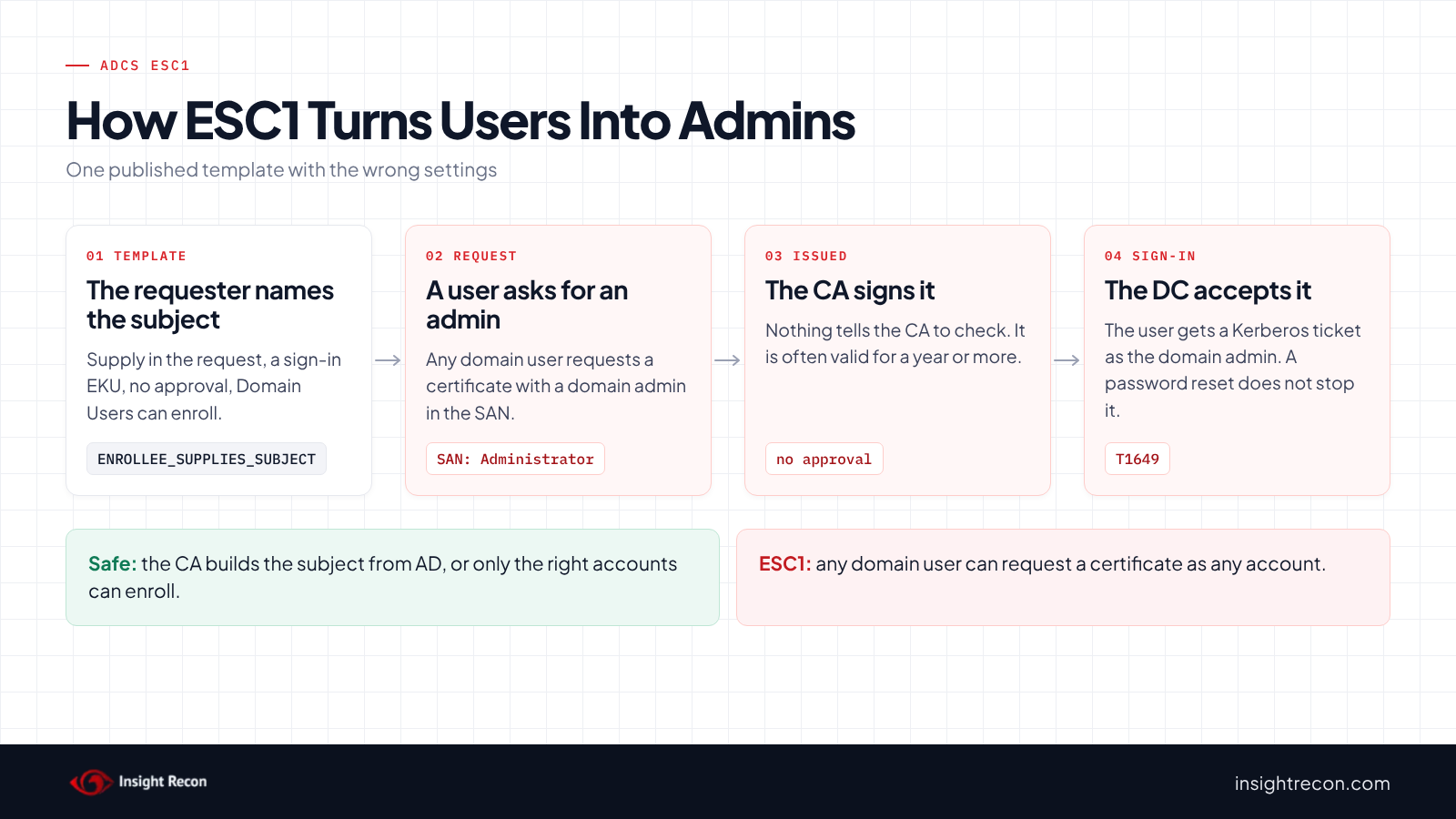
"Supply in the request" is a normal setting for web server certificates, where the subject is a hostname the CA can't look up. The danger starts when someone copies such a template and adds Client Authentication, or opens enrollment to everyone.
Why ADCS ESC1 is dangerous
The requester decides who the certificate is for
On an ESC1 template, a regular user can request a certificate and put a domain admin's name in it. The CA signs it because nothing tells it otherwise. That user can then present the certificate to a domain controller and get a Kerberos ticket as the domain admin. Microsoft's own Defender for Identity guidance says such a template "allows any unprivileged user to take over any arbitrary user, including a domain admin user." MITRE ATT&CK tracks this as T1649, Steal or Forge Authentication Certificates.
A password reset doesn't undo it
The certificate works until it expires or is revoked. Templates often issue certificates valid for a year or more. Resetting the impersonated account's password doesn't touch it, since the certificate signs in without the password. As a result, an attacker can potentially keep domain admin access long after the template is fixed. From there, they could also replicate every password hash in the domain, the attack covered in our DCSync permissions post.
Strong certificate mapping doesn't close it
Domain controllers moved to Full Enforcement of strong certificate mapping with the February 2025 Windows update, according to Microsoft's KB5014754. However, that doesn't stop ESC1. Microsoft's [MS-PKCA] specification lets a certificate prove its owner with the account's SID written as a URL in the SAN. On an ESC1 template, the requester writes the SAN. As a result, they can include the target's SID too. Our weak certificate mappings post covers the enforcement change.
Find ESC1 templates in your forest
Templates and CAs live in the forest's Configuration partition, so one run covers the whole forest. Both scripts run as any domain user with the AD module.
List ADCS ESC1 templates and who can enroll
This lists every template with "Supply in the request" that allows sign-in and needs no approval. For each one, it shows which CAs publish it, its EKUs and every account or group that can enroll.
Import-Module ActiveDirectory -ErrorAction Stop
$pks = "CN=Public Key Services,CN=Services,$((Get-ADRootDSE).configurationNamingContext)"
# Everyone, NETWORK, INTERACTIVE, Anonymous, Authenticated Users, This Organization, Users
$low = 'S-1-1-0', 'S-1-5-2', 'S-1-5-4', 'S-1-5-7', 'S-1-5-11', 'S-1-5-15', 'S-1-5-32-545'
# Domain Users, Domain Guests and Domain Computers of any domain
$lowRid = '^S-1-5-21-\d+-\d+-\d+-51[345]$'
$enroll = [guid]'0e10c968-78fb-11d2-90d4-00c04f79dc55'
$auth = '1.3.6.1.5.5.7.3.2', '1.3.6.1.4.1.311.20.2.2', '1.3.6.1.5.2.3.4', '2.5.29.37.0'
$cas = Get-ADObject -SearchBase "CN=Enrollment Services,$pks" -LDAPFilter '(objectClass=pKIEnrollmentService)' -Properties certificateTemplates
Get-ADObject -SearchBase "CN=Certificate Templates,$pks" -LDAPFilter '(msPKI-Certificate-Name-Flag:1.2.840.113556.1.4.803:=1)' -Properties displayName, pKIExtendedKeyUsage, msPKI-Enrollment-Flag, msPKI-RA-Signature, nTSecurityDescriptor |
    ForEach-Object {
        $t = $_
        $ekus = @($t.pKIExtendedKeyUsage)
        if ($ekus.Count -gt 0 -and @($ekus | Where-Object { $_ -in $auth }).Count -eq 0) { return }
        if (($t.'msPKI-Enrollment-Flag' -band 2) -or $t.'msPKI-RA-Signature') { return }
        $enrollers = $t.nTSecurityDescriptor.GetAccessRules($true, $true, [System.Security.Principal.SecurityIdentifier]) |
            Where-Object {
                $_.AccessControlType -eq 'Allow' -and (
                    (($_.ActiveDirectoryRights -band [System.DirectoryServices.ActiveDirectoryRights]::GenericAll) -eq [System.DirectoryServices.ActiveDirectoryRights]::GenericAll) -or
                    (($_.ActiveDirectoryRights -band [System.DirectoryServices.ActiveDirectoryRights]::ExtendedRight) -and
                     ($_.ObjectType -eq $enroll -or $_.ObjectType -eq [guid]::Empty)))
            } |
            ForEach-Object {
                $sid = $_.IdentityReference
                try { $name = $sid.Translate([System.Security.Principal.NTAccount]).Value } catch { $name = $sid.Value }
                if ($sid.Value -in $low -or $sid.Value -match $lowRid) { "$name (low privilege)" } else { $name }
            }
        [pscustomobject]@{
            Template    = $t.Name
            DisplayName = $t.displayName
            PublishedOn = ($cas | Where-Object { $_.certificateTemplates -contains $t.Name }).Name -join ', '
            EKUs        = if ($ekus.Count) { $ekus -join ', ' } else { '(none: any purpose)' }
            Enrollers   = ($enrollers | Sort-Object -Unique) -join '; '
        }
    }
What to look for: rows where PublishedOn isn't empty and Enrollers includes an entry marked (low privilege). Those are exploitable today. Also check the other enrollers. A custom group such as "All Staff" or "VPN Users" may hold most of your users. Rows with an empty PublishedOn can't be requested right now. However, anyone who can publish templates could turn them back on, so fix them too.
Check what each template already issued
Fixing the template doesn't touch certificates it already issued. Run this on the CA for each ESC1 template. It lists every certificate the CA issued from that template.
# Run on the CA as a CA administrator or certificate manager, with the AD module installed.
# Replace WebServerCustom with the template name from the script above.
Import-Module ActiveDirectory -ErrorAction Stop
$pks = "CN=Public Key Services,CN=Services,$((Get-ADRootDSE).configurationNamingContext)"
$t = Get-ADObject -SearchBase "CN=Certificate Templates,$pks" -LDAPFilter '(cn=WebServerCustom)' -Properties msPKI-Cert-Template-OID
if (-not $t) { throw 'Template not found.' }
certutil -view -restrict "CertificateTemplate=$($t.'msPKI-Cert-Template-OID'),Disposition=20" -out 'RequestID,RequesterName,CommonName,NotAfter,SerialNumber' csv
What to look for: requesters you don't expect. On a web server template, a user account as RequesterName is already a red flag. The name a certificate signs in as usually sits in the SAN, which this list doesn't show. For any row you're unsure of, run certutil -view -restrict "RequestID=<id>" and read its Subject Alternative Name. A user named jsmith with a certificate for Administrator is the pattern to find. Note the SerialNumber of any certificate you can't explain. If nothing comes back for a template, try its name instead of the OID in the restriction.
Check ADCS ESC1 with Insight Recon
The free scan includes User-controlled certificate template subject in ADCS (ESC1), a Critical check. It lists every published template where the enrollee supplies the subject and the certificate allows sign-in, with no approval or authorized signature required. A broad group also has to hold Enroll, all extended rights or full control. Broad groups here are Everyone, Anonymous, Authenticated Users, NETWORK, INTERACTIVE, This Organization and Users. Domain Users, Domain Guests and Domain Computers from any domain count too. It also honors deny entries on the template. Owners and accounts that can only edit the template show up under ESC4 instead. For each template, the finding shows the groups and the rights they hold. It also comes with the Hacker Insight, remediation steps and compliance mappings.
Know what the ADCS ESC1 check doesn't decide
Some things are still yours to check. The check skips templates no CA publishes. If it can't read a CA's template list, it treats every template as published, so it may list one nobody can request right now. When unpublished templates would match, a note on the result says how many. They show up in the script above with an empty PublishedOn. It also doesn't count custom groups with many members, so check those yourself. Also, it reads templates only. It doesn't look at certificates already issued, which the second script does.
Related ADCS checks beyond ESC1
These related checks cover the rest of this area:
- Server Authentication Template with Enrollee-Supplied Subject in ADCS (ESC17), the same setting on templates that only allow server authentication. Our ADCS ESC17 post covers it.
- Unrestricted certificate template with any purpose in ADCS (ESC2) and Unrestricted certificate template modification rights in ADCS (ESC4), templates anyone can use for anything or rewrite into an ESC1. Our ADCS ESC2 and ADCS ESC4 posts cover them.
- Certificate Authority Allows Arbitrary SAN in ADCS (ESC6), a CA setting that lets requesters supply a SAN on any template. Our ADCS ESC6 post covers it.
- Certificate Authority Disables SID Security Extension in ADCS (ESC16) and Accounts with Weak Certificate Mappings, settings that decide how a domain controller ties a certificate to an account. Our ADCS ESC16 and weak certificate mappings posts cover them.
You can see what the findings look like in our sample report. The full list is in our check library.
Find every template like this in your forest, plus the other ADCS attack paths.
It runs from any Windows machine that can reach your DCs, with a standard domain account. Every core AD check is free for one domain.
Before you change an ESC1 template
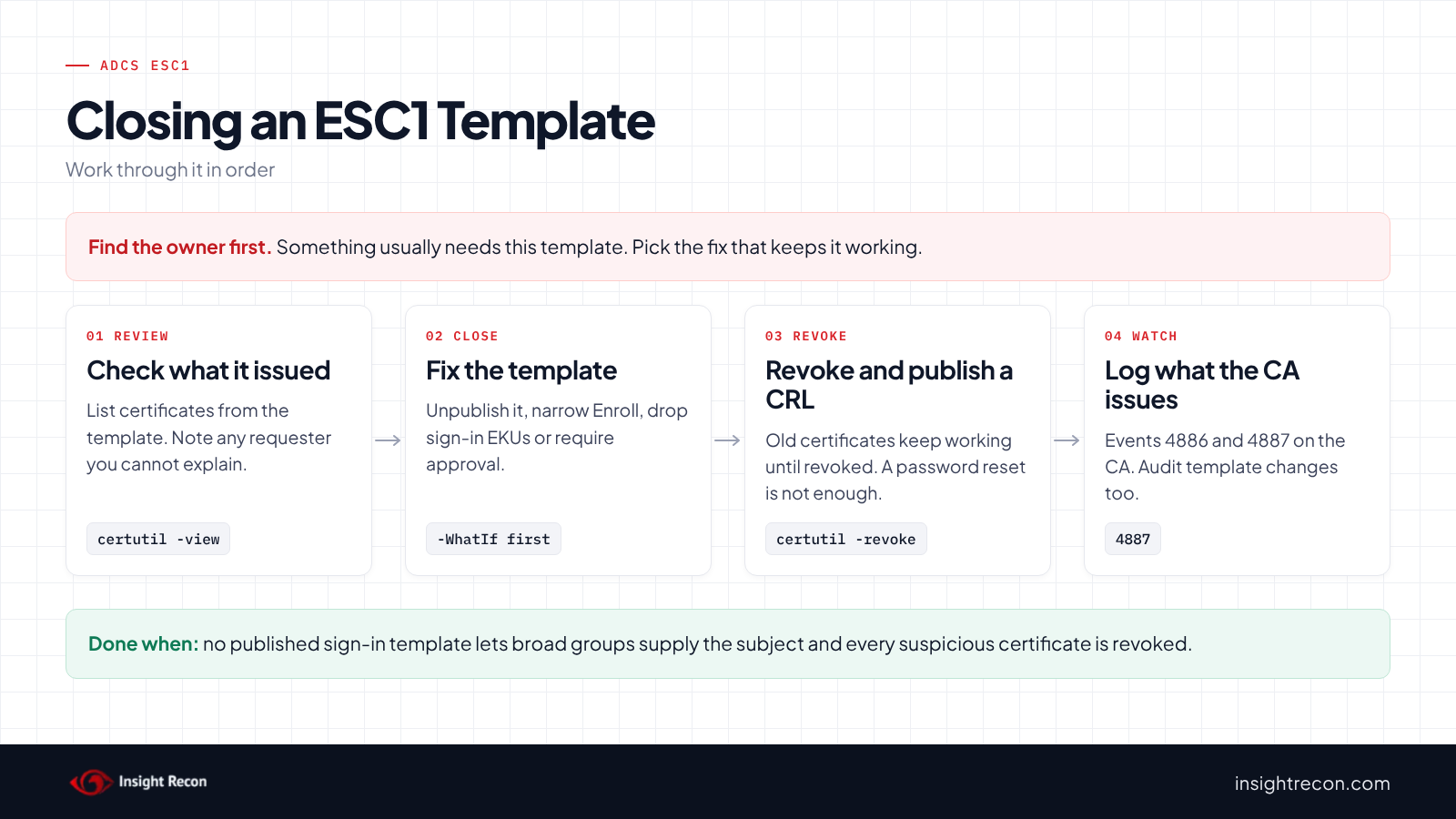
Find what uses the template before you change it. Then pick the fix that keeps that working.
Find the owner of each ADCS ESC1 template
The template's name, its EKUs and the requesters in the issued list usually point to the app. Common sources include web servers, VPN and Wi-Fi certificates, device management tools and third-party software that asked for a "flexible" template. If nothing was issued from it in the last year, it's probably safe to unpublish.
Pick the fix that fits
Microsoft lists five ways to close it. Any one of them is enough:
- Unpublish it if nothing uses it.
- Narrow who can enroll to the servers or group that need it, if the app still needs to supply its own subject.
- Remove the sign-in EKUs if the app only needs a server certificate. The template then shows up under ESC17 instead, so narrow enrollment as well.
- Turn off "Supply in the request" and build the subject from AD, if the requester is always the subject.
- Require CA certificate manager approval if the app needs all of the above. Someone then checks each request by hand.
Save the current settings
Note the template's current settings and permissions so you can put them back. The enroll script below saves the permissions to a file before it changes anything.
Fix ADCS ESC1 safely
1. Close the template
Each script below changes one template. Each is a dry run with -WhatIf. Drop that to apply. They need Enterprise Admins, or rights delegated on the template or CA object. Change WebServerCustom and Contoso-CA to your names.
Unpublish it. This stops one CA from issuing the template. To undo it, run the same command with -Add. Repeat it for each CA in PublishedOn.
# Dry run. Drop -WhatIf to apply.
# Needs Enterprise Admins, or write rights on the CA's enrollment services object.
Import-Module ActiveDirectory -ErrorAction Stop
$pks = "CN=Public Key Services,CN=Services,$((Get-ADRootDSE).configurationNamingContext)"
$ca = Get-ADObject -SearchBase "CN=Enrollment Services,$pks" -LDAPFilter '(cn=Contoso-CA)'
if (-not $ca) { throw 'CA not found.' }
Set-ADObject -Identity $ca -Remove @{ certificateTemplates = 'WebServerCustom' } -ErrorAction Stop -WhatIf
Narrow who can enroll. This removes Enroll and Autoenroll for the broad groups and keeps their Read access. It warns about entries that combine Enroll with other rights, which you fix on the template's Security tab. Before you apply it, give Enroll to the group that needs the template.
# Dry run. Drop -WhatIf to apply.
# Needs Enterprise Admins, or permission to change the template's security.
Import-Module ActiveDirectory -ErrorAction Stop
$pks = "CN=Public Key Services,CN=Services,$((Get-ADRootDSE).configurationNamingContext)"
$t = Get-ADObject -SearchBase "CN=Certificate Templates,$pks" -LDAPFilter '(cn=WebServerCustom)'
if (-not $t) { throw 'Template not found.' }
$low = 'S-1-1-0', 'S-1-5-2', 'S-1-5-4', 'S-1-5-7', 'S-1-5-11', 'S-1-5-15', 'S-1-5-32-545'
$lowRid = '^S-1-5-21-\d+-\d+-\d+-51[345]$'
$enrollRights = [guid]'0e10c968-78fb-11d2-90d4-00c04f79dc55', [guid]'a05b8cc2-17bc-4802-a710-e7c15ab866a2', [guid]::Empty
$path = "AD:$($t.DistinguishedName)"
$acl = Get-Acl -Path $path -ErrorAction Stop
# Saves the current permissions so you can put them back
$acl.Sddl | Set-Content -Path ".\$($t.Name)-acl.sddl"
foreach ($ace in $acl.GetAccessRules($true, $false, [System.Security.Principal.SecurityIdentifier])) {
    if ($ace.AccessControlType -ne 'Allow' -or ($ace.IdentityReference.Value -notin $low -and $ace.IdentityReference.Value -notmatch $lowRid)) { continue }
    if ($ace.ActiveDirectoryRights -eq 'ExtendedRight' -and $ace.ObjectType -in $enrollRights) {
        [void]$acl.RemoveAccessRuleSpecific($ace)
    } elseif ($ace.ActiveDirectoryRights -band [System.DirectoryServices.ActiveDirectoryRights]::ExtendedRight) {
        Write-Warning "$($ace.IdentityReference) holds Enroll combined with other rights. Fix it on the template's Security tab."
    }
}
Set-Acl -Path $path -AclObject $acl -ErrorAction Stop -WhatIf
Require approval. This turns on CA certificate manager approval. Every request then waits for a person. To undo it, set the flag back to the value it had before.
# Dry run. Drop -WhatIf to apply.
# Needs Enterprise Admins, or write rights on the template object.
Import-Module ActiveDirectory -ErrorAction Stop
$pks = "CN=Public Key Services,CN=Services,$((Get-ADRootDSE).configurationNamingContext)"
$t = Get-ADObject -SearchBase "CN=Certificate Templates,$pks" -LDAPFilter '(cn=WebServerCustom)' -Properties msPKI-Enrollment-Flag
if (-not $t) { throw 'Template not found.' }
# 0x2 is CT_FLAG_PEND_ALL_REQUESTS: every request waits for a certificate manager
Set-ADObject -Identity $t -Replace @{ 'msPKI-Enrollment-Flag' = ($t.'msPKI-Enrollment-Flag' -bor 2) } -ErrorAction Stop -WhatIf
To remove the sign-in EKUs or turn off "Supply in the request", use the Certificate Templates console (certtmpl.msc). The Extensions and Subject Name tabs set the related values together, which is safer than editing the attributes by hand.
2. Revoke certificates you can't explain
For each serial number you noted, revoke the certificate on the CA with certutil -revoke, then publish a new CRL with certutil -crl. Domain controllers may keep using a cached CRL until it expires, so publish the new one right away and run certutil -setreg chain\ChainCacheResyncFiletime @now on each domain controller. If a certificate named a privileged account, treat it as a possible domain compromise. Resetting that account's password alone doesn't stop the certificate.
3. Re-run the find script
The template should no longer appear, or should show only the groups you meant to allow.
Keep ADCS ESC1 closed
- Log what the CA issues. Turn on the CA's audit filter and the Audit Certification Services policy on the CA. Events 4886 and 4887 then record each request and each certificate issued. Alert when the requester and the subject don't match on a sign-in template.
- Watch template changes. Audit changes to the Certificate Templates container with Audit Directory Service Changes (event 5136). A template that gains "Supply in the request" or broad Enroll rights is how ESC1 comes back.
- Review new templates. Make "who enrolls, what EKUs, where the subject comes from" part of approving any new template.
- Re-run the scan. It flags the template again if it reopens.
ADCS ESC1 checklist
- Is every template with "Supply in the request" either server-only, unpublished or limited to the accounts that need it?
- Do Domain Users, Domain Computers, Authenticated Users and Everyone lack Enroll on those templates?
- Does any template that must stay this way require certificate manager approval?
- Did you review certificates already issued from each ESC1 template?
- Did you revoke the ones you can't explain and publish a new CRL?
- Does someone watch the CA's issued-certificate log for mismatched requests?
- Are changes to certificate templates audited?
A "no" on the first two questions means any domain user can potentially become a domain admin.
Compliance mapping
| Framework | Reference | Why it applies |
|---|---|---|
| MITRE ATT&CK | T1649 | Steal or Forge Authentication Certificates. An ESC1 template issues a certificate for any account the requester names. |
| CIS Controls v8 | Control 4, Control 6 | Secure configuration of enterprise assets and access control management. Templates should only issue to the accounts they're meant for. |
| NIST CSF 2.0 | PR.AA-01, PR.AA-02, PR.AA-05 | Identities and credentials are managed and bound to the right person. Access follows least privilege. ESC1 lets requesters bind a credential to someone else. |
| ANSSI | vuln_adcs_ | ANSSI's control point for authentication templates where the enrollee supplies the name. |
| DISA STIG | V-269098 | Templates that allow the requester to supply the subject name must require manual approval (Active Directory Forest STIG). |
ADCS ESC1 FAQ
What is ADCS ESC1?
A certificate template that lets the requester supply the subject, allows sign-in, needs no approval and lets broad groups enroll. Anyone who can enroll can potentially get a certificate as any user.
Is "Supply in the request" always a problem?
No. Web server templates often need it. It becomes ESC1 when the certificate also allows sign-in and broad groups can enroll.
Does fixing the template revoke existing certificates?
No. Certificates already issued keep working until they expire or you revoke them. Check what the template issued and revoke anything you can't explain.
Does strong certificate mapping enforcement fix ESC1?
No. The requester can put the target account's SID in the SAN, which domain controllers accept as a strong mapping.
Does Insight Recon check for ADCS ESC1?
Yes. The free scan includes User-controlled certificate template subject in ADCS (ESC1), along with the other ADCS checks.
See whether any user in your domain can request a certificate as your admins.
It runs from any Windows machine that can reach your DCs, with a standard domain account. Every core AD check is free for one domain.
Not ready to scan?
AD Signal is our monthly look at what's changing in AD security and how real domains score. Read the latest report.
References
- Microsoft Learn: Certificates security posture assessment (ESC1)
- Microsoft Learn: [MS-CRTD] 2.28 msPKI-Certificate-Name-Flag
- Microsoft Learn: [MS-PKCA] 3.1.5.2.1.6 SID
- Microsoft Support: KB5014754, certificate-based authentication changes on domain controllers
- Microsoft Learn: certutil
- Microsoft Learn: Audit Certification Services
- Microsoft Learn: Securing PKI, Certification Authority audit filter
- Microsoft Learn: Event 5136, a directory service object was modified
- SpecterOps: Certified Pre-Owned
- MITRE ATT&CK: T1649 Steal or Forge Authentication Certificates
- DISA STIG V-269098: manual approval for templates where the requester supplies the subject