MachineAccountQuota: Stop Non-Admin Users From Adding Computers to AD
MachineAccountQuota is the Active Directory setting that controls how many computer accounts a standard user can add to the domain. The default is 10. Few organizations need that, but it gives anyone with a domain login a way to create an identity they fully control. Here's how to check your domain, move joins to a delegated group and set the quota to 0.
| Priority | High. Any domain user can create computer accounts they control |
|---|---|
| What decides it | The ms-DS-MachineAccountQuota value on the domain object, and who holds the "Add workstations to domain" user right on domain controllers |
| Who's affected | Any domain still on the default. The quota starts at 10 and Authenticated Users hold the user right on DCs by default |
| Fix | Delegate domain joins to a group on the right OU, then set the quota to 0 and limit the user right to Administrators |
Check it now: what is your MachineAccountQuota?
$domain = [adsi]"LDAP://$(([adsi]'LDAP://RootDSE').defaultNamingContext)"
"MachineAccountQuota: $($domain.'ms-DS-MachineAccountQuota')"
Runs as any domain user, with no modules needed. It reads the quota from the domain object. 0 is what you want. 10 means the domain is still on the default. A blank result means the read failed. Try the AD module version below.
You checked one setting. The free scan checks the rest of your on-prem AD in a few minutes.
Nothing gets installed on your domain controllers. Only HTTPS leaves your network.
What MachineAccountQuota controls
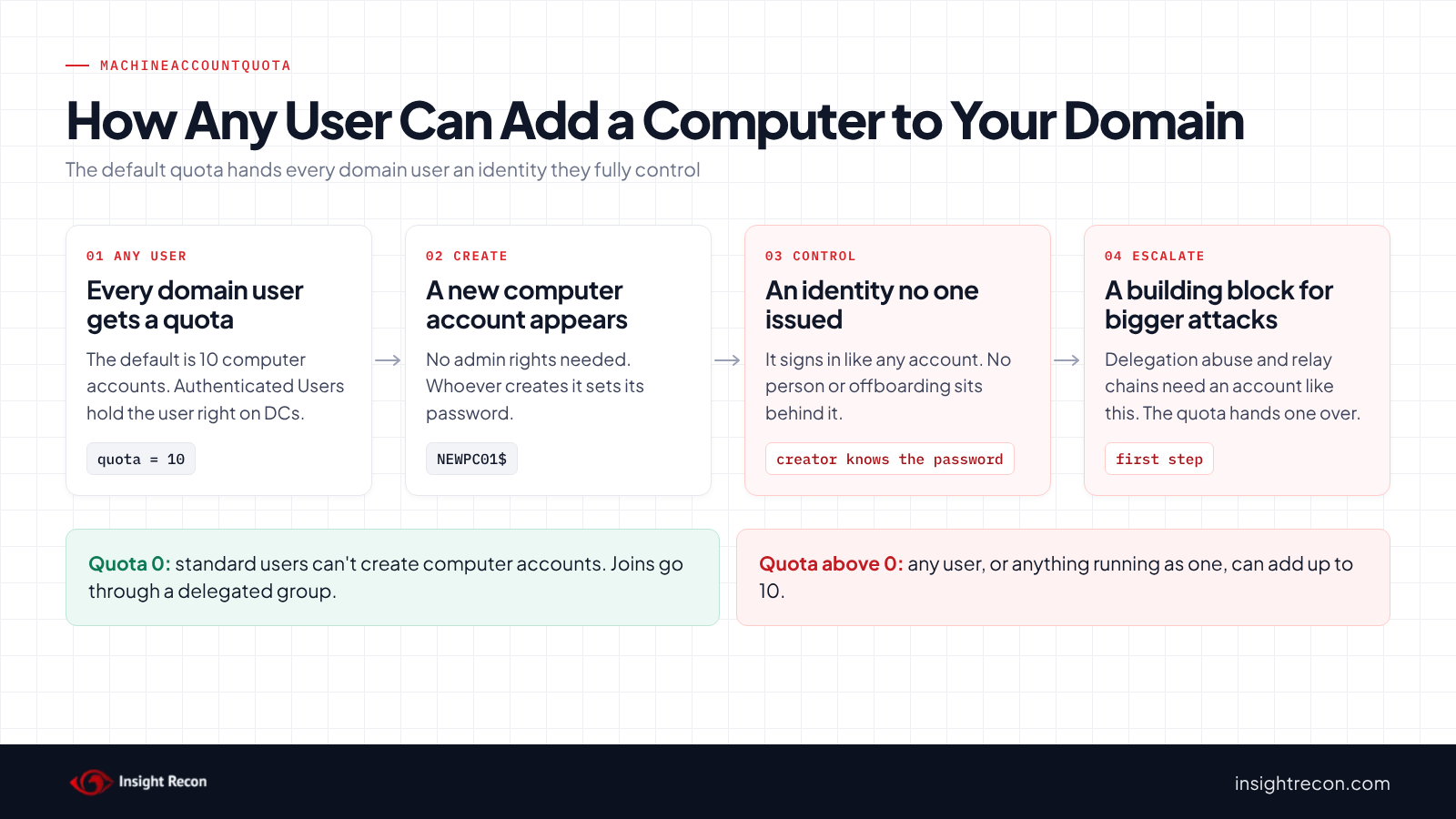
ms-DS-MachineAccountQuota is an attribute on the domain object. Microsoft documents it as the number of computer accounts a user is allowed to create in a domain. The default is 10. It applies to standard users only, as administrators aren't limited by it. Neither are accounts that hold delegated permission to create computer objects on an OU or container.
The quota works together with a user right. "Add workstations to domain" (SeMachineAccountPrivilege) is what lets a user join a computer without any other permission. On domain controllers, the effective default holder is Authenticated Users. Every domain user starts with the right and a quota of 10.
The idea dates back to Windows 2000. It let people join their own workstations without a call to IT. Most organizations moved past that a long time ago. Machines get joined by IT, an imaging process or a provisioning tool, usually under an account with its own permissions. The default often stays in place anyway, because nothing breaks while it's there.
Why a MachineAccountQuota above 0 is risky
A computer account is a full security principal. It signs in, gets Kerberos tickets and reads most of the directory the same way a user account does. With the default quota, any domain user can create one. The person who creates it sets its password. They now control a domain identity that never went through your normal account process. It isn't part of offboarding. In a list of thousands of workstations it's easy to miss.
That identity is a starting point for several known escalation paths. Abuse of resource-based constrained delegation, for one, needs an account with a service principal name that the attacker controls. Any computer account they create fits. So does the September 2026 path against constrained delegation on accounts with no SPN. SpecterOps lists restricting machine account creation as a defense for that reason. The new account also joins Domain Computers, which some domains let read a gMSA password. See our gMSA password post. In late 2021 a pair of Active Directory bugs (CVE-2021-42278 and CVE-2021-42287) let a standard user who could create a computer account impersonate a domain controller. Microsoft fixed them in the November 2021 updates. The Kerberos fix moved to full enforcement on domain controllers in October 2022. Patching closed that pair. The quota is still a cheap building block for other attack paths.
The attacker may not even need a password. If LDAP signing and channel binding aren't enforced, a login relayed to a domain controller's LDAP service can be used to create the computer account. Our posts on enforcing LDAP signing and LDAP channel binding cover that side. In MITRE ATT&CK terms this maps to T1136.002 Create Account: Domain Account and T1098 Account Manipulation.
Check MachineAccountQuota in your domain
Read the quota with the AD module
The quick check up top uses plain ADSI. This does the same with the ActiveDirectory module, which is easier to fold into a report. It runs as any domain user.
Import-Module ActiveDirectory
Get-ADObject (Get-ADDomain).DistinguishedName -Properties 'ms-DS-MachineAccountQuota' |
    Select-Object DistinguishedName, 'ms-DS-MachineAccountQuota'
What to look for: any value above 0. Ten is the default. Other values usually mean someone changed it on purpose at some point. Find out why before you change it again.
See who holds "Add workstations to domain"
The quota only matters for users who also hold the user right. This searches every GPO in SYSVOL for the setting that assigns it. It runs as any domain user, since SYSVOL is readable to all of them.
Import-Module ActiveDirectory
$dns = (Get-ADDomain).DNSRoot
$policies = "\\$dns\SYSVOL\$dns\Policies"
Get-ChildItem $policies -Recurse -Filter GptTmpl.inf -ErrorAction SilentlyContinue |
    Select-String -Pattern '^SeMachineAccountPrivilege' |
    Select-Object @{n='GpoGuid'; e={ ($_.Path -split '\\')[-6] }}, Line
What to look for: the GPOs linked to the Domain Controllers OU, the Default Domain Controllers Policy first (its GUID starts with 6AC1786C). *S-1-5-11 in the line is Authenticated Users. If no GPO sets it, the default applies, which is also Authenticated Users. If the line lists only *S-1-5-32-544 (Administrators), standard users can't use the quota even when it's above 0. Confirm on one DC with gpresult if your GPO layout is complicated.
Find computers created by standard users
When a standard user creates a computer account against the quota, Active Directory records who did it in mS-DS-CreatorSID. Microsoft's own guidance uses this attribute to count how many machines a user has added. This lists every computer that has one. It runs as any domain user.
Import-Module ActiveDirectory
Get-ADComputer -LDAPFilter '(mS-DS-CreatorSID=*)' -Properties 'mS-DS-CreatorSID', whenCreated, operatingSystem |
    ForEach-Object {
        $sid = $_.'mS-DS-CreatorSID'
        if ($sid -is [byte[]]) { $sid = New-Object System.Security.Principal.SecurityIdentifier($sid, 0) }
        try { $who = $sid.Translate([System.Security.Principal.NTAccount]).Value } catch { $who = $sid.Value }
        [pscustomobject]@{ Name = $_.Name; CreatedBy = $who; whenCreated = $_.whenCreated; OS = $_.operatingSystem }
    } | Sort-Object CreatedBy, whenCreated
What to look for: computers created by people outside IT, by accounts that no longer exist (they show as a bare SID) or by service accounts that shouldn't join machines. A computer with a creator SID and no operating system has likely never been joined by a real machine. Look at those first.
Find OUs where others can create computers
The quota isn't the only way to add computers. Anyone with "Create Computer objects" on an OU or the Computers container can add as many as they like, with no quota at all. This lists those permissions on every OU and the default Computers container, skipping the built-in admin groups. It runs as any domain user.
Import-Module ActiveDirectory
$computerClass = [guid]'bf967a86-0de6-11d0-a285-00aa003049e2'
$expected = 'Domain Admins|Enterprise Admins|BUILTIN\\Administrators|NT AUTHORITY\\SYSTEM|Account Operators'
$targets = @((Get-ADOrganizationalUnit -Filter *).DistinguishedName) + "CN=Computers,$((Get-ADDomain).DistinguishedName)"
foreach ($dn in $targets) {
    (Get-Acl "AD:$dn").Access | Where-Object {
        $_.AccessControlType -eq 'Allow' -and
        $_.ActiveDirectoryRights -match 'CreateChild|GenericAll' -and
        ($_.ObjectType -eq $computerClass -or $_.ObjectType -eq [guid]::Empty) -and
        $_.IdentityReference -notmatch $expected
    } | Select-Object @{n='Container'; e={ $dn }}, IdentityReference, ActiveDirectoryRights, IsInherited
}
What to look for: broad groups such as Domain Users or Authenticated Users, and individual users rather than a group. Each name on the list should be a join group you can explain. Treat this as a starting list and review it by hand.
Check MachineAccountQuota with Insight Recon
The free scan includes Non-administrative users can add computer accounts. It raises the finding when the quota is above 0. The finding carries the Hacker Insight, remediation steps and compliance mappings for the check. If the scanner can't read the quota, the check reports "not assessed" rather than passing.
Know what it doesn't cover. The check is about the quota. Delegated "Create Computer objects" permissions on OUs are a separate path with no quota at all. Review those with the OU script above.
These related checks cover the rest of this area:
- Pre-Created Computer Accounts Detected, computer objects that were created ahead of time and never joined.
- Resource-Based Constrained Delegation Configured, the delegation setting that a new computer account is most often used against.
- LDAP Signing Not Enforced on Domain Controllers and LDAPS Channel Binding Not Enforced, the settings that stop a relayed login from creating accounts.
- Insufficient Domain Controller Logging, which decides whether you'd see a new computer account appear.
Want to see what a finding looks like first? Here's a sample report. The full list is in our check library.
See what else is open in your AD.
The scan runs from a domain-joined Windows machine with a standard domain account. The free plan covers every on-prem AD check.
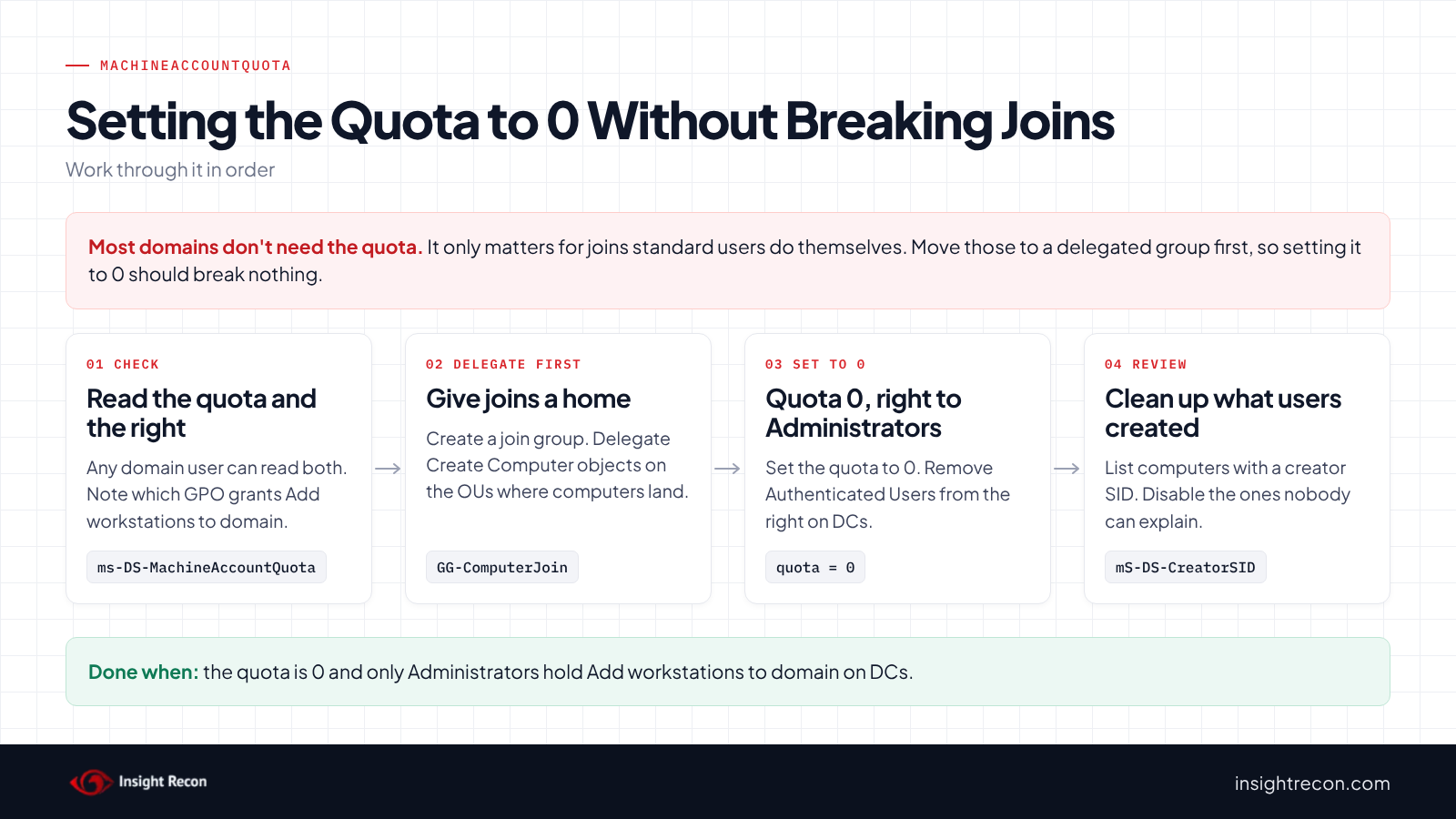
Before you set MachineAccountQuota to 0
The change itself is one attribute. The work is making sure nothing still depends on the old default. Existing computers aren't affected, since the quota only counts when a computer account gets created. Machines already in the domain keep working unless they're removed and joined again.
Setting the quota to 0 stops every standard-user join that relies on it. That can include a helpdesk account that joins machines without admin rights, imaging or task sequences that join with a plain user account, VDI provisioning and users who join their own devices. Find those first and give them a delegated path, or they'll fail the day you make the change.
Find out who joins machines today
Run the creator script above and group it by CreatedBy. Every account that shows up has been joining machines through the quota. Recent entries are the ones to talk to. If you collect event 4741 ("A computer account was created") from your DCs, the subject of each event tells you the same thing for recent joins.
Set up a delegated join group
Create a group for accounts that join computers, such as GG-ComputerJoin, and add the accounts you found. In Active Directory Users and Computers, right-click the OU where new computers belong and run the Delegation of Control Wizard. Choose a custom task, limit it to Computer objects and grant "Create selected objects in this folder". On the permissions page, the set most join accounts need is:
- Reset password
- Read and write Account Restrictions
- Validated write to DNS host name
- Validated write to service principal name
Test a real join with a member of the group before you go further. Delegate on the specific OUs where computers land. Skip the domain root.
One more thing to plan for. Since the October 2022 domain-join hardening, Windows runs extra ownership checks when a join reuses an existing computer account. If your join group reuses accounts, Microsoft added a policy for that in March 2023: Domain controller: Allow computer account re-use during domain join. Put only trusted account owners on it. Microsoft says not to add the account that performs the join or broad groups like Authenticated Users.
Record the current value
Save the current quota so you can put it back if something you missed breaks. It runs as any domain user.
Import-Module ActiveDirectory
Get-ADObject (Get-ADDomain).DistinguishedName -Properties 'ms-DS-MachineAccountQuota' |
    Select-Object DistinguishedName, 'ms-DS-MachineAccountQuota', @{n='SavedOn'; e={ Get-Date }} |
    Export-Csv .\machineaccountquota-before.csv -NoTypeInformation
Set MachineAccountQuota to 0
1. Set the quota to 0
It's a dry run with -WhatIf. Drop that to apply. It needs Domain Admin rights and changes one attribute on the domain object, which then replicates to every DC.
# Dry run. Drop -WhatIf to apply. Needs Domain Admin rights.
Import-Module ActiveDirectory
Set-ADDomain -Identity (Get-ADDomain).DistinguishedName -Replace @{'ms-DS-MachineAccountQuota' = 0} -WhatIf
Run the quick check again and confirm it returns 0. If something you missed breaks, this puts the saved value back while you set up delegation for it:
# Only if something breaks and you need time to set up delegation.
Import-Module ActiveDirectory
$saved = Import-Csv .\machineaccountquota-before.csv
Set-ADDomain -Identity $saved.DistinguishedName -Replace @{'ms-DS-MachineAccountQuota' = [int]$saved.'ms-DS-MachineAccountQuota'} -WhatIf
2. Limit "Add workstations to domain" to Administrators
Edit the Default Domain Controllers Policy, or the GPO your DCs use for user rights. Under Computer Configuration, Policies, Windows Settings, Security Settings, Local Policies, User Rights Assignment, open Add workstations to domain. Remove Authenticated Users and leave Administrators. That matches the DISA STIG for Windows Server 2022 domain controllers.
Your delegated join group keeps working. Microsoft documents that users with "Create Computer objects" on a container can join computers without this user right. The two controls cover each other. If the quota ever drifts back up, the user right still blocks standard users.
3. Review the computers users already created
Setting the quota to 0 doesn't remove accounts that were created before. Go back to the creator list. Disable each computer nobody can explain before you delete it. Then look at what it was used for. Pay attention to accounts with no operating system, accounts created recently and accounts that show up in delegation settings elsewhere in the domain.
Keep it from coming back
- Watch event 4741. Turn on "Audit Computer Account Management" on DCs. Event 4741 logs every new computer account and who created it. Alert on any creator outside your join group and admin accounts.
- Watch the hardening events. Since the November 2021 updates, DCs log events 16990 and 16991 in the System log when they block a non-admin from creating a malformed or misnamed computer account. Either one is worth a look.
- Review OU delegation. Re-run the OU permission script on a schedule. A new "Create Computer objects" grant to a broad group undoes the quota fix.
- Re-run the check. Domain rebuilds, migrations and recovery from backup can bring the default back. Confirm the quota is still 0 afterwards.
MachineAccountQuota checklist
- Does the quick check return
0? - Do only Administrators hold "Add workstations to domain" on domain controllers?
- Is there a delegated join group on the OUs where computers belong, and has a real join been tested with it?
- Have the computers in the creator list been reviewed and the unexplained ones disabled?
- Is "Create Computer objects" on OUs limited to groups you can explain?
- Is event 4741 collected from every DC?
A "no" on both of the first two means standard users can still add computers. Fix both and one drifting back won't reopen the gap.
Compliance mapping
| Framework | Reference | Why it applies |
|---|---|---|
| MITRE ATT&CK | T1136.002, T1098 | Creating a domain account an attacker controls, then changing it to gain or keep access. |
| CIS Controls v8 | Control 5, Control 6 | Account management and access control management. Accounts are created through a controlled process. |
| ANSSI | vuln_user_accounts_machineaccountquota | Control point for identifying domains where standard users can create computer accounts through MachineAccountQuota. |
| NIST CSF 2.0 | PR.AA-05, PR.AA-02 | Access permissions follow least privilege, and identities are issued and bound to credentials through a managed process. |
| DISA STIG | V-254419 (WN22-DC-000350) | "Add workstations to domain" on domain controllers is limited to Administrators. |
MachineAccountQuota FAQ
What is the default MachineAccountQuota?
Ten. Microsoft documents that authenticated users can join 10 machine accounts to the domain by default. The value lives in ms-DS-MachineAccountQuota on the domain object.
Will setting MachineAccountQuota to 0 break existing computers?
No. Computers already in the domain keep working. It stops standard users from creating new computer accounts through the quota. Admins and accounts with delegated "Create Computer objects" permission can still join machines.
Can helpdesk staff still join computers after the change?
Yes, once you delegate it. Put them in a join group with "Create Computer objects" and the related permissions on the OUs where computers belong. That also gives you one place to see and control who can join machines.
Is the quota enough, or do I need to change the user right too?
Do both. The quota is what most guidance and scanners look at. The user right is what the DISA STIG checks. Either one alone blocks standard users. Having both means one drifting back doesn't reopen the gap.
Does Insight Recon check MachineAccountQuota?
Yes. Non-administrative users can add computer accounts is in the free scan. It flags any quota above 0 and reports "not assessed" rather than passing if it can't read the value.
Find the defaults still open in your domain.
The scan runs from a domain-joined Windows machine with a standard domain account. The free plan covers every on-prem AD check.
Not ready to scan?
AD Signal is our monthly look at what's changing in AD security and how real domains score. Read the latest report.
References
- Microsoft Learn: ms-DS-MachineAccountQuota attribute
- Microsoft Learn: Default limit to number of workstations a user can join to the domain
- Microsoft Learn: Add workstations to domain (security policy setting)
- Microsoft Learn: ms-DS-Creator-SID attribute
- Microsoft Learn: Event 4741, A computer account was created
- Microsoft Support: KB5020276, Netjoin domain join hardening changes
- Microsoft Support: KB5008102, Active Directory Security Accounts Manager hardening changes (CVE-2021-42278)
- Microsoft Support: KB5008380, Authentication updates (CVE-2021-42287)
- SpecterOps Misconfiguration Manager: PREVENT-16, Restrict machine account creation
- DISA STIG for Windows Server 2022: V-254419, Add workstations to domain on domain controllers
- MITRE ATT&CK: T1136.002 Create Account: Domain Account
- MITRE ATT&CK: T1098 Account Manipulation