Privileged Object Owners in AD: Find and Fix Risky Owners
Privileged object owners hold a right that most access reviews never look at. The owner of an admin account or group can rewrite its permissions, even with no entry in the list. If a helpdesk or service account owns one, it may be one step from Domain Admin. This post shows you how to find privileged objects with the wrong owner, check what the owner may have done and reset it safely.
| Priority | High, or Moderate when every listed object is a former admin, since an enabled admin account owned by a non-admin is a working path to Tier 0 |
|---|---|
| What decides it | The owner recorded in the security descriptor of each object marked adminCount=1 |
| Who's affected | Domains where AdminSDHolder has the wrong owner, where an owner was changed in the last hour, where SDProp isn't running or where accounts that left their admin groups kept a non-admin owner |
| Fix | Check what each owner can already do, then make Domain Admins the owner, starting with AdminSDHolder |
Check it now: which privileged objects have an owner outside Tier 0?
# Runs as any domain user with the ActiveDirectory module.
Import-Module ActiveDirectory -ErrorAction Stop
$domainSid = (Get-ADDomain).DomainSID.Value
$rootSid = (Get-ADDomain -Identity (Get-ADForest).RootDomain).DomainSID.Value
# SYSTEM, Administrators, Domain Admins, the forest root's Domain Admins, Schema Admins, Enterprise Admins
$tier0 = 'S-1-5-18', 'S-1-5-32-544', "$domainSid-512", "$rootSid-512", "$rootSid-518", "$rootSid-519"
Get-ADObject -LDAPFilter '(adminCount=1)' -Properties nTSecurityDescriptor, sAMAccountName, userAccountControl |
    ForEach-Object {
        $owner = $_.nTSecurityDescriptor.Owner
        $ownerSid = try { ([Security.Principal.NTAccount]$owner).Translate([Security.Principal.SecurityIdentifier]).Value } catch { $owner }
        if ($ownerSid -notin $tier0) {
            [pscustomobject]@{
                Object  = $_.sAMAccountName
                Class   = $_.ObjectClass
                Enabled = if ($null -ne $_.userAccountControl) { -not ($_.userAccountControl -band 2) } else { $null }
                Owner   = $owner
                DN      = $_.DistinguishedName
            }
        }
    } |
    Sort-Object Class, Object
Runs as any domain user with the ActiveDirectory module. It lists every object marked adminCount=1 whose owner isn't SYSTEM, Administrators, Domain Admins, Schema Admins or Enterprise Admins. An empty result means every privileged object has a Tier 0 owner.
You checked one ownership gap. The free scan checks the rest of your on-prem AD in a few minutes.
Nothing gets installed on your domain controllers. Only HTTPS leaves your network.
What privileged object owners can do
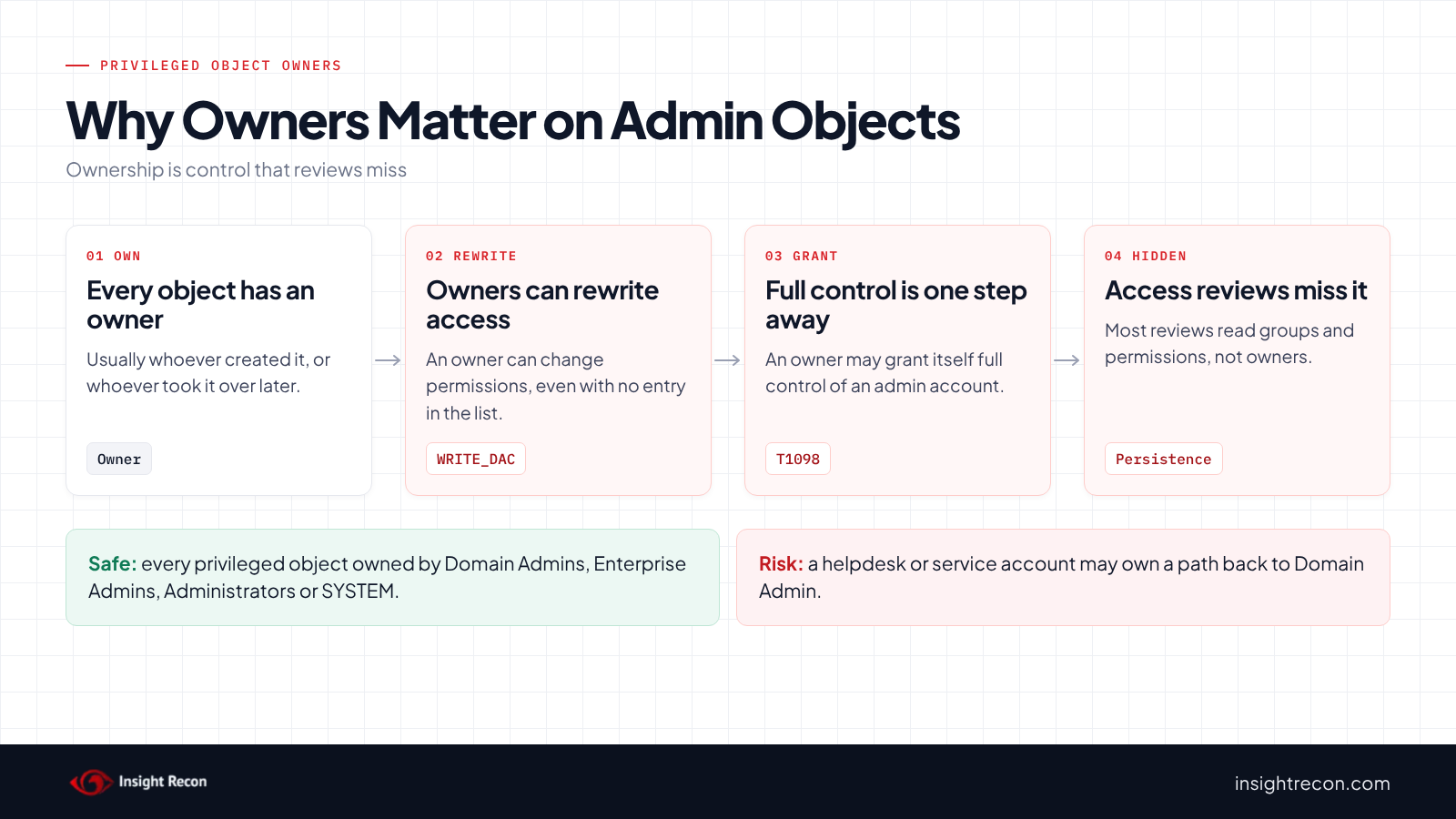
Every AD object has an owner in its security descriptor. Microsoft's page on object ownership explains: "An object's owner implicitly has WRITE_DAC access to the object. This means that the owner can modify the object's discretionary access control list (DACL), and thus, can control access to the object."
In other words, the owner doesn't need an entry in the permissions list. It can add one whenever it likes. Since Windows Server 2008, an OwnerRights entry can limit those implicit rights, but most objects don't have one.
What makes an object privileged
AD sets adminCount to 1 on accounts and groups in protected groups, such as Domain Admins, Enterprise Admins and the operator groups. Microsoft's attribute reference says it marks an object whose ACLs were changed "to a more secure value by the system because it was a member of one of the administrative groups." The full list of protected groups is in Microsoft's protected accounts appendix.
Who should own them
Only Tier 0 principals should own privileged objects: Domain Admins, Enterprise Admins, the built-in Administrators group or SYSTEM.
Why risky privileged object owners are dangerous
Ownership is a way back to Domain Admin
If a helpdesk account owns a Domain Admin's user object, whoever controls that helpdesk account may grant itself full control of the admin. From there, they could potentially reset the admin's password. MITRE ATT&CK tracks this kind of change as T1098, Account Manipulation.
Access reviews don't look at owners
Most reviews check group membership and the permissions list. An owner appears in neither. As a result, ownership can survive cleanups that remove every visible right, which makes it useful for persistence.
How the wrong owner gets there
The owner is usually whoever created the object. So an admin account created by a helpdesk technician or a provisioning tool starts with that creator as its owner. Once it joins a protected group, SDProp swaps in AdminSDHolder's owner within the hour. Objects that leave their protected groups keep whatever owner they have from then on.
SDProp copies AdminSDHolder's owner
Every hour, SDProp on the PDC emulator resets protected objects to match AdminSDHolder. Microsoft's protocol specification says it replaces each protected object's whole security descriptor, which includes the owner, with AdminSDHolder's. So on a protected object, a wrong owner usually means AdminSDHolder itself has that owner or the change is less than an hour old. Check AdminSDHolder's owner first, then the objects.
Find risky privileged object owners
Read the quick check results
The quick check above reads the owner of every adminCount=1 object and compares it by SID. That way, it works in any language.
What to look for: enabled users first, then groups. An owner shown as a bare SID usually means someone deleted the account. It still needs fixing. Note each owner, since you'll check what it can do next.
Find leftover adminCount values
Microsoft's AskDS team explains that adminCount isn't reset when a user leaves a protected group. In their words, "The reason AdminCount isn't set back to 0 when the user is removed from a protected group is that you told us not to!" This lists users and groups still marked privileged but no longer in any protected group.
# Runs as any domain user with the ActiveDirectory module.
# adminCount stays at 1 after an account leaves a protected group. This finds those leftovers.
Import-Module ActiveDirectory -ErrorAction Stop
$domainSid = (Get-ADDomain).DomainSID.Value
$rootSid = (Get-ADDomain -Identity (Get-ADForest).RootDomain).DomainSID.Value
$protectedSids = 'S-1-5-32-544', 'S-1-5-32-548', 'S-1-5-32-549', 'S-1-5-32-550', 'S-1-5-32-551', 'S-1-5-32-552',
    "$domainSid-512", "$domainSid-516", "$domainSid-521", "$domainSid-526", "$rootSid-518", "$rootSid-519", "$rootSid-527"
$protected = @{}
foreach ($sid in $protectedSids) {
    $group = try { Get-ADGroup -Identity $sid -ErrorAction Stop } catch { $null }    # forest-root groups may not resolve in a child domain
    if (-not $group) { continue }
    $protected[$group.DistinguishedName] = $true
    Get-ADObject -LDAPFilter "(memberOf:1.2.840.113556.1.4.1941:=$($group.DistinguishedName))" |
        ForEach-Object { $protected[$_.DistinguishedName] = $true }
}
Get-ADObject -LDAPFilter '(&(adminCount=1)(|(objectClass=user)(objectClass=group)))' -Properties sAMAccountName, objectSid |
    Where-Object { -not $protected.ContainsKey($_.DistinguishedName) -and $_.objectSid.Value -notmatch '-50[02]$' } |
    Select-Object @{ n = 'Object'; e = { $_.sAMAccountName } }, ObjectClass, DistinguishedName
What to look for: each row is a former admin or group. A wrong owner on one of these matters less, but the object still has inheritance turned off and should be cleaned up. The script skips the built-in Administrator and krbtgt by RID, so a renamed Administrator stays out too. It doesn't count membership through a primary group, so check any row against the quick check in our primary group ID post before you clean it up.
Check AdminSDHolder itself
AdminSDHolder is the template for every protected object. This shows its owner and whether inheritance is blocked.
# Runs as any domain user with the ActiveDirectory module.
Import-Module ActiveDirectory -ErrorAction Stop
$holder = "CN=AdminSDHolder,CN=System,$((Get-ADDomain).DistinguishedName)"
$acl = Get-Acl -Path "AD:$holder"
[pscustomobject]@{
    Object             = 'AdminSDHolder'
    Owner              = $acl.Owner
    InheritanceBlocked = $acl.AreAccessRulesProtected
}
What to look for: an owner other than Domain Admins or Administrators. If you find one, fix it before anything else. Our AdminSDHolder post covers its permissions in depth.
Check privileged object owners with Insight Recon
The free scan includes Privileged Objects With Unprivileged Owners, a High-severity quick win. It reads the owner of every object marked adminCount=1 and flags any owner outside Tier 0. Owners that pass are SYSTEM, the built-in Administrators group, Domain Admins, Enterprise Admins, Schema Admins and any account or group that is itself Tier 0. An object that owns itself passes too. Each finding lists the affected users, groups and computers, with each one's owner. Non-Standard Domain Controller Owner covers domain controllers. If the scan can't read an owner, the result is Not assessed instead of a pass. In addition, each finding comes with the Hacker Insight, remediation steps and compliance mappings.
Know what this check doesn't decide
Some things are still yours to check. First, it reads only objects marked adminCount=1. A former admin keeps that value after leaving its admin groups, so the check still lists it and labels it as one. A finding with only former admins rates Moderate instead of High. Use the stale script to clean those up. Second, it reads owners only. It can't tell whether the owner already added itself to the permissions list. Finally, privileged objects without adminCount, such as AdminSDHolder or GPOs linked to the Domain Controllers OU, aren't covered here.
Related checks beyond privileged object owners
- Non-Standard Domain Controller Owner, the same problem on DC computer objects. Our DC owners post covers it.
- Risky AdminSDHolder Permissions, which decides the permissions every protected object gets. Our AdminSDHolder post covers it.
You can see what the findings look like in our sample report. The full list is in our check library.
See which admin accounts and groups have the wrong owner, plus the rest of your Tier 0 risks.
It runs from any Windows machine that can reach your DCs, with a standard domain account. Every core AD check is free for one domain.
Before you change privileged object owners
Find out what each owner could already have done. Changing the owner stops future changes, but it doesn't undo past ones.
Check the permissions list
Run (Get-Acl "AD:<distinguished name>").Access on each flagged object. Then look for entries for the owner, or for anyone outside Tier 0, with rights such as GenericAll, WriteDacl, WriteOwner or reset password. For protected objects, SDProp resets permissions within the hour. Stale ones, however, keep whatever was added.
Check who the owner is
Find out whether the owner is a person, a service or a tool. If nobody can explain it, treat it as a possible compromise and follow your incident process before you clean up.
Look for who can change owners
Microsoft notes that anyone with WRITE_OWNER access, or the take ownership privilege, can set a new owner. So also look for WriteOwner entries on these objects, or the problem may come back.
Fix privileged object owners safely
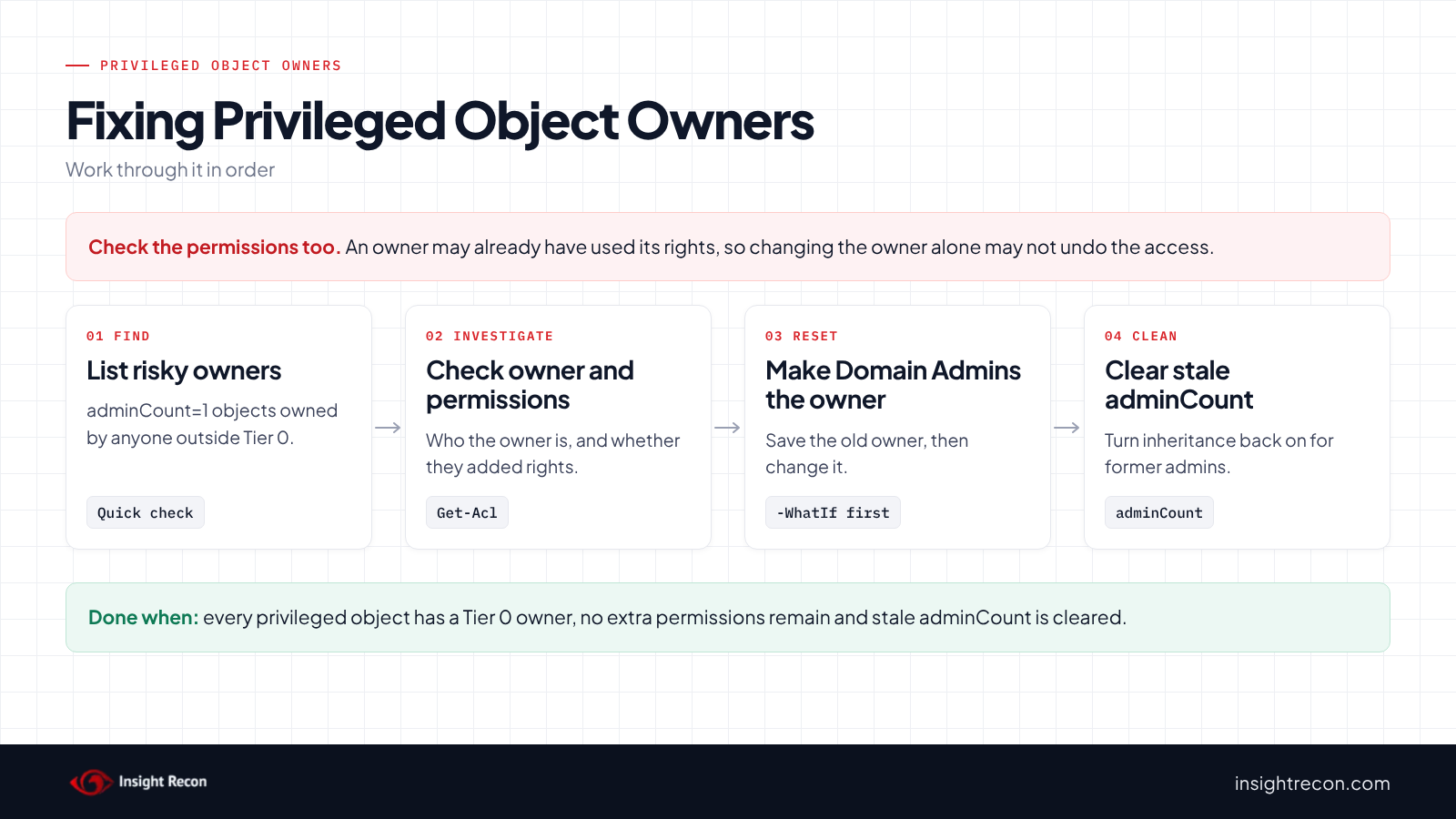
Each change script below is a dry run with -WhatIf. Drop that to apply. Change the distinguished name to the object you're fixing.
1. Make Domain Admins the owner
This prints the current owner, then sets the owner to the domain's Domain Admins group by SID. If AdminSDHolder has the wrong owner, run it on AdminSDHolder first, or SDProp puts that owner back on your protected objects within the hour.
# Dry run. Remove -WhatIf to apply.
# Needs Domain Admins. Change $dn to the object from the quick check.
Import-Module ActiveDirectory -ErrorAction Stop
$dn = 'CN=svc-backup,OU=Service Accounts,DC=contoso,DC=com'
$domain = Get-ADDomain
$acl = Get-Acl -Path "AD:$dn" -ErrorAction Stop
# Note the current owner so you can put it back
[pscustomobject]@{ Object = $dn; CurrentOwner = $acl.Owner }
$domainAdmins = [Security.Principal.SecurityIdentifier]::new("$($domain.DomainSID.Value)-512")
$acl.SetOwner($domainAdmins)
Set-Acl -Path "AD:$dn" -AclObject $acl -ErrorAction Stop -WhatIf
What to look for: the dry run names the object. After you apply it, re-run the quick check and confirm the object is gone from the list. Check again an hour later to confirm SDProp didn't put a wrong owner back.
2. Remove rights the owner added
If the permissions check found entries for the old owner or anyone else outside Tier 0, remove them in Active Directory Users and Computers under Security, Advanced. For a protected object, also review AdminSDHolder, since SDProp copies its permissions back every hour.
3. Clean up leftover adminCount
Some objects from the stale script shouldn't be privileged any more. Once you've confirmed that, this clears adminCount and turns inheritance back on while keeping existing entries. AskDS describes the same two steps.
# Dry run. Remove -WhatIf on each line to apply.
# Needs Domain Admins. Only for objects the stale script found, after you confirm they shouldn't be privileged.
Import-Module ActiveDirectory -ErrorAction Stop
$dn = 'CN=Former Admin,OU=Staff,DC=contoso,DC=com'
$obj = Get-ADObject -Identity $dn -Properties adminCount -ErrorAction Stop
$acl = Get-Acl -Path "AD:$dn" -ErrorAction Stop
# Note the current state so you can put it back
[pscustomobject]@{ Object = $dn; AdminCount = $obj.adminCount; InheritanceBlocked = $acl.AreAccessRulesProtected }
Set-ADObject -Identity $dn -Clear adminCount -ErrorAction Stop -WhatIf
$acl.SetAccessRuleProtection($false, $true)    # allow inheritance, keep existing entries
Set-Acl -Path "AD:$dn" -AclObject $acl -ErrorAction Stop -WhatIf
What to look for: the dry run shows one clear and one permission change. Afterward, the object picks up the permissions of its OU again.
Keep watching privileged object owners
- Re-run the quick check monthly. New admins created by delegated accounts bring the wrong owner with them.
- Create admin accounts as Tier 0. Only Tier 0 admins should create or add accounts to protected groups.
- Watch event 4780. Microsoft logs it when SDProp resets permissions on an admin object, which may mean someone changed them.
- Re-run the scan. The check flags any privileged object whose owner drifts outside Tier 0.
Privileged object owners checklist
- Is every
adminCount=1object owned by a Tier 0 principal? - Did you check each flagged object's permissions for rights the owner added?
- Is AdminSDHolder owned by Domain Admins or Administrators?
- Did you clear
adminCounton former admins and groups? - Are only Tier 0 admins able to create or promote admin accounts?
- Do you re-check owners on a schedule?
A "no" on the second question means a past owner may still have control, even after the owner is fixed.
Compliance mapping
| Framework | Reference | Why it applies |
|---|---|---|
| MITRE ATT&CK | T1098 | Account Manipulation. An owner may change an admin object's permissions to take control of it. |
| CIS Controls v8 | Control 5, Control 6 | Account management and access control management. |
| NIST CSF 2.0 | PR.AA-05 | Access permissions follow least privilege. |
| ANSSI | vuln_owner | ANSSI's control point for incorrect object owners. |
Privileged object owners FAQ
What can the owner of an AD object do?
It can change the object's permissions even without an entry in them, which includes granting itself full control.
Who should own admin accounts and groups?
Domain Admins, Enterprise Admins, the built-in Administrators group or SYSTEM.
Does SDProp reset the owner?
Microsoft's protocol specification says yes. SDProp copies AdminSDHolder's whole security descriptor, owner included, onto protected objects every hour. That's also why a wrong owner on AdminSDHolder spreads to every protected account and group.
Why is a former admin still flagged?
adminCount stays at 1 after an account leaves a protected group. Its owner can still take the account over, so the check lists it and labels it as a former admin. A finding with only former admins rates Moderate. Clear adminCount once you confirm the account isn't privileged.
Does Insight Recon check privileged object owners?
Yes. The free scan includes Privileged Objects With Unprivileged Owners.
See whether any admin account or group is owned by someone outside Tier 0.
It runs from any Windows machine that can reach your DCs, with a standard domain account. Every core AD check is free for one domain.
Not ready to scan?
AD Signal is our monthly look at what's changing in AD security and how real domains score. Read the latest report.
References
- Microsoft Learn: Owner of a new object
- Microsoft Learn: What's new for access control in Windows Server 2008 (OwnerRights)
- Microsoft Learn: Appendix C, protected accounts and groups in AD
- Microsoft Learn: Admin-Count attribute
- Microsoft AskDS: Five common questions about AdminSDHolder and SDProp
- Event 4780, the ACL was set on accounts which are members of administrators groups
- MITRE ATT&CK T1098, Account Manipulation
- Microsoft MS-ADTS: AdminSDHolder