Duplicate Accounts in AD: Find and Clean Up CNF Objects
When the same account is created on two domain controllers before they replicate, Active Directory keeps both and renames one. These duplicate accounts may keep a password, group memberships and permissions that nobody reviews. This post shows you how to find them, work out which twin is real and remove the other one safely.
| Priority | Low, or High when a listed account is enabled and in an admin group |
|---|---|
| What decides it | Objects with CNF: in their name, accounts renamed to $DUPLICATE- and accounts that still share a sAMAccountName |
| Who's affected | Any domain with more than one DC, especially where scripts, sync tools or several admins create accounts |
| Fix | Work out which twin is real and move any access it needs, then disable the other and delete it after a hold period |
Check it now: does your domain have duplicate accounts from replication conflicts?
# Runs as any domain user with the ActiveDirectory module.
# Name conflicts get "CNF:" and the objectGUID added to their name.
# Duplicate sAMAccountNames are renamed to $DUPLICATE- and the RID in hex.
Import-Module ActiveDirectory -ErrorAction Stop
Get-ADObject -LDAPFilter '(|(cn=*CNF:*)(sAMAccountName=$DUPLICATE-*))' `
    -Properties sAMAccountName, whenCreated, userAccountControl, memberOf, adminCount, lastLogonTimestamp |
    ForEach-Object {
        [pscustomobject]@{
            Name           = ($_.Name -split "`n")[0]
            Conflict       = if ($_.sAMAccountName -like '$DUPLICATE-*') { 'Duplicate sAMAccountName' } else { 'Name (CNF)' }
            Class          = $_.ObjectClass
            SamAccountName = $_.sAMAccountName
            Created        = $_.whenCreated
            Enabled        = if ($null -ne $_.userAccountControl) { -not ($_.userAccountControl -band 2) } else { $null }
            Groups         = @($_.memberOf).Count
            AdminCount     = $_.adminCount
            LastLogon      = if ($_.lastLogonTimestamp) { [datetime]::FromFileTime($_.lastLogonTimestamp) } else { $null }
            ObjectGUID     = $_.ObjectGUID
        }
    } |
    Sort-Object AdminCount, Groups -Descending
Runs as any domain user with the ActiveDirectory module. It lists every object renamed by a replication conflict, with admin and group-heavy objects first. An empty result means none were found.
You checked one hygiene issue. The free scan checks the rest of your on-prem AD in a few minutes.
Nothing gets installed on your domain controllers. Only HTTPS leaves your network.
What duplicate accounts are
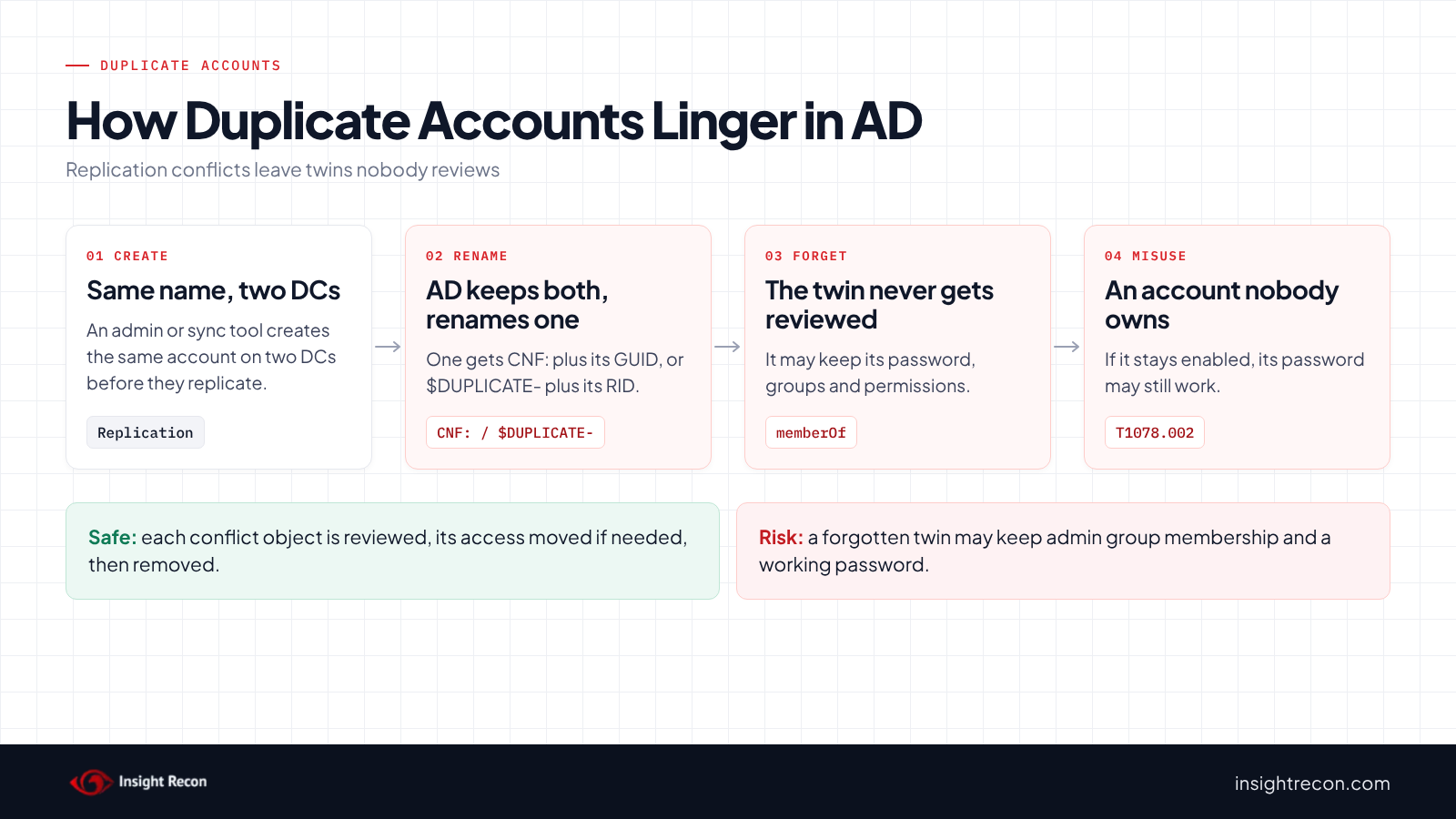
Every domain controller accepts changes and replicates them to the others. So if the same account is created on two DCs before they replicate, both copies exist for a while. When AD notices, it keeps both objects and renames one so they no longer clash. Microsoft's archived article on duplicate object name resolution describes two kinds:
- Name conflicts. When two objects get the same name in the same OU, one is renamed to
<Old RDN>\0ACNF:<objectGUID>, which shows up as the old name, a line break,CNF:and its GUID. - Duplicate sAMAccountNames. When two accounts get the same sign-in name anywhere in the domain, the SAM eventually renames one to
$DUPLICATE-followed by its RID in hexadecimal. That can take a while. A pair that also had a name conflict keeps the same sAMAccountName.
For name conflicts, Microsoft's conflict resolution policy explains how AD picks which object gets renamed. It goes by replication stamps, such as version and time. In other words, it has no idea which copy people use. Microsoft doesn't document how the SAM picks the account it renames to $DUPLICATE-.
How duplicate accounts get created
The usual cause is an HR or provisioning tool that writes to two DCs, or an admin who retries a slow account creation on another DC. Migration and restore work can leave twins behind too.
Why duplicate accounts are dangerous
A twin nobody owns
The renamed object is a full account, which may still be enabled with a working password and its group memberships. Yet because its name looks broken, it tends to drop out of reviews and offboarding. When the person leaves, the account they use gets disabled, while its twin may stay active.
Access that survives cleanups
A conflict object created during an admin's onboarding may carry the same admin groups. If its password still works, it gives a potential attacker valid domain credentials. MITRE ATT&CK tracks this as T1078.002, Valid Accounts: Domain Accounts.
Sign-in and sync problems
A user whose real account got renamed to $DUPLICATE- may not be able to sign in with their usual name. Similarly, sync tools may link to the wrong twin. As a result, these objects cause support tickets as well as risk.
Find duplicate accounts in your domain
Read the quick check results
The quick check above uses the same LDAP filters Microsoft's article gives: (cn=*CNF:*) and (sAMAccountName=$DUPLICATE*). It returns one row per conflict object.
What to look for: rows with AdminCount of 1, a high Groups count or Enabled set to True. Also check LastLogon, since a recent sign-in means someone is using that twin. Copy the ObjectGUID of each row for the next step.
Find accounts that still share a sAMAccountName
A pair that also had a name conflict keeps the same sAMAccountName, so group by it too. This lists every sAMAccountName that more than one object shares, ignoring case as AD does.
# Runs as any domain user with the ActiveDirectory module.
Import-Module ActiveDirectory -ErrorAction Stop
Get-ADObject -LDAPFilter '(sAMAccountName=*)' -Properties sAMAccountName, whenCreated |
    Group-Object sAMAccountName |
    Where-Object Count -gt 1 |
    ForEach-Object Group |
    Select-Object sAMAccountName, ObjectClass, whenCreated, ObjectGUID, DistinguishedName
What to look for: any rows at all. Treat each pair like a conflict object and compare the two with the next script.
Compare each conflict object with its twin
For a name conflict, the twin has the same name in the same container. For a duplicate sAMAccountName, the original name isn't kept. Microsoft's article suggests looking for objects created a few minutes either side of it. The script uses a 10-minute window. For a name conflict, it escapes the name first, since LDAP filters write special characters as a backslash and two hex digits.
# Runs as any domain user with the ActiveDirectory module. Paste the ObjectGUID from the quick check.
Import-Module ActiveDirectory -ErrorAction Stop
$guid = '00000000-0000-0000-0000-000000000000'
$props = 'sAMAccountName', 'whenCreated', 'userAccountControl', 'memberOf', 'lastLogonTimestamp'
$conflict = Get-ADObject -Identity $guid -Properties $props -ErrorAction Stop
if ($conflict.sAMAccountName -like '$DUPLICATE-*') {
    # The original name isn't kept. Look for accounts created within 10 minutes of the conflict.
    $from = $conflict.whenCreated.ToUniversalTime().AddMinutes(-10).ToString('yyyyMMddHHmmss.0Z')
    $to = $conflict.whenCreated.ToUniversalTime().AddMinutes(10).ToString('yyyyMMddHHmmss.0Z')
    $twins = Get-ADObject -LDAPFilter "(&(objectClass=user)(whenCreated>=$from)(whenCreated<=$to))" -Properties $props
} else {
    # Same name, same parent container, without the CNF marker
    $name = ($conflict.Name -split "`n")[0] -replace '\\', '\5c' -replace '\*', '\2a' -replace '\(', '\28' -replace '\)', '\29'
    $parent = ($conflict.DistinguishedName -split '(?<!\\),', 2)[1]
    $twins = Get-ADObject -LDAPFilter "(cn=$name)" -SearchBase $parent -SearchScope OneLevel -Properties $props
}
@($conflict) + @($twins | Where-Object ObjectGUID -ne $conflict.ObjectGUID) | ForEach-Object {
    [pscustomobject]@{
        Name           = ($_.Name -split "`n")[0]
        IsConflict     = $_.ObjectGUID -eq $conflict.ObjectGUID
        SamAccountName = $_.sAMAccountName
        Created        = $_.whenCreated
        Enabled        = if ($null -ne $_.userAccountControl) { -not ($_.userAccountControl -band 2) } else { $null }
        LastLogon      = if ($_.lastLogonTimestamp) { [datetime]::FromFileTime($_.lastLogonTimestamp) } else { $null }
        MemberOf       = ($_.memberOf | ForEach-Object { ($_ -split ',')[0] -replace '^CN=' }) -join '; '
        ObjectGUID     = $_.ObjectGUID
    }
}
What to look for: which row has recent sign-ins and the groups the person needs. Moreover, any group that only the conflict object holds needs a decision before you remove it.
Check for new conflicts
When AD renames a duplicate sAMAccountName, it logs event 12304 from the SAM. The message reads "The system has automatically renamed object %1 to a system assigned account name %2."
# Run as a Domain Admin. Reads SAM event 12304 from each DC's System log.
Import-Module ActiveDirectory -ErrorAction Stop
$filter = @{
    LogName      = 'System'
    ProviderName = 'Microsoft-Windows-Directory-Services-SAM'
    Id           = 12304
    StartTime    = (Get-Date).AddDays(-30)
}
foreach ($dc in Get-ADDomainController -Filter *) {
    Get-WinEvent -ComputerName $dc.HostName -FilterHashtable $filter -ErrorAction SilentlyContinue |
        Select-Object @{ n = 'DC'; e = { $dc.HostName } }, TimeCreated, Message
}
What to look for: any row at all. Microsoft calls it "a normal condition" for AD. Even so, the renamed account still needs the review above.
Look for one person with two accounts
A second kind of duplicate has nothing to do with replication: one person with two separately named accounts. This groups enabled users by employeeID, or by display name when that's empty.
# Runs as any domain user with the ActiveDirectory module.
# Groups enabled users by employeeID, or by display name when employeeID is empty.
Import-Module ActiveDirectory -ErrorAction Stop
Get-ADUser -Filter 'Enabled -eq $true' -Properties displayName, employeeID, lastLogonTimestamp |
    Where-Object { $_.employeeID -or $_.displayName } |
    Group-Object { if ($_.employeeID) { "employeeID $($_.employeeID)" } else { "displayName $($_.displayName)" } } |
    Where-Object Count -gt 1 |
    ForEach-Object {
        [pscustomobject]@{
            MatchedOn = $_.Name
            Count     = $_.Count
            Accounts  = ($_.Group.SamAccountName | Sort-Object) -join ', '
        }
    } |
    Sort-Object Count -Descending
What to look for: two everyday accounts for the same person. Separate admin accounts are expected, so confirm those are intended and named that way.
Check duplicate accounts with Insight Recon
The free scan includes Possible Duplicated Accounts, a quick win rated Low, or High when a listed account is enabled and in an admin group. It reads every user account and flags three cases:
- An account whose sAMAccountName starts with
$DUPLICATE-. - An account whose name carries the
CNF:conflict marker. - Two accounts in the scan that share a sAMAccountName, ignoring case.
Each account is listed on its own row. Accounts that share a sAMAccountName name each other. Each finding comes with the Hacker Insight, remediation steps and compliance mappings.
Know what this check doesn't decide
Some things are still yours to check. First, it reads user accounts, so conflict objects for computers, groups and contacts don't show up in it. The quick check above covers those. Second, it doesn't find one person with two differently named accounts. Finally, it can't tell you which twin to keep.
Related checks beyond duplicate accounts
- Inactive Privileged Users, for admin accounts nobody signs in with. Our inactive admin accounts post covers it.
- Recycle Bin is Disabled, which you'll want fixed before you delete anything. Our Recycle Bin post covers it.
You can see what the findings look like in our sample report. The full list is in our check library.
See which accounts AD has renamed after a conflict, plus the rest of your account hygiene risks.
It runs from any Windows machine that can reach your DCs, with a standard domain account. Every core AD check is free for one domain.
Before you remove duplicate accounts
Decide which twin is real for each pair. Then make sure the real one has everything it needs.
Don't assume the renamed one is stale
AD doesn't pick the object to rename by which one people use. So the renamed twin may be the one people sign in with, or the one a mailbox or sync tool is tied to. Use the pair script and ask the account owner before you touch either one.
Move needed access to the real account
If the conflict object holds a group the person still needs, add the real account to that group first. Likewise, if an app or service uses the conflict object, update it to use the real account.
Check sync tools
HR and sync tools may be linked to one twin. Check which object each tool points at, because deleting the linked one may cause the tool to recreate or remove an account.
Turn on the Recycle Bin
With the AD Recycle Bin on, Microsoft says restored user accounts "automatically regain all group memberships and corresponding access rights that they had immediately before deletion, within and across domains." For that reason, the delete script below stops if it's off.
Remove duplicate accounts safely
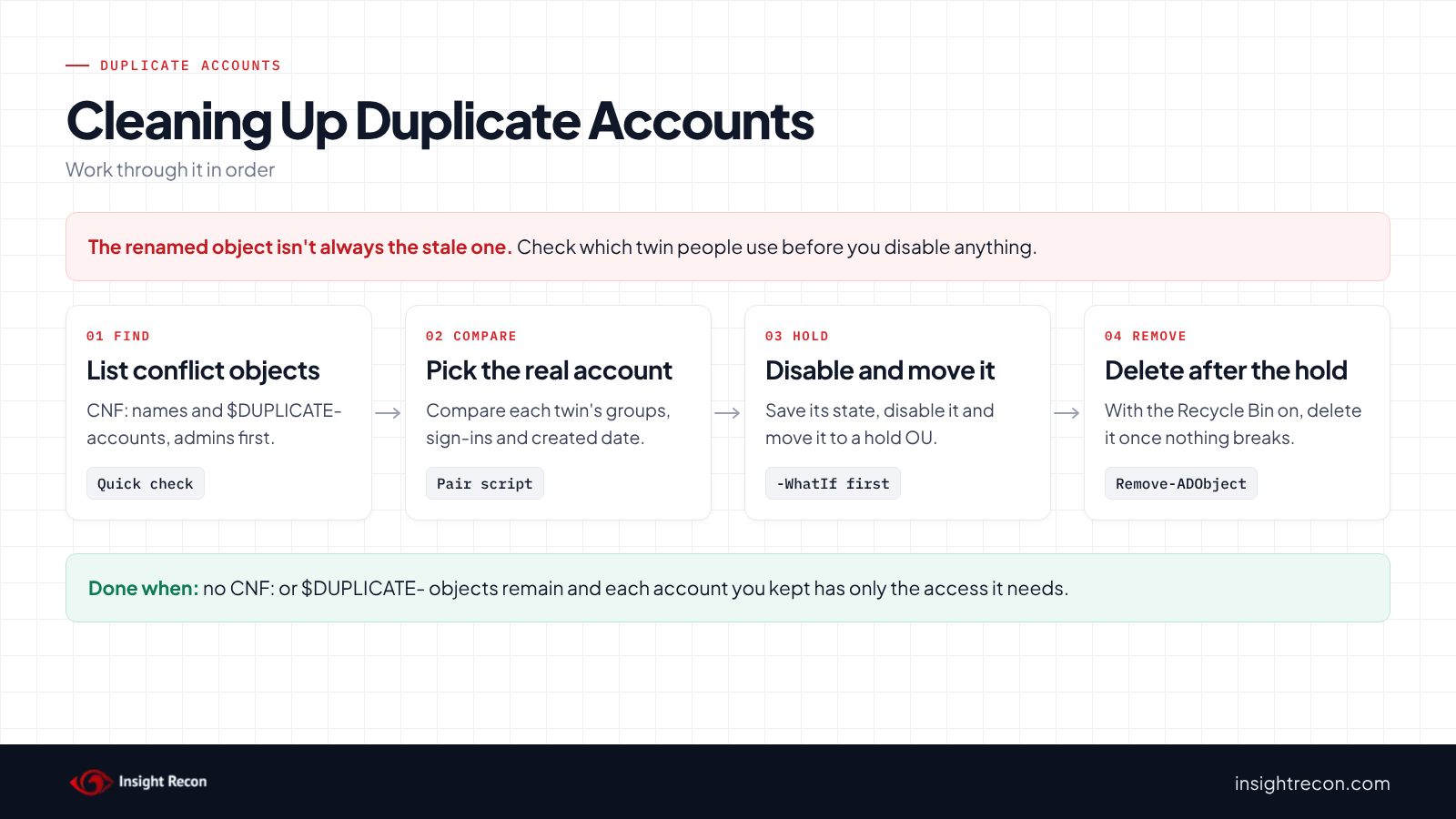
Each change script below is a dry run with -WhatIf. Drop that to apply. Paste the ObjectGUID of the twin you're removing and change the hold OU to your own.
1. Disable the twin and hold it
This saves the object's current groups to a CSV file. Then it disables the account and moves it to a hold OU, so anything that still depends on it fails in a way you can undo.
# Dry run. Remove -WhatIf from the last two lines to apply.
# Needs rights to change and move the object, and a hold OU you've already created.
Import-Module ActiveDirectory -ErrorAction Stop
$guid = '00000000-0000-0000-0000-000000000000'
$holdOu = 'OU=Conflict Hold,DC=contoso,DC=com'
$obj = Get-ADObject -Identity $guid -Properties sAMAccountName, memberOf, userAccountControl -ErrorAction Stop
# Save the current state so you can put it back
New-Item -ItemType Directory -Path 'C:\Temp' -Force | Out-Null
$obj | Select-Object DistinguishedName, ObjectGUID, sAMAccountName, @{ n = 'MemberOf'; e = { $_.memberOf -join ';' } } |
    Export-Csv -Path "C:\Temp\conflict-$guid.csv" -NoTypeInformation
if ($null -ne $obj.userAccountControl) { Disable-ADAccount -Identity $obj.ObjectGUID -ErrorAction Stop -WhatIf }
Move-ADObject -Identity $obj.ObjectGUID -TargetPath $holdOu -ErrorAction Stop -WhatIf
What to look for: the dry run names one disable and one move for the GUID you pasted. After you apply it, leave it in the hold OU for an agreed period, such as 30 days. Watch for tickets in the meantime.
2. Delete it after the hold period
Once nothing has broken, delete the object. The script checks that the Recycle Bin is on and prints the object first. Microsoft's Remove-ADObject reference covers the options.
# Dry run. Remove -WhatIf to apply.
# Needs rights to delete the object. Stops if the AD Recycle Bin is off.
Import-Module ActiveDirectory -ErrorAction Stop
$guid = '00000000-0000-0000-0000-000000000000'
$bin = Get-ADOptionalFeature -Filter "Name -eq 'Recycle Bin Feature'" -ErrorAction Stop
if (-not $bin.EnabledScopes) { throw 'The AD Recycle Bin is off. Turn it on before you delete anything.' }
$obj = Get-ADObject -Identity $guid -Properties whenChanged -ErrorAction Stop
$obj | Select-Object DistinguishedName, ObjectGUID, whenChanged
$children = @(Get-ADObject -SearchBase $obj.DistinguishedName -SearchScope OneLevel -Filter *)
$children | Select-Object Name, ObjectClass
if ($children.Count -gt 0) {
    Remove-ADObject -Identity $obj.ObjectGUID -Recursive -Confirm:$false -ErrorAction Stop -WhatIf
} else {
    Remove-ADObject -Identity $obj.ObjectGUID -Confirm:$false -ErrorAction Stop -WhatIf
}
What to look for: the dry run names only the object you meant. An account with child objects, such as Exchange ActiveSync devices, needs -Recursive. The script lists any children and adds it only when there are some. After you apply it, re-run the quick check and confirm the row is gone.
3. Fix the cause
If the same tool or process created several pairs, point it at a single DC for account creation, or add a pause that lets replication finish. Otherwise, new duplicate accounts will keep turning up.
Keep watching for duplicate accounts
- Alert on event 12304. Each one means AD just renamed a duplicate sAMAccountName.
- Run the quick check monthly. Name conflicts don't log that event. A regular search catches them.
- Review provisioning tools. A tool that writes to more than one DC may keep creating pairs.
- Re-run the scan. The check flags any new conflict object it finds.
Duplicate accounts checklist
- Did the quick check return no CNF: or $DUPLICATE- objects?
- For each pair, did you confirm which twin people use?
- Did you move needed groups to the real account first?
- Was the Recycle Bin on before you deleted anything?
- Do you alert on event 12304?
- Did you fix the process that created the pairs?
A "no" on the second question means you may disable the account someone relies on.
Compliance mapping
| Framework | Reference | Why it applies |
|---|---|---|
| MITRE ATT&CK | T1078.002 | Valid Accounts: Domain Accounts. A forgotten twin with a working password may be used to sign in. |
| CIS Controls v8 | Control 5, Control 6 | Account management and access control management. |
| NIST CSF 2.0 | PR.AA-01, PR.AA-05 | Identities and credentials are managed. Access permissions follow least privilege. |
Duplicate accounts FAQ
What does CNF mean in Active Directory?
It marks an object AD renamed after a name conflict. The new name is the old name, a line break, CNF: and the object's GUID.
What is a $DUPLICATE- account?
It's an account whose sAMAccountName clashed with another account, so AD renamed it to $DUPLICATE- plus its RID in hexadecimal.
Is the renamed account always the one to delete?
No. AD doesn't pick it by which one people use, so check that before you remove either one.
Can I rename a $DUPLICATE- account back?
Yes, once the other account with that name is gone. Otherwise, the two would clash again.
Does Insight Recon find duplicate accounts?
Yes. The free scan includes Possible Duplicated Accounts, which flags user accounts with CNF: or $DUPLICATE- markers and user accounts that share a sAMAccountName.
See whether AD is holding duplicate accounts nobody reviews.
It runs from any Windows machine that can reach your DCs, with a standard domain account. Every core AD check is free for one domain.
Not ready to scan?
AD Signal is our monthly look at what's changing in AD security and how real domains score. Read the latest report.
References
- Microsoft Learn archive: Active Directory duplicate object name resolution
- Microsoft Learn: Multimaster conflict resolution policy
- Microsoft Learn: Event ID 12304, Account Integrity
- Microsoft Learn: Active Directory Recycle Bin
- Microsoft Learn: Remove-ADObject
- MITRE ATT&CK T1078.002, Valid Accounts: Domain Accounts