

DES-Enabled Accounts: The Legacy Kerberos Setting Attackers Can Exploit
DES is a 1970s cipher with a 56-bit key that modern hardware cracks in hours. Windows turned it off by default years ago, but Active Directory still has a per-account switch that forces an account back onto DES-only Kerberos. Where that switch is on, the account's tickets are weak. A service account with an SPN turns into a soft Kerberoasting target wherever the domain still allows DES. Here's what the setting does, how to find the accounts that still have it, and how to move them to AES.
Quick Summary
| Priority | Moderate. Higher when a DES-only account has a service principal name, an old password or elevated access |
|---|---|
| What it means | One or more accounts are set to use DES only for Kerberos, via the USE_DES_KEY_ONLY flag in userAccountControl |
| Who's affected | The flagged accounts, plus anything that authenticates with them. Service accounts are the real risk |
| Exploitation | Where the domain still allows DES, a DES service ticket can be cracked offline. Its 56-bit key falls regardless of how strong the password is |
| Fix | Clear the DES-only flag, reset the password to generate AES keys, and test the legacy app that needed it |
If you want to see which accounts in your domain are still pinned to DES without touching anything, Insight Recon's free read-only scan flags them.
What Is DES Encryption in Active Directory?
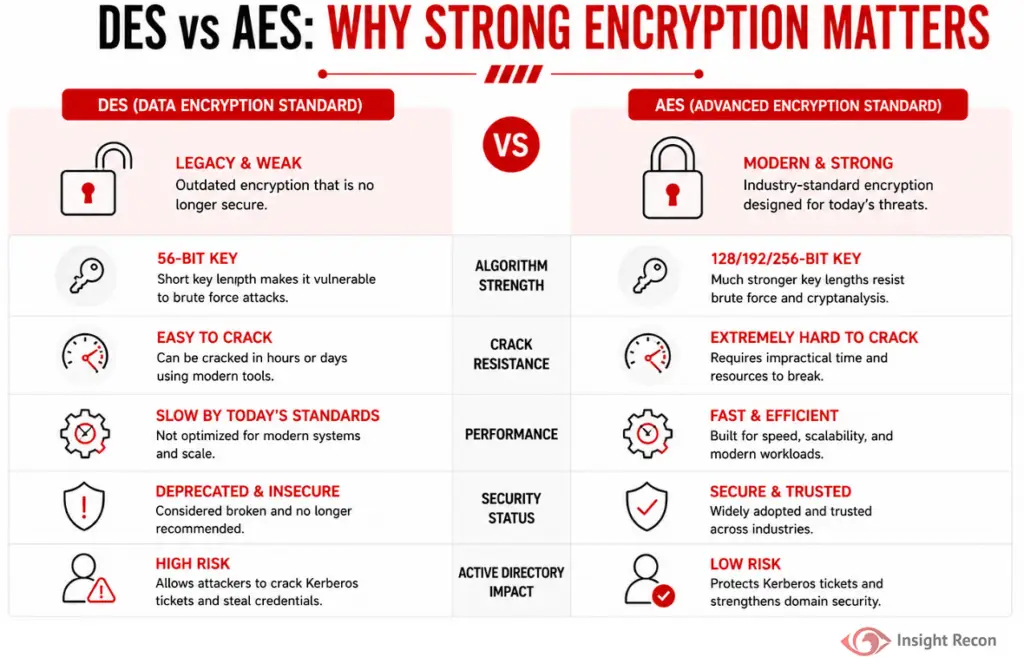
DES, the Data Encryption Standard, is a symmetric cipher from the 1970s with a 56-bit effective key. That key length was the problem long before it was retired. It's small enough to brute-force with ordinary hardware, which is why NIST withdrew DES as a standard years ago.
Active Directory keeps a per-account option that forces Kerberos to use DES only. It maps to the USE_DES_KEY_ONLY bit in the account's userAccountControl attribute. In Active Directory Users and Computers it's the checkbox labeled Use Kerberos DES encryption types for this account. It exists for old systems that never supported anything stronger. Windows itself has shipped with DES off by default since Windows 7 and Server 2008 R2. Microsoft's guidance is AES128 and AES256 everywhere else. It has also started removing DES from Kerberos entirely in current Windows. On the newest builds a DES-only account may stop working on its own.
This is a different problem from RC4 being allowed domain-wide on your domain controllers. If that's what you're chasing, our post on DES and RC4 support on domain controllers covers the configuration side. This one is about individual accounts pinned to DES.
Why DES-Enabled Accounts Are a Risk
- The crypto is broken. A 56-bit key is small enough to brute-force in full. A DES ticket cracks no matter how long or random the password is.
- It drags the account down to its weakest option. DES-only means the account can't use AES at all, even though everything around it can.
- Service accounts make it worse. A DES-only account with a service principal name can be Kerberoasted. The ticket comes back in a cipher whose whole keyspace can be brute-forced.
- It's usually an old account. DES-only accounts tend to have old passwords and sit untouched for years, which is exactly what makes them easy to crack and easy to miss.
Real-World Context
DES-only almost always traces back to one legacy thing nobody wants to touch. An old appliance, a non-Windows service, a vendor box that only ever spoke DES Kerberos. Someone checked the box years ago to make it work. The app still runs. Nobody circled back to the setting.
The setting on its own is a weak spot. It turns into a real problem when it's stacked with other things: a service principal name, an old password, or rights the account doesn't need. That combination is what moves this from a configuration nit to a credential you can actually steal.
DES's cousin RC4 got the bigger shakeup. Microsoft removed the silent RC4 fallback in 2026, which we cover in our Kerberos RC4 change post. DES never had that fallback, since it's been off by default for far longer. The account-level DES switch is the piece that survived. It's the one this check looks for.
How Attackers Use DES-Enabled Accounts
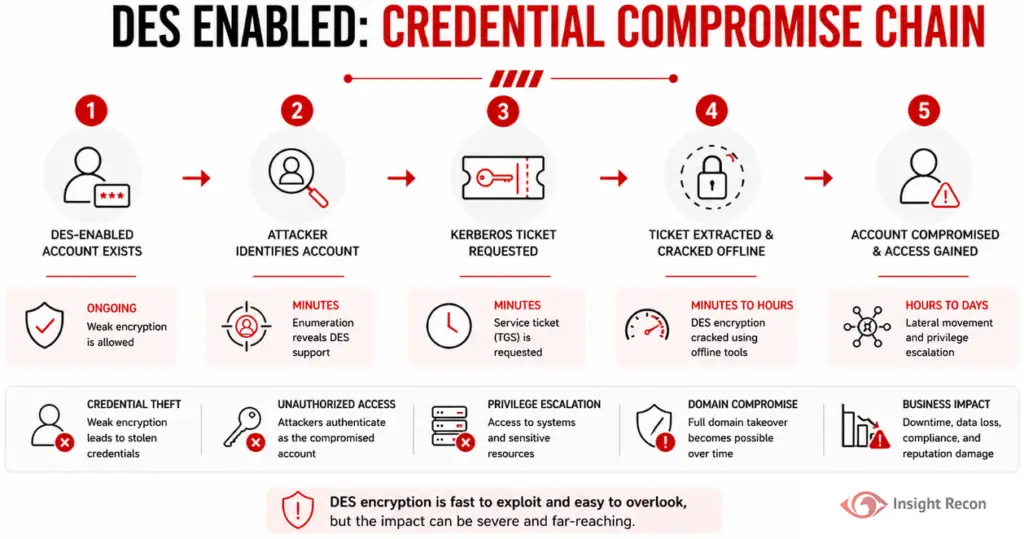
The path mirrors Kerberoasting, with DES making the last step quicker:
- The attacker has any domain account, even an unprivileged one.
- They enumerate accounts flagged for DES, then narrow to the ones with service principal names.
- They request service tickets for those accounts. A DES-only account hands back a DES ticket.
- They take the ticket offline and brute-force the 56-bit key. The keyspace is small enough that a strong password doesn't save it.
- The recovered key lets them impersonate the account. A weak password also falls to a dictionary attack. If the account has more rights than it needs, that's the next step toward domain compromise.
One catch makes this less automatic than it sounds. The ticket only comes back as DES if the domain controllers still allow DES. That's been off by default since Server 2008 R2. In a hardened domain the KDC won't issue a DES ticket at all. The account just fails to authenticate, with a KDC error logged as event 16 or 27, instead of getting roasted. That's why the per-account flag and the domain-wide DES setting go together. The domain side is our DES/RC4 Support Enabled check.
How to Find DES-Enabled Accounts
Check with PowerShell
The DES-only flag is bit 0x200000 (2097152) in userAccountControl. This lists every account that has it set, with whether the account carries an SPN and when its password last changed.
Import-Module ActiveDirectory
Get-ADUser -Filter 'useraccountcontrol -band 2097152' `
    -Properties userAccountControl, servicePrincipalName, PasswordLastSet |
    Select-Object SamAccountName, PasswordLastSet,
        @{ n = 'HasSPN'; e = { [bool]$_.servicePrincipalName } } |
    Sort-Object PasswordLastSet
What it does: Returns the accounts pinned to DES only, oldest password first.
How to interpret results: every account here is a finding. The ones with HasSPN set to True are your priority, because those are the Kerberoastable ones. Old PasswordLastSet dates at the top are the accounts most likely to have a crackable password.

Check in Active Directory Users and Computers
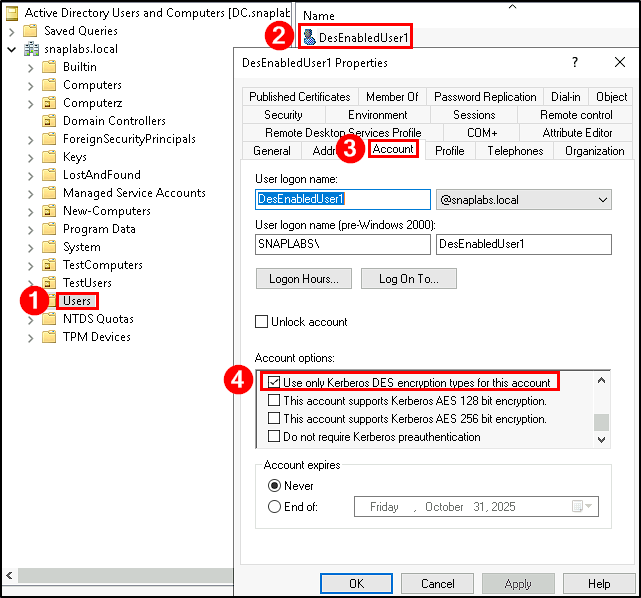
For a single account, open its properties in ADUC, go to the Account tab, and look in Account options. If Use Kerberos DES encryption types for this account is checked, that account is DES-only.
Confirm DES Is Actually in Use
The flag tells you what's allowed. The Security event log tells you what's really happening. On your domain controllers, Kerberos events 4768 and 4769 record the ticket encryption type. A value of 0x1 (DES-CBC-CRC) or 0x3 (DES-CBC-MD5) means DES tickets are being issued for real, not just permitted. Collect those events centrally with Windows Event Forwarding or your SIEM so you're not checking one DC at a time.
Finding DES Exposure with Insight Recon
The checks above are the manual way. Insight Recon's read-only Active Directory security assessment flags DES-enabled accounts for you, along with 150+ other checks:
- User Accounts with DES Enabled (Moderate): flags accounts pinned to DES only, with the account context and the remediation steps.
- DES/RC4 Support Enabled (Moderate): the domain-wide side, where DCs still advertise DES or RC4 for Kerberos.
- Accounts Vulnerable to Kerberoasting (High): the SPN accounts that weak ticket encryption makes crackable.
Every finding comes with the attacker context and the remediation steps. Hand it straight to whoever owns the fix.
See which accounts in your domain are still pinned to DES. Free and read-only. Takes a few minutes.
Run a Free AD CheckHow to Fix It
Clear the DES-Only Flag
Before you touch anything, find the application or device the account belongs to and confirm it supports AES. Most things built this century do. Document the change and have a rollback ready, because the whole reason the flag is there is some old dependency.
In ADUC, uncheck Use Kerberos DES encryption types for this account on the Account tab. In PowerShell, clear the flag like this:
# One account
Set-ADAccountControl -Identity svc-legacy01 -UseDESKeyOnly $false

# Everything flagged, after you've reviewed the list from the detection step
Get-ADUser -Filter 'useraccountcontrol -band 2097152' |
    ForEach-Object { Set-ADAccountControl -Identity $_ -UseDESKeyOnly $false -WhatIf }
Run the loop with -WhatIf first and check the output against your reviewed list. Drop -WhatIf once it matches.
Reset the Password So AES Keys Exist
Clearing the flag lets the account use AES, but it doesn't create the AES keys. Those only get generated when the password changes. Reset the account's password, then update it wherever the service uses it. For service accounts you can move to a group Managed Service Account, do that instead, since it rotates its own password and keeps AES keys without anyone tracking it.
Confirm the App Still Works
Test the actual application after the change, not just the login. With non-Windows services the failure usually shows up at the service rather than the domain controller. A quiet DC log doesn't mean you're clear. If a device genuinely can't do AES, that's a replacement conversation, not a reason to leave DES on.
Keep DES From Coming Back
Once you've cleaned up, keep it clean:
- Audit for the DES-only flag on a schedule, to stop a new one sitting for a year.
- Watch Kerberos events 4768 and 4769 for DES encryption types to catch real usage early.
- Watch event 4738, which logs account changes, to catch the flag being switched back on.
- Give SPN-bearing accounts their own review, since they're the ones worth cracking.
Quick Validation Checklist
- Do you know every account with the DES-only flag set?
- Which of those have a service principal name?
- Did you confirm the owning app supports AES before clearing the flag?
- Did you reset the password so AES keys actually exist?
- Is something watching for the flag coming back?
A no on any of these means some part of your domain is still leaning on DES.
Risk & Compliance Mapping
DES on an account is a weak-cryptography and credential-protection problem. It lines up with the control frameworks the same way your other Kerberos hardening does.
| Framework | Reference | Why it applies |
|---|---|---|
| NIST CSF 2.0 | PR.AA-03, PR.DS-02 | Authentication and data-in-transit protection. DES is too weak for either. |
| CIS Controls v8 | 3 (Data Protection), 5 (Account Management) | Remove weak cryptography and keep legacy accounts in check. |
| MITRE ATT&CK | T1558.003 | Kerberoasting, which weak ticket encryption makes practical. |
| DISA STIG | WN22-SO-000290 (V-254473) | The host-level Kerberos policy on domain controllers must exclude DES and RC4. Clearing the per-account flag is the account side of the same goal. |
| ANSSI | vuln_kerberos_properties_deskey | Flags accounts that still permit DES for Kerberos. |
Frequently Asked Questions
Is it ever safe to leave DES on?
No. The key length is too short and NIST retired it decades ago. Anything that still needs DES is overdue for replacement. The only reason to leave it on temporarily is a legacy dependency you've documented and scoped with an end date.
Is DES still supported in Active Directory?
The per-account setting still exists, which means you can turn it on. Windows just doesn't enable DES by default. It hasn't since Windows 7 and Server 2008 R2.
Why is DES still enabled on some accounts?
Almost always a legacy application, an appliance, or a non-Windows Kerberos setup that only supported DES when it was first wired up. The checkbox got set and never got revisited.
Will disabling DES break anything?
It can, if the owning app really can't do AES. That's why you confirm AES support and test before you clear the flag. Reset the password afterward so the account has AES keys to use.
Is this the same as the DES/RC4 Support Enabled check?
No. That check looks at your domain controllers advertising DES or RC4 domain-wide. This one is about individual accounts pinned to DES only. Our DES/RC4 Support Enabled post covers the domain side.
Remove Legacy Encryption Before It Becomes an Attack Path
DES has no place in a current domain. The accounts still pinned to it are usually old, often privileged, and easy to crack once someone asks for a ticket. Find them, move them to AES, and keep an eye out for the flag coming back.
See what else in your AD still runs on legacy crypto. Insight Recon checks DES, RC4, NTLMv1 and the rest of your domain. Free and read-only.
Scan Your Domain Now