
SMBv1 Enabled on Domain Controllers: Risks & Remediation
Microsoft put SMBv1 on its deprecation list back in 2013. WannaCry rode SMBv1 bugs across whole networks in 2017. It's still installed by default on Windows Server 2016 and earlier. It also tends to survive upgrades. Here's what the finding means, how to check your DCs and how to remove it without breaking whatever still depends on it.
Quick Summary
| Priority | High. A Tier 0 server is still accepting a file sharing protocol Microsoft has told everyone to stop using |
|---|---|
| What it means | One or more domain controllers still accept SMBv1 connections |
| Who's affected | DCs still running Windows Server 2016 or earlier, plus DCs upgraded in place from those or built from old images |
| Exploitation | An attacker on the network gets an older, weaker protocol to work with. Any DC that's behind on patches is also a target for known SMBv1 bugs |
| Fix | Audit who still connects with SMBv1, move those clients to SMB 2 or 3, then remove the SMBv1 feature from every DC |
If you want to know whether any of your domain controllers still run SMBv1 without touching anything, Insight Recon's free read-only scan checks every DC.
What the Finding Means
SMB is how Windows shares files over the network. Domain controllers lean on it constantly. Every machine in the domain pulls Group Policy and logon scripts from the SYSVOL and NETLOGON shares over SMB. Admins use it to reach the DC's file system too.
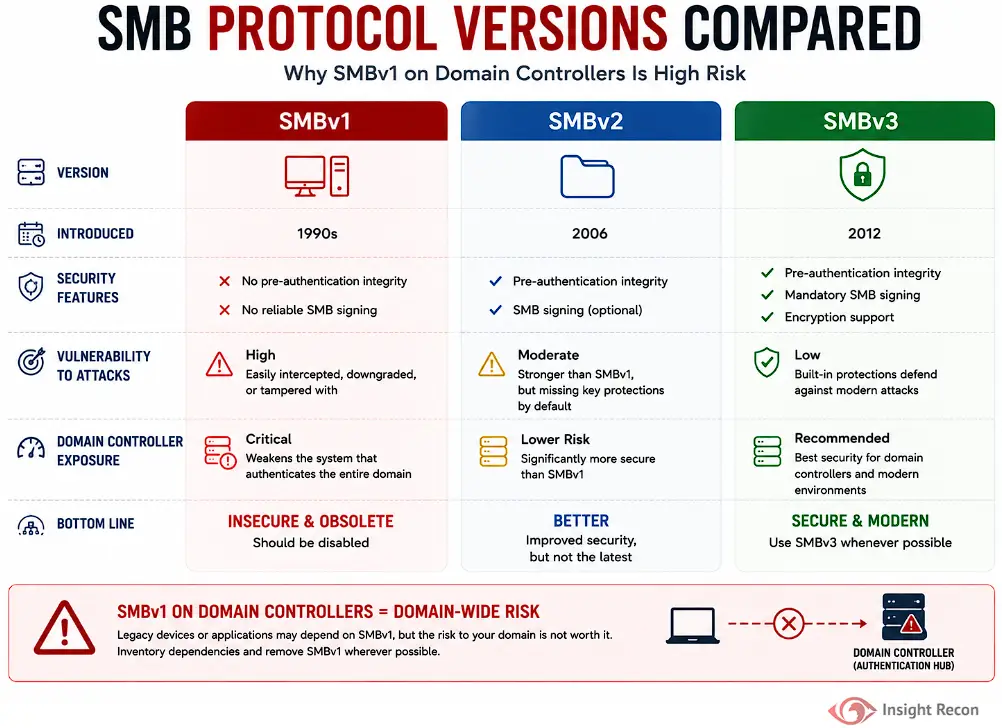
SMBv1 is the original version. It was already nearly 30 years old when Microsoft told everyone to stop using it. SMB 2 arrived with Windows Vista and Server 2008. SMB 3 followed with Windows 8 and Server 2012. The newer versions added the protections SMBv1 never had: stronger signing, encryption and, in SMB 3.1.1, pre-authentication integrity, which stops someone in the middle from tampering with the negotiation to force a weaker setup.
A domain controller with SMBv1 enabled will still accept SMBv1 connections, even if every client you own speaks SMB 3. Insight Recon tests this live. It connects to each domain controller on port 445 and offers only the SMBv1 dialect. If the DC accepts, it gets flagged. So the check sees what the DC's SMB server will actually accept. It doesn't look at whether the SMBv1 feature is installed or whether the DC's own SMBv1 client is on. That's why the fix below goes further than switching off the server side.
Why It's Risky
The risk is there even if nothing on your network actively uses SMBv1. It's about what the DC will accept:
- Weaker integrity. SMBv1's signing is older and weaker than SMB 2 and 3. It has no encryption or pre-authentication integrity either. Traffic to the DC is easier to tamper with.
- Downgrade. If a client also still speaks SMBv1, an attacker in the middle can try to push its connection to the DC down to SMBv1 to get around the newer protections.
- Known SMBv1 bugs. MS17-010 fixed SMBv1 server bugs that allowed remote code execution, in most cases without credentials. Any DC that missed that patch is exposed. Removing SMBv1 takes that whole class of bug off the table.
- A sign of neglect. SMBv1 is easy to spot from the network. A DC still running it tells an attacker other legacy settings are probably still around too.
Real-World Context
Microsoft has been trying to retire SMBv1 for over a decade:
- June 2013: SMBv1 was added to the Windows Server 2012 R2 deprecation list. Windows 8.1 and Server 2012 R2 made it an optional feature you could remove.
- September 2016: Microsoft's SMB team published "Stop using SMB1".
- March 2017: MS17-010 patched critical SMBv1 server bugs. Within months WannaCry used them to spread across unpatched networks. NotPetya used them too, alongside stolen credentials.
- Windows 10 1709 and Windows Server 2019: SMBv1 is no longer installed by default. Clean installs of Server 2019 and later have neither the SMBv1 client nor the server.
That last point is the catch. Clean installs of Server 2019 and later leave SMBv1 out. An in-place upgrade carries over the roles and features the old server had. SMBv1 can come along for the ride. A DC that started life on Server 2012 R2 or 2016 and got upgraded to 2019 or 2022 can still have it. So can a DC built from an old image, or one where someone turned it back on to get a copier or an old app working and never turned it off again.
It hangs around because nothing breaks. An expired certificate or a failed logon gets noticed. A DC still accepting SMBv1 doesn't, until someone scans for it.
How Attackers Use It
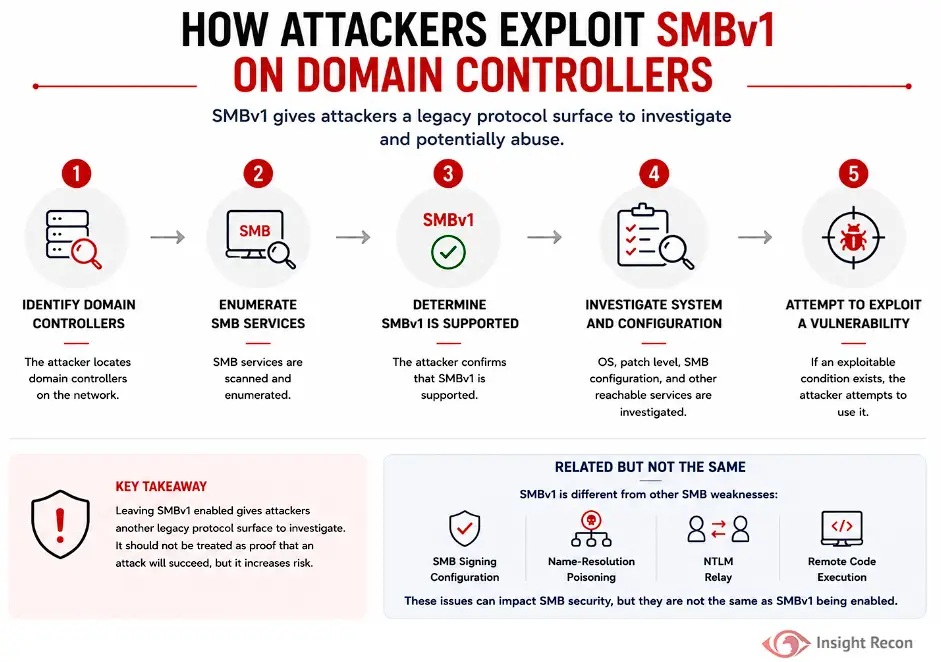
Once attackers are on the internal network, they map out the domain controllers and check which SMB versions each one accepts. Common network scanners report which SMB versions a server accepts. From there they look at what else the DC offers, like its patch level, its SMB settings and other services it exposes. Then they go after whatever weak spot they find.
SMBv1 on its own doesn't mean every attack works. SMB signing configuration, name-resolution poisoning and NTLM relay are separate conditions with their own fixes. SMBv1 just hands an attacker one more surface to probe on the most important servers you have.
How to Check Your Domain Controllers
Check One Domain Controller
Run these in an elevated PowerShell session on the DC:
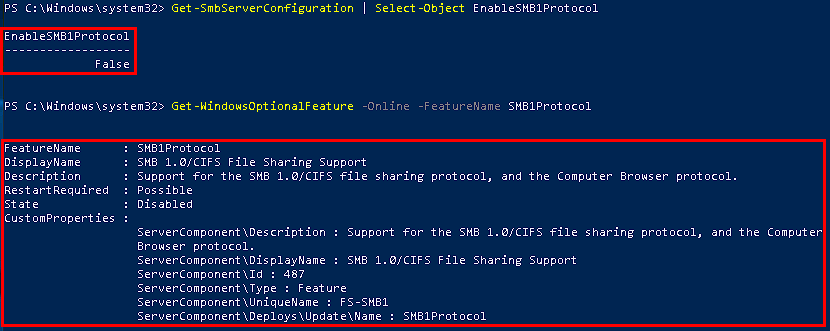
Get-SmbServerConfiguration | Select-Object EnableSMB1Protocol
Get-WindowsOptionalFeature -Online -FeatureName SMB1Protocol
What it does: The first command shows whether the SMBv1 server side is turned on. The second shows whether the SMBv1 feature is installed in Windows at all.
How to interpret results: EnableSMB1Protocol : True means the DC accepts SMBv1 connections. A feature State of Enabled means SMBv1 is installed, even if the server side has been switched off. You want False for the first. For the second you want Disabled or DisabledWithPayloadRemoved.
Check Every Domain Controller
The same check across the domain, over PowerShell remoting:
Import-Module ActiveDirectory
$dcs = (Get-ADDomainController -Filter *).HostName
Invoke-Command -ComputerName $dcs -ScriptBlock {
    [pscustomobject]@{
        SMB1Server  = (Get-SmbServerConfiguration).EnableSMB1Protocol
        SMB1Feature = (Get-WindowsOptionalFeature -Online -FeatureName SMB1Protocol).State
    }
} | Select-Object PSComputerName, SMB1Server, SMB1Feature
How to interpret results: any DC showing True or Enabled goes on the list.
Check in Server Manager
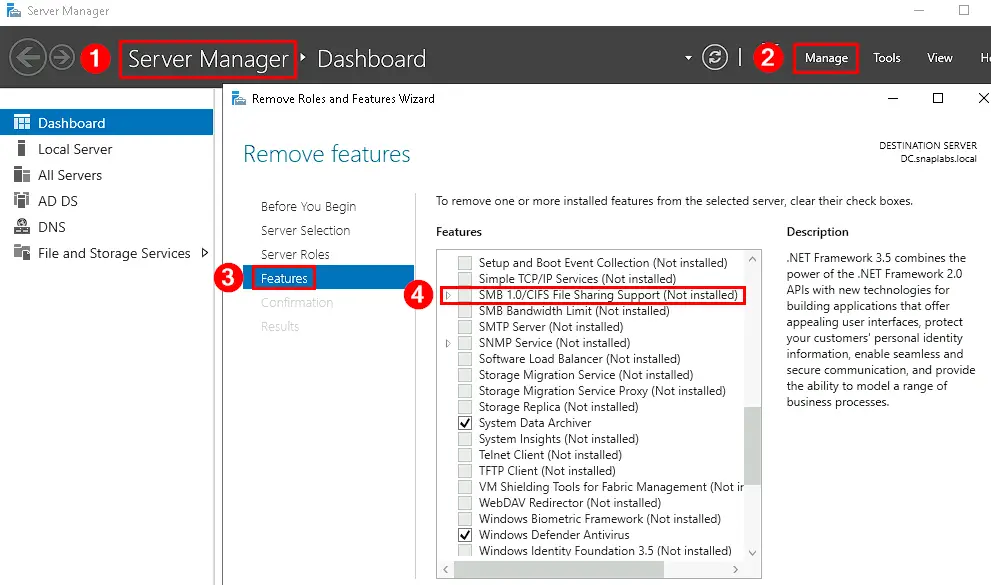
In Server Manager, select Manage > Remove Roles and Features, pick the DC and go to the Features page. If SMB 1.0/CIFS File Sharing Support is checked, SMBv1 is installed.
Find Out What Still Uses It
Before you remove anything, find out whether anything still connects with SMBv1. Turn on SMBv1 auditing on each DC:
Set-SmbServerConfiguration -AuditSmb1Access $true -Force

# A week or two later, see who connected with SMBv1
Get-WinEvent -LogName 'Microsoft-Windows-SMBServer/Audit' -ErrorAction SilentlyContinue |
    Where-Object Id -eq 3000 |
    Select-Object -First 50 TimeCreated, Message
What it does: Logs event 3000 in the SMBServer Audit log every time a client tries to connect with SMBv1. The event records the client's address.
How to interpret results: no events after a week or two means nothing is connecting to that DC with SMBv1. Any client that does show up needs an owner and a plan before you pull the plug.
The audit only covers connections coming in. Removing the feature also removes the DC's own SMBv1 client. Check whether anything running on the DC itself, like a backup job or script, reaches an old NAS. Event 32002 in the Microsoft-Windows-SmbClient/Security log shows the DC getting an SMBv1 response from another server.
Finding SMBv1 with Insight Recon
The commands above are the manual way. Insight Recon's read-only Active Directory security assessment checks every domain controller for SMBv1 along with 150+ other checks:
- Domain Controllers with SMBv1 Enabled (High): tests each DC live on port 445 and flags any that still accept SMBv1 connections.
- Domain Controller with SMB Signing Not Required (High) and Computer with SMB Signing Not Required (High): the other half of SMB hardening. Removing SMBv1 doesn't make SMB 2 and 3 require signing.
- NTLMv1 or LM is Permitted (High): another legacy protocol that tends to survive on the same old DCs.
Every finding comes with the attacker context and the remediation steps.
Find out whether any of your domain controllers still run SMBv1. Free and read-only. Takes a few minutes.
Run a Free AD CheckHow to Fix It
Before You Start
- Run the audit first. Event 3000 tells you exactly which clients still need SMBv1. Fix or replace those before you remove it.
- Plan a restart. Removing the feature needs a reboot. Schedule it like any other DC change.
- Know your rollback. Reinstalling the feature brings SMBv1 back. Treat that as a short-term exception with an owner and a deadline.
Remove the SMBv1 Feature
Removing SMBv1 is better than just disabling it, because it takes the SMBv1 server and client out of the running system. It's also what the Server 2022 STIG asks for. In an elevated PowerShell session on the DC:
Uninstall-WindowsFeature -Name FS-SMB1 -RestartLeave off -Restart if you need to reboot later. Disable-WindowsOptionalFeature -Online -FeatureName SMB1Protocol does the same job. Either way, the change finishes on reboot.
To do it in Server Manager, go to Manage > Remove Roles and Features and select the DC. On the Features page, clear SMB 1.0/CIFS File Sharing Support, finish the wizard and restart when prompted.
If You Can't Reboot Yet
You can switch off the SMBv1 server side right away, with no restart:
Set-SmbServerConfiguration -EnableSMB1Protocol $false -ForceThat stops the DC accepting SMBv1 connections today. Still schedule the feature removal, since this leaves the code on the box and doesn't touch the SMBv1 client.
Keep It from Coming Back
- Fix the dependency. If a device or app still needs SMBv1, give it an owner and an upgrade or replacement plan. Turning SMBv1 back on shouldn't become the permanent fix.
- Build it out of your images. Make sure DC build standards and templates leave SMBv1 off. Clean installs of Server 2019 and later already do.
- Enforce it with Group Policy. The MS Security Guide templates that ship with Microsoft's security baselines have two settings for this. Set Configure SMB v1 server to Disabled. Set Configure SMB v1 client driver to Enabled with Disable driver (recommended) selected. Don't set the client driver policy itself to Disabled, which removes the driver's startup setting instead. Both need a reboot.
- Check for drift. Restored VMs, old templates and late-night troubleshooting all bring it back. Rerun the check above on a schedule.
Quick Validation Checklist
- Does every domain controller show
EnableSMB1ProtocolasFalse? - Has the SMB1 feature been removed from every DC?
- Did SMBv1 auditing run long enough to catch occasional clients?
- Does every remaining SMBv1 dependency have an owner and a plan?
- Do your DC build images and Group Policy keep SMBv1 off?
- Do your DCs also require SMB signing?
A no on any of these leaves a legacy protocol running on your most important servers.
Risk & Compliance Mapping
On an unpatched DC, SMBv1 can lead to remote code execution and from there to a full domain compromise. Even on a patched one, it's a weaker protocol on your most important server. It lines up with the frameworks like this:
| Framework | Reference | Why it applies |
|---|---|---|
| NIST CSF 2.0 | PR.PS-01, PR.DS-02 | Configuration management practices are established and applied. Data in transit is protected. |
| CIS Controls v8 | 4.8 (Uninstall or Disable Unnecessary Services), 7 (Continuous Vulnerability Management) | Remove legacy services you don't need and keep up with known vulnerabilities. |
| MITRE ATT&CK | T1210, T1021.002 | Exploitation of remote services and use of SMB admin shares. |
| DISA STIG (Windows Server 2022) | V-254275 (WN22-00-000380), V-254276 (WN22-00-000390), V-254277 (WN22-00-000400) | SMBv1 must be uninstalled, or disabled on both the SMB server and the SMB client. |
| Microsoft guidance | Stop using SMB1 | Remove SMBv1 and move legacy dependencies to SMB 2 or 3. |
Frequently Asked Questions
Is SMBv1 enabled by default on Windows Server?
Not on clean installs of Windows Server 2019 or later. Server 2016 and earlier did include it. In-place upgrades keep it. If you find SMBv1 on a newer DC, it was either carried over by an upgrade or turned back on by someone.
Will removing SMBv1 break anything?
Only if something still depends on it, usually an old copier, NAS or legacy app. That's why the audit comes first. If event 3000 stays quiet for a couple of weeks, removing it is low risk.
Should I disable SMBv1 or remove it?
Remove it when nothing depends on it. Disabling the server side stops new SMBv1 connections, but the feature stays installed. Removing the feature takes SMBv1 out of the running system. Add -Remove to Uninstall-WindowsFeature if you also want the installation files deleted, which means reinstalling later needs your install media. Insight Recon's check passes as soon as the server side stops accepting SMBv1. Removing the feature is still worth doing.
Does turning off SMBv1 need a restart?
It depends on how you do it. Set-SmbServerConfiguration -EnableSMB1Protocol $false takes effect without a restart. Removing the feature, with Uninstall-WindowsFeature, Disable-WindowsOptionalFeature or Server Manager, needs one.
If SMBv1 is gone, is SMB on my DCs secure?
Not automatically. SMB 2 and 3 can still run without signing, which leaves the DC open to relay. Domain controllers require SMB signing by default, but a GPO can override that. It's worth checking. Our SMB signing guide covers how to check it.
Close the Gap Legacy Protocols Leave Open
SMBv1 has been on its way out since 2013. On a domain controller it's all downside. Audit who still uses it and fix those clients. Then remove the feature from every DC and keep it out of your build images.
See which legacy protocols are still running on your domain controllers. Insight Recon checks SMBv1, SMB signing, NTLMv1 and the rest of your AD. Free and read-only.
Scan Your Domain NowAdditional References
- Microsoft Tech Community: Stop using SMB1
- Microsoft Learn: Detect, Enable, and Disable SMBv1, SMBv2, and SMBv3
- Microsoft Learn: SMBv1 is not installed by default in Windows
- Microsoft Security Bulletin MS17-010
- Microsoft Learn: Securing Domain Controllers Against Attack
- Microsoft Learn: Best Practices for Securing Active Directory