

Kerberos Pre-Authentication: Prevent AS-REP Roasting
Kerberos pre-authentication makes an account prove it knows its password before a domain controller hands back anything useful. Turn it off and the DC will answer anyone who asks with data an attacker can take offline and guess against. It's one checkbox. It's often there because someone ticked it years ago. Here's what the finding means, how to find those accounts and how to turn pre-authentication back on.
Quick Summary
| Priority | Critical. An attacker doesn't need a password to start guessing at these accounts |
|---|---|
| What it means | One or more accounts have "Do not require Kerberos preauthentication" turned on |
| Who's affected | Often service and legacy app accounts, plus anything someone changed while troubleshooting and forgot |
| Exploitation | Anyone on the network who knows the username can ask a DC for a logon reply and guess the password against it offline |
| Fix | Turn pre-authentication back on. If an app truly can't work without it, give that account a long random password and watch it |
If you want to see which accounts in your domain have pre-authentication turned off without touching anything, Insight Recon's free read-only scan lists them.
What Kerberos Pre-Authentication Is
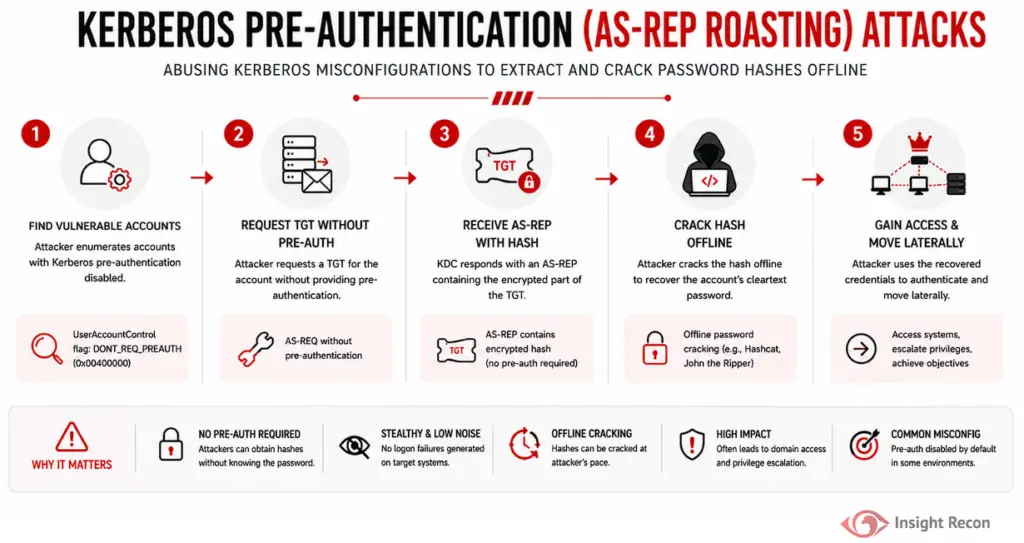
When a user logs on with Kerberos, their machine asks a domain controller for a ticket-granting ticket. With pre-authentication on, which is the default, the request has to include a timestamp encrypted with a key derived from the user's password. The DC checks it before sending anything back. No valid timestamp, no ticket.
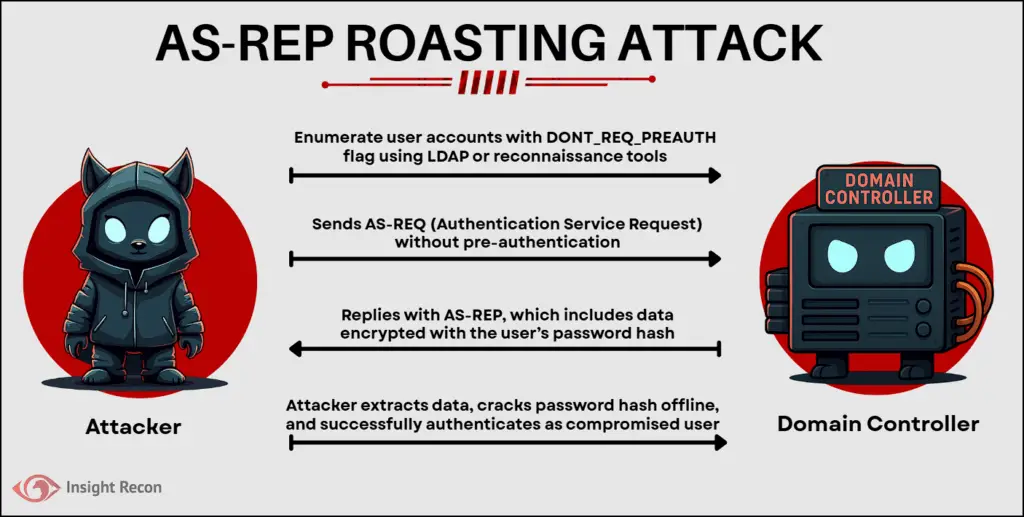
With pre-authentication off, the DC skips that check. It answers any request for that account. Part of the reply is encrypted with the same password-derived key. Whoever asked can take that reply offline and guess passwords against it until one fits. Nobody has to prove anything first.
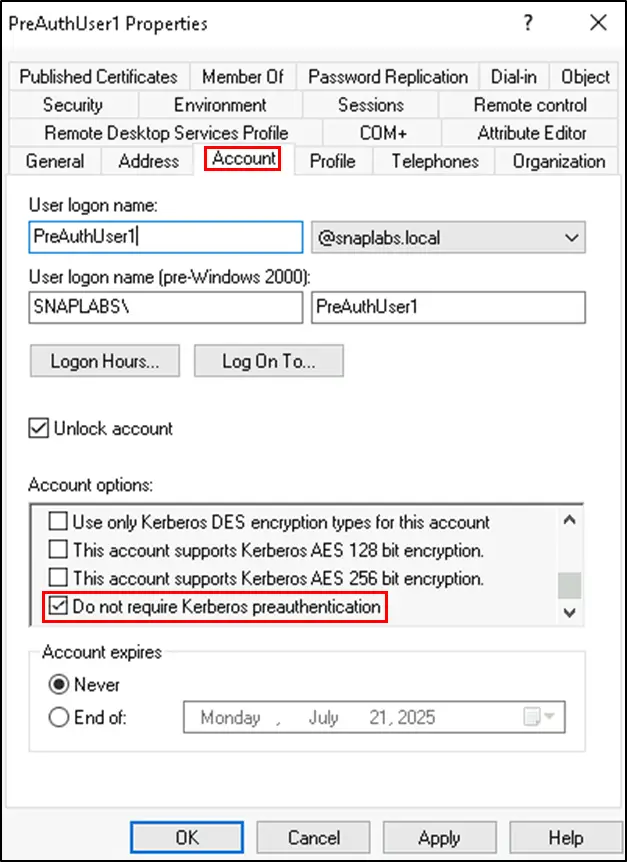
The setting is the Do not require Kerberos preauthentication checkbox on the account's Account tab in Active Directory Users and Computers. Under the hood it's the DONT_REQ_PREAUTH flag, 0x400000, in the account's userAccountControl attribute.
Insight Recon flags every user account with this flag set, disabled accounts included. A disabled account can't be roasted while it stays disabled, since the domain controller won't issue it tickets. Re-enable it and the exposure comes right back.
Why It's Risky
- No password needed to start. The attacker only needs a valid username. A domain account makes finding the right usernames easy, but it isn't required.
- The guessing happens offline. No failed logons hit the DC and nothing gets locked out.
- The accounts are often worth having. Accounts with pre-authentication off tend to be service or legacy app accounts. Those often have more access than they should and passwords nobody has changed in years.
- Nothing looks wrong. The account works normally day to day. The only sign is a checkbox nobody looks at.
Encryption type plays a part too. A reply encrypted with RC4 is much faster to guess against than one using AES. The 2026 RC4 changes target service tickets. They don't clearly change how this reply gets encrypted. Don't count on them here. A strong password is still the fix.
AS-REP Roasting vs Kerberoasting
Both end in offline password guessing. The difference is what makes an account a target and what the attacker needs first.
| AS-REP roasting | Kerberoasting | |
|---|---|---|
| Target | Accounts with pre-authentication turned off | User accounts with an SPN |
| Attacker needs | No password, just a valid username | Any valid domain account |
| What gets guessed | The account's password, from the logon reply | The service account's password, from a service ticket |
| Main fix | Turn pre-authentication back on | gMSAs, long random passwords, fewer SPNs |
| MITRE ATT&CK | T1558.004 | T1558.003 |
| Insight Recon check | Kerberos Pre-Authentication In Use | Accounts Vulnerable to Kerberoasting |
Our Kerberoasting post covers the other one.
Real-World Context
Pre-authentication has been on by default for every account since Active Directory shipped. When it's off, somebody turned it off. Microsoft describes the setting as a compatibility option for Kerberos implementations that don't support pre-authentication. That's why old vendor install guides and non-Windows systems sometimes call for it. Other times an admin ticked the box while troubleshooting a logon problem and never cleared it. Accounts carried over from older domains can bring the flag with them too.
None of those were security decisions, which is why these accounts tend to sit unnoticed. MITRE tracks the technique as T1558.004. Because it doesn't need a password to start, it's one of the first things an attacker can try once they're on the internal network.
How Attackers Use It
An attacker on the network finds the accounts with pre-authentication off. With any domain account that's a single directory query. Without one, they need to already know or guess the usernames. They ask a DC for a logon reply for each one and take the replies offline to guess the passwords. If one falls, they log on as that account and use whatever it can reach.
With Kerberos auditing on, the request is visible. It shows up on domain controllers as event 4768 with a pre-authentication type of 0. The guessing happens on the attacker's own hardware.
How to Check Your Domain
Find Accounts with PowerShell
Run this as any domain user with the ActiveDirectory module:
Get-ADUser -Filter * -Properties DoesNotRequirePreAuth | Where-Object { $_.DoesNotRequirePreAuth } | Select-Object Name, SamAccountNameWhat it does: Lists every user account with pre-authentication turned off.

On a big domain, this version is faster and adds the details that decide which accounts to fix first:
Get-ADUser -LDAPFilter '(userAccountControl:1.2.840.113556.1.4.803:=4194304)' `
    -Properties Enabled, PasswordLastSet, adminCount |
    Select-Object SamAccountName, Enabled, PasswordLastSet, adminCount
Get-ADUser only covers user accounts. Computer accounts can carry the flag too, but their passwords are normally long random strings that change on their own. User accounts are where the real risk is.
How to interpret results: every account listed is a finding. Start with enabled accounts, anything with adminCount set to 1 and anything with an old PasswordLastSet. Then compare the rest against any documented exceptions you have. Anything without one is a priority. Fix disabled accounts too. Nobody remembers the flag when an old account gets turned back on.
Check an Account in ADUC
Open Active Directory Users and Computers, find the account and open Properties > Account. Under Account options, look for Do not require Kerberos preauthentication. If it's checked, the account is exposed.
Watch for It in Your Logs
Domain controllers log event 4768 every time they issue a ticket-granting ticket, as long as Audit Kerberos Authentication Service is on for success events. Microsoft's guidance is that a pre-authentication type of 0 means pre-authentication wasn't used. This pulls those events from a DC and groups them by account:
$xpath = "*[System[EventID=4768] and EventData[Data[@Name='PreAuthType']='0']]"
Get-WinEvent -LogName Security -FilterXPath $xpath -MaxEvents 1000 -ErrorAction SilentlyContinue |
    ForEach-Object {
        $d = @{}
        ([xml]$_.ToXml()).Event.EventData.Data | ForEach-Object { $d[$_.Name] = $_.'#text' }
        [pscustomobject]@{ Account = $d.TargetUserName; Client = $d.IpAddress }
    } |
    Group-Object Account, Client | Sort-Object Count -Descending | Select-Object Count, Name
How to interpret results: run it as an admin or a member of Event Log Readers on the DC. Each row is an account that got a ticket without pre-authentication, plus the address that asked. One address asking for several of these accounts in a short window is the pattern to alert on. Feed 4768 into your SIEM so you see it across every DC.
Event 4768 shows these accounts being used. To catch the setting being turned on, watch event 4738 (a user account was changed) under Audit User Account Management. It lists "Don't Require Preauth" as Enabled when someone ticks the box. Microsoft's guidance on that event is that it shouldn't be enabled for user accounts.
Finding AS-REP Roastable Accounts with Insight Recon
The commands above are the manual way. Insight Recon's read-only Active Directory security assessment checks for this along with 150+ other checks:
- Kerberos Pre-Authentication In Use (Critical): flags every user account with pre-authentication turned off, disabled ones included. If it can't read the setting on some accounts, it reports the check as not assessed instead of passing.
- Accounts Vulnerable to Kerberoasting (High): the other offline password attack against Kerberos.
- User Accounts with DES Enabled (Moderate): another legacy Kerberos setting that tends to sit on the same old accounts.
Every finding comes with the attacker context and the remediation steps.
Find the accounts in your domain with pre-authentication turned off. Free and read-only. Takes a few minutes.
Run a Free AD CheckHow to Fix It
Before You Start
- Find out why it's off. Check with the app owner whether anything depends on it. Often nothing does.
- Plan service accounts. If the account runs a service, schedule the change and tell the owner first.
Turn It Back On with PowerShell
For a single account, clear the flag and confirm it worked:
$user = Get-ADUser "username" -Properties userAccountControl
$newUAC = $user.userAccountControl -band (-bnot 0x400000)
Set-ADUser -Identity $user -Replace @{userAccountControl = $newUAC}
Get-ADUser "username" -Properties DoesNotRequirePreAuth | Select-Object Name, DoesNotRequirePreAuth
Set-ADAccountControl does the same thing more simply. It's handy for fixing every account at once:
Get-ADUser -Filter 'DoesNotRequirePreAuth -eq $true' |
    ForEach-Object { Set-ADAccountControl -Identity $_ -DoesNotRequirePreAuth $false }
Only run the bulk version once you've checked the list with the app owners.
Turn It Back On in ADUC
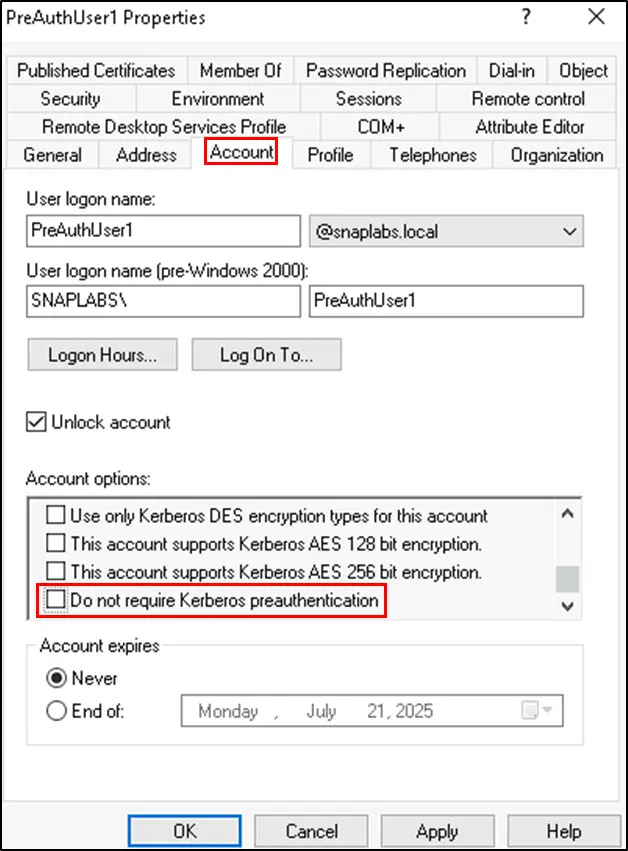
Open the account's Properties > Account tab, uncheck Do not require Kerberos preauthentication and select Apply. Then rerun the check to confirm the account has dropped off the list.
If an Account Really Needs It Off
Treat it as a documented exception with an owner and an end date. Give the account a long, random password of 25 characters or more. That makes offline guessing impractical. Keep it out of privileged groups. Then watch its 4768 events. The account still hands a reply to anyone who asks. Keep the exception on a short leash.
Keep It from Coming Back
- Check on a schedule. Rerun the PowerShell query monthly, or let your scanning tool flag new ones.
- Limit who can change it. Fewer people with rights to edit
userAccountControlon user accounts means fewer surprise changes. - Build it into provisioning. Any request to turn pre-authentication off should need a written reason and an expiry date.
- Alert on the change. Event 4738 showing "Don't Require Preauth" as Enabled means someone just made a new exception. You'll see it even if nobody tells you.
- Watch the use. Keep event 4768 with a pre-authentication type of 0 flowing to your SIEM so you see these accounts get tickets.
Quick Validation Checklist
- Do you know every account in the domain with pre-authentication turned off?
- Is it back on everywhere it isn't truly needed?
- Does each remaining exception have an owner, an end date and a long random password?
- Are you alerting on event 4738 when the setting changes and on event 4768 with a pre-authentication type of 0?
A no on any of these leaves an account someone can start guessing at without a password.
Risk & Compliance Mapping
Accounts with pre-authentication off are an authentication gap first. They line up with the frameworks like this:
| Framework | Reference | Why it applies |
|---|---|---|
| NIST CSF 2.0 | PR.AA-01, PR.AA-03 | Credentials are managed. Users, services and hardware are authenticated before they get access. |
| CIS Controls v8 | 5 (Account Management), 6 (Access Control Management) | Manage account settings and keep exceptions documented and reviewed. |
| MITRE ATT&CK | T1558.004 | AS-REP roasting. MITRE's mitigations include turning pre-authentication on for every account and auditing changes to the setting. |
| ANSSI | vuln2_kerberos_properties_preauth, vuln1_kerberos_properties_preauth_priv | Flags accounts with Kerberos pre-authentication turned off. Privileged accounts get the higher-severity rule. |
| Microsoft guidance | Events 4768, 4738 | All accounts should use pre-authentication. The setting shouldn't be enabled for user accounts. |
Frequently Asked Questions
Is it ever okay to turn pre-authentication off?
Rarely, and only for an old app that genuinely can't work without it. Treat it as a documented exception with an owner and an end date. Then turn it back on once that app is gone.
Why would pre-authentication be off in the first place?
Microsoft describes it as a compatibility setting for Kerberos implementations that don't support pre-authentication. Old vendor guides and non-Windows systems are common reasons. It also gets turned off during troubleshooting and forgotten. Accounts carried over from older domains sometimes bring it along too.
Does a disabled account with pre-authentication off matter?
Not while it stays disabled. The domain controller won't issue tickets to a disabled account. The risk comes back the moment someone re-enables it, which is why Insight Recon flags disabled accounts too. Clear the flag before the account ever gets turned back on.
Will turning it back on break anything?
In most environments, no. Modern Windows clients and apps use pre-authentication by default. An old app or device might complain, which is why you check with the owner and change service accounts in a maintenance window.
How does AS-REP roasting differ from Kerberoasting?
Both end in offline password guessing. AS-REP roasting targets accounts with pre-authentication turned off and doesn't need a password, just a valid username. Kerberoasting targets user accounts with SPNs and needs a valid domain account to start, since it works by requesting service tickets. Our Kerberoasting post covers how to find and fix those accounts.
Stop AS-REP Roasting at the Source
An account with pre-authentication off hands out something to guess against to anyone who asks. It's one checkbox to fix. Find every account with it turned off and turn it back on. Then make sure it stays that way.
See which accounts in your domain are open to offline password guessing. Insight Recon checks AS-REP roasting, Kerberoasting and the rest of your AD. Free and read-only.
Scan Your Domain Now