Accidental Deletion Protection: Protect Every OU in AD
Accidental deletion protection stops one wrong click from deleting an OU and every account inside it. It costs nothing to turn on. Yet OUs created before Windows Server 2008, or by tools that don't set it, may not have it. This post shows you how to find unprotected OUs, protect them along with your key objects and make sure you can recover if a delete still happens.
| Priority | Low and a quick win, since it takes one command and carries almost no risk |
|---|---|
| What decides it | Whether each OU's permissions deny Everyone the Delete and Delete Subtree rights |
| Who's affected | Domains with OUs created before Server 2008 or by scripts and tools that don't set it, plus the Domain Controllers OU in most domains |
| Fix | Turn on protection for every OU and your key containers, then keep the AD Recycle Bin on as your undo |
Check it now: which OUs have no accidental deletion protection?
# Runs as any domain user with the ActiveDirectory module.
Import-Module ActiveDirectory -ErrorAction Stop
Get-ADOrganizationalUnit -Filter * -Properties ProtectedFromAccidentalDeletion |
    Where-Object { -not $_.ProtectedFromAccidentalDeletion } |
    ForEach-Object {
        [pscustomobject]@{
            OU                = $_.Name
            # Objects that one delete of this OU would take with it
            ObjectsInside     = @(Get-ADObject -SearchBase $_.DistinguishedName -SearchScope Subtree -Filter *).Count - 1
            DistinguishedName = $_.DistinguishedName
        }
    } |
    Sort-Object ObjectsInside -Descending
Runs as any domain user with the ActiveDirectory module. It lists every unprotected OU with how many objects one delete would remove, biggest first. An empty result means every OU is protected.
You checked one setting. The free scan checks the rest of your on-prem AD in a few minutes.
Nothing gets installed on your domain controllers. Only HTTPS leaves your network.
What accidental deletion protection is
Accidental deletion protection is the Protect object from accidental deletion checkbox on an object's Object tab in Active Directory Users and Computers. In PowerShell, it's the ProtectedFromAccidentalDeletion property. Microsoft's Object tab reference says it updates "the security descriptor of the object and, potentially, its parent to deny all administrators or users of this domain and domain controller the ability to delete this object."
Under the hood, it adds a deny entry for Everyone covering Delete and Delete Subtree. Microsoft's archived post on the feature shows the same entry set with dsacls /d Everyone:SDDT.
Which OUs end up without it
Since Windows Server 2008, OUs created in Active Directory Users and Computers are protected by default. Even so, OUs that existed before that upgrade aren't, according to the same post. Scripts and third-party tools may also skip it. Windows itself creates the Domain Controllers OU without it.
Microsoft's own AD DS Best Practices Analyzer has a rule for this: "All OUs in this domain should be protected from accidental deletion." The rule's page also notes that you can't protect the Domain Controllers OU from the Active Directory Administrative Center, only from Users and Computers or PowerShell.
Why missing accidental deletion protection is dangerous
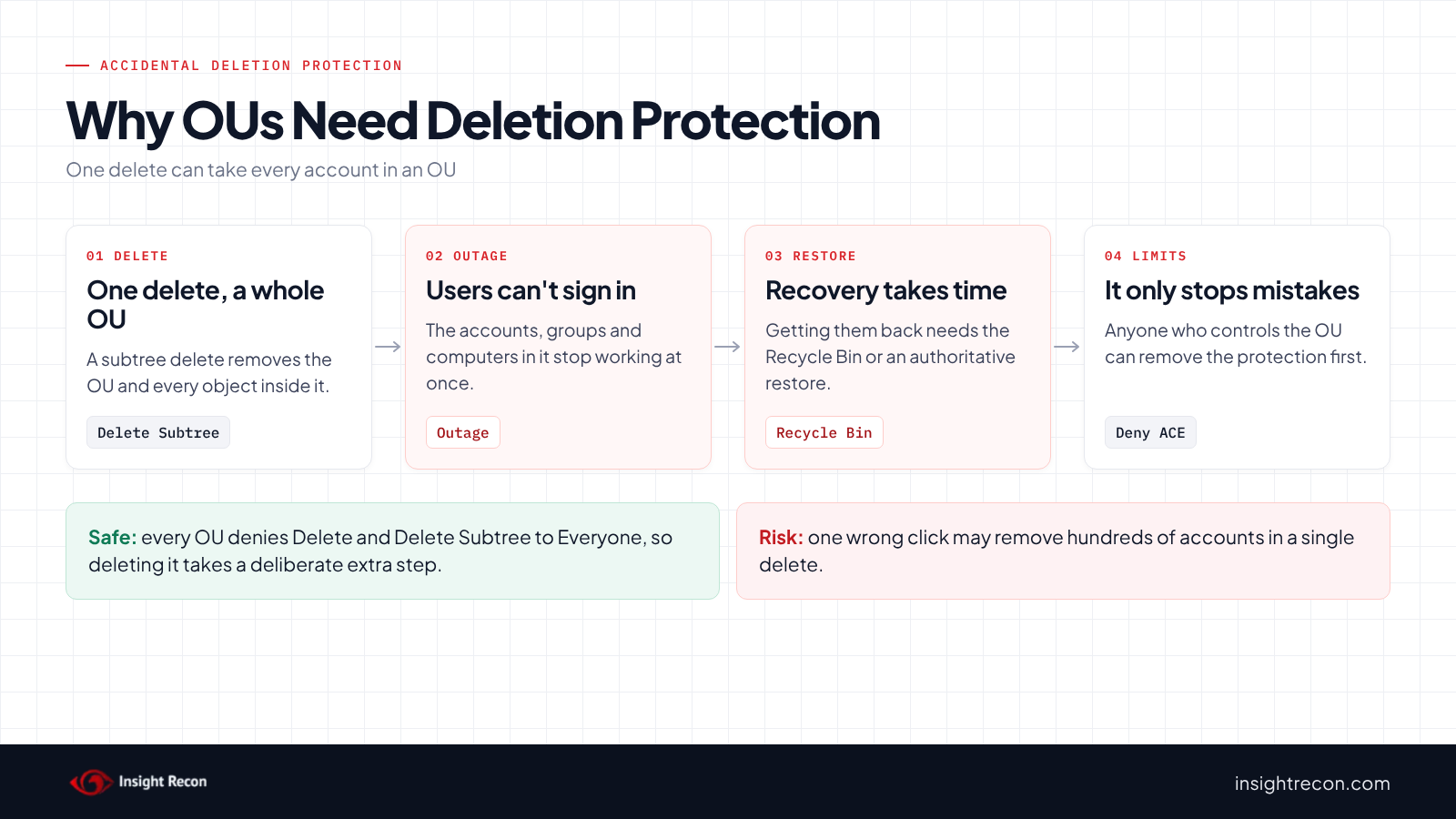
One delete can remove a whole OU
Deleting an OU with the subtree option removes every user, group and computer inside it. Microsoft's analyzer rule warns of "disruptions that might be caused by accidental bulk deletion of objects." Even the Domain Controllers OU isn't safe. Windows refuses to delete that OU itself, because it's a critical system object, but a subtree delete started on it can remove objects under it before it stops.
Recovery takes time
With the AD Recycle Bin on, Microsoft says restored user accounts "automatically regain all group memberships and corresponding access rights that they had immediately before deletion, within and across domains." Without it, you're looking at an authoritative restore from backup. Either way, Microsoft's AskDS team describes a customer who still needed hours to recover deleted users in a large environment. Meanwhile, those accounts can't sign in.
It stops mistakes, not attackers
The protection is a permission entry. As a result, anyone who can change an OU's permissions can remove it and then delete the OU. Treat it as a guard against errors, while access control and monitoring handle attackers.
Find OUs without accidental deletion protection
Read the quick check results
The quick check above reads ProtectedFromAccidentalDeletion on every OU, much like the command in Microsoft's analyzer rule. It also counts the objects under each one.
What to look for: the Domain Controllers OU and any OU with a large ObjectsInside count, since those are the deletes that would hurt most.
Check your default containers and admin objects
The default Users and Computers containers aren't OUs, so OU-only checks skip them. Microsoft's AskDS post "Two lines that can save your AD from a crisis" also notes that "with the exception of Organizational Units," the setting isn't on by default. This lists those containers plus groups and users marked adminCount=1.
# Runs as any domain user with the ActiveDirectory module.
# Checks the default Users and Computers containers, plus groups and users marked adminCount=1.
Import-Module ActiveDirectory -ErrorAction Stop
$domain = Get-ADDomain
$targets = @(
    Get-ADObject -Identity $domain.UsersContainer -Properties ProtectedFromAccidentalDeletion
    Get-ADObject -Identity $domain.ComputersContainer -Properties ProtectedFromAccidentalDeletion
    Get-ADObject -LDAPFilter '(&(adminCount=1)(|(objectClass=group)(objectCategory=person)))' -Properties ProtectedFromAccidentalDeletion
)
$targets |
    Select-Object Name, ObjectClass, ProtectedFromAccidentalDeletion, DistinguishedName |
    Sort-Object ProtectedFromAccidentalDeletion, ObjectClass
What to look for: rows with ProtectedFromAccidentalDeletion set to False, especially admin groups such as Domain Admins.
Check for recent OU deletions
Deleted directory objects are logged as event 5141 under the Audit Directory Service Changes subcategory, when the object's auditing settings cover deletes. This reads OU deletions from every DC for the last 30 days.
# Run as a Domain Admin. Reads event 5141 from each DC's Security log.
# Needs the Audit Directory Service Changes subcategory turned on for your DCs.
Import-Module ActiveDirectory -ErrorAction Stop
$xpath = "*[System[EventID=5141 and TimeCreated[timediff(@SystemTime) <= 2592000000]]] and *[EventData[Data[@Name='ObjectClass']='organizationalUnit']]"
foreach ($dc in Get-ADDomainController -Filter *) {
    Get-WinEvent -ComputerName $dc.HostName -LogName Security -FilterXPath $xpath -ErrorAction SilentlyContinue |
        ForEach-Object {
            $d = @{}
            ([xml]$_.ToXml()).Event.EventData.Data | ForEach-Object { $d[$_.Name] = $_.'#text' }
            [pscustomobject]@{
                DC        = $dc.HostName
                Time      = $_.TimeCreated
                OU        = $d.ObjectDN
                DeletedBy = "$($d.SubjectDomainName)\$($d.SubjectUserName)"
            }
        }
}
What to look for: any OU deletion you can't tie to a planned change. If nothing comes back, confirm the audit subcategory and the auditing settings on your OUs before you trust the result.
Check accidental deletion protection with Insight Recon
The free scan includes Accidental Deletion Protection Not On OUs, a Low-severity quick win. It reads each OU's permissions and flags any OU without an explicit deny entry for Everyone that covers both Delete and Delete Subtree and applies to the OU itself. Each finding lists the OUs and comes with the Hacker Insight, remediation steps and compliance mappings.
If the scan can't read an OU's permissions, that OU isn't listed. When no other OU is flagged, the result says the check couldn't be fully evaluated instead of passing.
Know what this check doesn't decide
Some things are still yours to check. First, it reads OUs only. The Users and Computers containers and admin objects aren't covered. Second, it doesn't check whether you can recover from a delete. The Recycle Bin is Disabled check covers that. Our Recycle Bin post explains it.
Related checks beyond accidental deletion protection
- Risky AdminSDHolder Permissions, which decides who can change your admin objects. Our AdminSDHolder post covers it.
- Non-Standard Domain Controller Owner, since an owner can change permissions, including this one. Our DC owners post covers it.
You can see what the findings look like in our sample report. The full list is in our check library.
See which OUs one wrong click could wipe out, plus the rest of your recovery and Tier 0 risks.
It runs from any Windows machine that can reach your DCs, with a standard domain account. Every core AD check is free for one domain.
Before you turn on accidental deletion protection
Protecting OUs is low risk, with two side effects to plan for. Protecting user and group objects needs one extra question: does anything delete them on purpose?
Check tools that delete objects
Provisioning and cleanup tools may delete accounts as part of offboarding. Protected objects block those deletes. So keep object-level protection to admin accounts and groups. Leave everyday users to your normal process.
Clear it before you move an OU
Protection blocks moving an OU as well as deleting it, until someone clears the setting. So anyone who reorganizes OUs, by hand or with a tool, has to clear it first and turn it back on afterward.
Protect the whole path
Microsoft's Object tab reference says the setting "does not provide protection against accidental deletion of a subtree that contains the protected object." It recommends protecting every container "up to the domain naming context head." In other words, protect parent OUs as well as the ones that matter most.
Know why a parent matters
Microsoft's object deletion rules say a deny on Delete "has no effect if the user has DELETE_CHILD access on the parent." For this reason, turning on the setting may also deny Everyone the Delete All Child Objects right on the parent. Anyone who deletes objects there only through a delegated right on the parent then loses that ability, so check those delegations before you protect the OUs under it.
Turn on accidental deletion protection safely
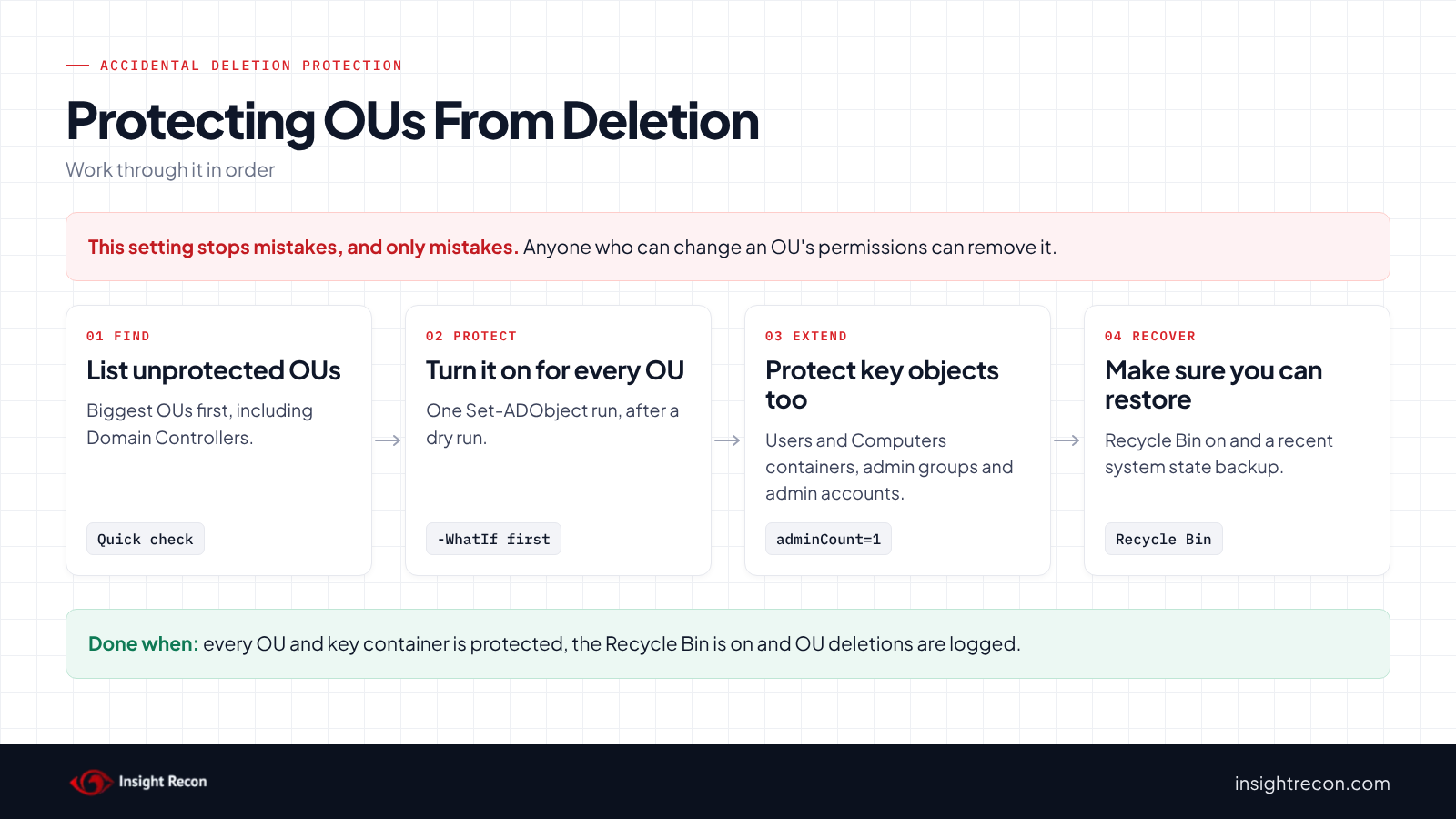
Each change script below is a dry run with -WhatIf. Drop that to apply.
1. Protect every OU
This saves the list of unprotected OUs to a CSV file, then turns on protection for all of them. It uses Set-ADObject, like the two lines in Microsoft's AskDS post.
# Dry run. Remove -WhatIf from the last line to apply.
# Needs rights to change permissions on each OU, such as Domain Admins.
Import-Module ActiveDirectory -ErrorAction Stop
$unprotected = Get-ADOrganizationalUnit -Filter * -Properties ProtectedFromAccidentalDeletion |
    Where-Object { -not $_.ProtectedFromAccidentalDeletion }
# Save the list so you know exactly what changed
$unprotected | Select-Object Name, DistinguishedName |
    Export-Csv -Path "$env:TEMP\unprotected-ous.csv" -NoTypeInformation
$unprotected | Set-ADObject -ProtectedFromAccidentalDeletion $true -ErrorAction Stop -WhatIf
What to look for: one "What if" line per unprotected OU. After you apply it, re-run the quick check and confirm it returns nothing.
2. Protect the default containers and admin objects
This turns on the same protection for the Users and Computers containers and every group and user marked adminCount=1. It lists what it will change first.
# Dry run. Remove -WhatIf from the last line to apply.
# Needs Domain Admins. Adds the same protection to Users, Computers and adminCount=1 groups and users.
Import-Module ActiveDirectory -ErrorAction Stop
$domain = Get-ADDomain
$targets = @(
    Get-ADObject -Identity $domain.UsersContainer -Properties ProtectedFromAccidentalDeletion
    Get-ADObject -Identity $domain.ComputersContainer -Properties ProtectedFromAccidentalDeletion
    Get-ADObject -LDAPFilter '(&(adminCount=1)(|(objectClass=group)(objectCategory=person)))' -Properties ProtectedFromAccidentalDeletion
) | Where-Object { -not $_.ProtectedFromAccidentalDeletion }
$targets | Select-Object Name, ObjectClass, DistinguishedName
$targets | Set-ADObject -ProtectedFromAccidentalDeletion $true -ErrorAction Stop -WhatIf
What to look for: only the containers and admin objects you expect. Remove any admin account a tool deletes on purpose before you apply it.
3. Confirm you can restore
Protection lowers the chance of a delete, but it can't undo one. So make sure the AD Recycle Bin is on and that you have a recent system state backup of at least one DC.
Delete a protected OU on purpose
When you do need to delete an OU, turn the protection off first with Set-ADObject -ProtectedFromAccidentalDeletion $false, or clear the checkbox. Then delete it. The extra step is the whole point.
Keep accidental deletion protection on
- Run the quick check monthly. New OUs from scripts or tools may arrive unprotected.
- Alert on event 5141 for OUs. Any OU deletion should match a change ticket.
- Watch who can change OU permissions. Anyone with that right can remove the protection.
- Re-run the scan. The check flags any OU that loses protection.
Accidental deletion protection checklist
- Is every OU protected, including Domain Controllers?
- Are the Users and Computers containers protected?
- Are your admin groups and admin accounts protected?
- Is the AD Recycle Bin on?
- Do you have a recent system state backup?
- Do you log and review OU deletions?
A "no" on the first question means one wrong click may still take an entire OU with it.
Compliance mapping
| Framework | Reference | Why it applies |
|---|---|---|
| CIS Controls v8 | Control 4 | Secure configuration of enterprise assets. |
| NIST CSF 2.0 | PR.PS-01, PR.DS-01 | Configuration management practices are applied. Data at rest is protected. |
Accidental deletion protection FAQ
What does accidental deletion protection do?
It adds a deny entry for Everyone on Delete and Delete Subtree. After that, the object can't be deleted or moved until someone turns it off.
Are new OUs protected by default?
OUs created in Active Directory Users and Computers are. OUs from before Server 2008 may not be, along with some made by scripts or tools. Windows creates the Domain Controllers OU without it.
Does it stop an attacker?
No. Anyone who can change the OU's permissions can remove it first. It guards against mistakes.
Do I still need the Recycle Bin?
Yes. Protection makes deletes less likely. The Recycle Bin is how you undo one.
Does Insight Recon check accidental deletion protection?
Yes. The free scan includes Accidental Deletion Protection Not On OUs, which lists every unprotected OU.
See which OUs are one click away from deletion.
It runs from any Windows machine that can reach your DCs, with a standard domain account. Every core AD check is free for one domain.
Not ready to scan?
AD Signal is our monthly look at what's changing in AD security and how real domains score. Read the latest report.
References
- Microsoft Learn: All OUs in this domain should be protected from accidental deletion
- Microsoft Learn: Object Properties, Object tab
- Microsoft Learn: Access control and object deletion
- Microsoft Learn: Set-ADObject
- Microsoft Learn: New-ADOrganizationalUnit
- Microsoft AskDS: Two lines that can save your AD from a crisis
- Event 5141, a directory service object was deleted
- Microsoft Learn: Active Directory Recycle Bin