ADCS ESC5: Find and Fix Weak Permissions on Your PKI Objects
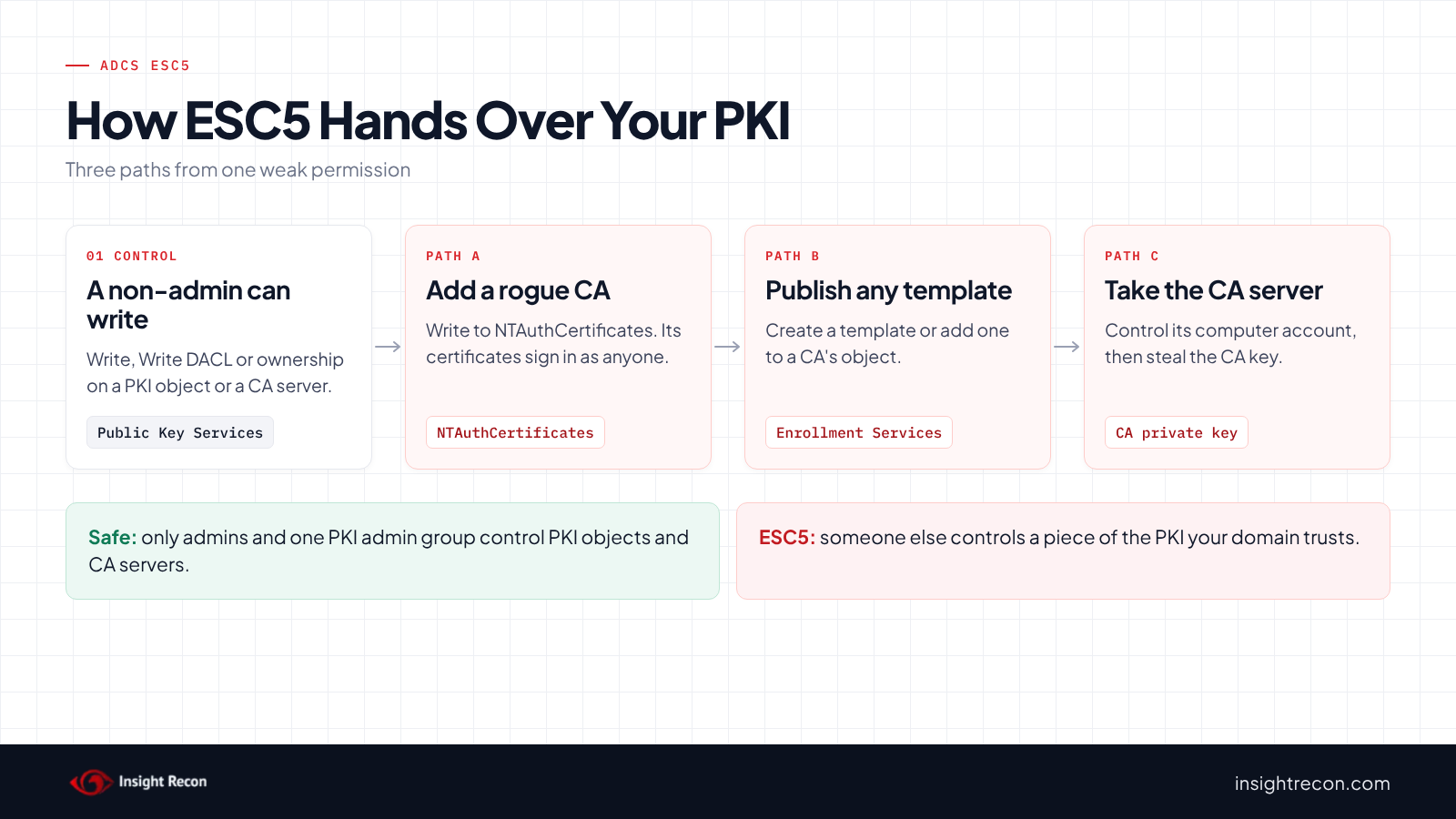
ADCS ESC5 covers everything in your PKI besides templates: the containers under Public Key Services, NTAuthCertificates, each CA's object in AD, the CA servers' computer accounts and the Cert Publishers group. Whoever controls those can potentially add a CA your domain controllers trust, publish any template or take over the CA server itself. This post shows you how to find who controls each one, check NTAuthCertificates for CAs that don't belong and take those rights back.
| Priority | High. Control of a PKI object can potentially become a trusted rogue CA or a stolen CA key |
|---|---|
| What decides it | Full Control, Write, Write DACL or Write Owner on PKI objects held by someone other than your admins |
| Who's affected | Forests where PKI permissions were delegated broadly, or where a CA server's computer account can be controlled by non-admins |
| Fix | Take the rights back, check NTAuthCertificates, clean up Cert Publishers and treat CA servers like domain controllers |
Check it now: can anyone besides your admins change your PKI objects?
Import-Module ActiveDirectory -ErrorAction Stop
$pks = "CN=Public Key Services,CN=Services,$((Get-ADRootDSE).configurationNamingContext)"
$domainSid = (Get-ADDomain).DomainSID.Value
$rootSid = (Get-ADDomain -Identity (Get-ADForest).RootDomain).DomainSID.Value
# SYSTEM, Administrators, Enterprise Domain Controllers, Domain Admins, Enterprise Admins, root Domain Admins
$admins = 'S-1-5-18', 'S-1-5-32-544', 'S-1-5-9', "$domainSid-512", "$rootSid-519", "$rootSid-512"
$control = [System.DirectoryServices.ActiveDirectoryRights]'WriteProperty, WriteDacl, WriteOwner'
Get-ADObject -SearchBase $pks -SearchScope Subtree -LDAPFilter '(|(objectClass=container)(objectClass=certificationAuthority)(objectClass=pKIEnrollmentService)(objectClass=msPKI-Enterprise-Oid))' -Properties nTSecurityDescriptor |
    Where-Object {
        @($_.nTSecurityDescriptor.GetAccessRules($true, $true, [System.Security.Principal.SecurityIdentifier]) |
            Where-Object {
                $_.AccessControlType -eq 'Allow' -and
                $_.IdentityReference.Value -notin $admins -and
                $_.IdentityReference.Value -notlike '*-517' -and   # Cert Publishers, checked separately
                (($_.ActiveDirectoryRights -band $control) -ne 0)
            }).Count -gt 0
    } | Select-Object Name, ObjectClass
Runs as any domain user with the ActiveDirectory module. It lists containers, CA objects and enrollment service objects under Public Key Services where anyone other than SYSTEM, Administrators, Enterprise Domain Controllers, Domain Admins or Enterprise Admins can write, change permissions or take ownership. It skips Cert Publishers, which the scripts below check separately. No output means only your admins can change them. Templates are covered in our ADCS ESC4 post.
You checked one setting. The free scan checks the rest of your on-prem AD in a few minutes.
Nothing gets installed on your domain controllers. Only HTTPS leaves your network.
What ADCS ESC5 is
Active Directory Certificate Services (ADCS) keeps most of its configuration in AD, under CN=Public Key Services,CN=Services in the forest's Configuration partition. SpecterOps named weak permissions on these objects ESC5 in their 2021 Certified Pre-Owned research. They note these objects "can have a security impact on the entire AD CS system." ESC5 covers:
- The containers under Public Key Services. Certificate Templates, Certification Authorities, Enrollment Services, AIA, CDP and OID.
- NTAuthCertificates. The list of CAs your domain controllers trust to issue sign-in certificates.
- Each CA's object in Enrollment Services. Among other things, it lists which templates the CA issues.
- The CA server's computer account in AD. Whoever controls it may be able to take over the server.
Our check also looks at the Cert Publishers group. Microsoft's security groups reference says its members are authorized to publish certificates in AD and "can create a large amount of AD data or remove certificates that are required." Therefore, it should hold only your CA servers.
Why ADCS ESC5 is dangerous
Write access to NTAuthCertificates adds a trusted CA
For instance, Microsoft's NTAuth documentation says publishing a CA certificate there means "issued certificates from these CA's can be used for authentication." As a result, anyone who can write to it can potentially add a CA they built themselves. From then on, certificates from that CA, in any user's name, are trusted for domain sign-in. MITRE ATT&CK tracks this as T1649, Steal or Forge Authentication Certificates.
Write access to the containers or CA objects changes what gets issued
For example, someone who can create objects in the Certificate Templates container can make a template of their own, with whatever settings they want. Similarly, someone who can write to a CA's object in Enrollment Services can publish any template on that CA. Both lead back to the template attacks in our ADCS ESC1 and ADCS ESC4 posts.
Control of the CA server's computer account can mean the CA's key
SpecterOps lists the CA server's AD computer object as an ESC5 target, compromised for example through resource-based constrained delegation. Our RBCD post covers how that works. An attacker who takes over the CA server can potentially steal the CA's private key. With it, SpecterOps notes, they can forge certificates for any user for as long as the CA certificate is valid. Also, those forged certificates can't be revoked, since the CA never issued them. Their research says to "treat CA servers (including subordinate CAs) as Tier 0 assets with the same protections as Domain Controllers!"
Find ESC5 exposure in your forest
The PKI containers live in the forest's Configuration partition. As a result, the first two scripts cover the whole forest. They run as any domain user with the AD module.
List who can change each ADCS ESC5 object
This lists every object under Public Key Services, except individual templates, whose owner isn't an admin or that anyone other than your admins can change. It shows the owner and each extra writer with the rights it holds.
Import-Module ActiveDirectory -ErrorAction Stop
$pks = "CN=Public Key Services,CN=Services,$((Get-ADRootDSE).configurationNamingContext)"
$domainSid = (Get-ADDomain).DomainSID.Value
$rootSid = (Get-ADDomain -Identity (Get-ADForest).RootDomain).DomainSID.Value
$admins = 'S-1-5-18', 'S-1-5-32-544', 'S-1-5-9', "$domainSid-512", "$rootSid-519", "$rootSid-512"
$low = 'S-1-1-0', 'S-1-5-2', 'S-1-5-4', 'S-1-5-7', 'S-1-5-11', 'S-1-5-15', 'S-1-5-32-545'
$lowRid = '^S-1-5-21-\d+-\d+-\d+-51[345]$'
$control = [System.DirectoryServices.ActiveDirectoryRights]'WriteProperty, WriteDacl, WriteOwner'
# Templates are covered by the ESC4 script, so this skips individual templates.
Get-ADObject -SearchBase $pks -SearchScope Subtree -LDAPFilter '(!(objectClass=pKICertificateTemplate))' -Properties nTSecurityDescriptor |
    ForEach-Object {
        $o = $_
        $sd = $o.nTSecurityDescriptor
        $owner = $sd.GetOwner([System.Security.Principal.SecurityIdentifier])
        $writers = $sd.GetAccessRules($true, $true, [System.Security.Principal.SecurityIdentifier]) |
            Where-Object { $_.AccessControlType -eq 'Allow' -and $_.IdentityReference.Value -notin $admins -and (($_.ActiveDirectoryRights -band $control) -ne 0) } |
            ForEach-Object {
                $sid = $_.IdentityReference
                try { $name = $sid.Translate([System.Security.Principal.NTAccount]).Value } catch { $name = $sid.Value }
                $tag = if ($sid.Value -in $low -or $sid.Value -match $lowRid) { ' (low privilege)' } elseif ($sid.Value -like '*-517') { ' (Cert Publishers)' } else { '' }
                "$name$tag [$($_.ActiveDirectoryRights)]"
            }
        if (-not $writers -and $owner.Value -in $admins) { return }
        [pscustomobject]@{
            Object  = $o.DistinguishedName -replace [regex]::Escape(",$pks"), ''
            Owner   = $(try { $owner.Translate([System.Security.Principal.NTAccount]).Value } catch { $owner.Value })
            Writers = ($writers | Sort-Object -Unique) -join '; '
        }
    }
What to look for:
- Any entry marked
(low privilege). Those are exploitable by any domain user. - Writers on
CN=NTAuthCertificates,CN=Certificate Templatesor any object underCN=Enrollment Services. Those are the most sensitive. - A PKI admin group. Microsoft's PKI delegation guide grants a management group Full Control on Public Key Services, so seeing one is expected. Its members should be treated as Tier 0.
(Cert Publishers)on CA certificate objects under AIA and Certification Authorities. CAs publish their certificates through it. Check the group's membership instead.
Check which CAs NTAuthCertificates trusts
This lists every CA certificate in NTAuthCertificates and when the object last changed.
Import-Module ActiveDirectory -ErrorAction Stop
$pks = "CN=Public Key Services,CN=Services,$((Get-ADRootDSE).configurationNamingContext)"
$ntauth = Get-ADObject -Identity "CN=NTAuthCertificates,$pks" -Properties cACertificate, whenChanged
"NTAuthCertificates last changed: $($ntauth.whenChanged)"
$ntauth.cACertificate | ForEach-Object {
    $cert = [System.Security.Cryptography.X509Certificates.X509Certificate2]::new([byte[]]$_)
    [pscustomobject]@{ Subject = $cert.Subject; Thumbprint = $cert.Thumbprint; NotAfter = $cert.NotAfter }
}
What to look for: every certificate should be one of your own issuing CAs, or a third-party smart card CA you knowingly added. However, an unknown subject, or a change date nobody can explain, needs investigating before you do anything else.
Check the CA servers and Cert Publishers
This lists who can change each CA server's computer object and who is allowed to delegate to it, then lists Cert Publishers members that don't host an enterprise CA. Run it in each domain that holds a CA server.
# Run this in each domain that holds a CA server.
Import-Module ActiveDirectory -ErrorAction Stop
$pks = "CN=Public Key Services,CN=Services,$((Get-ADRootDSE).configurationNamingContext)"
$domainSid = (Get-ADDomain).DomainSID.Value
$rootSid = (Get-ADDomain -Identity (Get-ADForest).RootDomain).DomainSID.Value
# Admins, Enterprise Domain Controllers, SELF, Key Admins and Enterprise Key Admins (default key credential grant)
$expected = 'S-1-5-18', 'S-1-5-32-544', 'S-1-5-9', 'S-1-5-10', "$domainSid-512", "$rootSid-519", "$rootSid-512", "$domainSid-526", "$rootSid-527"
$control = [System.DirectoryServices.ActiveDirectoryRights]'WriteProperty, WriteDacl, WriteOwner'
$caHosts = (Get-ADObject -SearchBase "CN=Enrollment Services,$pks" -LDAPFilter '(objectClass=pKIEnrollmentService)' -Properties dNSHostName).dNSHostName
$caComputers = foreach ($h in $caHosts) { Get-ADComputer -LDAPFilter "(dNSHostName=$h)" -Properties nTSecurityDescriptor, PrincipalsAllowedToDelegateToAccount }
foreach ($c in $caComputers) {
    $writers = $c.nTSecurityDescriptor.GetAccessRules($true, $true, [System.Security.Principal.SecurityIdentifier]) |
        Where-Object { $_.AccessControlType -eq 'Allow' -and $_.IdentityReference.Value -notin $expected -and $_.IdentityReference.Value -ne $c.SID.Value -and (($_.ActiveDirectoryRights -band $control) -ne 0) } |
        ForEach-Object {
            try { $_.IdentityReference.Translate([System.Security.Principal.NTAccount]).Value } catch { $_.IdentityReference.Value }
        }
    [pscustomobject]@{
        CaServer        = $c.DNSHostName
        CanChangeObject = ($writers | Sort-Object -Unique) -join '; '
        DelegationFrom  = ($c.PrincipalsAllowedToDelegateToAccount -join '; ')
    }
}
# Cert Publishers should hold only the computer accounts of your CA servers
Get-ADGroupMember -Identity "$domainSid-517" | Where-Object { $_.SamAccountName -notin ($caComputers.SamAccountName) } |
    Select-Object @{ n = 'UnexpectedCertPublisher'; e = { $_.SamAccountName } }, objectClass
What to look for: anything in CanChangeObject or DelegationFrom that isn't a Tier 0 admin. Account Operators shows up here on many domains, which is one more reason our operator groups post says to keep it empty. Also, any UnexpectedCertPublisher row is a member to remove.
Check ADCS ESC5 with Insight Recon
The free scan includes Vulnerable PKI Object Access Control in ADCS (ESC5), a High check. It reads the owner and permissions of NTAuthCertificates and of the Public Key Services, Certificate Templates and Enrollment Services containers. It also reads the Certification Authorities, OID, AIA, CDP and KRA containers with everything inside them, plus each CA's object. Then it flags anyone who owns one of them or holds Full Control, Write, Write DACL or Write Owner on it. Write on a key attribute counts too, such as a CA certificate or a CA's template list. So does the right to create objects in a container. Your admins and anyone already in Tier 0 don't count. Cert Publishers and the CA servers don't count in the Certification Authorities, AIA, CDP and KRA containers or anything inside them. A CA server doesn't count on its own CA's object either. The scan also checks who can take over each CA server's computer object, including who could set up resource-based constrained delegation on it. Finally, it lists Cert Publishers members that don't host an enterprise CA. If it can't read one of these objects, the result says so instead of passing. Each finding comes with the Hacker Insight, remediation steps and compliance mappings.
Know what the ADCS ESC5 check doesn't decide
Some things are still yours to check. For example, a delegated PKI admin group will show up as a finding. Still, keep it if it's intentional, small and treated as Tier 0. The check doesn't compare NTAuthCertificates to your real CAs, so run the NTAuth script. It doesn't net out deny entries on PKI objects, so an entry a deny cancels can still be listed. On CA server objects, it treats the operator groups as already privileged, so Account Operators only shows up in the script. It also skips CA servers outside the domain you scan, so scan each domain that holds one. Also, it reads AD only. Local administrators on the CA server and the CA's own security settings are separate. Our ADCS ESC7 post covers the CA's own permissions.
Related ADCS checks beyond ESC5
- Unrestricted certificate template modification rights in ADCS (ESC4), the same problem on individual templates. Our ADCS ESC4 post covers it.
- Risky Certificate Authority Access Control in ADCS (ESC7), who can manage the CA itself. Our ADCS ESC7 post covers it.
- Certificate Template Grants Group Membership via Issuance Policy in ADCS (ESC13), what a group link on an issuance policy object hands out. Our ADCS ESC13 post covers it.
- Resource-Based Constrained Delegation Configured and Shadow Credential Write Access on Privileged Objects, two common ways to take over a computer account like a CA server's.
You can see what the findings look like in our sample report. The full list is in our check library.
Find out who really controls your PKI, plus the other ADCS attack paths.
It runs from any Windows machine that can reach your DCs, with a standard domain account. Every core AD check is free for one domain.
Before you change PKI permissions
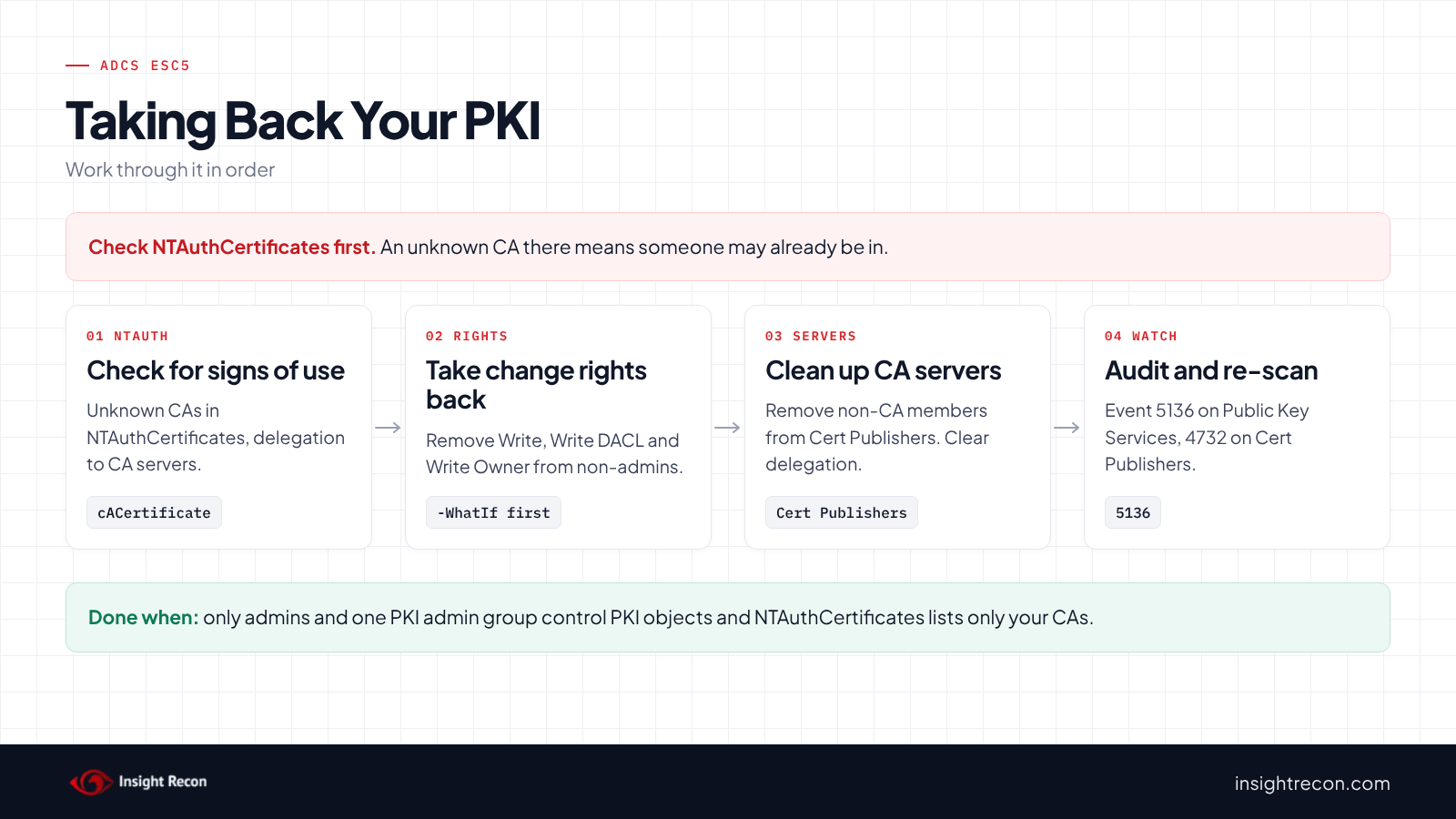
Check NTAuthCertificates and the CA servers for signs of use before you change anything. Then take rights back from everyone who isn't a PKI or Tier 0 admin.
Look for signs it was already used
An unknown certificate in NTAuthCertificates, an unexpected delegation to a CA server or an extra member in Cert Publishers may mean someone already used this access. In that case, treat it as a possible domain compromise first. If the CA server itself may have been taken over, its private key may be gone. Because replacing a CA's key is a project of its own, plan it with your PKI owner. Breach Point offers remediation assistance if you need a hand.
Know who should manage the PKI
PKI changes belong with Enterprise Admins or one small, named PKI admin group, as Microsoft's delegation guide describes. However, that group is now as powerful as Enterprise Admins for anything certificate-based. Its members should use separate admin accounts and log on only to Tier 0 systems.
Check third-party CAs before removing them
Of course, smart card and device vendors sometimes need their CA in NTAuthCertificates. In that case, removing a legitimate one breaks sign-in for everyone who uses it. So confirm each certificate with its owner before you remove it.
Fix ADCS ESC5 safely
1. Take the change rights back
This removes Write, Write DACL and Write Owner for one principal on one PKI object. It puts back Read if the removed entry included it. It saves the current permissions to a file first. It's a dry run with -WhatIf. Drop that to apply. It needs Enterprise Admins. Change the object and SID to the ones from the find script. To undo it, restore the saved permissions with Set-Acl.
# Dry run. Drop -WhatIf to apply.
# Needs Enterprise Admins. Replace the object path and SID with the ones from the find script.
Import-Module ActiveDirectory -ErrorAction Stop
$pks = "CN=Public Key Services,CN=Services,$((Get-ADRootDSE).configurationNamingContext)"
$dn = "CN=NTAuthCertificates,$pks"
$sid = [System.Security.Principal.SecurityIdentifier]'S-1-5-21-1111111111-2222222222-3333333333-1105'
$control = [System.DirectoryServices.ActiveDirectoryRights]'WriteProperty, WriteDacl, WriteOwner'
$path = "AD:$dn"
$acl = Get-Acl -Path $path -ErrorAction Stop
# Saves the current permissions so you can put them back
$acl.Sddl | Set-Content -Path '.\pki-object-acl.sddl'
$keepRead = $false
foreach ($ace in $acl.GetAccessRules($true, $false, [System.Security.Principal.SecurityIdentifier])) {
    if ($ace.AccessControlType -ne 'Allow' -or $ace.IdentityReference.Value -ne $sid.Value -or ($ace.ActiveDirectoryRights -band $control) -eq 0) { continue }
    if (($ace.ActiveDirectoryRights -band [System.DirectoryServices.ActiveDirectoryRights]::ReadProperty) -ne 0) { $keepRead = $true }
    [void]$acl.RemoveAccessRuleSpecific($ace)
}
if ($keepRead) { $acl.AddAccessRule([System.DirectoryServices.ActiveDirectoryAccessRule]::new($sid, 'GenericRead', 'Allow')) }
Set-Acl -Path $path -AclObject $acl -ErrorAction Stop -WhatIf
2. Remove certificates that don't belong in NTAuthCertificates
This removes one certificate by thumbprint and exports it to a file first. It's a dry run with -WhatIf. Drop that to apply. It needs Enterprise Admins. To undo it, publish the exported file again with certutil -dspublish -f <file> NTAuthCA, as Microsoft's NTAuth documentation describes. Clients cache NTAuthCertificates locally. The change may take a while to reach every machine.
# Dry run. Drop -WhatIf to apply.
# Needs Enterprise Admins. Use the thumbprint from the NTAuth script. Export it first so you can put it back.
Import-Module ActiveDirectory -ErrorAction Stop
$pks = "CN=Public Key Services,CN=Services,$((Get-ADRootDSE).configurationNamingContext)"
$thumb = '0000000000000000000000000000000000000000'
$ntauth = Get-ADObject -Identity "CN=NTAuthCertificates,$pks" -Properties cACertificate
$match = $ntauth.cACertificate | Where-Object { [System.Security.Cryptography.X509Certificates.X509Certificate2]::new([byte[]]$_).Thumbprint -eq $thumb }
if (-not $match) { throw 'No certificate with that thumbprint in NTAuthCertificates.' }
[System.IO.File]::WriteAllBytes("$PWD\$thumb.cer", [byte[]]$match)
Set-ADObject -Identity $ntauth -Remove @{ cACertificate = [byte[]]$match } -ErrorAction Stop -WhatIf
3. Clean up the CA servers and Cert Publishers
This takes one account that doesn't host a CA out of Cert Publishers and clears resource-based constrained delegation to one CA server. Each line is a dry run with -WhatIf. Drop that to apply. It needs Domain Admins in the domain that holds them. Change APP01$ and CA01 to your names. To undo it, add the member back with Add-ADGroupMember or set the delegation again with Set-ADComputer.
# Dry run. Drop -WhatIf on each line to apply.
# Needs Domain Admins in the domain that holds the group and the CA server.
Import-Module ActiveDirectory -ErrorAction Stop
$domainSid = (Get-ADDomain).DomainSID.Value
# Take an account that doesn't host a CA out of Cert Publishers
Remove-ADGroupMember -Identity "$domainSid-517" -Members 'APP01$' -Confirm:$false -WhatIf
# Clear resource-based constrained delegation to the CA server
Set-ADComputer -Identity 'CA01' -PrincipalsAllowedToDelegateToAccount $null -WhatIf
Next, remove any extra write rights on the CA server's computer object with the first script, pointed at its distinguished name. After that, treat the server as Tier 0. Only Tier 0 admins sign in to it. Its local Administrators group stays small.
4. Re-run the find scripts
Each object should show only admins and your PKI admin group. NTAuthCertificates should list only CAs you know.
Keep ADCS ESC5 closed
- Audit PKI changes in AD. Add auditing to the Public Key Services container and turn on Audit Directory Service Changes. Event 5136 then records each change, including who made it. Alert on any change to NTAuthCertificates.
- Watch Cert Publishers. It's a domain local group, so additions show up as event 4732 on domain controllers.
- Protect the CA servers. In other words, monitor sign-ins to them and changes to their computer objects as you would for a domain controller.
- Re-run the scan. It flags new writers, new Cert Publishers members and new control over CA servers.
ADCS ESC5 checklist
- Can only admins and one small PKI admin group change the Public Key Services objects?
- Does NTAuthCertificates list only CAs you know and own?
- Does Cert Publishers hold only your CA servers?
- Can only Tier 0 admins control each CA server's computer object?
- Is nothing allowed to delegate to a CA server?
- Are PKI changes audited, with an alert on NTAuthCertificates?
- Did you check every domain that holds a CA server?
A "no" on the first two questions means someone other than your admins can potentially make your domain trust a CA they control.
Compliance mapping
| Framework | Reference | Why it applies |
|---|---|---|
| MITRE ATT&CK | T1649, T1098 | Steal or Forge Authentication Certificates for a rogue trusted CA or a stolen CA key. Account Manipulation for changing PKI objects and Cert Publishers. |
| CIS Controls v8 | Control 4, Control 6 | Secure configuration of enterprise assets and access control management. Only PKI administrators should control PKI objects. |
| NIST CSF 2.0 | PR.AA-05 | Access permissions follow least privilege. Control of a PKI object is admin access to every certificate-based sign-in. |
| ANSSI | vuln_adcs_control | ANSSI's control point for dangerous permissions on AD CS objects. |
ADCS ESC5 FAQ
What is ADCS ESC5?
Weak permissions on PKI objects other than templates: the Public Key Services containers, NTAuthCertificates, CA objects and the CA servers' computer accounts.
What is NTAuthCertificates?
The list of CAs that domain controllers trust to issue certificates for sign-in. A CA added there can issue certificates that sign in as any user.
Is a delegated PKI admin group a problem?
Not if it's intentional and small. Microsoft's guide uses one. Treat its members as Tier 0, the same as Enterprise Admins.
Who should be in Cert Publishers?
Only the computer accounts of your CA servers. Anything else is worth removing.
Does Insight Recon check for ADCS ESC5?
Yes. The free scan includes Vulnerable PKI Object Access Control in ADCS (ESC5), along with the other ADCS checks.
See who can change your PKI and which CAs your domain controllers trust.
It runs from any Windows machine that can reach your DCs, with a standard domain account. Every core AD check is free for one domain.
Not ready to scan?
AD Signal is our monthly look at what's changing in AD security and how real domains score. Read the latest report.
References
- Microsoft Learn: Import third-party CA certificates into the Enterprise NTAuth store
- Microsoft Learn: Active Directory security groups (Cert Publishers)
- Microsoft Learn: Securing PKI, Appendix C: Delegating Active Directory PKI Permissions
- Microsoft Learn: Event 5136, a directory service object was modified
- Microsoft Learn: Event 4732, a member was added to a security-enabled local group
- SpecterOps: Certified Pre-Owned
- MITRE ATT&CK: T1649 Steal or Forge Authentication Certificates
- MITRE ATT&CK: T1098 Account Manipulation