SMB Signing Wasn't Enough Either: Patch Every Server for the Relay Bypass
A researcher published an SMB signing bypass that let a server requiring signing accept a relayed login anyway. Microsoft fixed it in the fall 2026 updates without an advisory or a CVE the researcher could find. Until a machine has that update, requiring signing won't stop someone relaying to it.
| Priority | High. Get servers onto the October 2026 update, domain controllers first. A server that requires SMB signing but missed the fix can still be relayed into |
|---|---|
| What it is | An SMB signing bypass that swaps a relayed login into a session the attacker opened and signed with their own key |
| Who's affected | Windows machines without the fix. It showed up in the September 2026 updates and appears to have reached every supported version by October |
| Fix | Install the October 2026 cumulative update or later everywhere. Keep SMB signing required and close the poisoning and coercion paths relay depends on |
Check it now: which servers are behind the October 2026 update?
Import-Module ActiveDirectory

# Lowest build that carries the October 2026 cumulative update, by OS major build
$patched = @{ '26100' = 33650; '20348' = 5761; '17763' = 9376; '14393' = 9612 }

$filter  = 'OperatingSystem -like "*Server*" -and Enabled -eq $true'
$servers = Get-ADComputer -Filter $filter -Properties DNSHostName |
    Where-Object DNSHostName | ForEach-Object DNSHostName

$results = Invoke-Command -ComputerName $servers -ErrorAction SilentlyContinue -ScriptBlock {
    $v = Get-ItemProperty 'HKLM:\SOFTWARE\Microsoft\Windows NT\CurrentVersion'
    [pscustomobject]@{
        OS    = (Get-CimInstance Win32_OperatingSystem).Caption
        Build = [int]$v.CurrentBuild
        UBR   = [int]$v.UBR
    }
}

$results | Select-Object PSComputerName, OS,
    @{ N = 'Installed'; E = { "$($_.Build).$($_.UBR)" } },
    @{ N = 'Patched';   E = {
        $min = $patched[[string]$_.Build]
        if (-not $min)            { 'check manually' }
        elseif ($_.UBR -ge $min)  { 'Yes' }
        else                      { 'NO - update' }
    } } | Sort-Object Patched, PSComputerName

# Servers that didn't answer. Treat these as unknown and check them directly.
$servers | Where-Object { $_ -notin $results.PSComputerName } |
    ForEach-Object { "No response: $_" }
Run it as an account with remote PowerShell rights on your servers, from a machine that can reach them over WinRM. NO - update means that server is below the October 2026 build for its version. check manually shows up for a version that isn't in the table, like Server 2012 R2. A No response line is a server that didn't answer or turned the connection down. Treat both as exposed until you've looked at them directly.
You checked one setting. The free scan checks the rest of your on-prem AD in a few minutes.
Nothing gets installed on your domain controllers. Only HTTPS leaves your network.
What the SMB signing bypass is
On October 21, 2026, Lyderic Lefebvre of blackfield published a short note called "Defeating enforced SMB signing." It describes an SMB signing bypass where a server that requires signing still accepts a relayed login. SpecterOps published the LDAP version of the same problem two days later. We covered that one in LDAP signing wasn't enough.
The attacker starts by signing in to the server with any domain account they control. Because it's their own login, they know the key that session is signed with. They then re-authenticate that same session using a privileged login relayed from another machine. The server switches the session to the relayed account but keeps using the original key, which means everything the attacker sends afterward still has a valid signature. In the researcher's example, it ended with a SYSTEM-level dump of the target's local password hashes. We're leaving out the step-by-step on purpose and sticking to what it means for your servers.
Microsoft fixed it without announcing anything. The researcher couldn't find a CVE for it either. Patched servers now check that the account re-authenticating a session is the same account that opened it. The check first showed up in the September 8, 2026 update for Windows 11 24H2 and 25H2 (KB5124008), and around the same time on Server 2025. According to the researcher, it seems to have reached the other supported versions over the following weeks. SpecterOps also says the SMB side was patched in September and tells people to install the September update on every server. With no advisory or CVE to track, a lot of teams won't know whether they're covered.
The researcher also released tooling, including a NetExec module called reauth_swap that reports whether a host still allows the swap. It's only in the researcher's fork of NetExec for now. If it gets merged into the main project, you'll probably start seeing it in pentest reports, since NetExec shows up on most internal tests.
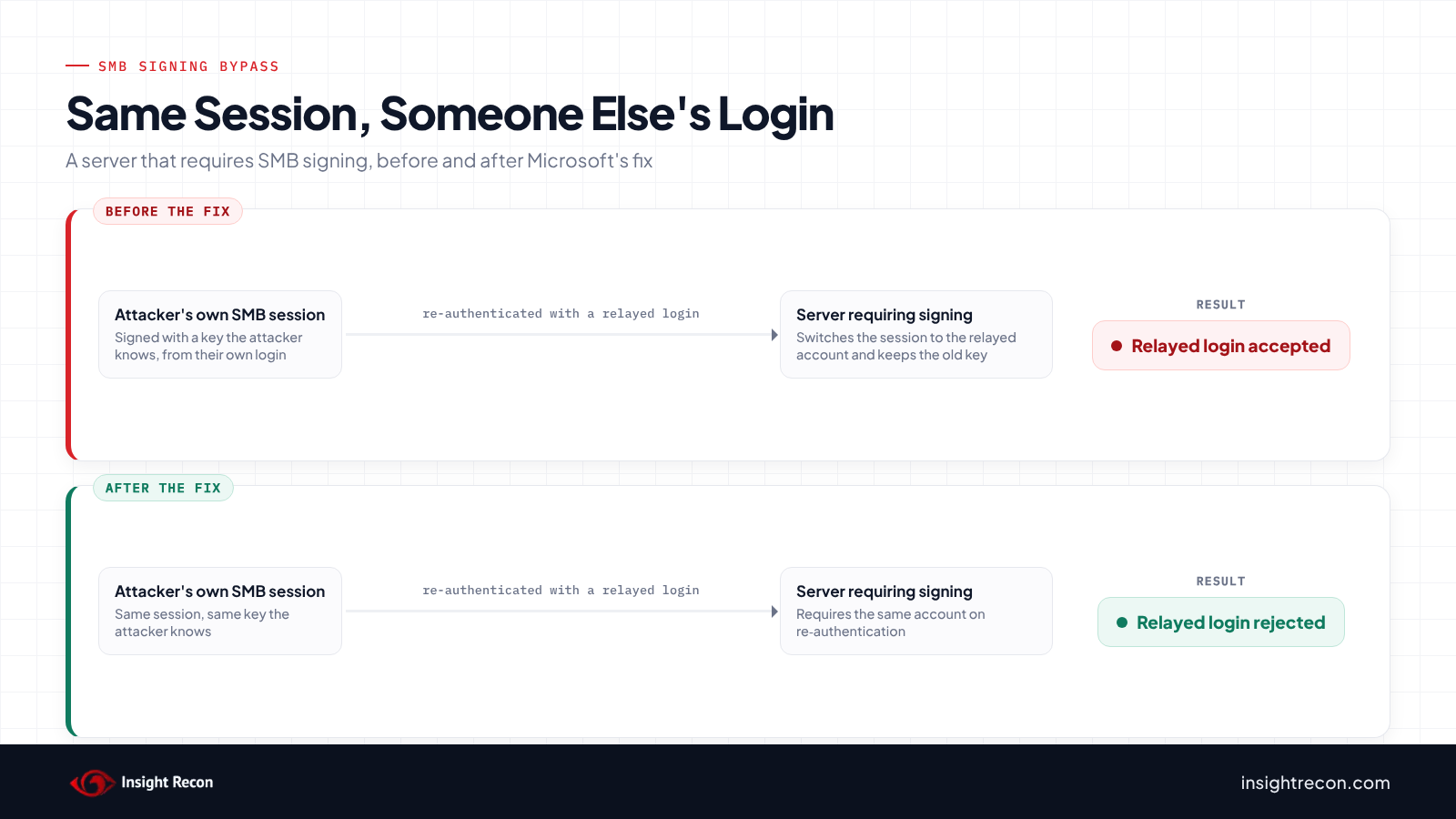
Why required SMB signing wasn't enough
SMB signing works by signing every message with a key that comes out of the login. In a normal relay, the attacker forwards someone else's login without ever learning that key, which leaves them with nothing to sign with. A server that requires signing drops the session right there. Our post on SMB signing not required covers how that works and how to turn it on without breaking things.
SMB also lets a client re-authenticate a session it already has open. Microsoft's protocol spec says the server keeps the existing key when that happens: "the existing Session.SessionKey will be retained." Keeping the key is intended behavior. What the server didn't do was check that the account re-authenticating was the same one that opened the session. Without that check, the attacker could pair their own key with someone else's login. The SMB signing bypass depends on that missing check.
Microsoft's SMB signing documentation says the signature "prevents relay attacks." On patched machines that's true again. A machine that missed the update can pass every signing audit you run and still accept one of these relays.
Which machines are affected
Almost every Windows machine runs an SMB server, but the SMB signing bypass only matters on the ones that require signing and haven't installed the fix:
- Domain controllers. They require SMB signing by default, which is why most people assumed they were covered. If the relayed login belongs to an account with admin rights on the DC, the attacker gets admin on the DC.
- Member servers you've hardened. If you followed the usual advice and required signing on your servers, they're in scope until they're patched.
- Windows 11 24H2 and later. Business editions require signing by default, which put them in scope as soon as they shipped.
- Out-of-support versions. The researcher thinks one or two end-of-life versions may never get the fix. Assume Server 2012 R2 and older are exposed unless you can show they aren't.
To pull this off, the attacker needs a domain account plus a way to capture or force a privileged login, usually through name poisoning or coercion. Getting past signing doesn't do anything by itself. The relayed account also needs rights on the target. If one account is local admin on hundreds of machines, a single relayed login from it works against all of them.
The table below lists the build that carries the October 2026 update for each supported version of Windows Server. Use it as your minimum. The October update is cumulative, which means it includes the September change. Nobody has confirmed the fix build by build on every version yet. If you're allowed to test, confirm 2016 and 2019 with the researcher's module.
| Windows Server | October 2026 update | Build at or above |
|---|---|---|
| 2025 | KB5126646 | 26100.33650 |
| 2022 | KB5126655 | 20348.5761 |
| 2019 | KB5126651 | 17763.9376 |
| 2016 | KB5126868 (install SSU KB5126649 first) | 14393.9612 |
Windows 11 24H2 and 25H2 machines are covered once they're on the September 8, 2026 update, KB5124008 (builds 26100.9445 and 26200.9445) or later. For your other workstations, check your patch tool's compliance report.
Check whether your servers are patched
The Check it now command reads the installed build from each server over WinRM, the same way our LDAP post checks domain controllers. You want every server showing Yes. If a server doesn't answer, you don't know its patch level yet. Check that one by hand.
Your regular SMB signing check won't tell you whether a server is exposed to the SMB signing bypass. A server that requires signing passes it whether or not it has the fix. You have to go by the build number instead.
If your pentest team uses NetExec, the researcher's fork includes the reauth_swap module, which tests a host directly. Only run it against systems you're authorized to test.
Patch, then close the relay paths
Only the update fixes the SMB signing bypass, though the steps after it make relay harder in general and help with whatever variant comes next.
Install the October 2026 update everywhere
Start with domain controllers and the servers admins sign in to most, then move on to the rest of your servers and workstations. On domain controllers, the October update also includes the LDAP fix from our other post.
If you run Exchange on-prem, read Microsoft's release health notes before you patch those servers. The October update has a known issue that can block OWA sign-ins and back up mail on Exchange. Microsoft lists a registry workaround for it there.
Keep SMB signing required
The patch only matters on machines that require signing. If a server doesn't require it, an attacker can relay to it the old-fashioned way and doesn't need this technique at all. Require signing on domain controllers and member computers. Our SMB signing post walks through the GPOs and the devices that tend to break when you turn it on.
Shut down the ways logins get captured
An attacker can't relay a login without capturing one first. The usual source is name poisoning over LLMNR and NBT-NS. Turn both off if you haven't already. The other common source is coercion, where the attacker tricks a server into authenticating to them. On domain controllers, the Print Spooler service is the best-known way to do that, with the WebClient service close behind. Disable both on DCs unless something needs them. Doing that cuts down on coercion but won't stop all of it, since methods like the EFS calls PetitPotam used don't depend on either service.
Cut NTLM where you can
Moving accounts from NTLM to Kerberos means fewer logins that can be relayed the easy way. The researcher says relayed Kerberos logins work with this technique too, though. Cutting NTLM helps, but it won't fix this on its own.
Limit where admin accounts have rights
A relayed login only matters if the account has rights on the target. The fewer accounts you have with local admin across lots of machines, the fewer logins are worth relaying. It won't help when a machine's own login gets reflected back at it, which is how the researcher's demo worked. Patching is what covers that case.
Check for the SMB signing bypass with Insight Recon
Insight Recon's free, read-only Active Directory security assessment runs 155+ checks. These are the ones that matter for the SMB signing bypass:
- Domain Controller with Stale Update (High): flags domain controllers that haven't been patched or rebooted in a while. On your DCs, this is the finding to look at for this fix.
- Domain Controller with SMB Signing Not Required (High) and Computer with SMB Signing Not Required (High): the patch only protects machines that require signing.
- LLMNR Enabled (High): the most common way attackers capture a login to relay.
- Print spooler service is enabled on a Domain Controller (Critical): lets an attacker force the DC to authenticate to them.
- WebClient Service Running on Domain Controllers (High): another way to force the DC to authenticate.
The patch check only covers domain controllers. It doesn't read build numbers from member servers or workstations. Use the script above or your patch tool for those. You can see what the findings look like in our sample report.
See which DCs are behind on patches and which relay paths are still open.
The scan runs from a domain-joined Windows machine with a standard domain account. The free plan covers every on-prem AD check.
SMB signing bypass checklist
- Is every server at or above the October 2026 build for its Windows Server version?
- Did you check every server that came back
check manuallyorNo response? - Are Windows 11 24H2 and 25H2 machines on the September 8, 2026 update or later?
- Do your domain controllers and member computers require SMB signing?
- Are LLMNR and NBT-NS off?
- Are Print Spooler and WebClient off on domain controllers unless something needs them?
If the answer to the first question is no for any server, that server is still exposed no matter what else you've configured.
Compliance mapping
Most of the SMB signing bypass falls under patch management. The relay itself maps to adversary-in-the-middle and forced authentication.
| Framework | Reference | Why it applies |
|---|---|---|
| NIST CSF 2.0 | ID.RA-01, PR.PS-02 | Identify the vulnerability and apply the vendor update that fixes it. |
| CIS Controls v8 | 7 (Continuous Vulnerability Management), 4 (Secure Configuration) | Patch on time and keep SMB signing required on every machine. |
| MITRE ATT&CK | T1557.001, T1187 | SMB relay after name poisoning, and the forced authentication that feeds it. |
| DISA STIG (Windows Server 2022) | V-254463 (WN22-SO-000190), V-254247 (WN22-00-000100) | Require SMB signing on the server side and keep Windows Server at a supported servicing level. |
| Microsoft guidance | September and October 2026 cumulative updates; CVE-2025-55234 (2025 SMB relay hardening) | Install the update. Microsoft's 2025 relay guidance still applies: require SMB server signing or SMB server EPA. |
SMB signing bypass FAQ
We require SMB signing everywhere. Are we safe?
Only on machines that have the fix, since required signing is the control the SMB signing bypass gets around. Keep it on because it still stops ordinary relay. Then get every machine to the October 2026 update or later.
Is there a CVE for the SMB signing bypass?
The researcher couldn't find one. It looks like Microsoft shipped it as silent hardening, which means a scanner that only looks for missing CVE patches won't flag it. Check build numbers instead.
Is this the same as the LDAP signing bypass?
It's the same idea applied to a different protocol. In both cases a relayed login gets swapped into a session the attacker already signed. On a DC, the October update covers both, since the LDAP fix landed in October 2026. Our post LDAP signing wasn't enough has the details.
Does it affect workstations?
Yes. Any Windows machine that requires signing and doesn't have the fix is affected. Business editions of Windows 11 24H2 are affected too, since they require signing by default.
Does turning off NTLM stop it?
It helps, but it won't stop it. The researcher says relayed Kerberos logins work with this technique too. You still need the update.
Can we test for it?
If you're authorized to test, the reauth_swap module in the researcher's NetExec fork reports whether a host still allows the swap. Otherwise, use the build check above.
Check DC patch levels, SMB signing and the relay paths around them in one scan.
Insight Recon checks DC patch level, SMB and LDAP signing, LLMNR, coercion paths and the rest of your AD from a domain-joined Windows machine with a standard account. Free and read-only.
Not ready to scan?
AD Signal is our monthly look at what's changing in AD security and how real domains score. Read the latest report.
References
- blackfield: Defeating enforced SMB signing: a note
- SpecterOps: Signed, Sealed, and Relayed, NTLM-style: Bypassing LDAP Signing Through Reauthentication
- Microsoft Open Specifications: MS-SMB2 3.3.5.5.2, Reauthenticating an Existing Session
- Microsoft Learn: Overview of SMB signing
- Microsoft Support: September 8, 2026, KB5124008 (Windows 11 24H2 and 25H2)
- Microsoft Support: October 13, 2026, KB5126646 (Windows Server 2025)
- Microsoft Support: October 13, 2026, KB5126655 (Windows Server 2022)
- Microsoft Support: October 13, 2026, KB5126651 (Windows Server 2019)
- Microsoft Support: October 13, 2026, KB5126868 (Windows Server 2016)
- Microsoft Support: KB5126649, servicing stack update for Windows Server 2016
- Microsoft Learn: Windows Server 2025 known issues and notifications
- MITRE ATT&CK: T1557.001, Name Resolution Poisoning and SMB Relay
- MITRE ATT&CK: T1187, Forced Authentication