krbtgt Password Reset: Rotate It Safely Without Breaking Kerberos
The krbtgt password is the secret behind every Kerberos ticket-granting ticket your domain controllers issue. Windows sets it once when the domain is created, and in many domains nobody has changed it since. If that key was ever exposed, a stale password keeps the exposure usable. Here's how to check its age, run the krbtgt password reset the way Microsoft and the DISA STIG describe, twice with a wait in between, and put it on a schedule.
| Priority | High. A krbtgt key exposed at any point can potentially be used to forge tickets until the password has been reset twice |
|---|---|
| What decides it | The age of the krbtgt account's password (PasswordLastSet). The DISA STIG sets the limit at 180 days |
| Who's affected | Domains that haven't reset krbtgt in the last 180 days, including many that never have |
| Fix | Check replication, reset the password, wait at least the maximum ticket lifetime, reset it again, then repeat on a schedule |
Check it now: how old is your krbtgt password?
Import-Module ActiveDirectory
Get-ADUser -Identity krbtgt -Properties PasswordLastSet |
    Select-Object Name, PasswordLastSet, @{n='DaysOld'; e={ ((Get-Date) - $_.PasswordLastSet).Days }}
Runs as any domain user with the ActiveDirectory module. It's the same command the DISA STIG uses. A DaysOld value over 180 is a STIG finding. A PasswordLastSet date close to when the domain was built usually means it has never been changed.
You checked one setting. The free scan checks the rest of your on-prem AD in a few minutes.
Nothing gets installed on your domain controllers. Only HTTPS leaves your network.
What the krbtgt account does
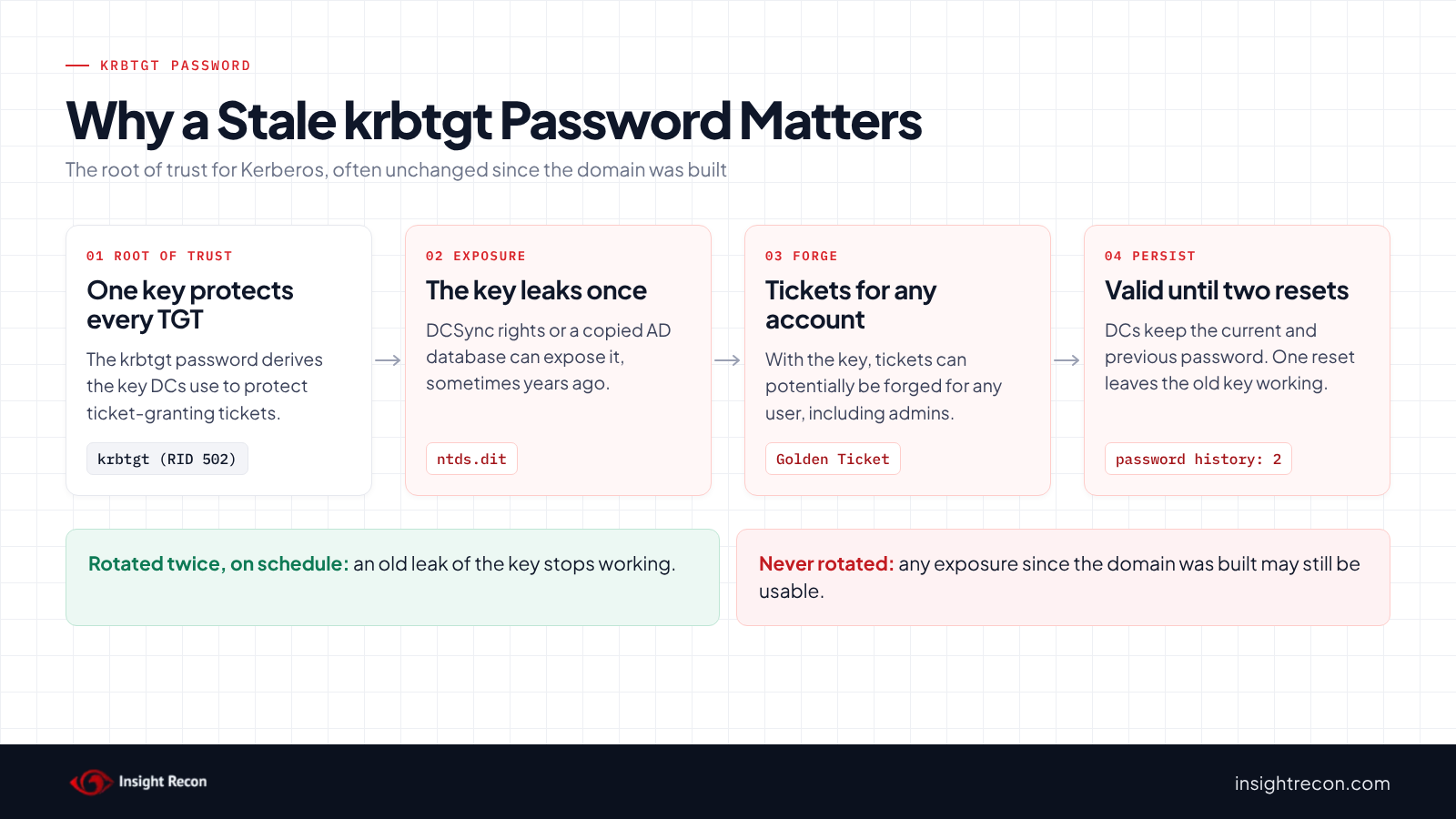
Every domain has its own krbtgt account (RID 502), so in a forest everything here applies to each domain separately. Windows creates it with the domain and keeps it disabled. You can't delete or rename it. It acts as the service account for the Key Distribution Center. When a user or computer signs in with Kerberos, the domain controller issues a ticket-granting ticket (TGT) protected with a key derived from the krbtgt password. Every later request for access to a service presents that TGT.
Two details shape how you rotate it. First, Microsoft documents that the krbtgt password history is 2: domain controllers keep the current password and the previous one, so tickets issued just before a change keep working. Second, read-only domain controllers don't use this account. Each RODC has its own, named krbtgt_ followed by a number.
Windows generates a strong random password for krbtgt. Microsoft's guidance is to change it on a regular schedule, as you would any privileged service account. The DISA STIG for Windows Server 2022 domain controllers sets that schedule at least every 180 days. The ASD and CISA guide on Active Directory compromises says every 12 months, and whenever the domain is or may have been compromised.
Why a stale krbtgt password is risky
The krbtgt key is the root of trust for Kerberos in the domain. The ASD guide explains that anyone holding it can forge their own TGTs to impersonate any user, an attack usually called a Golden Ticket. The key doesn't need to be cracked first. Attackers typically get it through DCSync rights or a copy of the AD database. Either one usually means the domain was already badly compromised at some point.
The password's age matters even when nothing is wrong today. A domain that was breached years ago, or whose AD database or backups were exposed, may still be using the same krbtgt key today. Because domain controllers also accept the previous password, a single reset doesn't close that window. The ASD guide and MITRE both say the password has to be reset twice to invalidate a forged ticket.
Forged tickets are also hard to spot. The ASD guide notes that detection relies on comparing TGT and service ticket events (4768 and 4769) and that attackers can make forged tickets look normal. Rotation is the control that doesn't depend on catching them. In MITRE ATT&CK terms this is T1558.001 Golden Ticket.
Rotating krbtgt isn't a substitute for keeping the key from leaking in the first place. The Risky DCSync Permissions check covers the accounts that could read it from a domain controller.
Check the krbtgt password in your domain
List every krbtgt account, including RODCs
The quick check reads the main account. This also lists each RODC's own krbtgt account and which RODC uses it. It runs as any domain user with the AD module.
Import-Module ActiveDirectory
Get-ADUser -LDAPFilter '(|(sAMAccountName=krbtgt)(sAMAccountName=krbtgt_*))' -Properties PasswordLastSet, 'msDS-KrbTgtLinkBl' |
    Select-Object SamAccountName, PasswordLastSet,
        @{n='DaysOld'; e={ ((Get-Date) - $_.PasswordLastSet).Days }},
        @{n='UsedByRODC'; e={ ($_.'msDS-KrbTgtLinkBl' | ForEach-Object { ($_ -split ',')[0] -replace '^CN=' }) -join '; ' }} |
    Sort-Object DaysOld -Descending
What to look for: the oldest DaysOld values at the top. An RODC account with an empty UsedByRODC belongs to an RODC that may no longer exist, and is worth checking against your list of RODCs. If you use Microsoft Entra Kerberos (cloud Kerberos trust), you may also see an account for it. Microsoft says to rotate that key only with Set-AzureADKerberosServer, never with krbtgt reset tools.
Confirm every DC sees the same date
This reads the krbtgt password date from each domain controller directly. You'll use it before, between and after the resets. It runs as any domain user with the AD module.
Import-Module ActiveDirectory
Get-ADDomainController -Filter * | ForEach-Object {
    $u = Get-ADUser -Identity krbtgt -Server $_.HostName -Properties PasswordLastSet -ErrorAction SilentlyContinue
    [pscustomobject]@{ DC = $_.HostName; Site = $_.Site; PasswordLastSet = $u.PasswordLastSet }
} | Sort-Object PasswordLastSet
What to look for: one PasswordLastSet value across every DC. A DC with an older date hasn't replicated the latest change. An empty value means the DC didn't answer.
Find your Kerberos ticket lifetime
The wait between the two resets has to be at least the maximum ticket lifetime. This finds any GPO that sets the Kerberos ticket policy. It runs as any domain user.
Import-Module ActiveDirectory
$dns = (Get-ADDomain).DNSRoot
Get-ChildItem "\\$dns\SYSVOL\$dns\Policies" -Recurse -Filter GptTmpl.inf -ErrorAction SilentlyContinue |
    Select-String -Pattern '^(MaxTicketAge|MaxServiceAge|MaxRenewAge)' |
    Select-Object @{n='GpoGuid'; e={ ($_.Path -split '\\')[-6] }}, Line
What to look for: MaxTicketAge (hours, for user tickets) and MaxServiceAge (minutes, for service tickets), usually in the Default Domain Policy. This identifies GPOs containing Kerberos ticket-lifetime settings. Confirm which policy is actually linked and effective before using the value to calculate the reset interval. If no configured value is found in the effective domain policy, the Windows defaults apply. Microsoft's forest recovery guidance gives 10 hours as the default and says to wait longer than whatever you've configured.
Check the krbtgt password with Insight Recon
The free scan includes Stale krbtgt Account Password. It flags the domain's krbtgt account when its password is more than six months old, and raises the severity the older it gets. The finding carries the Hacker Insight, remediation steps and compliance mappings for the check.
Know what it doesn't cover. The check looks at the domain's main krbtgt account. Review RODC krbtgt accounts with the script above. A recent date also can't tell you whether the last krbtgt password reset was done twice. Keep your own record of both resets.
These related checks cover the rest of this area:
- Risky DCSync Permissions, accounts that could read the krbtgt key straight from a domain controller.
- Stale AD Backup and Stale Domain Controller Passwords, other long-lived secrets on your most sensitive systems.
- Trust Accounts with Stale Passwords, the inter-realm keys Microsoft groups with krbtgt for regular changes.
- Dangerous Control Over Privileged Objects, the permissions that often lead to the access needed to steal the key.
You can see what the findings look like in our sample report. The full list is in our check library.
See what else is open in your AD.
The scan runs from a domain-joined Windows machine with a standard domain account. The free plan covers every on-prem AD check.
Before a krbtgt password reset
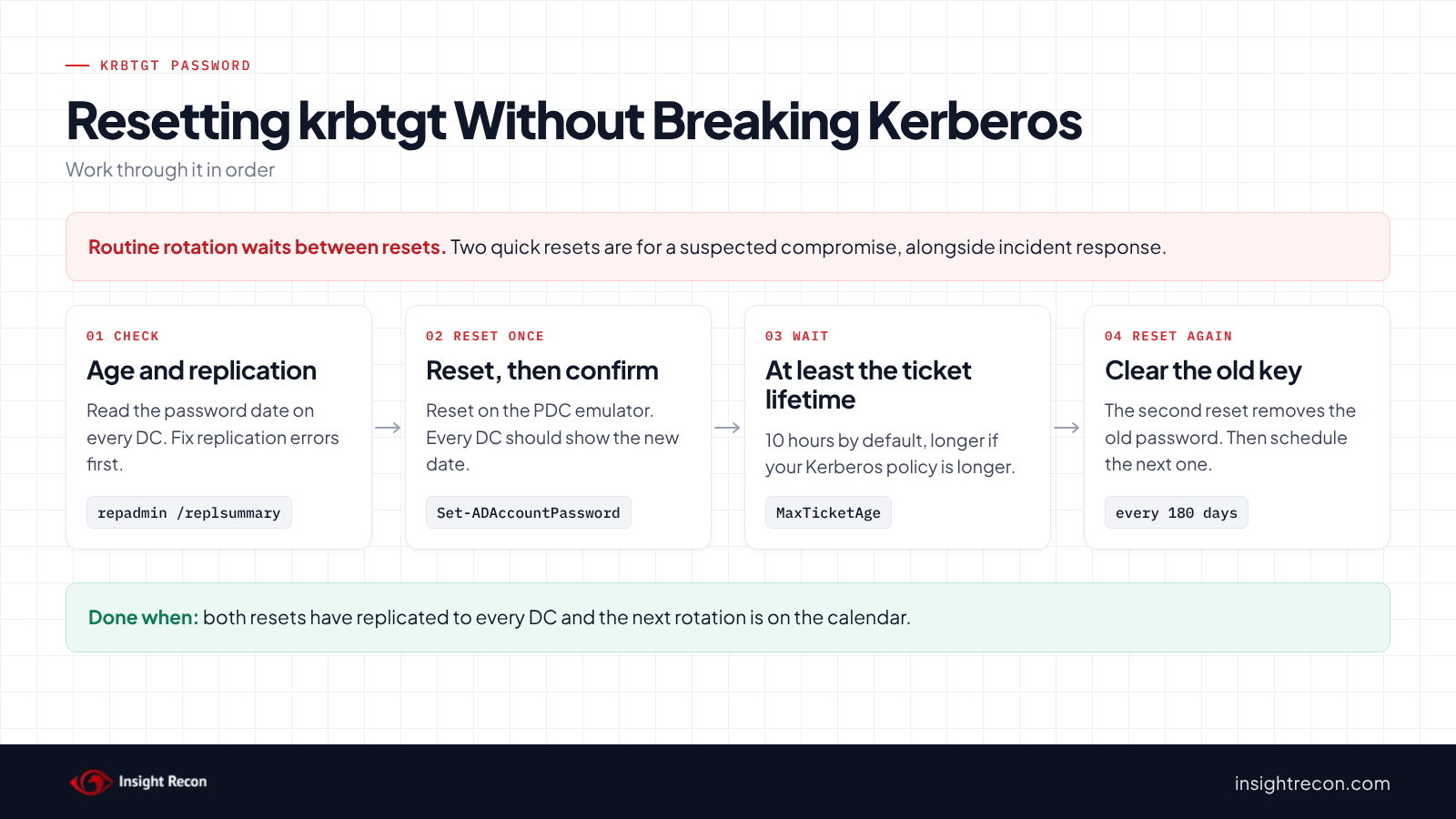
A krbtgt password reset affects Kerberos across the whole domain. Microsoft compares it to replacing a root CA key and says to assume every computer and user may be affected. A healthy, routine rotation with the full wait between resets is designed to avoid that. Two resets in quick succession aren't. Save those for a suspected compromise.
What Microsoft says can happen
- Once the old key is gone, DCs reject TGTs issued before the change, so clients need to get new ones.
- Sessions already established with service tickets keep working until those tickets need renewing.
- NTLM connections aren't affected.
- Rebooting a machine is the reliable way to recover one that has trouble, because it signs the computer and its users in again.
Get replication healthy first
The second reset is only safe once every DC has the first one. Check replication before you start. Retired DCs that nobody fully removed are a common problem: Microsoft's reset script notes it fails when it can't reach one, and recommends cleaning up their metadata first.
# Run as a Domain Admin on a DC or a management host with the AD DS tools.
repadmin /replsummary
repadmin /showrepl * /errorsonly
What to look for: zero failures in the summary and no errors in the second command. Fix those before resetting.
Decide routine or incident
For routine rotation, wait between resets. If you suspect the domain has been compromised, the STIG notes that two resets in quick succession force clients and services to authenticate again, and Microsoft recommends bringing in professional incident response. A krbtgt reset alone doesn't recover a compromised domain. If you'd like help with either, our remediation team does this work.
Reset the krbtgt password twice
1. Reset once
You can use Active Directory Users and Computers (View, Advanced Features, Users, right-click krbtgt, Reset Password, and leave "User must change password at next logon" unticked) or PowerShell. This is a dry run with -WhatIf. Drop that to apply. It needs Domain Admin and targets the PDC emulator.
# Dry run. Drop -WhatIf to apply. Needs Domain Admin. Targets the PDC emulator.
# Microsoft notes the password you set isn't significant: the system generates a strong one.
Import-Module ActiveDirectory
$pdc = (Get-ADDomain).PDCEmulator
$bytes = New-Object byte[] 48
[System.Security.Cryptography.RandomNumberGenerator]::Create().GetBytes($bytes)
$newPassword = ConvertTo-SecureString ([Convert]::ToBase64String($bytes)) -AsPlainText -Force
Set-ADAccountPassword -Identity krbtgt -Reset -NewPassword $newPassword -Server $pdc -WhatIf
Microsoft also published a script, New-KrbtgtKeys.ps1, built to reset the password while checking replication. The repository is archived and no longer supported. Its maintainers point to maintained versions. If you use one, read it and test it in a lab first.
2. Confirm every DC has it
Run the per-DC script again until every DC shows the new PasswordLastSet. Microsoft also says to check that event 9 from the Kerberos Key Distribution Center source appears in the System log after a reset.
3. Wait
Wait at least the maximum ticket lifetime you found earlier, 10 hours by default, plus enough time for replication. During this window, both the old and new keys are accepted.
4. Reset again
Run the same reset a second time and confirm it on every DC. This pushes the original password out of the history. Any ticket forged with the old key now fails.
5. Rotate the RODC accounts too
Each RODC's krbtgt_ account is separate, and Microsoft's forest recovery steps apply to writable DCs only. Each RODC signs its own TGTs with that key, so rotate each one the same way: twice, with the full wait between. Check that whatever tool you use covers them. Don't delete an RODC's krbtgt account if you may need to recover that RODC.
Keep it from coming back
- Put the krbtgt password reset on a calendar. At least every 180 days for the STIG, every 12 months at the latest per the ASD guide. Record both reset dates each time.
- Rotate after events too. Reset twice after a suspected compromise, after a DC or backup leaves your control, and when an admin with DCSync-level access leaves. After a compromise, do every domain in the forest and consider resetting trust passwords too, as Microsoft's forest recovery guide does.
- Keep Microsoft Entra Kerberos in step. If you use it, rotate its key with
Set-AzureADKerberosServer -RotateServerKeyon the same schedule, as Microsoft recommends. After a compromise, rotate it twice. Microsoft says that's what fully retires the old keys, and you can rotate once in 24 hours unless you add-Force. Our tenant compromise post covers why that key matters. - Re-run the check. It's a quick way to confirm the rotation happened and to catch it when it doesn't.
krbtgt password checklist
- Was the krbtgt password last set within the past 180 days?
- Was the last rotation done twice, with at least the maximum ticket lifetime between resets?
- Do all DCs show the same
PasswordLastSet? - Are the RODC krbtgt accounts on the same schedule?
- Is the next rotation scheduled, with an owner?
- If you use Microsoft Entra Kerberos, is its key rotated on the same schedule?
A "no" on either of the first two means a past exposure of the krbtgt key could still be usable.
Compliance mapping
| Framework | Reference | Why it applies |
|---|---|---|
| MITRE ATT&CK | T1558.001 | Golden Ticket. MITRE's mitigation for an existing forged ticket is resetting krbtgt twice. |
| CIS Controls v8 | Control 5, Control 6 | Account management and access control for a privileged service account. |
| NIST CSF 2.0 | PR.AA-01, PR.AA-03, PR.AA-04 | Credentials are managed and rotated, authentication is protected, and identity assertions (tickets) can be trusted. |
| ANSSI | vuln_krbtgt | ANSSI's Active Directory control point for a krbtgt password that hasn't changed for more than a year. |
| DISA STIG | V-254427 (WN22-DC-000430) | The krbtgt password must be reset at least every 180 days, twice, with time for replication in between. |
krbtgt password FAQ
How often should I reset the krbtgt password?
The DISA STIG says at least every 180 days. The ASD guide says every 12 months, and whenever the domain is or may have been compromised. Microsoft says to change it on a regular schedule, and Microsoft Defender for Identity flags any krbtgt password older than 180 days.
Why reset the krbtgt password twice?
Domain controllers keep the current and previous krbtgt password so tickets don't break during a change. One reset leaves the old one valid. The second reset removes it.
How long should I wait between the two resets?
At least the maximum ticket lifetime, 10 hours by default, plus time for every DC to replicate the first change. Microsoft says to wait longer if you've raised the ticket lifetime.
Will resetting krbtgt cause an outage?
A routine krbtgt password reset with the full wait between resets is designed to avoid one. Microsoft still says to assume every machine could be affected. Check replication first, and reboot any machine that has Kerberos trouble afterwards. Two resets back to back force every client and service to get new tickets. With the full wait between them, they shouldn't.
Does Insight Recon check the krbtgt password?
Yes. Stale krbtgt Account Password is in the free scan. It flags the domain's krbtgt account when the password is more than six months old, and raises the severity the older it gets.
Find the old secrets still trusted in your domain.
The scan runs from a domain-joined Windows machine with a standard domain account. The free plan covers every on-prem AD check.
Not ready to scan?
AD Signal is our monthly look at what's changing in AD security and how real domains score. Read the latest report.
References
- Microsoft Learn: Active Directory default user accounts (KRBTGT account)
- Microsoft Learn: AD Forest Recovery, reset the krbtgt password
- Microsoft Learn: Rotate the Kerberos server key for Microsoft Entra Kerberos
- Microsoft Learn: Defender for Identity, change the krbtgt account password
- Microsoft (archived): New-KrbtgtKeys.ps1
- ASD, CISA, NSA and partners: Detecting and mitigating Active Directory compromises
- DISA STIG for Windows Server 2022: V-254427 / WN22-DC-000430, krbtgt password reset every 180 days
- MITRE ATT&CK: T1558.001 Golden Ticket