Active Directory Security Benchmark: October 2026 Signal
Active Directory Security Benchmark: October 2026
This Active Directory security benchmark comes from 194 anonymized scans that Insight Recon users chose to share. Every environment had at least one High finding and 94.2% had a Critical. This month's spotlight is DnsAdmins.
| Sample | 194 anonymized scans from Insight Recon users who opted in to share them |
|---|---|
| Headline | Every environment had a High finding. 94.2% had at least one Critical |
| Most common | Kerberos armoring is off in 96.9% of environments. 95.3% don't use Protected Users |
| Spotlight | DnsAdmins. Anyone in it is administering your domain controllers |
See how your own domain stacks up against these numbers.
It runs from any Windows machine that can reach your DCs, with a standard domain account. Every core AD check is free for one domain.
The October numbers
Every environment in the sample had at least one High finding and 94.2% had at least one Critical. The average environment had 41.6 findings and 18.7 of those were Quick Wins. That's about 45% of everything we found.
This Active Directory security benchmark only includes environments whose owners chose to share their results, so it doesn't represent every organization.
| October | |
|---|---|
| Scans in the sample | 194 |
| Had a High finding | 100% |
| Had a Critical finding | 94.2% |
| Average findings | 41.6 |
| Estimated median findings | 43 |
| Average Quick Wins | 18.7 |
An average of 41.6 findings sounds like a lot. They don't all carry the same risk. Start with the Critical findings and anything that touches privileged access. Work the Quick Wins alongside them, since they do the most for the least work.
Severity mix
High findings were the biggest bucket at 15.5 per environment. That's more than four times the 3.4 Critical findings. The typical environment had about 3 Criticals. Moderate and Low were close to even at 11.1 and 11.7.
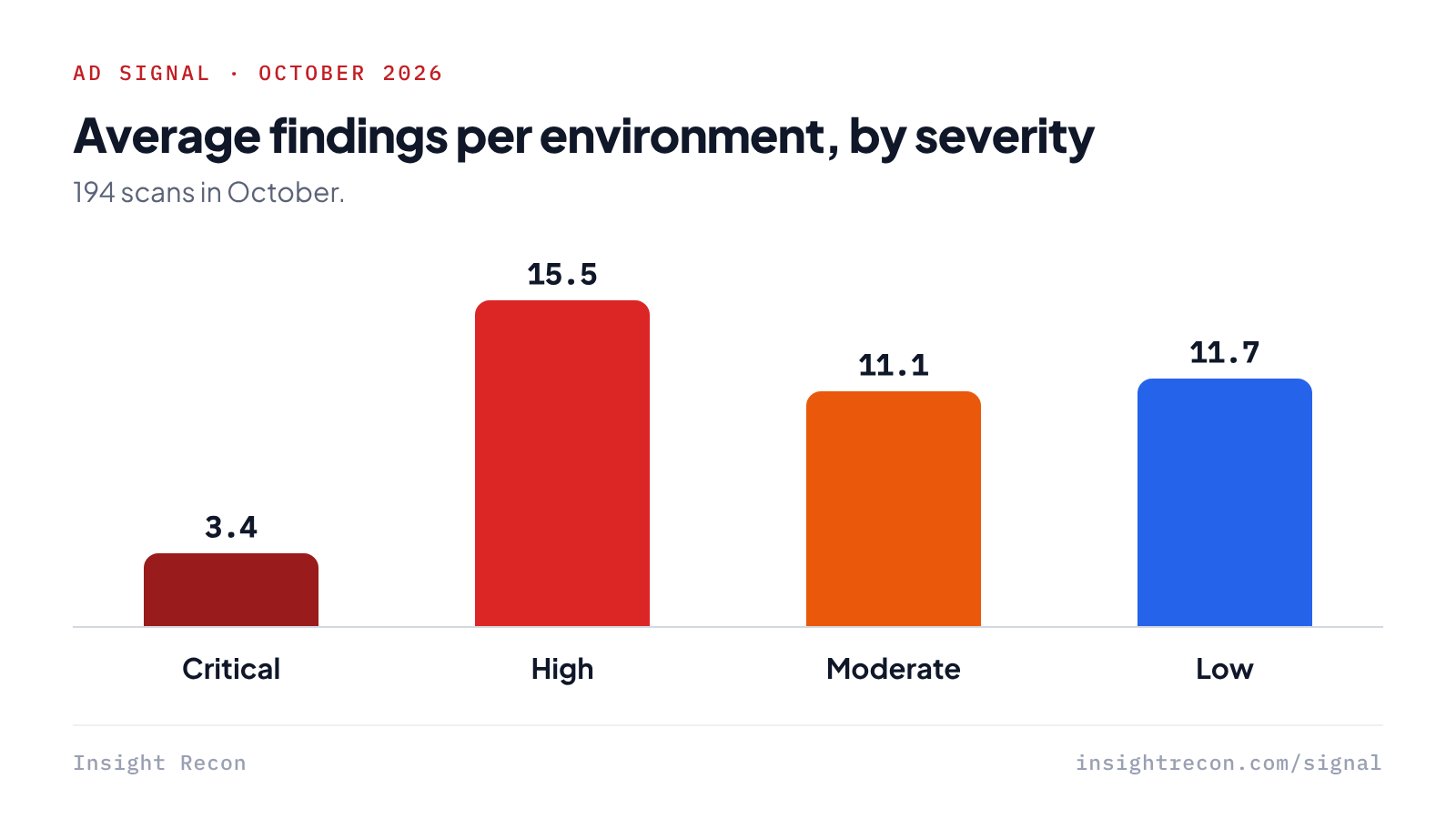
Each average is rounded on its own, so together they add up to 41.7 instead of 41.6.
The most common findings
Kerberos armoring and Protected Users both come built into AD. Most environments in this Active Directory security benchmark still haven't turned them on.
Certificate services shows up twice, through ESC8 and ESC5. If you run AD CS, those two deserve a look. The rest comes down to credentials nobody rotates, like a sync account password or a Domain Admin password that never expires.
Three of these up close
| Finding | Environments | Why it matters |
|---|---|---|
| Protected Users Group Not Utilized | 95.3% | Admin accounts sit outside Protected Users, so they miss its extra protection against credential theft. |
| Non-Expiring Passwords in Domain Admins Group | 90.6% | A Domain Admin password that never expires gives anyone who steals it more time to use it. |
| Vulnerable PKI Object Access Control in ADCS (ESC5) | 90.4% | Risky permissions on AD CS objects can let someone change your PKI setup and potentially escalate privileges. |
Spotlight: DnsAdmins
Each Active Directory security benchmark digs into one finding. This month it's DnsAdmins. DnsAdmins controls the DNS Server service. In most AD environments that service runs on your domain controllers, so anyone in the group is administering a Tier 0 box. The group ships empty. Every account in it is a decision somebody made and may have forgotten.
| Check | Severity | Remediation effort | Operational risk | Control area |
|---|---|---|---|---|
| DNS Admins Group Not Empty | High | Easy | Low | Privileged Groups |
The attacker's view
For years DnsAdmins was a straight line to code execution. A member could set ServerLevelPluginDll to point the DNS service at their own DLL. The next time DNS restarted, that DLL ran as SYSTEM on the domain controller. Microsoft closed that path in October 2021 with the fix for CVE-2021-40469.
DCs that never got that fix are still exposed. Patched or not, a member can change or delete DNS records and point clients wherever they want. Authentication leans on DNS, so treat everyone in the group like a Domain Admin. Our DnsAdmins guide covers the rest.
Find who's in DnsAdmins
This lists everyone in DnsAdmins, including anyone who gets it through a nested group. Any domain user can run it.
Import-Module ActiveDirectory

# Everyone in DnsAdmins, including members of nested groups
Get-ADGroupMember -Identity 'DnsAdmins' -Recursive |
    Select-Object Name, SamAccountName, ObjectClass
An empty result is the healthy state. Treat every account that comes back like a Domain Admin until someone can explain why it's there.
Empty DnsAdmins safely
Most people end up in DnsAdmins to manage a few zones. Give them rights on those zones instead and they can keep doing their job. Then remove everyone who doesn't need control of the DNS service itself. Check nested groups before you pull anyone.
Import-Module ActiveDirectory

# Preview removing one reviewed account. Drop -WhatIf to apply.
Remove-ADGroupMember -Identity 'DnsAdmins' -Members 'olduser' -WhatIf
Swap olduser for the account you reviewed. Once the preview looks right, run it again without -WhatIf.
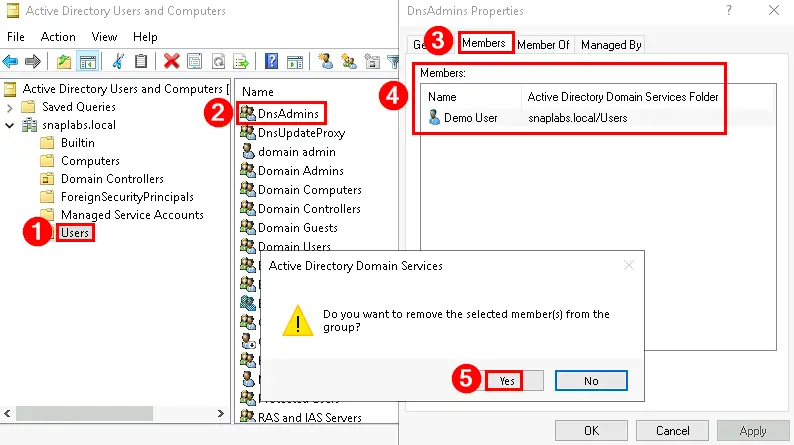
In Active Directory Users and Computers
- Open dsa.msc with an admin account.
- Go to the Users container, right-click DnsAdmins and pick Properties.
- On the Members tab, select the account, click Remove and confirm.
- Click OK, reopen the group and check that only approved members are left.
Keep it empty
Treat adding anyone to DnsAdmins as a privileged change with an approval behind it. With security group auditing on, event 4732 fires on your DCs whenever someone's added. Alert on it.
Compare your domain to this Active Directory security benchmark
Insight Recon runs the same 155+ checks behind this report against your domain. Line your results up with these numbers and you'll know where you stand. Every finding tells you how we'd abuse it on a pentest and how to fix it.
Find out where your domain lands against October's numbers.
It runs from any Windows machine that can reach your DCs, with a standard domain account. Every core AD check is free for one domain.
Active Directory security benchmark FAQ
Where does the AD Signal data come from?
Real Insight Recon scans. Users can opt in to share their results anonymously and we combine what they share. This edition covers 194 of them. None of it comes from surveys or self-reported scores.
How does Insight Recon decide a finding's severity?
Each finding is rated Critical, High, Moderate or Low based on its security impact and how exploitable it is. The severity describes the weakness. It doesn't mean anyone has exploited it.
Is my organization part of this report?
Only if you scanned with Insight Recon and opted in to anonymized benchmark sharing. Results are anonymized before they're combined and no single environment can be picked out of the report.
How often does AD Signal come out?
Every month. A quarterly deep dive and an annual report will join the schedule as they launch. Each edition uses that month's anonymized scans, so you can compare one month's sample with the next.
What is DnsAdmins and why is membership a risk?
DnsAdmins can manage the DNS Server service, which usually runs on your domain controllers. On a DC missing the October 2021 fix for CVE-2021-40469, a member could make the DNS service load their own DLL and run code as SYSTEM. Patched DCs closed that path. The group still controls DNS on your DCs, so treat its members like Domain Admins.
Can I see how my own environment compares?
Yes. An Insight Recon scan runs the same checks behind this report against your domain, so you can see where you land against these numbers.
Can you look into a check or add one?
Yes. Tell us what you want looked at and we'll factor it into next month's Signal.
Get your own numbers instead of the average.
Insight Recon checks DnsAdmins and Protected Users along with the rest of your AD. It runs from any Windows machine that can reach your DCs with a standard account. Free and read-only.
Not ready to scan?
Look through a sample report first. Or read the November edition.
References
- Microsoft Learn: Active Directory security groups, DnsAdmins
- Microsoft Security Response Center: CVE-2021-40469
- ADSecurity: From DNSAdmins to Domain Admin
- Microsoft Learn: Event 4732, a member was added to a security-enabled local group
- Microsoft Learn: Protected Users security group
- SpecterOps: Certified Pre-Owned, the original AD CS research behind ESC5 and ESC8