RODC Password Replication Policy: Keep Admins Off RODCs
The RODC password replication policy decides which passwords a read-only domain controller may keep. Microsoft calls it the RODC's security boundary. A gap in the Denied List, a broad group on the Allowed List or an admin who signed in at the branch can all leave privileged secrets on a server that sits outside your datacenter. This post shows you how to read each policy, fix it and clear what's already cached.
| Priority | Moderate for the two policy checks and High for an admin password already cached on an RODC |
|---|---|
| What decides it | Each RODC's Denied List, its Allowed List and the list of accounts whose passwords it has already cached |
| Who's affected | Any domain with RODCs, especially where the Allowed List was opened up to avoid branch sign-in problems |
| Fix | Restore the default Denied List, allow only a branch group, then reset every privileged account the RODC has cached |
Check it now: are your RODC policies doing their job?
# Runs as any domain user with the ActiveDirectory module.
Import-Module ActiveDirectory -ErrorAction Stop
$domainSid = (Get-ADDomain).DomainSID.Value
# The Denied List entries Microsoft puts on every RODC by default
$requiredDenied = [ordered]@{
    'S-1-5-32-544'   = 'Administrators'
    'S-1-5-32-548'   = 'Account Operators'
    'S-1-5-32-549'   = 'Server Operators'
    'S-1-5-32-551'   = 'Backup Operators'
    "$domainSid-572" = 'Denied RODC Password Replication Group'
}
foreach ($rodc in Get-ADDomainController -Filter 'IsReadOnly -eq $true') {
    $denied  = @(Get-ADDomainControllerPasswordReplicationPolicy -Identity $rodc -Denied).SID.Value
    $allowed = Get-ADDomainControllerPasswordReplicationPolicy -Identity $rodc -Allowed
    # Entries with a RID below 1000, other than Allowed RODC Password Replication Group (571)
    $broad = $allowed | Where-Object {
        $rid = [int]($_.SID.Value -split '-')[-1]
        $rid -lt 1000 -and $rid -ne 571
    }
    [pscustomobject]@{
        RODC              = $rodc.HostName
        MissingFromDenied = ($requiredDenied.Keys | Where-Object { $_ -notin $denied } | ForEach-Object { $requiredDenied[$_] }) -join ', '
        BroadAllowed      = ($broad.Name -join ', ')
        AllowedList       = ($allowed.Name -join ', ')
    }
}
Runs as any domain user with the ActiveDirectory module. It lists every RODC with any default Denied List entry it's missing and any entry with a RID below 1000 on its Allowed List. Empty MissingFromDenied and BroadAllowed columns mean the policy matches the defaults.
You checked one policy. The free scan checks the rest of your on-prem AD in a few minutes.
Nothing gets installed on your domain controllers. Only HTTPS leaves your network.
What the RODC password replication policy is
A read-only domain controller (RODC) holds a copy of AD without most passwords. Instead, when a user signs in, the RODC forwards the request to a writable DC. Then, if policy allows, it asks for that user's password to keep locally.
Microsoft's Password Replication Policy reference says the policy "acts as an access control list" and calls it "the security boundary for the RODC." In addition, each RODC has its own copy, in two lists on its computer account, plus two related lists that show what the policy has done:
- Denied List (
msDS-NeverRevealGroup): never cache these. By default it holds Administrators, Account Operators, Server Operators, Backup Operators and the Denied RODC Password Replication Group. - Allowed List (
msDS-RevealOnDemandGroup): may cache these. By default it holds only the Allowed RODC Password Replication Group, which Microsoft says "has no members." - Revealed List (
msDS-RevealedList): passwords the RODC has cached. - Authenticated to List (
msDS-AuthenticatedToAccountlist): accounts that have signed in, or tried to, through the RODC.
Microsoft notes that "the Denied List takes precedence over the Allowed List." The Denied RODC Password Replication Group itself contains Domain Admins, Enterprise Admins, Schema Admins, Cert Publishers, Group Policy Creator Owners, the domain krbtgt account and the domain controller groups.
Why RODC password replication policy gaps are dangerous
RODCs often sit where you have less control
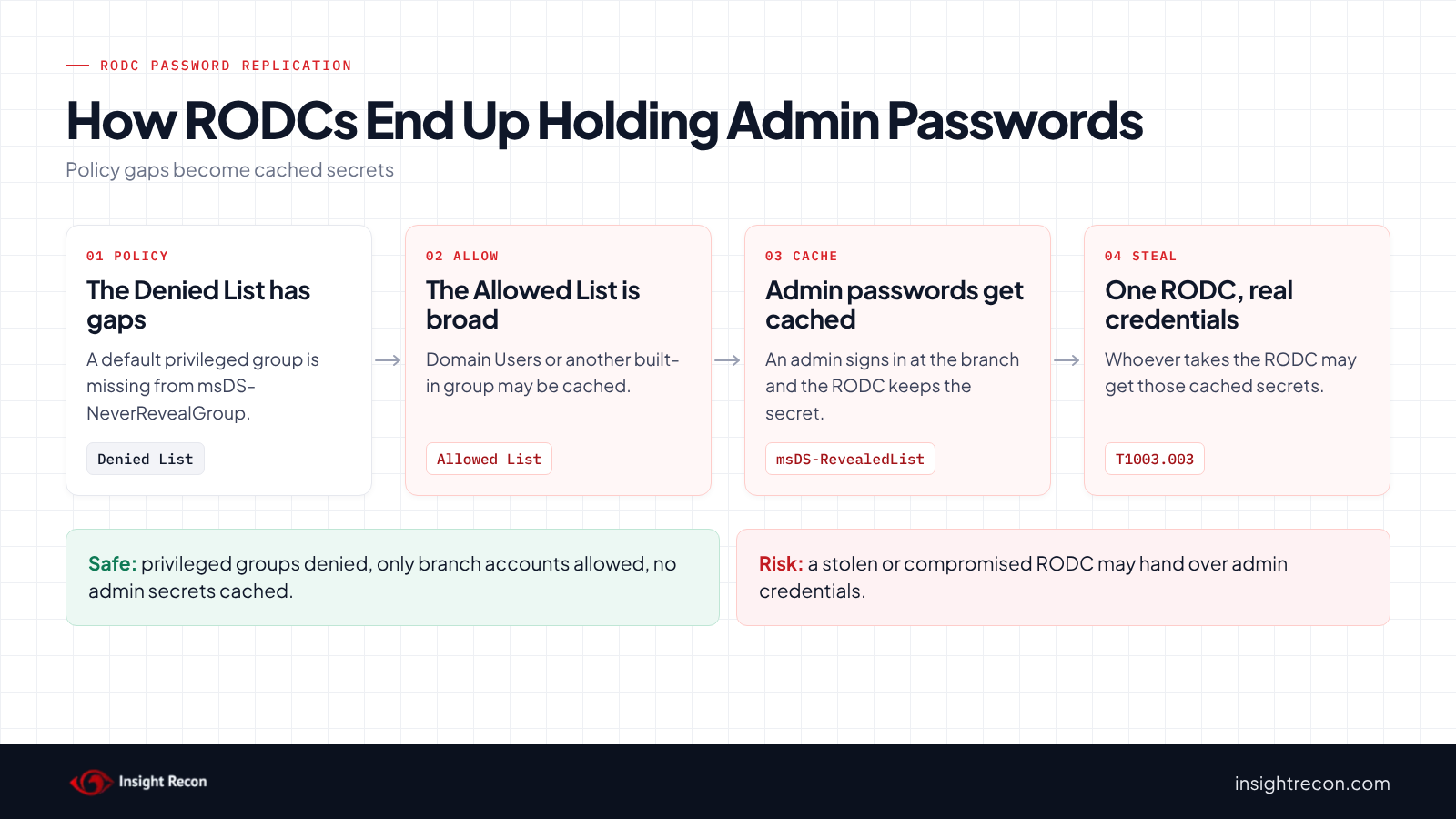
Typically, RODCs exist for branch offices and other places where physical security is weaker. If one is stolen or compromised, whoever controls it may potentially recover every password it has cached. MITRE ATT&CK tracks reading credentials from the AD database as T1003.003, OS Credential Dumping: NTDS. It tracks using them as T1078.002, Valid Accounts: Domain Accounts.
Each gap widens what the RODC may hold
For example, a privileged group missing from the Denied List loses its guarantee. Meanwhile, a default group such as Domain Users on the Allowed List means almost anyone who signs in there gets cached. Together, they may let an admin's password land on the RODC the next time that admin signs in at the branch.
Cached passwords stay until they change
Fixing the policy stops new caching but doesn't remove what's there. Microsoft says "if the RODC is stolen, you must reset the passwords for all users and computers whose passwords are cached on it." For that reason, the third check, which reads what's already cached, matters most.
Find RODC password replication policy gaps
Read the quick check results
The quick check above returns one row per RODC.
What to look for: any name in MissingFromDenied or any group in BroadAllowed, such as Domain Users or Domain Computers. Also review AllowedList for custom groups with more members than the branch needs.
List what each RODC has already cached
This lists every account whose password each RODC holds, with privileged accounts first.
# Runs as any domain user with the ActiveDirectory module.
Import-Module ActiveDirectory -ErrorAction Stop
foreach ($rodc in Get-ADDomainController -Filter 'IsReadOnly -eq $true') {
    Get-ADDomainControllerPasswordReplicationPolicyUsage -Identity $rodc -RevealedAccounts |
        ForEach-Object {
            $a = Get-ADObject -Identity $_.DistinguishedName -Properties objectClass, objectSid, tokenGroups
            # Privileged: the built-in Administrator (RID 500), or a member, directly or nested, of
            # Domain Admins (512), Schema Admins (518), Enterprise Admins (519) or Administrators (544)
            $groupRids = @($a.tokenGroups | ForEach-Object { [int64]($_.Value -split '-')[-1] })
            [pscustomobject]@{
                RODC       = $rodc.HostName
                Account    = $_.SamAccountName
                Class      = $a.objectClass
                Privileged = ([int64]($a.objectSid.Value -split '-')[-1] -eq 500) -or
                    (@($groupRids | Where-Object { $_ -in 512, 518, 519, 544 }).Count -gt 0)
            }
        } |
        Sort-Object Privileged -Descending
}
What to look for: any row with Privileged set to True. That means the built-in Administrator or a member of Domain Admins, Enterprise Admins, Schema Admins or Administrators, the same rule the scan uses. Every RODC also lists its own computer account and its krbtgt_NNNNN account, which is by design. Microsoft's cmdlet reference describes the same list. If you prefer, repadmin /prp view RODC01 reveal shows it too, as Microsoft's repadmin /prp page explains.
Check the RODC password replication policy with Insight Recon
The free scan includes three checks that read each RODC's Denied List, Allowed List and cached accounts:
- Privileged Groups Missing From RODC Denied List, rated Moderate, flags an RODC whose Denied List is missing Administrators, Server Operators, Account Operators, Backup Operators or the Denied RODC Password Replication Group. It names the ones that are missing. It matches them by SID, so renamed and non-English groups still count.
- RODC Privileged Groups Can Be Exposed, rated Moderate, flags an RODC whose Allowed List includes any group or account with a RID below 1000, other than the Allowed RODC Password Replication Group. The RID is the last number in a SID, so this covers Domain Users, Domain Computers, Domain Admins, Administrators, Authenticated Users and Everyone. The finding names each entry it flags.
- RODC Privileged Users Exposed, rated High, flags an RODC that holds the current password of a privileged account. That means the built-in Administrator or a member, directly or through nested groups, of Domain Admins, Enterprise Admins, Schema Admins or Administrators. Computer and service accounts in those groups count too. It lists those accounts under each RODC. Scans from older scanners, which can only see every password ever sent to the RODC, rate it Moderate.
Each one comes with the Hacker Insight, remediation steps and compliance mappings.
Know what these checks don't decide
Some things are still yours to check. First, the Denied List check relies on the Denied RODC Password Replication Group for Domain Admins and other privileged groups. Confirm that group still has its default members. Second, a custom Allowed List group isn't flagged, even with thousands of members. The members of the Allowed RODC Password Replication Group aren't checked either. Finally, if the scan can't look up an account an RODC has cached, the revealed check shows Not assessed instead of passing, unless it has already found a privileged account.
Related checks beyond RODC policy
- Stale krbtgt Account Password, which also covers each RODC's own krbtgt account. Our krbtgt password post covers it.
- Protected Users Group Not Utilized, another way to limit where admin credentials can end up. Our Protected Users post covers it.
You can see what the findings look like in our sample report. The full list is in our check library.
See which RODCs have policy gaps or admin passwords cached, plus the rest of your Tier 0 risks.
It runs from any Windows machine that can reach your DCs, with a standard domain account. Every core AD check is free for one domain.
Before you change the RODC password replication policy
Decide which accounts each branch really needs cached. Then build a group for them before you remove broad groups.
Pick a caching model
To start, Microsoft describes three models. "No accounts cached" is the most secure but needs the WAN for every sign-in. "Most accounts cached" exposes the most passwords. "Few accounts cached" caches only branch users and computers, which balances the two.
Build a branch group first
Microsoft recommends adding accounts to a group on the Allowed List instead of listing users directly. So before you remove Domain Users, create a group for each branch's users and computers. Then add it to that RODC's Allowed List. Otherwise, branch users may lose sign-in when the WAN is down.
Plan the password resets
Resetting a privileged password affects anything that uses it, including services and scheduled tasks. So line up the account owners before the reset.
Fix the RODC password replication policy safely
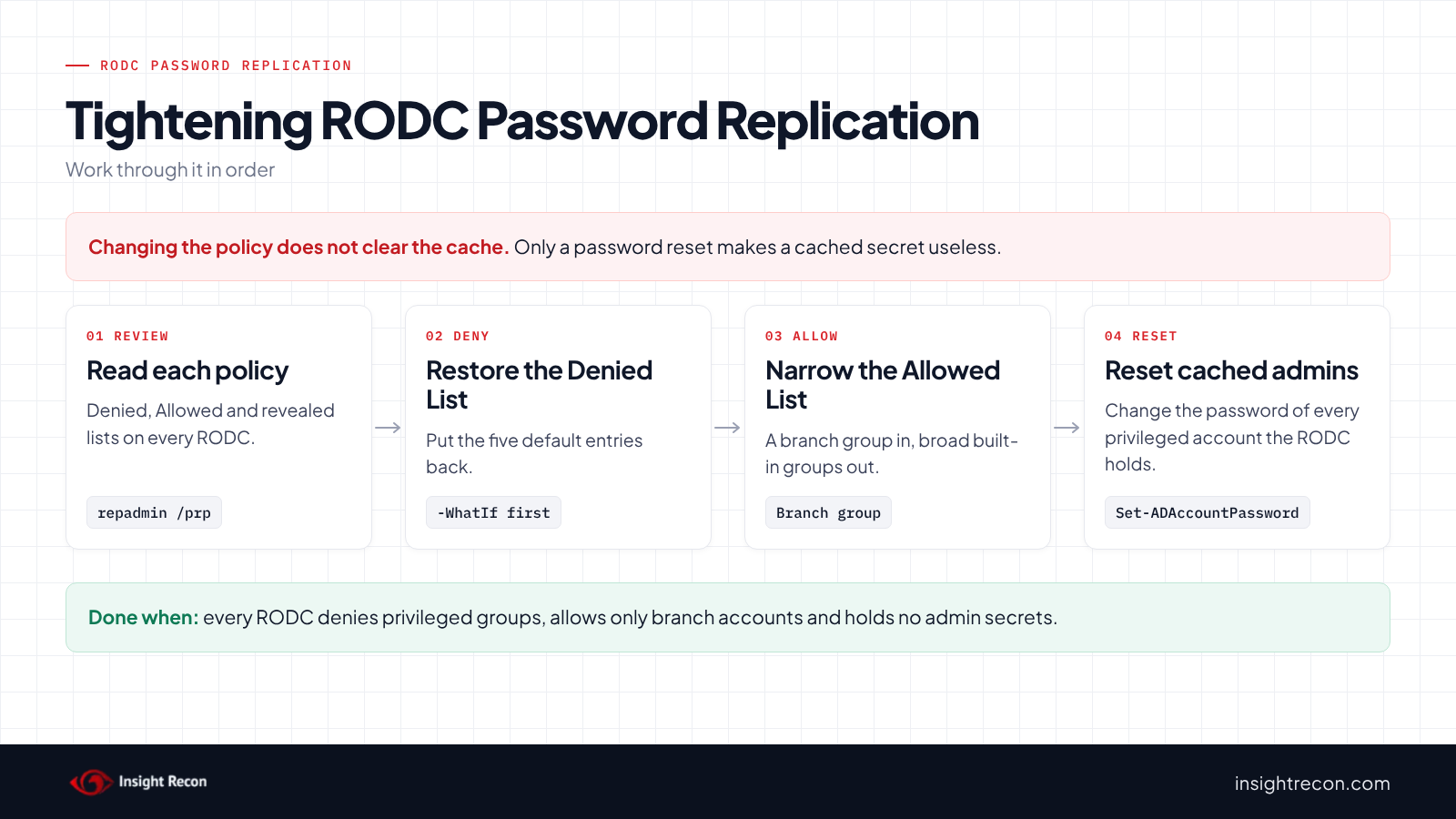
Each change script below is a dry run with -WhatIf. Drop that to apply. Change RODC01, the group names and the account to your own.
1. Restore the Denied List
This adds any of the five default entries that one RODC's Denied List is missing. It prints the current list first. Microsoft's cmdlet reference covers the options.
# Dry run. Drop -WhatIf to apply.
# Needs Domain Admins. Change the RODC name to yours.
Import-Module ActiveDirectory -ErrorAction Stop
$rodc = 'RODC01'
$domainSid = (Get-ADDomain).DomainSID.Value
# Note the current Denied List so you can put it back
$current = @(Get-ADDomainControllerPasswordReplicationPolicy -Identity $rodc -Denied -ErrorAction Stop)
$current | Select-Object Name, SID
$groups = 'S-1-5-32-544', 'S-1-5-32-548', 'S-1-5-32-549', 'S-1-5-32-551', "$domainSid-572"
$missing = @($groups | Where-Object { $_ -notin $current.SID.Value })
# Lists only the default entries this RODC is missing
$missing | ForEach-Object { Get-ADGroup -Identity $_ | Select-Object Name, SID }
if ($missing.Count -gt 0) {
    Add-ADDomainControllerPasswordReplicationPolicy -Identity $rodc -DeniedList $missing -ErrorAction Stop -WhatIf
}
What to look for: the script lists only the default entries this RODC is missing. The dry run adds just those. After you apply it, re-run the quick check.
2. Narrow the Allowed List
This adds the branch group, then removes the broad group, on one RODC. It prints the current list first.
# Dry run. Drop -WhatIf to apply.
# Needs Domain Admins. Add the branch group first, so branch users keep cached sign-ins.
Import-Module ActiveDirectory -ErrorAction Stop
$rodc   = 'RODC01'
$broad  = "$((Get-ADDomain).DomainSID.Value)-513"   # Domain Users, by SID
$branch = 'Branch01 RODC Cached Accounts'
# Note the current Allowed List so you can put it back
Get-ADDomainControllerPasswordReplicationPolicy -Identity $rodc -Allowed -ErrorAction Stop | Select-Object Name, SID
Add-ADDomainControllerPasswordReplicationPolicy -Identity $rodc -AllowedList $branch -ErrorAction Stop -WhatIf
Remove-ADDomainControllerPasswordReplicationPolicy -Identity $rodc -AllowedList $broad -ErrorAction Stop -WhatIf
What to look for: the dry run shows one add and one remove. Afterward, have a branch user sign in to confirm caching still works for them.
3. Reset privileged accounts already cached
Finally, for each privileged account the revealed script found, reset its password. This resets one account and shows its last password change first.
# Dry run. Drop -WhatIf to apply.
# Needs rights to reset this account's password. Tell the account owner first.
Import-Module ActiveDirectory -ErrorAction Stop
$account = 'adm-jsmith'
$user = Get-ADUser -Identity $account -Properties PasswordLastSet -ErrorAction Stop
$user | Select-Object SamAccountName, PasswordLastSet
$new = Read-Host -Prompt "New password for $account" -AsSecureString
Set-ADAccountPassword -Identity $user -Reset -NewPassword $new -ErrorAction Stop -WhatIf
What to look for: the dry run names the account. For service accounts, update every place the password is used at the same time. If you suspect the RODC itself was compromised, follow Microsoft's guidance and reset every account cached on it, including the ones that aren't privileged.
Keep the RODC password replication policy tight
- Re-run the revealed script on a schedule. Any new privileged account on the list means an admin signed in through that RODC.
- Keep admins off RODCs. Admin accounts should sign in through writable DCs, ideally from privileged access workstations.
- Watch the Denied RODC Password Replication Group. Removing a group from it removes that group's protection on every RODC.
- Re-run the scan. All three checks flag the RODC again if a gap comes back.
RODC password replication policy checklist
- Does every RODC's Denied List hold all five default entries?
- Does the Denied RODC Password Replication Group still have its default members?
- Is every Allowed List limited to branch groups?
- Did you reset every privileged account found cached on an RODC?
- Do you review each RODC's revealed list on a schedule?
- Do admins avoid signing in through RODCs?
A "no" on the fourth question means a stolen RODC may still hand over a working admin password.
Compliance mapping
| Framework | Reference | Why it applies |
|---|---|---|
| MITRE ATT&CK | T1078.002, T1003.003 | Valid Accounts: Domain Accounts and OS Credential Dumping: NTDS. Cached secrets on an RODC may be dumped and reused (all three checks). |
| CIS Controls v8 | Control 5, Control 6 | Account management and access control management (all three checks). |
| NIST CSF 2.0 | PR.AA-05 | Access permissions follow least privilege (all three checks). |
| ANSSI | vuln_rodc_never_reveal, vuln_rodc_reveal, vuln_rodc_priv_revealed | ANSSI's control points for the Denied List, the Allowed List and cached privileged accounts, one per check. |
| DISA STIG | V-243489 | RODC architecture and configuration must meet directory services requirements (all three checks). |
RODC password replication policy FAQ
What is the RODC password replication policy?
The per-RODC Allowed and Denied Lists that decide which passwords that RODC may cache.
What wins if an account is on both lists?
The Denied List wins. Microsoft says it takes precedence over the Allowed List.
Does fixing the policy remove cached passwords?
No. Cached passwords stay on the RODC. Resetting the password is what makes the cached copy useless.
Can I just allow Domain Users to keep branches working?
It works, but it may cache almost everyone's password. Microsoft recommends a branch-specific group instead.
Does Insight Recon check the RODC password replication policy?
Yes. The free scan includes Privileged Groups Missing From RODC Denied List, RODC Privileged Groups Can Be Exposed and RODC Privileged Users Exposed.
See whether any RODC is holding admin passwords.
It runs from any Windows machine that can reach your DCs, with a standard domain account. Every core AD check is free for one domain.
Not ready to scan?
AD Signal is our monthly look at what's changing in AD security and how real domains score. Read the latest report.
References
- Microsoft Learn: Password Replication Policy
- repadmin /prp command reference
- Microsoft Learn: cmdlet to list cached and authenticated RODC accounts
- Microsoft Learn: cmdlet to add accounts to an RODC policy list
- AskDS: Understanding Read Only Domain Controller authentication
- MITRE ATT&CK: T1003.003 NTDS
- MITRE ATT&CK: T1078.002 Domain Accounts