PowerShell Logging: Turn On Script Block and Module Logging
PowerShell logging decides whether you can see what ran on a server after the fact. Script block and module logging are off by default. Insight Recon flags any domain where Group Policy doesn't turn both on. This post shows you how to find which GPOs set them, check what a computer logs and roll out logging without flooding your event logs or exposing secrets.
| Priority | Low, since it doesn't open a door but decides how much you can see when someone uses PowerShell against you |
|---|---|
| What decides it | Whether an applied GPO turns on script block logging and whether one turns on module logging with at least one module listed |
| Who's affected | Domains with no PowerShell logging GPO, or one that turns module logging on without naming any modules |
| Fix | Turn on both in a GPO linked to every server and workstation, then forward the events and protect what they capture |
Check it now: which GPOs turn on PowerShell logging?
# Needs the GroupPolicy module (RSAT) and read access to GPOs, which domain users have by default.
Import-Module GroupPolicy -ErrorAction Stop
$base = 'HKLM\Software\Policies\Microsoft\Windows\PowerShell'
function Get-Value($gpo, $key, $name) {
    (Get-GPRegistryValue -Guid $gpo.Id -Key "$base\$key" -ValueName $name -ErrorAction SilentlyContinue).Value
}
foreach ($gpo in Get-GPO -All) {
    $script = Get-Value $gpo 'ScriptBlockLogging' 'EnableScriptBlockLogging'
    $module = Get-Value $gpo 'ModuleLogging' 'EnableModuleLogging'
    $transcript = Get-Value $gpo 'Transcription' 'EnableTranscripting'
    if ($null -eq $script -and $null -eq $module -and $null -eq $transcript) { continue }
    $names = (Get-GPRegistryValue -Guid $gpo.Id -Key "$base\ModuleLogging\ModuleNames" -ErrorAction SilentlyContinue).ValueName
    $links = ([xml](Get-GPOReport -Guid $gpo.Id -ReportType Xml)).GPO.LinksTo | Where-Object { $_.Enabled -eq 'true' }
    [pscustomobject]@{
        GPO           = $gpo.DisplayName
        Status        = $gpo.GpoStatus
        LinkedTo      = ($links.SOMPath -join '; ')
        ScriptBlock   = $script -eq 1
        ModuleLogging = $module -eq 1
        ModuleNames   = ($names -join ', ')
        Transcription = $transcript -eq 1
        OutputDir     = Get-Value $gpo 'Transcription' 'OutputDirectory'
    }
}
Needs the GroupPolicy module (RSAT). It lists every GPO that sets any PowerShell logging option, where it's linked and which options are on. No output means no GPO sets PowerShell logging at all.
You checked one GPO setting. The free scan checks the rest of your on-prem AD in a few minutes.
Nothing gets installed on your domain controllers. Only HTTPS leaves your network.
What PowerShell logging is
Windows PowerShell has three logging policies under Administrative Templates, Windows Components, Windows PowerShell. Microsoft's Group Policy settings reference describes each one:
- Script block logging logs PowerShell script input to the Microsoft-Windows-PowerShell/Operational log. Microsoft's logging reference lists the event as 4104.
- Module logging records pipeline execution events for the modules you list. With no modules listed, it logs nothing.
- Transcription writes a text record of each session's input and output to a folder you choose.
The joint NSA, CISA and NCSC guidance Keeping PowerShell notes these logging features "are disabled by default." Without a policy, PowerShell keeps only a partial record.
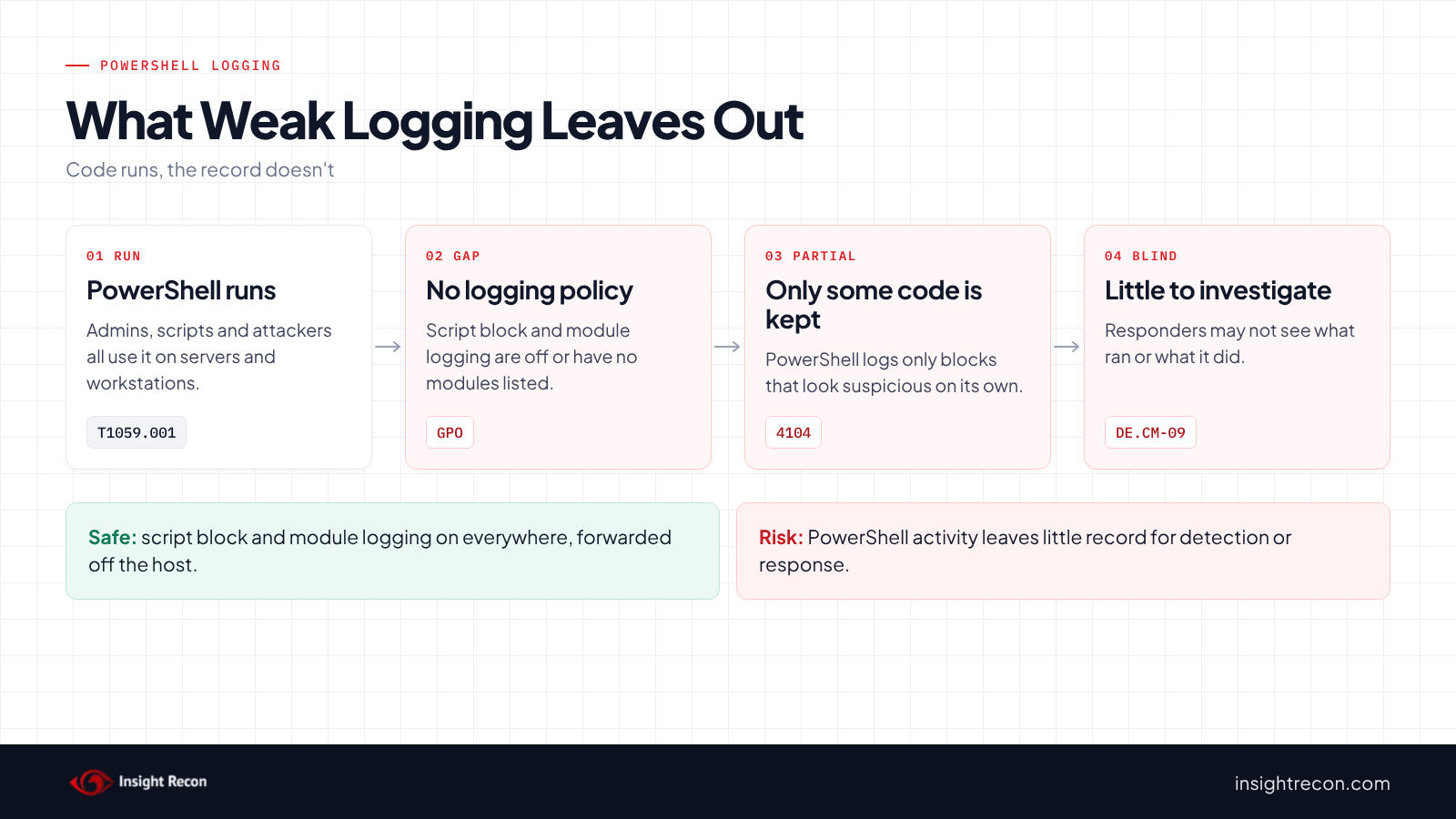
Why weak PowerShell logging is risky
PowerShell is a common tool for attackers
Attackers use PowerShell because it's already on every Windows machine. MITRE ATT&CK tracks this as T1059.001, Command and Scripting Interpreter: PowerShell. Without logging, you may only see that powershell.exe ran. What it did stays unknown.
The automatic record is only a last resort
PowerShell 5 and later logs some script blocks on its own when they contain content often used by malicious scripts. However, the PowerShell team's blue team guidance calls this a "record of last resort" and not a replacement for full logging.
Logging also catches code built at run time
Attackers often hide commands by encoding them and decoding them in memory. Script block logging records the generated code too. As a result, the decoded commands show up in the log.
Find PowerShell logging gaps
Read the PowerShell logging quick check
The quick check above returns one row per GPO that sets any PowerShell logging option.
What to look for: no rows at all, or no row with both ScriptBlock and ModuleLogging set to True. Also look for ModuleLogging on with an empty ModuleNames, since that logs nothing. Finally, check LinkedTo, because a GPO linked to one OU leaves the rest of the domain unlogged.
Check what one computer logs
Run this on a server or workstation. It shows the effective policy and counts recent script block events.
# Run on a server or workstation as an administrator. Shows the effective policy and recent logging events.
$base = 'HKLM:\Software\Policies\Microsoft\Windows\PowerShell'
$names = Get-Item -Path "$base\ModuleLogging\ModuleNames" -ErrorAction SilentlyContinue
[pscustomobject]@{
    ScriptBlock   = (Get-ItemProperty "$base\ScriptBlockLogging" -ErrorAction SilentlyContinue).EnableScriptBlockLogging -eq 1
    ModuleLogging = (Get-ItemProperty "$base\ModuleLogging" -ErrorAction SilentlyContinue).EnableModuleLogging -eq 1
    ModuleNames   = if ($names) { $names.Property -join ', ' } else { '' }
    Transcription = (Get-ItemProperty "$base\Transcription" -ErrorAction SilentlyContinue).EnableTranscripting -eq 1
    # PowerShell 7 reads its own policy key
    PowerShell7   = (Get-ItemProperty 'HKLM:\Software\Policies\Microsoft\PowerShellCore\ScriptBlockLogging' -ErrorAction SilentlyContinue).EnableScriptBlockLogging -eq 1
}
# Script block logging writes event 4104 to this log. Count the last day's events.
$count = @(Get-WinEvent -FilterHashtable @{ LogName = 'Microsoft-Windows-PowerShell/Operational'; Id = 4104; StartTime = (Get-Date).AddDays(-1) } -ErrorAction SilentlyContinue).Count
"Script block events (4104) in the last 24 hours: $count"
What to look for: False on either setting, or zero events on a machine where PowerShell runs daily. Also check PowerShell7. PowerShell 7 reads its own policy key, as Microsoft's PowerShell 7 logging reference shows. Windows PowerShell policies only cover it when its own policy says to use them.
Check PowerShell logging with Insight Recon
The free scan includes Weak PowerShell Logging, a Low check and a quick win. It reads script block and module logging from the computer settings in your GPOs. It follows Group Policy precedence, so a higher-priority GPO that turns logging off wins over one that turns it on. It passes only when both end up on, with at least one module listed for module logging. It also comes with the Hacker Insight, remediation steps and compliance mappings.
Know what the PowerShell logging check doesn't decide
Some things are still yours to check. First, it reads GPOs, not computers, so confirm the logging GPO is linked where your servers and workstations live. Second, it doesn't read transcription or PowerShell 7's policy key. Finally, it can't tell whether the events reach a central log store.
Related checks beyond PowerShell logging
- Insufficient Domain Controller Logging, the audit policy on your DCs. Our DC audit policy post covers it.
- Password in GPO, another reason to treat logs and scripts as sensitive. Our GPP passwords post covers it.
You can see what the findings look like in our sample report. The full list is in our check library.
See whether your GPOs turn on PowerShell logging, plus the rest of your detection settings.
It runs from any Windows machine that can reach your DCs, with a standard domain account. Every core AD check is free for one domain.
Before you turn on PowerShell logging
Plan where the events go and who can read them. Logs may capture secrets that scripts handle.
Expect more events
Script block and module logging add events on every machine that runs PowerShell. In contrast, script block invocation logging is optional. Microsoft warns it generates a high volume of events. Leave it off unless you need it.
Protect what the logs capture
Logging records any passwords or keys a script carries. Microsoft recommends Protected Event Logging when script block logging is used for anything beyond diagnostics. It encrypts the logged content with a certificate whose private key stays off the logging machines.
Lock down the transcript share
If you use transcription with a central share, restrict it so users can write their own transcripts but can't read anyone else's. The PowerShell team's blue team post includes an example set of share permissions.
Turn on PowerShell logging safely
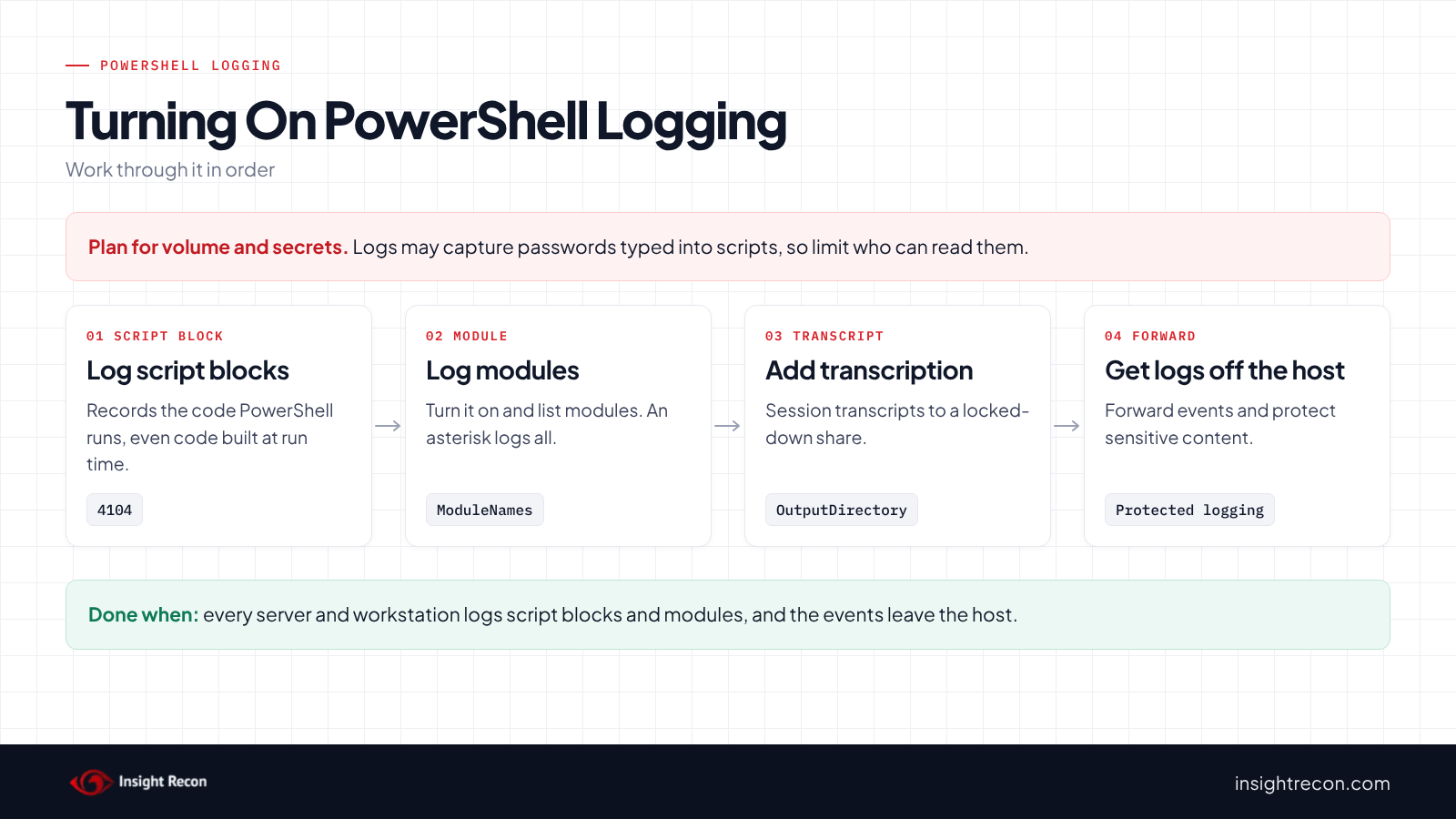
Each change script below is a dry run with -WhatIf. Drop that to apply. Change PowerShell Logging and the share path to your own.
1. Turn on script block and module logging
This sets both options in one GPO and lists every module for module logging. It prints the current values first.
# Dry run. Drop -WhatIf to apply.
# Needs edit rights on the GPO (Domain Admins or delegated GPO editors).
Import-Module GroupPolicy -ErrorAction Stop
function Enable-PowerShellLogging {
    [CmdletBinding(SupportsShouldProcess)]
    param([string]$GpoName = 'PowerShell Logging')
    $gpo = Get-GPO -Name $GpoName -ErrorAction Stop
    $base = 'HKLM\Software\Policies\Microsoft\Windows\PowerShell'
    # Note the current values so you can put them back
    'ScriptBlockLogging', 'ModuleLogging', 'ModuleLogging\ModuleNames' | ForEach-Object {
        Get-GPRegistryValue -Guid $gpo.Id -Key "$base\$_" -ErrorAction SilentlyContinue | Select-Object KeyPath, ValueName, Value
    }
    if ($PSCmdlet.ShouldProcess($GpoName, 'Turn on script block logging and module logging for all modules')) {
        Set-GPRegistryValue -Guid $gpo.Id -Key "$base\ScriptBlockLogging" -ValueName 'EnableScriptBlockLogging' -Type DWord -Value 1 -ErrorAction Stop | Out-Null
        Set-GPRegistryValue -Guid $gpo.Id -Key "$base\ModuleLogging" -ValueName 'EnableModuleLogging' -Type DWord -Value 1 -ErrorAction Stop | Out-Null
        # A module name of * logs every module
        Set-GPRegistryValue -Guid $gpo.Id -Key "$base\ModuleLogging\ModuleNames" -ValueName '*' -Type String -Value '*' -ErrorAction Stop | Out-Null
    }
}
Enable-PowerShellLogging -WhatIf
What to look for: the dry run names the GPO. Then link it to the OUs that hold your servers and workstations. Confirm with the host script after the next policy refresh.
2. Add transcription to a locked-down share
Transcription is optional, but it gives the fullest record. Create the share and set its permissions first. Then point the GPO at it.
# Dry run. Drop -WhatIf to apply.
# Needs edit rights on the GPO. Create and lock down the share first (see below).
Import-Module GroupPolicy -ErrorAction Stop
function Enable-PowerShellTranscription {
    [CmdletBinding(SupportsShouldProcess)]
    param(
        [string]$GpoName = 'PowerShell Logging',
        [string]$Share = '\\fs01.contoso.com\PSTranscripts$'
    )
    $gpo = Get-GPO -Name $GpoName -ErrorAction Stop
    $key = 'HKLM\Software\Policies\Microsoft\Windows\PowerShell\Transcription'
    # Note the current values so you can put them back
    Get-GPRegistryValue -Guid $gpo.Id -Key $key -ErrorAction SilentlyContinue | Select-Object ValueName, Value
    if ($PSCmdlet.ShouldProcess($GpoName, "Turn on transcription to $Share")) {
        Set-GPRegistryValue -Guid $gpo.Id -Key $key -ValueName 'EnableTranscripting' -Type DWord -Value 1 -ErrorAction Stop | Out-Null
        Set-GPRegistryValue -Guid $gpo.Id -Key $key -ValueName 'OutputDirectory' -Type String -Value $Share -ErrorAction Stop | Out-Null
    }
}
Enable-PowerShellTranscription -WhatIf
What to look for: the dry run shows the share path. Afterward, check that a test session writes a transcript and that a normal user can't read other people's files.
3. Cover PowerShell 7
If PowerShell 7 is installed, sessions in it may go unlogged. Add its administrative templates and turn on the same logging under PowerShell Core. Each of those settings also has a Use Windows PowerShell Policy setting option that applies your Windows PowerShell values instead.
4. Forward the events off the host
Send the PowerShell Operational log to your central log store or SIEM. The blue team post notes attackers may flood local logs to push out earlier events. For that reason, the sooner events leave the host the better.
Keep PowerShell logging on
- Alert on missing events. A server that stops sending 4104 events may have lost the policy or had logging turned off.
- Watch the GPO. Changes to the logging GPO or its links should go through review.
- Remove PowerShell 2.0. The joint guidance recommends uninstalling it, since it predates these logging features.
- Re-run the scan. It flags the domain again if a GPO change turns either setting off.
PowerShell logging checklist
- Does an applied GPO turn on script block logging?
- Does it turn on module logging with modules listed?
- Is the GPO linked to every server and workstation OU?
- Is PowerShell 7 covered where it's installed?
- Do the events reach a central log store?
- Is Protected Event Logging on, or are log readers limited?
A "no" on the first question means you may have little record of the scripts that ran during an incident.
Compliance mapping
| Framework | Reference | Why it applies |
|---|---|---|
| MITRE ATT&CK | T1059.001 | Command and Scripting Interpreter: PowerShell. Logging is how you see this technique. |
| CIS Controls v8 | Control 8 | Audit log management. PowerShell logs are part of a usable audit trail. |
| NIST CSF 2.0 | DE.CM-09, PR.PS-04 | Computing activity is monitored and log records are generated for monitoring. |
| DISA STIG | V-254377 | Windows Server 2022 rule for script block logging. |
PowerShell logging FAQ
Is PowerShell logging on by default?
No. Script block, module and transcription logging are off by default. PowerShell only logs some suspicious-looking script blocks on its own.
What event ID does script block logging use?
Event 4104 in the Microsoft-Windows-PowerShell/Operational log.
Why does module logging need module names?
It only logs the modules you list. Turning it on with an empty list logs nothing. For that reason, the check treats it as off.
Will PowerShell logging capture passwords?
It can, if a script contains them. Use Protected Event Logging and limit who can read the logs.
Does Insight Recon check PowerShell logging?
Yes. The free scan includes Weak PowerShell Logging, which reads your GPOs for script block and module logging.
See whether your domain turns on PowerShell logging.
It runs from any Windows machine that can reach your DCs, with a standard domain account. Every core AD check is free for one domain.
Not ready to scan?
AD Signal is our monthly look at what's changing in AD security and how real domains score. Read the latest report.