

Active Directory Accounts with Password Not Required
Active Directory accounts should require a password unless there's an exceptional and well-understood reason not to. When the Password Not Required setting is enabled, the account can bypass normal password-length requirements and may be able to exist with a blank password. However, this doesn't necessarily mean the account currently has no password at all. It simply indicates one of Active Directory's most basic authentication safeguards has been intentionally relaxed, creating unnecessary risk in the environment.
Quick Summary
Accounts configured with Password Not Required can bypass the normal password-length requirement in Active Directory. If an affected account actually has a blank password, an attacker may be able to authenticate without knowing or cracking a credential at all.
| Priority | Critical |
| Risk | The account is permitted to exist without satisfying the normal password-length requirement |
| Impact | Unauthorized access, lateral movement, privilege escalation, and potential domain compromise |
| Exploitation | Attackers can identify affected accounts and test for blank or weak credentials |
| Fix | Remove the Password Not Required setting, ensure the account has a compliant password, and validate that the flag does not return |
What Does Password Not Required Actually Mean in Active Directory?
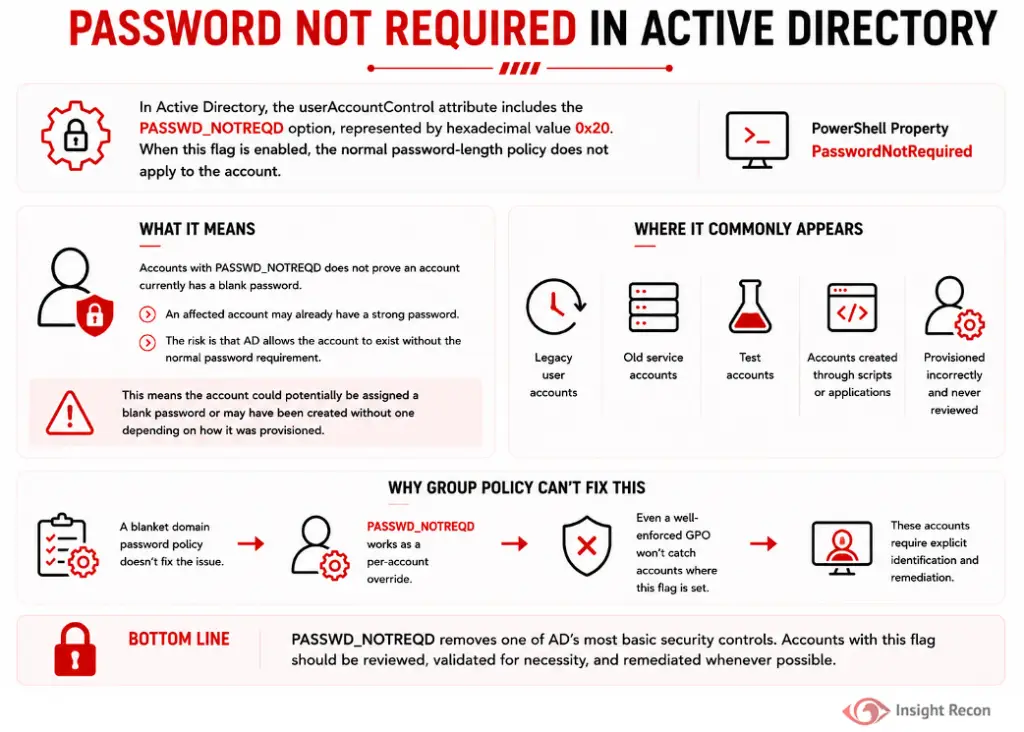
In Active Directory one of the options of the userAccountControl attribute is PASSWD_NOTREQD, represented by the hexadecimal value 0x20. When this flag is enabled, the normal password-length policy does not apply to the account. The Active Directory PowerShell module exposes the same setting through the PasswordNotRequired property.
Accounts with the PASSWD_NOTREQD setting do not necessarily have a blank password. An affected account may already have a strong password configured. The problem is that Active Directory is allowing the account to exist without the normal password requirement, meaning the account could potentially be assigned a blank password or may have been created without one depending on how it was provisioned.
This commonly appears on legacy user accounts, old service accounts, test accounts, accounts created through scripts or applications, or simply accounts that were provisioned incorrectly and never reviewed.
A blanket domain password policy unfortunately doesn’t fix the issue. PASSWD_NOTREQD works as a per-account override, so even a well-enforced GPO won’t catch accounts where this flag is already set.
Why Password Not Required Accounts Create Risk
The core issue is that the account has been exempted from a basic authentication control. This creates an immediate weakness that is often overlooked, as administrators believe their GPO may resolve it.
Common risks include:
- Unauthorized access
If the affected account has a blank password, an attacker may be able to authenticate without even having to guess a password. - Easier credential attacks
Once an attacker identifies an affected account, testing an empty password or a small number of credentials is straightforward. - Lateral movement
A compromised domain account gives the attacker an authenticated stance that can be used to enumerate systems, access resources, and search for additional attack paths. - Privilege escalation
The risk increases substantially if the affected account has administrative privileges, sensitive group memberships, delegated permissions, or access to important systems. - Legacy account exposure
Password Not Required frequently appears on old accounts that receive little operational attention, which can make the condition persist unnoticed. - Policy inconsistency
Security teams may believe the domain password policy applies uniformly while individual accounts retain an exception that weakens the expected control.
Real-World Context
These accounts are often the result of convenience rather than a deliberate security decision. A developer creates a temporary test account, an old provisioning script sets an incorrect flag, or an administrator simply follows vendor documentation without realizing the security implication. There are numerous ways attackers can identify this setting and frequently they slowly test these accounts with an empty password for easy authenticated access to the domain.
How Attackers Take Advantage of Password Not Required Accounts
Password spraying tools such as NetExec make it trivial for an attacker to attempt empty passwords across the environment until they find a vulnerable account. This ultimately gives an attacker the initial foothold and authenticated position within the domain to launch further attacks.
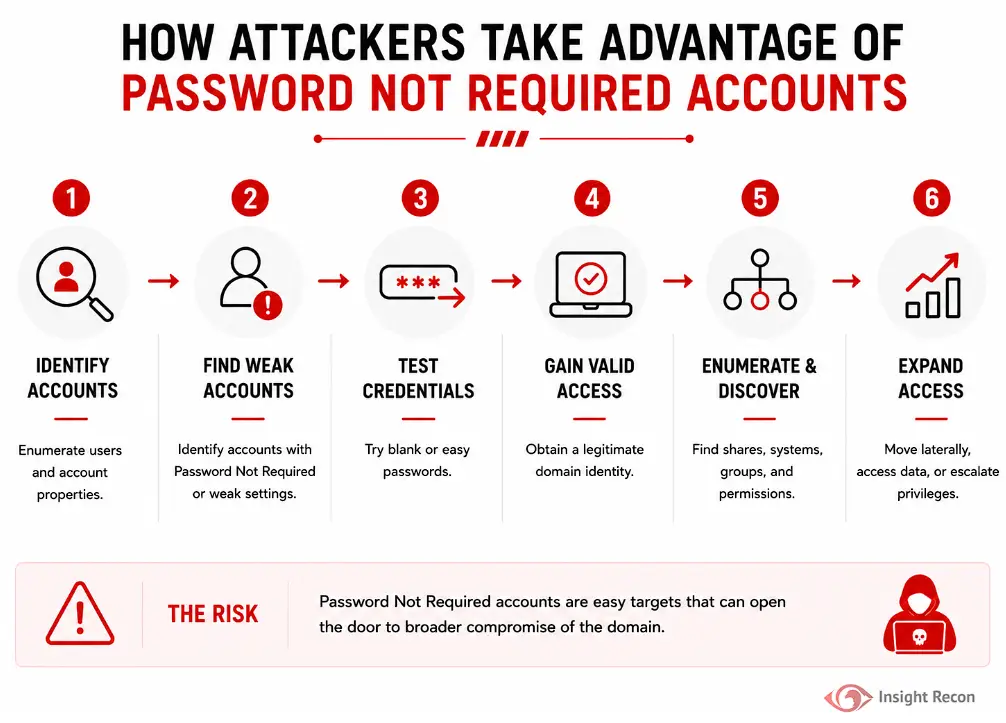
A typical attack path may look like this:
- Identify domain accounts
After gaining some visibility into the environment, the attacker enumerates users and account properties. - Locate accounts with weak configuration
The attacker identifies accounts configured with Password Not Required or other weak authentication settings. - Test likely credentials
The attacker attempts an empty password or other easily guessable passwords against the targeted accounts. - Obtain valid domain access
If the account has a blank or otherwise weak credential, the attacker now has a legitimate domain identity. - Enumerate privileges and access
The compromised account is used to identify shares, systems, group memberships, delegated rights, and other reachable resources. - Expand access
Depending on the account’s privileges, the attacker may move laterally, access sensitive data, or identify a path toward administrative control.
How to Identify Accounts with Password Not Required
Detection is straightforward and should be part of standard Active Directory account reviews. Prioritize validating accounts with empty passwords to mitigate immediate risk, followed by an audit to identify accounts configured with no password requirement settings.
Administrators can audit this setting in several ways:
- PowerShell: Use scripts to search for accounts with the PASSWD_NOTREQD attribute set.
- Active Directory Users and Computers (ADUC): Check account properties for the “Password not required” flag.
- Manual Testing: Attempting authentication with a blank password can reveal actual empty passwords.
- Hash Audits: Review stored password hashes to detect empty password hashes.
PowerShell Method
Run the following command from an elevated PowerShell prompt:
					# List Active Directory users configured with Password Not Required
Get-ADUser -Filter {PasswordNotRequired -eq $true} -Properties PasswordNotRequired | Select-Object SamAccountName, Enabled, PasswordNotRequired
What it does: The command returns user accounts where the Active Directory PasswordNotRequired property is enabled.
How to interpret results: Every returned account should be reviewed. An affected account is allowed to bypass the normal password-length requirement, but this query does not tell you whether the current password is actually blank. Focus first on enabled accounts, recently used accounts, service accounts, and identities with privileged access.

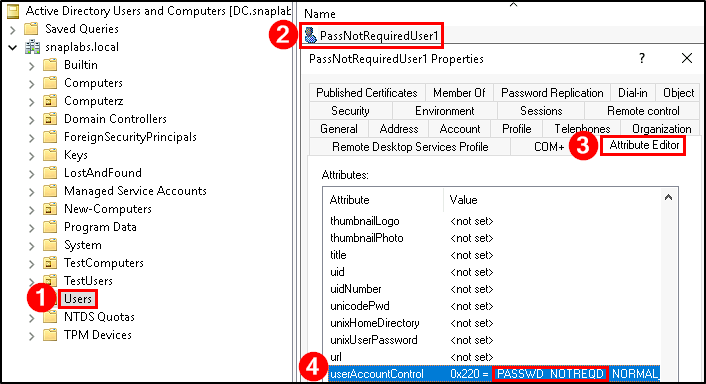
Active Directory Users and Computers (ADUC)
For manual verification of individual accounts:
- Open Active Directory Users and Computers (dsa.msc).
- Select View > Advanced Features.
- Locate the affected account.
- Open Properties.
- Select the Attribute Editor tab.
- Locate userAccountControl.
- Review the current value for “PASSWD_NOTREQD”.
If this value is present, the account has it enabled.
How Insight Recon Identifies This Risk
Insight Recon’s Active Directory security assessment surfaces risky account configurations and identifies users where Password Not Required is enabled.
It also provides:
- Visibility into affected accounts across the domain
- Account context to help prioritize higher-risk identities
- Risk prioritization alongside other authentication and privileged-access findings
- Hacker Insight explaining how attackers may take advantage of the condition
- Step-by-step remediation guidance
- Historical tracking to verify the configuration does not return
This allows teams to quickly understand not just if they are at risk, but how much it matters in their environment.
How to Remediate Password Not Required Accounts
Prerequisites
Before making changes:
- Identify the owner and purpose of each affected account.
- Confirm whether the account is still required.
- Verify any application dependencies.
- Ensure the account has a valid password that meets organizational policy.
- Review privileged memberships and delegated rights.
- Obtain change approval for sensitive or production service accounts.
If an account is no longer needed, disabling and eventually removing it may be more appropriate than simply changing the password setting.
PowerShell Method
From an elevated PowerShell prompt, run the following command. Replace ‘username’ with the targeted account name.
					# Require a password for the specified Active Directory user
Set-ADUser -Identity username -PasswordNotRequired $false

Active Directory Users and Computers (ADUC)
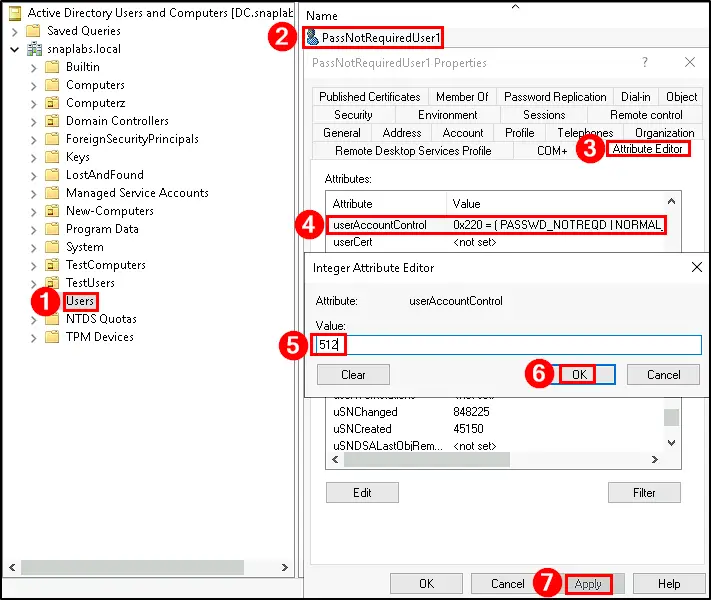
For individual accounts, PowerShell is the safer option because it allows the specific flag to be changed without manually calculating userAccountControl.
- Open Active Directory Users and Computers (dsa.msc).
- Select View > Advanced Features.
- Locate the affected account.
- Open Properties.
- Select the Attribute Editor tab.
- Locate userAccountControl.
- Change the value to “512”, if it is a “Normal Account” and doesn’t have other settings included. If you are unsure, look at similar accounts for their value.
- Click OK and click Apply to save changes.
Preventing Password Not Required Accounts Going Forward
Remediation removes today’s unsafe configuration. Preventing recurrence requires controls around account creation, administrative changes, and ongoing monitoring.
- Audit the setting regularly
Periodically query Active Directory for accounts with this setting. Include the check in routine account hygiene and privileged access reviews. - Review newly created accounts
Account creation workflows should verify that normal users and service identities do not receive the Password Not Required flag. - Monitor account changes
Event ID 4720 records user account creation, while account-change auditing can provide visibility when account properties are modified. Review unexpected changes to privileged or service identities. - Enforce strong authentication policy
Maintain appropriate domain password requirements and modern authentication controls. NIST CSF 2.0 specifically includes minimum strength policies for passwords and similar authenticators under PR.AA-03. - Reduce legacy accounts
Remove unused test, migration, application, and service identities rather than allowing outdated exceptions to remain indefinitely. - Use managed service accounts where appropriate
Group Managed Service Accounts can eliminate the need for administrators to manually manage passwords for many Windows services. - Require change approval for exceptions
If a legitimate dependency requires an unusual account configuration, document the owner, justification, compensating controls, and target date for removal.
Quick Validation Checklist
Can you confidently answer “yes” to all of these?
✓ Do you know every account with Password Not Required enabled?
✓ Do all enabled accounts have an appropriate password configured?
✓ Are Password Not Required accounts included in recurring Active Directory reviews?
If any of these answers are unclear, your domain may contain account-level exceptions that weaken otherwise strong password policies.
Risk & Compliance Mapping
Business Impact: Compromise can lead to lateral movement, sensitive resource access, privilege escalation, or broader Active Directory exposure.
| Framework | Reference |
|---|---|
| NIST CSF 2.0 | PR.AC-1 (Identity Management and Authentication), PR.AC-7 (User Authentication) |
| CIS Controls | Control 5 (Account Management), Control 6 (Access Control Management) |
| MITRE ATT&CK | T1110.001 (Brute Force: Password Guessing), T1078.002 (Valid Accounts: Domain Accounts) |
| DISA STIG | V-254292, V-254294 |
| ANSSI | User accounts with no password required (vuln_passwordnotreq) |
| Microsoft Security Baselines | PASSWD_NOTREQD removes the normal password requirement and should not be enabled on standard user or service accounts without a justified dependency |
Frequently Asked Questions
Yes. PASSWD_NOTREQD is an account-specific setting that exempts the account from the normal password-length requirement. A strong domain policy does not make the flag harmless.
No. It means Active Directory does not require the account to satisfy the normal password-length requirement. The account may still have a sufficient password configured.
Technically, yes, but that does not make it a good configuration. Identify why the exception exists and replace it with a securely managed credential or a managed service account where possible.
Yes, but prioritize enabled and privileged accounts first. A disabled account cannot currently authenticate, but leaving insecure configuration behind creates risk if someone later re-enables it without reviewing the account.
Remove Password Exceptions Before They Become An Attackers Foothold
Accounts with a password not required is easy to overlook because it’s only one flag on an Active Directory account. The real concern is what that exception allows, particularly when the affected identity is enabled, privileged, or connected to an important service.
See exactly where your Active Directory is exposed and what to fix first.