
Operator Groups Explained and Why to Keep Them Empty
Active Directory operator groups were created to delegate specific administrative tasks without granting full Domain Admin privileges. In modern environments, however, these groups can provide more access than many teams realize, especially when membership has accumulated over years without regular review. These accounts can gain elevated capabilities over domain controllers, directory objects, or sensitive systems.
Quick Summary
Operator groups are not inherently insecure, but unnecessary standing membership creates avoidable privilege. In many environments, these groups are populated because of legacy administrative practices rather than current operational requirements.
| Priority | Moderate |
| Risk | Members of built-in operator groups receive elevated rights that may provide paths to sensitive systems or privileged Active Directory objects |
| Impact | Privilege escalation, credential exposure, unauthorized administrative actions, and potential domain controller compromise |
| Exploitation | Attackers who compromise an operator account can abuse the account’s existing administrative rights instead of first obtaining Domain Admin privileges |
| Fix | Remove unnecessary membership and replace broad operator group privileges with narrowly scoped delegation where possible |
What Are Active Directory Operator Groups?
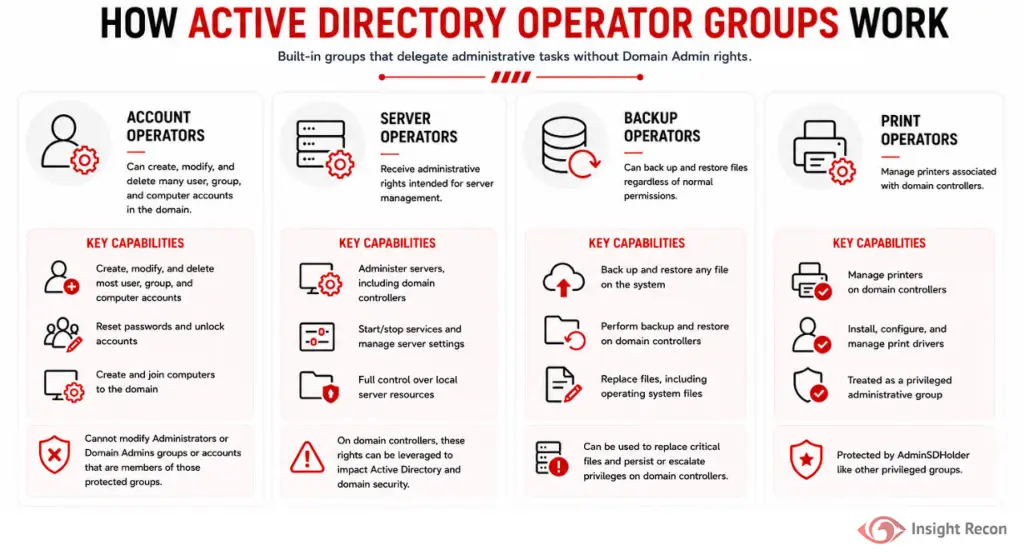
Active Directory includes several built-in groups designed to delegate administrative responsibilities without granting full Domain Admin access. The groups most commonly considered operator groups are Account Operators, Server Operators, Backup Operators, and Print Operators. Their original purpose was legitimate, allowing organizations to assign an administrator to perform a limited operational role without placing the account in Domain Admins.
The problem is that “limited” does not mean low risk. The permissions granted to these groups can still provide substantial control over domain controllers, Active Directory objects, or operating system resources.
Account Operators
Account Operators can create, modify, and delete many user, group, and computer accounts in the domain. The group can’t modify the Administrators or Domain Admins groups or accounts belonging to members of those protected groups, but its permissions still extend broadly across many ordinary directory objects.
Server Operators
Server Operators receive administrative rights intended for server management. On domain controllers, this places the group in a particularly sensitive position because operational rights over the server can potentially be leveraged to affect Active Directory itself.
Backup Operators
Backup Operators can back up and restore files regardless of the normal permissions protecting those files. Members can perform backup and restore operations on domain controllers and have permissions capable of replacing files, including operating system files.
Print Operators
Print Operators were designed to manage printers associated with domain controllers. Although the role sounds narrow, it is still treated as a privileged administrative group and is protected by AdminSDHolder.
Modern organizations can usually accomplish these administrative tasks with more targeted delegation, role-specific management platforms, or scoped permissions instead of standing membership in broad built-in operator groups.
Why Populated Operator Groups Can Create Risk
The primary issue is not that these groups exist, but that accounts often remain in them long after the original operational need has ended.
Common risks include:
- Unnecessary privileged access
Operator group members receive elevated rights that exceed those of standard users and may provide administrative control over sensitive systems or directory objects. - Faster privilege escalation
If an attacker compromises an account that already belongs to an operator group, they begin the intrusion with privileges that may eliminate several steps of a normal escalation path. - Credential and file exposure
Backup-related rights can bypass normal file permissions, increasing the value of a compromised Backup Operators account. - Legacy access accumulation
Membership is often inherited from old projects, former administrative roles, migrations, or applications that no longer require the privilege. - Weak separation of duties
Broad operator memberships can undermine least-privilege designs by granting capabilities far beyond the administrator’s current job function.
Real-World Context
In reality, attackers use these paths as they are often overlooked and typically provide an easier path to domain compromise. An account may have been added to Backup Operators for a migration five years ago, placed in Account Operators to support a help desk workflow, or granted Server Operators membership for a retired management process. The result is standing administrative access that nobody is actively using but an attacker can still abuse.
What Happens When an Operator Account Is Compromised
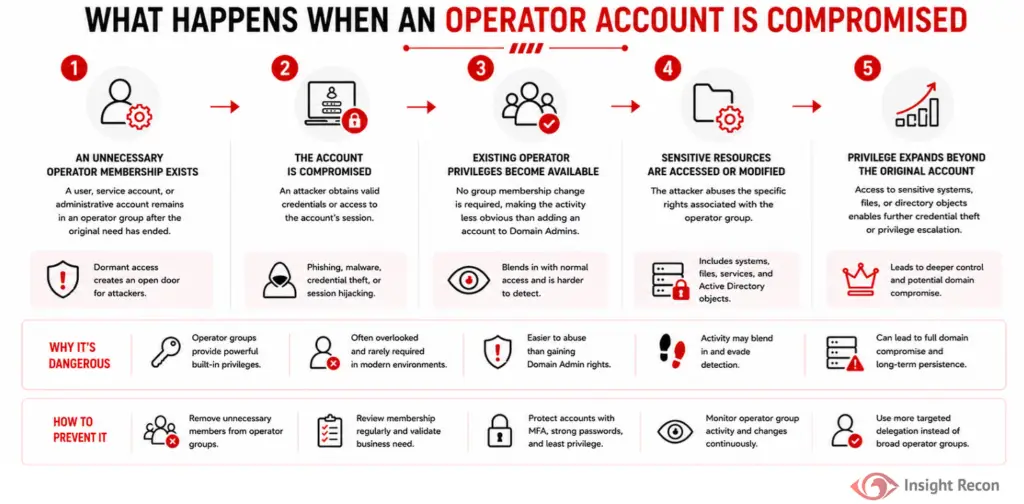
An attacker often focuses on compromising accounts that already belong to operator groups, but historical evidence suggests that attackers will place a compromised account in an operator group as a persistence technique.
A typical privilege escalation chain looks like this:
- An unnecessary operator membership exists
A user, service account, or administrative account remains in an operator group after the original need has ended. - The account is compromised
An attacker obtains valid credentials or access to the account’s session. - Existing operator privileges become available
No group membership change is required, which can make the activity less obvious than adding an attacker-controlled account to Domain Admins. - Sensitive resources are accessed or modified
The attacker abuses the specific rights associated with the operator group. - Privilege expands beyond the original account
Access to sensitive systems, files, or directory objects can provide additional credential theft or privilege escalation opportunities.
How to Detect Populated Operator Groups
Operator group membership is easy to review and should be included in regular privileged access assessments.
PowerShell Method
Run the following command from an elevated PowerShell prompt:
					# Review membership in the primary Active Directory operator groups
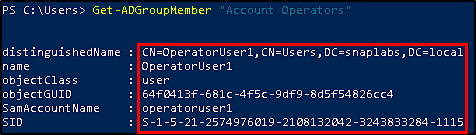
Get-ADGroupMember -Identity "Account Operators"
Get-ADGroupMember -Identity "Server Operators"
Get-ADGroupMember -Identity "Backup Operators"
Get-ADGroupMember -Identity "Print Operators"
What it does: Each command returns the direct members of the specified operator group.
How to interpret results: Any returned member should be reviewed to determine whether the account still requires the group’s privileges. Often, a better alternative is to narrowly scope specific access that is required instead of relying on the built-in operator group permissions.
Active Directory Users and Computers (ADUC)
For manual inspection:
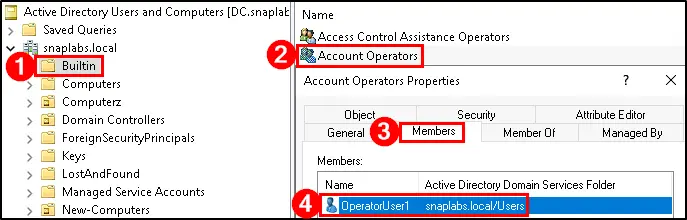
- Open Active Directory Users and Computers (dsa.msc).
- Navigate to the Builtin container.
- Locate Account Operators, Server Operators, Backup Operators, and Print Operators.
- Open each group’s Properties.
- Select the Members tab.
- Review every listed account and nested group.
Event Logging
Changes to operator group membership should be monitored like other privileged group changes. Because these are built-in local groups, security events of interest include:
- Event ID 4732, a member was added to a security-enabled local group
- Event ID 4733, a member was removed from a security-enabled local group
Monitor these events on domain controllers and alert when accounts are added to privileged built-in groups outside an approved administrative change.
Finding Operator Group Membership with Insight Recon
Insight Recon’s Active Directory security assessment surfaces all operator group membership as well as assigns them account risk scores.
It also provides:
- Visibility into populated operator groups
- Identification of the accounts or groups creating the exposure
- Risk prioritization alongside other privileged access findings
- Hacker Insight explaining how attackers can abuse the membership
- Step-by-step remediation and validation guidance
- Historical tracking to confirm unnecessary memberships do not return
This allows teams to distinguish between a documented operational exception and an account that simply remained privileged because nobody removed it.
How to Remediate Operator Group Membership
If you discover operator groups in use, the recommended remediation is to remove all accounts unless a clear, documented business case exists. In most organizations, delegation can be performed at the OU level with more controlled permissions.
Prerequisites
Before removing members:
- Identify every direct and nested member of the operator group.
- Confirm the account owner and current business purpose.
- Determine whether any application, backup process, print service, or administrative workflow depends on the membership.
- Identify a more narrowly scoped delegation model where appropriate.
- Obtain change control approval and schedule testing for operational accounts that may affect production services.
Do not remove service or administrative accounts blindly. Some environments may still have legitimate dependencies on these groups, even if modern designs generally avoid them.
PowerShell Method
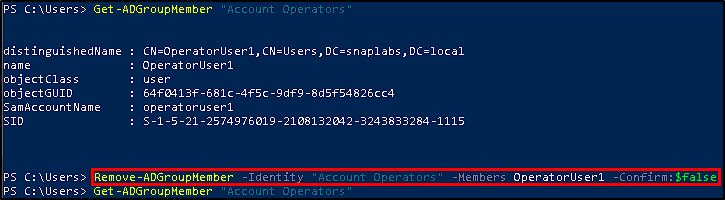
From an elevated PowerShell prompt, run the following command. Replace the group name and username with the appropriate values for your environment.
					# Removes a single user from an operator group (replace Operator_Group_Name and username)
Remove-ADGroupMember -Identity "Operator_Group_Name" -Members username -Confirm:$false

# Removes multiple users at once (replace Operator_Group_Name and usernames)
$users = "user1","user2","user3"
Remove-ADGroupMember -Identity "Operator_Group_Name" -Members $users -Confirm:$false
Active Directory Users and Computers (ADUC)
To remove a member manually:
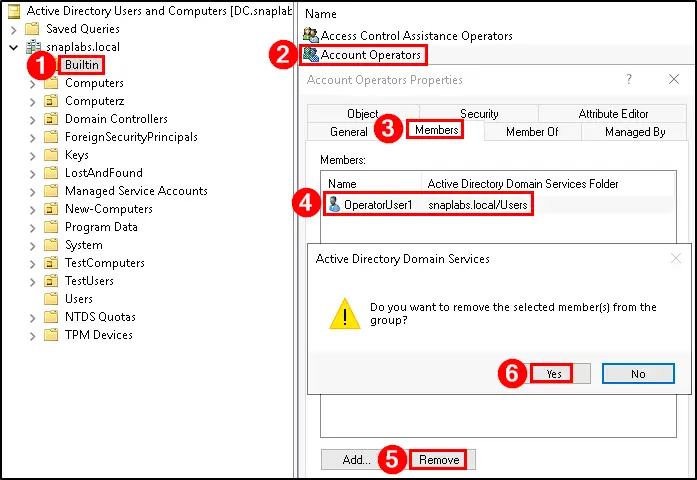
- Open Active Directory Users and Computers.
- Navigate to the Builtin container.
- Open the affected operator group.
- Select the Members tab.
- Select the account that no longer requires membership.
- Click Remove.
- Confirm the change.
Preventing Operator Group Membership from Returning
Cleaning up the groups once is not enough. Operator membership should be treated as privileged access and governed accordingly.
- Keep operator groups empty where possible
If there is no documented operational requirement, these groups should not contain standing members. - Use narrower delegation
Delegate administrative permissions at the OU, application, server, or task level instead of granting broad built-in group membership whenever possible. - Review privileged memberships regularly
Include operator groups in monthly or quarterly access reviews alongside Domain Admins, Enterprise Admins, Schema Admins, and other privileged groups. - Monitor membership changes
Alert on Event IDs 4732 and 4733 for these groups and correlate changes with approved tickets. - Require documented approval
Operator membership should have an owner, business justification, approval record, and review date. - Use temporary access where possible
If an administrator only needs the rights for a defined task, grant access for the duration of that activity rather than leaving permanent membership.
Quick Validation Checklist
Can you confidently answer “yes” to all of these?
✓ Do you know every account and group currently assigned to an operator group?
✓ Have you reviewed whether narrower delegated permissions could replace the operator group membership?
✓ Are you monitoring additions and removals from these groups?
If any of these answers are unclear, your environment may contain unnecessary administrative access that can accelerate an attacker’s path to higher privilege.
Risk & Compliance Mapping
Business Impact: Unauthorized access, privilege escalation, unauthorized changes, service disruption, and broader domain compromise.
| Framework | Reference |
|---|---|
| NIST CSF 2.0 | PR.AC-4 (Access Permissions and Authorizations), PR.AC-6 (Privileged Access Management) |
| CIS Controls | Control 5 (Account Management), Control 6 (Access Control Management) |
| MITRE ATT&CK | T1078.002 (Domain Accounts), T1098 (Account Manipulation) |
| DISA STIG | V-254495, V-254508, V-254512, V-36432 |
| Microsoft Security Baselines | Built-in operator groups are privileged groups whose memberships should be restricted to accounts with a legitimate administrative requirement |
Frequently Asked Questions
Not necessarily. Some organizations may have legitimate legacy or operational requirements. The security goal is to remove unnecessary standing membership and require documented justification for any account that remains.
No. Active Directory does not require these groups to contain members. Several operator groups have no default members, and Microsoft documents them as built-in privileged groups rather than required service identities.
Often, yes. OU-level delegation, scoped server administration, application-specific roles, and modern privileged access models can frequently provide the necessary permissions with a smaller blast radius.
Several operator groups are treated as protected administrative groups because of the privileges they hold. AdminSDHolder and SDProp help prevent unauthorized permission changes to protected groups and their members.
Remove Privileges That No Longer Serve a Purpose
Operator groups were created for a different era of Windows administration. They can still serve legitimate purposes, but permanent membership should never exist simply because an account was added years ago and nobody revisited it.
See exactly where your Active Directory is exposed and what to fix first.