Primary Group ID: Find Hidden Group Membership in AD
Every user and computer in AD has a primary group ID. It grants membership in a group without adding the account to that group's member list. Left at the default, it does no harm. Set to Domain Admins or another privileged group, it may give an account admin rights that some tools and access reviews never show. This post shows you how to find non-standard values, decide what access each account should keep and reset the rest.
| Priority | Low for most accounts, but Critical when an enabled account's primary group is Domain Admins or another privileged group |
|---|---|
| What decides it | The primaryGroupID attribute on each user and computer account |
| Who's affected | Any domain, especially ones with old migrations, Unix or Mac integration, or past admins who used it to tidy up group lists |
| Fix | Reset the primary group ID to its default, then remove the old group unless the account needs it |
Check it now: which accounts have a non-standard primary group ID?
# Runs as any domain user with the ActiveDirectory module.
Import-Module ActiveDirectory -ErrorAction Stop
$domainSid = (Get-ADDomain).DomainSID.Value
# Domain Admins, Domain Controllers, Schema Admins, Enterprise Admins, Group Policy Creator Owners,
# Read-only Domain Controllers, Key Admins, Enterprise Key Admins
$privileged = 512, 516, 518, 519, 520, 521, 526, 527
$names = @{}
function Get-GroupName($rid) {
    if (-not $names.ContainsKey($rid)) {
        $names[$rid] = try { (Get-ADGroup -Identity "$domainSid-$rid").Name } catch { "RID $rid" }
    }
    $names[$rid]
}
Get-ADObject -LDAPFilter '(&(objectClass=user)(primaryGroupID=*))' -Properties primaryGroupID, userAccountControl, objectCategory, sAMAccountName |
    ForEach-Object {
        $rid = [int]$_.primaryGroupID
        $uac = [int]$_.userAccountControl
        # Anything that isn't a person (computers, gMSAs) defaults to Domain Computers
        $isComputer = $_.objectCategory -notlike 'CN=Person,*'
        # 0x2000 is a writable DC, 0x4000000 an RODC and 0x800 a trust account
        $expected = if ($uac -band 0x2000) { 516 } elseif ($uac -band 0x4000000) { 521 } elseif ($uac -band 0x800) { 513, 528, 529 } elseif ($isComputer) { 515 } else { 513, 514 }
        if ($rid -notin $expected) {
            [pscustomobject]@{
                Account      = $_.sAMAccountName
                Type         = ($_.objectCategory -split ',')[0] -replace '^CN='
                PrimaryGroup = Get-GroupName $rid
                RID          = $rid
                Expected     = $expected -join ' or '
                Enabled      = -not ($uac -band 2)
                Privileged   = $rid -in $privileged
            }
        }
    } |
    Sort-Object Privileged -Descending
Runs as any domain user with the ActiveDirectory module. It lists every account whose primary group isn't the default for its type, with privileged groups first. An empty result means every account uses its default.
You checked one attribute. The free scan checks the rest of your on-prem AD in a few minutes.
Nothing gets installed on your domain controllers. Only HTTPS leaves your network.
What the primary group ID is
Every user and computer account has a primaryGroupID attribute. It holds the relative identifier (RID) of one group in the domain. Microsoft's schema reference says it "contains the relative identifier (RID) for the primary group of the user" and that "by default, this is the RID for the Domain Users group."
The account is a member of that group, yet the group's member attribute doesn't list it. Likewise, the account's memberOf attribute leaves it out. Microsoft's Entra Connect article puts it this way: "that user is excluded from the corresponding group membership in Active Directory. Instead, the PrimaryGroupID attribute is set with that group."
The defaults depend on the account type:
- Users: 513 (Domain Users), or 514 (Domain Guests) for guest accounts.
- Computers and gMSAs: 515 (Domain Computers).
- Writable domain controllers: 516 (Domain Controllers).
- Read-only domain controllers: 521 (Read-only Domain Controllers).
Microsoft Defender for Identity's assessment on this setting lists the same defaults.
Why a non-standard primary group ID is dangerous
Membership that member lists don't show
Microsoft's Defender for Identity guidance says membership through this attribute "doesn't appear in the list of group members in some interfaces." So if an account's primary group is Domain Admins, a review that reads the Domain Admins member list may miss it. Even so, the account still gets Domain Admins in its token at sign-in.
A way to hide access
The same guidance warns that the attribute "might be used as an attempt to hide group membership." It also calls it "a stealthy way for an attacker to escalate privileges without triggering normal auditing for group membership changes." MITRE ATT&CK tracks this kind of change as T1098, Account Manipulation. So an attacker who already has admin rights may use it to keep access that survives a cleanup of the member list.
Old fixes and tools leave it behind too
Most non-standard values aren't attacks. Some come from migrations, from Unix or Mac integration, or from an admin who wanted an account to drop out of Domain Users. TrustedSec's research on primary group behavior found that tools disagree on whether to show these members. As a result, review every one of them.
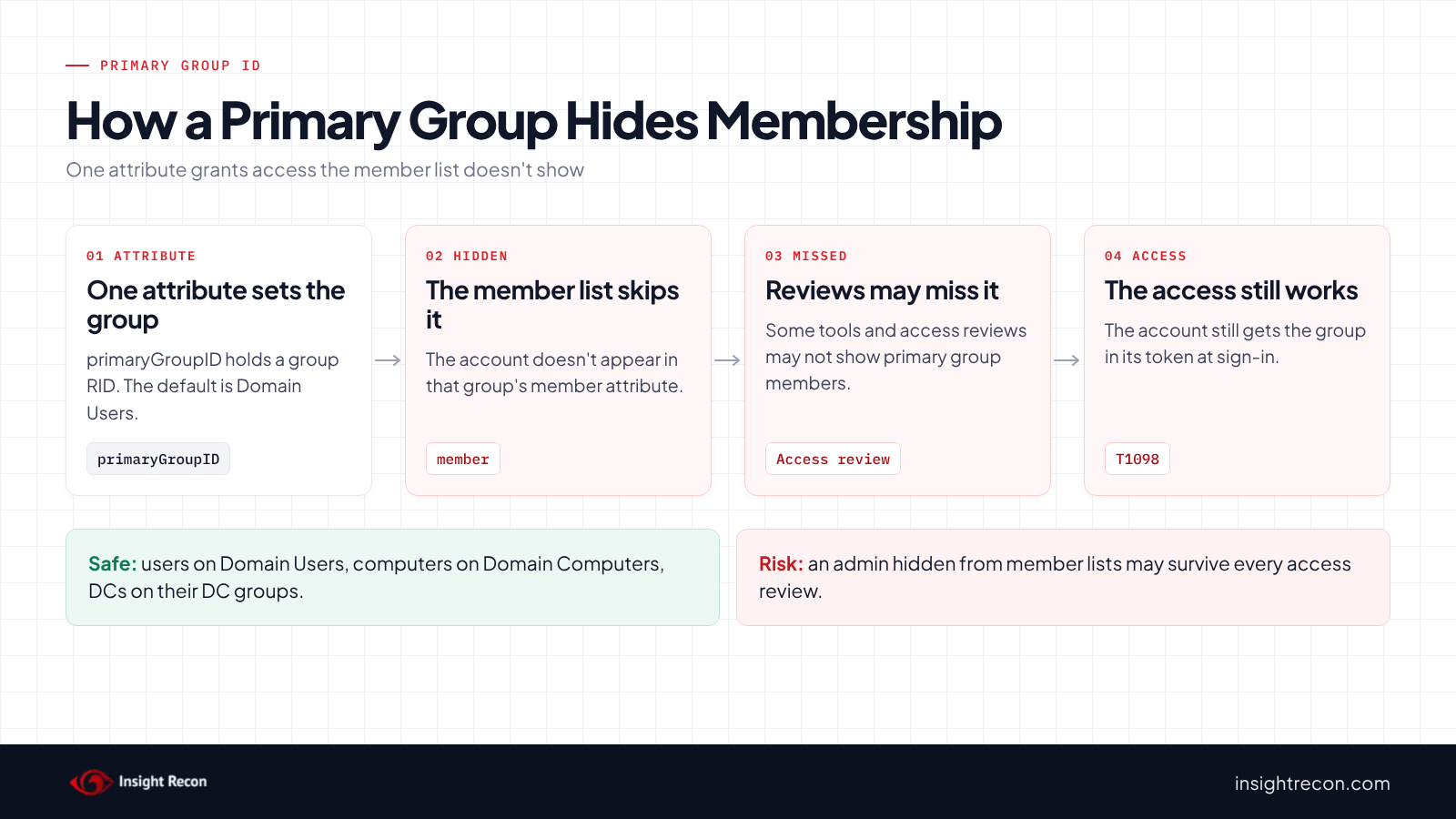
Find accounts with a non-standard primary group ID
Read the quick check results
The quick check above returns one row per account that doesn't use its default. It reads the account type from userAccountControl and objectCategory, so domain controllers, trust accounts and gMSAs aren't flagged for their normal values.
What to look for: any row with Privileged set to True, especially when Enabled is also True. Those accounts hold admin rights that may not show in the group's member list. Next, look at computers with 516 or 521 that aren't real DCs. The quick check takes the expected value from userAccountControl, so also compare every computer with 516 or 521 against the DCs registered under CN=Sites in the configuration partition, as the scan does. Finally, review custom groups shown by name or by RID and ask who set them and why.
Look for primary groups you can't read
Denying read access to primaryGroupID hides the membership from the account and the group alike. The quick check skips those accounts, so list them separately.
# Runs as any domain user with the ActiveDirectory module.
Import-Module ActiveDirectory -ErrorAction Stop
Get-ADObject -LDAPFilter '(&(objectClass=user)(!(primaryGroupID=*)))' -Properties sAMAccountName |
    Select-Object sAMAccountName, ObjectClass, DistinguishedName
What to look for: any row at all. Every user and computer has a primary group, so a blank one means your account can't read it. Find out who changed the permissions on that account.
Check recent primary group changes
Changes to a user's primary group show up in event 4738. For computers, the same field appears in event 4742. Both need account management auditing on your DCs. This script reads both from each DC for the last seven days.
# Run as a Domain Admin. Reads user (4738) and computer (4742) account changes from each DC's Security log.
# The PrimaryGroupId field is '-' unless the primary group changed.
Import-Module ActiveDirectory -ErrorAction Stop
$xpath = "*[System[(EventID=4738 or EventID=4742) and TimeCreated[timediff(@SystemTime) <= 604800000]]] and *[EventData[Data[@Name='PrimaryGroupId']!='-']]"
foreach ($dc in Get-ADDomainController -Filter *) {
    Get-WinEvent -ComputerName $dc.HostName -LogName Security -FilterXPath $xpath -ErrorAction SilentlyContinue |
        ForEach-Object {
            $d = @{}
            ([xml]$_.ToXml()).Event.EventData.Data | ForEach-Object { $d[$_.Name] = $_.'#text' }
            [pscustomobject]@{
                DC           = $dc.HostName
                Time         = $_.TimeCreated
                Event        = $_.Id
                Account      = "$($d.TargetDomainName)\$($d.TargetUserName)"
                NewPrimaryId = $d.PrimaryGroupId
                ChangedBy    = "$($d.SubjectDomainName)\$($d.SubjectUserName)"
            }
        }
}
What to look for: any NewPrimaryId other than 513 for users or 515 for computers. Microsoft's own monitoring guidance for 4738 says "other values should be monitored." Check who made each change in ChangedBy.
Check primary group IDs with Insight Recon
The free scan includes Accounts with Non-Standard Primary Group IDs. It reads the primary group of every user and computer account and compares it to the expected values for its type. Those are 513 or 514 for users, 515 or 514 for computers, 516 for writable DCs and 521 for RODCs, plus 528 or 529 for trust accounts. Domain controllers are matched against the DCs the forest has registered. Their read-only flag decides which DC group is expected.
The check is Low on its own. However, it rises to Critical when an enabled account's primary group is privileged, such as Domain Admins, Enterprise Admins, Schema Admins or Domain Controllers, or a group nested in an admin group. That includes a read-only DC whose primary group is Domain Controllers. For a disabled account with a privileged primary group, it's High. It also flags a computer that has a domain controller primary group but isn't registered as a DC. Each finding comes with the Hacker Insight, remediation steps and compliance mappings.
Know what this check doesn't decide
Some things are still yours to check. First, the check reads user accounts and computers. Group, standalone and delegated managed service accounts aren't read at all, so use the quick check above for them. If the scan can't read an account's primary group, the result names that account. Second, it tells you an account's primary group is unusual. Whether that access is needed is a call only you can make.
Related checks beyond primary group ID
- Privileged SIDs in sIDHistory, another way admin rights may not show in a group's member list. Our SID History post covers it.
- Risky AdminSDHolder Permissions, which decides who controls every protected admin account. Our AdminSDHolder post covers it.
You can see what the findings look like in our sample report. The full list is in our check library.
See which accounts get admin rights through their primary group, plus the rest of your Tier 0 risks.
It runs from any Windows machine that can reach your DCs, with a standard domain account. Every core AD check is free for one domain.
Before you change a primary group ID
Decide what access each flagged account should keep before you reset anything. Then plan to remove the old group from every account that doesn't need it.
Find out why it was set
Ask the account owner and check change tickets or the 4738 and 4742 events. A service account set to a custom group for a Unix or Mac app may still need that group. On the other hand, a user whose primary group is Domain Admins with no record of why should be treated as a possible compromise.
Know what the reset does to the old group
Microsoft's MS-SAMR specification says that after a primary group change, the account is in the old group's member list. So the reset doesn't take away the old group's access. It moves that access into the member list, where every tool and review can see it. Removing it is a separate step.
Check Domain Users membership
An account must be a member of a group before that group can be its primary group. A Microsoft post on fixing primary groups says to "always insure the user is a member" before you change it. Therefore, the reset script below adds the account to Domain Users or Domain Computers first if it's missing.
Reset a non-standard primary group ID safely
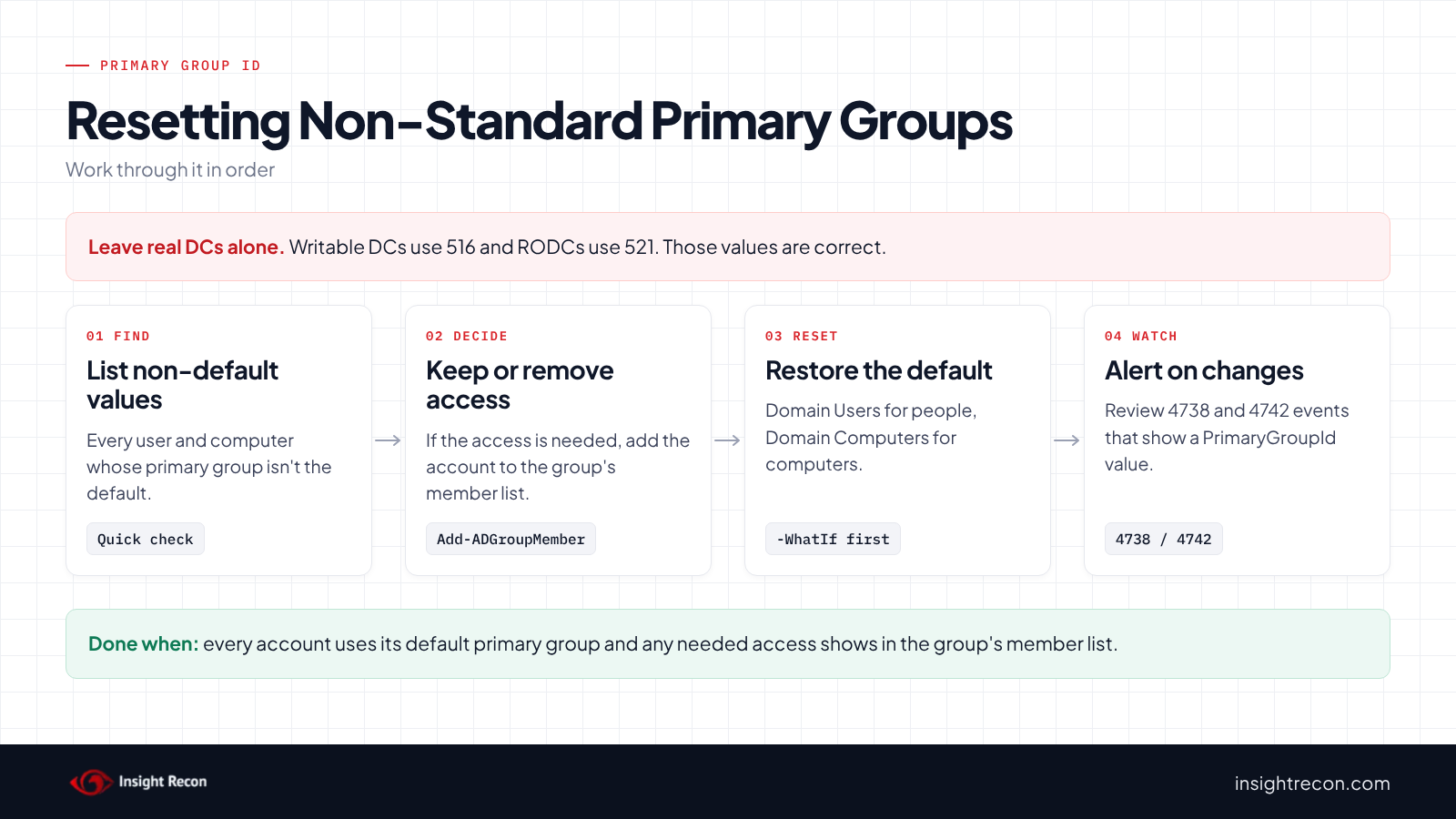
The change script below is a dry run with -WhatIf. Drop that to apply. Change svc-legacy to your own account.
1. Reset the primary group ID to its default
This sets one account back to Domain Users, or Domain Computers for a computer or gMSA. It prints the current value first. This way you can put it back. You don't need to add the account to its current primary group. Active Directory won't let you, because it already counts as a member.
# Dry run. Drop -WhatIf on each line to apply.
# Needs rights to change the account and the default group. The account stays a direct member of its
# old primary group afterward, so remove that membership if it isn't needed.
Import-Module ActiveDirectory -ErrorAction Stop
$account = 'svc-legacy'    # for a computer, use its sAMAccountName with the $, such as 'SRV01$'
$domainSid = (Get-ADDomain).DomainSID.Value
$escaped = $account -replace '\\', '\5c' -replace '\(', '\28' -replace '\)', '\29' -replace '\*', '\2a'
$obj = Get-ADObject -LDAPFilter "(sAMAccountName=$escaped)" -Properties primaryGroupID, memberOf, objectCategory -ErrorAction Stop
if (-not $obj) { throw "Account $account not found" }
# Domain Users for people, Domain Computers for computers and gMSAs. Don't run this on a registered DC.
$rid = if ($obj.objectCategory -like 'CN=Person,*') { 513 } else { 515 }
$group = Get-ADGroup -Identity "$domainSid-$rid" -ErrorAction Stop
# Note the current value so you can put it back
$obj | Select-Object Name, primaryGroupID
# The account must be a member of the group before it can be the primary group
if ($obj.memberOf -notcontains $group.DistinguishedName) {
    Add-ADGroupMember -Identity $group -Members $obj.DistinguishedName -ErrorAction Stop -WhatIf
}
Set-ADObject -Identity $obj -Replace @{ primaryGroupID = $rid } -ErrorAction Stop -WhatIf
What to look for: the dry run shows an add to the default group only if the account isn't already in it, then the attribute change. Don't run it on a registered DC. For a computer that carries a domain controller flag but isn't a registered DC, set its userAccountControl to 4096 first, or Active Directory puts the primary group back to 516. After you apply it, re-run the quick check and confirm the account is gone from the list.
2. Remove the old group unless the account needs it
The reset makes the account a direct member of its old primary group. Remove that membership unless the account should keep it. For example, Remove-ADGroupMember -Identity 'Domain Admins' -Members 'svc-legacy' -WhatIf previews that change. Until you do, an account that had Domain Admins as its primary group is still a Domain Admin.
3. Confirm the account's access
Have the account sign in again, or restart the service that uses it. Then confirm it can still do its job. If it held a privileged primary group with no known reason, also reset its password and review what it did while it had that access.
Keep watching primary group ID changes
- Alert on 4738 and 4742 with a primary group value. Any change other than to 513 or 515 deserves a look.
- Review privileged groups by token. Count primary group members as well as the member list when you review admin access.
- Re-run the quick check on a schedule. A new privileged row means someone changed the attribute.
- Re-run the scan. The check flags the account again if a non-standard value comes back.
Primary group ID checklist
- Does every user use 513, or 514 for guests?
- Does every computer and gMSA use 515?
- Do only real DCs use 516 or 521?
- Is every non-standard value explained by its owner?
- After a reset, did you remove the old group from accounts that don't need it?
- Do you alert on primary group changes in 4738 and 4742?
If the first question turns up an admin group, an account may hold admin rights your reviews can't see.
Compliance mapping
| Framework | Reference | Why it applies |
|---|---|---|
| MITRE ATT&CK | T1098 | Account Manipulation. Changing an account's primary group may grant or hide group access. |
| CIS Controls v8 | Control 5, Control 6 | Account management and access control management. |
| NIST CSF 2.0 | PR.AA-01, PR.AA-05 | Identities and credentials are managed. Access permissions follow least privilege. |
| ANSSI | vuln_primary_group_id_nochange, vuln_primary_group_id_1000 | ANSSI's control points for accounts whose primary group isn't the default. The second one, for primary group IDs below 1000, is level 1 because those groups are usually privileged. |
Primary group ID FAQ
What is the primary group ID in Active Directory?
It's an attribute on each user and computer that holds the RID of one group. The account is a member of that group without being in its member list.
What should the primary group ID be?
It should be 513 for users, 514 for guests, 515 for computers and gMSAs, 516 for writable DCs and 521 for RODCs. Trust accounts use 513, or 528 or 529 once a Windows Server 2025 DC holds the PDC emulator role.
Why doesn't the account show in the group's member list?
Membership through the primary group is stored on the account. As a result, the group's member attribute leaves it out.
Can I just reset every non-standard value?
Yes, once you've confirmed what each account needs. The reset keeps the old group as a direct membership, so remove it where it isn't needed. Never change a registered DC.
Does Insight Recon check the primary group ID?
Yes. The free scan includes Accounts with Non-Standard Primary Group IDs, rated Critical when an enabled account has a privileged primary group.
See whether any account is hiding admin rights in its primary group.
It runs from any Windows machine that can reach your DCs, with a standard domain account. Every core AD check is free for one domain.
Not ready to scan?
AD Signal is our monthly look at what's changing in AD security and how real domains score. Read the latest report.
References
- Microsoft Learn: Primary-Group-ID attribute
- Microsoft Defender for Identity: Accounts with non-default Primary Group ID
- Microsoft Entra Connect excludes a user's primary group from its group membership
- Microsoft MS-SAMR: primaryGroupID
- Microsoft archive: Fixing the user primary group
- Event 4738, a user account was changed
- Event 4742, a computer account was changed
- MITRE ATT&CK T1098, Account Manipulation
- TrustedSec: Adventures in Primary Group Behavior, Reporting, and Exploitation