WSUS Security: Fix HTTP, Weak TLS, Pinning and Proxy Gaps
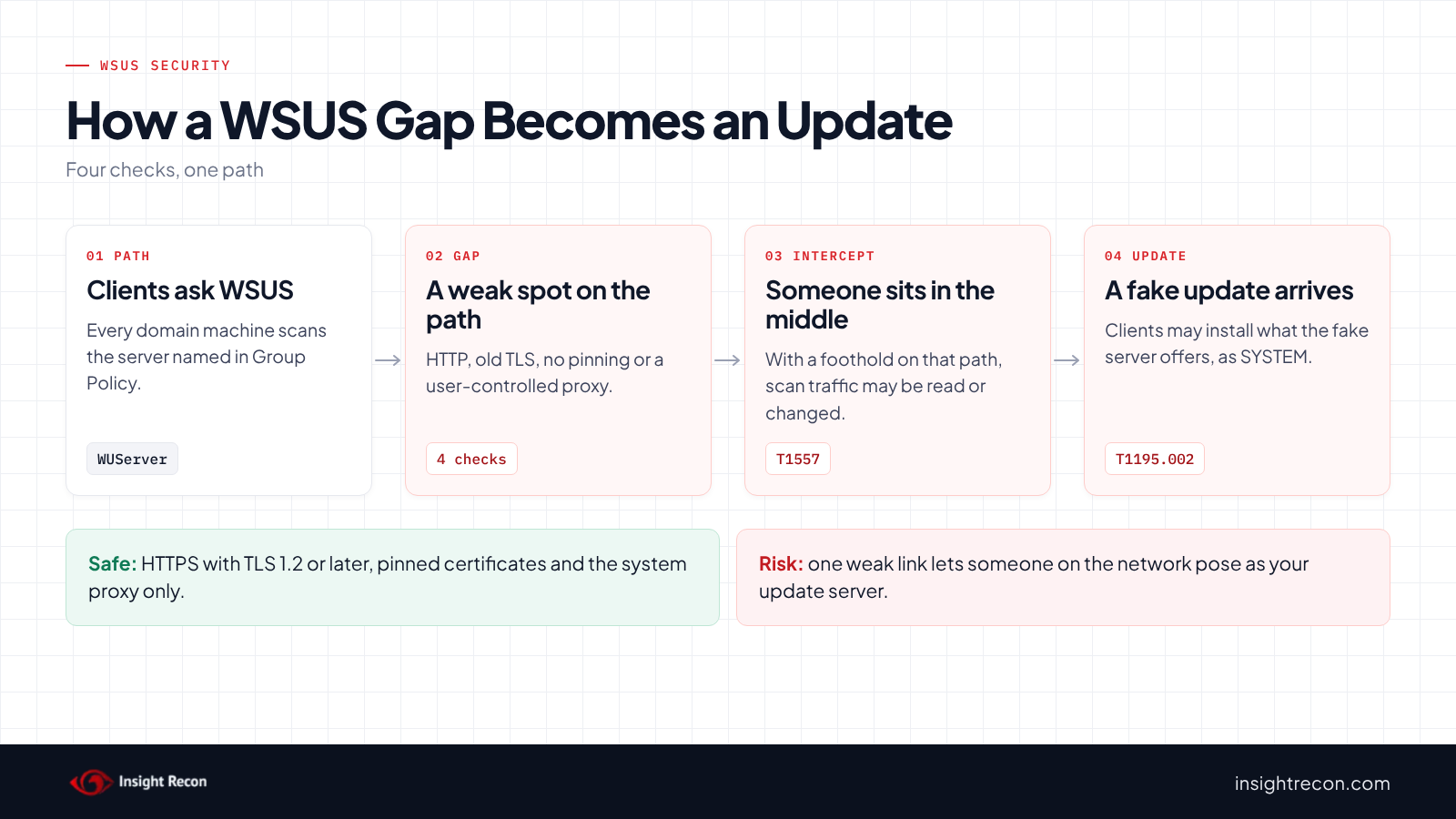
WSUS security comes down to one question: can someone on your network pose as your update server? Four settings decide it: HTTP instead of HTTPS, old TLS versions, certificate pinning turned off and update scans through a user-controlled proxy. Any one of them may let an attacker in the traffic path tamper with updates. This post shows you how to find all four and fix them in an order that keeps clients patching.
| Priority | Moderate, because a weak link may let someone in the traffic path tamper with updates on every client that uses that WSUS server. Old TLS versions alone rate Low |
|---|---|
| What decides it | The WSUS URL in Group Policy, the protocols the WSUS server accepts, the pinning opt-out and the proxy setting for update scans |
| Who's affected | Any domain that points clients at WSUS, especially over http:// on port 8530 |
| Fix | Move WSUS to HTTPS, turn off old protocols, pin the WSUS certificate on clients and use the system proxy only |
Check it now: how do your GPOs point clients at WSUS?
# Needs the GroupPolicy module (RSAT) and read access to GPOs, which domain users have by default.
Import-Module GroupPolicy -ErrorAction Stop
$key = 'HKLM\Software\Policies\Microsoft\Windows\WindowsUpdate'
function Get-Value($gpo, $name) {
    (Get-GPRegistryValue -Guid $gpo.Id -Key $key -ValueName $name -ErrorAction SilentlyContinue).Value
}
foreach ($gpo in Get-GPO -All) {
    $server = Get-Value $gpo 'WUServer'
    if (-not $server) { continue }
    [pscustomobject]@{
        GPO        = $gpo.DisplayName
        Status     = $gpo.GpoStatus
        WUServer   = $server
        UsesHttp   = $server -match '^http://'
        # 1 allows the user's proxy as a fallback for update scans
        UserProxy  = (Get-Value $gpo 'SetProxyBehaviorForUpdateDetection') -eq 1
        # 1 turns off TLS certificate pinning for update scans
        PinningOff = (Get-Value $gpo 'DoNotEnforceEnterpriseTLSCertPinningForUpdateDetection') -eq 1
    }
}
Needs the GroupPolicy module (RSAT). It lists every GPO that sets a WSUS server, with three of the four gaps for each one. True in UsesHttp, UserProxy or PinningOff is a finding. The fourth gap, old protocols, lives on the WSUS server itself and has its own script below.
You checked one GPO setting. The free scan checks the rest of your on-prem AD in a few minutes.
Nothing gets installed on your domain controllers. Only HTTPS leaves your network.
What WSUS security covers
First, domain machines learn where to get updates from the "Specify intranet Microsoft update service location" policy. Microsoft's Update policy reference lists that policy, plus two options that sit inside it: the proxy behavior for update scans and the TLS certificate pinning opt-out. Together with the server's own TLS settings, these settings decide how much a client trusts the server it talks to.
Insight Recon has four checks for this path:
- WSUS Using HTTP: the WSUS URL starts with
http://. - WSUS Using Weak SSL Protocol: the WSUS server still accepts SSL 3.0, TLS 1.0 or TLS 1.1.
- WSUS Certificate Pinning Disabled: a GPO turns certificate pinning off for update scans.
- WSUS Configured With User Proxy: a GPO lets update scans fall back to the signed-in user's proxy.
They share one post because they guard the same path. In other words, fixing one while leaving another open leaves the same attack in place.
Why WSUS security gaps are dangerous
HTTP breaks the chain of trust
Microsoft's WSUS security post says using HTTP "can be very dangerous as it breaks the chain of trust." Its Windows Update security page adds that Microsoft "strongly advises using TLS connections" with certificate pinning. As a result, without TLS someone in the traffic path may potentially read and change what clients are told to install.
HTTPS alone still trusts too much
For one thing, old protocol versions weaken the encryption itself. Furthermore, without pinning, a client accepts any certificate for the WSUS name that chains to a trusted root. That includes one issued from a careless template, as our ADCS ESC17 post explains.
A user proxy hands the path to the user
Microsoft's policy reference warns that allowing the user proxy "exposes your environment to potential security risk and makes scans unsecure." Because that proxy is set by whoever is signed in, a low-privilege user or malware running as them may potentially steer scans. MITRE ATT&CK tracks the interception as T1557, Adversary-in-the-Middle. It tracks the tampered update as T1195.002, Compromise Software Supply Chain.
Find WSUS security gaps
Read the WSUS security quick check
The quick check above returns one row per GPO that sets a WSUS server.
What to look for: UsesHttp first, since it makes the other settings moot. Next, UserProxy and PinningOff. Also check Status, since a disabled GPO doesn't apply.
Check which old protocols the WSUS server allows
Next, this reads the Schannel protocol settings on each WSUS server. Replace the server name with yours.
# Run as an account with local administrator rights on the WSUS servers. Reads Schannel settings over remote registry.
$servers = 'wsus01.contoso.com'
$base = 'SYSTEM\CurrentControlSet\Control\SecurityProviders\SCHANNEL\Protocols'
foreach ($s in $servers) {
    try {
        $reg = [Microsoft.Win32.RegistryKey]::OpenRemoteBaseKey('LocalMachine', $s)
        foreach ($p in 'SSL 3.0', 'TLS 1.0', 'TLS 1.1') {
            $k = $reg.OpenSubKey("$base\$p\Server")
            $enabled = if ($k) { $k.GetValue('Enabled') }
            [pscustomobject]@{
                Server   = $s
                Protocol = $p
                # Not set means the Windows default for that version applies
                Enabled  = if ($null -eq $enabled) { 'not set (OS default)' } else { $enabled -ne 0 }
            }
        }
    } catch {
        [pscustomobject]@{ Server = $s; Protocol = ''; Enabled = "couldn't read" }
    }
}
What to look for: True or not set (OS default) on any old protocol. Microsoft's TLS registry settings page explains these keys. When a value isn't set, check your Windows version's defaults before assuming it's off.
Check what one client uses
Finally, run this on a client. It shows the effective policy values and whether any certificate is pinned.
# Run on a client as an administrator. Shows the effective WSUS settings and the pinned certificates.
$p = Get-ItemProperty -Path 'HKLM:\Software\Policies\Microsoft\Windows\WindowsUpdate' -ErrorAction SilentlyContinue
[pscustomobject]@{
    WUServer   = $p.WUServer
    UserProxy  = $p.SetProxyBehaviorForUpdateDetection -eq 1
    PinningOff = $p.DoNotEnforceEnterpriseTLSCertPinningForUpdateDetection -eq 1
}
# Pinning only applies when this store holds the WSUS server's certificate
$store = 'Cert:\LocalMachine\WindowsServerUpdateServices'
if (Test-Path $store) { Get-ChildItem $store | Select-Object Subject, Thumbprint, NotAfter } else { 'No WindowsServerUpdateServices store: pinning is not in effect.' }
What to look for: an empty pinning store. Microsoft's post on WSUS scan changes explains that pinning applies only when this store holds certificates. As a result, a client with no opt-out but an empty store still isn't pinning.
Check WSUS security with Insight Recon
The free scan includes all four checks. The weak protocol check is Low, or Moderate when a server still accepts SSL 3.0. The other three are Moderate. They read GPOs that have an enabled link and computer settings turned on. A GPO that a higher-priority GPO overrides, or that applies to no computers, isn't listed.
- WSUS Using HTTP flags any WSUS URL in a GPO that isn't HTTPS.
- WSUS Using Weak SSL Protocol connects to each HTTPS WSUS server with TLS 1.2 first, then offers each older protocol. It flags a server that accepts any of them.
- WSUS Certificate Pinning Disabled flags a GPO that sets a WSUS server and turns pinning off. If no GPO sets one, it reads the same settings from the registry of the computer running the scanner.
- WSUS Configured With User Proxy flags a GPO that allows the user proxy for update scans.
In addition, each one comes with the Hacker Insight, remediation steps and compliance mappings.
Know what the WSUS security checks don't decide
Some things are still yours to check. First, a server that doesn't answer over TLS 1.2 comes back not assessed, so run the protocol script on it. Second, the scan can't see each client's pinning store. Finally, settings made outside Group Policy, such as by Configuration Manager, only show up on the client itself. The pinning check's registry read covers just the computer running the scanner.
Related checks beyond WSUS
- Server Authentication Template with Enrollee-Supplied Subject in ADCS (ESC17), which could hand out a trusted certificate for your WSUS name. Our ADCS ESC17 post covers it.
- LLMNR Enabled, another way to get into the traffic path. Our LLMNR and NBT-NS post covers it.
You can see what the findings look like in our sample report. The full list is in our check library.
Find every GPO that points clients at WSUS over HTTP, plus the rest of your update path.
It runs from any Windows machine that can reach your DCs, with a standard domain account. Every core AD check is free for one domain.
Before you change WSUS
Change the server first, then the clients. Clients that point at an HTTPS URL can't scan until the server answers on it.
Plan the WSUS certificate
To begin with, the WSUS server needs a certificate for the exact name clients use. Microsoft's WSUS configuration guide says clients and downstream servers must use the fully qualified domain name. For that reason, issue the certificate from a template that only admins can enroll in.
Know what changes on the wire
Once TLS is on, WSUS sends update metadata over HTTPS, on port 8531 by default. Update files stay on HTTP port 8530. Microsoft says to require TLS only on five virtual roots: SimpleAuthWebService, DSSAuthWebService, ServerSyncWebService, APIremoting30 and ClientWebService. Therefore, open port 8531 to clients and leave 8530 in place.
Find what else uses the server
Likewise, downstream WSUS servers and Configuration Manager software update points need the same change. In addition, any client that still needs the user proxy should move to a system proxy first.
Fix WSUS security safely
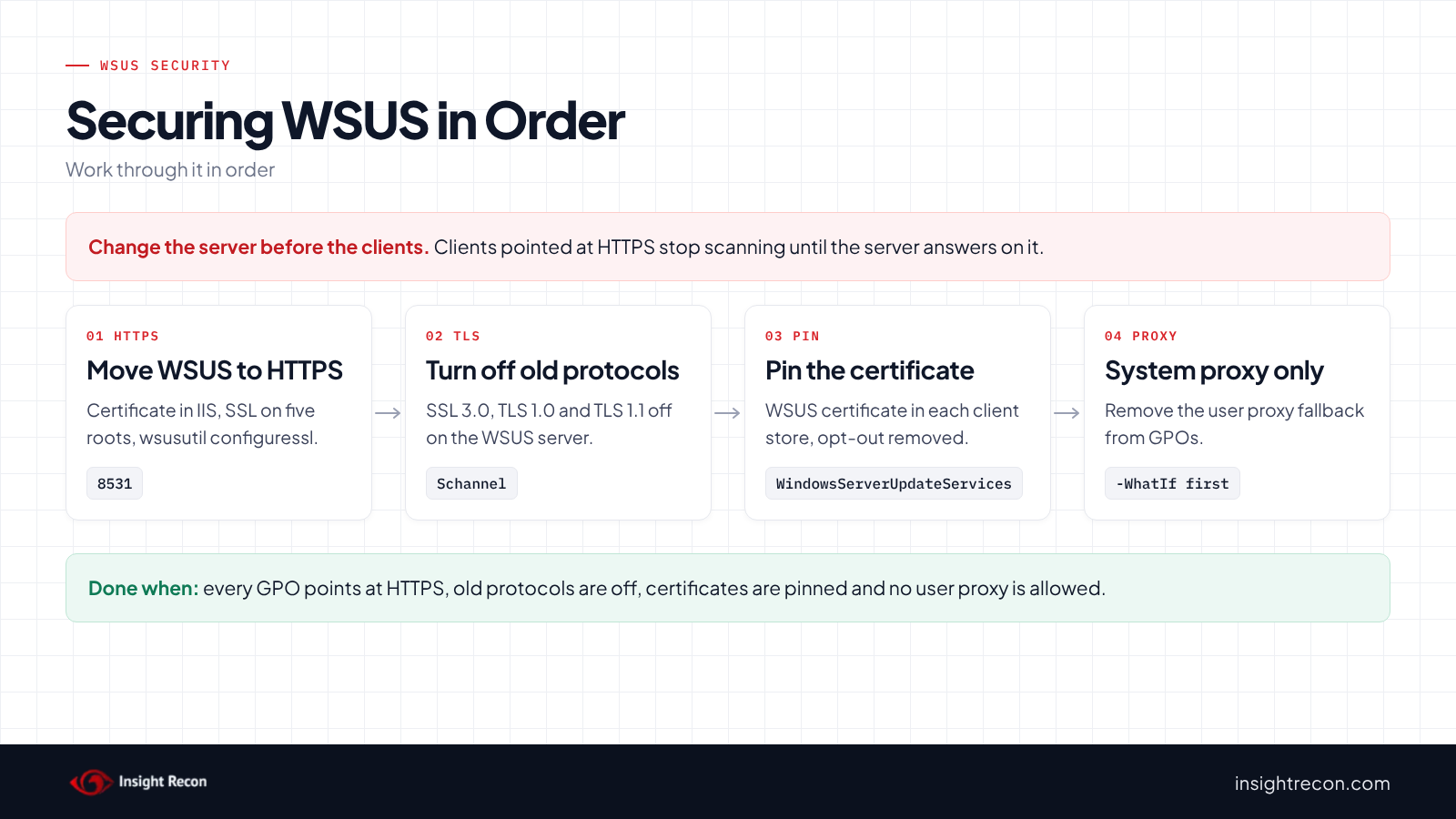
Each change script below is a dry run with -WhatIf. Drop that to apply. Change wsus01.contoso.com and WSUS Clients to your own names.
1. Move the WSUS server to HTTPS
First, bind the certificate to the HTTPS port in IIS and require SSL on the five virtual roots. Then run this on the WSUS server.
# Dry run. Drop -WhatIf to apply.
# Run on the WSUS server as a WSUS or local administrator, after binding a certificate for this name to
# the HTTPS port in IIS and requiring SSL on the five virtual roots Microsoft lists.
function Set-WsusHttps {
    [CmdletBinding(SupportsShouldProcess)]
    param([string]$Name = 'wsus01.contoso.com')
    $tool = Join-Path $env:ProgramFiles 'Update Services\Tools\wsusutil.exe'
    if (-not (Test-Path $tool)) { throw 'wsusutil.exe not found. Run this on the WSUS server.' }
    if ($PSCmdlet.ShouldProcess($Name, 'wsusutil configuressl')) {
        & $tool configuressl $Name
        if ($LASTEXITCODE -ne 0) { throw 'wsusutil configuressl failed.' }
    }
}
Set-WsusHttps -WhatIf
What to look for: the dry run names the server. After you apply it, browse to https://wsus01.contoso.com:8531/ClientWebService/client.asmx from a client and confirm the certificate is trusted.
2. Turn off SSL 3.0, TLS 1.0 and TLS 1.1
Next, this prints the current values and sets each old protocol to off on the server side. Microsoft notes a service restart may be needed for the change to apply.
# Dry run. Drop -WhatIf on each line to apply.
# Run on the WSUS server as a local administrator. Restart IIS or the server afterward.
$base = 'HKLM:\SYSTEM\CurrentControlSet\Control\SecurityProviders\SCHANNEL\Protocols'
foreach ($p in 'SSL 3.0', 'TLS 1.0', 'TLS 1.1') {
    $path = "$base\$p\Server"
    # Note the current value so you can put it back
    Get-ItemProperty -Path $path -Name Enabled -ErrorAction SilentlyContinue | Select-Object @{ n = 'Protocol'; e = { $p } }, Enabled
    if (-not (Test-Path $path)) { New-Item -Path $path -Force -WhatIf | Out-Null }
    New-ItemProperty -Path $path -Name Enabled -Value 0 -PropertyType DWord -Force -WhatIf | Out-Null
}
What to look for: the dry run should touch only the three old protocols. Then re-run the protocol script.
3. Point clients at HTTPS and remove the weak options
Once the server answers on HTTPS, this sets the HTTPS URL in one GPO and removes the user proxy and pinning opt-outs. It prints the current values first.
# Dry run. Drop -WhatIf to apply.
# Needs edit rights on the GPO (Domain Admins or delegated GPO editors).
Import-Module GroupPolicy -ErrorAction Stop
function Set-WsusClientPolicy {
    [CmdletBinding(SupportsShouldProcess)]
    param(
        [string]$GpoName = 'WSUS Clients',
        [string]$Url = 'https://wsus01.contoso.com:8531'
    )
    $gpo = Get-GPO -Name $GpoName -ErrorAction Stop
    $key = 'HKLM\Software\Policies\Microsoft\Windows\WindowsUpdate'
    # Note the current values so you can put them back
    Get-GPRegistryValue -Guid $gpo.Id -Key $key -ErrorAction SilentlyContinue | Select-Object ValueName, Value
    if ($PSCmdlet.ShouldProcess($GpoName, "Set WUServer and WUStatusServer to $Url and remove the user proxy and pinning opt-outs")) {
        foreach ($name in 'WUServer', 'WUStatusServer') {
            Set-GPRegistryValue -Guid $gpo.Id -Key $key -ValueName $name -Type String -Value $Url -ErrorAction Stop | Out-Null
        }
        foreach ($name in 'SetProxyBehaviorForUpdateDetection', 'DoNotEnforceEnterpriseTLSCertPinningForUpdateDetection') {
            Remove-GPRegistryValue -Guid $gpo.Id -Key $key -ValueName $name -ErrorAction SilentlyContinue | Out-Null
        }
    }
}
Set-WsusClientPolicy -WhatIf
What to look for: the dry run names the GPO and URL. In general, start with a pilot GPO, then move the rest.
4. Pin the WSUS certificate on clients
Finally, add the WSUS server's HTTPS certificate to the WindowsServerUpdateServices store on each client. A Microsoft engineer on the Tech Community forum notes Group Policy can't target that store, so use a startup script that runs certutil -addstore, or Intune or Configuration Manager. Afterward, run the client script to confirm.
Keep WSUS security in place over time
- Watch GPO changes. For example, any new GPO that sets a WSUS URL should use HTTPS and leave the proxy and pinning options alone.
- Renew the certificate on time. When it changes, also update the pinned copy on clients. Otherwise, scans fail.
- Check new WSUS servers. Run the protocol script before a new or rebuilt server takes traffic.
- Re-run the scan. The four checks flag the gap again if someone reopens it.
WSUS security checklist
- Does every GPO point clients at an
https://WSUS URL? - Are SSL 3.0, TLS 1.0 and TLS 1.1 off on every WSUS server?
- Is the WSUS certificate in each client's pinning store?
- Does no GPO turn pinning off?
- Does no GPO allow the user proxy for update scans?
- Did downstream servers and update points move too?
A "no" on the first question means clients may potentially accept updates from anyone who can sit in the traffic path.
Compliance mapping
| Framework | Reference | Why it applies |
|---|---|---|
| MITRE ATT&CK | T1557, T1195.002 | Adversary-in-the-Middle and Compromise Software Supply Chain. A weak update path lets someone tamper with updates (all four checks). |
| CIS Controls v8 | Control 4, Control 7 | Secure configuration and continuous vulnerability management. Patching depends on a trusted update channel (all four checks). |
| NIST CSF 2.0 | PR.DS-02, PR.PS-02 | Data in transit is protected and software is maintained securely (all four checks). |
WSUS security FAQ
Is WSUS over HTTP really a risk if updates are signed?
Yes. Microsoft says HTTP "breaks the chain of trust" for the metadata that tells clients what to install. Update files still travel over HTTP by design.
Which WSUS port should clients use?
The HTTPS port, 8531 by default, in both the update and statistics server boxes of the policy.
Is certificate pinning on by default?
Only once you add the WSUS certificate to each client's pinning store. With an empty store, clients don't pin.
Does the user proxy setting matter on HTTPS?
Yes. Since Microsoft's January 2021 change, scans of an HTTPS WSUS server only fall back to the user's proxy when this setting allows it. Without pinning, a proxy the user controls plus a trusted certificate for your WSUS name is still a way in. Remove it as you move to HTTPS.
Does Insight Recon check WSUS security?
Yes. The free scan includes WSUS Using HTTP, WSUS Using Weak SSL Protocol, WSUS Certificate Pinning Disabled and WSUS Configured With User Proxy.
See whether your update path has any of the four WSUS gaps.
It runs from any Windows machine that can reach your DCs, with a standard domain account. Every core AD check is free for one domain.
Not ready to scan?
AD Signal is our monthly look at what's changing in AD security and how real domains score. Read the latest report.
References
- Microsoft Learn: Policy CSP, Update
- Windows Update security (Microsoft Learn)
- Step 2: Configure WSUS (TLS and ports)
- TLS registry settings for Schannel
- Windows IT Pro Blog: Changes to improve security for Windows devices scanning WSUS
- Windows IT Pro Blog: Scan changes and certificates add security for WSUS
- MITRE ATT&CK: T1557 Adversary-in-the-Middle
- MITRE ATT&CK: T1195.002 Compromise Software Supply Chain