ADCS ESC16: Find CAs That Strip the SID From Every Certificate
ADCS ESC16 is a certificate authority set to leave the SID security extension out of every certificate it issues. That extension is what lets domain controllers tie a certificate to one exact account. Without it, any DC or service that still accepts weak mapping may potentially match certificates by name. This post shows you how to find the setting, turn the extension back on safely and reissue what the CA handed out without it.
| Priority | Critical, because one CA setting removes the SID binding from every certificate the CA issues |
|---|---|
| What decides it | The SID security extension OID, 1.3.6.1.4.1.311.25.2, listed in the CA's DisableExtensionList |
| Who's affected | Forests that disabled the extension as a 2022 compatibility workaround and never turned it back on |
| Fix | Remove the OID from the list, restart the CA, reissue what lacks the SID and enforce strong mapping everywhere |
Check it now: does any CA leave the SID out?
Import-Module ActiveDirectory -ErrorAction Stop
$pks = "CN=Public Key Services,CN=Services,$((Get-ADRootDSE).configurationNamingContext)"
foreach ($ca in Get-ADObject -SearchBase "CN=Enrollment Services,$pks" -LDAPFilter '(objectClass=pKIEnrollmentService)' -Properties dNSHostName) {
    $config = "$($ca.dNSHostName)\$($ca.Name)"
    $out = certutil -config $config -getreg policy\DisableExtensionList 2>&1 | Out-String
    [pscustomobject]@{
        CA                   = $config
        # A missing value means nothing is disabled
        SidExtensionDisabled = if ($out -match '0x80070002|FILE_NOT_FOUND') { $false }
                               elseif ($LASTEXITCODE -ne 0) { "couldn't read" }
                               else { $out -match '1\.3\.6\.1\.4\.1\.311\.25\.2' }
    }
}
Runs with the ActiveDirectory module and certutil, which ships with Windows. It finds every enterprise CA in AD and reads its DisableExtensionList. True means that CA is ESC16. couldn't read means you need to check that CA from an account with more access.
You checked one setting. The free scan checks the rest of your on-prem AD in a few minutes.
Nothing gets installed on your domain controllers. Only HTTPS leaves your network.
What ADCS ESC16 is
Since the May 10, 2022 update, enterprise CAs add a SID security extension to certificates issued from online templates. Microsoft's KB5014754 gives its OID as 1.3.6.1.4.1.311.25.2. The extension carries the requester's SID. With it, a domain controller can match the certificate to one exact account.
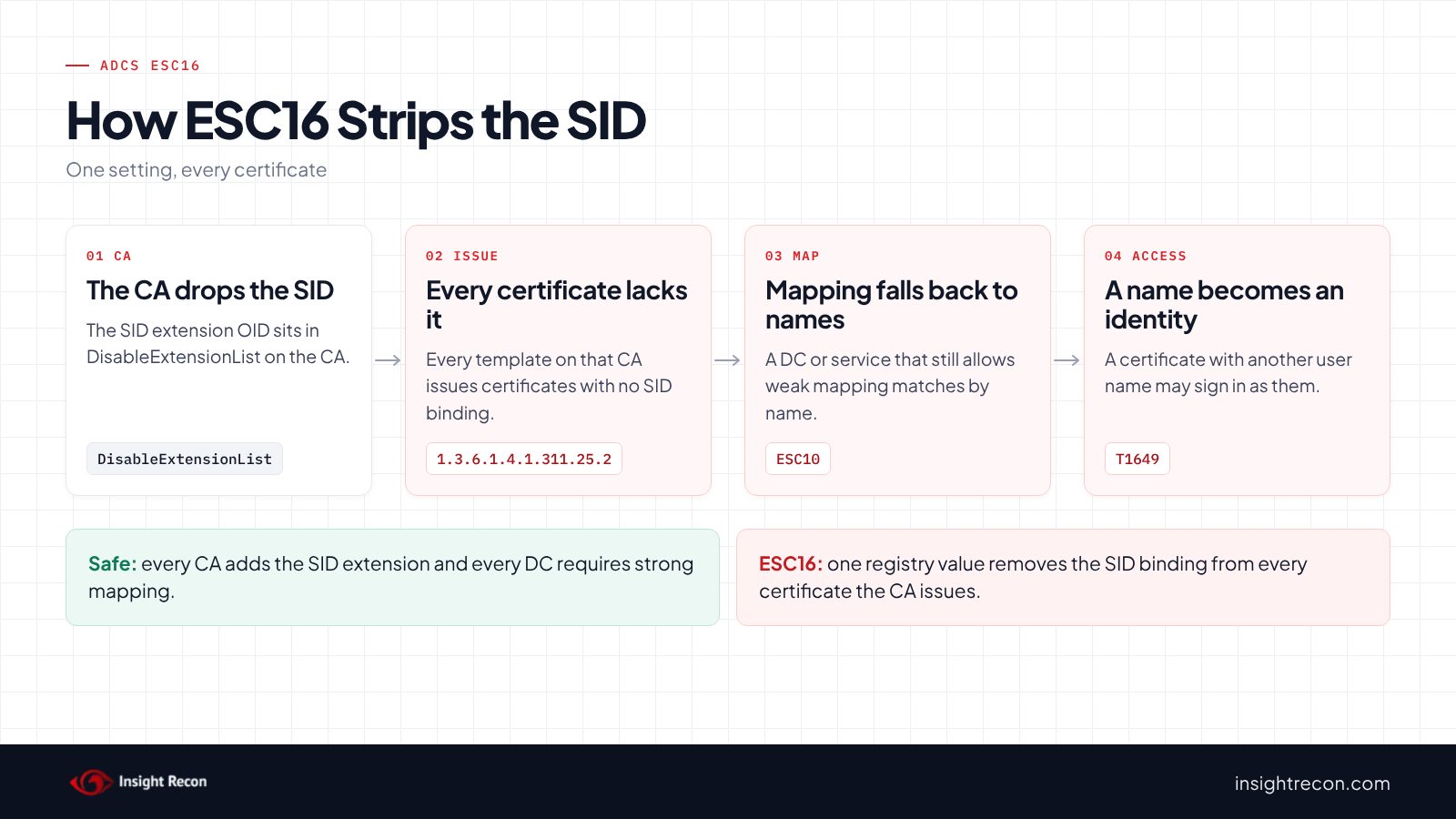
A CA also has a DisableExtensionList setting. A Microsoft Community Hub article describes it as a CA-wide list of extensions to leave out of new certificates. ESC16 is that list holding the SID extension's OID. As a result, every template on the CA issues certificates with no SID binding. Oliver Lyak published it as ESC16 with Certipy 5 in May 2025.
In contrast, KB5014754 documents only a per-template way to drop the extension. Microsoft says to consider it only when the certificates aren't used for sign-in or have other strong mappings. That per-template version is ESC9, covered in our ADCS ESC9 post. ESC16 is the same gap applied to the whole CA.
Why ADCS ESC16 is dangerous
Every template loses the SID at once
First, nobody has to touch a template. Instead, one registry value changes what the CA puts in every certificate. As a result, smart card, user, computer and custom templates all lose the binding together.
Weak mapping anywhere becomes a way in
Without the SID, a certificate can only be tied to an account by its names or by an explicit strong mapping. So any domain controller or service that still accepts weak mapping may potentially match a certificate to the wrong account. Combined with a CA or template that lets requesters choose the name, a certificate with another user's name may sign in as that user. MITRE ATT&CK tracks this as T1649, Steal or Forge Authentication Certificates.
Enforcement narrows it
Domain controllers moved to Full Enforcement with the February 2025 update. KB5014754 says that in that mode, "Authentication will be denied if a certificate cannot be strongly mapped." Compatibility mode lost support with the September 9, 2025 update. Still, full enforcement doesn't stop ESC16 when the same CA also lets requesters set the SAN (ESC6). Microsoft's [MS-PKCA] specification counts a SID written as a URL in the SAN as a strong match. So a requester can put the victim's name and SID in the SAN, then sign in as them. Schannel's UPN mapping is another way in on any update, since it maps TLS client certificates to accounts by UPN. Other systems may also trust your CA and match by name. Likewise, a DC that missed updates is exposed too. Our ADCS ESC10 post covers the DC side.
Find ESC16 in your forest
Read the quick check results
The quick check above returns one row per enterprise CA.
What to look for: True on any CA. Also re-check any couldn't read row from an account with administrator rights on that CA. A missing DisableExtensionList shows as False, which is the secure state.
Find out when the CA stopped adding the SID
Run this on a CA that showed True. It finds the last issued certificate that carried the SID extension and counts how many were issued after it.
# Run on the CA as a CA administrator or certificate manager.
function Get-RequestIds { $input | ConvertFrom-Csv | ForEach-Object { if ("$(@($_.PSObject.Properties.Value)[0])" -match '(\d+)\)?\s*$') { [int]$Matches[1] } } }
$issued = certutil -view -restrict 'Disposition=20' -out 'RequestID' csv | Get-RequestIds
if ($LASTEXITCODE -ne 0) { throw 'certutil could not read the CA database.' }
# 1.3.6.1.4.1.311.25.2 is the SID security extension
$withSid = certutil -view Ext -restrict 'ExtensionName=1.3.6.1.4.1.311.25.2' -out 'ExtensionRequestId' csv | Get-RequestIds
$lastWithSid = ($withSid | Measure-Object -Maximum).Maximum
$missing = @($issued | Where-Object { $_ -gt $lastWithSid })
[pscustomobject]@{
    LastRequestWithSid   = $lastWithSid
    IssuedAfterThat      = $missing.Count
    FirstWithoutSid      = ($missing | Measure-Object -Minimum).Minimum
}
if ($lastWithSid) {
    certutil -view -restrict "RequestID=$lastWithSid" -out 'RequestID,NotBefore,CertificateTemplate' csv | ConvertFrom-Csv
}
What to look for: the date on the last row shows roughly when the extension stopped. IssuedAfterThat is how many certificates you may need to reissue. Some of those may come from offline templates or ESC9 templates, which never carry the extension anyway. If LastRequestWithSid is empty, the CA has never added it.
Check how your DCs map certificates
Finally, confirm every DC enforces strong mapping and no Schannel setting re-enables weak mappings. The scripts in our ESC10 post read both on every DC.
Check ADCS ESC16 with Insight Recon
The free scan includes Certificate Authority Disables SID Security Extension in ADCS (ESC16), a Critical check. It reads each enterprise CA's registry and flags any CA whose active policy module lists 1.3.6.1.4.1.311.25.2 in DisableExtensionList. It drops to High only when the scan rules out the other ways in. The same CA can't let requesters set the SAN, so ESC6 there keeps it Critical. Every DC in the scanned domain also has to enforce strong mapping with Schannel's UPN mapping off. The forest can't have another domain whose DCs weren't scanned either. It also comes with the Hacker Insight, remediation steps and compliance mappings.
Know what the ADCS ESC16 check doesn't decide
Some things are still yours to check. If the scan can't read a CA's registry, the result names that CA and the reason. The check can't pass while any CA is unread, so it comes back not assessed unless another CA is flagged. Run the quick check from an account that can read that CA. The check reads DC settings only to set the severity. Pair it with the ESC10 check, which flags weak DCs on their own.
Related checks beyond ESC16
- Certificate Template Missing Security Extension in ADCS (ESC9), the same gap on one template. Our ADCS ESC9 post covers it.
- Weak Certificate Mapping on Domain Controllers in ADCS (ESC10), the DC settings that decide whether ESC16 can be used. Our ADCS ESC10 post covers it.
- Certificate Authority Allows Arbitrary SAN in ADCS (ESC6), a CA that lets requesters choose the name. Our ADCS ESC6 post covers it.
- Accounts with Weak Certificate Mappings, weak mappings on the accounts themselves. Our weak certificate mappings post covers it.
You can see what the findings look like in our sample report. The full list is in our check library.
Find every CA that strips the SID, plus the DC settings that decide whether it matters.
It runs from any Windows machine that can reach your DCs, with a standard domain account. Every core AD check is free for one domain.
Before you turn the SID back on
Find out why the extension was disabled. In many cases the reason ended with Full Enforcement.
Find out why it was disabled
Often the setting dates from 2022, when the extension first rolled out and some teams dropped it to avoid sign-in problems. Ask the PKI owner what broke at the time. If nobody knows, the date from the script above helps match it to a change ticket.
Know what changes
For one thing, removing the OID only affects certificates issued afterward. Existing certificates keep working or failing exactly as they do today. Since DCs in Full Enforcement already deny certificates they can't strongly map, new certificates with the SID will potentially sign in where old ones fail.
Plan a short pause in issuance
The change needs a Certificate Services restart, which pauses issuance for a moment. So pick a quiet time and let the help desk know.
Fix ADCS ESC16 safely
1. Remove the OID from each CA
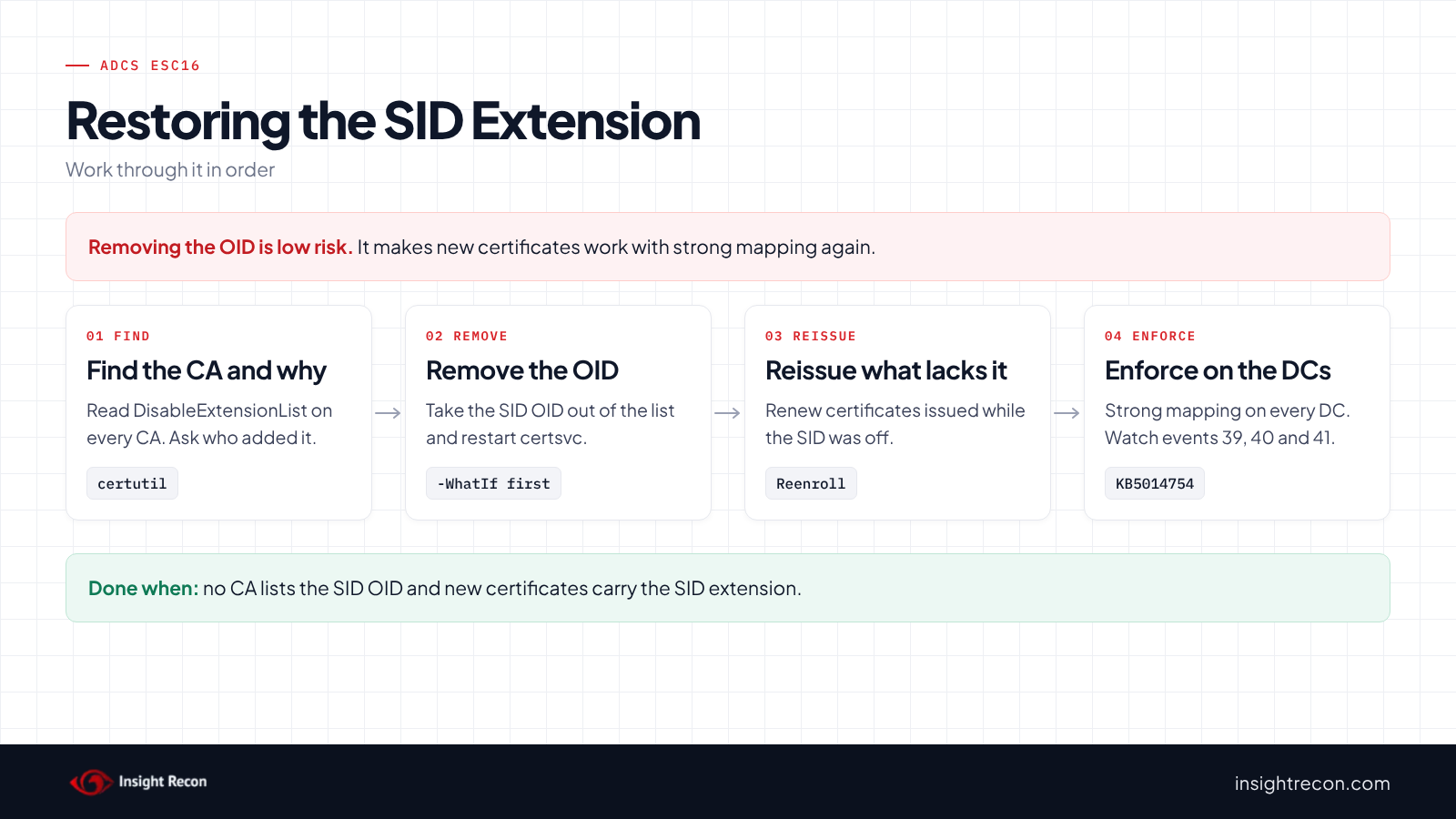
Run this on each CA that showed True, as a CA administrator. It prints the current list, removes only the SID extension's OID and restarts Certificate Services. Microsoft's certutil reference explains that a - prefix removes one string from a multi-string value like this one.
# Dry run. Drop -WhatIf to apply.
# Run on the CA as a CA administrator. Restarts Certificate Services, which pauses issuance briefly.
function Enable-SidSecurityExtension {
    [CmdletBinding(SupportsShouldProcess)]
    param()
    # Note the current list so you can put it back
    certutil -getreg policy\DisableExtensionList
    if ($PSCmdlet.ShouldProcess($env:COMPUTERNAME, 'Remove 1.3.6.1.4.1.311.25.2 from DisableExtensionList and restart certsvc')) {
        certutil -setreg policy\DisableExtensionList -1.3.6.1.4.1.311.25.2
        if ($LASTEXITCODE -ne 0) { throw 'certutil failed. Nothing was restarted.' }
        Restart-Service -Name certsvc -ErrorAction Stop
    }
}
Enable-SidSecurityExtension -WhatIf
What to look for: the dry run should show the current list and the one change. After you apply it, the quick check should show False for that CA.
2. Confirm new certificates carry the SID
Request a test certificate from a user or computer template. Then open it and look for 1.3.6.1.4.1.311.25.2 on the Details tab. Afterward, re-run the script that finds when the CA stopped adding the SID. LastRequestWithSid should now be your test request.
3. Reissue certificates issued without the SID
For templates that use autoenrollment, right-click the template in the Certificate Templates console and choose Reenroll All Certificate Holders. For certificates requested by hand, renew them from the same template. In general, start with smart card and other sign-in templates.
4. Enforce strong mapping everywhere
Make sure every DC has current updates and no GPO puts weak Schannel mappings back. Our ESC10 post has the scripts.
Keep ADCS ESC16 closed
Microsoft's list of PKI events to monitor covers changes to CA settings. These events need CA auditing turned on.
- Watch CA configuration changes. Event 4891 logs configuration entries changed in Certificate Services. For changes made straight to the registry, audit the policy module's key and watch event 4657.
- Watch mapping failures on DCs. KB5014754 lists event 39 for a certificate the DC couldn't strongly map. A jump in those events may mean a CA stopped adding the SID again.
- Check new CAs. Run the quick check before a new CA issues anything.
- Re-run the scan. It flags any CA that lists the OID again.
ADCS ESC16 checklist
- Does any CA list
1.3.6.1.4.1.311.25.2inDisableExtensionList? - Did you read every CA, including ones the scan couldn't reach?
- Do new certificates show the SID extension?
- Did you reissue certificates issued while it was off?
- Do all DCs require strong mapping, with no weak Schannel mappings?
- Is CA configuration auditing on?
A "yes" on the first question means every certificate from that CA may potentially be matched by name wherever weak mapping still works.
Compliance mapping
| Framework | Reference | Why it applies |
|---|---|---|
| MITRE ATT&CK | T1649 | Steal or Forge Authentication Certificates. Certificates without the SID can be matched to the wrong account. |
| CIS Controls v8 | Control 4, Control 6 | Secure configuration of enterprise assets and access control management. CA settings decide how sign-in works. |
| NIST CSF 2.0 | PR.AA-01, PR.AA-03 | Credentials are managed and users are authenticated. The SID extension binds each certificate to one identity. |
ADCS ESC16 FAQ
What is ADCS ESC16?
A CA that leaves the SID security extension out of every certificate it issues, because its OID is in DisableExtensionList.
How is ESC16 different from ESC9?
ESC9 drops the extension on one template. ESC16 drops it on every template the CA issues.
Does Full Enforcement make ESC16 safe?
It helps, but it doesn't close ESC16 by itself. DCs in Full Enforcement deny certificates they can't strongly map. If the same CA allows ESC6, though, a requester can put the victim's SID in the SAN and pass that check. Schannel's UPN mapping still matches by name on any update. So may other systems that trust your CA, or a DC that missed updates.
Do I need to reissue certificates?
Yes, for sign-in certificates issued while the extension was off. The fix only applies to new certificates.
Does Insight Recon check for ADCS ESC16?
Yes. The free scan includes Certificate Authority Disables SID Security Extension in ADCS (ESC16), along with the other ADCS checks.
See whether any CA strips the SID from your certificates.
It runs from any Windows machine that can reach your DCs, with a standard domain account. Every core AD check is free for one domain.
Not ready to scan?
AD Signal is our monthly look at what's changing in AD security and how real domains score. Read the latest report.
References
- KB5014754: Certificate-based authentication changes on Windows domain controllers
- Microsoft Learn: [MS-PKCA] 3.1.5.2.1.6 SID
- How to exclude the certificate template name from certificates (DisableExtensionList)
- Microsoft Learn: certutil command reference
- Certipy 5 release, which introduced ESC16
- Securing PKI, Appendix A: Events to Monitor
- MITRE ATT&CK: T1649 Steal or Forge Authentication Certificates