ADCS ESC15: Find and Retire Risky Version 1 Templates
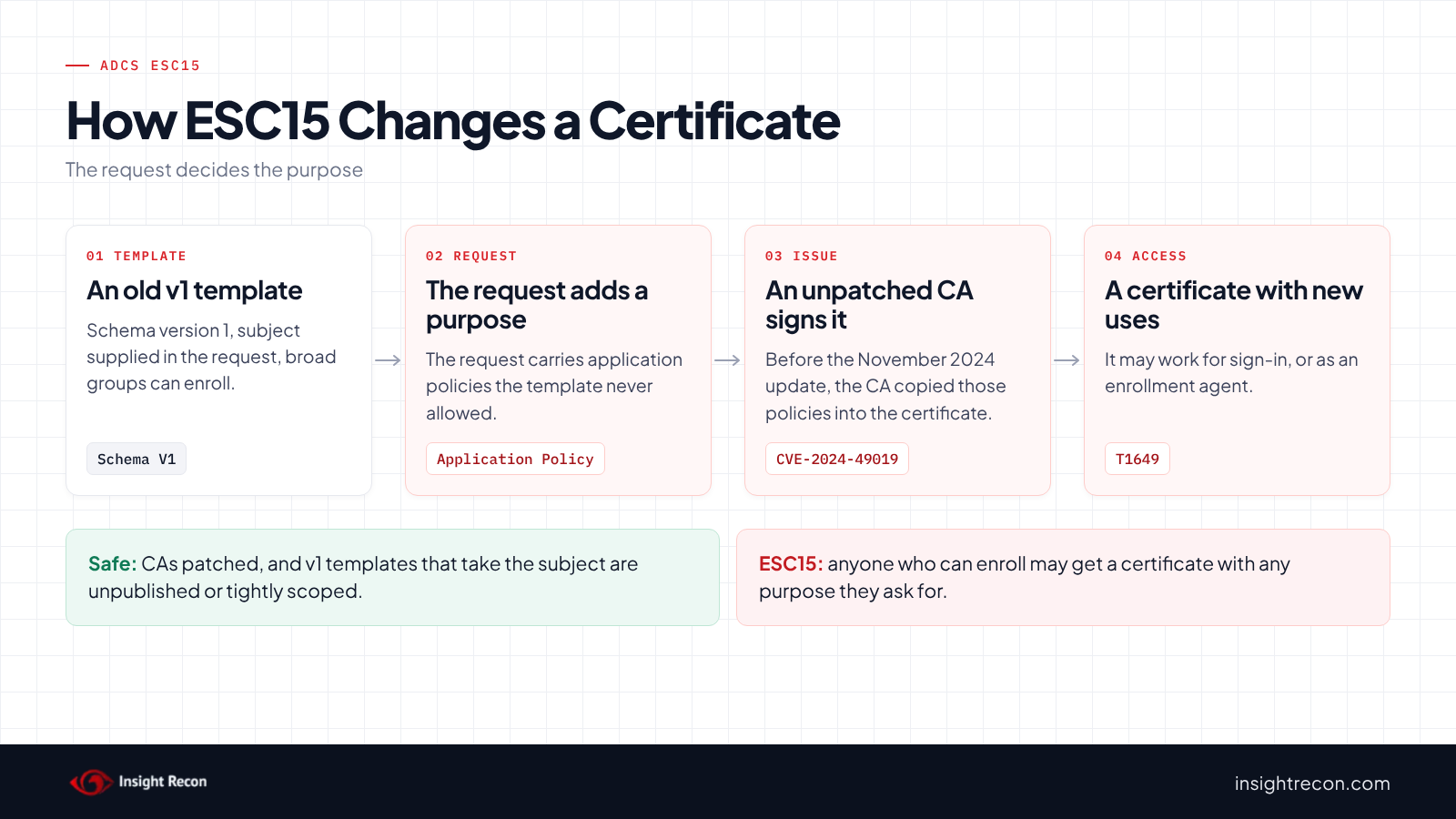
ADCS ESC15 is an old schema version 1 certificate template that takes the subject from the request and lets broad groups enroll. On a CA without the November 2024 update, a requester may potentially add purposes the template never allowed, such as sign-in. This post shows you how to find these templates, confirm your CAs are patched and move to a safer copy without breaking the servers that use them.
| Priority | High, because anyone who can enroll on an unpatched CA may potentially get a certificate that works for sign-in |
|---|---|
| What decides it | A schema version 1 template that takes the subject from the request, where a broad group can enroll |
| Who's affected | CAs missing the November 2024 update and forests that still publish a version 1 template such as Web Server to broad groups |
| Fix | Patch every CA. Then remove broad Enroll grants, or publish a version 2 copy and stop issuing the version 1 template |
Check it now: which version 1 templates take the subject from the request?
# Runs as any domain user. Lists version 1 templates that take the subject from the request,
# where each one is published and who can enroll.
Import-Module ActiveDirectory -ErrorAction Stop
$pks = "CN=Public Key Services,CN=Services,$((Get-ADRootDSE).configurationNamingContext)"
# Everyone, NETWORK, INTERACTIVE, Anonymous, Authenticated Users, This Organization, Users
$low = 'S-1-1-0', 'S-1-5-2', 'S-1-5-4', 'S-1-5-7', 'S-1-5-11', 'S-1-5-15', 'S-1-5-32-545'
# Domain Users, Domain Guests and Domain Computers of any domain
$lowRid = '^S-1-5-21-\d+-\d+-\d+-51[345]$'
$enroll = [guid]'0e10c968-78fb-11d2-90d4-00c04f79dc55', [guid]::Empty
$full = [System.DirectoryServices.ActiveDirectoryRights]::GenericAll
$cas = Get-ADObject -SearchBase "CN=Enrollment Services,$pks" -LDAPFilter '(objectClass=pKIEnrollmentService)' -Properties certificateTemplates
Get-ADObject -SearchBase "CN=Certificate Templates,$pks" -LDAPFilter '(msPKI-Certificate-Name-Flag:1.2.840.113556.1.4.803:=1)' -Properties msPKI-Template-Schema-Version, nTSecurityDescriptor |
    Where-Object { [int]$_.'msPKI-Template-Schema-Version' -le 1 } |
    ForEach-Object {
        $t = $_
        $enrollers = $t.nTSecurityDescriptor.GetAccessRules($true, $true, [System.Security.Principal.SecurityIdentifier]) |
            Where-Object {
                $_.AccessControlType -eq 'Allow' -and (
                    (($_.ActiveDirectoryRights -band $full) -eq $full) -or
                    (($_.ActiveDirectoryRights -band 'ExtendedRight') -and $_.ObjectType -in $enroll))
            } |
            ForEach-Object {
                $sid = $_.IdentityReference
                try { $name = $sid.Translate([System.Security.Principal.NTAccount]).Value } catch { $name = $sid.Value }
                if ($sid.Value -in $low -or $sid.Value -match $lowRid) { "$name (low privilege)" } else { $name }
            }
        [pscustomobject]@{
            Template    = $t.Name
            PublishedOn = ($cas | Where-Object { $_.certificateTemplates -contains $t.Name }).Name -join ', '
            Enrollers   = ($enrollers | Sort-Object -Unique) -join '; '
        }
    }
Runs as any domain user with the ActiveDirectory module. It lists every version 1 template that takes the subject from the request, the CAs that publish it and who can enroll. A row with a CA in PublishedOn and a (low privilege) enroller is the ESC15 pattern.
You checked one setting. The free scan checks the rest of your on-prem AD in a few minutes.
Nothing gets installed on your domain controllers. Only HTTPS leaves your network.
What ADCS ESC15 is
Certificate templates come in schema versions. Microsoft's page on version 1 templates says they "are created by default when a certification authority is installed and cannot be modified or removed." Instead, you duplicate one to get a version 2 template you can edit. Web Server is the best-known example. It lets the requester supply the subject name.
Certificates also carry two lists of what they can be used for. Microsoft's application policy reference explains that Windows CAs add both application policies and enhanced key usage, because some software can only read the second.
In October 2024, TrustedSec published their ESC15 research, which they call EKUwu. They found that for version 1 templates, the CA accepted application policies supplied in the request. As a result, a requester could add purposes the template never allowed. Microsoft tracks it as CVE-2024-49019 and fixed it in the November 12, 2024 security update.
Why ADCS ESC15 is dangerous
The template's purpose stops mattering
Web Server certificates are meant for TLS. However, TrustedSec showed requests that added client authentication, certificate request agent or code signing purposes. Because the requester also supplies the subject, the result can potentially sign in as someone else. Microsoft's advisory says an attacker who exploits it "could gain domain administrator privileges."
The template stays risky after patching
The update changes how the CA handles the request. Even so, a version 1 template that takes the subject from the request and lets a broad group enroll is still risky. Anyone in that group can request a certificate for any name the template allows. Microsoft's advisory lists the same conditions to look for: published version 1 templates with the subject supplied in the request and Enroll granted to groups like Domain Users or Domain Computers.
Any CA you missed reopens it
One unpatched CA that publishes the template is enough. MITRE ATT&CK tracks this kind of certificate misuse as T1649, Steal or Forge Authentication Certificates.
Find ESC15 in your forest
Read the quick check results
The quick check above returns one row per version 1 template that takes the subject from the request. Templates such as SubCA usually show only admin groups as enrollers. This is expected.
What to look for: any row with a CA in PublishedOn and a (low privilege) group in Enrollers. Also look for custom groups with many members, such as a group of every server admin. An unpublished template can't be used today. Still, anyone who can change a CA's templates could publish it.
Check that every CA has the fix
This compares each CA's build and revision with the November 12, 2024 update. It reads the registry on every CA listed in AD.
# Run as an account with local administrator rights on each CA. Compares each CA's build and revision with the November 2024 update.
Import-Module ActiveDirectory -ErrorAction Stop
$pks = "CN=Public Key Services,CN=Services,$((Get-ADRootDSE).configurationNamingContext)"
$november2024 = @{ 14393 = 7515; 17763 = 6532; 20348 = 2849; 25398 = 1251; 26100 = 2314 }
foreach ($ca in Get-ADObject -SearchBase "CN=Enrollment Services,$pks" -LDAPFilter '(objectClass=pKIEnrollmentService)' -Properties dNSHostName) {
    try {
        $reg = [Microsoft.Win32.RegistryKey]::OpenRemoteBaseKey('LocalMachine', $ca.dNSHostName)
        $cv = $reg.OpenSubKey('SOFTWARE\Microsoft\Windows NT\CurrentVersion')
        $build = [int]$cv.GetValue('CurrentBuildNumber')
        $ubr = [int]$cv.GetValue('UBR')
        $level = 'check its update history'
        if ($november2024.ContainsKey($build)) {
            $level = if ($ubr -ge $november2024[$build]) { 'November 2024 or later' } else { 'older than November 2024' }
        }
        [pscustomobject]@{ CA = $ca.Name; Server = $ca.dNSHostName; Build = "$build.$ubr"; UpdateLevel = $level }
    } catch {
        [pscustomobject]@{ CA = $ca.Name; Server = $ca.dNSHostName; Build = "couldn't read"; UpdateLevel = '' }
    }
}
What to look for: any CA marked older than November 2024. On those, anyone who can enroll in a version 1 template that takes the subject may potentially add purposes today. A hotpatch build can show up as older here, so check its update history. The same goes for a build the script doesn't know, like Windows Server 2012 R2.
Check what a version 1 template already issued
Run this on the CA. It lists certificates issued from one version 1 template that also carry an Application Policies extension.
# Run on the CA as a CA administrator or certificate manager.
# Version 1 templates are recorded by name in the CA database. Replace WebServer with yours.
$template = 'WebServer'
function Get-RequestIds { $input | ConvertFrom-Csv | ForEach-Object { if ("$(@($_.PSObject.Properties.Value)[0])" -match '(\d+)\)?\s*$') { [int]$Matches[1] } } }
$issued = certutil -view -restrict "CertificateTemplate=$template,Disposition=20" -out 'RequestID' csv | Get-RequestIds
if ($LASTEXITCODE -ne 0) { throw 'certutil could not read the CA database.' }
# 1.3.6.1.4.1.311.21.10 is the Application Policies extension
$withPolicy = certutil -view Ext -restrict 'ExtensionName=1.3.6.1.4.1.311.21.10' -out 'ExtensionRequestId' csv | Get-RequestIds
foreach ($id in ($issued | Where-Object { $_ -in $withPolicy })) {
    certutil -view -restrict "RequestID=$id" -out 'RequestID,RequesterName,CommonName,NotBefore,SerialNumber' csv | ConvertFrom-Csv
}
What to look for: open each listed certificate from the CA console (Issued Certificates) and read its Application Policies on the Details tab. Client Authentication, Certificate Request Agent or Code Signing on a Web Server certificate means someone potentially used ESC15. In that case, treat it as an incident.
Check ADCS ESC15 with Insight Recon
The free scan includes Schema V1 Certificate Template Allows Arbitrary Application Policy in ADCS (ESC15), a High check, rated Moderate when the scan shows every CA that publishes the listed templates has the November 2024 or later update. It lists every published schema version 1 template where the enrollee supplies the subject, with no approval or authorized signature required. A template with no schema version counts too, since the CA treats it as version 1. A broad group also has to hold Enroll, all extended rights or full control. Broad groups here are Everyone, Anonymous, Authenticated Users, NETWORK, INTERACTIVE, This Organization and Users. Domain Users, Domain Guests and Domain Computers from any domain count too. A deny entry only cancels a right when it comes earlier on the template and names that same group, Everyone, Authenticated Users or NETWORK. Owners and accounts that can only edit the template show up under ESC4 instead. For each template, the finding shows the groups and the rights they hold. It also comes with the Hacker Insight, remediation steps and compliance mappings.
Know what the ADCS ESC15 check doesn't decide
Some things are still yours to check. If the scan can't read a CA's build, run the patch script above. The check skips templates no CA publishes. If it can't read a CA's template list, it treats every template as published, so it may list one nobody can request right now. When unpublished templates would match, a note on the result says how many. They show up in the script above with an empty PublishedOn. It also doesn't count custom groups with many members, so check those yourself.
Related checks beyond ESC15
- User-controlled certificate template subject in ADCS (ESC1), the same supplied-subject risk on templates built for sign-in. Our ADCS ESC1 post covers it.
- Unrestricted certificate template with any purpose in ADCS (ESC2), templates that allow any purpose by design. Our ADCS ESC2 post covers it.
- Unrestricted certificate template modification rights in ADCS (ESC4), who can change your templates. Our ADCS ESC4 post covers it.
- Server Authentication Template with Enrollee-Supplied Subject in ADCS (ESC17), server certificates for any name, which patching doesn't fix. Our ADCS ESC17 post covers it.
You can see what the findings look like in our sample report. The full list is in our check library.
Find every risky version 1 template, plus the other ADCS attack paths.
It runs from any Windows machine that can reach your DCs, with a standard domain account. Every core AD check is free for one domain.
Before you change the template
Find out who requests certificates from the template. Then build the version 2 copy around them before you stop issuing the old one.
Find out who uses it
The certificates the CA issued from the template show who uses it. Run the issued script without the Application Policies filter, or filter Issued Certificates in the CA console by template. For example, server admins may request TLS certificates by hand. Similarly, an appliance or load balancer may enroll on a schedule. Ask the owners what names they need and how often they renew.
Plan the version 2 copy
- Keep the supplied subject only if requesters really need to choose names. In that case, grant Enroll to a small group and turn on CA certificate manager approval.
- Build the subject from AD when the requesters are domain-joined servers. Then the name comes from the computer account.
- Keep the purpose narrow. A web server certificate needs Server Authentication and nothing else.
Save the current state
The Enroll script saves the template's permissions to an SDDL file before it changes anything. The swap script prints the CA's current template list first. Keep both until you're sure nothing broke.
Fix ADCS ESC15 safely
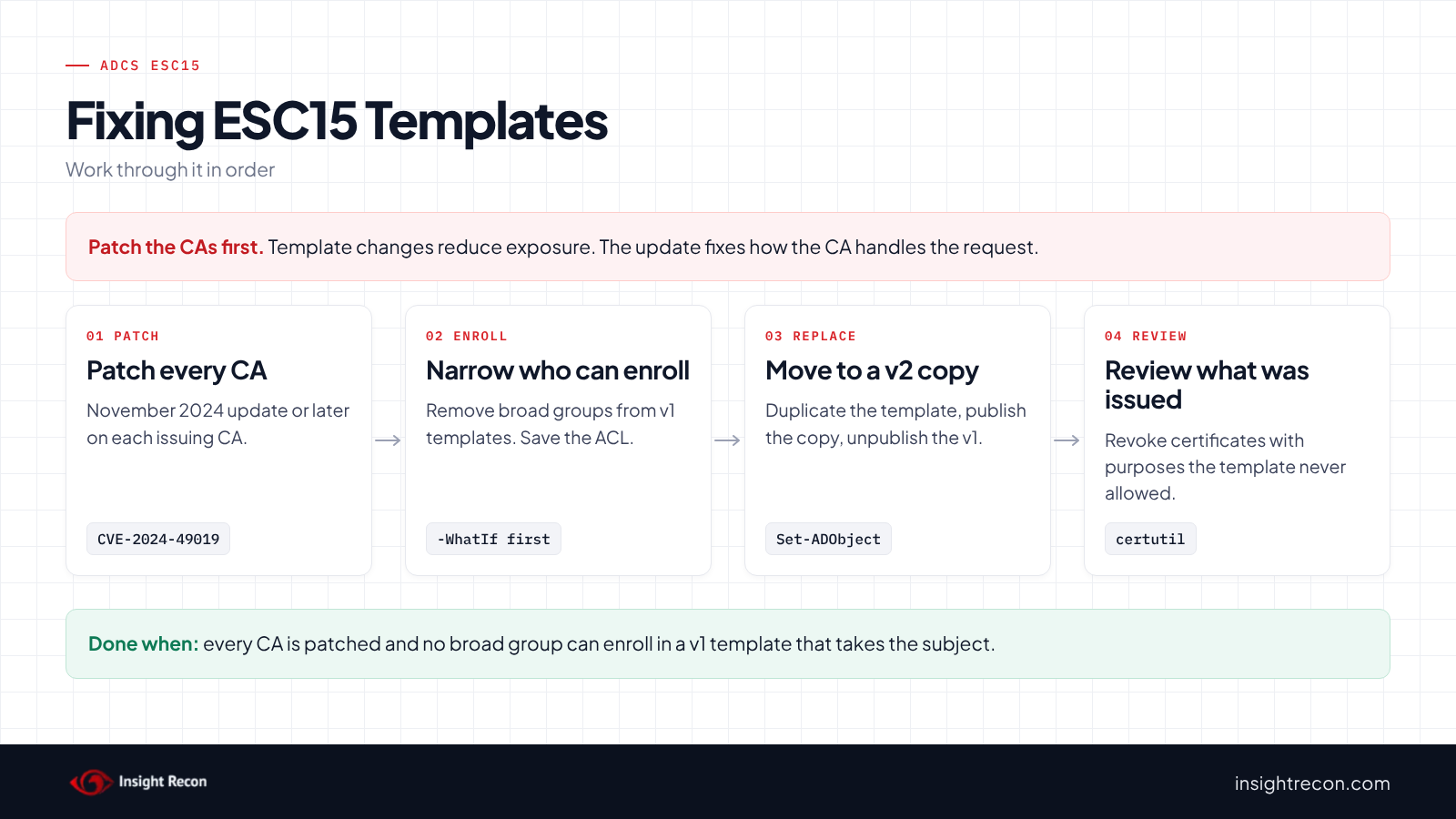
Each change script below is a dry run with -WhatIf. Drop that to apply. They need Enterprise Admins. Change WebServer, ContosoWebServer and Contoso-CA to your own names.
1. Patch every CA
Install the November 2024 cumulative update or any later one on each issuing CA, then restart it. Afterward, re-run the patch script to confirm.
2. Remove broad Enroll grants
This removes Enroll from Everyone, Authenticated Users, Domain Users, Domain Computers and the other broad groups on one template. It saves the current permissions first and warns about grants it can't safely split.
# Dry run. Drop -WhatIf to apply.
# Needs Enterprise Admins, or permission to change the template's security.
Import-Module ActiveDirectory -ErrorAction Stop
$pks = "CN=Public Key Services,CN=Services,$((Get-ADRootDSE).configurationNamingContext)"
$t = Get-ADObject -SearchBase "CN=Certificate Templates,$pks" -LDAPFilter '(cn=WebServer)'
if (-not $t) { throw 'Template not found.' }
$low = 'S-1-1-0', 'S-1-5-2', 'S-1-5-4', 'S-1-5-7', 'S-1-5-11', 'S-1-5-15', 'S-1-5-32-545'
$lowRid = '^S-1-5-21-\d+-\d+-\d+-51[345]$'
$enrollRights = [guid]'0e10c968-78fb-11d2-90d4-00c04f79dc55', [guid]::Empty
$path = "AD:$($t.DistinguishedName)"
$acl = Get-Acl -Path $path -ErrorAction Stop
# Saves the current permissions so you can put them back
$acl.Sddl | Set-Content -Path ".\$($t.Name)-acl.sddl"
foreach ($ace in $acl.GetAccessRules($true, $false, [System.Security.Principal.SecurityIdentifier])) {
    if ($ace.AccessControlType -ne 'Allow' -or ($ace.IdentityReference.Value -notin $low -and $ace.IdentityReference.Value -notmatch $lowRid)) { continue }
    if ($ace.ActiveDirectoryRights -eq 'ExtendedRight' -and $ace.ObjectType -in $enrollRights) {
        [void]$acl.RemoveAccessRuleSpecific($ace)
    } elseif ($ace.ActiveDirectoryRights -band [System.DirectoryServices.ActiveDirectoryRights]::ExtendedRight) {
        Write-Warning "$($ace.IdentityReference) holds Enroll combined with other rights. Fix it on the template's Security tab."
    }
}
Set-Acl -Path $path -AclObject $acl -ErrorAction Stop -WhatIf
What to look for: the dry run should show only the broad groups' Enroll entries being removed. Then add Enroll for the small group that really requests these certificates.
3. Move to a version 2 copy
In the Certificate Templates console, right-click the template and choose Duplicate Template. Next, set the subject, approval and Security tabs from your plan. Then publish the copy and stop issuing the old template in one change.
# Dry run. Drop -WhatIf to apply.
# Needs Enterprise Admins, or write rights on the CA's enrollment services object.
Import-Module ActiveDirectory -ErrorAction Stop
$pks = "CN=Public Key Services,CN=Services,$((Get-ADRootDSE).configurationNamingContext)"
$old = 'WebServer'
$new = 'ContosoWebServer'
$ca = Get-ADObject -SearchBase "CN=Enrollment Services,$pks" -LDAPFilter '(cn=Contoso-CA)' -Properties certificateTemplates
if (-not $ca) { throw 'CA not found.' }
if (-not (Get-ADObject -SearchBase "CN=Certificate Templates,$pks" -LDAPFilter "(cn=$new)")) { throw "Create $new first." }
if ($ca.certificateTemplates -notcontains $old) { throw "$old isn't published on this CA." }
# Note what the CA issues now so you can put it back
$ca.certificateTemplates
$change = @{ Remove = @{ certificateTemplates = $old } }
if ($ca.certificateTemplates -notcontains $new) { $change.Add = @{ certificateTemplates = $new } }
Set-ADObject -Identity $ca @change -ErrorAction Stop -WhatIf
What to look for: the dry run shows the new template being added and the old one removed. Allow time for AD replication before the CA picks up the change.
4. Revoke certificates with purposes the template never allowed
For each certificate the issued check turned up, revoke it on the CA with certutil -revoke and its serial number. Then review recent sign-ins for the name in its subject.
Keep ADCS ESC15 closed
Microsoft's list of PKI events to monitor covers the two that matter here. Both need CA auditing turned on.
- Watch template loads. Event 4898 fires when a CA loads a template and includes its schema version. Alert when a Schema V1 template you meant to retire shows up again.
- Watch issuance. Event 4887 fires for every issued certificate. Microsoft recommends monitoring certificates with usages like Enrollment Agent and Code Signing.
- Patch new CAs first. Install current updates before a new CA issues anything.
- Re-run the scan. It flags any version 1 template that broad groups can enroll in again.
ADCS ESC15 checklist
- Does every CA have the November 2024 update or a later one?
- Can broad groups still enroll in any version 1 template that takes the subject?
- Did you replace published version 1 templates with version 2 copies?
- Do the copies use approval or a subject built from AD?
- Did you revoke certificates with purposes the template never allowed?
- Is CA auditing on, with alerts for events 4887 and 4898?
A "no" on the first question means anyone who can enroll in a version 1 template on that CA may potentially get a certificate for sign-in.
Compliance mapping
| Framework | Reference | Why it applies |
|---|---|---|
| MITRE ATT&CK | T1649 | Steal or Forge Authentication Certificates. A request adds purposes the template never allowed. |
| CIS Controls v8 | Control 4, Control 6 | Secure configuration of enterprise assets and access control management. Templates and enrollment rights are both in scope. |
| NIST CSF 2.0 | PR.AA-01, PR.AA-02, PR.AA-05 | Credentials are managed, bound to the right identities and limited to least privilege. A certificate with added purposes breaks all three. |
ADCS ESC15 FAQ
What is ADCS ESC15?
A schema version 1 template that takes the subject from the request and lets broad groups enroll. On an unpatched CA, the request can potentially add purposes such as sign-in.
Did the November 2024 update fix ESC15?
It fixed CVE-2024-49019 on the CA. However, you should still replace a version 1 template that lets broad groups supply the subject.
Can I just edit the version 1 template?
No. Microsoft says version 1 templates can't be modified. Duplicate it to a version 2 copy and change that instead.
Is Web Server the only template affected?
No. Any version 1 template with the subject supplied in the request can be affected. Web Server is just the most common one.
Does Insight Recon check for ADCS ESC15?
Yes. The free scan includes Schema V1 Certificate Template Allows Arbitrary Application Policy in ADCS (ESC15), along with the other ADCS checks.
See which version 1 templates broad groups can still enroll in.
It runs from any Windows machine that can reach your DCs, with a standard domain account. Every core AD check is free for one domain.
Not ready to scan?
AD Signal is our monthly look at what's changing in AD security and how real domains score. Read the latest report.
References
- CVE-2024-49019: Active Directory Certificate Services Elevation of Privilege Vulnerability
- TrustedSec: EKUwu, Not Just Another AD CS ESC
- Version 1 certificate templates (Microsoft Learn)
- Application Policy (Microsoft Learn)
- Securing PKI, Appendix A: Events to Monitor
- MITRE ATT&CK: T1649 Steal or Forge Authentication Certificates