Passwords in AD Descriptions: Find and Remove the Ones Any User Can Read
On November 5, Microsoft reported an AI agent going from a GitHub search for leaked secrets to pulling data out of Azure Key Vault in five minutes. Inside your domain, that search is one LDAP query. Any domain user can read every account's description. In most domains they can read the userPassword attribute too. This post shows you how to find passwords left in either place, see how long they've been exposed and clean them up without breaking whatever still uses them.
| Priority | High. A password any domain user can read works for whoever reads it |
|---|---|
| What decides it | Text that looks like a password in the description of a user account or gMSA. Also any value in userPassword or unixUserPassword on an enabled account |
| Who's affected | Help desks that leave new-hire or service account passwords in descriptions. Also domains where old UNIX integrations wrote passwords to user attributes |
| Fix | Change each exposed password first. Then remove the copy from AD and find where else that password was used |
Check it now: which accounts have a password in their description?
Import-Module ActiveDirectory -ErrorAction Stop
$words = 'pass|pwd|pw\s*[:=]|p/w|\bmdp\b|kennwort|wachtwoord|contrase|senha|salasana|l[o\u00f6]senord|has[l\u0142]o'
Get-ADObject -LDAPFilter '(&(objectClass=user)(|(description=*)(info=*)))' -Properties sAMAccountName, description, info |
    Where-Object { "$($_.description) $($_.info)" -match $words } |
    Select-Object sAMAccountName, ObjectClass,
        @{ n = 'Description'; e = { $_.description -join ' ' } }, @{ n = 'Notes'; e = { $_.info } }
Runs as any domain user with the ActiveDirectory module. It lists every account, computers included, with a password word in its description or Notes field. It looks for English and a few other languages. Expect a few false hits like passport or bypass. A password on its own with no label won't match, so drop the Where-Object line to read every description. The output shows the text itself, so don't save it to a share or paste it into a ticket. Run it in each domain of a forest.
You checked one setting. The free scan checks the rest of your on-prem AD in a few minutes.
Nothing gets installed on your domain controllers. Only HTTPS leaves your network.
What passwords in AD descriptions and attributes are
Every account in AD has a description field. It's the Description box on the General tab in Active Directory Users and Computers. It's meant for a short note about the account. The Notes box on the Telephones tab writes to the info attribute and gets used the same way. Both are free text, so they end up holding things like svc-backup pw: Summer2019! or a new hire's first password.
Then there are attributes built for passwords. The one to know is userPassword. In AD Lightweight Directory Services it works as a real password. In a normal domain it doesn't. Microsoft's protocol docs say AD treats it as an ordinary attribute by default, so it keeps whatever an app writes there. Old UNIX integrations stored passwords there. Some used unixUserPassword instead, which arrived with Windows Server 2003 R2. Older ones used msSFU30Password from Services for UNIX. IBM's AIX documentation lists all three as places AIX can check a password against.
Some of those values are a crypt hash rather than the password itself. That's not much better, since anyone who reads a hash can try to crack it offline.
Why passwords in AD descriptions are as good as public
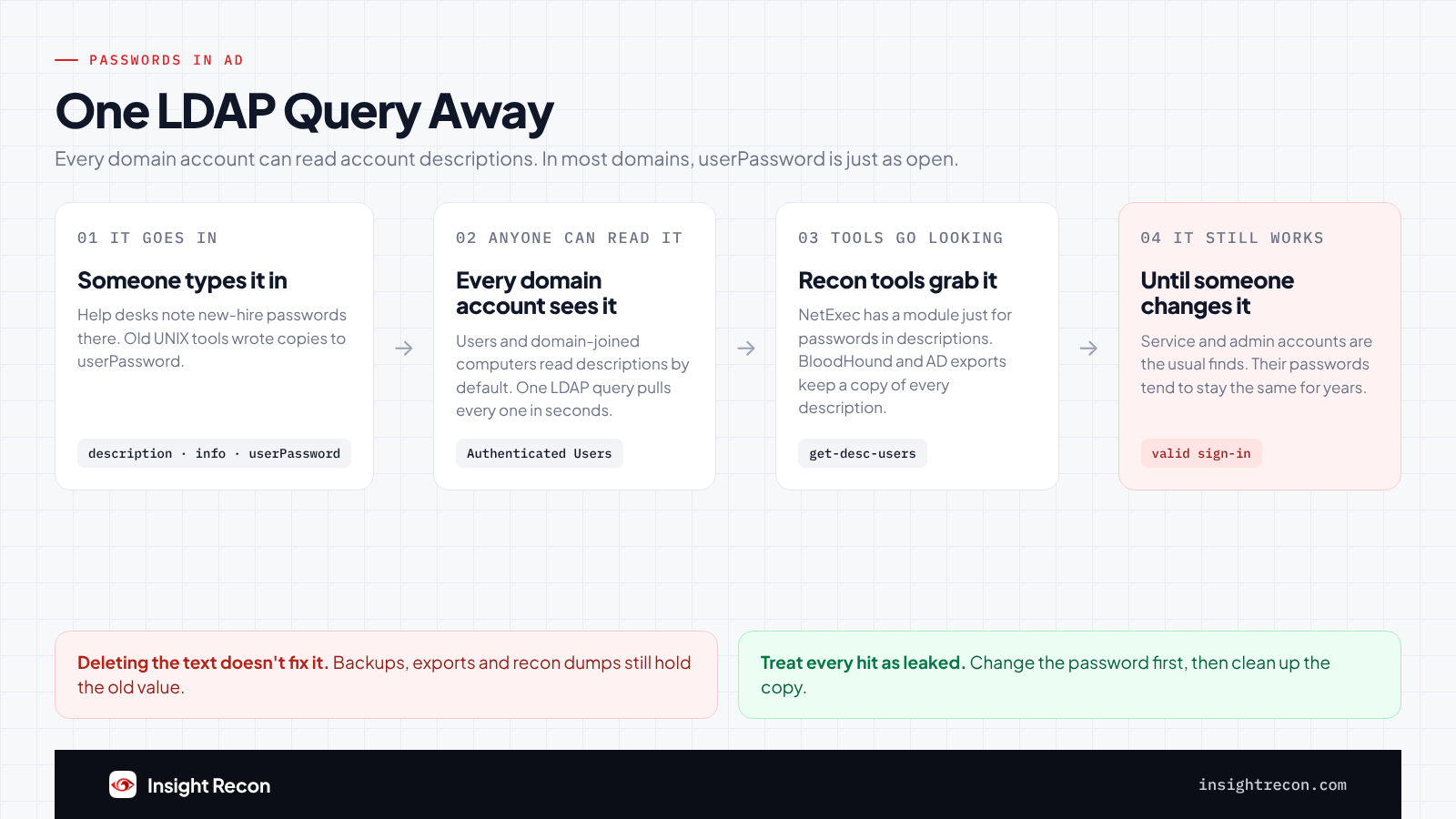
Attackers automate the search
Microsoft Threat Intelligence published research on November 5 about attackers using ARTEX, an agentic offensive security framework, to search public GitHub repositories for exposed secrets. One AI agent went from that search to pulling data out of Azure Key Vault in five minutes. Microsoft's advice is to treat any credential that was exposed as compromised, because deleting the copy doesn't take the credential back.
That report is about GitHub and the cloud, not AD. The AD version of the search is easier. It's one LDAP query. Common attack tools already ship with it. NetExec, a tool pentesters and attackers both use, has a module built just to pull passwords out of user descriptions. MITRE ATT&CK tracks this kind of find as T1552, Unsecured Credentials.
Every domain account can read it
Authenticated Users can read account descriptions and the Notes field by default. That's every user in the domain and every domain-joined computer, so malware running as SYSTEM on any workstation can read them too. The default permissions on user accounts grant this directly, not through a group. If a DC answers anonymous LDAP searches, people with no account at all may be able to read them too. Our anonymous LDAP access post covers how to check.
userPassword is close behind. Microsoft puts Authenticated Users in the Pre-Windows 2000 Compatible Access group in new domains. That group can read every attribute on user accounts that isn't marked confidential. userPassword isn't. unixUserPassword is, so only admins see it by default. Check who has full control over your user OUs before you count on that. Hardened domains sometimes take Authenticated Users out of Pre-Windows 2000 Compatible Access. There a standard account may not be able to read userPassword at all. A scan run that way says it couldn't check.
The accounts in there are the ones you'd least want leaked
Service accounts end up with their password in the description because someone didn't want to lose it. Those passwords rarely change and the accounts often have more access than they need. Help desk notes are the other big source. One new hire's starter password in a description often shows the pattern the help desk uses for everyone else.
"User must change password at next logon" doesn't save a password that's already out. Anyone who knows it can set a new one before the user ever signs in.
Copies outlive the cleanup
Clearing the field doesn't pull back the copies. AD backups still have the old value. So does any export or BloodHound collection someone made while it was there. The password only stops working when it changes.
Find passwords in AD descriptions and attributes
The Check it now script covers descriptions and the Notes field. These two cover the password attributes and how long each find has been sitting there.
List the password attributes in use
This checks which of the three attributes exist in your schema, then lists every account with a value in any of them. It doesn't print the values. A standard user won't see unixUserPassword, since it's confidential, so run it as an admin for the full picture.
Import-Module ActiveDirectory -ErrorAction Stop
$schema = (Get-ADRootDSE).schemaNamingContext
$attrs = @('userPassword', 'unixUserPassword', 'msSFU30Password' | Where-Object {
    Get-ADObject -SearchBase $schema -LDAPFilter "(lDAPDisplayName=$_)"
})
"Checking: $($attrs -join ', ')"
$filter = '(|' + (($attrs | ForEach-Object { "($_=*)" }) -join '') + ')'
Get-ADObject -LDAPFilter $filter -Properties ($attrs + 'sAMAccountName') | ForEach-Object {
    $o = $_
    [pscustomobject]@{
        Account    = $o.sAMAccountName
        Class      = $o.ObjectClass
        Attributes = ($attrs | Where-Object { $o.$_ }) -join ', '
    }
}
What to look for: any row at all. Each row is an account whose password, or a hash of it, may sit in AD. Find out what wrote it before you clear it. msSFU30Password usually only exists if the schema was extended for Services for UNIX at some point, so the Checking line tells you which attributes the script looked at. Third-party schema extensions can add password attributes of their own. If you have an old UNIX or LDAP integration, ask what it writes to AD.
See how long each one has been exposed
AD's replication metadata records when each attribute last changed. This shows when the description and Notes field were written and whether the password has changed since. Put the account names from the first script in the list and run it as the admin doing the cleanup.
Import-Module ActiveDirectory -ErrorAction Stop
$dc = (Get-ADDomain).PDCEmulator
foreach ($sam in 'svc-backup', 'jsmith') {
    $u = Get-ADUser -Identity $sam -Properties PasswordLastSet, LastLogonDate
    Get-ADReplicationAttributeMetadata -Object $u.DistinguishedName -Server $dc -Properties description, info |
        Select-Object @{ n = 'Account'; e = { $sam } }, AttributeName,
            @{ n = 'WrittenOn'; e = { $_.LastOriginatingChangeTime } },
            @{ n = 'PasswordLastSet'; e = { $u.PasswordLastSet } },
            @{ n = 'ResetSince'; e = { $u.PasswordLastSet -gt $_.LastOriginatingChangeTime } },
            @{ n = 'LastLogonDate'; e = { $u.LastLogonDate } }
}
What to look for: WrittenOn is the last time the field changed, so the text has been readable at least that long. If ResetSince is False and the text looks like that account's own password, assume it still works. If it's True, the password in the text is older than the current one, which still matters if it was reused anywhere. LastLogonDate tells you whether anything still signs in as the account.
Check passwords in AD descriptions with Insight Recon
The free scan includes two checks for this, both rated High and both Quick Wins:
- Possible Passwords in Account Descriptions reads the description on every user account and group managed service account (gMSA). Disabled ones count too. It flags one when a password word, in English or a few other languages, is followed by something that looks like a password: at least four characters with a number or a symbol like
!or#in it. The scanner swaps a flagged description for "Hidden because it may contain a password" before upload, so the portal and report never show it. - Possible Password in AD Attributes flags enabled user accounts with any value at all in
userPasswordorunixUserPassword. Each finding names the attribute. The scanner only uploads whether a value is there, never the value. If the scan couldn't read account attributes, the check says it wasn't assessed.
Each finding comes with the Hacker Insight, remediation steps and compliance mappings for the check.
Know what it doesn't decide for you. Neither check knows whether the password still works or where else it's been used.
Each one has a blind spot too. The description check doesn't read the Notes field or computer descriptions. It also needs a password word right in front of the password, so creds: Winter2023! or a password with no label gets past it. The Check it now script reads Notes and computer descriptions. Drop its Where-Object line to catch the unlabeled ones. On the attribute side, a standard account can't read unixUserPassword because it's confidential. A scan run that way only covers userPassword. The result says so in a note. Run the attribute script above as an admin to cover the rest.
These related checks cover the rest of this area:
- Password in GPO, passwords in SYSVOL that any domain user can decrypt. Our GPP passwords post covers it.
- Accounts with reversible passwords and GPO Enables reversible password use, passwords stored in a form that turns back into plain text. Our reversible encryption post covers both.
- Risky LAPS read permissions, the accounts that can read your local admin passwords.
You can see what the findings look like in our sample report. The full list is in our check library.
See which accounts in your domain have a password sitting in plain sight.
It runs from any Windows machine that can reach your DCs, with a standard domain account. Every core AD check is free for one domain.
Before you clean up passwords in AD descriptions
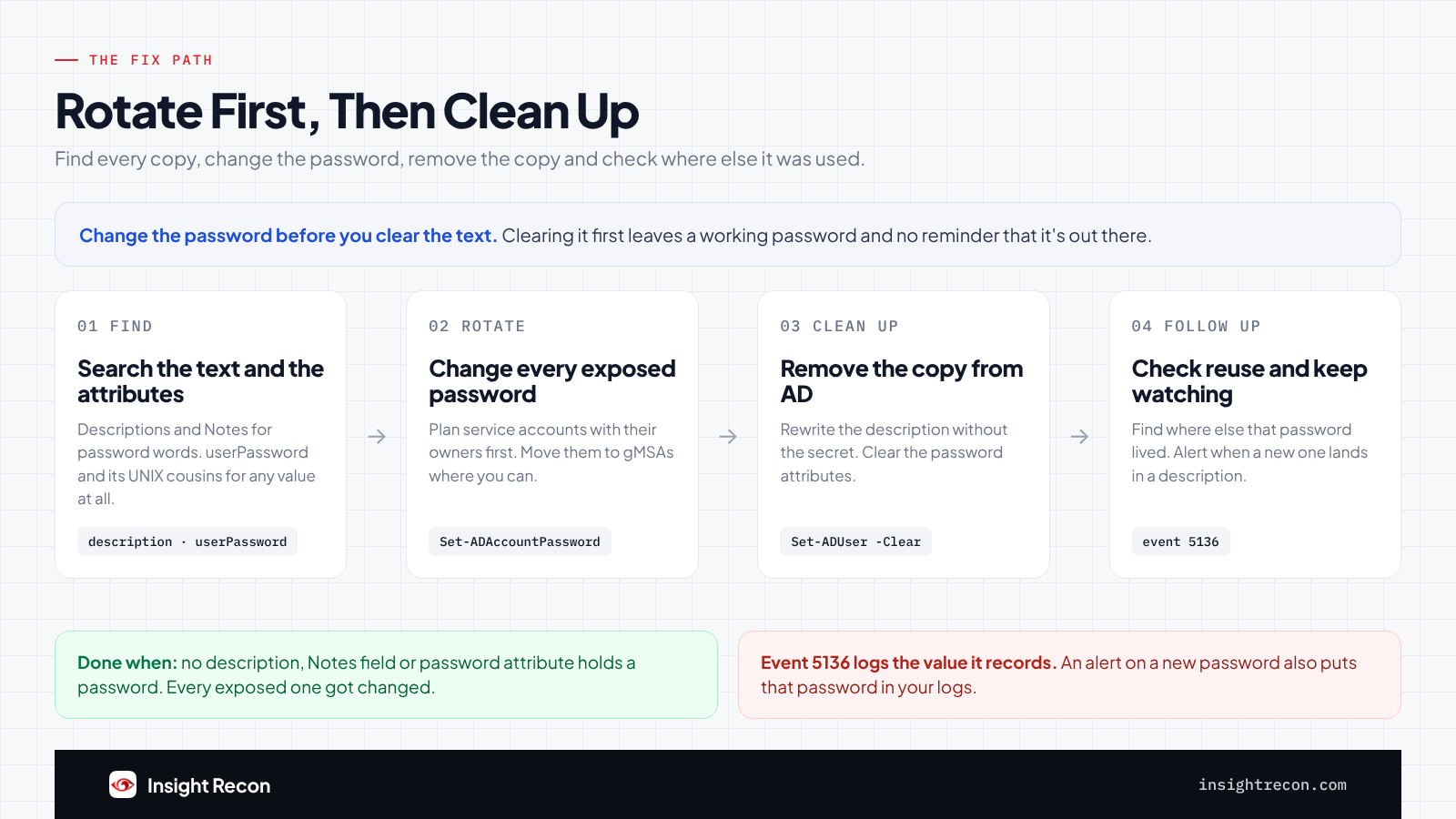
Changing an exposed password breaks anything still using it. For service accounts, find those first. Don't paste what you found into a ticket or chat either. That just makes another copy.
Sort what you found
- The account's own password: change it. Service accounts need a plan with their owners first.
- A password for something else: change it wherever it's used, like a vendor portal or a switch. Then remove the text.
- An old password that no longer works: remove it anyway, then check whether it's still in use somewhere else.
- The help desk's starter password: treat every account that got it as exposed until its password changes.
Find what uses a service account
Check its SPNs and the servers it signs in to, then ask the application owners. Our stale passwords post walks through finding what runs under one. A reset without that list usually turns into an outage the next time a service restarts.
Rotate and remove passwords in AD descriptions
1. Change the password
This resets one account's password. It's a dry run with -WhatIf. Drop that to apply. It needs the Reset Password right on the account. Use a long random password and update every place a service account is configured right after. Better still, move the service to a gMSA so nobody has to know its password at all. Our gMSA post covers who should be able to read one.
# Dry run. Drop -WhatIf to apply. Needs the Reset Password right on the account.
# For members of protected admin groups, that usually means Domain Admins.
Import-Module ActiveDirectory -ErrorAction Stop
Set-ADAccountPassword -Identity 'svc-backup' -Reset -NewPassword (Read-Host -AsSecureString 'New password') -WhatIf
2. Remove the copy from AD
This rewrites the description without the secret, then clears the Notes field and userPassword. Only clear the fields that held a password. It's a dry run with -WhatIf. Drop that to apply. Keep whatever in the description is still useful, like what the account is for and who owns it. Use Set-ADComputer for computer accounts. Clearing unixUserPassword works the same way but needs an admin.
# Dry run. Drop -WhatIf to apply. Needs write access to the account's attributes.
Import-Module ActiveDirectory -ErrorAction Stop
Set-ADUser -Identity 'svc-backup' -Description 'Backup service account. Owner: IT operations' -WhatIf
Set-ADUser -Identity 'svc-backup' -Clear info, userPassword -WhatIf
3. Check where else it was used
Ask the account's owner where else that password lives. Look at other accounts, local admin passwords, network gear and vendor portals. If a help desk starter password was in a description, this lists enabled accounts still waiting for their user to set a password. Give each one a unique password before its user signs in.
Import-Module ActiveDirectory -ErrorAction Stop
Get-ADUser -LDAPFilter '(&(pwdLastSet=0)(!(userAccountControl:1.2.840.113556.1.4.803:=2)))' -Properties whenCreated |
    Sort-Object whenCreated | Select-Object sAMAccountName, whenCreated
4. Look for sign-ins you can't explain
If you keep domain controller logs, check the account's sign-ins since the WrittenOn date. Kerberos events 4768 and 4769 on the DCs show which machines it signed in from. Event 4624 on member servers shows where it logged on. A sign-in from somewhere the account never goes is worth a closer look.
If something breaks
A service that stops after the reset still has the old password configured. Update it there rather than setting the old password back. If a UNIX or AIX system read userPassword to sign people in, those users can't sign in once it's cleared. Point that system at Kerberos instead of putting the value back.
Keep passwords out of AD descriptions
- Alert when a password lands in a description. With Audit Directory Service Changes on and an auditing entry for writes to
descriptionandinfo, event 5136 records the new value. Match it against the same words as the script. The event carries the value, so limit who can search those logs. - Give the help desk somewhere else to put passwords. Service account passwords belong in a vault. New-hire passwords should reach the person through a channel that isn't AD.
- Retire the UNIX password attributes. Move those systems to Kerberos so nothing needs a copy of the password in AD.
- Re-run the scan. Both checks show whether passwords are creeping back in.
Passwords in AD descriptions checklist
- Is every account description and Notes field free of passwords?
- Is
userPasswordempty on every account? What aboutunixUserPasswordandmsSFU30Password, if you have them? - Did every exposed password get changed?
- Did you check where else each exposed password was used?
- Does every account that got a help desk starter password have a unique one now?
- Do you alert when a new password lands in a description?
- Did you check every domain in the forest?
A "no" on the third question means anyone who read the password can still sign in with it.
Compliance mapping
| Framework | Reference | Why it applies |
|---|---|---|
| MITRE ATT&CK | T1552 | Unsecured Credentials. A password in a field every domain user can read is one. |
| CIS Controls v8 | Control 3, Control 5 | Data protection and account management. Credentials kept where everyone can read them fail both. |
| NIST CSF 2.0 | PR.DS-01, PR.AA-01 | Data at rest is protected and credentials are managed. A password left where every user can read it fails both. |
Passwords in AD descriptions FAQ
Can any domain user really read account descriptions?
Yes. Authenticated Users can read them by default. That covers every user and every domain-joined computer, so code running as SYSTEM on any workstation can read them too.
Isn't userPassword write-only?
Not in a normal domain. AD DS treats userPassword as an ordinary attribute by default, so it keeps whatever an app writes there. In most domains every user can read it back. unixUserPassword is marked confidential, so only admins see it by default.
Is deleting the description enough?
No. Treat the password as leaked. Change it, then clear the text. Backups and AD exports still hold the old copy.
Does "User must change password at next logon" protect it?
Not once the password is out. Anyone who knows it can set a new one before the real user signs in.
Does Insight Recon check for passwords in AD descriptions?
Yes. The free scan includes Possible Passwords in Account Descriptions and Possible Password in AD Attributes. The scanner masks any description it flags before upload. For the attributes, it only sends whether a value is there.
Find the passwords anyone in your domain can read.
It runs from any Windows machine that can reach your DCs, with a standard domain account. Every core AD check is free for one domain.
Not ready to scan?
AD Signal is our monthly look at what's changing in AD security and how real domains score. Read the latest report.
References
- Microsoft Security blog: Threat actors use agentic AI tooling to find and abuse exposed secrets
- Microsoft Learn: [MS-ADTS] 3.1.1.3.1.5.2 userPassword
- Microsoft Learn: [MS-ADTS] 6.1.1.2.4.1.2 dSHeuristics
- Microsoft Learn: [MS-ADA3] Attribute userPassword
- Microsoft Learn: [MS-ADA3] Attribute unixUserPassword
- Microsoft Learn: Public-Information property set (includes Description)
- Microsoft Learn: Personal-Information property set (includes Comment, the Notes field)
- Semperis: Security risks of Pre-Windows 2000 compatibility
- IBM: Active Directory password attribute selection (AIX)
- NetExec wiki: Get user descriptions
- Microsoft Learn: Event 5136, a directory service object was modified
- Microsoft Learn: Get-ADReplicationAttributeMetadata
- MITRE ATT&CK: T1552 Unsecured Credentials