Is Your iSCSI Target Server Exposing Your Domain Controllers? How to Check
SpecterOps showed that a Windows iSCSI Target Server without CHAP gives its disks to anyone who can reach it and present an allowed initiator name. Windows builds those names from DNS names that any domain user can look up. When one of the disks belongs to a virtual domain controller, the attacker gets a copy of NTDS.dit and every password hash in the domain.
| Priority | High wherever a target without CHAP holds domain controller disks or DC backups |
|---|---|
| What it is | Unless CHAP is on, Microsoft's iSCSI Target Server only checks the ID an initiator presents. IQNs, the ID SpecterOps focused on, are easy to work out from AD |
| Who's affected | Networks running the iSCSI Target Server role, commonly behind Hyper-V, SQL Server or Exchange clusters and backup software. SpecterOps found its SPN in about half the BloodHound Enterprise environments it checked |
| Fix | Require CHAP on every target and let only the initiators reach TCP 3260. Encrypt the volumes inside the LUNs. If a DC disk sat on an open target, treat NTDS.dit as stolen |
Check it now: which iSCSI target servers skip CHAP?
Import-Module ActiveDirectory

# Computers with an iSCSI SPN. Any domain user can run this part.
$servers = @(Get-ADComputer -LDAPFilter '(servicePrincipalName=*iscsi*)' -Properties DNSHostName |
    Where-Object DNSHostName | ForEach-Object DNSHostName)
"$($servers.Count) computer(s) with an iSCSI SPN: $($servers -join ', ')"

# Each target's CHAP setting, initiator list and disks. Needs admin rights on those servers.
if ($servers) {
    $results = Invoke-Command -ComputerName $servers -ErrorAction SilentlyContinue -ScriptBlock {
        Get-IscsiServerTarget | ForEach-Object {
            [pscustomobject]@{
                Target       = $_.TargetName
                Chap         = $_.EnableChap
                ReverseChap  = $_.EnableReverseChap
                AnyInitiator = ($_.InitiatorIds -join ',') -match '\*'
                Initiators   = $_.InitiatorIds -join ', '
                Disks        = $_.LunMappings.Path -join ', '
                LastLogin    = $_.LastLogin
            }
        }
    }
    $results | Sort-Object Chap, PSComputerName |
        Select-Object PSComputerName, Target, Chap, ReverseChap, AnyInitiator, Initiators, Disks, LastLogin

    # No answer, or no targets came back. Check these by hand.
    $servers | Where-Object { $_ -notin $results.PSComputerName } |
        ForEach-Object { "Check by hand: $_" }
}
The first part works as any domain user. The second needs admin rights on the target servers over WinRM. Chap showing False means a login only needs an initiator ID that's on the list. AnyInitiator showing True means the target takes any initiator at all. A Check by hand line is a server that didn't answer or returned no targets.
You checked one setting. The free scan checks the rest of your on-prem AD in a few minutes.
Nothing gets installed on your domain controllers. Only HTTPS leaves your network.
What SpecterOps found in iSCSI Target Server
Garrett Foster of SpecterOps published "Mi Scusi, My SCSI: Abusing iSCSI Target Server" on November 4, 2026. It looks at the iSCSI Target Server role in Windows Server, which turns a Windows server into block storage that other machines use over the network. Those machines are called initiators. SpecterOps commonly saw the role behind clustered Hyper-V, SQL Server and Exchange DAGs. Third-party backup products use it too.
When the role starts on a domain-joined server, it registers an SPN on that server's computer account. One LDAP query by any domain user lists every target server. Each target keeps a list of the initiators allowed to use it. SpecterOps focused on lists of IQNs, the iSCSI name every initiator has. Windows builds an initiator's default IQN from its DNS name, which any domain user can read in AD.
Without CHAP, the target checks nothing beyond that name. An attacker who can reach the target tries the names of machines that probably use it, like the nodes of a Hyper-V cluster, until the target answers. SpecterOps didn't run into any rate limiting along the way. Once logged in, the attacker reads the disk the same way a cluster node would. In the SpecterOps lab that meant browsing the shared volume, copying the disk file of a Hyper-V VM that was a domain controller and pulling the SAM, SYSTEM and SECURITY hives and NTDS.dit out of it.
SpecterOps also looked at its BloodHound Enterprise customers. About half had at least one computer with the iSCSI SPN. One tenant had close to 700 computers with it.
Foster released a read-only tool called scuzzy that tests targets the way an attacker would. It doesn't work against targets that require CHAP. He hasn't run the attack in production himself and says to make sure it won't cause outages first. If your pentest team picks it up, only point it at systems you're authorized to test.
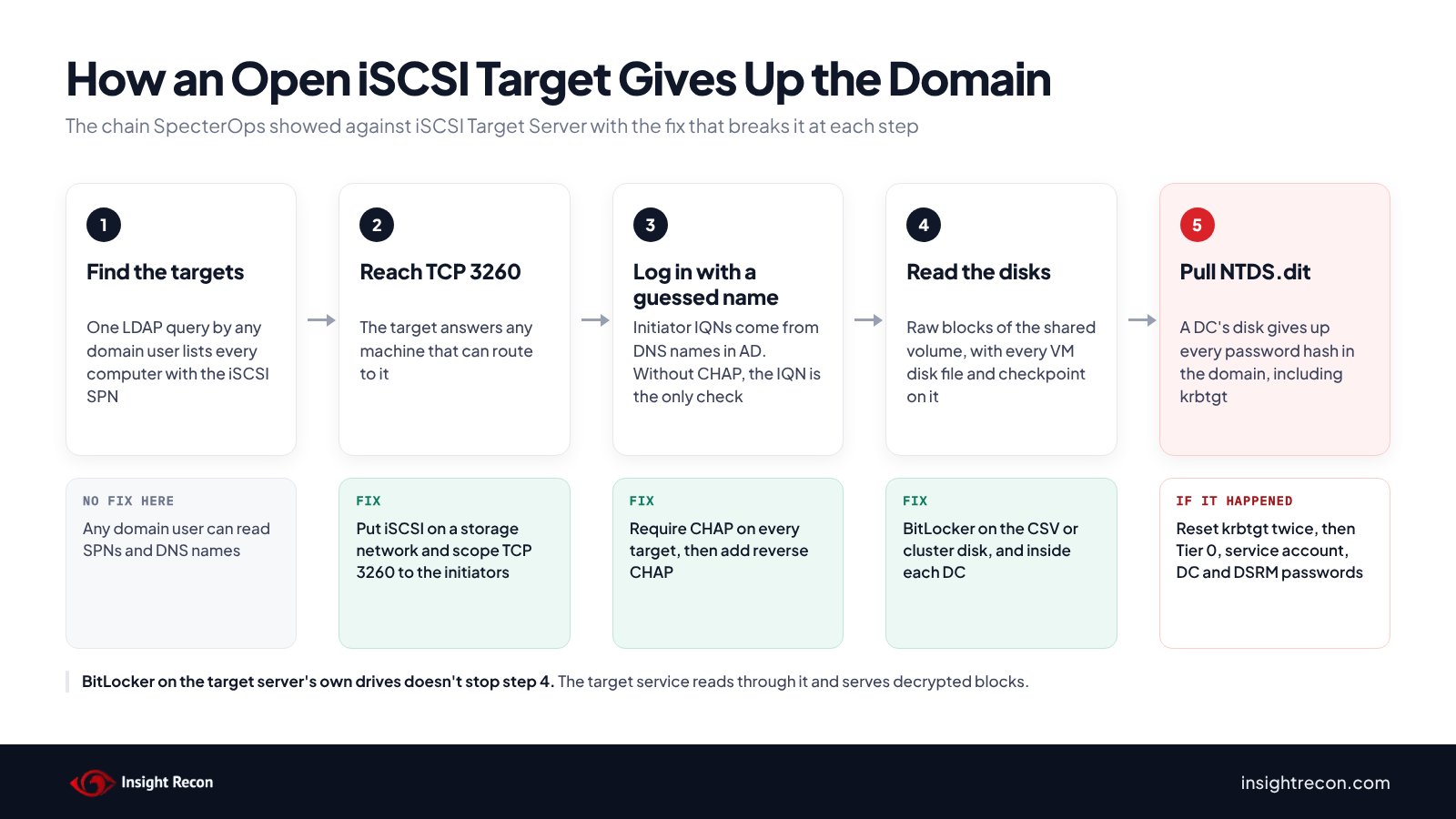
Why a domain controller's disk is the whole domain
NTDS.dit is the Active Directory database. It holds the password hash of every account in the domain, including krbtgt. The SYSTEM hive from the same DC holds the key that decrypts them. With both files, an attacker has every account's hash to sign in with. The krbtgt hash also lets them forge Kerberos tickets for any account. Copying the disk gets them the same hashes DCSync would, without touching the DC.
Microsoft's guidance for virtual DCs says "VHD files for a virtual DC are like the physical hard drive of a physical DC" and that only reliable, trusted admins should have access to them. It says the local admin credentials on a host that runs virtual DCs "should be treated as equal to the default domain admin." Storage that serves those VHD files over the network deserves the same treatment. A target without CHAP serves them to anyone who can reach it and guess a name.
DC disks aren't the only thing on these targets worth worrying about. Backup software that writes to an iSCSI volume may hold DC system state backups, which include NTDS.dit. Hyper-V checkpoints and old VM copies hold older copies of the database. Those hashes still work for every account whose password hasn't changed since.
Which iSCSI Target Server setups are at risk
Microsoft documents the iSCSI Target Server role for Windows Server 2016 through 2025. It's been built into Windows Server since 2012. These are the setups to look at first:
- Targets with CHAP off. CHAP is an optional step in Microsoft's setup wizard. The New-IscsiServerTarget cmdlet has no CHAP setting at all, so a target built in PowerShell starts without it. Until someone turns CHAP on, only the initiator list stands in the way.
- Targets that accept any initiator. With
IQN:*on the list, the attacker doesn't even need a good guess. Microsoft's own example of that setting says to "be very cautious when you use this configuration." - Targets that hold DC disks or DC backups. An open target holding either one hands over NTDS.dit.
- iSCSI storage that isn't Windows. NAS boxes and SANs that skip CHAP have the same problem. They usually don't register an iSCSI SPN, so AD won't lead you to them.
The attacker needs network access to the target on TCP 3260, the default iSCSI port. They also need the name of a machine on the target's list. They don't need admin rights anywhere. A domain account makes the targets and the names easy to find. DNS can give up the names too.
Find your iSCSI target servers and check CHAP
Start with the Check it now script. It finds every computer with an iSCSI SPN, then reads each target's CHAP setting, initiator list and disk files from the server itself. You want Chap to be True on every target and AnyInitiator to be False. Every name in Initiators should be a machine you know uses that target.
Check from the hosts that use the storage
The hosts that connect to iSCSI storage can tell you two more things: whether their logins use CHAP and which VMs keep their disks there. Run these on every Hyper-V host or cluster node that uses a target. Backup servers that write to one count too.
# Run on every Hyper-V host or cluster node that uses iSCSI storage, and on backup servers that write to it

# Which iSCSI logins skip CHAP? NONE means no CHAP.
Get-IscsiSession | Select-Object TargetNodeAddress, AuthenticationType, IsPersistent

# Where does each VM keep its disks? Look for your domain controllers.
# On a cluster, use Get-VM -ComputerName (Get-ClusterNode).Name instead of Get-VM.
Get-VM | Get-VMHardDiskDrive | Select-Object ComputerName, VMName, Path
A session with AuthenticationType set to NONE logged in without CHAP. This works for storage that isn't Windows too, since the initiator sees every target it logs in to. The disk paths show where each VM lives. If a domain controller's disks sit on a cluster volume or drive that comes from an iSCSI target, that target holds a copy of your domain.
Check encryption where it counts
SpecterOps notes the attack falls apart when BitLocker or similar encryption protects the drive. An attacker logged in to the target reads the LUN as raw blocks, the same blocks a cluster node gets. BitLocker on the target server's own drives doesn't help, because the target service reads through it and hands out decrypted blocks. Encryption at rest on a SAN or NAS works the same way.
BitLocker helps in two places. On a cluster disk or CSV, it encrypts the volume inside the LUN, so the blocks an attacker copies are unreadable. Inside a DC, it encrypts that DC's own volumes inside its VHDX. Check both:
# On a cluster node: is the CSV encrypted? Repeat for each volume.
manage-bde.exe -status "C:\ClusterStorage\Volume1"

# From an admin workstation: are the volumes inside each DC encrypted?
$dcs = (Get-ADDomainController -Filter *).HostName
$out = Invoke-Command -ComputerName $dcs -ErrorAction SilentlyContinue -ScriptBlock {
    if (Get-Command Get-BitLockerVolume -ErrorAction SilentlyContinue) {
        Get-BitLockerVolume | Select-Object MountPoint, VolumeStatus, ProtectionStatus
    } else {
        [pscustomobject]@{ MountPoint = 'All'; VolumeStatus = 'BitLocker not installed'; ProtectionStatus = 'Off' }
    }
}
$out | Select-Object PSComputerName, MountPoint, VolumeStatus, ProtectionStatus
$dcs | Where-Object { $_ -notin $out.PSComputerName } | ForEach-Object { "Check by hand: $_" }
For the DCs, look at the volumes that hold NTDS.dit, its logs and SYSVOL. You want FullyEncrypted with protection On. Microsoft recommends keeping those files on their own virtual disk, so the system drive alone isn't enough.
Lock down iSCSI Target Server
There's no update to install, only configuration changes. Turning on CHAP can cut an initiator off from its disks, so test each change and work one target at a time in a maintenance window.
Require CHAP, then add reverse CHAP
CHAP makes an initiator prove it knows a secret before the target lets it log in. Microsoft's own SAN guidance says to use one-way CHAP "at a minimum." Give every target its own random secret. Microsoft's initiator expects 12 to 16 characters unless IPsec is also in use.
# On the target server: require CHAP on one target
$chap = Get-Credential -Message 'CHAP user name and 12-16 character secret'
Set-IscsiServerTarget -TargetName 'HV-Cluster' -EnableChap $true -Chap $chap

# Later, once every initiator logs in with CHAP: add reverse CHAP
$rchap = Get-Credential -Message 'Reverse CHAP user name and secret'
Set-IscsiServerTarget -TargetName 'HV-Cluster' -EnableReverseChap $true -ReverseChap $rchap
Then update each initiator. One that reconnects without the secret loses its disks, so on a cluster drain one node at a time. Run Unregister-IscsiSession on the node's old session so it stops coming back at restart, then disconnect the target. Reconnect with Connect-IscsiTarget using -AuthenticationType ONEWAYCHAP with -ChapUsername and -ChapSecret. Add -IsPersistent $true so the new login survives a reboot. Make sure the node's disks came back before you move on to the next one.
Once one-way CHAP works everywhere, add reverse CHAP. It makes the target prove itself to the initiator, which stops a machine from posing as your storage. The target only does that for initiators that ask, so set each initiator's own CHAP secret to the target's reverse CHAP secret with Set-IscsiChapSecret and reconnect with -AuthenticationType MUTUALCHAP.
Let only the initiators reach TCP 3260
SpecterOps calls network segmentation "arguably the most effective thing you can do." Put iSCSI traffic on a storage network that only the initiators can reach. Microsoft's own iSCSI training suggests "a dedicated, isolated network and iSCSI authentication" for security. On the target itself, scope the Windows Firewall rules for TCP 3260 to the initiators' addresses:
# On the target server: which inbound rules open TCP 3260, and to whom?
Get-NetFirewallPortFilter -PolicyStore ActiveStore | Where-Object { $_.Protocol -eq 'TCP' -and $_.LocalPort -eq 3260 } |
    Get-NetFirewallRule | Where-Object { $_.Enabled -eq 'True' -and $_.Direction -eq 'Inbound' } |
    Select-Object Name, DisplayName,
        @{ N = 'From'; E = { ($_ | Get-NetFirewallAddressFilter).RemoteAddress -join ', ' } }

# Limit a rule to the initiators' storage addresses
Set-NetFirewallRule -Name '<Name from above>' -RemoteAddress 10.0.50.11, 10.0.50.12
From showing Any means any machine that can route to the server can try to log in. No rows doesn't mean the port is closed, since a rule can allow every port. Test from a machine that shouldn't get in with Test-NetConnection <server> -Port 3260. Rules that come from Group Policy have to be changed in the GPO.
Keep this step even after CHAP is on. CHAP doesn't encrypt anything, so the data crosses the network in the clear unless you add IPsec, which SpecterOps also suggests.
Replace IQN:* with a real initiator list
Every target should list only the machines that use it. For cluster storage, that's the cluster nodes. Take out IQN:* wherever the script found it. Set-IscsiServerTarget -InitiatorIds replaces the whole list, so give it every initiator in one go:
Set-IscsiServerTarget -TargetName 'HV-Cluster' -InitiatorIds @(
    'IQN:iqn.1991-05.com.microsoft:hv01.contoso.com',
    'IQN:iqn.1991-05.com.microsoft:hv02.contoso.com'
)
Keep the list tight even with CHAP on. A list only decides which names can log in. CHAP is what adds a secret on top.
Encrypt the volumes inside the LUNs
BitLocker on a cluster disk or CSV needs the cluster name object as a protector so the volume can move between nodes. Microsoft's example uses Enable-BitLocker E: -ADAccountOrGroupProtector -ADAccountOrGroup CLUSTER$. If the cluster already owns the disk, Microsoft says to put it in maintenance mode before you turn BitLocker on.
Microsoft also supports BitLocker inside virtual DCs. On Windows Server 2016 and later, a virtual TPM can hold the key for the system volume. Use Enable-BitLockerAutoUnlock on the other volumes, since Microsoft recommends putting NTDS.dit on its own disk. Microsoft notes that VSS-based snapshots in Hyper-V don't work with BitLocker inside a DC, so check how you take checkpoints and back up DCs before you start.
Encrypt the CSV even when the DCs use BitLocker. Standard checkpoints and saved states write a VM's memory to disk, usually on the same storage. A running DC's memory can hold its BitLocker keys.
Manage the storage like a domain controller
Whoever administers the iSCSI target server can copy DC disk files straight off its drives, CHAP or not. That gives them the same reach as a domain admin. Limit admin rights on those servers to the people you'd trust with a DC. The same goes for any storage that holds DC disks or DC backups.
If a DC disk sat on an open target
If a target without CHAP held DC disks or DC backups and other networks could reach it, you can't prove nobody copied them. SpecterOps didn't publish any detection guidance. Treat NTDS.dit as stolen:
- Reset krbtgt twice, waiting at least the maximum ticket lifetime between the two resets. Our krbtgt password reset post walks through it.
- Reset the passwords for Tier 0 admin accounts and service accounts.
- Reset the DSRM password on each DC whose disk was exposed. Its SAM hive holds that hash.
- Reset the computer account passwords of your DCs. NTDS.dit holds those hashes too. A DC's hash is enough to replicate every secret in the domain.
- Plan password resets for everyone else. Every hash in the domain was in that file.
- Plan for secrets that user password resets miss. gMSA passwords come from the KDS root key, so Microsoft's recovery steps replace the root key along with the gMSAs. Trust passwords and the DPAPI backup key were in the file too.
Spot iSCSI exposure in a scan
An attacker can find this from AD or from the network. A scan for it should look in both places.
- AD. The LDAP query in the Check it now script lists every Microsoft iSCSI target server.
- The network. Scan the ranges where your servers and storage live for TCP 3260. That finds iSCSI targets on the default port, including NAS and SAN gear that never shows up in AD.
- Each target you find. Run
nmap -p 3260 --script iscsi-infoagainst it. It reportsAuthentication: NOT requiredfor any target that lets its login through. Microsoft targets that check initiator names may show it nothing, orrequiredwith the reasonAuthorization failure, because the scanner's name isn't on the list. Neither tells you CHAP is on, so check those targets with the PowerShell above. - The initiators.
Get-IscsiSessionon each host that uses iSCSI storage shows which logins skip CHAP, whoever made the storage.
Only scan networks you're authorized to scan.
What Insight Recon checks for iSCSI Target Server exposure
Insight Recon doesn't flag iSCSI target servers today. It reads AD with a standard account. That's enough to see the SPN but not to read a target's CHAP setting or see what's on its disks, so use the script above for that part.
The free, read-only Active Directory security assessment does cover the AD side. These findings from its 155+ checks show what keeps a stolen hash working and who can already get the same hashes another way:
- Stale krbtgt Account Password (High): a krbtgt hash from an old disk copy or checkpoint keeps working until the password has been reset twice.
- Stale Domain Controller Passwords (High): a DC computer account whose password doesn't rotate keeps a stolen DC hash useful.
- Operator Groups In Use (Low): Backup Operators and Server Operators can already copy NTDS.dit off a DC without any storage trick.
- Risky DCSync Permissions (High): accounts that can pull every hash over replication without touching a disk.
You can see what the findings look like in our sample report.
See how old your krbtgt password is and which accounts can already pull every hash.
It runs from any Windows machine that can reach your DCs, with a standard domain account. Every core AD check is free for one domain.
iSCSI Target Server checklist
- Do you have a list of every iSCSI target on your network, including NAS and SAN gear that doesn't show up in AD?
- Does every target require CHAP?
- Is
IQN:*gone, with each target listing only the initiators that use it? - Can only the initiators reach TCP 3260 on each target?
- Is reverse CHAP on once one-way CHAP works everywhere?
- Are the CSVs and cluster disks on iSCSI storage encrypted, along with the volumes inside your virtual DCs?
- Do only the people you'd trust with a DC manage the storage that holds DC disks and DC backups?
- If a DC disk sat on an open target, have you reset krbtgt twice and the other secrets that were on it?
A target that holds DC disks and fails the second question is the one to fix first.
Compliance mapping
iSCSI Target Server exposure maps to authentication and encryption controls on the storage side. The attack itself is credential theft from the AD database.
| Framework | Reference | Why it applies |
|---|---|---|
| NIST CSF 2.0 | PR.AA-03, PR.DS-01, PR.DS-02, PR.IR-01 | Authenticate initiators before they can read a disk. Protect storage data at rest and in transit. |
| CIS Controls v8 | 3.10, 3.11, 3.12, 4.4 | Encrypt sensitive data at rest and in transit. Keep storage on its own segment behind a server firewall. |
| MITRE ATT&CK | T1003.003, T1006 | T1003.003 covers pulling NTDS.dit from a DC's disk. T1006 covers reading a volume's raw blocks instead of going through file permissions. |
| Microsoft guidance | Virtualizing domain controllers with Hyper-V, BitLocker for CSVs and SANs | Guard virtual DC disk files like a DC's hard drive. Encrypt cluster volumes with the cluster name object as a protector. |
iSCSI Target Server FAQ
Is there a patch for the iSCSI Target Server issue?
No. SpecterOps didn't describe a bug. The fixes are all configuration changes, starting with CHAP.
Doesn't the initiator list keep attackers out?
Not by itself. Without CHAP, the target only checks the ID an initiator presents. When that ID is an IQN, Windows built it from a DNS name any domain user can read, so it isn't hard to guess.
We use a NAS or SAN for iSCSI. Does this apply?
The SpecterOps research covers Microsoft's iSCSI Target Server. Any iSCSI target that skips CHAP and that an attacker can reach has the same problem, whoever made it. Pentest Partners got to Domain Admin in 2016 through a StarWind target with no authentication that held VMware disks. Those devices won't show up in AD, so find them with a scan for TCP 3260 and check CHAP in each one's settings.
If BitLocker is on for the target server's drives, are we covered?
No. The target service reads through that encryption and serves plain blocks to any initiator that logs in. Encrypt the cluster disks or CSVs inside the LUNs, or the volumes inside your DCs.
Check krbtgt age and who can already get to NTDS.dit in one scan.
Insight Recon checks krbtgt age and DCSync rights along with the rest of your AD, using a standard account. It runs from any Windows machine that can reach your DCs. Free and read-only.
Not ready to scan?
AD Signal is our monthly look at what's changing in AD security and how real domains score. Read the latest report.
References
- SpecterOps: Mi Scusi, My SCSI: Abusing iSCSI Target Server
- GitHub: scuzzy
- Pentest Partners: An interesting route to domain admin, iSCSI
- Microsoft Learn: iSCSI Target Server overview
- Microsoft Learn: Set-IscsiServerTarget
- Microsoft Learn: New-IscsiServerTarget
- Microsoft Learn: Connect-IscsiTarget
- Microsoft: Managing iSCSI Initiator connections with Windows PowerShell on Windows Server 2012
- Microsoft Learn: iSCSI Initiator configuration properties, CHAP secret length
- Microsoft Learn: Storage Manager for SANs, configure iSCSI security
- Microsoft Learn: iSCSI functionality, components and use cases
- Microsoft Learn: Considerations for implementing iSCSI
- Microsoft Learn: Virtualizing domain controllers with Hyper-V
- Microsoft Learn: Protect cluster shared volumes and storage area networks with BitLocker
- Microsoft Learn: Hyper-V checkpoints, standard and production
- Microsoft Learn: How to recover from a Golden gMSA attack
- Nmap: iscsi-info
- MITRE ATT&CK: T1003.003, OS Credential Dumping: NTDS
- MITRE ATT&CK: T1006, Direct Volume Access