
AdminSDHolder Permissions: Risks, Detection & Fixes
A dangerous permission on AdminSDHolder is not limited to a single Active Directory object. Because its security descriptor is used to protect privileged accounts and groups, one unauthorized access control entry can become a persistent path to some of the most sensitive objects in the domain.
Quick Summary
An unexpected permission entry on AdminSDHolder is a low-effort, high-persistence backdoor. Because SDProp reapplies it to every protected account automatically, a single planted entry can survive routine cleanup and keep granting access long after the initial compromise.
| Priority | High |
| Risk | Dangerous permissions on AdminSDHolder can propagate unauthorized access across protected administrative accounts and groups |
| Impact | Privilege escalation, persistent privileged access, unauthorized account control, and potential domain compromise |
| Exploitation | An attacker with write access modifies the AdminSDHolder ACL, allowing SDProp to propagate malicious permissions to protected objects |
| Fix | Remove dangerous non-standard permissions from AdminSDHolder and review protected objects for permissions that may already have propagated |
What Is AdminSDHolder in Active Directory?
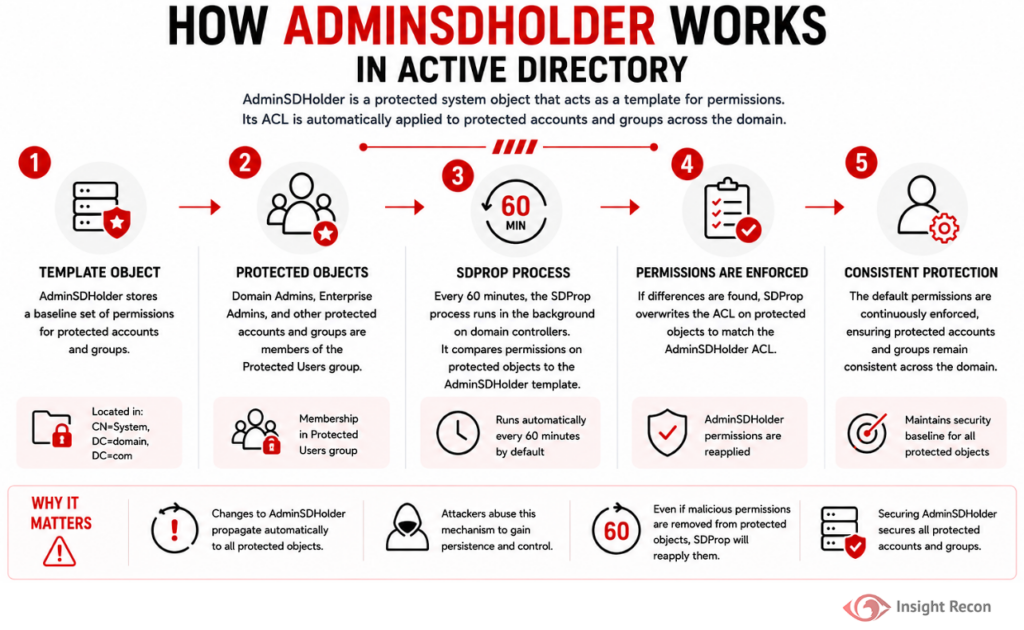
AdminSDHolder is a special Active Directory object located at CN=AdminSDHolder,CN=System within each domain. Its purpose is to maintain a consistent security descriptor for protected administrative accounts and groups.
These protected objects include highly privileged identities such as Domain Admins, Enterprise Admins, Schema Admins, the built-in Administrator account, and other administrative groups. Microsoft documents AdminSDHolder as the permissions template used to protect these sensitive objects.
A process called the Security Descriptor Propagator, commonly referred to as SDProp, runs on the domain controller holding the “PDC Emulator” role. By default, it runs every 60 minutes and compares protected objects against AdminSDHolder. When their permissions differ, SDProp resets them to match the AdminSDHolder security descriptor.
This behavior is designed to protect privileged accounts from accidental or unauthorized permission changes. The problem occurs when the AdminSDHolder ACL itself contains a dangerous permission.
How AdminSDHolder Permissions Can Pose a Risk
AdminSDHolder is effectively a centralized permissions template for protected administrative objects. If an unauthorized principal receives dangerous control over AdminSDHolder, SDProp can distribute that access across protected accounts and groups.
Common risks include:
- Persistent privileged access
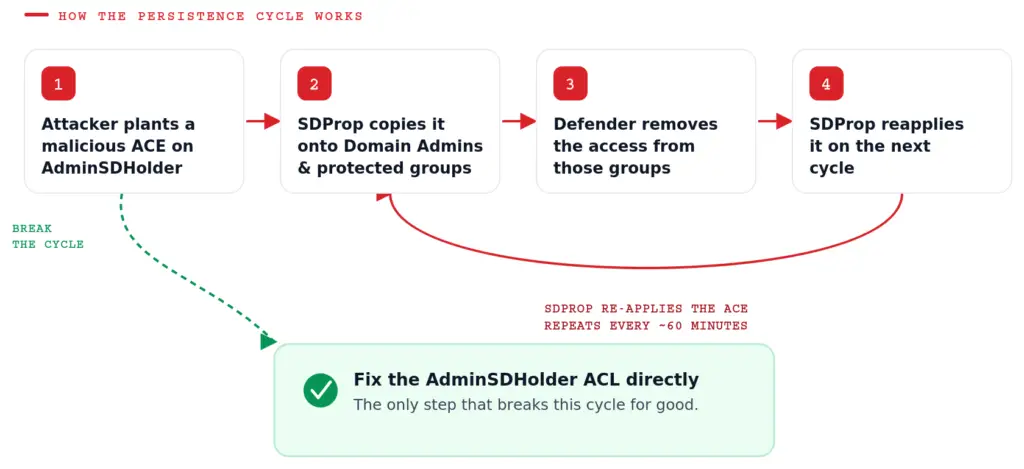
Malicious permissions can be reapplied by SDProp even after administrators remove them directly from affected protected objects. - Privilege escalation
Permissions such as Full Control, WriteDACL, or WriteOwner can provide a path toward taking control of privileged accounts and groups. - Broad privileged exposure
A single dangerous AdminSDHolder permission can affect multiple protected administrative objects instead of only one account. - Difficult remediation
Correcting the visible permission on an individual privileged account does not address the source if AdminSDHolder remains modified. - Domain compromise
An attacker who gains effective control over protected administrative identities may ultimately obtain extensive control over the Active Directory domain.
Real-World Context
Many environments have never reviewed AdminSDHolder’s permissions at all, since it doesn’t show up in typical group membership audits. It’s a well-known technique in red team and incident response circles precisely because it hides in a place where defenders rarely look, and because a single planted entry can outlast several rounds of “obvious” cleanup on the accounts it protects.
How Attackers Take Advantage of AdminSDHolder Permissions
Most attackers don’t touch AdminSDHolder to gain initial access. They use it to make sure they don’t lose access going forward.
Typical abuse scenarios include:
- Gain permission to modify AdminSDHolder
The attacker compromises an account that already has sufficient rights, or abuses another permission path that provides control over the object. - Add a malicious access control entry
The attacker grants a controlled account or group rights such as Full Control, WriteDACL, WriteOwner, or another permission that provides meaningful control. - Wait for SDProp
Active Directory’s protection mechanism processes protected administrative objects. By default, this occurs approximately every 60 minutes. - Malicious permissions reach protected objects
The modified security descriptor can be applied to protected accounts and groups. - Use the new access for persistence or escalation
The attacker can abuse the propagated rights to maintain or expand privileged access.
This makes AdminSDHolder particularly dangerous. The attacker is not simply changing one privileged object’s permissions. They are tampering with the mechanism Active Directory uses to protect many of its most sensitive objects.
How to Detect Risky AdminSDHolder Permissions
AdminSDHolder should be treated as a highly sensitive Active Directory object. Its permissions should be reviewed for unexpected principals and dangerous access rights.
PowerShell Method
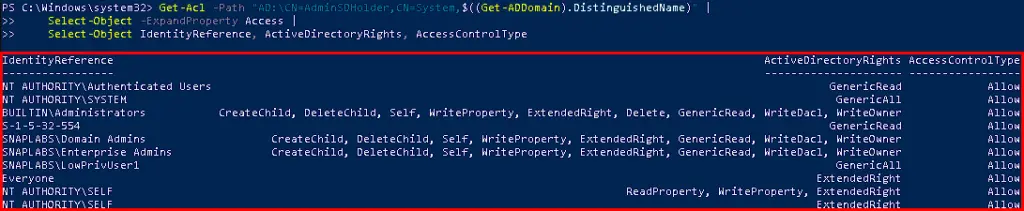
The following PowerShell provides a readable view of the AdminSDHolder ACL:
					# List every permission entry currently set on the AdminSDHolder object
Get-Acl -Path "AD:\CN=AdminSDHolder,CN=System,$((Get-ADDomain).DistinguishedName)" |
    Select-Object -ExpandProperty Access |
    Select-Object IdentityReference, ActiveDirectoryRights, AccessControlType
What it does: Displays every identity with a permission entry on the AdminSDHolder object, along with the specific rights each one holds.
How to interpret results: Compare the identities returned against your documented baseline (typically SYSTEM, Administrators, Domain Admins, Enterprise Admins, and a small number of built-in entries). Any identity outside that baseline, especially one holding rights like GenericAll, WriteDacl, or WriteOwner, should be treated as a priority finding and investigated immediately.
ADSI Edit
For manual verification:
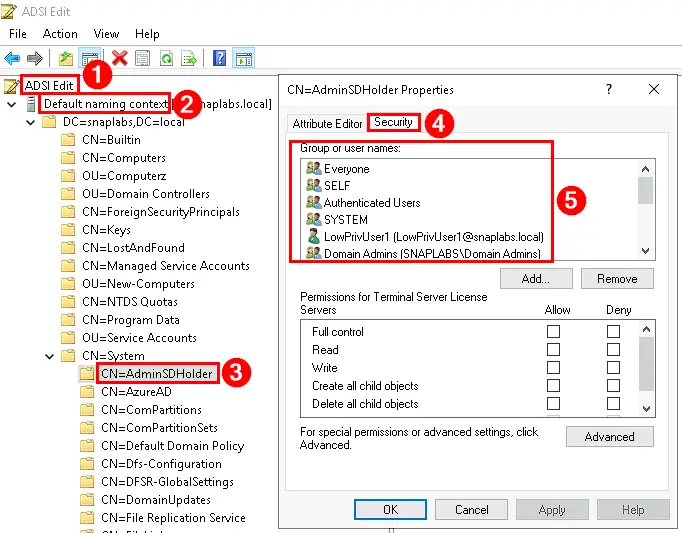
- Open ADSI Edit (adsiedit.msc).
- Connect to the Default naming context.
- Navigate to CN=System.
- Locate CN=AdminSDHolder.
- Right-click AdminSDHolder and select Properties.
- Open the Security tab.
- Review the configured principals and permissions.
Pay particular attention to non-standard principals with Full Control or permissions capable of modifying the object’s ACL, ownership, or other sensitive attributes.
Finding This Risk with Insight Recon
Insight Recon’s Active Directory security assessment surfaces every non-default permission entry on AdminSDHolder across the domain within minutes.
It also provides:
- Visibility into every current permission entry and the rights it grants
- Risk prioritization based on the sensitivity of the rights involved
- Account risk scores for every identity holding an entry
- Step-by-step remediation guidance
- Validation guidance to confirm the ACL matches baseline after remediation
Remediating Risky AdminSDHolder Permissions
Prerequisites
Before removing a permission entry:
- Confirm the entry doesn’t trace back to an approved delegation, backup tool, or PAM solution.
- Document the identity, rights, and date the entry was first observed.
- Obtain appropriate change approval.
- Ensure Domain Administrator or Enterprise Administrator privileges are available.
PowerShell Method
From an elevated PowerShell prompt, run the following command. Replace the identity value to match the entry you’re removing.
					# Removes a specific permission entry from the AdminSDHolder object
$adminSDHolderDN = "CN=AdminSDHolder,CN=System,$((Get-ADDomain).DistinguishedName)"
$acl = Get-Acl -Path "AD:\$adminSDHolderDN"
$ruleToRemove = $acl.Access | Where-Object { $_.IdentityReference -eq "DOMAIN\SuspiciousAccount" }
$acl.RemoveAccessRule($ruleToRemove)
Set-Acl -Path "AD:\$adminSDHolderDN" -AclObject $acl

ADSI Edit
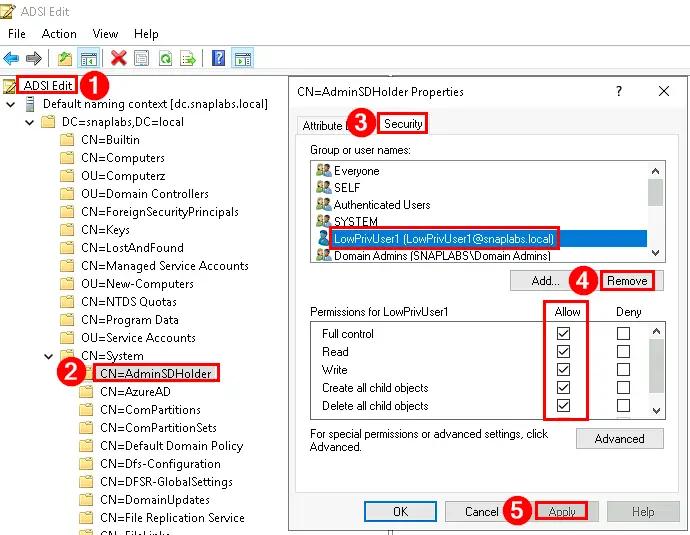
- Open ADSI Edit.
- Connect to the Default naming context.
- Navigate to CN=System > CN=AdminSDHolder.
- Right-click AdminSDHolder and select Properties.
- Open the Security tab.
- Identify the approved non-standard entry targeted for removal.
- Remove the dangerous permission.
- Save the change.
Exercise caution when modifying the AdminSDHolder security descriptor. Incorrect changes can affect permissions on protected administrative accounts and groups.
Preventing AdminSDHolder Permission Drift Going Forward
AdminSDHolder should be managed as a Tier 0 security object because changes to it can influence permissions across protected administrative identities.
- Establish a documented baseline
Record exactly which identities and rights are expected on AdminSDHolder in your environment, so drift is easy to spot. - Review AdminSDHolder on a schedule
Include it alongside Domain Admins, Enterprise Admins, and Schema Admins in quarterly or monthly privileged access reviews. - Enforce change management
Require documented approval before any permission change to AdminSDHolder, and verify removal once a project concludes. - Monitor for changes
Configure alerts on ACL changes to the AdminSDHolder object, since legitimate changes here are rare enough that any alert deserves a look.
Quick Validation Checklist
Can you confidently answer “yes” to all of these?
✓ Do you know every identity with a permission entry on AdminSDHolder?
✓ Do you have a documented baseline to compare against?
✓ Do you have alerting in place for changes to this object?
If any of these are unclear, your environment may be exposed to a persistence technique that’s easy to miss.
Risk & Compliance Mapping
Business Impact: Unexpected permissions on AdminSDHolder create a self-healing path to forest-wide privileged access and violate the principle of least privilege
| Framework | Reference |
|---|---|
| NIST CSF 2.0 | PR.AC-4 (Access Permissions and Authorizations), PR.AC-6 (Privileged Access Management) |
| CIS Controls | Control 5 (Account Management), Control 6 (Access Control Management) |
| MITRE ATT&CK | T1098 (Account Manipulation), T1078.002 (Valid Accounts: Domain Accounts) |
| MITRE Mitigations | M1026 (Privileged Account Management), M1047 (Audit) |
| DISA STIG | V-243481, V-205742 |
| ANSSI | vuln_permissions_adminsdholder (Dangerous permissions on the AdminSDHolder object) |
| Microsoft Security Baselines | Restrict permissions on AdminSDHolder to the documented default set and monitor for changes. |
Frequently Asked Questions
Rarely. Outside of specific, approved delegation models, the permissions on AdminSDHolder should match the environment's documented default and stay stable over time.
AdminSDHolder is the Active Directory object that provides the security descriptor used for protected accounts and groups. SDProp is the process that periodically compares protected objects against that security descriptor and resets their permissions when necessary.
No. Some environments may intentionally modify permissions for legitimate administrative requirements. Every non-standard entry should be investigated and justified rather than removed blindly.
Protected objects include Domain Admins, Enterprise Admins, Schema Admins, Administrator, Administrators, krbtgt, Account Operators, Backup Operators, Server Operators, Print Operators, and several other sensitive accounts and groups. The exact protected set varies somewhat by Windows Server version.
Stop Privileged Persistence at the Source
AdminSDHolder exists to protect Active Directory’s most sensitive accounts. When its permissions are compromised, that same protection mechanism can work against defenders by repeatedly distributing dangerous access across privileged objects.
See exactly where your Active Directory is exposed and what to fix first.