

Your Entra hybrid setup left a footprint in Active Directory. Now we check it.
Insight Recon now assesses hybrid identity: 24 new checks covering the on-premises attack surface that syncing to Microsoft Entra ID quietly creates. If your domain talks to the cloud, this is exposure you have not been looking at.
Most organizations running Active Directory also sync it to Microsoft Entra ID. It is how single sign-on to Microsoft 365 works, and for the vast majority of environments it is not optional. What almost nobody talks about is the trail that integration leaves behind: a hybrid identity attack surface sitting inside your on-premises domain.
When you connect AD to Entra ID, the setup creates a small set of objects inside your domain and hands them real power: the directory synchronization accounts, the Seamless SSO computer account, and, if you use cloud Kerberos trust, a dedicated trust object. They are privileged by design, they make good targets, and in most environments no one is keeping an eye on them.
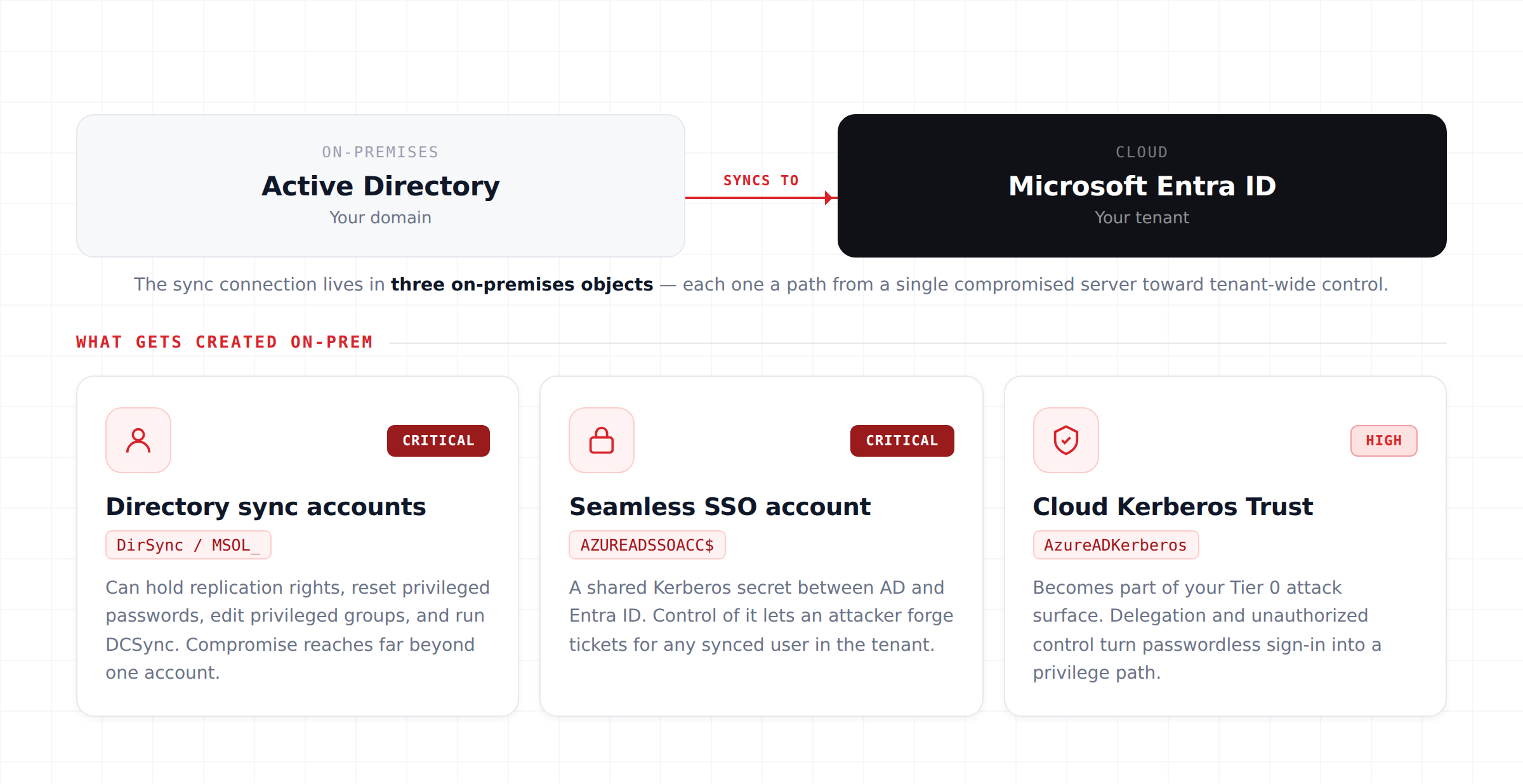
That is the gap these new checks close. Insight Recon now runs 24 checks dedicated to hybrid identity across all paid plans, assessing the on-premises footprint your Entra integration creates and flagging the misconfigurations attackers go after.
Why the hybrid identity attack surface is the dangerous part
There is a common assumption that once identity moves to the cloud, the risk moves with it. Hybrid identity works the other way around. The connection runs through servers and accounts that live in your on-premises domain, and that is where an attacker who already has a foothold will look first.
The synchronization account is the clearest example. Depending on how your tenant is configured, it can hold replication rights, password reset rights over user objects, and write access across large parts of the directory. Compromise it and you are not just touching one account, you are potentially resetting privileged passwords, editing privileged groups, or pulling hashes with DCSync. The Seamless SSO computer account is worse in a different way: it functions as a shared Kerberos secret, and control of it lets an attacker forge tickets for any synced user in the tenant.
None of this shows up in a standard permissions audit, because these objects look like plumbing. They get set up once and forgotten, the permissions on them drift, and nobody circles back. That is the case for checking them on a schedule.
What the 24 checks cover
The new category breaks down into three families, mapped to the three pieces of on-premises infrastructure your Entra hybrid deployment relies on.
Directory synchronization accounts
Whether the sync account can modify privileged groups, reset privileged passwords, control Tier 0 objects, or carries unexpected DCSync rights and excessive AD permissions. We also catch the quieter problems: disabled sync accounts that still hold sensitive permissions, orphaned accounts, stale passwords, and non-privileged principals that can take control of the account.
The Entra Seamless SSO account
The AZUREADSSOACC computer account is a shared secret between AD and Entra ID. We check it for dangerous Kerberos delegation, resource-based constrained delegation, unexpected owners and SPNs, weak Kerberos encryption support, and whether unauthorized principals can control it. Any one of these can turn into tenant-wide impersonation.
Cloud Kerberos Trust configuration
If you use cloud Kerberos trust, the AzureADKerberos object becomes part of your Tier 0 attack surface. We assess its password replication policy, dangerous delegation, and unauthorized control, so a convenience feature for passwordless sign-in does not become a quiet privilege escalation path.
What it looks like in a report
Every check lands in your report the same way the rest do: severity-rated, with the affected objects listed, full remediation guidance, compliance framework mappings, and a place in your risk score and trend history. Here is a sample of what a hybrid environment tends to surface.
How this compares
PingCastle set the bar for on-premises AD hygiene, and it earns its reputation there. Hybrid identity is newer ground, and across the tools built for the on-prem era, coverage of it is still light. That is not a shot at any of them, it is where the field is right now. We treated hybrid identity as its own category and built it out: 24 checks across the sync accounts, the Seamless SSO account, and the Cloud Kerberos Trust object, with the affected objects grouped by the account that holds the risky access so you can see exactly who can do what, all folded into a prioritized report with remediation you can act on the same day.
Getting your results
The hybrid identity checks are available on all paid plans and rely on data collected by scanner v1.1.14. If you are already a customer, update to the latest scanner and run a new scan to light them up. If you are not, this is the kind of exposure that is worth seeing before an attacker does.
See your hybrid identity exposure.
Upgrade to any paid plan, run a scan with the latest scanner, and get all 24 hybrid identity checks alongside your full Active Directory assessment.