

Non-Expiring Passwords: A Hacker's Delight
When the PasswordNeverExpires flag is set, a stolen credential stays valid forever. Non-expiring passwords are one of the most common findings we see in Active Directory. Here is how attackers find and abuse these accounts, how to identify them in your environment, and how to close the gap for good.
Quick Summary
Active Directory environments rely on credential lifecycle management to limit the window of exposure when passwords are compromised. When the PasswordNeverExpires flag is set on an account, that window never closes. A stolen, dumped, or phished credential remains valid indefinitely, giving attackers a persistent foothold that requires no re-exploitation and survives most standard incident response procedures.
| Priority | Moderate (High if privileged account) |
| Risk | Credentials never expire, allowing attackers indefinite access after compromise |
| Impact | Credential compromise, unauthorized access, privilege escalation, lateral movement, domain persistence |
| Exploitation | Attackers find non-expiring accounts, steal credentials, and maintain access without reset pressure |
| Fix | Disable non-expiring passwords, enforce rotation policies, and use gMSAs or PAM where possible |
What Are Non-Expiring Passwords in Active Directory?
A non-expiring password is a configuration in Active Directory where a user account is exempt from domain password expiration policies. This is controlled by the PasswordNeverExpires attribute, which allows the account’s password to remain valid indefinitely regardless of its age or the domain’s password policy settings.
This attribute is commonly found on service accounts, scheduled task accounts, administrative accounts configured for convenience, and legacy or test accounts that were never properly decommissioned. While there are limited scenarios where the setting may be justified, it is frequently applied and forgotten. Over time, these accounts become high-value, low-noise targets for attackers who specifically look for long-lived credentials that are unlikely to change or be actively monitored.
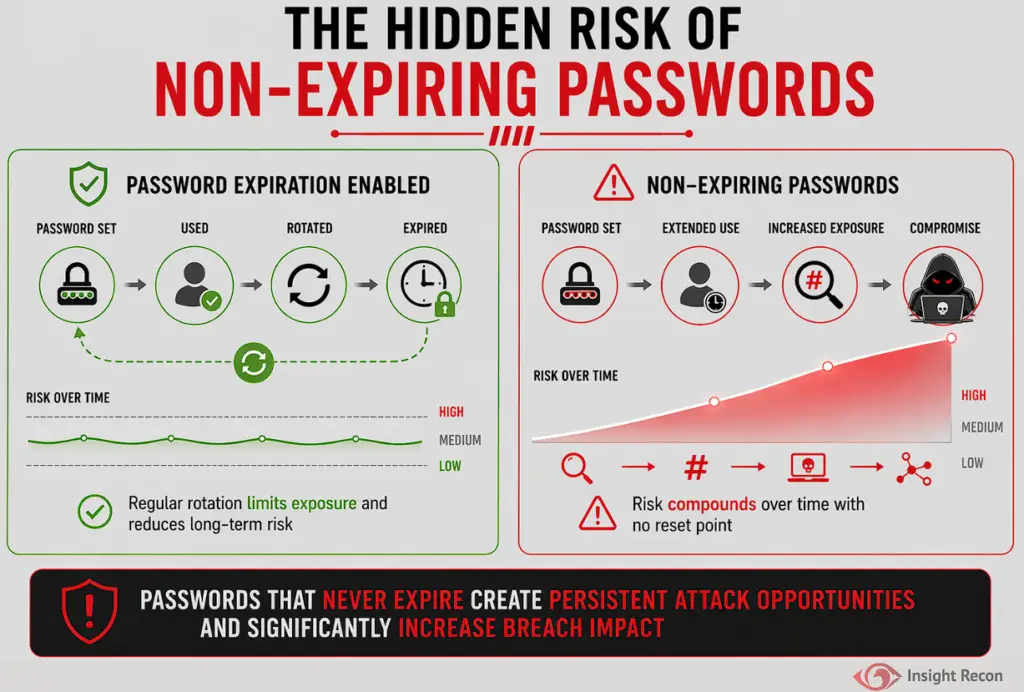
Why Non-Expiring Passwords Are a Security Risk
Credentials weaken over time. A password that was strong when created can be exposed through phishing, third-party breaches, credential dumping, or offline cracking. Without forced rotation, that exposure persists indefinitely. The older the credential, the more likely it has appeared in breach datasets, been observed in transit, or been captured in a previous compromise.
Common risks include:
- No forced reset after exposure
A leaked or captured password remains valid indefinitely, giving attackers unlimited time to use it. - Extended persistence at no cost
Once compromised, the attacker can maintain access without needing to re-exploit the environment, establish new footholds, or maintain any active presence. - Audit and visibility gaps
Accounts that never expire are frequently overlooked during access reviews, offboarding processes, and privilege audits. They accumulate over time and rarely receive the same scrutiny as actively managed accounts. - Elevated risk from privileged accounts
The danger increases significantly when non-expiring passwords are set on accounts with elevated privileges. - Compliance impact
Frameworks such as NIST and CIS require proper credential lifecycle management. Non-expiring passwords directly undermine these controls and are a consistent finding in compliance audits
Real-World Context
In real-world breaches, attackers rarely rely on a single credential. Non-expiring passwords frequently act as a reliable fallback, remaining valid long after other compromised accounts have been reset. In post-incident investigations, security teams routinely discover that an initial intrusion was fully remediated except for one service account or legacy user account with a non-expiring password, which the attacker had already harvested and used to re-establish access weeks later.
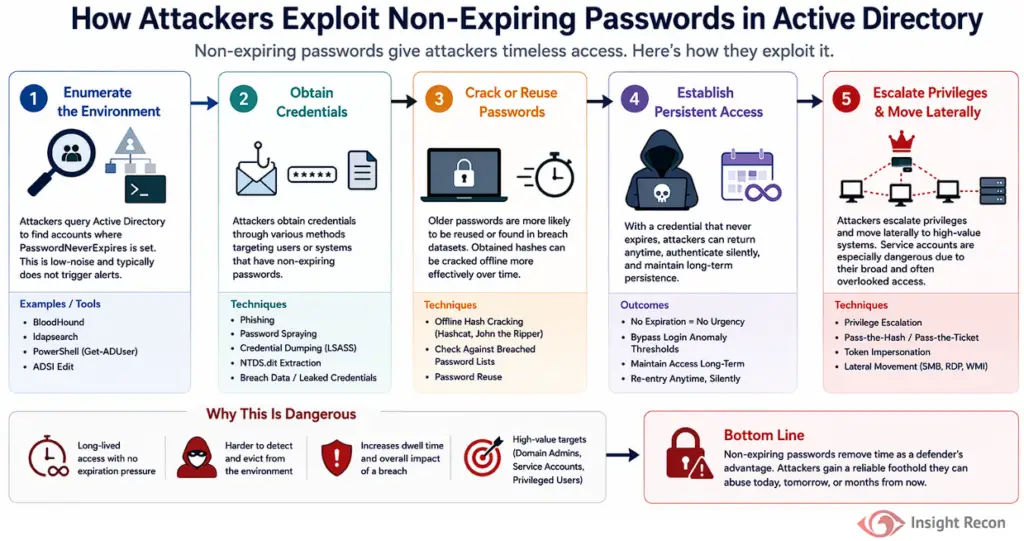
How Attackers Exploit Non-Expiring Passwords in Active Directory
During Active Directory reconnaissance, attackers specifically look for accounts where PasswordNeverExpires is set. These accounts are prioritized because they provide long-lived credentials with no expiration pressure and are frequently deprioritized in monitoring due to their perceived stability.
Typical abuse scenarios include:
Environment enumeration
Using tools such as BloodHound, ldapsearch, or native PowerShell, attackers query Active Directory to identify accounts with the PasswordNeverExpires flag. This is a low-noise, read-only action that rarely triggers alerts in standard configurations.
Credential acquisition
Target accounts are pursued through phishing, password spraying, credential dumping, or previously exposed credentials. Older passwords are more likely to appear in those datasets.
Offline cracking with a long runway
If password hashes are obtained through dumping, the attacker faces no urgency. The hash remains valid for as long as the password does, meaning cracking attempts can continue over long periods of time.
Persistent silent access
With a credential that never expires, the attacker faces no time pressure. They can authenticate infrequently to avoid login anomaly thresholds and return to the environment long after the initial compromise has been closed out.
Privilege escalation and lateral movement
Service accounts with non-expiring passwords are especially dangerous due to their broad and often poorly documented access. Compromising one frequently provides paths to file shares, databases, and systems.
How to Identify Accounts with Non-Expiring Passwords
This misconfiguration is straightforward to enumerate and should be part of any standard Active Directory security review.
PowerShell Method
Run the following command from an elevated PowerShell prompt:
					# List all accounts with non-expiring passwords
Get-ADUser -Filter * -Properties PasswordNeverExpires | Where-Object { $_.PasswordNeverExpires -eq $true } | Select-Object Name, SamAccountName
What it does: This queries Active Directory for all accounts with the PasswordNeverExpires flag set.
How to interpret results: Any account returned by this query should be reviewed. Pay particular attention to accounts with elevated privileges. Disabled accounts with this flag set should also be reviewed, as they can be re-enabled by attackers with sufficient access.

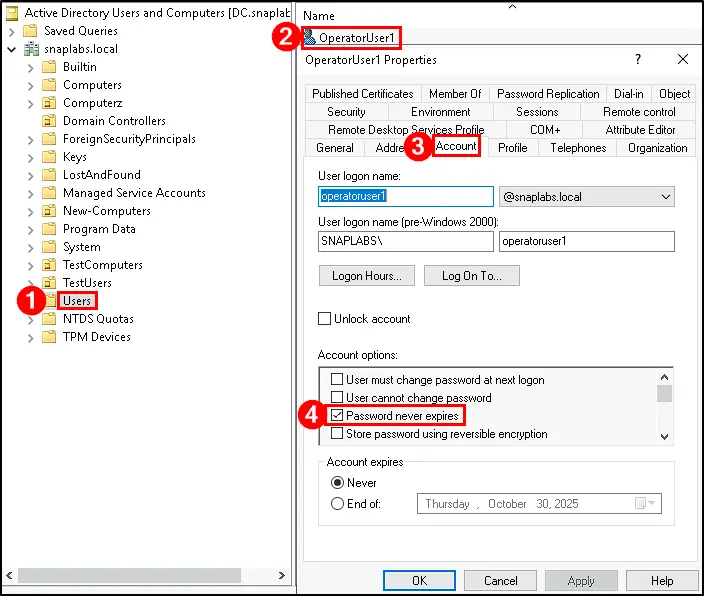
Active Directory Users and Computers (ADUC)
For manual inspection of individual accounts:
- Open Active Directory Users and Computers
- Navigate to the relevant OU and open the account Properties
- Go to the Account tab
- Check whether “Password never expires” is enabled
If checked, the account is vulnerable.
Finding This Risk with Insight Recon
Insight Recon’s Active Directory security assessment surfaces every account configured with PasswordNeverExpires, including accounts that are active, inactive, and elevated.
It also provides:
- All accounts with non-expiring passwords across the entire domain, including active and inactive accounts
- Which affected accounts hold elevated privileges or belong to sensitive groups
- Context on password age and account usage to assess exploitation likelihood
- Risk-based prioritization so the highest-impact findings are addressed first
- Actionable remediation guidance and compliance mappings
This gives your team immediate visibility into which accounts carry the highest real-world risk.
Remediating Non-Expiring Passwords
Prerequisites
Before making changes, verify the following to avoid disrupting services:
- Confirm whether the account is used by applications, services, or scheduled tasks. Changing credentials without validating dependencies can cause outages.
- Coordinate with system and application owners before making changes to service accounts. Schedule a maintenance window if the account supports production services.
- Document the current state of the account for your audit records before making changes.
PowerShell Method
From an elevated PowerShell prompt, run the following command. Replace the username components to match your environment:
					# Remove the PasswordNeverExpires flag from a specific account
Set-ADUser -Identity "username" -PasswordNeverExpires $false
Active Directory Users and Computers (ADUC)
- Open Active Directory Users and Computers
- Navigate to the affected account and open Properties
- Go to the Account tab
- Uncheck “Password Never Expires”
- Apply changes and re-run the detection query to confirm the account no longer appears in results
Preventing Non-Expiring Passwords Going Forward
Removing the flag is the immediate action. The following controls address the root causes and prevent recurrence:
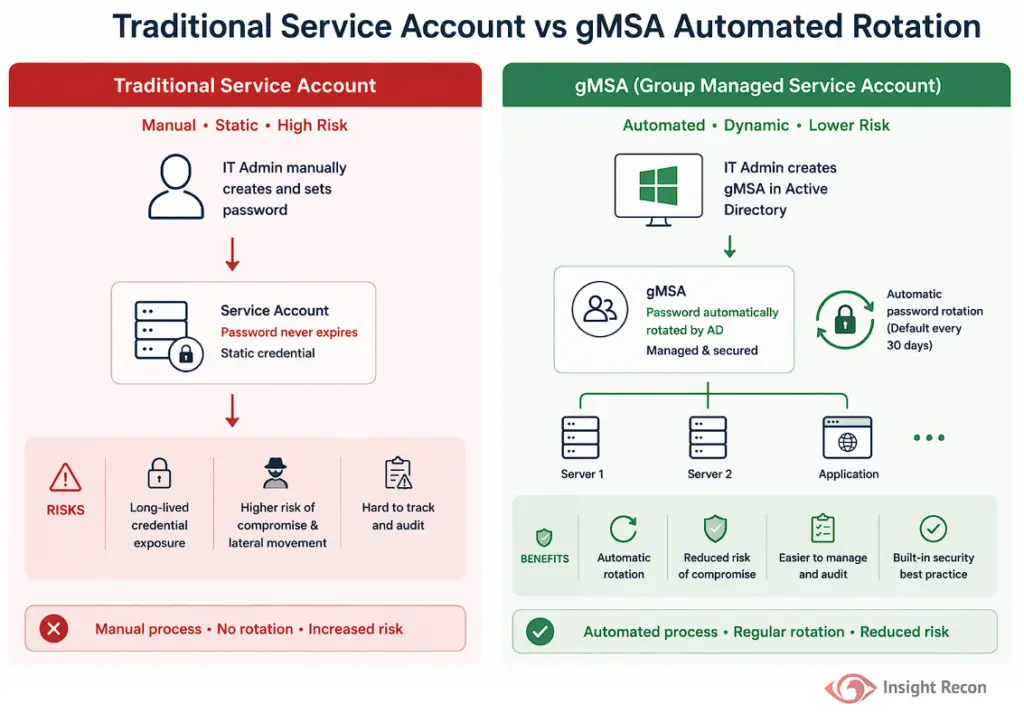
- Migrate service accounts to Group Managed Service Accounts (gMSAs)
gMSAs automatically rotate passwords without manual intervention or service disruption. This is the preferred solution for most service-based use cases and eliminates the underlying problem entirely. - Implement Privileged Access Management (PAM)
PAM solutions enforce credential rotation, just-in-time access, and centralized control for privileged accounts, making non-expiring static credentials unnecessary for most administrative workflows. - Document and control exceptions
If a non-expiring password is genuinely required for a legacy system, assign ownership, document the justification, and apply compensating controls including MFA, network access restrictions, and enhanced logging on the account. - Enforce strong passwords on static credentials
For any account that cannot be migrated away from static credentials, enforce a long, complex, randomly generated password of at least 20 characters to reduce the risk of successful offline cracking.
Quick Validation Checklist
Can you confidently answer “yes” to all of these?
- Do you know which accounts in your domain have PasswordNeverExpires set?
- Are non-expiring password accounts documented, owned, and reviewed on a defined cadence?
- Have service accounts been migrated to gMSAs or have compensating controls in place?
- Do changes to the PasswordNeverExpires attribute generate an alert in your SIEM or monitoring platform?
If any of these are unclear, your environment likely has non-expiring credentials that represent an untracked persistence risk.
Risk & Compliance Mapping
Business Impact: Unauthorized access, long-term credential-based persistence, data exfiltration, lateral movement, and regulatory exposure.
| Framework | Reference |
|---|---|
| NIST CSF | PR.AC-1 (Identity Management and Authentication), PR.AC-4 (Access Permissions and Authorizations) |
| CIS Controls | Control 5 (Account Management), Control 6 (Access Control Management) |
| MITRE ATT&CK | T1078 (Valid Accounts), T1586 (Compromise Accounts) |
| ANSSI | Accounts with non-expiring passwords [vuln_dont_expire] |
| STIG | V-243474 |
| Microsoft Security Baselines | Regular password rotation is strongly recommended. Non-expiring passwords should be treated as exceptions requiring documented justification and compensating controls. |
Frequently Asked Questions
No. Accounts configured with the “PasswordNeverExpires” flag are excluded from domain password expiration policies. This means that even if Group Policy enforces regular password changes, those accounts will remain exempt until the setting is removed.
Each organization has their own risk appetite, but it’s generally considered an insecure practice and should be used sparingly in rare cases where systems cannot support password changes, and even then, compensating controls should be applied.
It often can, if a service account is tied to an application, scheduled task, or service and the credentials change without coordination. Removing the flag itself does not change the password, so the immediate impact is limited. However, once expiration policy takes effect and a forced reset occurs, dependent services will need updated credentials. Always validate dependencies before making changes and coordinate with application owners. Migrating to gMSAs is the preferred long-term solution because it eliminates this coordination problem entirely.
Yes. The in PowerShell the Set-ADUser cmdlet can be applied across multiple accounts in a single operation. Bulk changes should be preceded by a full review of the affected account list and paired with a phased rollout and communication plan to reduce operational risk. Running the detection query first and reviewing the output carefully before applying changes in bulk is strongly recommended.
Find It Before Attackers Do
Accounts with non-expiring passwords are among the first targets enumerated after an attacker gains a foothold. Insight Recon identifies every affected account, surfaces which ones carry the highest real-world risk, and gives you the exact steps to remediate with confidence.
See exactly where your Active Directory is exposed and what to fix first.