Pre-Windows 2000 Compatible Access: Find and Empty It
Pre-Windows 2000 Compatible Access is a builtin group that can read every user and group in the domain. It exists for Windows NT 4.0, yet many domains still have Authenticated Users in it. Some also add Everyone, Anonymous Logon or app groups. Microsoft says it should have no members once nothing legacy depends on it. This post shows you who is in it, what it can read and how to empty it without breaking older apps.
| Priority | Low, or Moderate for Custom membership when Everyone or Anonymous Logon is a member, since that can expose directory data without signing in |
|---|---|
| What decides it | Any member in Pre-Windows 2000 Compatible Access: Authenticated Users, Everyone, Anonymous Logon or a custom group |
| Who's affected | Most domains, since current Windows Server makes Authenticated Users a member by default. Domains where someone added members are affected too |
| Fix | Remove Everyone and Anonymous Logon first. Move app accounts to Windows Authorization Access, then test and remove the rest |
Check it now: who is in Pre-Windows 2000 Compatible Access?
# Runs as any domain user. Lists the group's direct members in the current domain.
Import-Module ActiveDirectory -ErrorAction Stop
$labels = @{
    'S-1-5-11' = 'Over permissioned check (Authenticated Users)'
    'S-1-1-0'  = 'Custom membership and anonymous access checks'
    'S-1-5-7'  = 'Custom membership and anonymous access checks'
}
$group = Get-ADGroup -Identity 'S-1-5-32-554' -Properties member -ErrorAction Stop
foreach ($dn in $group.member) {
    $m = Get-ADObject -Identity $dn -Properties objectSid, objectClass
    $sid = $m.objectSid.Value
    try { $name = ([System.Security.Principal.SecurityIdentifier]$sid).Translate([System.Security.Principal.NTAccount]).Value } catch { $name = $m.Name }
    [pscustomobject]@{
        Member  = $name
        SID     = $sid
        Class   = $m.objectClass
        Flagged = if ($labels.ContainsKey($sid)) { $labels[$sid] } else { 'Custom membership check' }
    }
}
Runs as any domain user with the ActiveDirectory module. It lists the group's direct members in the current domain and which Insight Recon check each one trips. Run it once per domain. No output means the group is empty, which is the goal.
You checked one group. The free scan checks the rest of your on-prem AD in a few minutes.
Nothing gets installed on your domain controllers. Only HTTPS leaves your network.
What Pre-Windows 2000 Compatible Access is
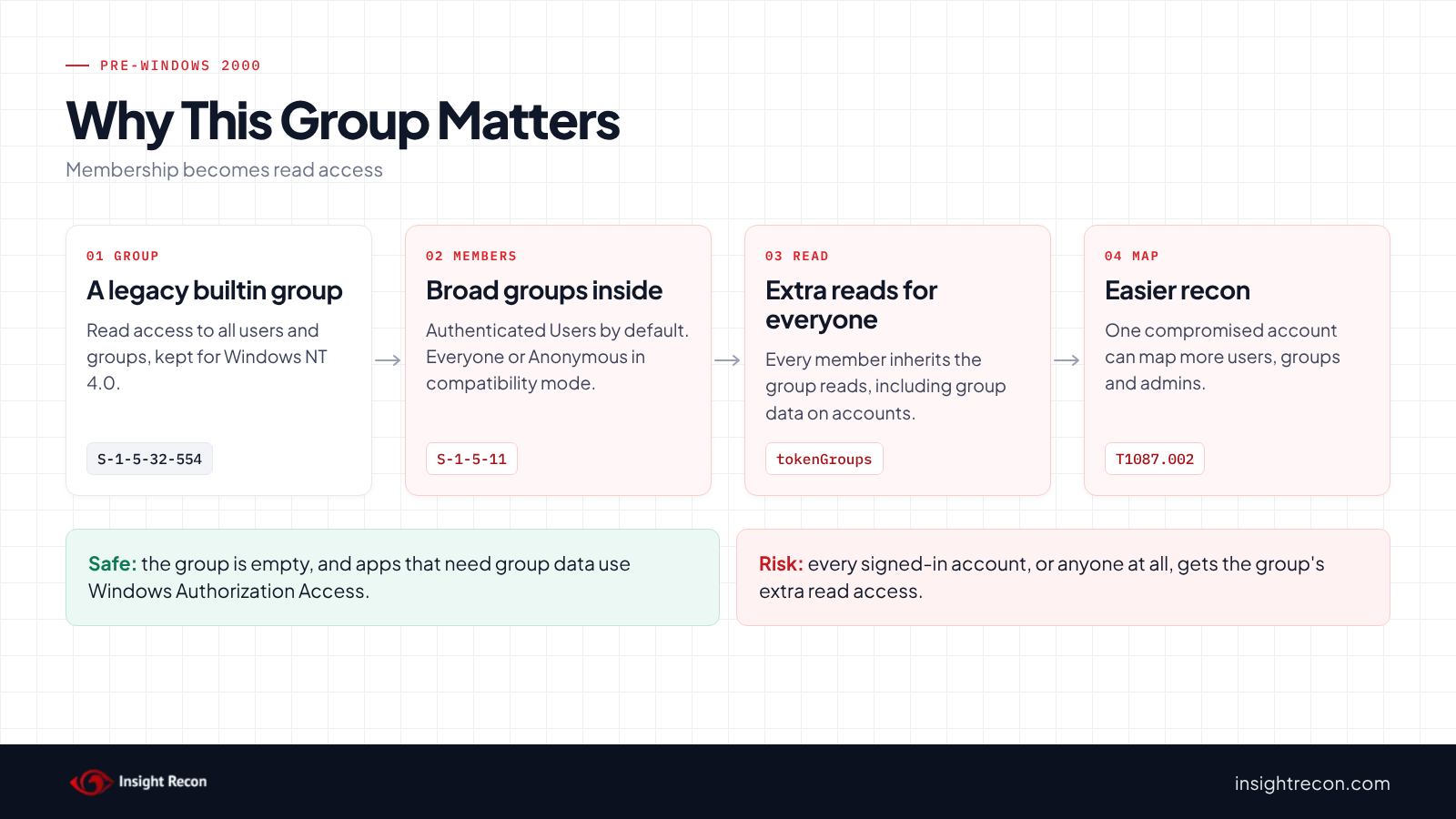
Pre-Windows 2000 Compatible Access is a builtin domain local group with the well-known SID S-1-5-32-554. Microsoft's reference on default security groups says its members "have Read access for all users and groups in the domain" and that it exists for computers that run Windows NT 4.0 and earlier.
Its starting members depend on a choice made when the domain was created. In Pre-Windows 2000 Compatible Permissions mode, Everyone and Anonymous Logon are members. In Windows 2000-only permissions mode, Authenticated Users is the member. Over the years, admins also add groups or service accounts to fix an app that failed with access denied.
Microsoft's guidance is direct: "When no Windows NT 4.0 or older system is in the domain, and all components are updated to be AD aware, this group should have no members."
Why Pre-Windows 2000 Compatible Access matters
Everyone or Anonymous Logon opens the directory
With either one in the group, someone who never signed in may potentially read users and groups. The DISA STIG for AD domains, V-243486, says they "must not be members" of this group. Our anonymous LDAP access post covers that case in depth.
Authenticated Users adds reads every account gets
As a result, every signed-in user and computer inherits whatever the group can read. Some of that overlaps with permissions Authenticated Users already has. However, the group also grants reads that exist only for compatibility, such as group membership data on accounts. Removing it means one compromised account potentially sees less.
Custom members are undocumented exceptions
Similarly, an app group added years ago usually has no owner and no note explaining why. MITRE ATT&CK tracks the reconnaissance these reads support as T1087.002, Account Discovery: Domain Account and T1069.002, Permission Groups Discovery: Domain Groups.
Find Pre-Windows 2000 Compatible Access members
Read the quick check results
The quick check above returns one row per direct member. Authenticated Users, Everyone and Anonymous Logon show as foreign security principals named by their SID.
What to look for: Everyone (S-1-1-0) or Anonymous Logon (S-1-5-7) first. Next, any custom group or account, since each one needs an owner and a reason. Finally, Authenticated Users (S-1-5-11), the default member.
See what the group can read
For the most part, the group's access comes from permissions on the domain root. This lists them, along with the entries for Windows Authorization Access.
# Runs as any domain user. Shows the permissions on the domain root for Pre-Windows 2000 Compatible Access
# (S-1-5-32-554) and Windows Authorization Access (S-1-5-32-560).
Import-Module ActiveDirectory -ErrorAction Stop
$names = @{
    [guid]::Empty                                  = '(all)'
    [guid]'bf967aba-0de6-11d0-a285-00aa003049e2'   = 'user'
    [guid]'bf967a9c-0de6-11d0-a285-00aa003049e2'   = 'group'
    [guid]'4828cc14-1437-45bc-9b07-ad6f015e5f28'   = 'inetOrgPerson'
    [guid]'bf967a86-0de6-11d0-a285-00aa003049e2'   = 'computer'
    [guid]'46a9b11d-60ae-405a-b7e8-ff8a58d456d2'   = 'tokenGroupsGlobalAndUniversal'
}
$root = (Get-ADDomain).DistinguishedName
(Get-Acl -Path "AD:$root" -ErrorAction Stop).GetAccessRules($true, $true, [System.Security.Principal.SecurityIdentifier]) |
    Where-Object { $_.IdentityReference.Value -in 'S-1-5-32-554', 'S-1-5-32-560' } |
    ForEach-Object {
        [pscustomobject]@{
            Group       = if ($_.IdentityReference.Value -eq 'S-1-5-32-554') { 'Pre-Windows 2000' } else { 'Windows Authorization Access' }
            Rights      = $_.ActiveDirectoryRights
            Property    = if ($names.ContainsKey($_.ObjectType)) { $names[$_.ObjectType] } else { $_.ObjectType }
            AppliesTo   = if ($names.ContainsKey($_.InheritedObjectType)) { $names[$_.InheritedObjectType] } else { $_.InheritedObjectType }
            Inheritance = $_.InheritanceType
        }
    }
What to look for: the read rights on user, group and inetOrgPerson objects. Also look for any entry for tokenGroupsGlobalAndUniversal, the group membership data apps read for users who aren't signed in.
Check Pre-Windows 2000 Compatible Access with Insight Recon
The free scan includes two checks that read the group's direct members. They find the group by its SID, so domains in any language get checked. A nested group counts as one member. Together, they pass only when the group is empty.
- Custom "Pre-Windows 2000 Compatible Access" Group Membership flags any member other than Authenticated Users. It's Low, but it goes to Moderate and calls them out when Everyone or Anonymous Logon is a member.
- Over permissioned "Pre-Windows 2000 Compatible Access" Group flags Authenticated Users as a member and stays Low.
Both list the group with its members. Foreign security principals show up as raw SIDs, orphaned ones included. Both checks also come with the Hacker Insight, remediation steps and compliance mappings.
Know what these checks don't decide
Some things are still yours to check. Both read direct members only, so look inside any nested group yourself. Neither tells you which apps depend on the group. If a member can't be read and the result depends on it, the check shows Not assessed.
Related checks beyond this group
- Anonymous Access to AD Enabled, which also fails when Anonymous Logon is in this group. Our anonymous LDAP access post covers it.
- Operator Groups In Use, other legacy builtin groups that should stay empty. Our operator groups post covers it.
You can see what the findings look like in our sample report. The full list is in our check library.
See who is in this group in every domain, plus the anonymous access settings that go with it.
It runs from any Windows machine that can reach your DCs, with a standard domain account. Every core AD check is free for one domain.
Before you remove members
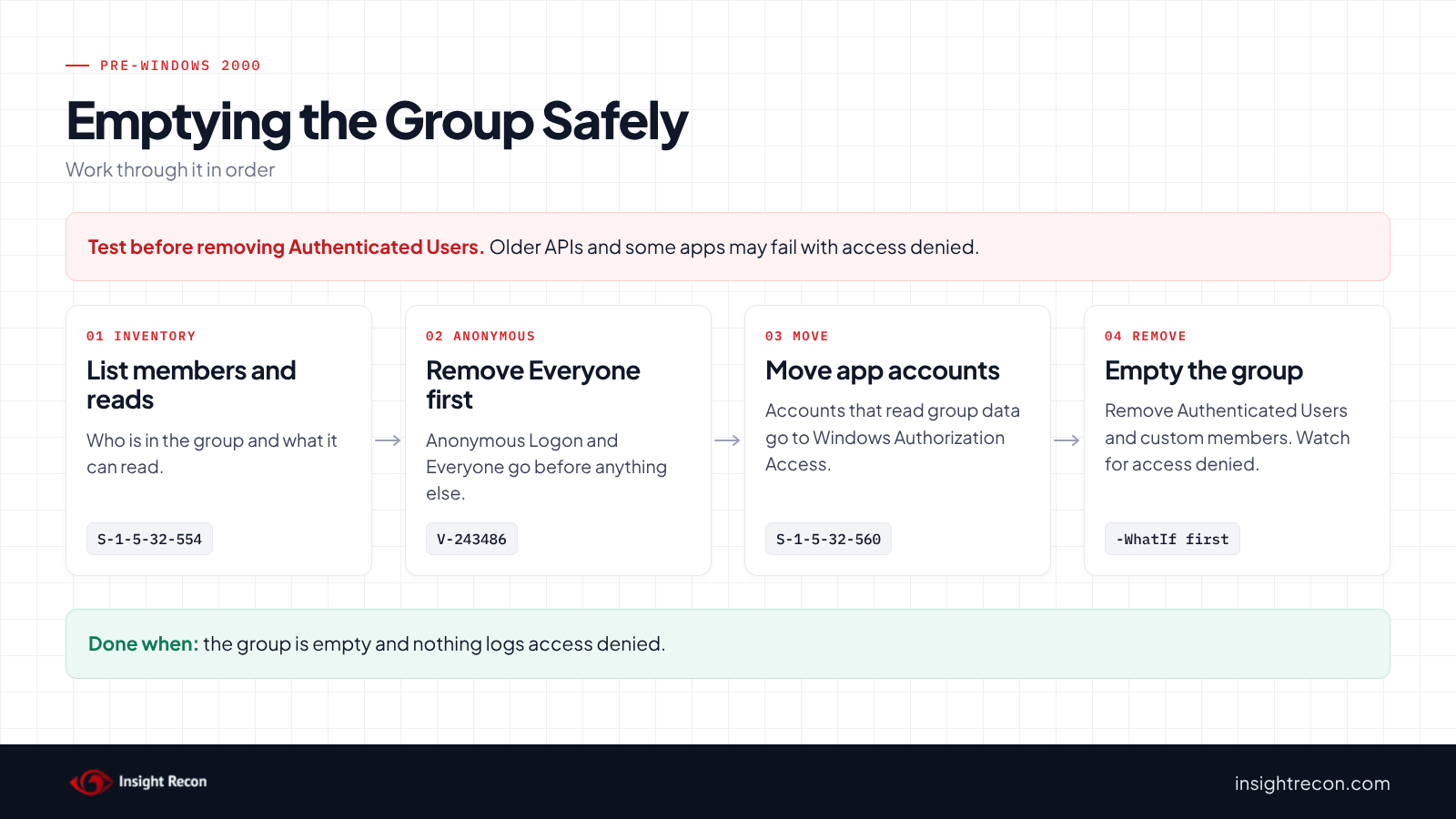
Remove Everyone and Anonymous Logon now. Treat Authenticated Users as a tested change, since older APIs and some apps rely on the reads it gives.
Know what may break
Microsoft documents two common cases. First, apps that read a user's groups while that user isn't signed in. Microsoft's article on apps that need authorization information names AuthzInitializeContextFromSid and LsaLogonUser as functions that read it. Second, older NetUser and NetGroup APIs and the ADSI WinNT provider. Microsoft's article on NetUser and NetGroup access denied errors says they may fail after accounts leave this group.
Give apps a better home
For the first case, Microsoft recommends the Windows Authorization Access group (S-1-5-32-560). It can read the group membership data on accounts without the rest of this group's reads. For the second, the fix is to grant the specific reads, or move the app to LDAP.
Plan a test window
Membership changes may only apply as accounts sign in again, so problems may show up over a few days. Pick a pilot window, watch app logs for access denied and keep the saved member list ready to put back.
Empty Pre-Windows 2000 Compatible Access safely
Each change script below is a dry run with -WhatIf. Drop that to apply. Change svc-webapp and the member SID to your own.
1. Remove Everyone and Anonymous Logon
Run the removal script with $memberSid set to S-1-1-0, then S-1-5-7. Our anonymous LDAP access post covers the related dSHeuristics settings to check at the same time.
2. Move app accounts to Windows Authorization Access
Next, add each service account that reads group membership for other users to Windows Authorization Access. The script prints the current members first.
# Dry run. Drop -WhatIf to apply.
# Needs Domain Admins or Account Operators. Microsoft's recommended home for accounts that read group data for other users.
Import-Module ActiveDirectory -ErrorAction Stop
$account = 'svc-webapp'
$waa = Get-ADGroup -Identity 'S-1-5-32-560' -Properties member -ErrorAction Stop
# Note the current members so you can put them back
$waa.member
Add-ADGroupMember -Identity $waa -Members $account -ErrorAction Stop -WhatIf
What to look for: the dry run shows the account being added. In domains upgraded from older versions, Microsoft notes this group may not have the read permission yet. The reads script above shows whether Windows Authorization Access has an entry for tokenGroupsGlobalAndUniversal on the domain root.
3. Remove custom members and Authenticated Users
This removes one direct member. It saves the full member list to a file first and stops if the SID isn't a member.
# Dry run. Drop -WhatIf to apply.
# Needs Domain Admins. Accounts keep the old membership until they sign in again.
Import-Module ActiveDirectory -ErrorAction Stop
$memberSid = 'S-1-5-11'   # Authenticated Users. Use the SID from the quick check.
$group = Get-ADGroup -Identity 'S-1-5-32-554' -Properties member -ErrorAction Stop
# Save the current members so you can put them back
$group.member | Set-Content -Path '.\prewin2000-members.txt'
$dn = $group.member | Where-Object { (Get-ADObject -Identity $_ -Properties objectSid).objectSid.Value -eq $memberSid }
if (-not $dn) { throw "$memberSid isn't a direct member." }
Set-ADGroup -Identity $group -Remove @{ member = $dn } -ErrorAction Stop -WhatIf
What to look for: the dry run should name only the member you chose. In general, start with custom groups. Then remove Authenticated Users once your pilot passes.
4. Put a member back if something breaks
Add the member back from the saved file with Set-ADGroup -Add, then fix the app with the narrower permission before you try again.
Keep Pre-Windows 2000 Compatible Access empty
- Alert on membership changes. Event 4732 logs a member added to a security-enabled local group, which includes builtin groups such as this one. Filter it for
S-1-5-32-554. - Check each domain. After all, every domain in the forest has its own copy of this group.
- Re-run the scan. One of the two checks flags the group again as soon as anyone adds a member.
Pre-Windows 2000 Compatible Access checklist
- Are Everyone and Anonymous Logon out of the group in every domain?
- Does each remaining member have an owner and a documented reason?
- Did you move app accounts to Windows Authorization Access?
- Did a pilot without Authenticated Users run with no access denied errors?
- Is the group empty?
- Do you alert on new members?
A "no" on the first question means anyone may potentially read your users and groups without signing in.
Compliance mapping
| Framework | Reference | Why it applies |
|---|---|---|
| MITRE ATT&CK | T1087.002, T1069.002 | Account Discovery and Permission Groups Discovery. The group's reads make it easier to map accounts and groups (both checks). |
| CIS Controls v8 | Control 4, Control 6 | Secure configuration of enterprise assets and access control management (both checks). |
| NIST CSF 2.0 | PR.AA-03, PR.AA-05 | Users are authenticated before access (Custom membership). Access follows least privilege (both checks). |
| ANSSI | vuln_compatible_2000_not_default, vuln_compatible_2000_anonymous | ANSSI's control points for non-default members of this group and for Anonymous Logon as a member (Custom membership). |
| DISA STIG | V-243486 | Anonymous Logon and Everyone must not be members of this group (Custom membership). |
Pre-Windows 2000 Compatible Access FAQ
What is Pre-Windows 2000 Compatible Access?
A builtin group with read access to all users and groups in the domain, kept for Windows NT 4.0 compatibility.
Should Pre-Windows 2000 Compatible Access be empty?
Yes, once nothing legacy depends on it. Microsoft says it should have no members when no Windows NT 4.0 system remains and all components are AD aware.
Is it safe to remove Authenticated Users?
Usually, after a test. Apps that read group data for other users and older NetUser APIs may fail, so move those to Windows Authorization Access or narrower permissions first.
Why does Insight Recon have two checks for one group?
They separate the default member, Authenticated Users, from everything else. That way, Everyone, Anonymous Logon and custom members stand out from the common default.
Does Insight Recon check this group?
Yes. The free scan includes both checks for Pre-Windows 2000 Compatible Access, along with Anonymous Access to AD Enabled.
See who is still in Pre-Windows 2000 Compatible Access.
It runs from any Windows machine that can reach your DCs, with a standard domain account. Every core AD check is free for one domain.
Not ready to scan?
AD Signal is our monthly look at what's changing in AD security and how real domains score. Read the latest report.
References
- Microsoft Learn: Active Directory security groups
- Some applications and APIs require access to authorization information on account objects
- NetUser and NetGroup APIs fail with access denied
- Event 4732, a member was added to a security-enabled local group
- DISA STIG V-243486 (Active Directory Domain)
- MITRE ATT&CK: T1087.002 Account Discovery: Domain Account
- MITRE ATT&CK: T1069.002 Permission Groups Discovery: Domain Groups