Anonymous LDAP Access in Active Directory: Fix dSHeuristics, NSPI and Pre-Windows 2000 Access
Anonymous LDAP access lets anyone who can reach a domain controller read your directory without signing in. Windows Server 2003 and later block it by default. Two characters in the forest-wide dSHeuristics attribute turn it back on, the 7th for LDAP and the 8th for the NSPI address book interface. Group membership, including Anonymous Logon in Pre-Windows 2000 Compatible Access, then decides what an anonymous request can read. This post shows you how to check each setting, find anything that still relies on them and turn them off without breaking older apps.
| Priority | Critical when a DC answers anonymous searches. Anyone on the network can list users and groups without an account |
|---|---|
| What decides it | dSHeuristics character 7 (anonymous LDAP), character 8 (anonymous NSPI) and character 21 (UPN and SPN uniqueness), plus Anonymous Logon in Pre-Windows 2000 Compatible Access, or Everyone when "Let Everyone permissions apply to anonymous users" is on |
| Who's affected | Forests that opened anonymous access for an old app, printer or appliance. Also domains that kept old group memberships from a Windows NT or 2000 upgrade, or from a Windows Server 2003 build with pre-Windows 2000 compatible permissions |
| Fix | Find what still uses anonymous access, move it to an authenticated account, then reset the dSHeuristics characters and remove the group members |
Check it now: what does your dSHeuristics value allow?
Import-Module ActiveDirectory -ErrorAction Stop
$config = (Get-ADRootDSE).configurationNamingContext
$h = (Get-ADObject "CN=Directory Service,CN=Windows NT,CN=Services,$config" -Properties dSHeuristics).dSHeuristics
function CharAt([string]$s, [int]$p) { if ($s.Length -ge $p) { "$($s[$p - 1])" } else { '0' } }
[pscustomobject]@{
    dSHeuristics    = if ($h) { $h } else { '(not set, defaults apply)' }
    AnonymousLdap   = (CharAt $h 7) -eq '2'
    AnonymousNspi   = (CharAt $h 8) -ne '0'
    UpnSpnChecksOff = (CharAt $h 21) -ne '0'
    ListObjectMode  = (CharAt $h 3) -eq '1'
}
Runs as any domain user with the ActiveDirectory module. dSHeuristics is one value for the whole forest, so one run covers every domain. True in any column except ListObjectMode needs attention. A value that isn't set means the safe defaults apply.
You checked one setting. The free scan checks the rest of your on-prem AD in a few minutes.
Nothing gets installed on your domain controllers. Only HTTPS leaves your network.
What anonymous LDAP access is
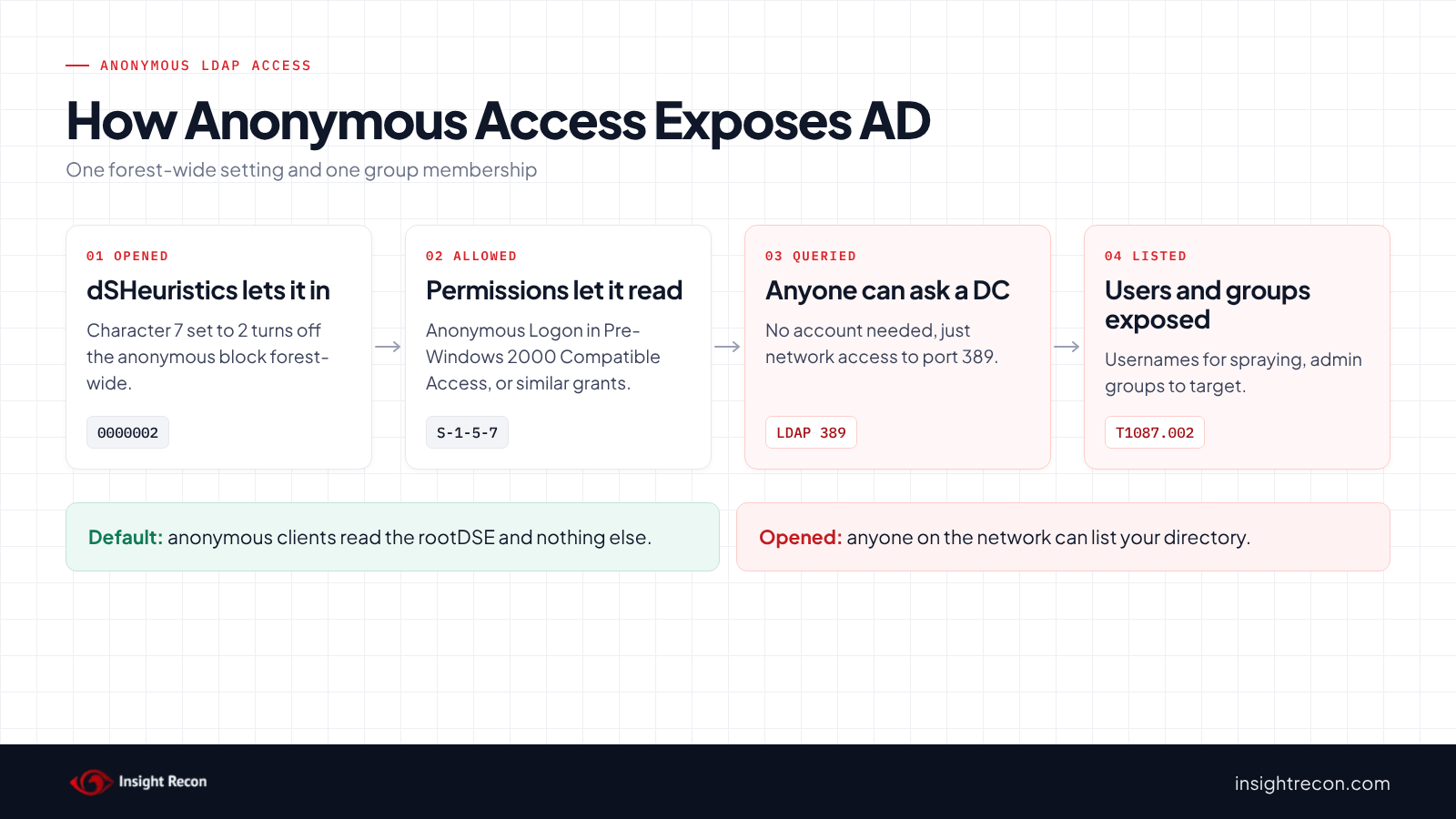
Microsoft's support article on the change says that by default, anonymous LDAP operations to Active Directory, "other than rootDSE searches and binds, are not permitted" since Windows Server 2003. An anonymous client can read the rootDSE (the server's basic information) and nothing else.
The dSHeuristics attribute
dSHeuristics is a string of single-character switches on CN=Directory Service,CN=Windows NT,CN=Services in the forest's configuration partition. It applies to every DC in the forest. Microsoft's [MS-ADTS] specification lists what each position does. Three matter here:
- Character 7, fLDAPBlockAnonOps. A
2turns the block off. Microsoft's article says anonymous clients can then "perform any operation that is permitted by the access control list (ACL)." - Character 8, fAllowAnonNSPI. Anything other than
0lets anonymous clients bind to the NSPI interface. [MS-NSPI] is the RPC protocol that gives messaging clients access to addressing data, such as an Outlook address book. - Character 21, DoNotVerify
UPNAndOr Since Windows Server 2012 R2, DCs refuse duplicate UPNs and SPNs. Microsoft's November 2021 updates for CVE-2021-42282 added a check on SPN aliases. This character is a bit mask.SPNUniqueness. 1turns off the UPN check,2the SPN check and4the SPN alias check. Values up to7combine them.
Pre-Windows 2000 Compatible Access
The built-in Pre-Windows 2000 Compatible Access group can read users and groups across the domain. Domains that started on Windows NT or 2000 sometimes still have Anonymous Logon or Everyone in it. So do domains whose first DC ran Windows Server 2003 with the pre-Windows 2000 compatible permissions option, which added both. Anonymous Logon gives anonymous clients the read permissions the directory then checks. Everyone only does if "Network access: Let Everyone permissions apply to anonymous users" is on. Microsoft's default leaves it off. Take both out anyway. The DISA STIG for Active Directory says the same in V-243486.
The two work together. dSHeuristics decides whether AD will process an anonymous request at all. Group membership and other permissions decide what that request can read.
Why anonymous LDAP access is dangerous
With anonymous access open, anyone who can reach a DC on the network can list users, groups and their memberships without an account. The DISA STIG for Windows Server 2022 (V-254399) rates this high severity: directory data outside the rootDSE "must be configured to prevent anonymous access."
That list is where most attacks on AD start. Usernames feed password spraying. Group memberships show who the admins are. Descriptions sometimes hold passwords, as our passwords in AD descriptions post covers. MITRE ATT&CK tracks this reconnaissance as T1087.002, Account Discovery: Domain Account and T1069.002, Permission Groups Discovery: Domain Groups. Normally an attacker needs one working account first. Anonymous access skips that step.
Anonymous NSPI gives the same kind of list through a different door, the address book interface. The UPN and SPN override is a different problem: it lets duplicates in. Microsoft's SPN and UPN uniqueness page says duplicate SPNs "result in authentication failures." Duplicate UPNs break sync to Microsoft Entra ID.
Find anonymous access in your forest
Check Pre-Windows 2000 Compatible Access
This shows whether Anonymous Logon (S-1-5-7) or Everyone (S-1-1-0) is a member of Pre-Windows 2000 Compatible Access. It finds the group by its well-known SID, so it works in any language. It runs as any domain user with the AD module and covers the domain you're signed in to. The group exists in every domain, so run it in each one.
Import-Module ActiveDirectory -ErrorAction Stop
(Get-ADGroup -Identity 'S-1-5-32-554' -Properties member).member |
    Where-Object { $_ -like 'CN=S-1-5-7,*' -or $_ -like 'CN=S-1-1-0,*' }
What to look for: any output. Each line is a member that gives anonymous clients read access. The default member is Authenticated Users, which this script ignores. Our check library covers that separately.
Test each DC with an anonymous search
The settings show what's configured. This shows what a DC returns in practice. It makes one anonymous LDAP search for up to five users against each DC in the domain. It runs from any domain-joined machine with the AD module and doesn't need any rights, since it's testing what someone with none can see.
# Runs from any domain-joined machine. Makes one anonymous LDAP search against each DC on port 389.
Import-Module ActiveDirectory -ErrorAction Stop
Add-Type -AssemblyName System.DirectoryServices.Protocols
$base = (Get-ADDomain).DistinguishedName
foreach ($dc in (Get-ADDomainController -Filter *).HostName) {
    $result = 'blocked'
    try {
        $conn = [System.DirectoryServices.Protocols.LdapConnection]::new(
            [System.DirectoryServices.Protocols.LdapDirectoryIdentifier]::new($dc, 389))
        $conn.AuthType = [System.DirectoryServices.Protocols.AuthType]::Anonymous
        $conn.Bind()
        $req = [System.DirectoryServices.Protocols.SearchRequest]::new(
            $base, '(objectClass=user)', [System.DirectoryServices.Protocols.SearchScope]::Subtree, 'sAMAccountName')
        $req.SizeLimit = 5
        $resp = $conn.SendRequest($req)
        if ($resp.Entries.Count -gt 0) { $result = "OPEN: returned $($resp.Entries.Count) users" }
    }
    catch [System.DirectoryServices.Protocols.DirectoryOperationException] {
        if ("$($_.Exception.Response.ResultCode)" -eq 'SizeLimitExceeded') { $result = 'OPEN: returned users' }
    }
    catch { $result = "not tested: $($_.Exception.Message)" }
    [pscustomobject]@{ DC = $dc; AnonymousSearch = $result }
}
What to look for: any DC marked OPEN. That DC returns user data to anyone. blocked is what you want. not tested means the search didn't run, most often because port 389 wasn't reachable. The message says why. Test that DC from somewhere that can reach it.
Check for duplicates before you turn uniqueness back on
If character 21 is set, duplicates may already exist. This lists duplicate UPNs in the domain you're signed in to and runs setspn -X -F, which searches for duplicate SPNs at the forest level, per Microsoft's setspn documentation. It runs as any domain user with the AD module.
Import-Module ActiveDirectory -ErrorAction Stop
Get-ADObject -LDAPFilter '(userPrincipalName=*)' -Properties userPrincipalName |
    Group-Object userPrincipalName | Where-Object Count -gt 1 |
    Select-Object @{ n = 'DuplicateUPN'; e = { $_.Name } }, Count
setspn -X -F
What to look for: any duplicate. Turning uniqueness back on blocks new duplicates. It doesn't fix existing ones, so clean them up as well.
Check anonymous LDAP access with Insight Recon
The free scan includes three checks for this:
- Anonymous Access to AD Enabled (Critical) fails when a DC in the scanned domain returns the domain object or users to an anonymous request, when dSHeuristics character 7 is
2, or when Anonymous Logon is in Pre-Windows 2000 Compatible Access. It lists the DCs that answered. It finds Anonymous Logon by SID, so it works in any language. DCs it couldn't test are named in the result. It doesn't test DCs in other domains of the forest. - Insecure dSHeuristics Configuration (High) flags character 7 set to
2and character 21 set to anything but0, which turns off one or more of the uniqueness checks. List Object mode (character 3) shows up in the result but doesn't fail the check. - Anonymous NSPI Access Permitted (Moderate) flags dSHeuristics character 8 set to anything but
0.
Each finding comes with the Hacker Insight, remediation steps and compliance mappings for the check.
Know what it doesn't decide for you. None of the checks can see which apps or devices still rely on anonymous access. List Object mode doesn't open anonymous access. It changes how AD enforces the List Object permission, so if you turned it on deliberately to hide objects, document why. The checks also don't look at explicit permissions granted to Anonymous Logon or Everyone on individual OUs, which the probe script above would reveal if they let anonymous searches return data.
These related checks cover the rest of this area:
- Custom "Pre-Windows 2000 Compatible Access" Group Membership flags members beyond the default, Anonymous Logon and Everyone included. It goes from Low to Moderate when either of those two is a member. It's the only check that flags Everyone. Over permissioned "Pre-Windows 2000 Compatible Access" Group covers Authenticated Users, the default member. Our Pre-Windows 2000 Compatible Access post covers both.
- Possible Passwords in Account Descriptions, the kind of data anonymous reads expose. Our passwords in AD descriptions post covers it.
Our sample report shows all three passing. The full list is in our check library.
See what your domain controllers hand out without a sign-in.
It runs from any Windows machine that can reach your DCs, with a standard domain account. Every core AD check is free for one domain.
Before you turn off anonymous access
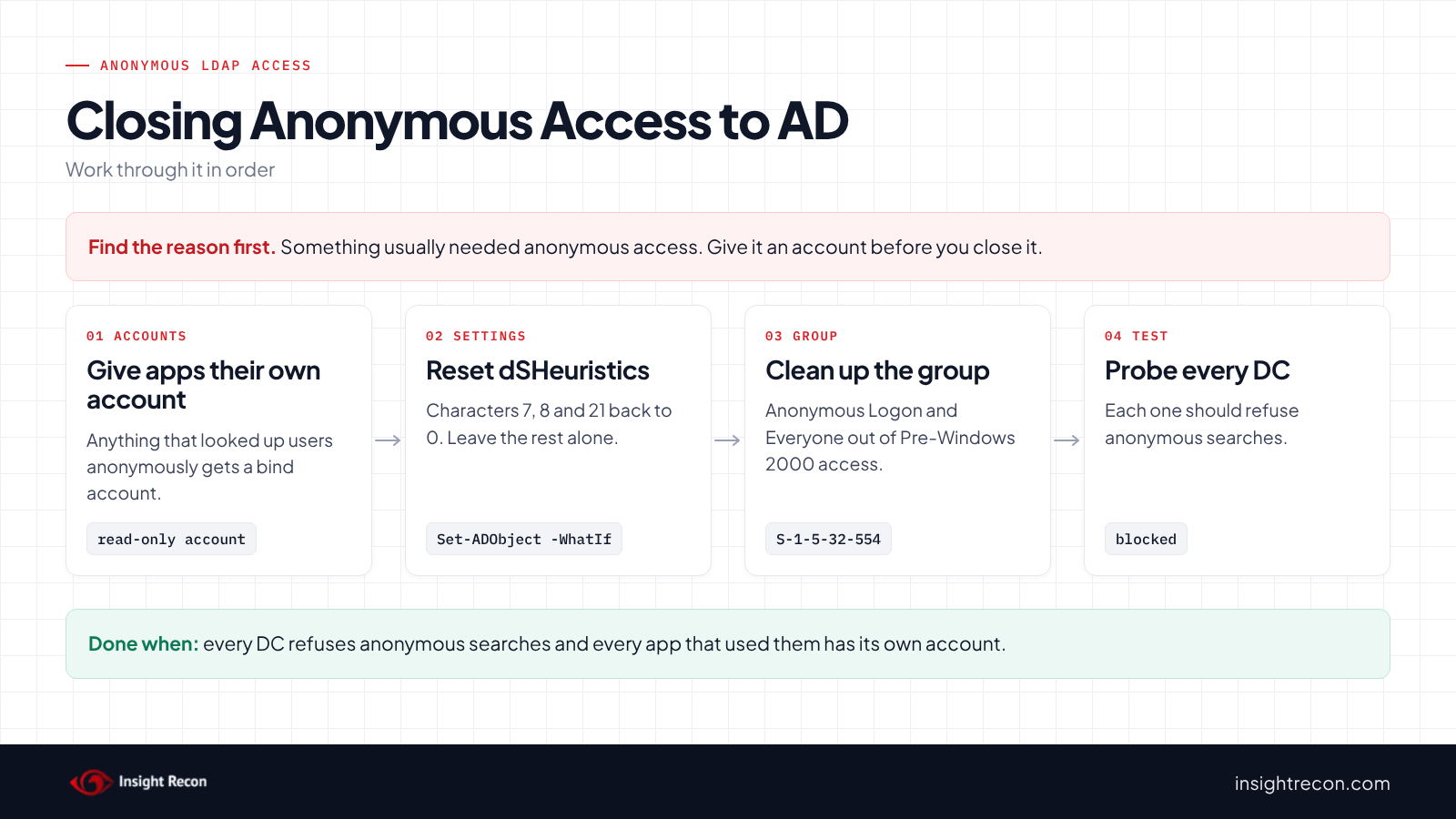
Someone usually turned these settings on for a reason: an app, a printer or an appliance that looked up users without signing in. Find it first and give it an account, or it stops working the moment you change the setting.
Find what uses it
- Older apps and appliances that look up users or email addresses over LDAP: scanners and printers with an address book, NAS devices, phone systems and line-of-business apps.
- Older address book clients if character 8 is set.
- Migration tools if character 21 is set. Microsoft's KB3070083 describes third-party migration tools failing on the 2012 R2 duplicate SPN check, which is one reason people turn it off.
Ask the owners of anything that queries AD and check its configuration for a bind account. Anything with no account configured is a likely candidate.
Give each one a read-only account
Create a dedicated domain account for each app or device, set it in the app's LDAP settings and confirm it works. A normal domain user can read what these apps need. Don't add it to any admin group.
Save the current value
The fix script prints the current dSHeuristics value before it changes anything. Keep it. It's your way back.
Turn off anonymous LDAP access safely
1. Reset the dSHeuristics characters
This sets characters 7, 8 and 21 back to 0 and leaves every other character as it is. When you change the seventh character, Microsoft's article says not to touch any of the others. The script follows the same rule for 8 and 21. [MS-ADTS] also says the DC rejects a value whose 10th character isn't 1 or 20th isn't 2 when the string is that long. The same goes for a 30th character that isn't 3. Changing single characters in place keeps those intact. It's a dry run with -WhatIf. Drop that to apply. It needs Enterprise Admins, since the object is in the forest's configuration partition. Microsoft's article says DCs pick up the change through replication without a restart.
# Dry run. Drop -WhatIf to apply. Needs Enterprise Admins: the object is in the forest's configuration partition.
# Changes only characters 7, 8 and 21. Keep the "Before" line: it's your way back.
Import-Module ActiveDirectory -ErrorAction Stop
$dn  = "CN=Directory Service,CN=Windows NT,CN=Services,$((Get-ADRootDSE).configurationNamingContext)"
$old = (Get-ADObject $dn -Properties dSHeuristics).dSHeuristics
if (-not $old) { 'dSHeuristics is not set: nothing to change'; return }
$chars = $old.ToCharArray()
foreach ($p in 7, 8, 21) { if ($chars.Length -ge $p) { $chars[$p - 1] = '0' } }
$new = -join $chars
"Before: $old"
"After:  $new"
Set-ADObject -Identity $dn -Replace @{ dSHeuristics = $new } -WhatIf
If you only want to change one of the three, remove the others from the 7, 8, 21 list. Clean up existing duplicates before you reset character 21. Otherwise the tools that rely on them keep failing.
2. Remove Anonymous Logon and Everyone from the group
This removes Anonymous Logon and Everyone from Pre-Windows 2000 Compatible Access if they're members. It's a dry run with -WhatIf. Drop that to apply. It needs rights to change the group's membership, which by default means Domain Admins. Run it in each domain where the earlier script found them. To undo it, add the member back the same way with -Add.
# Dry run. Drop -WhatIf to apply. Needs rights to change the group's membership (Domain Admins by default).
Import-Module ActiveDirectory -ErrorAction Stop
$fsp = "CN=ForeignSecurityPrincipals,$((Get-ADDomain).DistinguishedName)"
$remove = (Get-ADGroup -Identity 'S-1-5-32-554' -Properties member).member |
    Where-Object { $_ -eq "CN=S-1-5-7,$fsp" -or $_ -eq "CN=S-1-1-0,$fsp" }
if ($remove) { Set-ADGroup -Identity 'S-1-5-32-554' -Remove @{ member = @($remove) } -WhatIf }
3. Test every DC again
Wait for replication, then run the probe script again. Every DC should show blocked. Then check that each app you moved to an account still works.
If something breaks
This puts the old dSHeuristics value back. Paste the "Before" value you saved into $before. The script stops if you forget. It's a dry run with -WhatIf. Drop that to apply. It needs Enterprise Admins. Then give the app that broke its own account and try again.
# Dry run. Drop -WhatIf to apply. Needs Enterprise Admins. Paste the "Before" value you saved.
Import-Module ActiveDirectory -ErrorAction Stop
$before = 'PASTE-BEFORE-VALUE'
if ($before -eq 'PASTE-BEFORE-VALUE') { throw 'Paste the Before value from the fix script first.' }
$dn = "CN=Directory Service,CN=Windows NT,CN=Services,$((Get-ADRootDSE).configurationNamingContext)"
Set-ADObject -Identity $dn -Replace @{ dSHeuristics = $before } -WhatIf
Keep anonymous access closed
- Watch dSHeuristics. It rarely changes, so look into any change. Compare the quick check's output with the last known value after any forest-level change.
- Run the probe after DC builds. A new DC picks up dSHeuristics from replication. The probe confirms it in a minute.
- Require a bind account for new apps. Make "uses an authenticated LDAP account" part of approving anything that queries AD.
- Re-run the scan. All three checks show whether anonymous access is back.
Anonymous LDAP access checklist
- Are dSHeuristics characters 7, 8 and 21 all
0or unset? - Is neither Anonymous Logon nor Everyone a member of Pre-Windows 2000 Compatible Access in any domain?
- Does the anonymous probe show
blockedon every DC? - Does every app that used anonymous access now use its own account?
- Did you clean up duplicate UPNs and SPNs before turning uniqueness back on?
- If List Object mode is on, is the reason documented?
- Did you save the old dSHeuristics value?
A "no" on the third question means anyone on your network can list your users and groups without an account.
Compliance mapping
| Framework | Reference | Why it applies |
|---|---|---|
| MITRE ATT&CK | T1087.002, T1069.002 | Account Discovery and Permission Groups Discovery for domain accounts and groups. Anonymous reads hand both over without a sign-in. |
| CIS Controls v8 | Control 4, Control 6 | Secure configuration and access control. The directory shouldn't answer clients that haven't authenticated. |
| NIST CSF 2.0 | PR.AA-03, PR.AA-05, PR.PS-01 | Least-privilege access for all three checks. PR.AA-03 (authentication) applies to the two anonymous checks and PR.PS-01 (secure configuration) to Insecure dSHeuristics Configuration. |
| ANSSI | vuln_dsheuristics_bad, vuln_compatible_2000_anonymous | ANSSI's control points for dangerous dSHeuristics settings (all three checks) and Anonymous in Pre-Windows 2000 Compatible Access (Anonymous Access to AD Enabled). |
| DISA STIG | V-243503, V-254399 | Anonymous access above the rootDSE must be disabled (Anonymous Access to AD Enabled and Insecure dSHeuristics Configuration). Directory data must not be readable anonymously (Anonymous Access to AD Enabled). |
Anonymous LDAP access FAQ
Is anonymous LDAP access enabled by default?
No. Since Windows Server 2003, anonymous clients can only read the rootDSE. Someone has to change dSHeuristics to open more. Permissions then decide what anonymous clients can read.
What does dSHeuristics 0000002 mean?
The 7th character is 2, which turns off the block on anonymous LDAP operations. Anonymous clients can then do whatever the permissions allow.
What is anonymous NSPI access?
dSHeuristics character 8 lets clients bind to the NSPI address book interface without signing in. Set it to 0.
Will turning it off break anything?
Anything still using anonymous lookups stops working: older apps, printers, scanners or appliances. Give each one its own account first.
Does Insight Recon check for anonymous access?
Yes. The free scan includes Anonymous Access to AD Enabled, Insecure dSHeuristics Configuration and Anonymous NSPI Access Permitted.
Find out what your directory tells people who never signed in.
It runs from any Windows machine that can reach your DCs, with a standard domain account. Every core AD check is free for one domain.
Not ready to scan?
AD Signal is our monthly look at what's changing in AD security and how real domains score. Read the latest report.
References
- Microsoft Learn: Anonymous LDAP operations to Active Directory are disabled
- Microsoft Learn: [MS-ADTS] 6.1.1.2.4.1.2 dSHeuristics
- Microsoft Learn: [MS-ADTS] 6.1.1.4.12.14 Pre-Windows 2000 Compatible Access Group Object
- Microsoft Learn: [MS-NSPI] Name Service Provider Interface Protocol
- Microsoft Learn: SPN and UPN uniqueness
- Microsoft Learn: Network access: Let Everyone permissions apply to anonymous users
- Microsoft Support: KB3070083, duplicate SPN check and migration tools
- Microsoft Support: KB5008382, UPN, SPN and SPN alias uniqueness (CVE-2021-42282)
- DISA STIG V-254399 (WN22-DC-000150): prevent anonymous access to directory data
- DISA STIG V-243503: anonymous access above the rootDSE must be disabled
- DISA STIG V-243486: Anonymous Logon and Everyone not in Pre-Windows 2000 Compatible Access
- MITRE ATT&CK: T1087.002 Account Discovery: Domain Account
- MITRE ATT&CK: T1069.002 Permission Groups Discovery: Domain Groups