SID History: Find Privileged SIDs and Clean Up Old Migrations
SID History lets an account keep the access of an identity it used to have, usually from before a domain migration. Left in place, those old SIDs keep granting access that no group membership list shows. A privileged SID in SID History is worse: it can give an account admin rights without making it a member of any admin group. Here's how to find every SID History value in your domain, investigate the privileged ones and clear the rest without cutting off access users still need.
| Priority | High. Old SIDs can grant access nobody sees. A privileged SID can grant admin rights outside any admin group |
|---|---|
| What decides it | Values in the sIDHistory attribute on user, computer and group objects, and whether any of them belong to a privileged group or account |
| Who's affected | Domains that went through a migration or consolidation and never cleaned up, and any domain where someone added SID History without a migration |
| Fix | Investigate privileged values as a possible compromise. Move remaining access to current SIDs, then remove SID History in small, logged batches |
Check it now: which objects carry SID History?
Import-Module ActiveDirectory
Get-ADObject -LDAPFilter '(sIDHistory=*)' -Properties sIDHistory, sAMAccountName |
    Select-Object sAMAccountName, ObjectClass, @{n='SIDHistory'; e={ $_.sIDHistory -join '; ' }}
Runs as any domain user with the ActiveDirectory module. It lists every user, computer and group with a value in sIDHistory. No output is what you want outside an active migration. Any output is worth running the detailed script below on.
You checked one setting. The free scan checks the rest of your on-prem AD in a few minutes.
Nothing gets installed on your domain controllers. Only HTTPS leaves your network.
What SID History is for
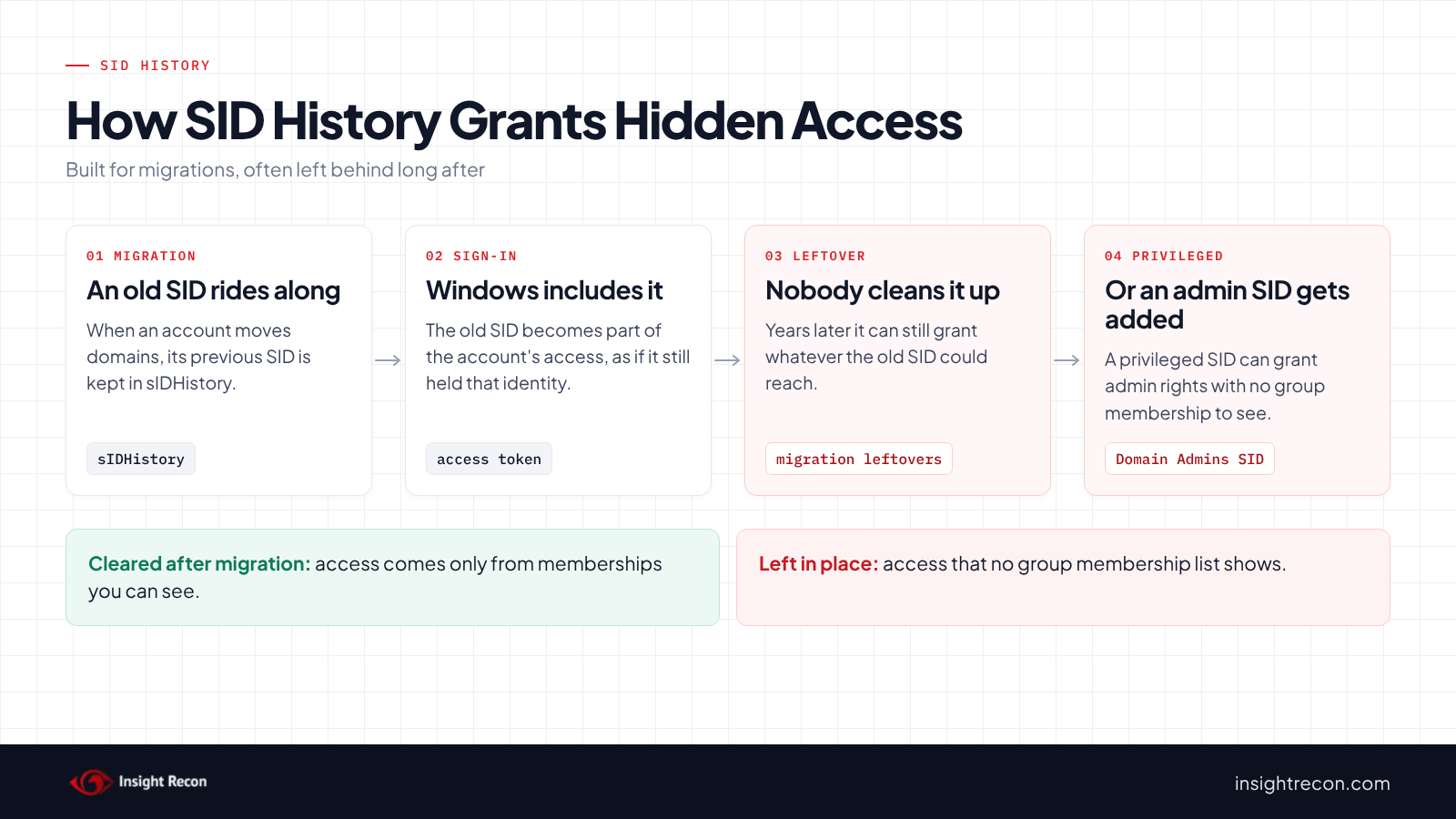
Every user, computer and group has a security identifier (SID) that includes its domain. Move an account to another domain and it gets a new SID. Microsoft documents that the previous SID is then kept in the sIDHistory attribute.
The point is migrations. File shares, applications and other resources still grant access to the old SID. With it, Windows includes the old SID when the account signs in. The user keeps that access while admins move resources over to the new SID. Migration tools such as ADMT set it. They can also translate permissions from old SIDs to new ones.
The attribute is meant to be temporary. Once a migration is done and resources use the new SIDs, the old values have no job left. The ASD and CISA guide on Active Directory compromises says that unless you're migrating accounts between domains, the attribute shouldn't be needed.
Why SID History is risky
Access granted this way doesn't show up where admins usually look. An account can reach a share, a server or a group's rights through an old SID while its group memberships look ordinary. That makes leftover values from an old migration an easy-to-miss source of excess access. Some of those old SIDs may also belong to domains that no longer exist.
A privileged value is a different level of concern. If SID History contains the SID of a privileged group such as Domain Admins or Enterprise Admins, that SID can be included in the account's authorization token and grant the corresponding access even though the account is not a current member of the group. MITRE describes adding SIDs to the attribute as a way to escalate privileges and move between domains. The ASD guide describes it as a post-exploitation technique used to persist and avoid detection. Writing the attribute outside a migration generally requires Domain Admin or equivalent rights. An unexplained privileged value usually means the domain has already been compromised.
Trusts are part of the picture. SID filtering on a trust discards SIDs from the other side that don't belong there, including values carried over from old domains. MITRE notes forest trusts filter by default and that legacy external trusts may not. Once SID History is allowed across a forest trust, though, SIDs of groups with a relative ID (RID) of 1000 or higher get through. In MITRE ATT&CK terms this is T1134.005 SID-History Injection.
Find SID History in your domain
Flag privileged and suspicious values
The quick check lists objects. This breaks out each value and adds what you need to triage it: the domain it came from, whether it's a privileged group or account, and whether it's from your own domain. It runs as any domain user with the AD module.
Import-Module ActiveDirectory
$localDomain = (Get-ADDomain).DomainSID.Value
$privilegedRids = 500, 512, 516, 518, 519, 520, 521, 526, 527
$privilegedBuiltin = 'S-1-5-32-544', 'S-1-5-32-548', 'S-1-5-32-549', 'S-1-5-32-550', 'S-1-5-32-551'
Get-ADObject -LDAPFilter '(sIDHistory=*)' -Properties sIDHistory, sAMAccountName |
    ForEach-Object {
        $obj = $_
        foreach ($sid in $obj.sIDHistory) {
            $v = $sid.Value
            $rid = [int]($v.Split('-')[-1])
            [pscustomobject]@{
                Object       = $obj.sAMAccountName
                Class        = $obj.ObjectClass
                HistorySid   = $v
                SourceDomain = $v.Substring(0, $v.LastIndexOf('-'))
                Privileged   = ($privilegedBuiltin -contains $v) -or ($v -like 'S-1-5-21-*' -and $privilegedRids -contains $rid)
                OwnDomain    = $v.StartsWith("$localDomain-")
            }
        }
    } | Sort-Object Privileged, OwnDomain -Descending
What to look for: rows where Privileged is True. They sort to the top. The script treats the built-in Administrator account and groups such as Domain Admins, Enterprise Admins, Schema Admins, Administrators and the operator groups as privileged. It can't recognize custom admin groups, so look at what each resolved name grants. OwnDomain set to True means the old SID comes from this same domain, which a normal cross-domain migration doesn't produce. Then group the rest by SourceDomain and compare each one to the SIDs of your current domains and trusted domains. A name lookup won't sort these for you, because a global catalog resolves an old SID to the account that now carries it. A SourceDomain that matches none of your domains or trusts belongs to a domain that's gone.
Check SID filtering on your trusts
SID filtering decides whether old SIDs from another domain count here. This lists your trusts and their filtering settings. It runs as any domain user with the AD module.
Import-Module ActiveDirectory
Get-ADTrust -Filter * |
    Select-Object Name, Direction, TrustType, IntraForest, ForestTransitive, SIDFilteringQuarantined, SIDFilteringForestAware
What to look for: skip rows where IntraForest is True. Those are trusts inside your forest, where SID filtering doesn't apply. Then flag external trusts (ForestTransitive is False) where SIDFilteringQuarantined is False, and forest trusts where SIDFilteringForestAware is True, which means SID History is allowed across. Either one may be intentional during a migration. Outside one, they deserve an explanation.
Look for recent SID History changes
Microsoft documents event 4765 ("SID History was added to an account") on domain controllers, under Audit User Account Management. The ASD guide also points to event 4738 for changes to the attribute. This reads recent 4765 events from every DC. It uses PowerShell remoting, so run it as a DC admin or as a member of Remote Management Users and Event Log Readers.
# Uses PowerShell remoting. Needs DC admin, or Remote Management Users plus Event Log Readers.
Import-Module ActiveDirectory
$dcs = (Get-ADDomainController -Filter *).HostName
Invoke-Command -ComputerName $dcs -ScriptBlock {
    Get-WinEvent -FilterHashtable @{ LogName = 'Security'; Id = 4765 } -MaxEvents 50 -ErrorAction SilentlyContinue
} | Select-Object PSComputerName, TimeCreated, Id, Message
What to look for: any 4765 event outside a planned migration. The event records who made the change and which SIDs were added.
Check SID History with Insight Recon
The free scan includes two checks for this. Privileged SIDs in sIDHistory lists accounts whose SID History contains privileged SIDs such as Domain Admins, Enterprise Admins or Administrators. Accounts with SID History lists accounts carrying any SID History at all. Each finding has the Hacker Insight, remediation steps and compliance mappings for its check.
Know what they don't decide for you. A value from a migration still in progress may be expected. The checks can't tell an active migration from a forgotten one. Privileged SIDs are recognized by well-known group and account IDs. A custom admin group in SID History needs the review above.
These related checks cover the rest of this area:
- Account Migrated from Non-Existent Domain, accounts whose SID History points to a domain that no longer exists.
- Trust without SID Filtering and Dangerous Trust Attributes Detected, the trust settings that decide whether SID History crosses a trust.
- DCShadow Activity, signs of a technique that can push changes such as SID History into AD through replication.
You can see what the findings look like in our sample report. The full list is in our check library.
See what else is open in your AD.
The scan runs from a domain-joined Windows machine with a standard domain account. The free plan covers every on-prem AD check.
Before you remove SID History
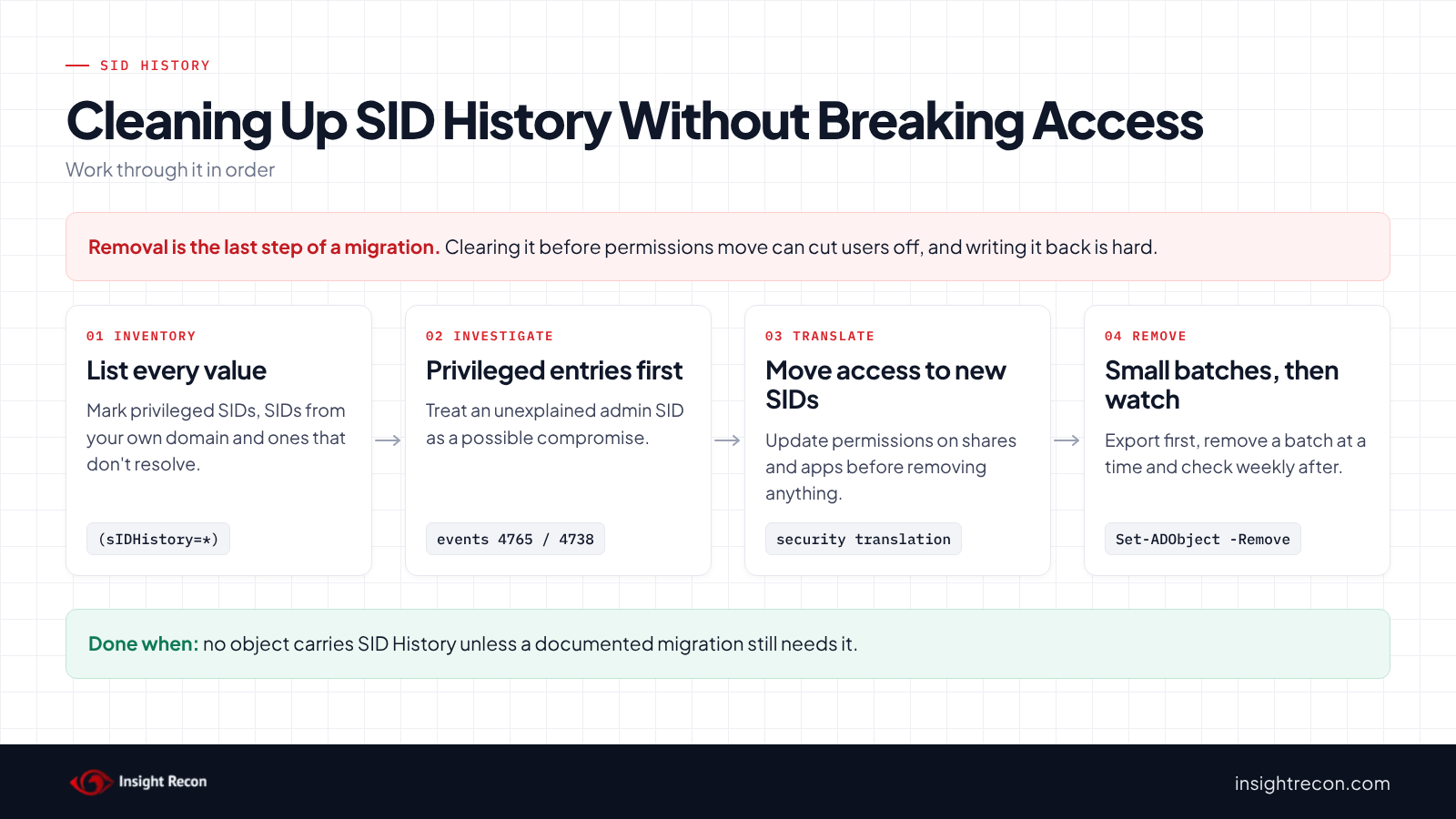
Removing SID History before permissions have been moved to the new SIDs can cut users off from file shares, mailboxes and applications. Microsoft's archived guide on removing it calls this the last step of a migration and notes you can't easily write the values back. Take a system state backup on at least two DCs per domain, export every value and remove in small batches. An AD snapshot lets you read the old values but can't put them back.
Sort each value
- Privileged, or from your own domain: treat as a possible compromise. Find out when it was added and by whom before you change anything. If you'd like help, our remediation team does this work.
- From a domain that's gone: the
SourceDomainmatches none of your domains or trusts. These are often the easiest to clear once you've confirmed nothing still grants access to them. - From a domain that still exists: check whether a migration is still running and whether resources still reference the old SID.
Move access to the new SIDs first
Before removing a value, make sure the resources the account uses grant access to its current SID or group instead of the old one. Migration tools such as ADMT include security translation for this. ADMT 3.2 is deprecated and hasn't been updated for current Windows Server, so test its translation in a lab first. File servers, NAS devices and applications with their own permission stores are where old SIDs tend to survive.
Record every value
Save each object and SID History value so you have a record and a basis for a SID mapping if something breaks. It runs as any domain user with the AD module.
Import-Module ActiveDirectory
Get-ADObject -LDAPFilter '(sIDHistory=*)' -Properties sIDHistory, sAMAccountName |
    ForEach-Object {
        $obj = $_
        foreach ($sid in $obj.sIDHistory) {
            [pscustomobject]@{ Object = $obj.sAMAccountName; DistinguishedName = $obj.DistinguishedName; HistorySid = $sid.Value }
        }
    } | Export-Csv .\sidhistory-before.csv -NoTypeInformation
Remove SID History safely
1. Handle privileged values first
Investigate before you remove. Check the 4765 and 4738 events, the account's recent sign-ins and what it touched. Once you've captured what you need, disable the account and reset its password, since removing the value won't revoke tickets that already carry it. Then remove it with the single-object command in step 2. An unexplained privileged entry is a sign to review the rest of the domain too, starting with the checks in our krbtgt post.
2. Remove one value to test
Pick one migrated account whose resources you've confirmed. This is a dry run with -WhatIf. Drop that to apply. It needs Domain Admin.
# Dry run. Drop -WhatIf to apply. Removes one value from one object. Needs Domain Admin.
Import-Module ActiveDirectory
Set-ADObject -Identity 'CN=jsmith,OU=Users,DC=contoso,DC=com' -Remove @{ sIDHistory = 'S-1-5-21-1111111111-2222222222-3333333333-1105' } -WhatIf
Have the user sign out and back in, then check the shares and applications they use. Test groups as their own batch. A group's SID History goes into every member's token, so removing it from a group hits all of them at once.
3. Remove the rest in batches
Copy reviewed rows from the export into a batch file and remove a small group at a time, by department or by resource. Wait a few days between batches so problems surface before the next one.
# The CSV is a reviewed subset of sidhistory-before.csv (columns: DistinguishedName, HistorySid).
# Dry run first. Keep each batch small.
Import-Module ActiveDirectory
Import-Csv .\sidhistory-batch1.csv | ForEach-Object {
    Set-ADObject -Identity $_.DistinguishedName -Remove @{ sIDHistory = $_.HistorySid } -WhatIf
}
4. Tighten your trusts
Once no migration needs old SIDs across a trust, make sure SID filtering is on. MITRE lists turning SID History off on forest trusts and SID filter quarantine on external trusts as mitigations. MITRE also notes that SID filtering between domains in the same forest isn't a supported configuration. If a domain in your forest isn't trusted, the guidance is to move it to its own forest.
Keep it from coming back
- Check weekly. The ASD guide recommends checking the
sIDHistoryattribute weekly. The quick check takes seconds. - Alert on changes. Collect events 4765 and 4738 from every DC and alert on any SID History change outside a planned migration. The ASD guide also lists event 4675, logged when SIDs are filtered at a trust.
- End migrations on purpose. Give each migration a close-out step that translates permissions and removes the old values.
- Re-run the scan. Both checks show whether new values have appeared.
SID History checklist
- Is every privileged SID History value explained, or removed after an investigation?
- Does every remaining value belong to an active, documented migration?
- Have permissions been moved to current SIDs before any removal?
- Is SID filtering on for external and forest trusts that don't need SID History?
- Are events 4765 and 4738 collected and alerted on?
- Is the attribute checked weekly?
A "no" on the first question needs attention now. A "no" on the second means accounts still carry access you can't see in their group memberships.
Compliance mapping
| Framework | Reference | Why it applies |
|---|---|---|
| MITRE ATT&CK | T1134.005 | SID-History Injection: SIDs added to SID History are included in the account's access token. |
| CIS Controls v8 | Control 5, Control 6 | Account management and access control. Access should come from memberships you can review. |
| NIST CSF 2.0 | PR.AA-05 | Access permissions follow least privilege and are managed. |
| ANSSI | vuln_sidhistory_dangerous, vuln_sidhistory_present | ANSSI's Active Directory control points for accounts with unexpected SID History and for SID History that's still set. |
SID History FAQ
What is SID History in Active Directory?
An attribute that keeps an object's previous SIDs after it moves between domains. Windows includes those SIDs when the account signs in. The account keeps access granted to its old identity during a migration.
Is it safe to remove SID History?
Once permissions have been moved to the new SIDs, yes. Before that, users can lose access. Export every value first, take a backup, test with one account and remove in small batches.
Why is a privileged SID in SID History dangerous?
It can give the account the privileged group's rights without membership in that group. MITRE and the ASD describe it as a privilege escalation and persistence technique. Treat an unexplained one as a possible compromise.
Does SID filtering protect me?
It helps at trust boundaries by discarding SIDs that don't belong to the trusted domain. It doesn't apply within a domain or between domains in the same forest. And once SID History is allowed across a forest trust, SIDs of groups with a RID of 1000 or higher get through.
Does Insight Recon check SID History?
Yes. The free scan includes Privileged SIDs in sIDHistory and Accounts with SID History, plus related checks for migrated accounts and trust filtering.
Find the access your group memberships don't show.
The scan runs from a domain-joined Windows machine with a standard domain account. The free plan covers every on-prem AD check.
Not ready to scan?
AD Signal is our monthly look at what's changing in AD security and how real domains score. Read the latest report.
References
- Microsoft Learn: SID-History attribute
- Microsoft Learn: Event 4765, SID History was added to an account
- Microsoft (archived blog): How to remove SID history with PowerShell
- Microsoft Learn: ADMT support policy and known issues
- Dirk-jan Mollema: Active Directory forest trusts, how does SID filtering work?
- ASD, CISA, NSA and partners: Detecting and mitigating Active Directory compromises
- MITRE ATT&CK: T1134.005 SID-History Injection