
LDAP Signing Wasn't Enough: Patch Your DCs for the NTLM Relay Bypass
Researchers showed domain controllers with LDAP signing enforced could still be relayed into. Microsoft patched it in the October 2026 updates. Until your DCs are on that update, enforced signing isn't protecting them the way you think.
| Priority | High. Patch domain controllers first. A DC that enforces LDAP signing but isn't on the October 2026 update is still exposed |
|---|---|
| What it is | An NTLM relay technique that reached domain controllers over plain LDAP even with signing required |
| Who's affected | Domain controllers on Windows Server 2016 through 2025, before the October 2026 cumulative update |
| Fix | Install the October 2026 cumulative update on every DC. Then keep signing and channel binding on, require SMB signing on the DCs and close the coercion paths relay needs |
Check it now: are your DCs on the October 2026 update?
Import-Module ActiveDirectory

# Lowest build that carries the October 2026 cumulative update, by OS major build
$patched = @{ '26100' = 33650; '20348' = 5761; '17763' = 9376; '14393' = 9612 }

$dcs = (Get-ADDomainController -Filter *).HostName
$results = Invoke-Command -ComputerName $dcs -ErrorAction SilentlyContinue -ScriptBlock {
    $v = Get-ItemProperty 'HKLM:\SOFTWARE\Microsoft\Windows NT\CurrentVersion'
    [pscustomobject]@{
        OS    = (Get-CimInstance Win32_OperatingSystem).Caption
        Build = [int]$v.CurrentBuild
        UBR   = [int]$v.UBR
    }
}

$results | Select-Object PSComputerName, OS,
    @{ N = 'Installed'; E = { "$($_.Build).$($_.UBR)" } },
    @{ N = 'Patched';   E = {
        $min = $patched[[string]$_.Build]
        if (-not $min)            { 'check manually' }
        elseif ($_.UBR -ge $min)  { 'Yes' }
        else                      { 'NO - update' }
    } }

# Any DC that didn't answer. Treat these as unknown and check them directly.
$dcs | Where-Object { $_ -notin $results.PSComputerName } |
    ForEach-Object { "No response: $_" }
Run it from a machine that can reach your DCs over WinRM. NO - update means that DC is below the build that carries the fix. check manually shows up for an OS build that isn't in the table. Confirm that one against Microsoft's update history. A No response line is a DC that didn't answer. Treat it as unknown and check it directly.
See what else is open on your domain controllers, or send the link to your work inbox.
The scan runs from a domain-joined Windows machine with a standard domain account. The free plan covers every on-prem AD check.
What the researchers found
On October 23, 2026, SpecterOps published a technique that relays NTLM to a domain controller over plain LDAP, with LDAP signing enforced the whole time. Signing has been on every AD hardening list for years. It's the fix Microsoft has pushed since 2019. Turns out it doesn't stop this on its own.
The short version is that a signed LDAP session can be set up with a key the attacker controls, a coerced login gets relayed into that same session, then the domain controller carries out the relayed account's request anyway. Where the relayed account is a domain controller's own machine account, that opens the usual takeover paths, resource-based constrained delegation and shadow credentials, which lead on to pulling secrets from the directory. We're keeping this conceptual on purpose. What matters is what it means for your DCs and how to handle it.
Microsoft shipped the fix. The SMB side went out in the September 2026 updates without being called out. The LDAP side followed in October 2026. SpecterOps reported it on October 6 and the LDAP fix landed on October 13. There's no splashy advisory or headline CVE to track it by, which is why a lot of teams won't realize a patch already handles it.
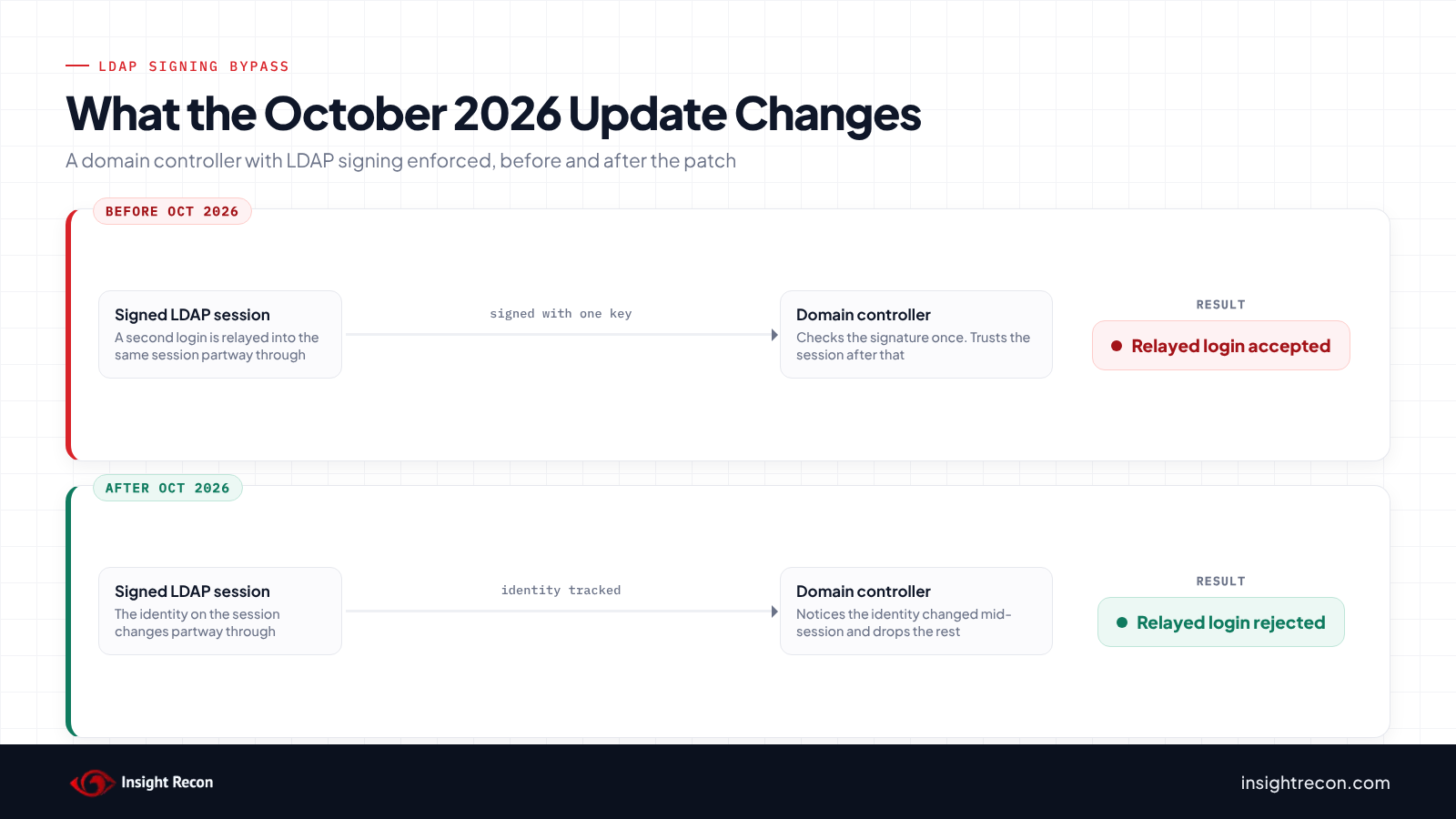
Why enforced signing wasn't enough
LDAP signing works by signing each message with the session key so the domain controller knows the traffic wasn't tampered with and came from whoever authenticated. The gap was that the DC checked that signature once, against the key the session started with, then trusted the rest of the exchange. If the identity on the session changed partway through, nothing re-checked it. The later request ran with the new identity's rights.
So signing did its job. It proved the messages weren't altered. It just never checked that the identity stayed the same across the signed block. That's the gap the October 2026 update closes: a patched DC tracks the identity through the session and throws away the rest if it changes mid-stream.
Signing is still worth keeping on. It just doesn't stop this by itself. The real fix is the patch. No setting substitutes for it.
Which domain controllers are affected
SpecterOps tested Server 2016 and up and found them vulnerable until the October 2026 cumulative update. Here's the build that carries the fix for each supported Windows Server version. A DC at or above the build in its row is patched for this.
| Windows Server | October 2026 update | Build at or above |
|---|---|---|
| 2025 | KB5126646 | 26100.33650 |
| 2022 | KB5126655 | 20348.5761 |
| 2019 | KB5126651 | 17763.9376 |
| 2016 | KB5126868 (install SSU KB5126649 first) | 14393.9612 |
The Check it now command above reads the installed build from each DC and tells you which ones are behind. These are the on-premises Patch Tuesday builds. If you run a different servicing channel, confirm your version's fixed build against Microsoft's update history before you rely on it.
Check whether your DCs are patched
The build check is the one that matters for this. Run the Check it now command and get every DC to Yes. One thing to watch: reading a build number off a remote DC depends on the host answering, whether that's WinRM for the command above or Remote Registry for a scanner. If a DC doesn't answer, treat it as unknown and go check it directly rather than assuming it's fine.
Don't lean on your LDAP signing check for this one. A DC that enforces signing passes it and can still be exposed, because the bypass went around signing instead of exploiting a DC that was missing it. Go by patch level here.
Patch, then close the relay paths
Patching the DCs is the fix. Everything else here is defense in depth: it makes relay harder and covers you on the next variant.
Install the October 2026 update on every DC
Get all your domain controllers to the build in the table, Server 2016 through 2025. Member servers want the September 2026 update or later too, since that's where the SMB side was fixed. The build check tells you when you're there.
Keep signing and channel binding on
Leave LDAP signing required and turn on LDAP channel binding if it isn't already. Signing covers plain LDAP on 389 and channel binding covers LDAPS on 636. Neither one stops this bypass on its own. The patch does. They still close the ordinary relay paths into a DC though. No reason to run without them. Our posts on LDAP signing and channel binding walk through both.
Require SMB signing on domain controllers
The relay rides in on a coerced SMB login. Requiring SMB signing on your DCs, which is the default on current ones but not older builds, makes a relayed SMB session useless. See SMB signing not required.
Close the coercion paths
Relay needs a victim coerced into authenticating somewhere the attacker is listening. The usual triggers live right on the DC. Turn off the Print Spooler service on domain controllers unless something genuinely needs it. Turn off the WebClient (WebDAV) service on DCs, since it opens an easy coercion path. And cut NTLM where you can. Every account you move to Kerberos is one less login that can be relayed. Microsoft has deprecated NTLM and the October 2026 updates add better NTLM auditing on Server 2019 and 2022 to help you find what's still using it.
Check it with Insight Recon
Insight Recon's free, read-only Active Directory security assessment flags the pieces this attack leans on, across 155+ checks:
- Domain Controller with Stale Update (High): flags domain controllers behind on cumulative updates, including the October 2026 one that carries this fix. This is the finding that catches it.
- LDAP Signing Not Enforced on Domain Controllers (High): still want this on. Just know a pass here doesn't clear you for this bypass.
- LDAPS Channel Binding Disabled (Moderate): the 636 half of LDAP relay protection.
- Domain Controller with SMB Signing Not Required (High): the SMB login the relay rides in on.
- WebClient Service Running on Domain Controllers (High): a common coercion path, right on the DC.
The key one here is the stale update check. A DC can pass every signing check and still be exposed if it's behind on patches. That's the finding that lines up with this. Want to see what a finding looks like first? Here's a sample report.
Find the DCs that are behind on patches and the relay paths still open.
The scan runs from a domain-joined Windows machine with a standard domain account. The free plan covers every on-prem AD check.
Validation checklist
- Is every domain controller at or above the October 2026 build for its Windows Server version?
- For any DC that came back unknown because it didn't answer, did you go check it directly?
- Are member servers on the September 2026 update or later for the SMB side?
- Is LDAP signing still required and is channel binding on for LDAPS?
- Is SMB signing required on your domain controllers?
- Are Print Spooler and WebClient off on domain controllers unless something needs them?
A no on the first one means a DC is still exposed to this no matter what else is set.
Compliance mapping
This one is mostly patch and vulnerability management, with the relay angle sitting under adversary-in-the-middle and forced authentication.
| Framework | Reference | Why it applies |
|---|---|---|
| NIST CSF 2.0 | ID.RA-01, PR.PS-02 | Identify the vulnerability and apply the vendor update that fixes it. |
| CIS Controls v8 | 7 (Continuous Vulnerability Management), 4 (Secure Configuration) | Patch domain controllers on time and keep the hardening around them in place. |
| MITRE ATT&CK | T1557, T1187 | Adversary-in-the-middle and forced authentication, the relay and the coercion that feeds it. |
| DISA STIG | Timely security updates; V-254416 (LDAP signing) | Domain controllers must stay current on security updates and require LDAP signing. |
| Microsoft guidance | October 2026 cumulative updates; ADV190023, KB4520412 | Install the update that carries the fix. Keep signing and channel binding on. |
FAQ
We already enforce LDAP signing. Are we safe?
Not on its own. The whole point of this technique is that it got past enforced signing. The fix is the October 2026 cumulative update on your domain controllers. Keep signing on, it's still worth having. But only the patch closes this.
Is there a CVE to track?
There's no headline advisory for it. The SMB side shipped in the September 2026 updates without being called out and the LDAP side in October 2026. That's part of why it's easy to miss. Go by patch level on your DCs rather than a CVE in a scanner.
Which domain controllers are affected?
SpecterOps tested Server 2016 and up and found them vulnerable until the October 2026 cumulative update. Use the build table above. A DC at or above its row's build is patched for this.
Does using LDAPS instead of plain LDAP avoid it?
The technique ran over port 389. Blocking 389 where you can helps, but your DCs still listen on it unless you've locked it down, which is a bigger change than installing the update. Patch first.
Does SMB signing or channel binding stop it instead of patching?
No. They make relay harder and you should have both on, but neither closes this specific bypass. Only the update does. The config is hardening around the fix.
Find the DCs that are behind and the relay paths still open on your AD.
Insight Recon checks DC patch level, LDAP and SMB signing, channel binding and the rest of your AD from a domain-joined Windows machine with a standard account. Free and read-only.
Not ready to scan?
AD Signal is our monthly look at what's changing in AD security and how real domains score. Read the latest report.
References
- SpecterOps: Signed, Sealed, and Relayed, NTLM-style: Bypassing LDAP Signing Through Reauthentication
- Microsoft Support: October 13, 2026, KB5126646 (Windows Server 2025)
- Microsoft Support: October 13, 2026, KB5126655 (Windows Server 2022)
- Microsoft Support: October 13, 2026, KB5126651 (Windows Server 2019)
- Microsoft Support: KB4520412, LDAP channel binding and LDAP signing requirements
- MITRE ATT&CK: T1557, Adversary-in-the-Middle
- MITRE ATT&CK: T1187, Forced Authentication