
How to Disable LLMNR and NBT-NS and Stop Name Poisoning
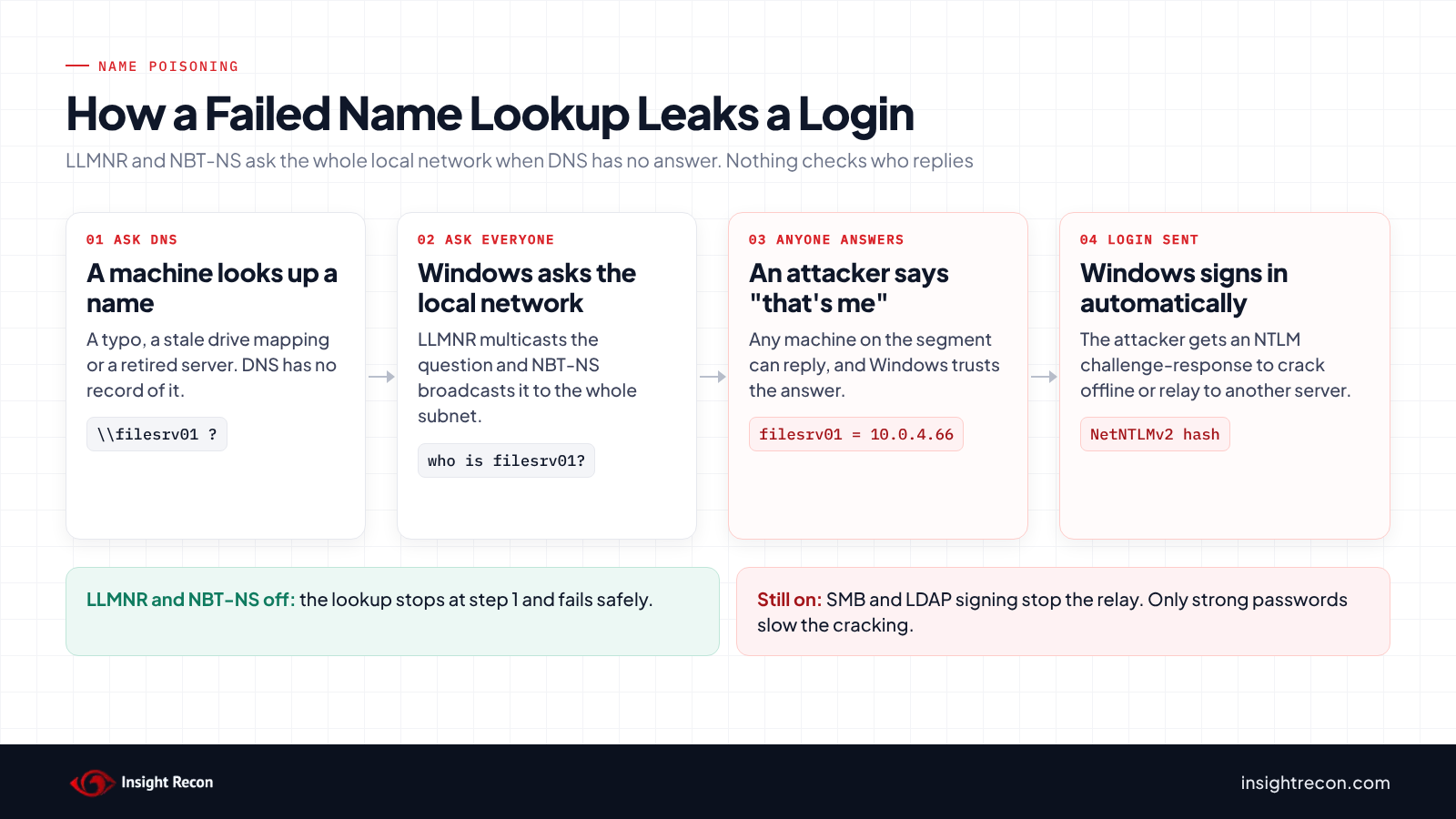
When DNS can't find a name, Windows asks everyone on the local network instead. Anyone can answer. Whoever does gets a login hash from the machine that asked. Here's how to turn LLMNR and NBT-NS off without breaking things.
| Priority | High. Poisoning is one of the first things an attacker tries once they're on your network |
|---|---|
| What decides it | Whether LLMNR and NetBIOS name resolution are still on, which they are by default |
| Who's affected | Any Windows network that hasn't turned both off, wired or wireless |
| Fix | Turn LLMNR off with Group Policy. Turn NetBIOS over TCP/IP off through DHCP or on each adapter |
Check it now: is LLMNR or NetBIOS on here?
Get-ItemProperty 'HKLM:\Software\Policies\Microsoft\Windows NT\DNSClient' -Name EnableMulticast -ErrorAction SilentlyContinue |
    Select-Object EnableMulticast
Get-CimInstance Win32_NetworkAdapterConfiguration -Filter "IPEnabled=true" |
    Select-Object Description, TcpipNetbiosOptions
Runs as any user. EnableMulticast 0 means a policy turned LLMNR off. Nothing returned means it's on. For each adapter, TcpipNetbiosOptions 2 means NetBIOS is off, 1 means it's on and 0 means it follows DHCP, which leaves it on unless DHCP says otherwise.
Scan your domain now, or send the link to your work inbox.
The scan runs from a domain-joined Windows machine with a standard domain account. The free plan covers every on-prem AD check.
How LLMNR and NBT-NS poisoning works
Windows tries DNS first. When DNS has no answer, it doesn't give up. It falls back to LLMNR, which multicasts the question to everything on the local subnet, and NetBIOS name resolution (NBT-NS), which broadcasts it. Plenty of lookups fail every day. Somebody mistypes a share name, or a drive mapping still points at a server you retired two years ago.
Nothing checks who answers those fallback questions. Anyone on the same network segment can reply "that's me," and Windows believes them. If the thing being reached asks for a login, Windows signs in on its own with the user's NTLM credentials. Nobody clicks anything.
The attacker doesn't get the password itself. They get an NTLM challenge-response, usually NetNTLMv2. A weak password falls to offline cracking. A strong one can still be relayed to another server that doesn't require signing, where it works as that user right then.
It's also everywhere. Vonahi Security's 2024 report, based on the most recent 3,000 of its 10,000+ automated network pentests, ranked mDNS, NBT-NS and LLMNR spoofing as the top three findings. mDNS spoofing showed up in 60.5% of them, NBT-NS in 57.9% and LLMNR in 52%. NSA and CISA call these protocols out too, noting attackers use them to "obtain domain hashes."
Windows 10 and later also speak mDNS, a third local name protocol that's been on since version 1703. The LLMNR policy doesn't touch it. In Vonahi's numbers it showed up as a finding even more often than LLMNR. It's covered in the fix section below.
Check your domain
Find the GPOs that control LLMNR
The setting is Turn off multicast name resolution, under Computer Configuration, Administrative Templates, Network, DNS Client. Enabled writes EnableMulticast 0 and turns LLMNR off. Disabled writes 1 and turns it back on. This lists every GPO that sets it either way:
Import-Module GroupPolicy
Get-GPO -All | ForEach-Object {
    $v = Get-GPRegistryValue -Guid $_.Id -Key 'HKLM\Software\Policies\Microsoft\Windows NT\DNSClient' `
        -ValueName EnableMulticast -ErrorAction SilentlyContinue
    if ($v) { [pscustomobject]@{ GPO = $_.DisplayName; EnableMulticast = $v.Value; Status = $_.GpoStatus } }
}
What to look for: at least one GPO with EnableMulticast 0 and none with 1. A GPO with 1 turns LLMNR back on wherever it applies. Depending on link order, it can win. Then make sure the GPO that turns it off is linked where your computers actually live. This shows what reaches an OU, inheritance included:
Get-GPInheritance -Target 'OU=Workstations,DC=contoso,DC=com' |
    Select-Object -ExpandProperty InheritedGpoLinks | Select-Object DisplayName, Enabled, Enforced, Order
Run it against each OU that holds workstations or servers. Security filtering and WMI filters can still stop a linked GPO from applying. Check a couple of machines too. gpresult /r /scope computer, run from an elevated prompt on a workstation, shows which GPOs it actually got.
Check NetBIOS on your machines
NetBIOS over TCP/IP is a per-adapter setting. There's no single GPO to find. The Check it now command above shows it for one machine. On a DHCP scope, look for vendor class option 001 Microsoft Disable Netbios Option set to 0x2. Without it, every client left on the default "use the setting from DHCP" keeps NetBIOS on. Machines with static IPs ignore DHCP and need the adapter setting changed directly.
Check it with Insight Recon
The free scan includes LLMNR Enabled (High). It reads the Group Policy objects in SYSVOL and looks at the Turn off multicast name resolution setting in every GPO that's enabled and linked. It passes when at least one of them turns LLMNR off and none turns it back on. If a GPO turns it back on, the finding names that GPO, even when another one turns it off. If the scanner can't read GPO settings from SYSVOL, the check reports "not assessed" instead of passing.
Know what it doesn't cover. It reads GPOs only. A setting pushed through Intune or local policy won't count. It doesn't evaluate security filtering, WMI filters or blocked inheritance. Use the commands above to confirm the GPO reaches all your computers. It checks LLMNR only. NetBIOS over TCP/IP is set per adapter or through DHCP, where a GPO scan can't see it. That's why the NetBIOS check above is manual. The scan doesn't read the NetBIOS or mDNS GPO settings either.
Want to see what a finding looks like first? Here's a sample report.
See what else is open in your AD.
The scan runs from a domain-joined Windows machine with a standard domain account. The free plan covers every on-prem AD check.
Before you turn it off
On most networks nobody notices. Anything DNS already resolves keeps working. What breaks are lookups that only ever worked by accident. Find those first. CISA's guidance says the same: assess current LLMNR use before you turn it off.
What can depend on it
- Short names without DNS suffixes. A logon script or drive mapping that uses
\\fileserverinstead of a full name can stop resolving if the machine has no matching DNS suffix. Microsoft documents a related case: in cross-forest logons, user logon scripts don't run when NetBIOS is off and DNS suffixes aren't set. There's a policy for it, Allow logon scripts when NetBIOS or WINS is disabled. - Old devices and SMB1-era gear. Older NAS boxes and multifunction printers that scan to a folder by name.
- Defender for Identity v2.x sensors. They use NetBIOS on UDP 137 as one of several ways to resolve device names. If NTLM over RPC and RDP are blocked too, expect the "Low success rate of active name resolution" health alert. The v3.x sensor doesn't need it.
- Laptops off your network. If you only turn NetBIOS off through DHCP, a laptop at home, or on any network Windows marks Private, goes back to using it. Windows 11 22H2 and later already skip NetBIOS name resolution on Public networks by default. Older builds don't.
See what's using it
Capture name traffic on a few busy subnets for a week before the change. If you run Zeek, its DNS log already includes LLMNR (UDP 5355), NBT-NS (UDP 137) and mDNS (UDP 5353). On a single Windows machine, pktmon is built in. Run it as admin:
pktmon filter add LLMNR -p 5355
pktmon filter add NBTNS -p 137
pktmon filter add mDNS -p 5353
pktmon start --capture --file-name C:\Temp\nameres.etl
# leave it running during a normal workday, then:
pktmon stop
pktmon etl2pcap C:\Temp\nameres.etl --out C:\Temp\nameres.pcapng
pktmon filter remove
Open the capture in Wireshark and look at which names are being asked for and by whom. Each one is a name DNS couldn't resolve. Add the missing record or DNS suffix so the lookup works without the fallback. Then turn LLMNR and NetBIOS off for a pilot OU first and widen it once nothing complains.
Turn off LLMNR and NBT-NS
Turn off LLMNR with Group Policy
Edit a GPO linked at the domain root, or at every OU that holds computers. Under Computer Configuration, Policies, Administrative Templates, Network, DNS Client, set Turn off multicast name resolution to Enabled. Then run the GPO check above again and make sure nothing sets it back to Disabled. On a test machine, run gpupdate /force and the Check it now command. EnableMulticast should come back as 0.
Turn off NetBIOS over TCP/IP
There's no single GPO for this. It takes two pieces. For DHCP clients, set the Microsoft vendor option on each scope: Scope Options, Advanced, vendor class Microsoft Options, option 001 Microsoft Disable Netbios Option, value 0x2. Clients pick it up after a lease renewal or a restart, as long as their adapter is on the default "use the setting from the DHCP server."
Static-IP servers and laptops that leave your network need the adapter setting changed directly. Run this as admin through a GPO startup script or your management tool:
# Connected adapters, right away
Get-CimInstance Win32_NetworkAdapterConfiguration -Filter "IPEnabled=true" |
    Invoke-CimMethod -MethodName SetTcpipNetbios -Arguments @{ TcpipNetbiosOptions = [uint32]2 }
# Every adapter Windows knows about, connected or not
Get-ChildItem 'HKLM:\SYSTEM\CurrentControlSet\Services\NetBT\Parameters\Interfaces' |
    ForEach-Object { Set-ItemProperty -Path $_.PSPath -Name NetbiosOptions -Value 2 }
The first command only reaches adapters that are connected when it runs. A disconnected Wi-Fi card or a dock keeps the default, which is why the second one sets NetbiosOptions to 2 under every Tcpip_{GUID} key. A new VPN client creates a new adapter with the default. Run both at every startup instead of once.
Windows 11 22H2 and later also have a Configure NetBIOS settings policy in the same DNS Client folder. It stops the machine from resolving names over NetBIOS. It doesn't turn NetBIOS over TCP/IP off on the adapter. Treat it as an extra layer on top. For machines you can't reach any other way, the NetBT NodeType configuration setting set to P-node stops NetBIOS broadcast lookups. It lives under MS Security Guide and needs Microsoft's SecGuide template from the Security Compliance Toolkit.
Decide on mDNS
The LLMNR policy doesn't cover mDNS. Microsoft's networking team recommends blocking it on corporate networks with Windows Defender Firewall: disable the inbound mDNS (UDP-In) rules for the Domain profile. Chrome, Edge and Teams use the same port and Miracast depends on mDNS. Test before you roll it out. You'll also see an EnableMDNS registry value recommended online. Microsoft hasn't documented it.
Check WPAD while you're at it
Machines that auto-detect a proxy keep looking up wpad, which made it the classic repeat trigger for poisoning. Microsoft stopped WPAD lookups from using NetBIOS in 2016 (MS16-077), and Windows DNS servers block the name by default with their global query block list. That list is per server and doesn't replicate. Check each DNS server:
Get-DnsServerGlobalQueryBlockListYou should see wpad and isatap in the list. If you don't use automatic proxy discovery at all, Microsoft documents turning it off with the WinHTTP DisableWpad registry value on Windows 10 1809 and Server 2019 or later. That value only covers WinHTTP. Also turn off Automatically detect settings in the Windows proxy settings.
Limit the damage if it still happens
Turning the protocols off removes the easy path. It doesn't stop everything an attacker on your network can try. A missed adapter or a new VPN client can also bring it back. Make a captured login worth as little as possible.
- Require SMB signing. A relayed login is useless against a server that requires signing. Windows 11 24H2 Pro, Enterprise and Education require it. Server 2025 only requires it outbound. Most servers still accept unsigned sessions unless you set it. See our SMB signing post.
- Require LDAP signing and channel binding on DCs. That closes the relay path into AD itself. Our posts on LDAP signing and channel binding walk through it.
- Turn on Extended Protection for Authentication on AD CS web enrollment. Microsoft's KB5005413 covers relays into certificate services.
- Make the hashes hard to crack. Long passwords for people and gMSAs for service accounts turn an offline cracking attempt into a waste of time.
- Cut NTLM where you can. Microsoft has deprecated NTLM and removed NTLMv1 from Windows 11 24H2 and Server 2025. Every app you move to Kerberos is one less place a captured NTLM login works.
Catch someone trying
Poisoning is noisy if you listen for it. Keep one canary machine with LLMNR and NetBIOS still on. Have it regularly ask for a name that doesn't exist. Nobody should ever answer. Any reply points to a poisoner on that segment. We couldn't find a Defender for Identity alert for the poisoning itself, but it does alert on some of the NTLM relay attacks that follow.
Validation checklist
- Does a linked GPO set Turn off multicast name resolution to Enabled, with no GPO setting it to Disabled?
- Does that GPO reach every OU with workstations and servers?
- Is NetBIOS over TCP/IP off on every adapter, through DHCP option 001 or set directly on static hosts?
- Did you capture traffic on a few subnets after the change and see no LLMNR or NBT-NS queries?
- Are SMB signing and LDAP signing required everywhere a captured login could be relayed?
Compliance mapping
| Framework | Reference | Why it applies |
|---|---|---|
| MITRE ATT&CK | T1557.001 Name Resolution Poisoning and SMB Relay | The technique now covers LLMNR, NBT-NS and mDNS. Its first mitigation, M1042, is to disable them where they aren't needed. |
| CIS Benchmarks | 18.6.4.4, 18.4.6, 18.6.4.2 (Windows 11 v5.1.0, Server 2022 v5.1.0, Server 2025 v2.1.0) | Turn off multicast name resolution and set NetBT to P-node. 18.6.4.2 turns off NetBIOS name resolution, but only on public networks. |
| CIS Controls v8 | 4.8 | Disable unnecessary services on enterprise assets. |
| NIST CSF | PR.IP-1, PR.DS-2 (1.1) / PR.PS-01, PR.DS-02 (2.0) | Least-functionality baseline configuration and protecting credentials in transit. |
| NIST SP 800-53 Rev 5 | CM-7, CM-6 | Least functionality and documented configuration settings. |
| DISA STIG | No LLMNR rule | Current Windows 10, 11, Server 2019 and 2022 STIGs don't require turning LLMNR off. They only cover NetBIOS name release requests. |
FAQ
Is LLMNR still on by default in Windows 11 and Server 2025?
Yes. Unless a policy turns it off, LLMNR runs on every network adapter. Microsoft said in 2022 that it plans to ramp LLMNR and NetBIOS name resolution down, but the LLMNR default hasn't changed.
Will turning off LLMNR break anything?
Usually not. Names your DNS already resolves aren't affected. What breaks are lookups that only worked because something answered a broadcast. Capture traffic first and fix those names in DNS.
Does SMB signing stop LLMNR poisoning?
No. Signing stops relays to SMB servers that require it. The attacker can still crack the hash, or relay it to LDAP or AD CS if those aren't locked down. That's why the protocols need to go too.
Do I need to turn off mDNS as well?
It's the same kind of fallback and it showed up as a pentest finding even more often than LLMNR. Microsoft's networking team recommends the firewall rule. Test printer discovery and wireless display first.
Does Insight Recon check NetBIOS and mDNS?
No. It checks LLMNR, from Group Policy. Use the commands in this post to check NetBIOS on your machines and DHCP scopes.
Check LLMNR and 155+ other AD settings in a few minutes.
The scan runs from a domain-joined Windows machine with a standard domain account. The free plan covers every on-prem AD check.
Not ready to scan?
AD Signal is our monthly look at what's changing in AD security and how real domains score. Read the latest report.
References
- Microsoft Learn: Policy CSP ADMX_DnsClient (Turn off multicast name resolution)
- Microsoft Learn: Disable NetBIOS over TCP/IP by using DHCP server options
- Microsoft Learn: SetTcpipNetbios method of the Win32_NetworkAdapterConfiguration class
- Microsoft Networking Blog: Aligning on mDNS, ramping down NetBIOS name resolution and LLMNR
- Microsoft Networking Blog: mDNS in the Enterprise
- Microsoft Learn: Set-DnsServerGlobalQueryBlockList
- Microsoft Learn: Disable HTTP proxy authentication features (DisableWpad)
- Microsoft Learn: Defender for Identity network name resolution
- MITRE ATT&CK: T1557.001 Name Resolution Poisoning and SMB Relay
- NSA and CISA: Top Ten Cybersecurity Misconfigurations (AA23-278A)
- CISA Eviction Strategies: Disable LLMNR (CM0053)
- Vonahi Security: Top 10 Critical Pentest Findings 2024
- Praetorian: A simple and effective way to detect broadcast name resolution poisoning