
LDAP Signing Not Enforced on Domain Controllers: How to Require It Without Breaking Your Apps
For most of Active Directory's history, domain controllers have accepted unsigned LDAP binds by default. Windows Server 2025 finally requires LDAP signing on new deployments. Older DCs and upgraded ones still need you to turn it on. Here's how to find the apps that will break before you flip the switch.
| Priority | High. A DC that accepts unsigned LDAP lets someone in the middle tamper with directory traffic or forward a logon to it |
|---|---|
| What it means | One or more domain controllers accept LDAP binds that aren't signed |
| Who's affected | Domain controllers on Windows Server 2022 and earlier unless someone required signing, plus Server 2025 DCs that kept older settings through an upgrade |
| Fix | Log the unsigned binds and move those apps to signing or LDAPS. Then set Domain controller: LDAP server signing requirements to Require signing |
Check it now: do your DCs require LDAP signing?
Import-Module ActiveDirectory
$dcs = (Get-ADDomainController -Filter *).HostName
Invoke-Command -ComputerName $dcs -ScriptBlock {
    $p = Get-ItemProperty 'HKLM:\SYSTEM\CurrentControlSet\Services\NTDS\Parameters' -ErrorAction SilentlyContinue
    [pscustomobject]@{
        OS                         = (Get-CimInstance Win32_OperatingSystem).Caption
        LDAPServerIntegrity        = $p.LDAPServerIntegrity
        LDAPServerEnforceIntegrity = $p.LDAPServerEnforceIntegrity
    }
} | Select-Object PSComputerName, OS, LDAPServerIntegrity, LDAPServerEnforceIntegrity
Run it from a machine that can reach your DCs over WinRM. On Server 2022 and earlier, LDAPServerIntegrity of 2 means signing is required. On Server 2025, LDAPServerEnforceIntegrity not set or 1 means it's enforced.
Scan your domain now, or send the link to your work inbox.
The scan runs from a domain-joined Windows machine with a standard domain account. The free plan covers every on-prem AD check.
What the finding means
Almost everything that talks to Active Directory uses LDAP: Windows itself, admin tools, VPNs, HR systems, printers looking up email addresses and any app with a "connect to AD" box. On port 389 that traffic isn't protected by TLS. Simple binds send the password in clear text. LDAP signing adds a signature to each message so the domain controller can tell it hasn't been changed and came from the client that authenticated.
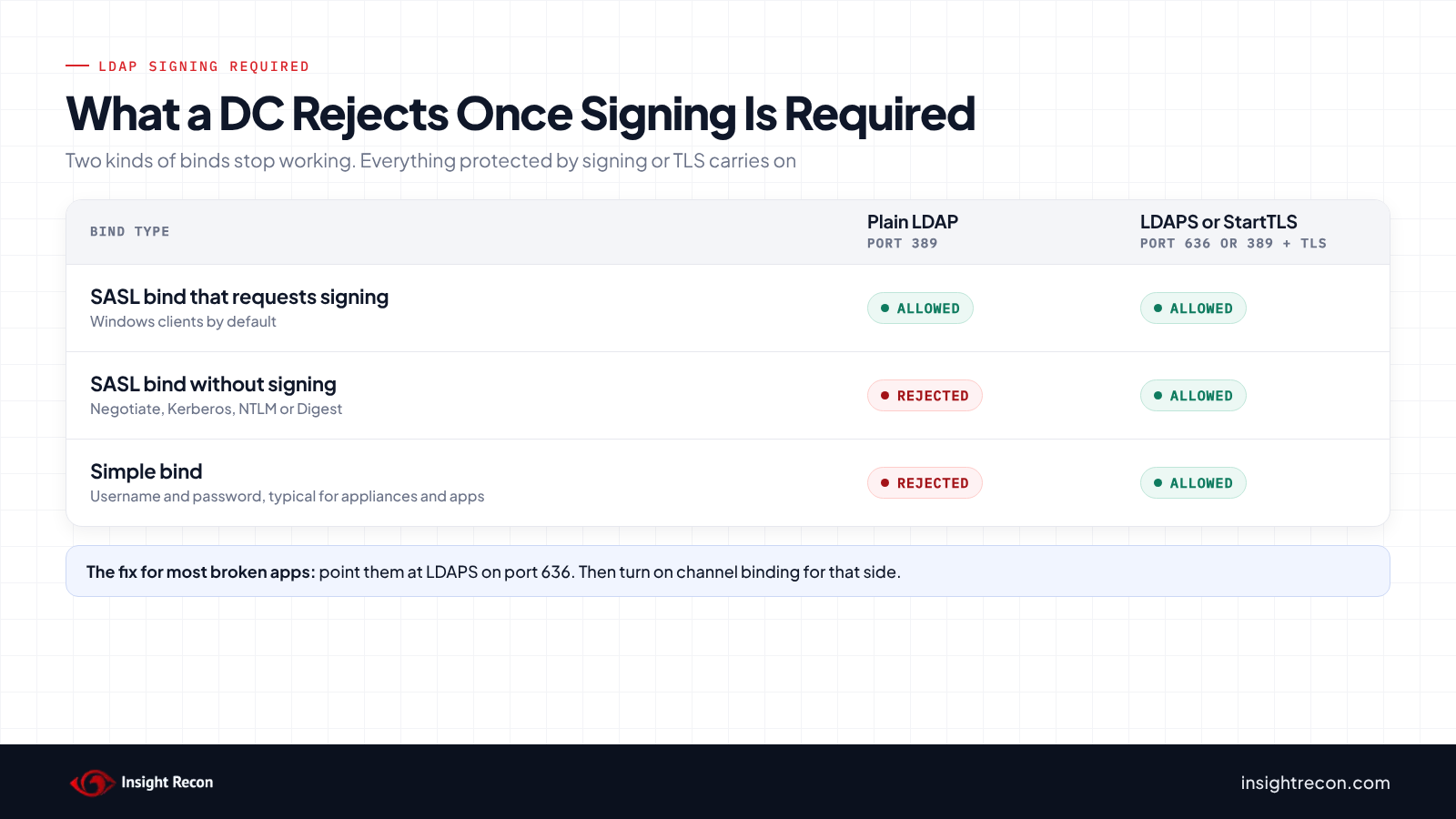
When a DC requires signing, Microsoft says it "rejects SASL LDAP binds that don't request signing and rejects simple binds performed over nonencrypted connections." Two kinds of binds stop working:
- Unsigned SASL binds: Negotiate, Kerberos, NTLM or Digest logons that don't ask for signing.
- Simple binds on plain LDAP: a username and password sent in clear text on port 389.
Binds over LDAPS on port 636, or plain LDAP upgraded with StartTLS, keep working because TLS already protects them. That's where the sibling control, LDAP channel binding, takes over.
The defaults depend on the DC:
| Domain controller | LDAP signing by default |
|---|---|
| Windows Server 2022 and earlier | Not required. Signed and unsigned binds are both accepted |
| Windows Server 2025, new deployment | Required, through the new LDAP server signing requirements enforcement policy. Vendors report a fresh 2025 DC promoted into an older domain enforces it too |
| Windows Server 2025, upgraded in place | Keeps whatever it had before the upgrade |
How we got here
Microsoft has been trying to get people to turn this on for years. It's backed off more than once:
- August 2019: Microsoft published ADV190023, its guidance for enabling LDAP signing and channel binding. The plan was to start changing defaults in early 2020.
- February 2020: Microsoft pushed enforcement back to the second half of 2020 to give admins more time to test.
- March 2020: the updates added the channel binding policy and better auditing. KB4520412 says "the March 10, 2020 updates, and updates in the foreseeable future, will not change LDAP signing or LDAP channel binding default policies." So the defaults stayed where they were.
- Windows Server 2025: new Active Directory deployments require LDAP signing by default. Upgrades keep their existing settings.
So the fix has been on every supported version for years. Unless someone changes it, though, a pre-2025 DC still runs with the original default. The usual reason nobody changes it is fear of breaking something nobody can name. Microsoft's own warning is that some clients "will stop working" once a DC rejects unsigned binds. The audit step further down is how you find out which ones.
Why unsigned LDAP is risky
Microsoft's own description in KB4520412 is that unsigned LDAP leaves domain controllers open to replay and man-in-the-middle attacks. The worst version is someone in the middle forwarding another account's authentication to the DC. If that account can change things in the directory, the attacker can too.
There's a second problem that gets less attention. Every app doing a simple bind on port 389 is sending a service account's password across your network in clear text. Requiring signing forces those apps onto LDAPS or a signed bind, which fixes that too.
How attackers use it
This sits under MITRE ATT&CK T1557, adversary-in-the-middle. It's the same relay story as SMB without signing. An attacker on the network gets an account to authenticate to them, then forwards that authentication to a domain controller over plain LDAP. If the DC doesn't require signing, the forwarded session works. The attacker can read and change the directory with that account's rights.
Signing breaks this because the forwarded session never gets the session key. Without the key, the attacker can't sign anything. A DC that requires signing drops the connection.
LDAP signing vs channel binding
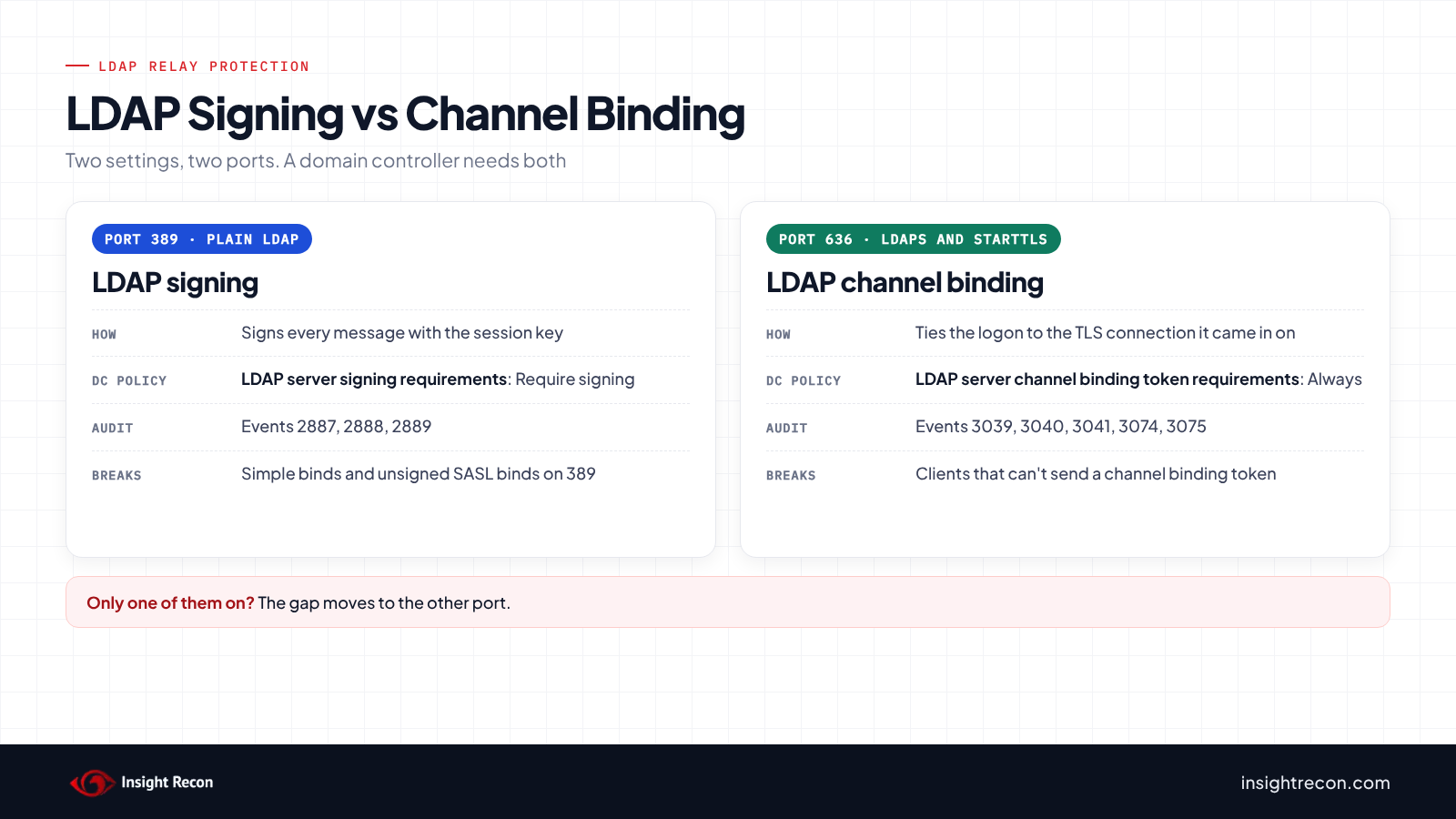
These two get mixed up constantly. They cover different ports. You want both.
| Feature | LDAP signing | LDAP channel binding |
|---|---|---|
| Protects | Plain LDAP on port 389 | LDAPS on port 636 and StartTLS |
| How | Signs each message with the session key | Ties the logon to the TLS connection it came in on |
| DC setting | Domain controller: LDAP server signing requirements | Domain controller: LDAP server channel binding token requirements |
| Audit events | 2887, 2888, 2889 | 3039, 3040, 3041, 3074, 3075 |
| Insight Recon check | LDAP Signing Not Enforced on Domain Controllers | LDAPS Channel Binding Disabled |
If you require signing but leave channel binding off, the gap just moves to port 636. Turn on both and the main LDAP paths are covered.
What breaks when you require LDAP signing
Windows' own LDAP traffic signs by default, as long as the client policy is still at Negotiate signing. Requiring signing on the DC doesn't touch it. What breaks is everything else:
- Appliances doing simple binds on 389. VPN concentrators, firewalls, NAS boxes, printers and copiers that look up users in AD. They're often set up once with a service account and port 389 and never touched again.
- Linux and Java apps. Anything configured for a plain
ldap://URL with a simple bind. - Old scripts and in-house tools that bind without asking for signing.
- Your first Server 2025 DC. An app that binds to whichever DC answers can start failing only when it lands on the new one. That's often the first time anyone notices.
When they fail, the app usually logs LDAP error 8, "Strong Authentication Required" or "stronger authentication required." The DC's own message reads "The server requires binds to turn on integrity checking if SSL\TLS are not already active on the connection." The fix is almost always to point the app at ldaps:// on port 636, or turn on StartTLS. Simple binds over TLS are still allowed when signing is required. Event 2889 tells you exactly which clients to fix.
Check your domain controllers
Check the setting on each domain controller
This reads the LDAP server signing setting from every DC over PowerShell remoting. It returns each DC's operating system and the two registry values the signing policies write to.
Import-Module ActiveDirectory
$dcs = (Get-ADDomainController -Filter *).HostName
Invoke-Command -ComputerName $dcs -ScriptBlock {
    $p = Get-ItemProperty 'HKLM:\SYSTEM\CurrentControlSet\Services\NTDS\Parameters' -ErrorAction SilentlyContinue
    [pscustomobject]@{
        OS                         = (Get-CimInstance Win32_OperatingSystem).Caption
        LDAPServerIntegrity        = $p.LDAPServerIntegrity
        LDAPServerEnforceIntegrity = $p.LDAPServerEnforceIntegrity
    }
} | Select-Object PSComputerName, OS, LDAPServerIntegrity, LDAPServerEnforceIntegrity
What to look for:
- Server 2022 and earlier: only
LDAPServerIntegritymatters.2means the DC requires signing.1,0or nothing means it doesn't. - Server 2025:
LDAPServerEnforceIntegrityis the new enforcement policy. Not set or1means signing is enforced no matter whatLDAPServerIntegritysays. If someone disabled the enforcement policy,LDAPServerIntegritydecides again.
See what the DC is actually doing
Domain controllers log what they do with unsigned binds once a day in the Directory Service log. This pulls the newest 2886, 2887 and 2888 from each DC:
Invoke-Command -ComputerName $dcs -ScriptBlock {
    Get-WinEvent -FilterHashtable @{ LogName = 'Directory Service'; Id = 2886, 2887, 2888 } -ErrorAction SilentlyContinue |
        Group-Object Id | ForEach-Object { $_.Group[0] | Select-Object Id, TimeCreated }
} | Sort-Object PSComputerName, Id | Select-Object PSComputerName, Id, TimeCreated
What to look for:
- 2886: the DC isn't configured to require signing. It's logged when directory services start.
- 2887: unsigned binds happened in the last 24 hours and the DC allowed them. The message includes how many.
- 2888: the DC rejected unsigned binds in the last 24 hours. Enforcement is on, but something is still trying and failing.
Check TimeCreated. An old 2886 from before someone changed the setting doesn't tell you much. A recent 2887 is your warning that something is binding without signing today. The next step finds out what. A DC that requires signing and has no broken clients logs none of these.
Find the clients that would break
Event 2889 logs each unsigned bind with the client's IP and the account it used. It's off by default. Turn it on for each DC and let it collect for a week or two. Then summarize it. On a busy DC, raise the Directory Service log size first or forward the events somewhere. Otherwise new events push the old ones out. This turns on per-client logging, then lists every client and account that bound without signing, busiest first.
# Turn on per-bind logging (event 2889) on every DC
Invoke-Command -ComputerName $dcs -ScriptBlock {
    Set-ItemProperty -Path 'HKLM:\SYSTEM\CurrentControlSet\Services\NTDS\Diagnostics' -Name '16 LDAP Interface Events' -Value 2 -Type DWord
}

# A week or two later: who is binding without signing, across all DCs
Invoke-Command -ComputerName $dcs -ScriptBlock {
    Get-WinEvent -FilterHashtable @{ LogName = 'Directory Service'; Id = 2889 } -ErrorAction SilentlyContinue |
        ForEach-Object {
            [pscustomobject]@{
                Client   = $_.Properties[0].Value -replace ':\d+$', ''
                Account  = $_.Properties[1].Value
                BindType = if ($_.Properties[2].Value -eq 1) { 'Simple bind, no TLS' } else { 'SASL, no signing' }
            }
        }
} | Group-Object Client, Account, BindType | Sort-Object Count -Descending | Select-Object Count, Name
What to look for: every row is something that will break when you require signing. "Simple bind, no TLS" also means that account's password is crossing the network in clear text. Set the logging value back to 0 on each DC when you're done, since it gets noisy.
Check it with Insight Recon
The commands above are the manual way. Insight Recon's read-only Active Directory security assessment checks LDAP signing along with 150+ other checks:
- LDAP Signing Not Enforced on Domain Controllers (High): tests each domain controller live with an unsigned bind and falls back to the registry and Group Policy when it can't.
- LDAP Signing Not Enforced (Moderate): the client side. It flags and lists any enabled, linked GPO that sets Network security: LDAP client signing requirements to None, which tells Windows machines not to ask for signing.
- LDAPS Channel Binding Disabled (Moderate): the LDAPS half of LDAP relay protection.
- Weak LDAP Encryption (Moderate): flags LDAPS still allowing old SSL versions. Moving apps to LDAPS only helps if the TLS underneath is sound.
The domain controller check tries an LDAP bind on port 389 with signing turned off. If the DC refuses with "stronger authentication required," signing is enforced. If the bind goes through, it isn't. Only when the test can't get a clean answer does the check fall back to LDAPServerIntegrity in the registry. After that it tries the signing policy in SYSVOL. It passes only on Require signing. Because the live test comes first, a Server 2025 DC enforcing signing through the new policy reads correctly even if the older setting says otherwise. If none of the sources answers, the DC shows as not assessed.
Every finding comes with the attacker context and the remediation steps. Want to see what one looks like first? Here's a sample report.
See whether your domain controllers require LDAP signing.
The scan runs from a domain-joined Windows machine with a standard domain account. The free plan covers every on-prem AD check.
How to require LDAP signing
Log the unsigned binds first
Turn on event 2889 logging on every DC as shown above and let it run for at least a week. Two weeks is better. It catches jobs that only run occasionally. List every client IP and account it turns up, then find an owner for each one.
Move the clients off unsigned binds
- Simple binds: switch the app to LDAPS on port 636, or to StartTLS on 389. This needs a valid certificate on your DCs. If the app can't do TLS, check whether it supports a SASL bind with signing.
- Unsigned SASL binds: usually an older library or a setting in the app. Turn on signing in its LDAP settings or update it.
- Windows clients: make sure Network security: LDAP client signing requirements is at least Negotiate signing. That's the Windows default. It's also what the STIG requires. A GPO that sets it to None makes those machines bind without signing. They'll break once the DCs require it. That's what Insight Recon's Moderate check looks for.
Check event 2889 again after each fix. You're done when it stays quiet.
Require signing on the domain controllers
Edit the Default Domain Controllers Policy, or whichever GPO you use for DC hardening. Set this under Computer Configuration\Policies\Windows Settings\Security Settings\Local Policies\Security Options:
- Domain controller: LDAP server signing requirements: Require signing.
- Domain controller: LDAP server signing requirements enforcement (Server 2025 DCs): leave it Not Configured or set it to Enabled. Microsoft says this policy overrides the older one when both are set. Disabled hands control back to the older setting.
Run gpupdate /force on the DCs, or wait for the next refresh. From then on, events 2886 and 2887 should stop. A 2888 means enforcement is working but something still tried an unsigned bind. That client still needs fixing.
Verify it
Microsoft's test is to try a simple bind on port 389 with ldp.exe: Connection > Connect to the DC on 389, then Connection > Bind with Simple bind. A DC that requires signing answers with Strong Authentication Required. Use a test account for this, since a simple bind on 389 sends the password in clear text.
Then do channel binding
Signing covers port 389. The apps you just moved to LDAPS are now on port 636, which signing doesn't cover. Our LDAP channel binding guide walks through the audit and rollout for that side.
Close the plain LDAP door
Microsoft has been pushing this hard since 2019 and only made it the default in Server 2025. Every older domain controller is still waiting on you. Log the unsigned binds and fix the apps behind them. Then require signing and finish the job with channel binding.
Validation checklist
- Does every domain controller require LDAP signing?
- Have events 2886 and 2887 stopped on every DC?
- Has event 2889 gone quiet after running long enough to catch occasional jobs?
- Have the apps doing simple binds moved to LDAPS or StartTLS?
- Are Windows clients set to at least Negotiate signing, with no GPO setting it to None?
- Is channel binding on for LDAPS as well?
A no on any of these leaves a path to the directory that nobody's checking.
Compliance mapping
Required LDAP signing protects the integrity of directory traffic and ties each request to the client that authenticated. It lines up with the frameworks like this:
| Framework | Reference | Why it applies |
|---|---|---|
| NIST CSF 2.0 | PR.DS-02, PR.AA-03 | Data in transit is protected. Users, services and hardware are authenticated. |
| CIS Controls v8 | 3 (Data Protection), 4 (Secure Configuration) | Protect directory traffic and enforce a secure baseline on domain controllers. |
| MITRE ATT&CK | T1557 | Adversary-in-the-middle, including forwarding authentication to a DC that doesn't require signing. |
| DISA STIG (Windows Server 2022) | V-254416 (WN22-DC-000320), V-254476 (WN22-SO-000320) | Domain controllers must require LDAP signing. Clients must at least negotiate it. |
| Microsoft guidance | ADV190023, KB4520412 | Enable LDAP signing and channel binding on domain controllers. |
FAQ
Is LDAP signing required by default?
Only on new Windows Server 2025 deployments. Domain controllers on Server 2022 and earlier accept unsigned binds unless you require signing. A DC upgraded to Server 2025 keeps whatever setting it had before.
Will requiring LDAP signing break Windows clients?
Not normally. Windows negotiates signing by default. Domain-joined machines keep working. The breakage comes from third-party apps and appliances doing simple binds on port 389 or SASL binds without signing.
If we use LDAPS, do we still need signing?
Yes. Your DCs still listen on port 389. Requiring signing is what stops anything from using it unprotected. Binds over LDAPS are allowed when signing is required, since TLS already protects them. For those, turn on channel binding.
What's the difference between LDAP signing and LDAP channel binding?
Signing protects plain LDAP on port 389 by signing each message. Channel binding protects LDAPS by tying the logon to the TLS connection. They close different gaps. You want both. Our channel binding post covers the other half.
Our Server 2025 DCs enforce signing by default. Will Insight Recon see that?
Yes. The check tries an unsigned bind against each DC first. It sees what the DC actually does. That holds even when the older LDAP server signing requirements setting still says None and the new enforcement policy is doing the work.
Does turning on event 2889 logging hurt performance?
It adds an event for every unsigned bind, which can be a lot on a busy DC. Run it long enough to find your clients, then set 16 LDAP Interface Events back to 0.
Find the relay paths still open on your domain controllers.
Insight Recon checks LDAP signing, channel binding and the rest of your AD from a domain-joined Windows machine with a standard account. Free and read-only.
Not ready to scan?
AD Signal is our monthly look at what's changing in AD security and how real domains score. Read the latest report.
References
- Microsoft Learn: LDAP signing overview
- Microsoft Learn: Manage LDAP signing using Group Policy
- Microsoft Learn: How to enable LDAP signing in Windows Server
- Microsoft Support: KB4520412, LDAP channel binding and LDAP signing requirements
- Microsoft Security Response Center: ADV190023
- MITRE ATT&CK: T1557, Adversary-in-the-Middle